1
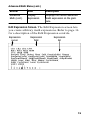
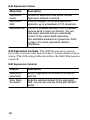
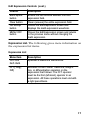
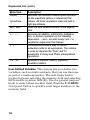
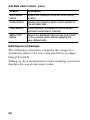
Expression List (cont.) Menu item Description Period( CycleArea( Executes the selected measurement operation on the waveform (active or reference) that follows. All these operations must end with a right parenthesis. Adds the user-defined variable to the expression. Var1, Var2 +, - , ¢, ( ) , 1-0, ., E Executes an addition, subtraction, multiplication, or division operation on the following expression. + and - are also unary; use - to negate the expression that follows. Parentheses provide a way to control evaluation order in an expression. The comma is used to separate the “from” and “to” waveforms in Delay and Phase measurement operations. Specifies a numeric value in (optional) scientific notation. User-Defined Variables. This feature lets you define two variables, such as math constants, that you can then use as part of a math expression. The side menu button toggles between selecting the numeric field and selecting the scientific notation field (E). Use the general purpose knob to enter values in either field. Push the COARSE front panel button to quickly enter larger numbers in the numeric field. 18