1
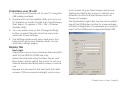
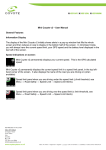
The drop down menu offers a choice of detectors; the supplied TDS detector, the LE30 Diffusor, the LT400 Diffusor or the Cheetah Radar
Detector.
The LE30, LT400 Diffusors and Cheetah Radar
Detector are available as accessories from
specialist retailers.
Speed Display Units
Indicate your preferences for the speed units
by clicking on MPH (miles per hour) or KPH
(kilometres per hour).
Speed Warning
If you wish to be regularly warned for driving
‘overspeed’ you can check this box and set a
Warning Speed. This can be adjusted in units of
5 mph or 5 kph.
Once you have made all of your choices click on
the Save button to save your settings and return
you to the main ‘splash’ screen.
You can restore your TR unit to the factory default
settings at any time by opening the Settings
window and clicking on the Restore Defaults
button.
TR Series User’s Guide - Page 37