1
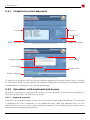
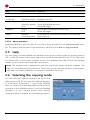
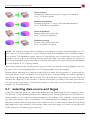
5.4 Operation 5.4.1 Graphical control elements List box Info box Check box Button (normal) fig. 3: Graphical control elements (1) Dialog window Button (focused) Close dialog Percentage Progress bar Button (inactive) fig. 4: Graphical control elements (2) To control the program, HDClone knows different graphical control elements (fig. 3 and fig. 4). The names which are used within this manual to designate the different elements are listed and illustrated by examples in the following illustration. 5.4.2 Operation with keyboard and mouse HDClone is operated by keyboard and mouse. It is also possible to operate the pro-gram exclusively by keyboard or exclusively by mouse. 5.4.2.1 Keyboard operation Operation by keyboard always refers to the currently focused graphical element. This element is highlighted by color, brightness, or an additional frame. With the tabulator key you can switch the focus in turn to the other operating elements. The following control keys have a function when operating the keyboard: 25