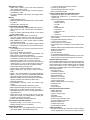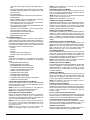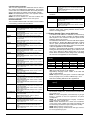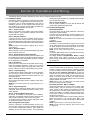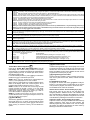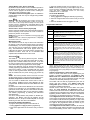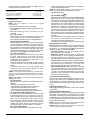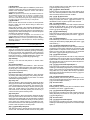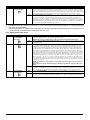
1
PC1616 / PC1832 / PC1864
This manual contains information on limitations regarding product use and function and information on the limitations as to liability
of the manufacturer. The entire manual should be carefully read.
Reference Manual
PC1616/PC1832/PC1864 v4.1
DLS2002 and higher
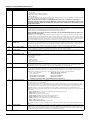
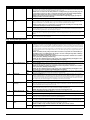
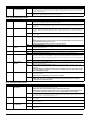
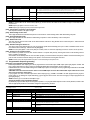
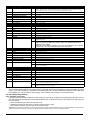
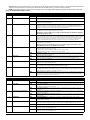
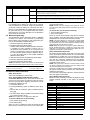
Table of Contents
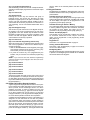
Section 1: Introduction
1
1.1
About the PC1616/PC1832/PC1864 System . . . . . . . 1
1.2
About the PC1616/PC1832/PC1864 Manual Set . . . . 1
Reference Manual . . . . . . . . . . . . . . . . . . . . . . . . . . . . 1
Installation Guide . . . . . . . . . . . . . . . . . . . . . . . . . . . . . 1
Programming Worksheets . . . . . . . . . . . . . . . . . . . . . . 1
User Guide . . . . . . . . . . . . . . . . . . . . . . . . . . . . . . . . . . 1
1.3
1.4
1.5
Control and Indicating Equipment Specifications . . . . 1
Zone Configuration . . . . . . . . . . . . . . . . . . . . . . . . . . . . 1
Access Codes. . . . . . . . . . . . . . . . . . . . . . . . . . . . . . . . 1
Warning Device output . . . . . . . . . . . . . . . . . . . . . . . . . 2
Memory. . . . . . . . . . . . . . . . . . . . . . . . . . . . . . . . . . . . . 2
Programmable Outputs (PGMs) . . . . . . . . . . . . . . . . . . 2
Power Supply . . . . . . . . . . . . . . . . . . . . . . . . . . . . . . . . 2
Operating Environmental Conditions . . . . . . . . . . . . . . 2
Keypad Specifications . . . . . . . . . . . . . . . . . . . . . . . . . 2
Alarm Transmitter Equipment (ATE) Specification . . . . 2
System Supervision Features. . . . . . . . . . . . . . . . . . . . 2
False Alarm Prevention Features . . . . . . . . . . . . . . . . . 2
Additional Features. . . . . . . . . . . . . . . . . . . . . . . . . . . . 2
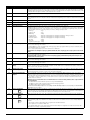
Installation Steps . . . . . . . . . . . . . . . . . . . . . . . . . . . . . 5
Terminal Descriptions . . . . . . . . . . . . . . . . . . . . . . . . . 5
AC Power Terminals. . . . . . . . . . . . . . . . . . . . . . . . . . . 5
Battery Connection . . . . . . . . . . . . . . . . . . . . . . . . . . . . 5
Auxiliary Power Terminals - AUX+ and GND . . . . . . . . 5
Bell Output Terminals - BELL+ and BELL- . . . . . . . . . . 5
Keybus Terminals - RED, BLK, YEL, GRN. . . . . . . . . . 6
Programmable Outputs - PGM1 to PGM4 . . . . . . . . . . 6
Zone Input Terminals - Z1 to Z8 . . . . . . . . . . . . . . . . . . 6
Telephone Connection Terminals - TIP,RING,T-1,R-1. 6
2.3
Wire Routing for Power & Non-Power Limited . . . . . . . 6
2.4
Keybus Operation and Wiring . . . . . . . . . . . . . . . . . . . 6
Assigning Zones to Zone Expanders . . . . . . . . . . . . . .7
2.7
Keypad Assignment . . . . . . . . . . . . . . . . . . . . . . . . . . .7
How to Assign Keypads. . . . . . . . . . . . . . . . . . . . . . . . 7
Function Key Programming . . . . . . . . . . . . . . . . . . . . . 8
2.8
Confirming Module Supervision . . . . . . . . . . . . . . . . . .8
2.9
Removing Modules . . . . . . . . . . . . . . . . . . . . . . . . . . . .8
2.12 Zone Activity Log . . . . . . . . . . . . . . . . . . . . . . . . . . . .10
Section 3: How to Program
i
11
3.1
How to Enter Installer Programming . . . . . . . . . . . . . .11
LED Keypad. . . . . . . . . . . . . . . . . . . . . . . . . . . . . . . . 11
LCD Keypad . . . . . . . . . . . . . . . . . . . . . . . . . . . . . . . 11
3.2
Programming Decimal Data . . . . . . . . . . . . . . . . . . . .11
3.3
Programming Hexadecimal Data . . . . . . . . . . . . . . . .11
3.4
Programming Toggle Options . . . . . . . . . . . . . . . . . . .11
3.5
Viewing Programming . . . . . . . . . . . . . . . . . . . . . . . . .11
LED and ICON Keypads . . . . . . . . . . . . . . . . . . . . . . 11
LCD Keypad . . . . . . . . . . . . . . . . . . . . . . . . . . . . . . . 11
Section 4: Keypad Commands
5
2.2
2.6
2.11 Keypad Zone/PGM . . . . . . . . . . . . . . . . . . . . . . . . . . .10
Assigning Keypad Zones . . . . . . . . . . . . . . . . . . . . . . 10
Battery Standby Times versus AUX Load . . . . . . . . . . 4
2.1
Current Ratings - Modules & Accessories . . . . . . . . . .6
PC1616/PC1832/PC1864 Device Ratings. . . . . . . . . . 7
System Output Ratings . . . . . . . . . . . . . . . . . . . . . . . . 7
2.10 Zone Wiring . . . . . . . . . . . . . . . . . . . . . . . . . . . . . . . . .8
Burglary Zone Wiring Chart . . . . . . . . . . . . . . . . . . . . . 8
Normally Closed (NC) Loops . . . . . . . . . . . . . . . . . . . . 8
Single End Of Line (EOL) Resistors . . . . . . . . . . . . . . 9
Double End of Line (DEOL) Resistors . . . . . . . . . . . . . 9
Fire Zone Wiring - 4-wire Smoke Detectors. . . . . . . . . 9
Compatible 4-Wire Smoke Detectors . . . . . . . . . . . . . 9
Fire Zone Wiring - 2-wire Smoke Detectors. . . . . . . . . 9
Compatible 2-Wire Smoke Detectors . . . . . . . . . . . . 10
2-Wire Smoke Detector Initating Circuit. . . . . . . . . . . 10
Keyswitch Zone Wiring . . . . . . . . . . . . . . . . . . . . . . . 10
Additional Devices . . . . . . . . . . . . . . . . . . . . . . . . . . . . 3
Keypads . . . . . . . . . . . . . . . . . . . . . . . . . . . . . . . . . . . . 3
PC5100 2-Wire Addressable Interface Module . . . . . . 3
PC5108 Eight Zone Expander Module . . . . . . . . . . . . . 3
PC5132 Wireless Receiver Module . . . . . . . . . . . . . . . 3
PC5200 Power Supply Output Module . . . . . . . . . . . . . 3
PC5204 Power Supply Output Module . . . . . . . . . . . . . 3
PC5208 Eight Low Current Output Module . . . . . . . . . 3
Escort5580(TC) Module . . . . . . . . . . . . . . . . . . . . . . . . 3
PC5900 Audio Verification Module . . . . . . . . . . . . . . . . 3
PC5400 Printer Module . . . . . . . . . . . . . . . . . . . . . . . . 3
PC5401 Serial Interface Module. . . . . . . . . . . . . . . . . . 3
T-Link Local Area Network Communicator . . . . . . . . . . 3
TL250/TL300 Intranet/Internet Communicators . . . . . . 3
Alternate Communicators . . . . . . . . . . . . . . . . . . . . . . . 3
PC5700/PC5720 Fire Module. . . . . . . . . . . . . . . . . . . . 4
Enclosures/Cabinets. . . . . . . . . . . . . . . . . . . . . . . . . . . 4
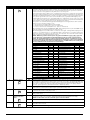
Section 2: Installation and Wiring
2.5
12
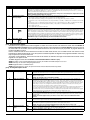
4.1
Arming and Disarming . . . . . . . . . . . . . . . . . . . . . . . .12
Arming . . . . . . . . . . . . . . . . . . . . . . . . . . . . . . . . . . . . 12
Stay and Away Arming . . . . . . . . . . . . . . . . . . . . . . . 12
Stay Arming . . . . . . . . . . . . . . . . . . . . . . . . . . . . . . . . 12
Away Arming . . . . . . . . . . . . . . . . . . . . . . . . . . . . . . . 12
Disarming. . . . . . . . . . . . . . . . . . . . . . . . . . . . . . . . . . 13
Event Buffer (Event Log) . . . . . . . . . . . . . . . . . . . . . . 13
Viewing the Event Buffer . . . . . . . . . . . . . . . . . . . . . . 13
4.2
[*] Commands . . . . . . . . . . . . . . . . . . . . . . . . . . . . . . .13
[*][1] Zone Bypassing. . . . . . . . . . . . . . . . . . . . . . . . . 13
[*][2] Trouble Display . . . . . . . . . . . . . . . . . . . . . . . . . 13
[*][3] Alarm Memory . . . . . . . . . . . . . . . . . . . . . . . . . . 14
[*][4] Door Chime On/Off . . . . . . . . . . . . . . . . . . . . . . 14
[*][5] Programming Access Codes. . . . . . . . . . . . . . . 14
Installer’s Programming - Codes and Options . . . . .
[*][6] User Functions . . . . . . . . . . . . . . . . . . . . . . . . .
LCD Keypad User Functions . . . . . . . . . . . . . . . . . .
[*][7] Command Output Functions . . . . . . . . . . . . . .
[*][8] Installer Programming . . . . . . . . . . . . . . . . . . .
[*][9] Arming Without Entry Delay . . . . . . . . . . . . . . .
[*][0] Quick Arm. . . . . . . . . . . . . . . . . . . . . . . . . . . . .
[*][0] Quick Exit . . . . . . . . . . . . . . . . . . . . . . . . . . . . .
15
16
16
16
16
16
17
17
4.3
Function Keys . . . . . . . . . . . . . . . . . . . . . . . . . . . . . . 17
4.4
Global and Partition Keypad Operation . . . . . . . . . . . 18
4.5
Keypad Features . . . . . . . . . . . . . . . . . . . . . . . . . . . . 18
Automatic Scrolling of Open Zones . . . . . . . . . . . . . 18
Automatic Scrolling of Alarms in Memory . . . . . . . . . 18
24 Hour Time Display Option . . . . . . . . . . . . . . . . . . 18
Keypad Zones. . . . . . . . . . . . . . . . . . . . . . . . . . . . . . 18
Viewing Troubles While Armed. . . . . . . . . . . . . . . . . 18
Backlighting Boost . . . . . . . . . . . . . . . . . . . . . . . . . . 18
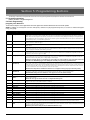
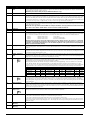
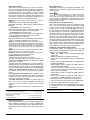
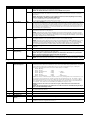
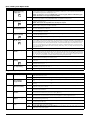
Section 5: Programming Sections
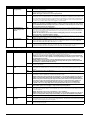
5.5
Communicator Programming . . . . . . . . . . . . . . . . . . 35
Communicator - Telephone Numbers . . . . . . . . . . . . 35
[301] - First Telephone Number . . . . . . . . . . . . . . . . . 35
[302] - Second Telephone Number . . . . . . . . . . . . . . 35
[303] - Third Telephone Number . . . . . . . . . . . . . . . . 35
[304] - Call Waiting Cancel Dialing String . . . . . . . . . 35
Communicator - Account Codes . . . . . . . . . . . . . . . . 36
[310] - System Account Code . . . . . . . . . . . . . . . . . . 36
[311]-[318] - Partition 1-8 Account Codes . . . . . . . . . 36
Reporting Codes . . . . . . . . . . . . . . . . . . . . . . . . . . . . 36
Communicator - Reporting Codes . . . . . . . . . . . . . . . 36
[320]-[323] - Alarm Reporting Codes, Zones 1 to 64 . 36
[324]-[327] - Alarm Restoral Reporting Codes,
Zones 1 to 64. . . . . . . . . . . . . . . . . . . . . . . . . . . . . . . 36
[328] - Miscellaneous Alarm Reporting Codes . . . . . 36
[329] - Priority Alarm/Restoral Reporting Codes . . . . 36
[330]-[333] - Tamper Reporting Codes, Zones 1 to 64 36
[334]-[337] - Tamper Reporting Codes, Zones 1 to 64 37
[338] - Miscellaneous Tamper Reporting Codes . . . . 37
[339]-[340] - Closing (Arming) Reporting Codes,
Zones 1-32. . . . . . . . . . . . . . . . . . . . . . . . . . . . . . . . . 37
[341] - Miscellaneous Closing (Arming) Reporting
Codes . . . . . . . . . . . . . . . . . . . . . . . . . . . . . . . . . . . . 37
[342]-[343] - Opening (Disarming) Reporting Codes
Access Codes 1 to 32 . . . . . . . . . . . . . . . . . . . . . . . . 37
[344] - Miscellaneous Opening (Disarming) Reporting
Codes . . . . . . . . . . . . . . . . . . . . . . . . . . . . . . . . . . . . 37
[345] - Maintenance Alarm Reporting Codes. . . . . . . 37
[346] - Maintenance Alarm Reporting Codes. . . . . . . 37
[347] - Miscellaneous Maintenance Reporting Codes 38
[348] - Test Transmission Reporting Codes . . . . . . . 38
[349] - PC5700 Maintenance Reporting Codes . . . . . 38
[350] - Communicator Format Options . . . . . . . . . . . 38
Reporting Codes . . . . . . . . . . . . . . . . . . . . . . . . . . . . 38
Contact ID . . . . . . . . . . . . . . . . . . . . . . . . . . . . . . . . . 38
SIA (Level 2) . . . . . . . . . . . . . . . . . . . . . . . . . . . . . . . 39
Residential Dial . . . . . . . . . . . . . . . . . . . . . . . . . . . . . 39
Private Line Format . . . . . . . . . . . . . . . . . . . . . . . . . . 39
Pager Format . . . . . . . . . . . . . . . . . . . . . . . . . . . . . . . 39
Pulse Formats . . . . . . . . . . . . . . . . . . . . . . . . . . . . . . 40
Scantronics Format . . . . . . . . . . . . . . . . . . . . . . . . . . 40
Robofon Format . . . . . . . . . . . . . . . . . . . . . . . . . . . . . 40
200 Baud FSK (CESA) . . . . . . . . . . . . . . . . . . . . . . . 40
Telephone Line Monitoring (TLM) . . . . . . . . . . . . . . . 41
[351]-[376] - Communicator Call Directions . . . . . . . . 41
[377] - Communication Variables. . . . . . . . . . . . . . . . 41
[378] - Test Transmission Time of Day . . . . . . . . . . . 42
[379] - Periodic DLS Time of Day . . . . . . . . . . . . . . . 42
[380] - First Communicator Option Codes . . . . . . . . . 42
[381] - Second Communicator Option Codes . . . . . . 43
[382] - Third Communicator Option Codes . . . . . . . . 44
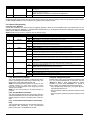
5.6
Downloading Options . . . . . . . . . . . . . . . . . . . . . . . .
Downloading . . . . . . . . . . . . . . . . . . . . . . . . . . . . . . .
[401] - First Downloading Option Codes . . . . . . . . . .
[402] - Downloading Computer’s Phone Number . . .
[403] - Downloading Access Code. . . . . . . . . . . . . . .
[404] - Panel Identification Code . . . . . . . . . . . . . . . .
[405] - Double-Call Timer. . . . . . . . . . . . . . . . . . . . . .
[406] - Number of Rings to Answer On . . . . . . . . . . .
[499] - Initiate PC-Link Communications . . . . . . . . . .
19
5.1
Keypad Programming . . . . . . . . . . . . . . . . . . . . . . . . 19
5.2
Basic Programming . . . . . . . . . . . . . . . . . . . . . . . . . . 19
[001]-[004] - Zone Definitions . . . . . . . . . . . . . . . . . . 19
[005] - System Times . . . . . . . . . . . . . . . . . . . . . . . . 21
[006] - Installer’s Code . . . . . . . . . . . . . . . . . . . . . . . 21
I[007] - Master Code . . . . . . . . . . . . . . . . . . . . . . . . . 21
[008] - Maintenance Code/Guard Code . . . . . . . . . . 21
[009]-[011] - Programmable Output Options. . . . . . . 21
[012] - Keypad Lockout Options . . . . . . . . . . . . . . . . 24
[013] - First System Option Codes . . . . . . . . . . . . . . 24
[014] - Second System Option Codes . . . . . . . . . . . 25
[015] - Third System Option Codes . . . . . . . . . . . . . 26
[016] - Fourth System Option Codes . . . . . . . . . . . . 27
[017] - Fifth System Option Codes . . . . . . . . . . . . . . 27
[018] - Sixth System Option Codes. . . . . . . . . . . . . . 28
[019] - Seventh System Option Codes . . . . . . . . . . . 29
[020] - Keypad Zone Assignment . . . . . . . . . . . . . . . 30
[021] - Eighth System Option Codes . . . . . . . . . . . . 30
[023] - Tenth System Option Codes . . . . . . . . . . . . . 32
[030] - Fast Loop Response . . . . . . . . . . . . . . . . . . . 33
5.3
Advanced Programming . . . . . . . . . . . . . . . . . . . . . . 33
[101]-[164] - Zone Attributes . . . . . . . . . . . . . . . . . . . 33
[165] - Maximum Dialing Attempts . . . . . . . . . . . . . . 33
[166] - Post Dial Wait For Handshake . . . . . . . . . . . 33
[167] - T-Link Communications Wait for Acknowledge
Delay. . . . . . . . . . . . . . . . . . . . . . . . . . . . . . . . . . . . . 33
[168]-[169] - Daylight Saving Time . . . . . . . . . . . . . . 33
[170] - PGM Output Timer . . . . . . . . . . . . . . . . . . . . 34
[171] - Tamper PGM Output Timer . . . . . . . . . . . . . 34
[172] - Settle Delay Timer . . . . . . . . . . . . . . . . . . . . . 34
[173] - Bell Delay Timer . . . . . . . . . . . . . . . . . . . . . . 34
[175] - Auto-arm Postpone Timer . . . . . . . . . . . . . . . 34
[176] - Cross Zone/Police Code Timer . . . . . . . . . . . 34
[178] - For Future Use . . . . . . . . . . . . . . . . . . . . . . . 34
[181]-[188] - Auto-arm Schedules. . . . . . . . . . . . . . . 34
[190] - No Activity Arming Pre-Alert Duration . . . . . . 34
[191]-[198] - No-Activity Timer (Partition 1-8) . . . . . . 35
[199] - Auto-arming Pre-Alert Time. . . . . . . . . . . . . . 35
5.4
Partitions and Zone Assignment . . . . . . . . . . . . . . . . 35
Partition & Zone Programming . . . . . . . . . . . . . . . . . 35
[201] - Partition Selection Mask . . . . . . . . . . . . . . . . 35
[202]-[265] - Partition Zone Assignments . . . . . . . . . 35
ii
45
45
45
46
46
46
46
46
46
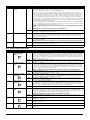
5.7
Programmable Output Programming . . . . . . . . . . . .
[501]-[514] - Programmable Output Attributes . . . . . .
Assigning Partitions to Programmable Outputs . . . . .
[551]-[564] - PGM Partition Assignment. . . . . . . . . . .
46
46
46
47
5.8
International Programming . . . . . . . . . . . . . . . . . . . .
[700] - Automatic Clock Adjust . . . . . . . . . . . . . . . . . .
[701] - First International Option Codes . . . . . . . . . . .
[702] - Second International Option Codes . . . . . . . .
[703] - Delay Between Dialing Attempts. . . . . . . . . . .
47
47
48
48
49
5.9
Module Programming . . . . . . . . . . . . . . . . . . . . . . . . 49
5.10 Special Installer Instructions . . . . . . . . . . . . . . . . . . .
[900] - Panel Version . . . . . . . . . . . . . . . . . . . . . . . . .
[901] - Installer Walk Test Mode Enable / Disable . . .
[902] - Reset Module Supervision . . . . . . . . . . . . . . .
[903] - Module Supervision Field . . . . . . . . . . . . . . . .
[904] - Module Placement Test . . . . . . . . . . . . . . . . .
[906] - For Future Use . . . . . . . . . . . . . . . . . . . . . . . .
[989][Installer Code] - Default Master Code . . . . . . . .
[990][Installer Code] - Installer Lockout Enable . . . . .
[991][Installer Code] - Installer Lockout Disable. . . . .
[993]-[999] - Factory Defaults. . . . . . . . . . . . . . . . . . .
[993][Installer Code] - Restore Alternate Comm.
Factory Default Programming . . . . . . . . . . . . . . . . . .
[995][Installer Code] - Restore ESCORT5580(TC)
Factory Default Programming . . . . . . . . . . . . . . . . . .
[996][Installer Code] - Restore PC5132 Wireless
Factory Default Programming . . . . . . . . . . . . . . . . . .
[997][Installer Code] - Restore PC5400 Factory
Default Programming . . . . . . . . . . . . . . . . . . . . . . . . .
[998][Installer Code] - Restore PC5900 Factory
Default Programming . . . . . . . . . . . . . . . . . . . . . . . . .
[999][Installer Code] - Restore Factory Default
Programming . . . . . . . . . . . . . . . . . . . . . . . . . . . . . . .
49
49
49
49
49
50
50
50
50
50
50
Section 6: Fire Monitoring
51
6.1
Partitions and Fire System Configuration . . . . . . . . . .51
Fire Configuration 1 . . . . . . . . . . . . . . . . . . . . . . . . . . 51
Fire Configuration 2 . . . . . . . . . . . . . . . . . . . . . . . . . . 51
6.2
Fire Zones . . . . . . . . . . . . . . . . . . . . . . . . . . . . . . . . .51
Standard Fire Operation . . . . . . . . . . . . . . . . . . . . . . 51
Auto Verify Fire . . . . . . . . . . . . . . . . . . . . . . . . . . . . . 51
Four-Wire Smoke Detector Zones. . . . . . . . . . . . . . . 51
Two-Wire Smoke Detector Zones . . . . . . . . . . . . . . . 52
Fire Supervisory Zone . . . . . . . . . . . . . . . . . . . . . . . . 52
6.3
Fire System Operation . . . . . . . . . . . . . . . . . . . . . . . .52
Manual Signal Silence . . . . . . . . . . . . . . . . . . . . . . . . 52
Automatic Signal Silence (Bell Time-out) . . . . . . . . . 52
Manual Sensor Reset ([*][7][2]) . . . . . . . . . . . . . . . . . 52
Subsequent Alarm Operation . . . . . . . . . . . . . . . . . . 52
Auto-Scroll LCD Keypad Display. . . . . . . . . . . . . . . . 52
Fire Trouble Conditions . . . . . . . . . . . . . . . . . . . . . . . 52
AC Delays . . . . . . . . . . . . . . . . . . . . . . . . . . . . . . . . . 53
Fire Reporting Codes . . . . . . . . . . . . . . . . . . . . . . . . 53
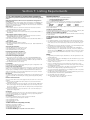
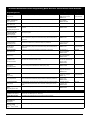
Section 7: Listing Requirements
54
7.1 UL Listed Commercial and Residential Installations .54
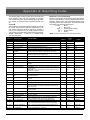
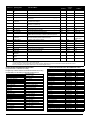
Appendix A: Reporting Codes . . . . . . . . . . . . . . . . . . . . . .56
Contact ID . . . . . . . . . . . . . . . . . . . . . . . . . . . . . . . . . 56
SIA Format - Level 2 (Hardcoded). . . . . . . . . . . . . . . 56
Contact ID Zone Alarm/Restoral Event Codes . . . . . 57
SIA Format Automatic Zone Alarm/Restoral Codes . 57
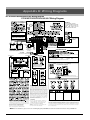
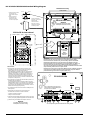
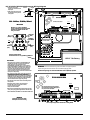
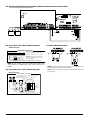
Appendix B: Wiring Diagrams . . . . . . . . . . . . . . . . . . . . . .58
B.1 PC1616/PC1832/PC1864 UL/ULC Wiring Diagram . . . . .58
B.2 PC1616/PC1832/PC1864 Standard Wiring Diagram . . . .59
B.3 PC1616/PC1832/PC1864 European Wiring Diagram . . . .60
B.4 PC1616/PC1832/PC1864 and PC5700 Fire Module
Communications Connections . . . . . . . . . . . . . . . . . . . . . . .61
B.5 Sensor Reset for 2-Wire Smoke Detectors . . . . . . . . . . . .61
B.6 Sensor Reset for 4-wire Smoke Detectors . . . . . . . . . . . .61
B.7 Other PGM Connections . . . . . . . . . . . . . . . . . . . . . . . . .61
50
50
50
50
50
50
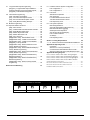
The below symbols are used to indicate features that are only available in a particular market. No symbol
indicates the feature is available for all markets.
EN
IMQ
CP-01
UK
C
Europe
Italy
United States
United Kingdom
Scandinavia
iii
Section 1: Introduction
• How to program the system (Section 3: “How to Program”)
• An introduction to the user interface and keypad operation (Section 4: “Keypad Commands”)
• An overview of the main system programming sections
(Section 5: “Programming Sections”).
Installation Guide
The Installation Guide provides the basic installation, wiring
and programming information required to program the PowerSeries PC1616, PC1832 and PC1864 control panels.
Programming Worksheets
The Programming Worksheets provid a detailed list of all
programming sections available in the panel and a place to
record your programming. Be sure to record all your system
programming in the Programming Worksheets. If adding
modules to your PowerSeries Control Panel, refer to the
Installation Instructions that come with each module.
User Guide
One user guide comes with the PC1616/PC1832/PC1864
system. The User’s Guide provides easy to follow instructions for end users. Installers should also review this manual,
in order to properly instruct the end-users once the installation is complete.
1.1 About the PC1616/PC1832/PC1864 System
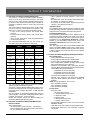
This product is in conformity with EMC Directive 89/336/EEC
based on results using harmonized standards in accordance
with article 10(5), R&TTE Directive 1999/5/EC based on following Annex III of the directive and LVD Directive 73/23/EEC as
amended by 93/68/EEC based on results using harmonized
standards.
This product meets the requirements of Class II, Grade 2 equipment as per EN 50131-1:2004 Standard. This product is suitable for use in systems with the following notification options:
• A (use of two warning devices and internal dialer
required),
• B (self powered warning device and internal dialer
required),
• D (use of DSC model T-Link TL250 encrypted Ethernet
communicator required).
The PC1616/PC1832/PC1864 are high end security systems. Below are the list of features for each panel:
PC1616
PC1832
PC1864
On-board Zones
6
8
8
Hardwired Zones
16 (1xPC5108)
32(3xPC5108)
64 (7xPC5108)
Wireless Zones
16
32
32
Keypad Zone
Support
8
8
8
On-board PGM
Outputs
PGM 1 - 50mA
PGM 2 - 300mA
PGM 1 - 50mA
PGM 2 - 300mA
PGM 1/3/4 - 50mA
PGM 2 - 300mA
Additional PGM
Outputs
Zone Configuration
• 6 Fully programmable zones (PC1616)
• 8 Fully programmable zones (PC1832/PC1864)
• 34 zone types, 9 programmable zone attributes
• Zone configurations available: Normally closed, Single
EOL and Double EOL zone supervision
• Hardwired zone expansion (fully supervised) available
using the Model PC5108 (eight Zone Expander Module)
and the Model PC5700 (Fire Module)
• Expandable to 16 zones (PC1616)
• Expandable to 32 zones (PC1832)
• Expandable to 64 zones (PC1864)
• One zone input available on the keypads
• Wireless zone expansion (fully supervised) available
using the Model PC5132 (RF Receiver, operating at
433MHz)
NOTE: PC1616 expandable to 16 zones only.
• Up to 2 partitions (PC1616)
• Up to 4 partitions (PC1832)
• Up to 8 partitions (PC1864)
Access Codes
• 39 access codes:
• 32 User Codes (Level 2)
• 1 System Master Code (Level 3)
• 2 Supervisor Codes
• 2 Duress Codes
• 1 Maintenance/Guard Code
• 1 Installer Code (Level 3)
• Programmable attributes for each user code (see section 4.2 for details)
• 1,000,000 access code variations (using 6-digit codes)
• Duress codes derived from user codes plus 1 digit are
not allowed
PC5208 - 8x50mA PC5208 - 8x50mA PC5208 - 8x50mA
PC5204 - 4x500mA PC5204 - 4x500mA PC5204 - 4x500mA
Keypads
8
8
8
Partitions
2
4
8
User Codes
1.3 Control and Indicating Equipment Specifications
32 + Master Codes 32 + Master Codes 32 + Master Codes
Event Buffer
500 Events
500 Events
500 Events
Transformer
Required
16.5VAC
40VA
16.5VAC
40VA
16.5VAC
40VA
Battery Required
4Ah / 7Ah / 14Ah
4Ah / 7Ah / 14Ah
4Ah / 7Ah / 14Ah
Bell Output
12V 700 mA
(continuous)
12V 700 mA
(continuous)
12V 700 mA
(continuous)
The LCD keypad guides users through their available
options with easy-to-understand prompts.
The status of the PC1616/PC1832/PC1864 system can be
monitored over telephone lines, or using an alternative communicating device, including Skyroute™, T-LINK, GS-3050
and DVACS.
You can program the PC1616/PC1832/PC1864 using any
system keypad, or using DLS downloading software and a
computer (see section 3, ‘How to Program’).
Review the complete manual set before installing the
PC1616/PC1832/PC1864 security system.
1.2 About the PC1616/PC1832/PC1864 Manual Set
Reference Manual
This manual provides:
• An overview of the system (Section 1: “Introduction”)
• How to install and wire the system and its modules (Section 2: “Installation and Wiring”)
1
Warning Device output
• Rated 12VDC, 700mA, (current limit 2.0A) supervised
(EOL resistor shall be used)
• Programmable as steady, pulsed or temporal three (as
per ISO 8201) output
• Fire alarm notification has priority over burglary alarm
notification
Memory
• CMOS EEPROM memory
• Retains programming and system status on AC and battery failure
• Data Retention: 200 years min.
Programmable Outputs (PGMs)
• Up to 14 programmable outputs (PGM) with 21 options
• PGM outputs are open collector type and switched to
ground
• Three low current (50mA) PGM outputs on main panel
(PGM1, PGM3, PGM4)
NOTE: PGM3 and PGM4 available on PC1864 only.
• One high current (300mA) output with 2-wire smoke
detector capability on the main control board (PGM2)
• Eight additional low current outputs (50mA) available
using the Model PC5208
• Four high current outputs (1A) available using the Model
PC5204 (one configurable as a supervised bell output)
Power Supply
• 1.5A regulated (1.7A for UL/ULC), supervised and integral to the control unit
• Type A as per EN50131-6 Standard
• Input ratings: 120V, 60Hz Class II (220V-240Vac, 50/
60Hz, 200mA for European installations)
• Transformer required, mounted in the same enclosure,
permanently connected for European installations
• Transformer secondary ratings: 16.5Vac, 40VA min
• AUX Output Voltage: 12VDC, -15%/+10% when AC Input
Voltage is 85% to +110% of rated value and output current is 500mA (700mA for UL/ULC) (550mA for IMQ)
• Output ripple voltage: 270mVp-p max.
• Storage device: Rechargeable battery, rated 12VDC
• Battery capacity: 4Ah, 7Ah, 14Ah (2 x 7Ah) or 24 Ah (2 x
12Ah)
• Battery = One 12V 4Ah battery (For burglary applications)
• Battery = Two 12V 7Ah (min.) rechargeable sealed lead
acid for 24-hr backup (For fire monitoring applications)
• Maximum standby time 24Ah (when using 14Ah battery
capacity and AUX current limited to 480mA max.).
• Recharging time 48h
• Programmable recharging current: Low 400mA, High
700mA
• Low battery trouble indication threshold 11.5VDC
• Battery deep discharge protection (cut-off at 9.5VDC)
• Main board current draw: 85mA (set and unset state)
• Resettable fuses (PTC) used on circuit board instead of
replaceable fuses
• Supervision for loss of primary power source (AC Fail),
battery fail or battery low voltage (Battery Trouble) with
indication provided on the keypad
• Internal clock locked to AC power frequency
Operating Environmental Conditions
• Temperature range: -10°C to +55°C (14°F to 131°F)
• Relative humidity: 93% non condensing
Keypad Specifications
• Each keypad has 5 fully programmable function keys
(see Section [000] in the programming section.
• “T” version keypads have tamper protection
• Connect up to 8 keypads
• Four wire (Quad) connection to Keybus
• Built in piezoelectric buzzer
Alarm Transmitter Equipment (ATE) Specification
• Digital dialer integral to the main control board
• Complies with TS103 021-1, -2, -3 Telecom equipment
requirements
• Supports the following communications formats:
• 10 BPS/20 BPS
• DTMF Contact ID
• SIA FSK
• Pager
• Residential Dial
• Private Line
• Scantronics 4-8-1
• Robofon
• CESA 200
• Split reporting of selected transmissions to each telephone number
• 3 programmable telephone numbers
• 1 system account number
• Upto 8 partition account numbers
• Supports Skyroute™ Cellemetry Communication Transceiver
• GS3050 GSM Universal Wireless Alarm Communicator
• DTMF and pulse dialing
• DPDT line seizure
• Anti-jam detection
• Event-initiated personal paging
• T-Link/T-Link TL250/T-Link TL300 Ethernet Communications (using PC-Link) for Intranet/Internet connectivity.
System Supervision Features
The PC1616/PC1832/PC1864 continuously monitors a number of possible trouble conditions and provides audible and
visual indication at the keypad. Multiple signals are indicated
using scroll buttons on the LCD keypads (no priority
assigned) or by different lights on the LED’s keypads. Trouble Conditions include:
• AC Power Failure
• Low Battery Condition
• AUX Power Supply Fault
• Bell Output Trouble
• Telephone Line Trouble
• Failure to Communicate
• Loss of Internal Clock
• Module Fault (Supervisory or Tamper)
• Trouble by Zone
• Fire Trouble
• Tamper by Zone
False Alarm Prevention Features
• Audible Exit Delay
• Audible Exit Fault
• Urgency on Entry Delay
• Quick Exit
• Swinger Shutdown
• Recent Closing Reporting Code
• Cross Zone/Police Code Alarm
• Burglary-Verified Timer
• Communication Delay
• Rotating Keypress Buffer
Additional Features
• Automatic inhibit (swinger shutdown) for Alarm, Tamper,
Trouble signals after 3 occurrences in a given set period
2
•
•
•
•
•
•
•
•
•
•
•
•
NOTE: PC1616 expandable to 16 zones only. The PC1832
expandable to 32 zones only.
(see section [377]), Opt [1] alarms, [2] tampers, [3] troubles.
Programmable keypad lockout option (see section [012])
Automatic arming by partition at a specified time, each
day of the week
No activity arming
Keypad activated alarm output and communicator test
Keypad lockout
Audio capability using the PC5900 Audio Verification
Module and central station 2-way listen-in
All modules connect to the system via a 4-wire Keybus,
up to 1000’/305m from the main panel
Event buffer can be printed using PC5400/PC5401 RS232 Serial Interface module
Supports the Escort5580(TC) Voice Prompt Module,
with automation and lighting control
500 event buffer, time and date stamped
Uploading/downloading capability
Daylight savings time option
PC5132 Wireless Receiver Module
The PC5132 Wireless Receiver module can be used to connect up to 32 fully supervised wireless devices (see the
PC5132 Installation Manual for details).
NOTE: Only the first 32 zones on the PC1616/PC1832/PC1864
system can be used as wireless zones.
NOTE: PC1616 expandable to 16 zones only.
PC5200 Power Supply Output Module
The PC5200 can provide up to 1 Amp of additional power for
modules or devices connected to the control panel. Up to 4
modules can be connected to the system. Each module
requires a 16.5VAC 40VA transformer and 4 AH battery (see
PC5200 Installation Instructions for details).
PC5204 Power Supply Output Module
The PC5204 can provide up to 1 Amp of additional power for
modules or devices connected to the control panel. The
module requires a 16.5VAC 40VA transformer and 4Ah(min.)
battery. In addition, the module provides 4 programmable
high current outputs (see PC5204 Installation Instructions for
details).
PC5208 Eight Low Current Output Module
Adds 8 programmable low current outputs (50mA) to the
control (see the PC5208 Installation Instructions for details).
NOTE: If you use the main panel and the PC5208 outputs,
1.4 Additional Devices
If a Fault or Tamper condition occurs on a zone while the
system is disarmed, a trouble condition will be indicated. If a
Fault or Tamper condition occurs on a zone while the system
is armed, the bell will be sounded. This applies to zones and
zone expander modules, and cannot be changed. This feature will be active for the following modules:
• PC5108
• PC5700
• PC5132
• PK55XX with a zone programmed
• RFK55XX with a zone programmed
Keypads
A maximum of 8 keypads can be connected to the control
panel. You can connect any combination of the following
listed.
• PK5500/RFK5500 LCD keypad
• PK5501/RFK5501 ICON keypad
• PK5508/RFK5508 8 Zone LED keypad
• PK5516/RFK5516 16 Zone LED keypad
• LCD5511 Fixed Message LCD keypad
• LED5511Z 8 Zone LED keypad
• PC5508Z 8 Zone LED keypad
• PC5532Z 32 Zone LED keypad
• PC5516Z 16 Zone LED keypad
• LCD5500Z Liquid Crystal Display (LCD) keypad
• LCD5501Z LCD-style keypad
PC5100 2-Wire Addressable Interface Module
The PC5100 module is used to connect 2-wire addressable
devices to the system. Up to 32 2-wire addressable devices
can be added to the system.
NOTE: PC5100 v1.0 and lower modules can only support the
PGM 3 will work the same as the first PC5208 output, and
PGM 4 will work the same as the second PC5208 output.
Escort5580(TC) Module
This Escort5580(TC) module will turn any touch-tone telephone into a fully functional keypad. The module also
includes a built-in interface to control up to 32 powerline carrier type devices for lighting and temperature control (see the
Escort5580(TC) Installation Manual for details).
NOTE: An Escort5580(TC) version 3.x or higher is needed to
support more than 32 zones and/or 2 partitions.
PC5900 Audio Verification Module
The PC5900 series Audio Verification Modules provide "Talk/
Listen-In" capability for audio verification of alarms. The
module permits the central station to monitor up to four
microphones and to communicate to the occupants through
2 separate speakers.
PC5400 Printer Module
This PC5400 Printer Module allows the panel to print all
events on the system to any serial printer. All events will be
printed with the partition, time, date and the event that
occurred (see PC5400 Installation Manual for details).
NOTE: The PC5400 v2.x and lower only supports events on
partitions 1 and 2, and zones 1-32.
PC5401 Serial Interface Module
The PC5401 Serial Interface Module can be used to communicate with 3’rd party devices (automation) through a standard RS-232 serial connection (see the PC5401 Developer’s
Guide for more information on communicating with the
PC5401 module).
T-Link Local Area Network Communicator
The T-Link Local Area Network Communicator provides an
efficient method of communicating via a Local Area Network
(LAN). See the T-Link Installation Manual for more details.
TL250/TL300 Intranet/Internet Communicators
The T-Link Ethernet Communicator provides an efficient
method of communicating via Internet/Intranet. See the TLink TL250/TL300- Installation Manual for more details.
Alternate Communicators
Refer to the associated Skyroute™ Installation Manual, or
GS3050 Installation Manual for programming details.
first 32 zones on the PC1616/PC1832/PC1864 system.
NOTE: PC1616 expandable to 16 zones only.
PC5108 Eight Zone Expander Module
Eight zone expander module can be used to increase the
number of zones on the system. Up to 7 modules can be
connected to increase the system zones to a maximum of 64
(see the PC5108 Installation Instruction Sheet.)
NOTE: PC5108 v1.0 and lower modules can only support the
first 32 zones on the PC1616/PC1832/PC1864 system. PC5108
v1.0 and lower modules enroll as two modules and use up
two supervisory slots.
NOTE: Do not mix PC5108 v1.x and lower modules with
PC5108 v2.0 and higher modules on the same system.
3
PC5700/PC5720 Fire Module
This is a zone expansion fire module that can be used for
ULC Listed non-residential fire applications. The PC5720
can be used as an interface between the control panel and
either a serial printer or a DVACs communication network.
NOTE: The PC5700/PC5720 enroll as two expander modules
PC4050CAR
Accessories can be installed in separate metal enclosures
as follows:
and use two supervisory slots each.
NOTE: Do not mix PC5700 v1.x and lower modules with
PC5108 v2.0 and higher modules on the same system.
Enclosures/Cabinets
The PC1616/PC1832/PC1864 main board can be installed
in the following metal enclosures/cabinets:
Enclosure
Description/Dimensions
PC500C
Description: Alternate Main Control Cabinet (Household Burglary).
Approximate Dimensions: 213mm x 235mm x 76mm /
8.4” x 9.25” x 3.0”
Description: Cabinet to house the PC5204 Power Supply Output Module.
Approximate Dimensions: 213mm x 235mm x 76mm /
8.4” x 9.25” x 3.0”
Description: Main Control Cabinet for the PC1616/
PC1832/PC1864 main panel with removable door. (UL/
ULC Household Fire & ULC Commercial Burglary) Made
with 22Ga steel.
Approximate Dimensions: 287mm x 297mm x 76mm /
11.3” x 11.7” x 3.0”
Description: Main Control Cabinet for the PC1616/
PC1832/PC1864 main panel with removable door. Made
with 1.2mm thick steel.
Approximate Dimensions: 287mm x 297mm x 76mm /
11.3” x 11.7” x 3.0”
Description: Cabinet to house the Escort5580(TC)
Module and PC5400 Printer Module.
Approximate Dimensions: 229mm x 178mm x 66mm /
9.0” x 7.0” x 2.6”
Description: Cabinet to house the PC5108 Zone
Expander Module and the PC5208 Eight Low Current
Output Module.
Approximate Dimensions: 152mm x 122mm x 38mm /
6.0” x 4.8” x 1.5”
Description: Plastic Cabinet to house the PC5108 Zone
Expander Module and the PC5208 Eight Low Current
Output Module.
Approximate Dimensions: 146mm x 107mm x 25mm /
5.75” x 4.2” x 1.0”
Description: Main control cabinet for the PowerSeries
panel. Made with 18Ga steel.
Approximate Dimensions: 318mm x 318mm x 102mm
/ 12.5” x 12.5” x 4.0”
Description: Alternate Main Control Cabinet (Commercial Burglary)
Approximate Dimensions: 287mm x 297mm x 76mm /
11.3” x 11.7” x 3.0”
Description: Cabinet to house the PC5937.
Approximate Dimensions: 287mm x 297mm x 76mm /
11.3” x 11.7” x 3.0”
Description: Structured wiring cabinet for PC1616/
PC1832/PC1864 main panel, with a wire raceway in the
center of the cabinet.
Approximate Dimensions: 362mm x 362mm x 102mm
/ 14.25” x 14.25” x 4.0”
Approximate Dimensions of Cover: 389mm x 389mm
/ 15.3” x 15.3”.
Description: Structured wiring cabinet for PC1616/
PC1832/PC1864 main panel, with a wire raceway in the
center of the cabinet.
Approxmiate Dimensions: 724mm x 362mm x 102mm
/ 28.5” x 14.25” x 4.0”
Approximate Dimensions of Cover: 752mm x 389mm
/ 29.6” x 15.3”.
Description: Structured wiring cabinet for PC1616/
PC1832/PC1864 main panel, with a wire raceway in the
center of the cabinet.
Approximate Dimensions: 1086mm x 362mm x
102mm / 42.75” x 14.25” x 4.0”
Description: Alternate Main Control Cabinet (UL/ULC
Household Fire & ULC Commercial Burglary) for the
PC1616/PC1832/PC1864 main panel.
Approximate Dimensions: 305mm x 376mm x 124mm
/ 12.0” x 14.8” x 4.9”
Description: Alternate Main Control Cabinet (UL Commercial Fire) for the PC1616/PC1832/PC1864 main
panel.
Approximate Dimensions: 305mm x 376mm x 124mm
/ 12.0” x 14.8” x 4.9”
PC5002C
PC5003C
(Removable
Door)
PC5003C
(Hinged Door)
PC5004C
PC5001C
PC5001CP
PUC-1
CMC-1
Multi-3
HS-CAB1000B
HS-CAB3000LDR
HS-CAB4000LDR
PC4050C
PC4050CR
Description: Alternate Main Control Cabinet (ULC
Commercial Burglary) for the PC1616/PC1832/PC1864
main panel.
Approximate Dimensions: 305mm x 376mm x 124mm
/ 12.0” x 14.8” x 4.9”
Enclosure
Description/Dimensions
PC4003C
Description: Single expander cabinet made of 18Ga
steel, painted, hinged door, weight: 1050g.
Approximate Dimensions: 229mm x 178mm x 64mm /
9.0” x 7.0” x 2.5”
Description: Cabinet made of 18Ga steel, painted,
hinged door, weight: 3600g.
Approximate Dimensions: 427mm x 264mm x 106mm
/ 16.8” x 10.4” x 4.18”
PC4051C
All cabinets are provided with means for installing tamper
protection switch (door opening detection and/or removal
from the mounting position).
1.5 Battery Standby Times versus AUX Load
In accordance with EN50131-1 Standard, for a Power Supply Type A rated for Grade 2 systems, the battery standby
time required in case of failure of the prime power source
shall be a minimum of 12 hours.
The table below indicates the maximum load values applicable to the AUX+/-, Keybus (Red, Black) and PGM 1-4 outputs
that the panel (PC1616/PC1832/PC1864) will be able to
support when using a certain battery size for a certain period
of time as applicable for each installation.
The AUX +/-, Keybus (Red, Blk) and PGM 1-4 outputs are all
sharing the same load (max. 500mA), (max. 700mA for UL/
ULC), (max. 550mA for IMQ). Please refer to the other
Power Series accessories current ratings when calculating
the maximum load applicable for each installation.
Standby Times
Battery
Capacity
4hrs
12hrs
24hrs
36hrs
4Ah
500mA
220mA
-
-
7Ah
500mA
480mA
150mA
-
14Ah
-
500mA
480mA
280mA
24Ah
-
-
500mA
500mA
Standard Battery Charging Current: 400mA (280mA for
IMQ).To be used with 4Ah or 7Ah batteries.
High Battery Charging Current: 700mA. To be used with
14Ah or 24Ah batteries.
NOTE: Program Section [701] option 7 to ON to enable high
battery charging current, if 14Ah or 24Ah battery is used.
Refer to the following table for UL/ULC Applications:
Battery
Capacity
Standby Times (UL/ULC)
4hrs
24hrs
4Ah
700mA
-
7Ah
700mA
180mA
14Ah (2x7Ah in parallel)
700mA
470mA
NOTE: When two batteries are required in order to meet
the minimum standby times, the DSC Enclosure Model Power
UC1 shall be used.
NOTE: A sealed, rechargeable, lead acid battery or gel type
battery is required to meet UL requirements for power
standby times.
NOTE: UL Residential/Commercial Burglary installations
require 4Hrs Power Standby time.
NOTE: UL/ULC Residential Fire & Home Care installations
require 24 Hr power standby. ULC Commercial Burglary and
Fire monitoring installations require 24 Hr power standby.
NOTE: Replace batteries every 3-5 years.
NOTE: Battery capacity will deteriorate with age and number of charge/discharge cycles.
4
Section 2: Installation and Wiring
The following section provides a description of how to wire and configure devices and zones.
2.1 Installation Steps
Worksheets should be filled out completely before attempting to program the system.
Step 11 Testing the System
Test the panel completely to ensure that all features and
functions are operating as programmed.
The following steps are provided to assist with the installation of the panel. It is suggested that you read over this section briefly to get an overall understanding of the order of
installation. Once this is done carefully work through each
step. Working from this plan will help reduce problems and
reduce the overall installation time required.
Step 1 Create a Layout
Draw a rough sketch of the building and include all alarm
detection devices, zone expanders, keypads and all other
modules that are required.
Step 2 Mounting the Panel
Locate the panel in a dry area, preferably located near an
unswitched AC power source and the incoming telephone
line. Before attaching the cabinet to the wall be sure to press
the five circuit board mounting studs into the cabinet from the
back.
NOTE: Complete all wiring before applying AC or connect-
2.2 Terminal Descriptions
AC Power Terminals
The panel requires a 16.5V, 40VA transformer. Connect the
transformer to these terminals.
The panel can be programmed to accept a power line frequency of either 50Hz AC or 60Hz AC in programming section [701], option [1].
NOTE: Do not connect the transformer until all other wiring
is complete.
Battery Connection
The battery is used to provide back up power in the event of
an AC power failure and to provide additional current when
the panel demands exceed the power output of the transformer, such as when the panel is in alarm.
NOTE: Do not connect the battery until all other wiring is
ing the battery.
Step 3 Wiring the Keybus
Wire the Keybus to each of the modules following the guidelines provided in Section 2.4.
Step 4 Assigning Zones to Zone Expanders
If zone expander modules are being used the modules must
be configured so the panel knows which zones are assigned
to each expander. Follow the guideline provided in Section
2.6 to assign zones to expanders.
Step 5 Zone Wiring
Power down the control panel and complete all zone wiring.
Follow the guidelines provided in section 2.10 to connect
zones using normally closed loops, single EOL resistor, double EOL resistors, Fire zones and Keyswitch Arming zones.
Step 6 Completing Wiring
Complete all other wiring including bells or sirens, telephone
line connections, ground connections or any other wiring
necessary. Follow the guidelines provided in section 2.2 “Terminal Descriptions”.
Step 7 Power up the Control Panel
Once all zone and Keybus wiring is complete, power up the
control panel.
NOTE: The panel will not power up if only the battery is con-
complete.
Connect the RED battery lead to the positive of the battery,
the BLACK battery lead to the negative.
The High Current Charge/Standard Battery Charge
option (section [701], option [7]) allows you to choose
between a high current battery charge and the standard battery charge rate.
High Current/Standard Battery Charge . . . . . . . . .Section [701]: [7]
Auxiliary Power Terminals - AUX+ and GND
These terminals provide up to 500mA of current at 12 VDC
(700mA of current at 12VDC for UL/ULC) (550mA of current
at 12VDC for IMQ) for devices requiring power (rated 11.612.6 VDC for UL residential applications). Connect the
positive side of any device requiring power to the AUX+ terminal, the negative side to GND. The AUX output is protected; if too much current is drawn from these terminals
(wiring short) the panel will temporarily shut off the output,
until the problem is corrected.
NOTE: When using a 12V 14Ah battery, the maximum AUX
capacity for 24-hour standby is 470mA.
Bell Output Terminals - BELL+ and BELLThese terminals provide up to 2A of current at 12VDC (with
standby battery; 700 mA continuous) for powering bells,
sirens, strobes or other warning type equipment. Connect
the positive side of any alarm warning device to BELL+, the
negative side to BELL–. The BELL output is protected; if too
much current is drawn from these terminals (wiring short)
the BELL PTC will open.
The Bell output is supervised. If no alarm warning device is
being used connect a 1KΩ resistor across BELL+ and
BELL– to prevent the panel from displaying a Bell Trouble
condition.
NOTE: The Bell output is current limited with a 2A PTC.
NOTE: Steady, Pulsed and Temporal Three Pattern alarms
nected.
Step 8 Keypad Assignment
Keypads must be assigned to different slots to be properly
supervised. Follow the guideline provided in section 2.7 to
assign keypads.
Step 9 Confirming Module Supervision
By default, all modules are supervised upon installation.
Supervision is enabled at all times so that the panel can indicate a trouble if a module is removed from the system.
To confirm that each module is properly supervised, follow
the guidelines provided in section 2.8.
Step 10 Programming the System
Section 4.0 provides a complete description of how to program the panel. Section 5.0 contains complete descriptions
of the various programmable features, what options are
available and how the options function. The Programming
are supported.
5
A minimum ¼” (6.4mm) separation must be maintained at all
points between power limited and non-power limited wiring
and connections.
Keybus Terminals - RED, BLK, YEL, GRN
The Keybus is used by the panel to communicate with modules and by modules to communicate with the panel. Each
module has four Keybus terminals that must be connected to
the four Keybus terminals on the panel.
Programmable Outputs - PGM1 to PGM4
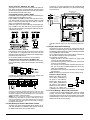
Each PGM output is designed so that when activated by the
panel, the terminal will switch to ground
PGM1, PGM3, and PGM4 can each sink up to 50 mA of current. These PGMs can be used to activate LEDs or a small
buzzer. Connect the positive side of the LED or buzzer to
AUX+, the negative side to the PGM.
PGM2 is a high current output (300mA) and operates similarly to PGM1. If more than 300 mA of current is required, a
relay must be used. Refer to the diagram. PGM2 can also be
configured as an input.
North America Only
POWER LIMITED
PC Board
Stand Off
Cable Tie (not supplied) recommended
Cabinet
DSC
UA503
Primary:120VAC/60Hz.
Secondary: 16.5VDC 40VA
DSCPTD 1640U
Class II Transformer
PC1616/1832/1864
NOTE: Do not connect
transformer to receptacle
controlled by a switch
High Voltage. Disconnect AC Power
and telephone lines before servicing
WARNING:
PC1864
Only
PC1864
PC1832
Only
CON1
BAT+BAT-
TB-2
AC AC
AUX+
BELL+
PGM1
PGM3
AUXBELL- RED BLK YEL GRN
PGM2
PGM4 Z1 COM Z2
Z3 COM Z4
Z5 COM Z6
12V / 7 AHr
Z7 COM Z8 EGND
RING
TIP
R-1
T-1
12V / 7 AHr
BLACK
RED
NON-POWER LIMITED
DSC Model BD7-12
or equivalent
Battery
StandbyTime:
24Hrs min.
NOTE: Wire entry for power limited wiring must be separated by a different entry access from non-power limited wiring.
2.4 Keybus Operation and Wiring
The Keybus is used by the panel to communicate with all
modules connected and by the modules to talk to the panel.
The RED and BLK terminals are used to provide power while
YEL and GRN are clock and data.
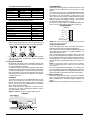
The 4 Keybus terminals of the panel must be connected to
the 4 Keybus terminals or wires of all modules.
The following conditions apply:
• Keybus should be run with minimum 22 gauge quad
(0.5mm), two pair twisted preferred
• The modules can be home run to the panel, connected in
series or can be T-tapped
• Any module can be connected anywhere along the Keybus, you do not need a separate Keybus wire run for keypads, zone expanders etc.
• No module can be more than 1,000'/305m (in wire length)
from the panel
NOTE: Shielded wire should not be used for Keybus wiring.
Example of Keybus Wiring
Module (A) is wired correctly
as it is within 1,000'/305m of
the panel, in wire distance.
Module (B) is wired correctly
as it is within 1,000'/305m of
the panel, in wire distance.
Module (C) is NOT wired correctly as it is further than
1,000'/305m from the panel, in wire distance.
Zone Input Terminals - Z1 to Z8
Each detection device must be connected to a zone terminal
on the system. It is suggested that each zone have one
detection device however it is possible to wire multiple detection devices to the same zone.
For zone wiring details, see section 2.10 ’Zone Wiring’ .
Telephone Connection Terminals - TIP,RING,T-1,R-1
If a telephone line is required for central station communication or downloading, connect an RJ-31X jack in the following
manner:
Connect the PC1616/PC1832/PC1864 and modules that
use the telephone line(s) in the following order:
PC1616
PC18xx
PC5900
NOTE: Ensure that all plugs and jacks meet the dimension,
tolerance and metallic plating requirements of 47 C.F.R. Part
68, SubPart F. For proper operation there must be no other
telephone equipment connected between the control panel
and the telephone company facilities.
NOTE: Do not connect the alarm panel communicator to
telephone lines intended for use with a FAX machine. These
lines may incorporate a voice filter which disconnects the line
if anything other than FAX signals are detected, resulting in
incomplete transmissions.
2.5 Current Ratings - Modules & Accessories
In order for the PC1616/PC1832/PC1864 system to operate
properly, the power output capabilities of the main control
and expansion devices must not be exceeded. Use the data
presented below to ensure that no part of the system is overloaded and cannot function properly.
2.3 Wire Routing for Power & Non-Power Limited
All wiring entry points are designated by the arrows. All circuits are classified UL installation power limited except for
the battery leads which are not power limited.
6
2.6 Assigning Zones to Zone Expanders
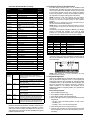
PC1616/PC1832/PC1864 Device Ratings
Device
Description
The main panel contains zones 1 to 8. Additional zone
expanders may be added to increase the number of zones
on the system. Each zone expander consists of one group of
8 zones. Each module must be set to assign the specific
zones to the expander. To do this, set the jumpers located on
the expander to the proper settings (see chart below).
NOTE: PC5108 v1.0 and lower modules can only support
Max
Rating
@12VDC
PK5500
LCD Keypad
125mA
PK5501
ICON Keypad
125mA
PK5508
8 Zone LED Keypad
125mA
PK5516
16 Zone LED Keypad
125mA
RFK5500
LCD Keypad with Wireless Module
135mA
RFK5501
ICON Keypad with Wireless Module
135mA
RFK5508
8 Zone LED Keypad With Wireless
Module
135mA
RFK5516
16 Zone LED Keypad With Wireless
Module
135mA
the first 32 zones on the PC1616/PC1832/PC1864 system.
PC5108 v1.0 and lower, PC5700 enrolls as two expander
modules.
NOTE: Do not use PC5108 v1.0 and v2.0 simultaneously on
the same PC1616/PC1832/PC1864 panel.
NOTE: Before a zone expander will work properly, you must
set the jumpers so the panel can determine the correct zone
assignment.
The following are jumper settings for different zone assignments for PC5108 v2.0 modules. If you need to enroll
PC5108 v1.0 or PC5700 modules, refer to the appropriate
module Installation Sheet for the correct jumper settings.
LCD5500Z
LCD Keypad
85mA
LCD5501Z
ICON Keypad
45mA
LCD5501Z32-433
ICON Keypad with Wireless Module
260mA
LCD5511
ICON Keypad
100mA
LED5511Z
8 Zone LED Keypad
100mA
PC5532Z
32 Zone LED Keypad
85mA
J1
J2
J3
PC5516Z
16 Zone LED Keypad
85mA
ON
ON
ON
Zones disabled
PC5508Z
8 Zone LED Keypad
85mA
OFF
ON
ON
Zones 09 - 16
PC5108
Zone Module
35mA
ON
OFF
ON
Zones 17 - 24
PC5132
Wireless Module
125mA
OFF
OFF
ON
Zones 25 - 32
PC5200
Output Module
20mA
ON
ON
OFF
Zones 33 - 40
PC5204
Output Module
20mA
OFF
ON
OFF
Zones 41 - 48
PC5208
Output Module
50mA
ON
OFF
OFF
Zones 49 - 56
PC5320
Multiple Receiver Interface Module
55mA
OFF
OFF
OFF
Zones 57 - 64
Escort5580(TC)
Voice Prompting Module
150mA
PC5400
Printer Module
65mA
PC5401
Data Interface Module
35mA
PC5700
Fire Module
150mA
PC5900
Audio Verification Module
50mA
PC5904
Central Station Talk/Listen Module
175mA
PC5921
Intercom Audio Station
20mA
PC5921 EXT
Door Box Audio Station
20mA
PC5921 EXT/R
Door Box Audio Station
35mA
Module Jumpers
System Zones Assigned
The following is a diagram of the PC5108 zone expander
module and where the jumper switches are located. Refer to
the PC5108 Installation Instruction sheet for the module for
more information.
System Output Ratings
Device
PC1616
PC1832
PC1864
Output
AUX:
BELL:
PC5200
AUX:
PC5204
AUX:
PC5208
AUX:
PC5108
VAUX:
Rating (12VDC)
500mA (700 mA for UL/ULC).
Subtract the listed rating for each keypad,
expansion module and accessory connected to
AUX or Keybus.
700 mA. Continuous Rating.
2.0 A. Short Term. Available only with stand-by
battery connected.
1.0 A.Continuous Rating. Subtract for each
device connected.
3.0 A. Short Term. Available only with stand-by
battery connected.
1.0 A. Continuous Rating. Subtract for each
device connected.
3.0 A. Short Term. Available only with stand-by
battery connected.
250 mA. Subtract for each device connected.
Subtract the total load on this terminal from the
PC1616/PC1832/PC1864 AUX/Keybus output.
100 mA. Subtract for each device connected.
Subtract the total load on this terminal from the
PC1616/PC1832/PC1864 AUX/Keybus output.
NOTE: Only jumpers J1, J2, and J3 determine the zone
assignment for the module.
2.7 Keypad Assignment
There are 8 available slots for keypads. LED and ICON keypads by default are assigned to slot 1. LCD keypads are
assigned by default to slot 8. Keypads can each be assigned
to a different slot (1 to 8) which offers two advantages. The
panel can supervise the keypad connection to indicate a
trouble condition if it is removed. Also keypads can be
assigned to operate on a specific partition, or to operate as a
global keypad.
How to Assign Keypads
1. Enter Installer Programming
2. Press [000] for Keypad Programming
3. Press [0] for Partition and Slot Assignment
4. Enter a two digit number to specify the partition and slot
assignment.
• 1st digit - enter 0 for Global operation, or enter 1-8 for
Partitions 1-8
• 2nd digit - enter 1 to 8 for Slot Assignment
5. Press the [#] key twice to exit programming.
6. Continue this procedure at each keypad until all have
been assigned to the correct slot and partition (see section [902].
Other Devices
Read the manufacturer’s literature carefully to determine the
maximum current requirement (during activation or alarm)
and use this value for loading calculations. Do not allow connected devices to exceed the system capabilities during any
possible operational mode.
7
If a module is connected but does not show as being
present, it may be due to any of the following reasons:
• it is not connected to the Keybus
• there is a Keybus wiring problem
• the module is more than 1,000'/305m from the panel
• the module does not have enough power
• the wireless receiver does not have any devices added
NOTE: Module supervision will not display correctly at an
NOTE: All keypad assignments must be done at each keypad
on the system. When using LCD keypads, one keypad must
remain in slot 8 to upload/download LCD information. Do
not assign more than one keypad to the same slot.
NOTE: The following keypad versions can only be used on
the Partition 1 & Partition 2, and the first 8, 16, or 32 zones:
PC5508(Z), PC5516(Z), PC5532(Z) versions v2.0 & lower,
LCD5500(Z) versions 3.x and lower. To assign a keypad to a
slot and select the partition it will operate in, enter the following:
LCD5500Z v2.x and lower keypad.
Function Key Programming
Each of the 5 function keys on each keypad may be programmed for different operations.
1. Enter Installer Programming.
2. Press [000] for Keypad Programming.
3. Enter [1] to [5] to select function key to program.
4. Enter a 2-digit number for function key option - [00] - [32].
5. Continue from step 3 until all function keys are programmed.
2.9 Removing Modules
If a module is no longer required on the system, the panel
must be told to stop supervising the module. To do this:
1. Power down the panel by removing the backup battery
and AC.
2. Remove the module from the Keybus.
3. Power up the panel by connecting the backup battery
and AC.
4. Press [*][8][Installer Code] to enter Installer Programming.
5. Press [902] to enable supervision. The panel will automatically search for all modules connected to the system
for the next 60 seconds. Do not perform any other operations during this 60 second period.
6. Once the search is complete enter section [903] to confirm that the correct modules are supervised on the system.
6. Press [#] key twice to exit Installer Programming.
Keypad Function Keys
[00] - Null
[10] - Alarm Memory
[01] - Partition 1 Select
[11] - User Programming
[24] - Bypass Group Recall
[26] - Time & Date Program
[02] - Partition 2 Select
[12] - User Functions
[27] - Partition 3 Select
[03] - Stay Arm
[13] - Command Output 1
[28] - Partition 4 Select
[04] - Away Arm
[14] - Command Output 2
[29] - Partition 5 Select
[05] - No Entry Arm
[16] - Quick Exit
[30] - Partition 6 Select
[06] - Chime On/Off
[17] - Activate Stay/Away
[31] - Partition 7 Select
[07] - System Test
[19] - Command Output 3
[32] - Partition 8 Select
[08] - Bypass Mode
[21] - Command Output 4
[09] - Trouble Display
[23] - Bypass Recall
2.10 Zone Wiring
For a complete description of the operation of all zone types,
see section 5.2 ’Basic Programming’ section [001]-[004].
The panel can be programmed to supervise normally closed,
End of Line, or Double End of Line loops. Refer to the following sections to study each type of individually supervised
zone wiring.
NOTE: Any zone programmed for Fire or 24 Hour Supervi-
For details on the operation of Function Keys, see section
4.3 ’Function Keys’ .
2.8 Confirming Module Supervision
By default, all modules are supervised upon installation.
Supervision is enabled at all times so that the panel can indicate a trouble if a module is removed from the system.
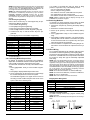
To check which modules are currently connected and supervised:
1. Press [*][8][Installer Code] to enter Installer Programming.
2. Press [903] to display Module Supervision Field.
3. On an LCD keypad, use the arrow keys to scroll through
the modules the panel has found on the system.
On LED/ICON keypads, zone lights will be turned on
according to what modules the panel has found on the
system. Refer to the following chart:
sory must be wired with a single End of Line (EOL) resistor
regardless of the type of zone wiring supervision selected for
the panel (section [013], options [1] and [2]). See Zone Definitions [001]-[004]. If you change the zone supervision options
from DEOL to EOL or from NC to DEOL (section [013], options
[1] or [2]), power the system down completely, and then
power it back up for correct operation.
NOTE: For UL Listed Installations use SEOL or DEOL only.
NOTE: Use minimum 22 AWG wire, maximum 18 AWG wire.
NOTE: Do not use shielded wire.
NOTE: Wire run resistance shall not exceed 100Ω.
Burglary Zone Wiring Chart
Wire Gauge
Maximum Wire length to End of Line Resistor
Light
Module/Device
Light
Module/Device
24
1900 feet / 579 meters
[1]
Keypad 1
[16]
Zones 57 to 64
22
3000 feet / 914 meters
[2]
Keypad 2
[17]
Wireless Receiver
20
4900 feet / 1493 meters
[3]
Keypad 3
[18]
PC5208
19
6200 feet / 1889 meters
[4]
Keypad 4
[19]
PC5204
18
7800 feet / 2377 meters
[5]
Keypad 5
[20]
PC5400
[6]
Keypad 6
[21]
PC5900
[7]
Keypad 7
[22]
Alternate Communicator
[8]
Keypad 8
[23]
Future Use
[9]
Zones 9 to 16
[24]
Escort5580(TC)
[10]
Zones 17 to 24
[25]
Future Use
[11]
Zones 25 to 32
[26]
PC520X-1
[12]
Zones 33 to 40
[27]
PC520X-2
[13]
Zones 41 to 48
[28]
PC520X-3
[14]
Zones 49 to 56
[29]
PC520X-4
[15]
PC5100
Normally Closed (NC) Loops
To enable normally closed loops, program section [013],
option [1] to ON.
NOTE: Do not use Normally Closed Loops for UL Listed systems.
ANY Z
ANY COM
TERMINAL TERMINAL
8
ANY Z
ANY COM
TERMINAL TERMINAL
The following chart shows zone status under certain conditions for DEOL:
The following chart shows zone status under certain conditions for NC Loops:
Loop Resistance
Loop Status
Loop Resistance
Loop Status
0Ω (shorted wire, loop shorted)
Secure
0Ω (shorted wire, loop shorted)
Fault
Infinite (broken wire, loop open)
Violated
5600Ω (contact closed)
Secure
Infinite (broken wire, loop open)
Tamper
11200Ω (contact open)
Violated
Normally Closed Loops . . . . . . . . . . . . . . Section [013], Option [1]
Single End Of Line (EOL) Resistors
To enable panel detection of single end-of-line resistors, program section [013], options [1] and [2] to OFF.
NOTE: This option should be selected if either Normally
End-of-Line Resistors . . . . . . . . . . . . . . . . Section [013], Option [1]
Double End-of-Line Resistors . . . . . . . . . . Section [013], Option [2]
Closed (NC) or Normally Open (NO) detection devices or contacts are being used.
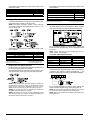
Fire Zone Wiring - 4-wire Smoke Detectors
All zones defined as Fire (see section 5.2 ’Basic Programming’ ) must be wired according to the following diagram:
The following chart shows zone status under certain conditions for SEOL:
For a complete description of how fire zones operate, see
section 5.2 ’Basic Programming’ sections [001]-[004] option
07 and 08.
NOTE: Smoke detectors must be latching type. To reset
Loop Resistance
0Ω (shorted wire, loop shorted)
Loop Status
smoke detector, enter [*][7][2].
Compatible 4-Wire Smoke Detectors
Violated
5600Ω (contact closed)
Secure
Infinite (broken wire, loop open)
Violated
End of Line Resistors . . . . . . . . . . . . . . . . Section [013], Option [1]
Single End of Line Resistors . . . . . . . . . . . Section [013], Option [2]
Double End of Line (DEOL) Resistors
Double End of Line resistors allow the panel to determine if
the zone is in alarm, tampered or faulted.
To enable panel detection of double end of line resistors, program section [013], option [1] to OFF and option [2] to ON.
Model
Model
FAS-410x
FSA-410xLST
FSA-410xRST
FSA-410xT
FSA-410xR
FSA-410xLRST
FSA-410xS
FSA-410xRT
FSA-410xST
FSA-410xRS
For model numbers above: x=A (ULC)
Model
x=B (UL)
x=C (CE)
Fire Zone Wiring - 2-wire Smoke Detectors
If PGM 2 has been programmed for 2-Wire Smoke Detector
connection (see section 5.2 ’Basic Programming’ ) , the
detectors must be wired according to the following diagram:
NOTE: If the Double EOL supervision option is enabled, all
hardwired zones must be wired for Double EOL resistors,
except for Fire and 24 Hour Supervisory zones. Do not use
DEOL resistors for Fire zones or 24 Hour Supervisory zones.
NOTE: Do not wire Fire zones to keypad zone terminals if
the DEOL supervision option is selected.
NOTE: This option can only be selected if Normally Closed
(NC) detection devices or contacts are being used. Only one
NC contact can be connected to each zone.
For a complete description of how fire zones operate, see
section 5.2 ’Basic Programming’ section [009] option 04.
NOTE: Do not combine models from different manufacturers on the same circuit. Operation may be impaired.
NOTE: Refer to smoke detector installation sheet when positioning detectors.
9
PK55XX/RFK55XX
PK55XX/RFK55XX keypad comes with a Z/P terminal. This
terminal can be configured as an input (zone) or output
(PGM).
To connect the zone input on a PK55XX/RFK55XX keypad,
run one wire to the Z/P terminal and the other to B. For powered devices, use red and black to supply power to the
device. Run the red wire to the R (positive) terminal and the
black wire to the B (negative) terminal. The PK55XX/
RFK55XX keypad zone supports Normaly Closed Loops,
Single End of Line and Double End of Line.
To connect the PGM output on a PK55XX/RFK55XX keypad, run one wire to the Z/P terminal and the other to R.
PK55XX/RFK55XX
Compatible 2-Wire Smoke Detectors
Model
Model
Model
FAS-210B
FSA-210BLST
FSA-210BRST
FSA-210BT
FSA-210BR
FSA-210BLRST
FSA-210BS
FSA-210BRT
FSA-210BST
FSA-210BRS
For model numbers above: x=A (ULC)
x=B (UL)
x=C (CE)
2-Wire Smoke Detector Initating Circuit
Item
Specification
Style/Class, Supervised, Power Limited
Style B (Class B)
Compatibility Identifier
PC18-1
DC Output Voltage
9.8-13.8 VDC
Detector Load
2mA (MAX)
Single End of Line Resistor (SEOL)
2200Ω
Loop Resistance
24Ω (MAX)
Standby Impedance
1020Ω (NOM)
Alarm Impedance
570Ω (MAX)
Alarm Current
89mA (MAX)
PK55xx
RED
BLK
YEL
GRN
To zone or
PGM output
Keyswitch Zone Wiring
Zones may be programmed to be used as keyswitch arming
zones and must be wired according to the following diagram:
R
B
Y
G
Z/P
NOTE: End of line resistors must be placed on the device end
of the loop, not at the keypad.
Assigning Keypad Zones
When using keypad zone inputs, each input used must be
assigned a zone number in Installer’s Programming.
First, ensure that you have enrolled all installed keypads into
the desired slots (see section 2.7 ’Keypad Assignment’ ) to
assign the keypad to a slot.
Next, enter programming section [020] to assign the zones.
There are eight programming locations in this section, one
for each keypad slot. Enter a 2-digit zone number for each of
the keypad zones. This number must be entered in the location corresponding to the keypad to which each zone is connected.
NOTE: If a keypad zone input is assigned to zone number 1
For a complete description of how keyswitch zones operate,
see section 5.2 ’Basic Programming’ sections [001]-[004]
option 22 and 23.
2.11 Keypad Zone/PGM
Keypads with zone inputs can be connected to devices such
as door contacts. This saves you from running wires back to
the control panel for every device.
To install the keypad, open the keypad plastic. Refer to the
Installation Sheet that came with the keypad for instructions
on how to open the keypad. Locate the terminals on the keypad circuit board. Connect the four Keybus wires from the
control panel: the red wire to R, the black to B, the yellow to
Y and the green to G.
LCD55XXZ
To connect the zone input on an LCD55XXZ keypad, run one
wire to the Z terminal and the other to B. For powered
devices, use red and black to supply power to the device.
Run the red wire to the R (positive) terminal and the black
wire to the B (negative) terminal.
When using end of line supervision, connect the zone
according to one of the configurations outlined in section
2.10 ‘Zone Wiring‘ on page 8.
NOTE: LCD55XXZ zones do not support DEOL resistors.
LCD55XXZ
to 8, the corresponding zone cannot be used on the main
control panel.
Once the keypad zones are assigned, you must also program zone definitions and zone attributes (see Section 5.2
Basic Programming PWS Sect 3 [001]-[004] and Section 5.3
Advanced System Programming PWS Sect 4 [101]-[164]).
2.12 Zone Activity Log
This feature stores the date stamp of each zone activation
event. It stores the last day, month and year a zone was violated. This data can be retrieved during the installer’s DLS
access.
NOTE: If the panel is powered down, this data will be lost.
10
Section 3: How to Program
The following section of the manual describes how to enter Installer Programming and how to program the various sections.
NOTE: It is extremely important that you read the following section of the manual to completely understand how to program the panel.
NOTE: It is important to watch the Ready light. If the
light is flashing any number you enter will be programmed as the HEX equivalent.
Example: To enter ‘C1’ for a closing by user 1, you would
enter [*] [3] [*], [1]
[*] to enter Hexadecimal mode (Ready light flashes)
[3] to enter C
[*] to return to decimal mode (Ready light is solid)
[1] to enter digit 1
If you enter information into a section and make a mistake,
press the [#] key to exit the section. Select that section again
and re-enter the information correctly.
If you are using a pulse communications format, a decimal
zero [0] does not transmit. Programming a zero [0] tells the
panel not to send any pulses for that digit. Decimal zero [0] is
a filler digit. To make a zero [0] transmit, it must be programmed as a Hexadecimal ‘A’.
Example: for the three digit account number ‘403’, you would
enter [4], [*] [1] [*] [3], [0].
[4] to enter the digit 4
[*] to enter Hexadecimal mode (Ready light flashes)
[1] to enter A
[*] to return to decimal mode (Ready light is solid)
[3] to enter the digit 3
[0] to enter the digit 0 as a filler digit.
3.1 How to Enter Installer Programming
Installer Programming is used to program all communicator
and panel options. The Installer Code is [5555] at default,
but should be changed to prevent unauthorized access to
programming.
NOTE: Once the Installer’s Mode is exited, the system will
reset. This will take 15 seconds. Do not attempt to perform any system function during this reset period. In addition, all outputs will return to their normal, deactivated
state (or activated if inverted).
EN
NOTE:
EN installations will restrict access to the Master code section [007] in installers programming. The
Installer may view the Master Code via DLS.
LED Keypad
Step 1: From any keypad enter [*][8][Installer Code].
• The ‘Program’ light will flash to indicate you are in programming
• The ‘Armed’ light will turn on to indicate the panel is
waiting for the 3 digit Section number to program
Step 2: Enter the 3 digit Section number you want to program.
• The Armed light will turn off
• The Ready light will turn on to indicate the panel is ready
for the information for the selected Section
NOTE: If the 3 digit section number entered is not valid or
the module that pertains to the Section is not present, the
keypad will sound a 2 second error tone.
LCD Keypad
Step 1: From any keypad enter [*][8][Installer Code].
The Keypad will display ‘Enter Section’ followed by three
dashes.
Step 2: Enter the 3 digit Section number you want to program. The keypad will now display information for the section
entered.
3.4 Programming Toggle Options
Some Sections contain several toggle options. The panel will
use zone lights 1 through 8 to indicate if the different options
are enabled or disabled. Refer to the Programming Worksheets to determine what each option represents and
whether the light should be ON or OFF for your application.
Press the number corresponding to the option to toggle the
light ON or OFF.
Once all the toggle options have been selected correctly
press the [#] key to exit the Section and save the changes.
The panel will turn off the Ready light and turn on the Armed
light.
Installer Code . . . . . . . . . . . . . . . . . . . . . . . . . . . . . . Section [006]
3.5 Viewing Programming
LED and ICON Keypads
Any programming section can be viewed from an LED or
ICON keypad. When a programming section is entered, the
keypad will immediately display the first digit of information
programmed in that section.
The keypad displays the information using a binary format,
according to the following chart:
3.2 Programming Decimal Data
When the Ready light is ON the panel is waiting for the information to be programmed for the selected Section. Enter the
information written in the boxes for the Section found in the
Programming Worksheets.
If a digit is entered for each program box in a Section the
panel will automatically exit from the Section. It will turn OFF
the Ready light and turn the Armed light back ON.
You can also press the [#] key to exit a Section before entering data for every box. This is handy if you only need to
change the first few program boxes. All other locations in the
Section will remain unchanged. If the [#] key is pressed the
panel will turn OFF the Ready light, turn ON the Armed light
and exit you from the Section.
See Hex data entry instructions
3.3 Programming Hexadecimal Data
Press any of the Emergency Keys (Fire, Auxiliary or Panic)
to advance to the next digit.
When all the digits in a section have been viewed, the panel
will exit the section: the Ready Light will turn OFF, and the
Armed light will turn ON, waiting for the next three-digit programming section number to be entered.
Press the [#] key to exit the section.
LCD Keypad
When a programming section is entered, the keypad will
immediately display all the information programmed in that
section. Use the arrow keys (< >) to scroll through the data
being displayed. To exit the section, scroll past the end of the
data displayed, or press the [#] key.
On occasion, hexadecimal (HEX) digits may be required. To
program a HEX digit press the [*] key. The panel will enter
HEX programming and Ready light will begin to flash.
The following table indicates which number should be
pressed to enter the corresponding HEX digit:
1=A 2=B
3=C
4=D
5=E
6=F
After the correct HEX digit is entered the Ready light will
continue to flash. If another HEX digit is required press the
corresponding number. If a decimal digit is required press
the [*] key again. The Ready light will turn on solid and the
panel will return to regular decimal programming.
11
Section 4: Keypad Commands
Use any system keypad to enter commands, or to program the PC1616/PC1832/PC1864 security system. The LED keypad uses
function and zone indicator lights to represent alarm functions and status. The LCD keypad provides a written description on the liquid crystal display and uses function indicator lights to communicate alarm status to the user. The PC1616/PC1832/PC1864 User’s
Guide provides basic directions for arming and disarming the system, bypassing zones and performing user functions from the keypads. The following sections provide additional details on these functions.
If a delay zone is violated during the exit delay (e.g. somebody leaves through the designated entry/exit door), all
zones will be active after the exit delay expires. The panel is
now “Away” armed. The Bypass light on the keypad will be
off. Other methods of Stay and Away arming are available
(see section 4.3 ’Function Keys’ ).
NOTE: The buzzer will not sound during “Stay Arming”.
Stay Arming
When a user arms the system by pressing the Stay button, if
any zones on the system have been programmed as Stay/
Away, the panel will immediately turn on the ‘Bypass’ light.
After the exit delay the panel will bypass all Stay/Away type
zones. The panel is now “Stay” armed. The ‘Bypass’ light will
remain on to inform the home owner that the interior protection is bypassed. This is a convenience for users that want to
arm the panel while at home. Using this method, users do
not have to bypass the interior zones manually.
Users can add Stay/Away zones back into the system at any
time by entering [*][1] (see section ’[*][1] Zone Bypassing’ ),
or by using the Away button.
Away Arming
When a user arms the system by pressing the Away button,
the panel will begin the exit delay. All zones will be active
after the exit delay expires. The panel is now “Away” armed.
The Bypass light on the keypad will be off.
4.1 Arming and Disarming
Arming
The system cannot be armed unless the ‘Ready’ light is on.
If the ‘Ready’ light is not on, ensure all protected doors and
windows are secure and stop movement in areas covered by
motion detectors.
When the ‘Ready’ light is on, enter a valid access code. As
each digit is pressed the keypad will beep. If an incorrect
code is entered, the keypad will emit a steady 2 second beep
to indicate that the code was not correct. If the code is correct but the ‘Ready’ light was not on, the panel will beep six
times rapidly followed by a long two second beep to indicate
the system was not ready.
When the correct code is entered and the system is ready,
the panel beeps six times rapidly, and the ‘Armed’ light turns
on. The panel begins counting down the exit delay. If the
Audible Exit Delay option is enabled, the keypad will beep
every second until the exit delay expires. The keypad will
beep rapidly for the last 10 seconds of exit delay to warn the
user the system is about to arm. Exit the premises through
the designated entry/exit door before the exit delay expires.
Users can restart the exit delay while it is counting down by
pressing the Away key. The system will not log the user who
re-started the exit delay, unless the Quick Arming Disabled/Function Keys Require Code option is turned on
(section [015], option [4]).
NOTE: If the system has been Stay armed, or armed with no
Using the Away Button While Stay Armed
If a partition is armed in Stay mode and a user wishes to
leave the premises without having to disarm and re-arm the
system, they may press the Away button. The system will
begin counting the standard exit delay, allowing the user to
leave without actually disarming. The panel will log “Armed
in Away Mode” upon completion of the Exit Delay. This feature is useful for users with Wireless Keys with Stay/Away
buttons, and who wish to have their panel armed at all times.
entry delay ([*][9]), pressing the Away key will not restart an
exit delay.
NOTE: If the system is armed while an alarm is in memory,
the mode cannot be changed.
Other methods of arming are available (See section “[*][0]
Quick Arm”, “[*][9] Arming without Entry Delay”, and section
4.4 “Function Keys”).
NOTE: The PC1616/PC1832/PC1864 has a built-in feature
called Audible Exit Fault (see Section [013], option 6 for more
information).
NOTE: For SKAFOR Installations, the keypad will sound a
steady tone for 5 seconds when the system is armed while a
trouble is present. Exit delay should continue normally (silent
or audible) after 5 seconds.
Using the Stay Button While Away Armed
Pressing the Stay key while a partition is Away armed will
begin the Exit Delay again. The panel will log “Armed in Stay
Mode”. This feature is useful for users with Wireless Keys
with Stay/Away buttons, and who wish to have their panel
armed at all times.
NOTE: If Function Keys require the entering of an access
Stay and Away Arming
When a user arms the system with an access code, if any
zones on the system have been programmed as Stay/Away,
the panel will immediately turn on the ‘Bypass’ light. The
panel will then monitor all zones programmed as Delay 1
and Delay 2. If no delay type zone is violated by the end of
the exit delay (e.g. nobody leaves through the entry/exit
door), the panel will bypass all Stay/Away type zones. The
panel is now “Stay” armed. The ‘Bypass’ light will remain on
to inform the home owner that the interior protection is
bypassed. This is a convenience for users that want to arm
the panel while at home. Using this method, users do not
have to bypass the interior zones manually.
Users can add Stay/Away zones back into the system at any
time by entering [*][1] (see section ’[*][1] Zone Bypassing’ ),
or by using the Away button.
code, a valid access code must be entered to toggle between
arming modes. The access code used to perform this function
will be logged with “User Log User XX”. Swinger Shutdown
will be reset if the Away button is pressed while the system is
armed.
EN
Inhibit Arming
All troubles on the panel will prevent the system from arming
and it will force the Ready LED to shut off. Press [9] in the
Trouble Menu to clear Troubles.
NOTE: With this feature disabled, Bell Trouble will still
inhibit arming.
12
The keypad will display “Zone Search < > “Zone Name?”. “B”
will appear on the display to show that the zone is bypassed.
If a zone is open (e.g., door with door contact is open), the
keypad will display “Zone Search < > “Zone Name” O”. If you
bypass the open zone, a “B” will replace the “O”.
4. To unbypass a zone, enter the two-digit number of the
zone(s) to be bypassed (01-64). You can also use the < >
keys to find the zone, and then press [*] to select the zone.
The “B” will disappear from the display to show that the zone
is no longer bypassed.
5. To exit bypassing mode and return to the Ready state,
press [#].
Bypassing Zones with a LED/ICON keypad:
Start with disarming the system
1. Press [*][1], then your [access code] (if required).
2. Enter the two-digit number of the zone(s) to be bypassed
(01-64). On LED keypads, the zone light will turn on to indicate that the zone is bypassed.
3. To unbypass a zone, enter the two-digit number of the
zone (01-64). On LED keypads,the zone light will turn off to
indicate that the zone is not bypassed.
4. To exit bypassing mode and return to the Ready state,
press [#].
Other Bypass Features:
The following features are also available on the [*][1] zone
bypassing menu:
• Bypass Recall: Press [99] while in the [*][1] menu to
recall the last set of bypassed zones.
• Clear Bypasses: Press [00] while in the [*][1] menu to
clear all bypassed zones.
• Bypass Groups: Users can program a group of zones
to be bypassed (bypass group). Each partition can have
a different bypass group. To program a bypass group, in
the [*][1] menu, select the zones to be bypassed. Press
[95] to save the group. To recall the group, press [*][1]
followed by [91].
If the Code Required for Bypass option is enabled, the
Master code or Supervisor codes must be used to
access this feature.
NOTE: The zone attribute for zone bypassing must be
Disarming
To disarm the panel, enter the premises through the designated entry/exit door. The keypad will emit a steady beep to
warn that you must disarm the system. During the last 10
seconds of entry delay the panel will pulse the keypad
beeper on and off rapidly to warn the entry delay is about to
expire.
Enter a valid Access Code at the keypad. If an error is made,
re-enter the code correctly. When a correct code is entered
the keypad will turn off the ‘Armed’ light and stop the keypad
buzzer.
If an alarm occurred while the panel was armed the ‘Memory’ light and the zones which caused the alarm will be flashing. Press the [#] key to return the keypad to the Ready
state.
Event Buffer (Event Log)
The panel will store the last 500 events that have occurred
on the system. Each event will contain the time, date, partition and the event itself along with the zone number, access
code number or any other information pertaining to the
event.
If the Event Buffer Follows Swinger Shutdown feature is
enabled (Section [013], option 7) the event buffer will not
store events after the swinger shutdown level has been
reached. This will prevent the panel from overwriting the
entire buffer if a problem exists. The event buffer can be
viewed three different ways. It can be viewed through an
LCD keypad, printed on-site using the PC5400 printer module or it can be uploaded through the DLS software.
Viewing the Event Buffer
The following is the procedure for viewing the event buffer
through the LCD keypad:
• Step 1 - Enter [*] [6] [Master/Access Code]
• Step 2 - Select ‘View Event Buffer’
The keypad will display the Event Number, Partition, Time
and Date of the event in question. Use the [*] key to toggle
between this information and the event itself. Use the arrow
keys (< >) to scroll through the events in the buffer. When
you have finished viewing the event buffer press the [#] key
to exit.
NOTE: When viewing events for partitions 3 to 8 on an
enabled (see Section [101]-[164] Zone Attributes, Option 4).
NOTE: Hold-up zones should not be part of Bypass Groups.
NOTE: A zone that is manually bypassed via [*][1] will
LCD5500 v2.x and lower keypad, they will show as being
logged in the “System Area”.
bypass the alarm, fault, and tamper conditions when DEOL is
used.
NOTE: If a 24-hour zone is bypassed, ensure that the zone is
restored or disabled before removing the bypass.
4.2 [*] Commands
[*][1] Zone Bypassing
Users can bypass individual zones using the [*][1] keypad
command. This command can be used if users want to have
access to an area while the Partition is armed, or to bypass a
defective zone (bad contact, damaged wiring) until service
can be provided.
A bypassed zone will not cause an alarm.
When the partition is disarmed, all zones that were
bypassed using [*][1] will be unbypassed, except for 24-hr
zones.
If the Code Required for Bypass option is enabled, an
access code will be required to enter the Bypass mode. Only
access codes with the Bypass attribute enabled will be able
to bypass zones (see section ’[*][5] Programming Access
Codes’ ).
Bypassing Zones with an LCD keypad:
Start with disarming the system.
1. Press [*] to enter the function menu. The keypad will display “Press [*] for < > Zone Bypass”.
2. Press [1] or [*], then your [access code] (if required). The
keypad will display “Zone Search < > Zone Name”.
3. Enter the two-digit number of the zone(s) to be bypassed
(01-64). You can also use the < > keys to find the zone to be
bypassed, and then press [*] to select the zone.
Code required for bypass . . . . . . . . . . . . . Section [015], Option [5]
[*][2] Trouble Display
The panel constantly monitors itself for several different trouble conditions. If a trouble condition is present, the Trouble
light will be ON and the keypad will beep twice every 10 seconds. The trouble beep can be silenced by pressing any key
on any keypad. If Bell Squawk on Trouble is enabled (section [014], option[5]), the bell will squawk every 10 seconds
when a trouble condition is present.
NOTE: If there is an AC trouble, the keypad will not beep
for a General System Trouble.
To view trouble conditions from an LED or ICON keypad:
1. Press [*][2] to enter the trouble menu.
2. The keypad will flash the Trouble light. The zone indicator lights corresponding to the present trouble conditions
will be ON.
13
.
Light
Trouble
Light [1]
Service Required: Press [1] to determine the specific trouble. Lights 1 - 8 will light up to indicate the trouble:
• Light [1] Low Battery: Main panel backup battery charge is low (below 11.5 volts under load).Trouble is restored when the battery charges over
12.5 volts.
• Light [2] Bell Circuit Trouble: The bell circuit is open (see section 2.2 ’Terminal Descriptions’ ).
• Light [3] General System Trouble: One or more of the following troubles has occurred: the PC5204 Power Supply module has an AUX failure,
PC5204 Output #1 Trouble, Home Automation Trouble on the Escort5580(TC), or a printer connected to the PC5400 Printer module has a fault and
is off-line, or T-Link Troubles. Users can view specific conditions in the Event Buffer.
• Light [4] General System Tamper: Tamper has been detected from a module.
• Light [5] General System Supervisory: The panel has lost communication with a module connected to the Keybus (See section 2.8 ‘Confirming
Module Supervision‘ on page 8). The event buffer will log the event.
• Light [6] RF Jam: Please refer to the PC5132 Installation Manual for more information.
• Light [7] PC5204 Low Battery: The PC5204 module has a low backup battery.
• Light [8] PC5204 AC Failure: The PC5204 module has lost AC power.
NOTE: If you remove and then restore power to the main panel in order to service any PC5204 module, or any module being powered by a
PC5204, you must also remove and then restore power to the PC5204 and any connected modules. This ensures that any troubles present
on the module are correctly logged and/or annunciated.
Light [2]
AC Failure: AC power is no longer being supplied to the control panel. The Trouble light will flash if an AC Failure is present, if the Trouble Light
Flashes if AC Fails option is programmed (section [016], option [2]). This trouble will not be displayed if the AC Trouble Displayed option is disabled
(section [016], option [1]).
Light [3]
Telephone Line Monitoring Trouble (TLM): There is a problem with the telephone line. If the system has an Alternate Communicator, this trouble
can be reported to the central station by programming reporting codes in sections [345] and [346].
Light [4]
Failure to Communicate (FTC): The communicator failed to communicate with any of the programmed telephone numbers (see section 5.6 ‘Communicator Programming’).
Light [5]
Zone Fault (including Fire Zone): A zone on the system is experiencing trouble, meaning that a zone could not provide an alarm to the panel if
required to do so (e.g. a fire zone is open, or there is a short on a DEOL zone, or a supervisory fault on a wireless zone). When a zone fault occurs,
the keypad(s) on the system will start to beep. Press [5] while in Trouble mode to view the affected zones.
NOTE: A Fire zone trouble will be generated and displayed in the armed state.
Light [6]
Zone Tamper: A zone configured for Double End Of Line resistor supervision has a tamper condition, or the tamper switch is open on a wireless
device. When a tamper condition occurs, the keypad(s) will start to beep (if the system is armed, an alarm will occur). Press [6] while in the Trouble
mode to view the affected zones. If a zone is tampered or faulted, it must be fully restored to clear the trouble.
Light [7]
Device Low Battery/RF Delinquency: A wireless device has a low battery condition. Press [7] one, two, or three times to view which devices are
experiencing battery failure. Press the [7] key an additional time to view zones in RF Delinquency trouble. An LED keypad will indicate battery failure
using zone lights. The following will occur:
Keypad beeps:
Keypad displays:
Press [7]
1
Zones with low batteries (LED keypad - zone lights 1 to 32)
Press [7] again
2
Handheld keypads with low batteries (LED keypad - zone lights 1 to 4)
Press [7] again
3
Wireless keys with low batteries (LED keypad - zone lights 1 to 16)
Press [7] again
4
Zones in RF Delinquency trouble (LED keypad - zone lights 1 to 32)
Light [8]
Loss of System Time: When the panel is powered up, the internal clock needs to be set to the correct time. This trouble is cleared when an attempt
is made to reset the clock. This is set in [*][6] [Master Code] Programming on page 16.
Trouble Menu Acknowledgement
[*][4] Door Chime On/Off
If enabled the keypad will beep 6 times rapidly when a zone
is tripped and restored. The panel will only do this for zones
with the Door Chime attribute enabled and if the door chime
feature is enabled. The door chime attribute for each zone is
programmed in sections [101] to [164].
[*][5] Programming Access Codes
Access codes are required in order to perform various functions on the system such as arm, disarm, activate command
outputs etc.
EN
Press [9] for Trouble Menu Acknowledgement. This will
acknowledge and override existing troubles so the system
can be armed. An override event will also be generated and
logged, identifying the user. To override open zones, use the
Zone Bypass feature [*][1].
If a zone fault/tamper occurs, press [*][2][9] to override the
trouble, then [*][1] to override the open zone.
NOTE: When using the Trouble Menu Acknowledgement
feature, Section [022] Option 3 has to be enabled.
Program New Access Code
When using an LCD keypad, the trouble conditions will be
listed on the display. Users can scroll through the list of
present trouble conditions using the arrow (< >) keys.
NOTE: Troubles can be viewed while armed using the LCD
To program an access code enter [*][5][Master Code] followed by a two digit number corresponding to the access
code you want to program, then enter a new access code.
The available access codes are as follows:
keypad, provided the keypad is version 2.0 or later. Older
keypads will incorrectly display “Fire Trouble”. If using older
LCD keypads, program section [013], option [3] as OFF to
ensure that troubles are displayed correctly.
NOTE: If a trouble is present when the system is armed, the
trouble LED will remain on during Exit Delay but will turn off
once the exit delay timer expires.
General Access Codes - Access Codes [01] to [32]
Each access code can be used to arm and disarm the
assigned partitions. Additional access code attributes are
also programmable to determine what abilities the code will
have. You can program partition assignments and access
code attributes by following the instructions in this section.
[*][3] Alarm Memory
The ‘Memory’ light will be on if any alarm occurred during the
last armed period or if an alarm occurred while the panel
was disarmed (24 hour zones). Press [*][3] to view zones in
alarm memory. To clear the memory, arm and disarm the
system.
Supervisor Codes - Access Codes [41] and [42]
Supervisor Codes can program additional access codes. By
default, Supervisor codes have the same partition and
attribute programming as the Master code. You can change
the partition and attribute programming for these codes by
following the instructions in this section.
14
3. Enter the partition number (1-8) to toggle it on or off.
NOTE: Partition programming is NOT supported by the fol-
System Master Code - Access Code [40]
By default the System Master Code is enabled to operate on
all partitions and can perform any keypad function. This code
can be used to program all access codes, including the
Supervisor Codes and Duress Codes.
If the Master Code Not Changeable option is enabled the
System Master Code can only be changed using Installer
Programming.
NOTE:
lowing keypads: PC5508(Z), PC5516(Z), PC5532(Z) versions
v2.00 and lower; LCD5500(Z) version 2.x and lower;
LCD5501Z version 1.x and lower.
Access Code Attributes
To program each attribute:
1. Enter [*][5][Master Code][9] for attribute programming.
2. Enter the 2-digit number of the access code you want to
edit.
3. Enter the attribute number to toggle it on or off.
EN
For EN installations the installer will not have
access to Master Code Programming. In order to return the
master code to the factory default setting enter the Special
Installer Function [989][Installer's Code][989] (Master Code
Factory Default Programming). This will allow the installer to
default the Master Code.
Programmable Attributes
Attribute
Duress Codes - Access Codes [33] and [34]
Duress codes are standard user codes that will transmit the
Duress Reporting Code whenever the code is entered to
perform any function on the system.
NOTE: Duress codes are not valid when entering [*][5], [*][6]
or [*][8] sections.
NOTE: Duress codes cannot be programmed as a duplicate
of another code or as a “Code + 1”.
Maintenance Code
The maintenance code can only be used to arm and disarm
the system. It cannot be used to bypass zones, to access the
Escort5580(TC), or to cancel or postpone automatic arming.
The code can only be programmed in Installer’s Programming. The Maintenance code cannot bypass zones, use
[*][9] to arm the system, cancel auto-arming, or perform [*][7]
command functions. There will be no arm/disarm bell
squawks when the Maintenance code is used.
Guard Code C
The Guard Code can arm the panel at any time. However,
the Guard code can only disarm the system after an alarm,
tamper, fault or trouble condition has occurred. It can also
be used to bypass zones and activate Command Outputs.
The Guard Code may be programmed in Section [008].
Arming and disarming using the Guard Code will log as
"Closing (Opening) by Maintenance Code". If a Command
Output that requires a code is activated with the Guard
Code, no User Log will be made. When zones are bypassed
with the Guard Code, the panel will log "[*][1] Access by
User".
NOTE: The Latching Trouble feature should be used with
Description
[1]
For Future Use
[2]
For Future Use
[3]
Zone Bypass enabled.
This attribute allows the user to bypass zones.
[4]
Escort5580(TC) Remote Access
This attribute allows the user to access the security system
via the Escort, if installed.
[5]
For Future Use
[6]
For Future Use
[7]
Bell Squawk on Arming/Disarming. When this attribute is ON,
the bell will squawk when the access code is entered to arm
or disarm the system. For example, you can use the arm/disarm bell squawk attribute to have wireless key access codes
squawk the bell, while other codes are silent. To do this,
enable attribute [7] on all access codes associated with wireless keys.
[8]
One Time Use Code. This attribute will only affect Access
Codes 01-16. If the panel is disarmed with this code, the
code will be erased at the end of the Exit Delay the next time
that the panel is armed, regardless of which code is used to
arm the system. The code will also be erased at the end of
the Exit Delay when used to arm the panel. If the panel is disarmed during the Exit Delay when armed with a One Time
Use Code, it will still be valid after the next time the panel is
armed (unless the same One Time Code is used to arm the
second time).
NOTE: If you enable the Bell Squawk on Arming/Disarming
option (section [014], option [1]), the bell will sound arm/
disarm bell squawks for all access codes, regardless of the
programming for attribute [7] (see Section 5.3 Basic Programming PWS Sect 3 [001]-[004] (see Section 5.4 ‘Advanced
Programming’).
Installer’s Programming - Codes and Options
There are three codes which can be programmed by the
installer in Installer’s Programming: the Installer’s code,
Master Code and a Maintenance Code/Guard Code. All
other access codes can be programmed through the [*][5]
command, as described previously in this section.
The master code can also be programmed by the user as
access code (40). However, if the Master Code Not
Changeable option is enabled, the master code can only be
accessed in Installer’s Programming.
General access codes can arm and disarm the system.
When the Code Required for Bypassing option is
enabled, users will need to enter a valid access code in order
to bypass zones. Individual access codes can have the Zone
Bypassing attribute disabled under Access Code Attribute
programming, as described previously in this section.
If the 6-Digit User Access Codes option is enabled, all the
access codes are programmed with six digits instead of four.
The Installer’s Code will become [555555]. If 4-digit codes
are already programmed and this option is selected, the first
four digits of the programmed codes will remain as programmed and the last two digits will be [00].
If the 4-Digit User Access Codes is selected, all codes will
be 4-Digits in length, with the exception of the Panel ID code
and the Downloading Access Code. If 6-digit codes were
the Guard Code feature in order disarm with Trouble Present.
Partition Assignments and Access Code Attributes
You can enable or disable each access code to work on
each partition. Additional access code attributes are also
programmable. Attributes determine what abilities the code
will have.
By default, each code has the attributes of the code used to
program it. For example, if you use the Master code to program other access codes, the new codes will have the same
attributes as the Master code. You can change the partition
and attribute programming by following the instructions
described below.
You cannot change Master code partition or attribute programming. The Master code has all partitions and all
attributes turned on, except for the Bell Squawk on Arming/
Disarming and One Time Use Code Attributes.
Access Code Partition Assignment
To program which partition(s) each code will work on:
1. Enter [*][5][Master Code][8] for partition programming.
2. Enter the 2-digit number of the access code you want to
edit.
15
downloading computer. The panel will make 1 attempt to
call the downloading computer.
NOTE: The downloading computer must be waiting for the
previously programmed and this option is enabled, the first
four digits of each code will be used.
Installer’s Code . . . . . . . . . . . . . . . . . . . . . . . . . . . . . Section [006]
Maintenance Code . . . . . . . . . . . . . . . . . . . . . . . . . . Section [008]
Master Code Not Changeable . . . . . . . . . . . . . . . Section [015]: [6]
Code Required for Bypassing . . . . . . . . . . . . . . . Section [015]: [5]
6-digit User Access Codes . . . . . . . . . . . . . . . . . . Section [701]: [5]
panel to call before downloading can be performed.
• [7] - For Future Use
• [8] - User Walk Test
EN
[*][6] User Functions allows the user to enable/disable the
User Walk Test mode. The User Walk Test functionality
and operation are based on the Installer Walk Test however there are some relevant differences between them
regarding fire zone violation handling or communication
during the test. Fire zones, [F] Key and 2-wire Smoke
Detectors are excluded from User Walk Test. If any of
these zones is violated or activated during User Walk
Test, the system will exit from Walk Test mode and generate an alarm condition for the violated fire zone. To provide support for event communication new Programming
Sections are added for the Walk Test Begin/End reporting codes.
The User Walk Test mode operates with a 15 minute time
out. If there is no zone violation for 15 minutes, the system restores from User Walk Test mode.
The Bell will sound a squawk instead of a 2-second pulse.
LCD Keypad User Functions
Additional features are available using on the LCD keypad.
These features do not have numbers assigned. Use the
arrow keys (< >) to scroll through the [✱][6] menu and press
the [✱] key to select the following commands.
• View Event Buffer: The 500 Event Buffer can be
viewed through any LCD keypad.
• Brightness Control: When this option is selected the
keypad will allow you to scroll through 10 different backlight level options. Use the arrow keys (<>) to scroll to
the desired backlight level and press the [#] key to exit.
• Contrast Control: When this option is selected the keypad will allow you to scroll through 10 different contrast
level options. Use the arrow keys (< >) to scroll to the
desired contrast level and press the [#] key to exit.
• Keypad Buzzer Control: When this option is selected
the keypad will allow you to scroll through 21 different
keypad sounder tone options. Use the arrow keys (< >)
to scroll to the desired keypad beeper level and press
the [#] key to exit. This function can be achieved on LED
keypads by holding the [*] key.
[*][7] Command Output Functions
There are four output functions available to the user. Entering [*][7] [1-4] [Access Code, if required] will activate any output programmed as [19]-[22] (respectively). Each function
can be performed when the system is either armed or disarmed.
[*][8] Installer Programming
Enter [*][8] followed by the Installer Code to enter Installer
Programming.
[*][9] Arming Without Entry Delay
When a partition is armed with the [*][9] command the panel
will remove the entry delay from the partition. After the exit
delay, Delay 1 and Delay 2 type zones will behave as instant
and Stay/Away zones will remain bypassed. The entry delay
can be activated or deactivated at any time while the system
is armed by pressing [*][9].
NOTE: If the panel is armed using [*][9], disarming will only
NOTE: Only one keypad at a time can use [*][5]
programming.
[*][6] User Functions
NOTE: Only one keypad at a time can use [*][6]
programming.
To program user functions, perform the following:
1. Press [*][6][Master Code]. The keypad will flash the ‘Program’ light.
2. Press the number [1] to [8] for the item to be programmed.
• [1] - Time and Date
Enter 4 digits for 24 Hour System Time (HH-MM). Valid
entries are 00-23 for the hour and 00-59 for minutes.
Enter 6 digits for the Month, Day and Year (MM-DD-YY)
• [2] - Auto-arm Enable/Disable
Pressing [2] while in the User Function menu will enable
auto-arm (3 beeps) or disable auto-arm (one long beep).
The auto-arm feature needs to be enabled on each partition individualy. With this feature enabled, the panel will
automatically arm in the Away mode (Stay Away zones
active) at the scheduled time. The auto-arm time is programmed with the [*][6][Master Code][3] command.
• [3] - Auto-arm Schedule
Enter [3] to change the Auto-arm time for each day of
the week. Scroll to the day of the week you want to
change, or enter the number of the day (1-7 for Sunday
to Saturday). On an LED keypad, zone lights 1-7 will
represent Sunday to Saturday.
When you have selected a day, enter the Auto-arm time
in 24-hour format (i.e. enter a 4-digit number in [hhmm]
format).
The system will return you to the day selection menu.
Scroll to the next day you want to program, or to exit
auto-arm programming, press [#].
NOTE: To change the auto-arm schedule at another partition, users with access to that partition will have to select the
partition on the keypad before entering the auto-arm schedule menu.
NOTE: Only LCD5500 v2.0 or greater keypads support the
[*][6][3] menu option.
• [4] - System Test
When System test is initiated the panel will perform the
following.
- Sound the alarm output for two seconds
- Light all lights and display pixels on the keypad
- Sound the keypad buzzer for two seconds
- Test the main panel/PC5200/PC5204 battery
- Send a System Test Reporting code, if programmed.
• [5] - Enable DLS / Allow System Service
If enabled, the installer will be able to access Installer
Programming by DLS. In case of DLS access this provides a window where rings will be detected by the
panel. The DLS window will remain open for 6hrs,
during which time the installer will be able to enter
DLS an unlimited number of times. After the 6-hr
window has expired, Installer’s Programming will be
unavailable again until the window is re-opened.
• [6] - User Initiated Call-Up
When [6] is pressed, the panel will initiate a call to the
be possible from the keypad inside the premises.
NOTE: Global Delay zones will always have an entry delay,
even if the system is armed using [*][9].
16
from the partition when the exit delay expires (see section
’[*][9] Arming Without Entry Delay’ ).
[*][0] Quick Arm
If the Quick Arm Enable option is enabled the panel can be
armed by entering [*][0]. This is a useful method of arming a
Partition when someone without a access code will be
required to arm a Partition.
NOTE: The Quick Arm feature must be enabled in order for
[06] - [*]+[4] Door Chime On/Off
Pressing the key will toggle the Door Chime feature ON or
OFF. One solid beep means the feature has been disabled,
three short beeps means it has been enabled.
the Stay/Away function keys to operate as intended. If the
feature is not enabled, the user will be required to enter
their access code after pressing the Stay or Away function key
in order to arm the system in the stay or away mode.
[07] - [*]+[6]...[4] System Test
This function key provides the user with a simple method for
testing the system (see section ’[*][6] User Functions’ ). A
valid Master Code is required to perform this command.
[*][0] Quick Exit
Quick Exit will allow someone to leave an armed premise
through a Delay type zone without having to disarm and
rearm the system.
When [*][0] is entered, if the Quick Exit Enabled option is
enabled, the panel will provide a two minute window to exit.
During this time the panel will ignore the first activation of a
Delay type zone. When the Delay zone is secured the panel
will end the two minute time period.
If a second Delay zone is tripped, or if the zone is not
restored after two minutes, the panel will start entry delay.
NOTE: If Quick Exit is used on a partitioned system, Keypad
[08] - [*]+[1] Bypass Mode
This function key provides the user with a simple method for
entering the Bypass Mode. If a access code is required it
must be entered before bypassing can be performed (see
section ’[*][1] Zone Bypassing’ ).
[09] - [*]+[2] Trouble Display
This function key provides the user with a simple method for
entering the Trouble Display Mode (see section ’[*][2] Trouble Display’ ).
[10] - [*]+[3] Alarm Memory
This function key provides the user with a simple method for
entering the Alarm Memory Display Mode (see section ’[*][3]
Alarm Memory’ ).
Blanking and Access Code Required to Remove Blanking
should be enabled.
Quick Arm Enable . . . . . . . . . . . . . . . . . . Section [015], Option [4]
Quick Exit Enable . . . . . . . . . . . . . . . . . . . Section [015], Option [3]
[11] - [*]+[5] Programming Access Codes
This function key provides the user with a simple method for
programming access codes. After this key is pressed a valid
System Master or Supervisor Code will have to be entered
before the panel will allow programming to be performed
(see section ’[*][5] Programming Access Codes’ ).
4.3 Function Keys
There are 5 function keys on the PC1616/PC1832/PC1864
keypads. The function is activated by pressing and holding
the key for 2 seconds. The programming of any function key
on any keypad may be changed to one of the options listed
below. (See section 2.7 ‘Keypad Assignment‘ on page 7 for
instructions on changing function key programming.)
[12] - [*]+[6] User Functions
This function key provides the user with an easy method for
programming user functions. After keys are pressed a valid
System Master or Partition Master must be entered before
the panel will allow user functions to be performed (see section ’[*][6] User Functions’ ).
[00] - Null Key
The key is not used and will perform no function when
pressed.
[01] - Select Partition 1
Provides an easy way to select Partition 1. This is the same
as pressing and holding the [#] key then pressing and holding the [1] key to select Partition 1 (see section 4.4 ’Global
and Partition Keypad Operation’ ).
[13] - [*]+[7]+[1] Command Output Option 1
This function key provides the user with a simple method for
activating a PGM Output programmed as Command Output
Option 1 (See Section 5.8 Programmable Output Programming PWS Sect 8). By default, after this key is pressed a
valid access code must be entered (see section ’[*][7] Command Output Functions’ ).
[02] - Select Partition 2
Provides an easy way to select Partition 2. This is the same
as pressing and holding the [#] key then pressing and holding the [2] key to select Partition 2 (see section 4.4 ’Global
and Partition Keypad Operation’ ).
[14] - [*]+[7]+[2] Smoke Detector Reset
Pressing this key will cause the panel to activate for 5 seconds any output programmed as Sensor Reset. (see section
’[*][7] Command Output Functions’ ).
[03] - Stay Arm
Arms the partition to which the keypad is assigned. All Stay/
Away type zones will be automatically bypassed. Delay type
zones will provide entry and exit delay. The Quick Arm feature must be enabled for this key to function (Section [015],
Option [4]). If Quick Arming is not enabled, the user must
enter their access code after pressing the function key in
order to arm the system in the Stay mode.
[15] - For Future Use
[16] - [*]+[0] Quick Exit
Pressing this key will cause the panel to activate the Quick
Exit feature (see section ’[*][0] Quick Exit’ ).
[17] - [*]+[1] Reactivate Stay/Away Zones
This function key provides the user with a simple method for
adding Stay/Away zones back into the system (see section
’[*][1] Zone Bypassing’ ).
[04] - Away Arm
Arms the partition to which the keypad is assigned. All Stay/
Away type zones will be active at the end of the exit delay.
Delay type zones will provide entry and exit delay. The Quick
Arm feature must be enabled for this key to function (Section
[015], Option [4]). If Quick Arming is not enabled, the user
must enter their access code after pressing the function key
in order to arm the system in the Away mode.
[18] - For Future Use
[19] - [*]+[7]+[3] Command Output 3
This function key provides the user with a simple method for
activating a PGM Output programmed as Command Output
Option 3
[05] - [*]+[9] No-Entry Delay Arm
After this function key is pressed the user must enter a valid
access code. The Partition will arm and remove entry delay
17
play the status of the selected partition and allow normal
access.
[21] - [*]+[7]+[4] Command Output 4
This function key provides the user with a simple method for
activating a PGM Output programmed as Command Output
Option 4
4.5 Keypad Features
Not all features are available on all keypad types, refer to the
installation sheet that came with your keypad for a list of supported features.
Automatic Scrolling of Open Zones
The LCD keypad automatically scrolls through open zones
while the keypad is idle. This feature, if enabled, will override
the clock display. This option can be programmed in LCD
programming section [076], Option [8].
Automatic Scrolling of Alarms in Memory
The LCD keypad allows automatic scrolling through alarms
in memory while the keypad is idle. This feature, if enabled,
will override the clock display. This option can be programmed in LCD programming section [076], Option [4].
24 Hour Time Display Option
LCD keypads can be programmed to display time using a
24- hour clock, instead of a 12-hour, a.m./p.m. clock. This
option can be programmed in LCD programming section
[076], Option [3].
Keypad Zones
See section 2.11 ‘Keypad Zone/PGM‘ on page 10.
Viewing Troubles While Armed
See section ‘[*][2] Trouble Display‘ on page 13 for information on how to view troubles.
Backlighting Boost
Keypads will provide extra number pad lighting when any key
is pressed. The backlighting boost will last for an additional
30 seconds after the last keypress.
[22] - For Future Use
[23] - Bypass Recall
Pressing this function key will recall the last group of
bypassed zones. The function key will follow the Code
Required for Bypass option. If the option is enabled, a valid
access code with the Bypass attribute enabled must be
entered after the function key is pressed. For instructions on
zone bypassing, see the PC1616/PC1832/PC1864 User’s
Guide.
[24] - Recall Bypass Group
This function key will recall zones in the Bypass Group for
the partition. This group is programmed by the user in the
[*][1] Bypass menu. The function key will follow the Code
Required for Bypass option. If the option is enabled, a valid
access code with the Bypass attribute enabled must be
entered after the function key is pressed.
[25] - For Future Use
[26] - Time and Date Programming Function Key
When this function key is programmed the panel time and
date can be programmed . There are two different ways to
use this function key.
1. With the PK5500/RFK5500 series keypads press [*][2],
when Trouble 8 appears on the screen, press the [*] key.
This will take you into Time Programming.
2. Or press the function key, once programmed by the
installer, and you enter the Time and Date programming
menu.
NOTE: If you enter into the Time and Date Programming
using the function key, pressing [#] to exit will return to the
base users menu.
[27] - Select Partition 3
[28] - Select Partition 4
[29] - Select Partition 5
[30] - Select Partition 6
[31] - Select Partition 7
[32] - Select Partition 8
These keys provide users with an easy way to select one of
the above partitions. For example, this is the same as pressing and holding the [#] key, then pressing and holding the [3]
key to select Partition 3 (see section 4.4 ’Global and Partition
Keypad Operation’ ).
4.4 Global and Partition Keypad Operation
A global keypad will display limited information until a partition is selected: the Trouble light will turn on if a trouble condition is present, and the Armed light will turn on if all the
partitions are armed. To select a partition the user must
press and hold one of keys [1] - [8] for two seconds, depending on which partition they want to access. (e.g. press and
hold [2] for Partition 2). The keypad will then display the status of the selected partition and allow normal operation.
A Partition keypad will display the status of the Partition it is
assigned to. A user with access to more than one partition
may temporarily assign the keypad to another partition to
gain access. To do this the user must first press and hold the
[#] key for two seconds. The keypad will go blank. The user
must then press and hold one of keys [1] - [8] for two seconds, depending on which partition they want to access (e.g.
press and hold [2] for Partition 2). The keypad will then dis-
18
Section 5: Programming Sections
The structure of this section corresponds with the structure of the Programming Worksheets (PWS) and is intended to be used with them.
5.1 Keypad Programming
Refer to Section 2.7 ‘Keypad Assignment’
5.2 Basic Programming
[001]-[004] - Zone Definitions
These sections require 16 two digit entries. Each two digit number entered determines how a zone will operate.
NOTE: In addition to selecting how each zone will operate, attributes may be programmed by zone (see section 5.3 ’Advanced Programming’ [101]-[164]).
Option
Zone Type
Description
00
Null Zone
For zones that are not used and do not require a closed loop or EOL resistor
01
Delay 1
Follows the Entry Delay 1 and Exit Delay programmed in Section [005] and is normally used for Entry/Exit doors. The exit
delay starts as soon as the panel is armed. The zone may be opened and closed during the delay time without causing an
alarm. After the exit delay time has expired, opening the zone will start the Entry Delay timer. During the Entry Delay time,
the keypad buzzer will sound steadily to advise the user that the system should be disarmed. If the panel is disarmed before
the Entry Delay expires, no alarm will be generated.
02
Delay 2
Operates the same as Type [01] zone except the Entry Delay time can be independently set in Section [005]. The Exit Delay
time is common to both zone types.
03
Instant
Normally used for door and window contacts and has the standard Exit Delay, but is instant when opened after the Exit
Delay expires.
04
Interior
Used with interior motion detectors. Interior zones feature an Exit Delay and an Entry Delay provided that any Delay type
zone has been tripped first. If the protected area is entered without coming through the a delayed entrance and an Interior
zone is tripped, an immediate alarm will be generated.
05
Interior Stay/Away
If the system is armed and a Delay zone is NOT tripped during the exit delay time, this zone type will be bypassed. If the
[*][1] command is used to activate all Stay/Away type zones, this zone will have the standard exit delay. Once armed, this
zone will act like an Interior type zone [04].
06
Delay Stay/Away
If the system is armed and a Delay zone is NOT tripped during the exit delay time, this zone type will be bypassed. If the
[*][1] command is used to activate all Stay/Away type zones, this zone will have the standard exit delay. Once armed, this
zone will follow the Entry Delay time for Entry Delay 1 when tripped.
NOTE: The automatic bypass on Stay/Away type zones will not be removed by any event other than a valid exit
through a non-Global Delay type 1 zone during the exit delay or by pressing [*][1] while armed.
07
Delayed 24-hr Fire
(Hardwired)
Operates the same as the standard Fire zone, except the alarm memory and transmission by the communicator is delayed by
30 seconds. If the alarm is acknowledged by pressing any key within 30 seconds, the bells will silence and the transmission
will be aborted. If the alarm has been acknowledged, and the smoke detector has not been restored to normal, the bell output will activate after 90 seconds, the user then has another 30 second delay before the bell output latches and communications is activated. A code is then required to silence the bell output.
NOTE: The Fire Delay will be terminated if a 2nd Fire zone is tripped or if the [F] key is pressed during a delay.
08
Standard 24-hr Fire
(Hardwired)
This Fire Zone is used for pull station type circuits. On alarm, the bell output will sound to indicate that the fire loop has been
activated. If enabled, the communicator will immediately transmit the alarm to the monitoring station.
NOTE: DO NOT change the Zone Attributes of Fire type zones from the default settings.
09
Future Use
10
24-hr Supervisory
Buzzer
This zone is active at all times and will report an alarm at all times. Once tripped, the keypad buzzer will sound until a valid
access code is entered.
NOTE: This zone type should not be used on a Keyswitch ONLY system
11
24-hr Burglary
This zone is active at all times and will report an alarm if the panel is armed or disarmed. This zone will sound the bell for the
length of ‘Bell cutoff’ if the audible attribute is enabled.
12
24-hr Holdup
Similar to 24 Hour Burglary except for System Event output type and SIA identifier.
13
24-hr Gas
Similar to 24 Hour Burglary except for System Event output type and SIA identifier
14
24-hr Heat
Similar to 24 Hour Burglary except for System Event output type and SIA identifier.
15
24-hr Medical
Similar to 24 Hour Burglary except for System Event output type and SIA identifier
16
24-hr Panic
Similar to 24 Hour Burglary except for System Event output type and SIA identifier.
17
24-hr Emergency
Similar to 24 Hour Burglary except for System Event output type and SIA identifier
18
24-hr Sprinkler
Similar to 24 Hour Burglary except for System Event output type and SIA identifier
19
24-hr Water
Similar to 24 Hour Burglary except for System Event output type and SIA identifier
20
24-hr Freeze
Similar to 24 Hour Burglary except for System Event output type and SIA identifier.
21
24-hr Latching Tamper
This zone type, when violated, will cause arming of the system to be inhibited until the valid Installer code is entered. If this
zone type is violated, the Installers code must be entered ([*][8] Installers Code) before the system can be armed.
22
Momentary Keyswitch
Arm
A keyswitch module may be connected to the zone programmed as Momentary Keyswitch arm. Momentary activation of
this zone to the alarm state will alternatively arm and disarm the system and silence alarms. Tampers and Faults will only initiate their respective trouble sequence.
NOTE: The panel arms in Away mode (for SKAFOR Installations only).
19
Option
Zone Type
Description
23
Maintained Keyswitch
Arm
A keyswitch module may be connected to the zone programmed as Maintained Keyswitch arm. In the restored state, the
panel is disarmed. Only the violation of this zone type to the alarm state will make the panel arm. Tampers and Faults will
only initiate their respective trouble sequence.
NOTE: The panel arms in Away mode (for SKAFOR Installations only).
24
Future Use
25
Interior Delay Zone
The Interior Delay Zone is normally used with motion detectors and has a standard exit delay time. If the panel is armed, and
a Delay zone is violated during the Exit Delay (or the Away function key is used), the Interior Delay Zone will be active at the
end of the Exit Delay. This zone will cause an instant alarm when violated. This zone type will follow the Entry Delay time
provided that a Delay zone is violated first. If the panel is armed, and a Delay zone is NOT violated during the Exit Delay (or
the Stay function key is used, or [*][9] armed), a violation of this zone type will initiate Entry Delay1.
26
24-hr Non-Alarm
These zones are active at all times but do not cause an alarm, and do not show up in alarm memory. Zone Attributes such as
Zone Bypassing and Door Chime affect the functionality of this zone. A 24 Hour Non-alarm zone may be used for Zone Follower automation applications.
NOTE: This zone type will be active in Walk Test. Tampers and Faults. Zones programmed as 24 Hour Non-alarm
type will not cause alarms. NOTE: Alarms on this zone will not initiate Downlook.
27
Future Use
28
Future Use
29
Auto Verified Fire Zone
This zone ensures that an alarm condition persists by resetting a tripped sensor in a fire zone and confirming that the sensor
has remained tripped or is waiting for the sensor to re-trip within a set period of time. (e.g. Cycling power to a smoke detector to ensure the condition persists when power is restored.) The alarm sequence for the zone is indicated below:
Step #1
Duration 20 Seconds
Sensor Reset
Step #2
Duration 10 Seconds
Settle Time (Power Up)
Step #3
Duration 60 Seconds
Check for Verified Alarm
NOTE: If another fire device detects fire during the Auto Verify or Delay sequence, the sequence is terminated
and alarms are immediately generated for all pending zones. This applies to all other Fire zones on the system
regardless of the partition assignments (i.e. two fire alarms anywhere on the system will cancel all pending fire
delays and create immediate alarms).
30
Fire Supervisory Zone
When this zone is violated, the system turns on the keypad buzzer, and communicates the supervisory alarm condition to
the monitoring station. The buzzer will not follow the Bell-Time-Out timer. To silence the buzzer, a valid access code must be
entered.
31
Day Zone
A zone programmed with this type has different characteristics in the armed and disarmed state. In the disarmed state, violating this zone will sound the keypad buzzer but will not log or report the event. In the armed state, violating this zone will
sound the bell and communicate the event.
32
Instant, Stay/Away
Zone
The Instant Stay/Away Zone will be bypassed when armed in the Stay Mode, but will act like an Instant Zone when armed in
the Away Mode. This zone type is useful for motion detectors in an installation that must not follow the Entry Delay after a
Delay zone is violated, but must still retain the Stay/Away functionality.
33
Push to Set Zone
When the panel is armed with this zone type programmed an infinite exit delay will begin (see chart below). To complete the
arming sequence after infinite exit delay has begun, the Push to Set zone must be violated and restored, the system then
counts down a five second exit delay. The infinite exit delay is audible.
All arming methods that start infinite exit delay are audible except and [*][9] arming. This zone definition uses SIA data
code “BA-XX / BH-XX” when violated during walk test, Exit Delay Termination should not be used with this zone type
because it does not go into alarm while armed or disarmed (where XX is the zone that went into alarm). Away arming with
a bypassed Push to Set or Final Door Set zone prevents the panel from arming because the exit delay never terminates.
UK
34
Final Door Set Zone
UK
Arming Method
Infinite
Exit Delay
Arming
Mode
Arming Method
Infinite
Exit Delay
Arming
Mode
Arming Method
Infinite
Exit Delay
Arming
Mode
User Code
Y
Away
[*][0] Arm
Y
Away
Wireless Key Stay
N
Stay
Key Switch
Y
Away
Escort Local
Y
Away
Escort Remote
N
Away
Away Arm
Y
Away
[*][9] Arm
N
Stay
DLS Arm
N
Away
Wireless Key Away
Y
Away
Stay Key
N
Stay
Auto Arm
N
Away
If Final Door Set zone type is programmed, infinite exit delay will commence when arming is initiated. To complete the arming sequence after infinite exit delay has begun, the Final Door Set zone must be violated and then restored. When the system is armed, this zone functions identically to a Delay 01 zone, including the entry delay programmed in Section [005].
Away arming with a bypassed Push to Set zone or Final Door Set will prevent the panel from arming because the exit delay
never terminates.
35
24-hr Bell/Buzzer
Similar to 24 Hour Burglary Zone when armed. Similar to 24 Hour Supervisory Buzzer zone when disarmed. When the
panel is armed and this zone is violated, the Bell will sound for the duration of Bell Time Out. When the panel is disarmed
and this zone is violated, the buzzers will sound until a valid access code is entered. The SIA identifier BA-XX/BH-XX will be
sent for this zone type in both states.
36
24-hr Non-Latching
Tamper Zone
To provide support for tamper protection this new 24-hr Non-Latching Tamper Zone type is implemented. This zone is
always active and will report a tamper condition if the panel is armed or disarmed.
IMQ
37
Night Zone
This zone type will only be considered as armed when the panel is armed in one of the following ways:
1 The panel is armed and then a delay zone is activated during an exit delay
2 The panel is armed using the away mode function key on the keypad or wireless key.
If the panel is stay armed and then the interior zones are activated through *1 the night zones will not be armed. Instead
the zone will act like a interior stay away type zone. This will give the user a way of arming an area that will not be used
during the night.
87
Delayed 24-hr Fire
(Wireless)
Used only with wireless smoke detectors. Functions same as that of Zone Type [07].
88
Standard 24-hr Fire
(Wireless)
Used only with wireless smoke detectors. Functions same as that of Zone Type [08].
20
I[007] - Master Code
The Master code can only be changed by the Master or the
Installer Code if it has been programmed to change, see
section [015] (6).
[005] - System Times
This section has 9 sub-sections, 1 for each of the 8 partitions, and 1 for the Bell timeout. This section programs the
entry and exit delays for the control panel. After entering section [005] press [01] to select partition 1. Enter the 3-digit
delay time for Delay 1 type zones, Delay 2 type zones followed by the exit delay time. Enter the next 2 digit sub-section number to program the next partition. Press [#] to exit
the sub-menu and return to regular programming.
NOTE: Entry of 000 in these sections will result in a 255 sec-
NOTE:
EN
For EN installations the installer will not have
access to Master Code Programming. In order to return the
master code to the factory default setting enter the Special
Installer Function [989][Installer's Code][989] (Master Code
Factory Default Programming). This will allow the installer to
default the Master Code.
ond time.
[008] - Maintenance Code/Guard Code
When used as Maintenance Code it is a Arm/Disarm code
only. It can not be used to bypass, activate [*][7] outputs,
program other user codes or enter the [*][6] menu. It can
access and arm through the ESCORT5580. Openings or
Closings using this code report as a Special Opening/Closing and will log to the event buffer as “Maintenance Code”.
The Guard Code can arm the panel at any time. However,
the Guard code can only disarm the system after an alarm,
tamper, fault or trouble condition has occurred. It can also
be used to bypass zones and activate Command Outputs.
Arming and Disarming by the Guard Code will log as “Closing (Opening) by Maintenance Code”. If a Command Output
that requires a code is activated with the Guard Code, no
User Log will be made. When zones are bypassed with the
Guard Code, the panel will log “[*][1] Access by User”..
[009]-[011] - Programmable Output Options
Programmable Outputs are programmed with a two digit
code indicated in the table below. Programmable outputs are
available on the following devices:
• PGM1 and PGM2 on the PC1616/PC1832/PC1864
main board
• PGM3 and PGM4 on the PC1864 main board
• 8 low current outputs available with the PC5208 Output
Module
• 4 high current outputs available with the PC5204 Power
Supply/Output Module
• Section [009] is used to program two PGM outputs on
the PC1616/PC1832/PC1864.
• The first two entries of Section [010] are used to program the last two outputs on the PC1832/PC1864, and
the first two on the PC5208.
• Section [010] is used to program the PGM outputs on
the PC5208.
• Section [011] is used to program the PGM outputs on
the PC5204 and PGM3 and PGM4 on the PC1864.
Programming any of the outputs is a three step process:
1. Select an option from the list below for the PGM output.
2. Select the output attributes for the PGM output.
3. Select the partitions on which the PGM output will operate.
The following is a list of the programmable output options
and attributes.
Sub-Sections 1-8 each require three 3-digit entries.
[01] - [08] Entry Delay 1, Entry Delay 2, and Exit Delay per
Partition.
• Entry Delay 1: (001-255) Seconds
This value determines the Entry delay time for Delay 1 type
zones. The default Entry Delay 1 time is 30 seconds.
• Entry Delay 2: (001-255) Seconds
This value determines the Entry delay time for Delay 2 type
zones. The default Entry Delay 2 time is 45 seconds.
• Exit Delay: (001-255) Seconds
This value determines the Exit delay time when arming the
system. The default Exit Delay time is 120 seconds.
NOTE: For SIA FAR Installations, the Exit Delay must be
within the range of 045-255 seconds (Default 60 seconds). If
the Exit Delay is silent (Section 14, Option 6 or Stay Function
Key Arming) the exit delay must be twice the programmed
value but must not exceed 255 seconds (i.e., 090-255 seconds).
NOTE: For UL Installations, the Entry Delay plus the Communications Delay must not exceed 60 seconds.
NOTE: Exit Time Restart shall be disabled when the panel is
used in combination with T-Link TL250/TL300.
[09] Bell Cut-off: (001-255) Minutes
The Bell Cut-off for all 8 partitions is one entry.
The siren will silence after the number of minutes programmed for the Bell Cut-off time have passed. The default
Bell Cut-off is 4 minutes
The panel supervises the Bell output. If an open condition is
detected, the panel will immediately indicate a trouble condition by beeping the keypad twice every 10 seconds to alert
the owner of the problem. The panel can send a Bell Circuit
Trouble and Trouble Restoral reporting codes to indicate
the situation (See Section 5.6 Communicator Programming).
If the Temporal Three Fire Signal option is enabled, all Fire
signals will follow the Temporal Three Pattern as described
in NFPA 72. If turned OFF all Fire signals will sound a one
second on, one second off cadence.
If Fire Bell Continuous is enabled, the alarm output will
sound until a code is entered. If disabled, the alarm will
sound until a code is entered or the bell cut-off time has
expired.
NOTE: Only fire zones will follow the Temporal Three Fire
Signal.
PGM Attribute Programming . . . . . . . . . . . . . . Section [501]-[564]
Bell Cut-off . . . . . . . . . . . . . . . . . . . . . . . . . . . . . . . . Section [005]
Bell Circuit Trouble Reporting Code . . . . . . . . . . . . . . Section [349]
Bell Circuit Trouble Restoral Reporting Code . . . . . . . Section [350]
Temporal Three Fire Signal
Enable/Disable . . . . . . . . . . . . . . . . . . . . . Section [013], Option [8]
Fire Bell Continuous. . . . . . . . . . . . . . . . . Section [014], Option [8]
[006] - Installer’s Code
The installers code is used to enter installers programming.
Enter installers programming by entering [*][8][installers
code]. By default the installers code is 5555 when using 4
digit access codes and 555555 when using 6 digit access
codes.
21
[009]-[011] - Programmable Output Options
Option
Output
Description
01
Burglary and Fire Bell Follower
This output will activate when the alarm output is active (switch to ground) and will turn off when the alarm output is
silenced. If the alarm output is pulsing, the PGM output will pulse as well. This PGM output will follow:
• Fire Pre-alerts
• Temporal Three Fire Signal (if enabled)
• All Burglary and Fire Alarms by Partition
• Bell Cut-Off time
This output will NOT follow Bell Squawks of any kind. The Main Bell will still activate for all alarms; the PGM output will
only activate for alarms for the partition it is assigned to.
NOTE: The Fire Bell has precedence over Burglary. If a fire alarm occurs on Partition X, and Partition Y
already has a Burglary Alarm active (“Burg” PGM active on Partition Two), the Fire and Burg output on Partition Y will pulse (“Fire” PGM) with the Main Bell. Silent alarms will be audible if the either Partition is in an
audible alarm condition.
02
Future Use
03
Sensor Reset
This output will normally be active (switched to ground). This option is used to reset power for latching smoke detectors. The output will deactivate for 5 seconds when the [*] [7] [2] command is entered (see section ’[*][7] Command
Output Functions’ ). The keypad buzzer will not sound for the five second period.
Refer to the Control Panel Wiring Diagram in this manual for wiring instructions.
NOTE: Only ONE of options [03] Sensor Reset and [20] [*] [7] [2] Command Output Option [2] may be programmed on the same system.
When this option is selected, the PGM output is normally low. That is it is the reverse of all other options which are normally high and go low when activated. This option is normally used as the negative return for power to 4-wire smoke
detectors (positive comes from the Aux + terminal). To activate this output (to reset smoke detectors), enter the [*][7][2]
command. The PGM terminal will go high (open circuit), and thus remove power from the devices connected. Refer to
the hookup diagram at the back of the manual for instructions on connecting 4 wire smoke detectors.
04
2-Wire Smoke Reset
(PGM2 only)
When this option is selected, the PGM2 functions much like option 03 in that it is normally low supplying the negative
return. However, 2 Wire smoke detectors can be supported which means that a zone input does not need to be used.
The PGM2 terminal also supervises the input and generates a trouble condition with the absence of a 2.2KΩ resistor
between it and the Aux + terminal. The two wire smoke detector input is an instant and latching alarm.
05
System Armed Status
The output will activate (switch to ground) when the Partition or System is armed and deactivate when disarmed. If this
output is assigned to both partitions, all partitions must be Armed for the output to activate.
06
Ready To Arm
The output will activate (switch to ground) when the Partition or System is ready to arm (all non-force armable zones on
the system are restored). The output will deactivate when an access code is entered to arm the system and the exit delay
begins.
07
Keypad Buzzer Follow
This output will activate (switch to ground) when any of the following events occur and will remain active for as long as
the keypad buzzer is active:
• Door Chime
• Entry Delay
• Audible Exit Delay
• Auto-arm Prealert
• 24 hour Supervisory Buzzer Zone
08
Courtesy Pulse
This option provides an output which activates for the entry and exit times, plus 2 minutes. It can be used to turn on a
courtesy light near the exit door for the duration of the entry / exit times. If more than one courtesy pulse output is
required, they all must be programmed for global operation (PGM attributes 1 and 2 enabled).
09
System Trouble
The output will activate (switch to ground) when any of the selected trouble conditions are present. It will deactivate
when all the selected trouble conditions are cleared. The PGM attributes for this option, programmed in Sections [141]
to [142], differ from the standard selection of attributes normally programmed in sections [501] to [514]. Program
which trouble conditions will activate the output by selecting some or all of the following attributes:
Bit [1] Service Required*
Bit [5] Fire Trouble / Zone Fault
Bit [2] AC Failure
Bit [6] Zone Tamper
Bit [3] Telephone Line Trouble
Bit [7] Zone Low Battery
Bit [4] Failure to Communicate
Bit [8] Loss of Clock
*Battery, bell, general trouble, general tamper, general supervisory
10
Latched System Event
(Strobe)
This output will activate (switch to ground) when any of the selected system events (alarms) occur on the system. In the
armed state, the output will deactivate only once the system is disarmed. This output will activate when the programmed events occur on any partition.
If an alarm activates this output in the disarmed state, the output will deactivate if a user enters a valid access code
while the Bell Cut-off timer is counting down. The output will also deactivate if someone arms the system after the Bell
Cut-off has expired. This output can be used to indicate that an alarm has occurred before entering the premises.
The PGM attributes for this option, programmed in sections [501] to [514], differ from the standard selection of
attributes normally programmed. Program the events that will activate the output by selecting some or all of the following attributes:
Bit [1] Burglary (Delay, Instant, Interior, Stay/Away and 24 Hour Burglary Zones)
Bit [2] Fire (Fire Keys, Fire Zones)
Bit [3] Panic (Panic Keys and Panic Zones)
Bit [4] Medical (Auxiliary Keys, Medical and Emergency Zones)
Bit [5] Supervisory (Supervisory, Freezer and Water Zones)
Bit [6] Priority (Gas, Heat, Sprinkler and 24-Hour Latching Zones)
Bit [7] Holdup (Holdup zones)
Bit [8] Output follows pulse timer (Section [170])
This output will activate for silent and audible alarms or medical conditions only. It will not activate during pre-alert or
delays.
11
System Tamper
This output will activate (switch to ground) when any Tamper condition is present and will deactivate when all Tamper
conditions are cleared. These tampers include zone tampers (DEOL), 24 hour latching tamper zone type, module and
keypad tampers. This output will also activate for the following events: Bell CKT Trouble, TLM Trouble, Keybus Fault,
Zone Expander Supervisory, General Supervisory, RF Jam and General Tamper.
22
Option
Output
Description
12
TLM and Alarm
This output will activate (switch to ground) when a telephone line fault condition is present AND an alarm occurs. The
output will remain active until an access code is entered to disarm any partition. The output will activate for all audible
and silent alarms (except duress) if a TLM trouble is present. If an alarm activates this output in the disarmed state, it will
deactivate when the system is armed or the telephone line is restored.
13
Kissoff
The PGM Output will activate (switch to ground) for two seconds after the panel receives the kissoff from the central
station.
14
Ground Start
The output will activate for two seconds before the panel attempts dialing to obtain a dial tone on Ground Start telephone equipment. Two 2-second pauses must be inserted at the beginning of the telephone number when using this
option.
15
Remote Operation
This output can be activated and deactivated remotely on command from DLS software.
16
Future Use
17
Away Armed Status
This output will activate when the system is armed with the Stay/Away zones activated.
18
Stay Armed Status
The output will activate when the system is armed with the Stay/Away zones bypassed.
PGM Output Types [17] and [18] are designed to follow the status of the Stay/Away zones. If the system is armed with
Stay/Away’s bypassed, the Stay output should be active. If the system is armed with the Stay/Away’s active, the Away
output should be active. The following indicates how these arming techniques work.
STAY Key
- Stay
[*][9] + Code
- Stay
AWAY Key
- Away
Keyswitch Arm
- Depends on Delay Type Zone during the Exit Delay - Away for Skafor
[*][0] Quick Arm
- Depends on Delay Type Zone during the Exit Delay
Access Code Arm
- Depends on Delay Type Zone during the Exit Delay
DLS Arm
- Away
Auto Arm
- Away
Stay Armed, then [*][1] - Away
19
Command Output #1
This output is activated by entering the [*][7][1] command. The configuration of the corresponding attributes determines how this PGM type will activate.
Command Outputs 1-4 are user-initiated by entering [*] [7] [1-4] at any keypad. When any output is activated, three
acknowledgment beeps are sounded.
Refer to Section [501] and [551] for more information on Attributes.
NOTE: If there are multiple outputs programmed with the same output type, the output options must be the
same.
20
Command Output #2
This output is activated by entering the [*][7][2] command. The configuration of the corresponding attributes determines how this PGM type will activate.
NOTE: Only ONE of options [03] Sensor Reset and [20] [*][7][2] Command Output Option #2 may be programmed on the same system.
21
Command Output #3
This output is activated by entering the [*][7][3] command. The configuration of the corresponding attributes determines how this PGM type will activate.
22
Command Output #4
This output is activated by entering the [*][7][4] command. The configuration of the corresponding attributes determines how this PGM type will activate.
23
Silent 24-hr Input (PGM2
Only)
With this input the Keypad will not indicate an alarm, the Bell will remain silent but the signal will be sent to the Central
Station. This input does not follow Swinger Shutdown. A 2.2KΩ EOL resistor is required for this input (to Aux+). If a
short or open occurs, an alarm is generated.
24
Audible 24-hr Input
(PGM2 Only)
LCD keypads will show that the system is in alarm, and the Bell will sound for the Duration of Bell Time Out. The signal
will also be sent to the Central Station. This input does not follow Swinger Shutdown. A 2.2KΩ EOL resistor is required
for this input (to Aux+). If a short or open occurs, an alarm is generated.
25
Delay Fire and Burglary
Output
This programmable output type operates the same as the Fire and Burglary Output (Type 01), except it follows the
Transmission Delay Timer found in Section [377]. If a zone is violated that has the TX Delay Attribute enabled (Bit 7), the
Bell and Regular Fire and Burg PGMs will activate. At the end of the Transmission Delay, this new PGM type will activate.
This feature is used for outside sirens; if a false alarm occurs on a panel, the end user could silence it before any
external sirens are activated.
NOTE: If a zone is violated that causes an alarm that does not have Tx Delay enabled, these outputs will activate immediately.
This PGM will not interfere with the operation of any other PGM Output.
This Output is partitionable, and will follow transmission delay by partition.
This Output will activate for Audible Exit Fault
See Main Board PGM Output Options Section [009], PC5208 PGM Output Options Section [010], and PC5204 PGM
Output Options Section [011]
26
Battery Test Output
PGM output (Type [26]) has been added to comply with strict Norwegian Battery Test regulations. When the panel performs the battery check at midnight, the Battery Test PGM outputs will also activate. The application of this output is to
control a relay that will switch a 20 ohm load across the battery for this 10 second period.
C
27
Police Code Output
C
28
Holdup Output
C
When the Police Code event occurs, this output will activate until the panel is either armed (access code, keyswitch,
[*][0], etc) or disarmed.
When a Holdup Zone (Type [12]) goes into alarm, this output will activate until the partition is either armed (access
code, keyswitch, [*][0], etc) or disarmed. A tamper or fault on this zone definition must not cause Holdup Outputs to
activate.
• This feature is partition dependent and is programmed in the PGM attributes.
• This output does not activate In Walk Test
• If a global holdup alarm occurs, each partition that has the holdup zone assigned to it needs to be armed or disarmed before the holdup output will de-activate.
23
Option
Output
Description
29
Zone Follower Output
This output type is normally active and allows an output to deactivate for the duration that a zone is violated. The PGM
Attributes are an eight-bit toggle mask that selects which zones the output will follow. Example: If PGM 1 is programmed as Type [29] with Attributes 1, 6, and 8 on, the Output will turn off when any one of Zones 1, 6, or 8 are in
violation, and will activate when all three zones are restored.
NOTE: The toggle mask always works as an OR function. If any zones are violated, the output turns off, and
will not activate until all outputs are restored.
30
Partition Status Alarm
Memory Output
This feature is intended to be used on a keyswitch plate and will function as follows:
• This feature is partition dependant and is programmed in the PGM attributes.
• This output will activate (steady), at the beginning of the exit delay, when the partition is armed.
• If an alarm occurs on the armed partition, the output will flash (1 sec ON, 1 sec OFF) for the remainder of the armed
period
• If an alarm occurs on a disarmed partition (24 Hr zone), the output will flash (1 sec ON, 1 sec OFF) until the alarm is
acknowledged (bells are silenced during Bell Time Out, or the partition is armed after Bell Time Out).
• This output is type 30.
• This output will not activate in walk test.
31
Alternate Communicator
If any zone is still violated after the end of the Police Code Timer, it must be omitted from the system or bypassed and a
transmission sent to the central station alerting them of the condition. The Police Code/Burglary Verified Timer must be
ON for this feature to work. If the omitted zone is an entry/exit point, then PIR zones must provide entry delay to replace
them. To delay the communication of alarms and the initiation of the confirmation time, the toggle option TX DelayDuring Entry Only must be enabled. The transmission delay attribute must also be enabled for all zones and the communications delay time should be programmed with 255 in section [370] to ensure that the TX delay is longer or equal to
the entry delay time. When entry delay expires, any communication delays will be cancelled.
NOTE: When using for Opening/Closing, the Latched attribute must be OFF.
UK
32
Open After Alarm
This Programmable Output type activates for a 5 second period when the system has been disarmed after an alarm.
EN
[012] - Keypad Lockout Options
The panel can be programmed to ‘lockout’ keypads if a series of incorrect access code entries are made. After the Number of
Invalid Codes Before Lockout has been reached the panel will lock out the keypad for the Lockout Duration and log the event to
the event buffer. For the duration of the lockout the panel will sound an error tone when any key is pressed. To program ‘Number of
Invalid Codes Before Lockout’.
Enter a number from 000 to 255 to determine the number of invalid master, duress, user or installer access code entries to reach
keypad lockout. When keypad lockout occurs, the system is rendered inoperative via keypad for the programmed duration. When any
keys are pressed, an error tone will sound.
To program ‘Lockout Duration’, enter a time from 000 to 255 minutes to determine the length of time before lockout resets and the
keypad can once again be used.
To disable Keypad Lockout enter the Number of Invalid Codes Before Lockout as (000).
NOTE: If lockout is not reached within the hour roll-over, the number of invalid attempts is reset to 0.
NOTE: FAP keys are still active during Keypad Lockout.
NOTE: Keypad Lockout is a Global Feature.
NOTE: If Keypad Lockout is active, the panel cannot be armed or disarmed with a keyswitch.
[013] - First System Option Codes
Option
1
2
3
4
Definition
On/Off
Description
Zone Loop Type
ON
Normally Closed Loops All zones are wired as normally closed circuits with returns connected to a COM
terminal. The end-of-line resistor is not required. An alarm will be generated when the circuit is opened.
OFF
End-of-Line Resistors All zones must be wired with an end-of-line resistor configuration, determined by
Option 2 in this system.
NOTE: The valid EOL value is 5600 Ohms (5.6KW).
ON
Double End-of-Line Resistors All zones will use Double-End-of-Line resistors, except Standard Fire,
Delayed Fire, Supervisory, and LINKS Answer zone types. These zones must be connected using the EOL
resistor. Double EOL resistors enables detection of zone faults and tampers. The tamper resistor (5.6KΩ) is
placed across the alarm activating device, and the single EOL resistor (5.6KΩ) is placed between the alarm
and tamper contacts. This configuration will allow the panel to detect zone faults (zone shorted), zone
tampers (open zone), zone alarms (11.2KΩ), and restored zones (5.6KΩ).
If the zone is disarmed and placed in the tamper (open) or fault (short) state, trouble beeps will generate on
all system keypads until a key is pressed. A zone tamper will be sent to the monitoring station if programmed. If the zone is armed and a tamper is activated, The tamper alarm and zone alarm will be logged
and transmitted. The zone will begin normal alarm sequence (Alarm, Bell, etc.).
OFF
Single End-of-Line Resistors All zones must have a 5.6KΩ resistor across them. If the zone is shorted or
open, it will be in the violated state. If the zone is open and programmed as a fire zone, it will be in the
trouble state.
NOTE: Zone Faults (Supervisories) on wireless zones will not cause an audible alarm while
armed.
ON
Panel Shows all Troubles While Armed The panel will illuminate the Trouble LED when any troubles are
present on the System in both the armed and disarmed state.
OFF
Panel Shows Only Fire Troubles While Armed The panel will illuminate the Trouble LED for all troubles
while disarmed, but will only illuminate the LED for Fire Troubles while armed.
NOTE: This option must be OFF if LCD5500 keypads older than version 2.0 are used.
ON
Tampers and Faults Do Not Show as Open The panel will not illuminate the respective Zone LED if the
zone is in the Tamper or Fault states, only the Trouble LED will be on.
OFF
Tampers and Faults Show as Open The panel will illuminate the respective Zone LED if the zone is in the
Tamper or Fault states. The Trouble LED will also light.
End-of-Line Option
Trouble Display
Tampers/Faults Display
24
Option
5
6
Definition
On/Off
Description
Auto-arm Schedule
Programming
ON
Auto-arm Schedule in [*][6] The Auto-arm Schedules (Sect [181] - [188]) are accessible via [*][6] as well
as Installer’s Programming.
OFF
Auto-arm Schedule in Installer’s Programming Only The Auto-arm Schedules (Sect [181] - [188]) are
only accessible via Installer’s Programming.
NOTE: This toggle controls access for all eight partitions
ON
Audible Exit Fault is Enabled To prevent false alarms, use the built-in feature Audible Exit Fault. If a
Audible Exit Fault
delay type zone is violated within 4 seconds after the exit delay has expired, the panel will sound
the entry delay warning through the keypad and siren alerting the customer that an improper exit
was made. If the panel is disarmed within the entry delay no signal is sent. If not, the panel will
continue to sound the alarm and send a signal to central station.
7
8
Event Buffer Follows Swinger Shutdown
Fire Signaling
OFF
Audible Exit Fault is Disabled
NOTE: For [*][9] arming, if Audible Exit Fault is enabled a violated zone will begin entry delay as
per Audible Exit Fault functionality. If this option is disabled, a violated delay zone at the end of
the exit delay will cause an instant alarm.
ON
Event Buffer Follows Swinger Shutdown Once an event reaches its Swinger Shutdown limit programmed in Section [370], it will no longer log events to the Event Buffer until the Swinger Shutdown is
reset. This avoids filling the Event Buffer with useless events and prevents the panel from overwriting the
entire buffer if a problem exists.
NOTE: The Event Buffer can be viewed with an LCD Keypad, printed on-site using the PC5400
printer module, or uploaded with DLS software.
OFF
Event Buffer Logs Events past Swinger Shutdown The event buffer will continue to log events to the
buffer even after the event has gone into swinger shutdown.
ON
Temporal Three Fire Signal To comply with NFPA 72, all Fire Bells will sound in the Temporal Three Pattern as described in the NFPA standard if this option is enabled. This cadence is as follows: (500ms ON,
500ms OFF, 500ms ON, 500ms OFF, 500ms ON, 1.5 sec. OFF).
OFF
Standard Pulsed Fire Signal All fire bells will sound with the standard 1 second on/1 second off fire bell
cadence. Only Zone Definitions [07], [27], [28], [29], [08], [87], and [88] (along with the [F] Key) will use this
signaling if enabled. All other zone definitions set to pulse will use standard pulse cadence.
[014] - Second System Option Codes
Option
1
2
3
Definition
On/Off
Description
Bell Squawk
ON
Arm / Disarm Bell Squawk Enabled The Bell output will sound a single squawk when armed in any manner, including Auto-arm, and a double squawk upon disarming the system. If there are alarms in memory,
the bell will emit a series of three squawk pairs to indicate the alarm memory.
NOTE: If you enable the Bell Squawk on Arming/Disarming, the bell will sound arm/disarm bell
squawks for all access codes, regardless of the programming for attribute [7] (see section ’[*][5]
Programming Access Codes’
NOTE: Enable both the Squawk on Away Arming/Disarming Only and the Arm/Disarm Bell
Squawk options to have the panel squawk the bell only when the system is away armed with
the Away key or disarmed with the Aux key.
OFF
Arm / Disarm Bell Squawk Disabled The Bell output will not squawk when the system is armed or disarmed in any manner.
ON
Bell Squawk During Auto-arm Enabled The Bell output will sound a single squawk every 10 seconds
during the Auto-arm Pre-alert time. This will inform anyone on the premises that the system is being
armed.
OFF
Bell Squawk During Auto-arm Disabled The Bell output will not be activated during the Auto-arm
warning time
ON
Bell Squawk On Exit Delay The Bell output will squawk once per second during the Exit Delay time. The
bell will also sound 3 squawks per second for the final 10 seconds.
NOTE: If the panel is armed using the Stay function key, or by entering [*][9][Access Code], there
will be no bell squawks during entry and exit delays, except for the arm/disarm bell squawks.
NOTE: If the panel is armed using the Stay function key there will be no bell squawks during the
exit delay except for the arm bell squawk. If the panel is no-entry armed using [*][9][Access
Code], there will be no bell squawks during the exit delay, except for the arm/disarm bell
squawks. There is no entry delay (and no bell squawks) when the panel is no-entry armed.
OFF
No Bell Squawk On Exit Delay The Bell output will not squawk during the Exit Delay time.
This audible option does not apply to Stay and No Entry Arming Modes.
ON
Bell Squawk On Entry Delay The Bell output will pulse with the same timing as the buzzer during the
Entry Delay time. The bell will also sound 3 squawks per second for the final 10 seconds if Option 6 in this
section is enabled.
NOTE: This feature must not be used with two or more partitions.
NOTE: If the panel is armed using the Stay function key, or by entering [*][9][Access Code], there
will be no bell squawks during entry and exit delays, except for the arm/disarm bell squawks.
Bell During Autoarm
Bell Squawk On Exit
4
Bell Squawk On
Entry
5
Bell Squawk on
Trouble
OFF
No Bell Squawk On Entry Delay The Bell output will not squawk during the Entry Delay time.
ON
Bell Squawks on Trouble When there is a Trouble condition annunciated on the system keypads, the Bell
will squawk 2 times every 10 seconds (as per the keypad buzzer). The Bell will be silenced when the keypad
beeps are silenced (any key pressed on keypad).
OFF
No Bell Squawks on Trouble The Bell output will not squawk when there is a Trouble condition annunciated on the system keypads.
25
Option
Definition
On/Off
Description
6
Audible Exit Beeps
ON
Audible Exit With Urgency The keypad will sound a pulsing tone (once per second) during the Exit Delay.
For the last 10 seconds of the Exit Delay, the keypad and bell / siren (if enabled) will sound a different tone
(3 tones per second) to warn that the Exit Delay is about to expire.
NOTE: Users can restart the exit delay while it is counting down by pressing the Away key. The
system will not log the user who re-started the exit delay, unless the Quick Arming Disabled/
Function Keys Require Code option is turned on (section [015], option [4]).
NOTE: If the system has been Stay armed, or armed with no entry delay ([*][9]), pressing the
Away key will not re-start the exit delay.
7
Exit Delay Termination
8
Fire Bell Timeout
OFF
Silent Exit Delay The keypad will not sound during the Exit Delay.
ON
Exit Delay Termination Enabled The Exit Delay will be terminated once a Delay 1 Zone for the entry/exit
door or area is restored. All audible options associated with the exit delay will be silenced when the Exit
Delay is terminated. Force-Armable Delay 1 type zones will also terminate the exit delay.
NOTE: If a Delay type zone is violated then secured during the exit delay, the exit delay will be
terminated and the panel will be armed immediately.
OFF
Exit Delay Termination Disabled The Exit Delay timer will continue to count even after the Delay Zone
for the entry/exit door or area is restored. All audible options associated with the Exit Delay will function
until the time programmed for the Exit Delay has elapsed.
ON
Fire Bell is Continuous The Bell output will sound for all Fire type alarms until an access code is entered to
silence the alarm or disarm the system regardless of the time programmed for Bell Timeout in Section
[005].
OFF
Fire Bell Follows Timeout The Bell output will sound for all Fire type alarms for the duration of Bell timeout or until an access code is entered.
[015] - Third System Option Codes
Option
Definition
On/Off
Description
1
[F] Key Annunciation
ON
[F] Key Enabled Pressing and holding the [F] key for 2 seconds will generate a Fire alarm. The keypad will
sound a set of 3 beeps to acknowledge the valid alarm and the bell or siren will pulse one second on, one
second off if option 8 of Section [013] is disabled (Standard Fire option). If Fire Bell is Continuous (Section
[014], Option 8) is selected the alarm output will sound until a code is entered, otherwise it will sound until
a code is entered or the alarm output times out. Communication of the signal to central station is immediate. The bell will sound for the length of Bell time-out. An alarm reporting code (if programmed) will be
transmitted.
NOTE: If enabled, this key will generate alarms at all times except while in a valid installer programming section on an LED keypad. The [F] key is used for scrolling through data on LED keypads in the installer programming sections.
NOTE: Fire, Auxiliary, and Panic key transmissions follow the partition 1 alarm/restore call direction options (Fire, Auxiliary, and Panic key)
NOTE: The Fire, Auxiliary, Panic keys will operate even if Keypad Blanking and Keypad Lockout
are active (See Section 5.3 Basic Programming PWS Sect 3 [012]).
OFF
[F] Key Disabled The [F] key will not sound or report an alarm when pressed.
2
[P] Key Annunciation
ON
[P] Key Audible When a valid [P] key alarm is generated, the Keypad buzzer will sound a series of 3 beeps
to acknowledge the alarm. The bell or siren will also sound for the length of Bell timeout.
NOTE: Fire, Auxiliary, and Panic key transmissions follow the partition 1 alarm/restore call direction options (Fire, Auxiliary, and Panic key)
NOTE: The Fire, Auxiliary, Panic keys will operate even if Keypad Blanking and Keypad Lockout
are active (See Section 5.3 Basic Programming PWS Sect 3 [012]).
OFF
[P] Key Silent When a valid [P] key alarm is generated: the Keypad buzzer and the bell output will remain
silent, the alarm transmission will still be transmitted if programmed.
3
Quick Exit
ON
Quick Exit Enabled When the system is armed, users may enter the [*][0] Command to allow a single
Delay 1 or Delay 2 Zone to be activated so they may leave the premises. Only one Delay zone may be activated. Additional activity on another Delay zone will initiate its respective alarm sequence. If the Delay zone
is still open two minutes after the [*][0] command is entered, the Entry Delay will be initiated. If armed in
the Stay mode, the automatic bypass on Stay/Away zones will not be removed.
OFF
Quick Exit Disabled When the system is armed, users can not perform a quick exit pr pressing [*][0].
4
Quick Arming/Function Key
ON
Quick Arming Enabled/Function Keys Do Not Require Code [*][0] arming and Stay/Away Function
Keys may be used to arm the system without the entry of a valid access code. All other function Keys may
also be used without the entry of an access code.
OFF
Quick Arming Disabled/Function Keys Require Code [*][0] arming is not permitted, and all Function
Keys require the entry of an access code to activate (including Stay/Away keys).
NOTE: This option must be on if less than version 3.0 of the PC5132 is used.
5
Bypass Access Code
ON
Access Code Required to Bypass Zones After entering the [*][1] Bypass Zones Command, an access
code must be entered before zones may be bypassed.
OFF
Access Code Not Required to Bypass Zones Enter [*][1] Bypass Zones Command to bypass zones.
6
Master Code
ON
Master Code Not User Changeable The Master Code (Access Code 40) may not be changed by the user,
and may only be programmed in the Installer’s Programming Mode.
OFF
Master Code User-Changeable The Master Code may be programmed by the user using the [*][5][Master Code] command. The Master Code may also be programmed in the Installer’s Programming Mode.
ON
Telephone Line Monitor enabled The TLM function will be active and the system will indicate a Trouble
#3 condition when using the [*][2] View Trouble Conditions Command.
NOTE: For IMQ-Security certified installations the TLM option shall be enabled.
OFF
Telephone Line Monitor disabled The TLM function will be shut off and telephone line troubles will not
be indicated by the system.
7
Telephone Line Monitor
26
Option
8
Definition
On/Off
Description
Telephone Line Monitor Audible Trouble
ON
TLM Audible When Armed When the system is disarmed, a telephone line monitor trouble will generate
a trouble indication as described above. If the system is armed, a telephone line monitor trouble will generate an audible alarm on the bell or siren for the duration programmed for Bell Timeout or until an access
code is entered to disarm.
OFF
TLM Trouble Only A telephone line trouble will generate a trouble indication, the Trouble LED will come
ON, and the keypad sounder will beep until a key is pressed.
[016] - Fourth System Option Codes
Option
1
2
Definition
On/Off
Description
AC Trouble Display
ON
AC Trouble Displayed If AC power fails, the condition will be reported to the monitoring station and will
be indicated as a Trouble condition on the system Keypads.
OFF
AC Trouble Not Displayed If AC power fails, the condition will be reported, but the Trouble light will not
be indicated on the system keypads. If [*][2] is entered to view the system troubles, Trouble #2 will still be
displayed.
ON
Trouble Light Flashes if AC Fails When AC power is lost from the system, the “Trouble” light will flash in
the base “Ready” and “Armed” mode within 30 seconds from after power is lost. When AC restores, the
“Trouble” light will stop flashing within 30 seconds. If enabled, this option will override the AC display
option.
OFF
Trouble Light Does Not Flash on AC Fail When AC power is lost from the system, the “Trouble” light
will not flash.
Blank Keypad When Not Used If no keys are pressed for 30 seconds, all keypad lights except backlighting (if enabled) will be shut OFF until the next keypress, Entry delay, Audible Alarm or keypad buzzer condition.
NOTE: Keypad function keys will still operate when the keypad is blank, unless the function key
is programmed to require an access code.
NOTE: Keypad Blanking While Armed will override this feature.
AC Trouble Flash
3
Keypad Blanking
ON
OFF
Keypad Always Active The keypad lights will remain ON at all times.
4
Keypad Blanking
Restore
ON
Access Code Required to remove Keypad Blanking A valid access code must be entered before a
blanked Keypad can be used
OFF
Access Code Not Required Pressing any key on a blanked keypad will remove the blanking.
5
Keypad Backlighting
ON
Keypad Backlighting is Enabled All keypads on the system will have backlighting on all of the time.
OFF
Keypad Backlighting is Disabled All keypads on the system will have their backlighting off.
6
Power Save Mode
ON
Power Save Mode Enabled If AC power fails, all keypad lights including backlighting will be shut OFF.
The keypad lights will come back ON after a keypress, Entry delay, Audible Alarm or keypad buzzer condition (except Door Chime). The keypad lights will return to the off state after 30 seconds of keypad inactivity.
OFF
Power Save Mode Disabled If AC power fails, the keypads will not go into power save mode.
7
Bypass Status
Display
ON
Bypass Status Displayed While Armed The Bypass status light will be ON if there are zones bypassed
when the system is armed.
OFF
Bypass Status Not Displayed While Armed The Bypass light will be ON only while the system is disarmed to indicate that there are bypassed zones on the system. When the system is armed, the Bypass light
will be OFF.
NOTE: The Bypass status LED will be ON if there are Stay/Away zones auto bypassed at the time
of arming regardless of whether or not this option is enabled. This option only enables and disables manual bypass display.
ON
Keypad Tampers are Enabled All keypads containing Tamper switches will generate Tamper Alarms and
Restores (Sect 338).
NOTE: Not used in North America, ensure that it is disabled.
OFF
Keypad Tampers are Disabled The Tamper switches on all keypads will not generate Tamper Alarms.
NOTE: If this option is used, all keypads should be properly installed and secured (tamper
restored) before enabling the option.
8
Keypad Tampers
[017] - Fifth System Option Codes
Option
1
2
3
Definition
On/Off
Description
Wireless Key
Disarming
ON
WLS Keys Do Not Use Access Codes The panel will accept the disarm keycode from an unidentified wireless key, allowing arming/disarming without a code.
NOTE: This option must be ON when using a PC5132 older than v3.00.
NOTE: When using wireless keys with access codes, if you default the PC1616/PC1832/PC1864,
you should also default the PC5132 (See Section 5.12 Special Installer Functions [996]).
OFF
WLS Keys Uses Access Codes The panel will NOT accept the disarm keycode from an unidentified Wireless Key. An Access code must be associated to a WLS key for proper operation.(Refer to the PC5132 manual for information on programming wireless keys.)
ON
RF Jam Log After 5 Minutes The RF Jam Trouble will not log to the event buffer until the 5 minute delay
has elapsed.
OFF
RF Jam Log After 30 Seconds The RF Jam Trouble will log to the event buffer after the initial 30 second
delay has elapsed.
ON
Audible RF Jam Trouble Beeps Keypads will sound trouble beeps when an RF Jam Trouble is detected.
OFF
An RF Jam will not sound Trouble Beeps Keypads will not sound trouble beeps when an RF Jam Trouble
is detected.
RF Jam Event Log
Audible RF Jam
Trouble Beeps
27
Option
4
5
6
Definition
On/Off
Description
Double Hit
ON
Double Hit Enabled Two alarms from the same zone within the Cross Zone Timer Duration will cause the
Police Code or Cross Zone to be logged and transmitted.
NOTE: The Double Hit feature cannot be used on DD243 Listed systems.
OFF
Double Hit Disabled Two alarms from the same zone will not cause the Police Code or Cross Zone to be
logged and transmitted. Two different zones must be in alarm to transmit the Police Code or verify the
Cross Zone.
NOTE: This feature only applies to zones defined as Interior, Instant Stay/Away, Interior Delay,
Interior Stay/Away, or Delay Stay/Away (PIR Zones).
• This is a flexible extension of the existing Police Code.
• This feature is directly affected by the Cross Zone Timer.
ON
Late to Close Enabled The panel will communicate and log a Late to Close event at the time programmed
for Auto-arm for each partition. This system toggle controls if the Late to Close Reporting Code is sent at
the end of the Auto-arm/Postpone Pre-alert. Use this feature for installations that require an audible warning if the panel is not armed by a certain time of day, but do not wish to have it arm. Anyone who hears
this warning should manually arm, or contact the Central Station to let them know why the panel has not
been armed by the programmed time.
OFF
Late to Close Disabled The panel will neither communicate nor log a Late to Close event at the time programmed for Auto-arm for each partition.
NOTE: If the Auto-arm toggle option is disabled, the Auto-arm Pre-alert will still occur if there is a time
programmed for that day if this option is enabled. This option does not directly affect the functionality of
Auto-arm. If Late to Close is enabled and Auto-arming is not, LCD Keypads will still display “System Arming
in Progress” during the Late to Close Pre-alert.
ON
Daylight Savings Time Enabled The panel will adjust between Daylight and Standard times according to
the programmed time of the year and number of hours in sections [168] and [169].
NOTE: Auto-arm and Test Transmissions should not be attempted between 0200 and 0300 hours, as they
will be missed during a daylight savings clock adjust. Events programmed to occur between 0100 and
0200 will occur twice during a daylight savings clock adjust. Daylight Savings Time programming under
section [168] and [169] shall not conflict with the Auto-arm and Test Transmissions programming.
OFF
Daylight Savings Time Disabled The panel will make no automatic time adjustments for Daylight Savings time.
ON
Squawk on Away Arming/Disarming Only Bell Squawks will only be heard on Away Arming, as well as
upon Disarming after being armed in the Away Mode.
NOTE: This option controls when Bell Squawks are annunciated. This feature is to prevent the
Bell from being activated when arming from inside the premises.
OFF
Bell Squawk on all Arming/Disarming Bell Squawks will be heard on all types of Arming and Disarming.
NOTE: This option follows the “Bell Squawk on Arming/Disarming” and “Bell Squawk Attribute” features.
Late To Close
Daylight Savings
Time
7
For Future Use
8
Bell Squawk on
Away Arming
[018] - Sixth System Option Codes
Option
1
Definition
On/Off
Description
Periodic Test Transmission Exception
ON
Periodic Test Transmission Exception Enabled With this feature enabled, the panel will not send a test
transmission if there has been a transmission sent to the receiver within the programmed time. Test Transmission Exception allows any communicable event to reset the test transmission cycle, reducing the
amount of communications events sent to the central station, for example:
02/10 - Opening
02/11 - Closing
1 Days
02/14 - Test Transmission
3 Days
< 7 Days
02/16 - Opening
2 Days
between
02/18 - Closing
2 Days
Test
02/21 - Test Transmission
3 Days
< Transmissions
NOTE: If an event is communicated, the Test Tx counter is reset, ensuring that a Test Tx event will not occur
for an entire cycle from that point, instead of from the last Test Transmission sent. An example is given
below with test transmission set for every 3 days. This ensures that a transmission is sent every 3 days to
test communications, however, if an event has already been sent in the last 3 days, a Test Transmission is
not required. If the event was sent via landline, the landline Test Tx cycle is reset.
NOTE: In order for an event to reset the Test Tx cycle, a Kissoff must be received from the
receiver.
NOTE: The Test Transmission cycle will not be reset when events are transmitted using the Pager
(05) or Residential Dial (06) formats.
OFF
Periodic Test Transmission Exception Disabled The Panel will always send a test transmission at the
programmed interval and time.
ON
Keypad Buzzer Follows Bell Enabled The keypad buzzers will follow the selected partition’s bell activity.
OFF
Keypad Buzzer Follows Bell Disabled The keypad buzzer will not follow all bell activity. Only alarms designated to activate the keypad buzzer will do so.
2
For Future Use
3
For Future Use
4
For Future Use
5
Keypad Buzzer
Alarm
28
Option
6
7
8
Definition
On/Off
Description
Cross Zone/Police
Code
ON
Cross Zoning is Enabled The panel will use the Cross Zone Attribute for Burglary Verification.
This feature requires two or more trips on a zone(s) specified as “cross zones” within a specified time
before starting an alarm sequence. See Section [101],Option 9.
When a zone with the Cross Zone Attribute Enabled is violated, nothing occurs on the local premises
(except Entry Delay or System Event PGM output activation, if applicable) and the Cross Zone Timer commences. If another Zone with the Cross Zone attribute enabled is violated before the timer expires, the
panel will transmit the first alarm signal, a Cross Zone event, followed by the second zone alarm, and
begins the appropriate local alarm sequence. If no other zones are violated before the timer the expires, no
alarm sequence occurs and an Alarm Not Verified event is logged. If the Double Hit Feature is enabled (Section [017], Option 4), the panel will react on two violations of the same zone during the Cross Zone Timer
(section [176]) for starting an alarm sequence.
This option is dependent on the programming of the Burglary Verification Options (Section [018], Option
6). It is not enabled if Police Code is enabled. This option will not function on zones that do not log alarm
events (e.g. While disarmed, Day Zone, Instant zone, etc.)
NOTE: The Cross Zone/Police Code Timer is in Seconds for Cross Zoning and in Minutes for Police
Code.
NOTE: No fire zones types should use the Cross Zone Attribute.
OFF
Police Code is Enabled The panel will use the Police Code feature for Burglary Verification. Each zone has
the ability to individually protect the intended area.
ON
One Time Exit Delay Restart on Delay zone re-entry Enabled If a Delay zone is violated and restored
during the Exit Delay, it is considered an exit. If a delay zone is violated again it is considered a re-entry.
With this option enabled the panel will restart the exit delay. Further violations and restores of delay zones
will not restart the exit delay.
OFF
One Time Exit Delay Restart on Delay zone re-entry Disabled Delay zone violations and restores will
not restart the exit delay.
NOTE: The exit delay can only be restarted once. This includes restarts from Away function keys.
ON
AC Trouble Beeps Enabled When an AC trouble occurs on the panel, all keypads will sound an audible
trouble indication (2 beeps every 10 seconds)
OFF
AC Trouble Beeps Disabled AC troubles will remain silent.
Exit Delay Restart
AC Trouble Beeps
[019] - Seventh System Option Codes
Option
1
Definition
Audible Wireless
Zone Fault while
Armed
On/Off
Audible Wireless Zone Fault while Armed If a wireless zone fault occurs while armed, the bell will
sound for the duration of Bell Time Out. This zone type will only effect zone definitions that are considered
armed. This means that Zone types 5 (Interior stay away zone), 6 (delay stay away zone), 32 (Instant stay
away zone), 37 (Night Zone) do not generate an alarm when faulted while stay armed. Zone types 9 (24
Hour Supervisory), 12 (24 Hour Hold Up), 26 (24 Hour Non-Alarm) do not generate an audible alarm in any
armed state (stay or away).
OFF
Wireless Zone Fault Does NOT Sound Bell If a wireless zone fault occurs while armed, the bell will not
sound.
ON
Troubles are Latching If any trouble occurs on the system, the Trouble LED will be illuminated as normal.
If the trouble restores before it is viewed via [*][2], the trouble will ‘latch’ until it is viewed. The trouble
condition restores when the user presses the [#] key viewing the [*][2] trouble menu. It clears the Trouble
LED, unless other troubles are present on the system. If the system returns from the [*][2] menu after timing out the Latching Troubles will not be cleared.
NOTE: An FTC when using the Residential Dial format should not create a latching trouble.
OFF
Troubles follow Restore If any trouble occurs on the system, the Trouble LED will be illuminated. The
trouble LED will deactivate when the trouble is restored.
ON
First Zone in Alarm Enabled When an alarm (or multiple alarms) occur while armed, upon disarming only
the first zone that went into alarm will automatically be displayed. Viewing Alarm memory [*][3] will display all zones that were in alarm during the last arm period.
OFF
First Zone in Alarm Disabled Upon disarming, all zones that went into alarm during the last armed
period will be automatically displayed.
ON
2nd Line Flash (R-Button) Enabled If there is no dial tone present on the initial dial tone search, the
panel will ‘flash’ the phone line (go on hook for 90ms) and perform another dial tone search. The panel
will then proceed to wait 20 seconds, and perform another five second dial tone search. The panel will
then force dial if programmed. This whole sequence counts as one dialing attempt.
EN
2
Troubles are Latching
EN
3
First Zone in Alarm
Displayed
EN
4
2nd Line Flash
(R-Button)
C
5
Keybus Fault Sounds
Bell
OFF
2nd Line Flash (R-Button) Disabled If there is no dial tone present the panel will not flash the phone line.
ON
Keybus Fault Sounds Bell Keybus, Battery, Bell Circuit and AC Fault conditions will be indicated within 10
seconds after their occurrence. Fault condition of the Keybus will sound the bell. This shall allow the
installer to enable/disable the operation of the bell when Keybus fault condition occurs. When this option is
enabled, a supervisory trouble from any module will cause the bell to activate.
NOTE: The PC52XX will not detect a battery trouble within 10 seconds.
OFF
Keybus fault does not sound bell A supervisory trouble from any module will not cause the bell to activate.
ON
Keypad Green LED Option Power Indication The green LED indicator on the keypads will indicate the
status of AC on the system.
OFF
Keypad Green LED Option Ready Indication The green LED indicator on the keypads will indicate the
partition ready status.
ON
[✱][6] Accessible by all users All access codes can be used to enter the [✱][6] User Functions menu
OFF
[✱][6] Accessible by Master Code only Only the master code can be used to enter the [✱][6] User Functions menu
EN
6
Keypad, Green LED
C
7
[✱][6] Access
UK
Description
ON
29
Option
8
Definition
On/Off
Remote Reset After
Second Activation
Description
ON
Remote Reset After Second Activation Only A remote reset will occur only after a second confirmed
alarm, which is generated by the activation of a different zone, or the same zone with double hit enabled.
This second activation must tie in with the Burglary verified timer. If this timer expires, then further two
activations in different zones will be required before the keypads are locked out. The system will be locked
out until a 4 digit Reset code that is provided by the Installer/Central Station is entered on a keypad.
OFF
Reset Required After One Activation If remote reset is enabled when an Alarm occurs on a burglary
zone, the system will be locked out until a 4 digit Reset code that is provided by the Installer/Central Station
is entered on a keypad. If the Duress code is used to disarm the partition, then the system will not be
locked out. In the Disarmed state, only Audible 24Hr Burglary zones, Audible 24Hr Latching Tamper zones,
and Audible 24Hr zone on PGM 2 will cause the panel to be locked out. To get the Reset code from the
Installer/Central Station, the end user must provide the Installer/Central Station with the corresponding System Lock code, which will be displayed on the keypad.
UK
[020] - Keypad Zone Assignment
Each keypad has a zone input to which a device (i.e. a door contact) can be connected (see section 2.11 ‘Keypad Zone/PGM‘ on
page 10 for wiring information).
Once the keypad zones are installed. Enter section [020], there are eight 2 digit entries, repersenting the zone for keypads in slot 1 to
8. Enter the 2-digit zone designated for each keypad (slot) from 01-64.
[021] - Eighth System Option Codes
Option
1
Definition
Access Codes
Blocked During
Entry Delay
UK
2
EN Entry Delay
On/Off
Access code entry blocked during Entry Delay During entry delay, access codes will not be accepted by
the system. Only keyswitches can be used to disarm the system.
NOTE: If the system is *9 armed the user will not be able to disarm with a wireless key.
OFF
Access code entry NOT blocked during Entry Delay An access code can be used to disarm the system
during entry delay.
ON
EN Entry Procedure The following zone type alarms will follow bell delay if a zone violation occurs while
entry delay is active on the partition: Instant, Interior, Interior Stay/Away, Delay Stay/Away, 24 Hr Supervisory, 24 Hr Buzzer, 24 Hr Burg, 24 Hr Holdup, 24 Hr Gas, 24 Hr Heat, 24 Hr Medical, 24 Hr Panic, 24 Hr
Emergency, 24 Hr Sprinkler, 24 Hr Water, 24 Hr Freeze, 24 Hr Latching Tamper, Interior Delay, Day Zone,
Instant Stay/Away, 24 Hr Bell/Buzzer, 24 Hr Non-Latching Tamper, Night Zone, Audible 24 Hr PGM Input.
The transmission delay attribute must be enabled for all burg type zones when this feature is ON. Transmission delay and bell delay times should be programmed to be longer than entry delay. When entry delay
ends, the bell delay will be cleared and the siren will activate. Any burg type zone will follow transmission
delay when the zone alarm occurred during the Entry Delay. When entry delay expires, the control panel
will delay the communication of the alarm for an additional 30 seconds to allow the user time to disarm
before the signal is sent. The police code or burglary verified timer will not begin until the additional 30
second transmission delay has expired without a valid disarming procedure. If a zone violation occurs but
entry delay is not active the bell will sound and the alarm will be communicated immediately depending on
the zone type tripped.
NOTE: The transmission delay attribute must be enabled for all burg type zones when this feature is on.
NOTE: Transmission delay and bell delay times should be programmed to be longer than entry
delay.
OFF
Standard Entry Delay If bell delay is activated, an alarm from a burg type zone will follow bell delay
regardless of entry delay being active. If transmission delay is activated, the communication of an alarm
from a zone with the tx delay attribute enabled will be delayed regardless of entry delay being active.
ON
5-second Keypad Blanking. The panel will turn off all lights and LCDs on the keypads if no key is
pressed for 5 seconds when the Keypad Blanking Option is on. See option 3 Section [016].
OFF
30-second Keypad Blanking. The panel will turn off all lights and LCDs on the keypads if no key is
pressed for 30 seconds when the Keypad Blanking Option is on - Option 3 Programming Section [016].
EN
3
Keypad Blanking
Timing Options
C
Description
ON
30
Option
4
Definition
Remote Reset
On/Off
ON
UK
Description
Remote Reset Enabled. The purpose of this feature is to force the end user to contact the Installer/Central Station whenever they have an alarm condition. This is accomplished by locking out the panel after an
alarm occurs, which will force the end user to call the Installer/Central Station to get a Reset code which
must be entered on the keypad before they will be able to use their system.
In the Armed state, when an Alarm occurs on a burglary zone (please refer to chart below), the system will
be locked out after disarming the panel. The panel will remain locked until a 4 digit Reset code that is provided by the Installer/Central Station is entered on a keypad. If the Duress code is used to disarm the partition, then the system will not be locked out. In the Disarmed state, only Audible 24Hr Burglary zones,
Audible 24Hr Latching Tamper zones, and Audible 24Hr zone on PGM 2 will cause the panel to be locked
out. To get the Reset code from the Installer/Central Station, the end user must provide the Installer/Central
Station with the corresponding System Lock code, displayed on the keypad.
The System Lock code will be randomly generated and displayed on the keypad after an alarm condition
when one of the following conditions occurs:
• the system has been disarmed (Duress Code excluded)
• the bell has timed out (24Hr zones - please see chart below)
• an access code has been entered (24Hr zones - please see chart below)
On a LCD keypad, the message “REMOTE RESET RQD” will be displayed on the top line and “CODE” along
with the actually code will be displayed across the bottom line.
On an LED keypad, the reset number will be scrolled across the keypad. Each digit will be displayed one at
a time for 1 second with a pause of 1 second between digits. There will be a 3 second pause after the last
digit of the System Lock code before the System Lock code is repeated. This routine will continue until the
Unlock code (from Installer/Central Station) is entered.
NOTE: While the system is locked out, the only options available are [*][3], [*][6], [*][7], and
[*][8]. Going into [*][8] Installers Programming while the panel is locked out will unlock the
panel. The system will continue to function properly (alarms, tampers, etc) while the system is
locked out. This feature will follow the Keypad Lockout . If the Duress Code is used to disarm the
system, the system will not be locked out. Silent 24Hr zone on PGM 2 will not Lock out the panel.
Lock out will follow both the Transmission and Bell Delays.
Zone Definition
Armed
Disarmed
00 Null Zone (Not Used)
Zone Definition
Armed
Disarmed
Lock
Lock *
20 24 Hour Freeze
01 Delay 1
Lock
21 24 Hour Latching Tamper
02 Delay 2
Lock
22 Momentary Keyswitch Arm
03 Instant
Lock
23 Maintained Keyswitch Arm
04 Interior
Lock
24 Not Used
05 Interior Stay/Away
Lock
25 Interior Delay
06 Delay Stay/Away
Lock
26 24-Hr Non-Alarm
07 Delayed 24-Hr Fire
27 Delayed 24Hr Waterflow
08 Standard 24-Hr Fire
28 Instant Waterflow
09 24-Hr Supervisory
Lock
29 Auto Verify Fire
10 24-Hr Supervisory Buzzer
11 24-Hr Burg
30 Fire Supervisory
Lock
12 24-Hr Holdup
Lock
Lock *
31 Day Zone
Lock
32 Instant, Stay-Away
13 24-Hr Gas
33 Push to Set Zone
14 24-Hr Heat
34 Final Door Set
Lock
15 24-Hr Medical
35 24Hr Bell/Buzzer
Lock
16 24-Hr Panic
36 24 Hour Non-Latching Tamper
17 24-Hr Emergency
37 Night Zone
18 24-Hr Sprinkler
87 Delayed 24 Hour Fire (Wireless)
19 24-Hr Waterflow
88 Standard 24 Hour Fire (Wireless)
Lock
* These zones will lock out the system only if the zone is audible.
5
Engineer’s Reset
OFF
Remote Reset Disabled The system will not be locked out after an alarm occurs.
ON
Engineer’s Reset Enabled If the panel has gone into alarm during the previous armed period, or if a 24
Hour alarm has occurred (armed or disarmed), the system will not be ready to arm (Ready Light OFF) until
the Installers Programming is entered or Engineer’s Reset is performed via Downloading Software. This feature applies to Tampers and Faults in both Armed and Disarmed states and does not apply to Module
Tampers, System Supervisories, Zone Expander alarms or PGM2 Input Alarms.
OFF
Engineer’s Reset Disabled If the panel has gone into alarm during the previous armed period, or if a 24
Hour alarm has occurred (armed or disarmed), the system will be ready to arm.
ON
Keyswitch Disarming During Entry Delay Only All key-switches and Wireless Keys on the system will
only disarm the panel if an entry delay is active.
OFF
No Entry Delay for Keyswitch Disarm All key-switches and Wireless Keys will disarm regardless if entry
delay is active or not.
ON
Installer Access follows DLS window Access to Installers programming requires the DLS window to be
opened up in order to access installers. Enable DLS window by entering [*][6][Access Code][5].
NOTE: For this feature to work section 401 option 2 must be enabled.
OFF
Installers can be accessed at any time Installers programming can be accessed at any time.
ON
Arming Inhibit for All Troubles When there is a trouble present on the system arming will be inhibited,
until the trouble is restored.
OFF
Troubles do not Inhibit Arming The system can be armed even when there is a trouble present.
UK
6
Disarming (WLS Key)
UK
7
Installer Access
Requires DLS window
EN
8
Arming Inhibit
EN
31
[022] - Ninth System Option Codes
Option
1
Definition
On/Off
Access Code
Required for [*][1],
[*][2], [*][3]
Access code is required for [*][1], [*][2] and [*][3] menu options In order to access the [*][1] bypass
menu, [*][2] trouble menu, or [*][3] alarm memory menu a valid access code is required. Events will also be
generated and logged, thus identifying the user.
NOTE: You must have a version LCD5500 3.40U or greater keypad, PK55XX or RFK55XX Keypad.
NOTE: This feature is not supported by the PC5400.
OFF
No access code required for [*][1], [*][2], [*][3] menu options No access code is required In order to
access the [*][1] bypass menu, [*][2] trouble menu, or [*][3] alarm memory menu.
ON
Keypad Blanking while Armed Keypad will blank after the programmed time (Section [021], Option 3)
when the system is armed.
NOTE: This feature will only blank after exit delay has expired.
OFF
Keypad follow regular blanking option Keypad will blank after the programmed time (Section [021],
Option 3) when the system is armed or disarmed.
ON
Auto-Arming/Force Arming Open Zones All zones will be force armed during an autoarm regardless of
the force arm attribute on the zone.
OFF
Auto Arming follows Force Arming Attribute Only zones with the force arm attribute enabled will be
force armed during an autoarm.
ON
Master code bypasses holdup zones only Attempting to bypass a hold-up zone with any other access
code will generate error tone.
OFF
Any code can bypass hold up zones Any code can bypass Hold up zones
ON
Time Limit Enabled for PGM 05, 06, 17, 18 Setting Keypad Blanking Option ON - Option 5 Programming
Section [022] - may satisfy this requirement. The panel will turn off all lights and LCDs on the keypads if no
key is pressed for 30 or for 5 seconds – depending on the status of toggle option 3 in Programming Section
[021] irrespectively of the armed or disarmed state of the Intruder alarm system. Implementation of the
option 3 in Programming Section [021] shall allow the installer to enable/disable the 5 seconds time limit
for Programmable Output Options 05 (Armed Status), 06 (Ready to Arm), 17 (Away Armed Status) and 18
(Stay Armed Status).
EN
2
Keypad Blanking
while Armed
EN
3
4
Auto-Arming/Force
Arming Open Zones
Master Code
Bypasses Holdup
EN
5
Time Limit for PGM
05, 06, 17, 18
EN
6
7
RF Delinquency
Enable
Open Zones Cancel
Arming
EN
8
Audible Exit Delay
for Stay Arming
Description
ON
OFF
Time Limit Disabled for PGM 05, 06, 17, 18 Listed PGM’s will not turn off (time out)
ON
RF Delinquency Enabled If any wireless zone supervisory transmission is not received by the PC5132 during a 15-minute period, the PC5132 will place the panel into Not Ready To Arm mode. In the armed state,
the Zone faults will generate tamper alarms. The panel will generate a silent trouble (NO trouble beeps but
the Trouble LED is turned ON) called “RF Device Delinquency”, that’s only viewable in [*][2] (Trouble Memory). The user can override the condition and arm the panel by using the feature.
OFF
RF Delinquency Disabled The system will not indicate an RF Delinquency when a zone supervisory transmission is not received during a 15 minute period.
ON
Open Zones Cancel Arming If there is an open zone at the end of exit delay, arming of the system will be
canceled.
OFF
Open Zones Cancel Arming Disabled If there is an open zone at the end of exit delay the system will
arm with the zone open.
ON
Audible Exit Delay for Stay Arming When the system is armed in Stay mode the exit delay will be
sounded by 1 beep every 3 seconds.
OFF
Stay Arming is Silent When the system is armed in Stay mode the exit delay will be silent.
[023] - Tenth System Option Codes
Option
Definition
1
[F] Key Beeps
2
200 Baud Open/
Close Identifier
Toggle ON/OFF
3
4
5
6
Test Transmission
While Armed Only
Transmission
Counter
Stay/Away Toggle
Option
2-way Audio Disconnect
On/Off
Description
ON
[F] Key Beeps Only Whenever the [F] is pressed you will only get the acknowledge beeps from the keypad. The bell will not sound.
OFF
[F] Key Beeps and Sounds Bell [F] key will beep the keypad and trigger the bell output
ON
200 Baud Open/Close Identifier Toggle ON 200 Baud Open Close Identifier is 2 for arming 1 for disarming
OFF
200 Baud Open/Close Identifier Toggle OFF 200 Baud Open Close Identifier is 1 for arming 2 for disarming
ON
Test Transmission While Armed Only The Panel will send a test transmission at the programmed interval
and time if the system is armed.
OFF
Test Transmission While Armed or Disarmed The Panel will always send a test transmission at the programmed interval and time.
ON
Transmission Counter in Hours The Panel will send a test transmission after the programmed number of
hours in the test transmission cycle (Section [377], Option 7)
OFF
Transmission Counter in Days The Panel will send a test transmission after the number of days programmed in the test transmission cycle (Section [377], Option 7) at the programmed time.
ON
Switching from Away to Stay Disabled The system can not be switched from Away to Stay mode by
pressing the [Stay] function key.
OFF
Away to Stay Toggle Option Permitted The system can be switched from Away to Stay mode by pressing the [Stay] Function key.
ON
2-way Audio Will Not Disconnect For New Event The system will not disconnect the 2-way audio session if a new event occurs on the system.
OFF
2-way Audio Will Disconnect For a New Event The system will disconnect the 2-way audio session if a
new event occurs on the system.
32
Option
7
8
Definition
Trouble Beeps Silent
On/Off
Description
ON
Trouble Beeps are Silent When a trouble is detected on the system, trouble beeps will not be sounded at
the keypad.
OFF
Trouble Beeps will Sound Every 10 Seconds When a trouble is detected on the system, trouble beeps
will be sounded at the keypad.
NOTE: This option must be OFF for UL Residential Fire Applications
For Future Use
[030] - Fast Loop Response
An eight bit toggle option controls which main board zones have Fast Loop Response (36ms) or Normal Loop Response (540ms, 400ms
for IMQ certified installations. Fast loop response is typically used for vibration sensors.
5.3 Advanced Programming
[101]-[164] - Zone Attributes
The two sets of attributes (1-8 and 9-16) may be toggled by pressing ‘9’ within any zone’s attribute section. If the Ready LED is on, the
keypad is indicating Zone Attributes 1-8; if the Ready and Armed LED’s are on, the keypad is indicating Zone Attributes 9-16 The following
options can be enabled or disabled by zone.
NOTE: DO NOT change Fire Zones attributes from the default settings.
Option
1
Definition
Bell
2
Bell Type
3
Chime
4
Bypass
5
Force Arming
6
Swinger Shutdown
7
Transmission Delay
8
Wireless
9
Cross Zone
On/Off
ON
Description
Bell Audible An alarm on this zone will cause the bell output to activate.
OFF
Bell Silent An alarm on this zone will not activate the bell output.
ON
Bell Steady The bell output will be steady when the zone is in alarm.
OFF
Bell Pulsed The bell output will pulse when the zone is in alarm.
ON
Chime Enabled Every keypad will chime when the zone is violated and when the zone is secured. Door
Chime will work in both the armed and disarmed states.
OFF
Chime Disabled The zone will not chime the keypads.
ON
Bypass Enabled The zone may be manually bypassed from the [*][1] Bypass Menu.
OFF
Bypass Disabled The zone cannot be bypassed.
ON
Force Arm Enabled The system (partition) may be armed with the zone violated. The zone will be temporarily bypassed, and when the zone is secured it will be added back into the system.
OFF
Force Arm Disabled The system cannot be armed if this zone is open.
ON
Swinger Shutdown Enabled The zone will shut down after a programmed number of alarms, inhibiting
further transmissions to the monitoring station. The bell can follow Swinger Shutdown if programmed.
OFF
Swinger Shutdown Disabled The zone will not go into swinger shutdown after the programmed number of alarms.
ON
Transmission Delay Enabled The reporting of zone alarms will be delayed for the programmed time. If a
valid access code is entered within this time, no alarm signal will be communicated.
OFF
Transmission Delay Disabled When an alarm occurs, the reporting code is transmitted immediately.
NOTE: Transmission Delay cannot be used on fire zones.
ON
Zone is Wireless The zone will ignore the main board zone (if applicable) and respond to the corresponding zone enrolled on the PC5132.
OFF
Zone is Hardwired The zone uses the corresponding hardwired zone.
ON
Zone is a Cross Zone Zone is enabled for Cross Zoning.
OFF
Zone is not a Cross Zone Zone is not enabled for Cross Zoning.
[168]-[169] - Daylight Saving Time
Daylight Saving Time can be programmed to adjust the time
by 1 or 2 hours (back/forward) at an exact date and time
(Example 1, March 5, 2006, 2:00am) OR on a specific
weekday of a specific month (Example 2, 1st Sunday in
March, 2:00am). See example date & time entries below.
• Enter Programming Section [017], set Option [6] ‘Daylight Saving Enabled’ to On.
• Enter Programming Section [168] when setting the clock
forward
• Enter Programming Section [169] when setting the clock
back.
[165] - Maximum Dialing Attempts
This value represents the number of attempts that will be
made to each telephone number when communicating. The
default value is 005. Valid entries are 001-005.
NOTE: The PC1616/PC1832/PC1864 will not allow more than
5 dialing attempts to a single phone number. If a value
higher than 5 is programmed in Section [165], the panel will
still only dial 5 attempts.
NOTE: For UL Listed Installations 5-10 Dialing attempts are
required.
[166] - Post Dial Wait For Handshake
This value represents the time the communicator waits for a
valid initial handshake from the receiver after dialing the programmed telephone number. The default value is 040 seconds.
[167] - T-Link Communications Wait for Acknowledge
Delay
This value represents the time the communicator waits for an
acknowledge after transmitting a SIA communications
packet via the T-Link. The default is 20 seconds.
33
When the postpone time expires, the panel Auto-arm Prealert will be re-initiated (unless the partition is armed). The
Auto-arm may be postponed multiple times. If the Auto-arm
is postponed, arming or disarming the panel will not affect
the postpone sequence.
[176] - Cross Zone/Police Code Timer
This option affects the Cross Zone Police Code log and
transmission as well as the Cross Zone Feature.
When a zone trip occurs, the Cross Zone Timer starts. This
timer affects the panel in two different ways depending on
the programming of the Burglary Verification Options (Section [018], Option 6):
• If the Police Code Feature is being used, the first zone
alarm will immediately transmit. If a second zone alarm
occurs in the time period (minutes) programmed in this
section, the panel will log and transmit the Police Code
event. If the second zone alarm occurs after this timer
expires, the Police Code will not be logged or transmitted, and the timer will restart.
• If the new Cross Zone Attribute is used, the first zone
alarm will not log or transmit. If a second zone is violated
within the Cross Zone Timer’s (seconds) duration, the
panel will go into the appropriate alarm sequence and
will communicate both zone alarms. No Police Code is
sent.
NOTE: If 000 is programmed in this section, either: The
Example 1: March 5th, 2006, 2:00am
Opt
1
2
3
4
5
Ex.1
003 Month valid entries 001-012 (003 for March)
000 Week valid entry is 000 (to program a specific date
and time)
005 Day valid entries are 001-031 ( 005 for the 5th of
the month)
002 Hour valid entries are 000-023 (time of day to set
clock forward or back, 2:00am)
001 Interval valid entries are 001-002 (1 hour ahead or
back)
Example 2 : 1st Sunday in March, 2:00am
Opt
1
2
3
4
5
Ex. 2
003 Month valid entries 001-012
001 Week valid entries are 001-005 (001 for the first
week)
000 Day valid entries are 000-006 (Sunday to Saturday,
000 for Sunday)
002 Hour valid entries are 000-023 (time of day to set
clock forward or back, 2:00am)
001 Interval valid entries are 001-002 (1 hour ahead or
back)
Police Code will transmit for any two different zone alarms
during an armed-to-armed period or the new Cross Zoning
feature will not work. This is not a valid entry for Cross Zoning.
NOTE: Option[9], Section [101]-[164] must be enabled for
the Cross Zoning feature to function. Each zone has the ability to individually protect the intended area. Cross Zoning is
NOT recommended for line security installations or on exit/
entry zones.
[170] - PGM Output Timer
This value represents the period of time (in seconds) that a
PGM will activate if programmed to follow the PGM Timer.
The default value is 005 seconds. Valid entries are 001-255.
NOTE: This option does not affect outputs programmed as
Sensor Reset (Type 03).
NOTE: If a System Event PGM is programmed to follow the
Automatic Bypass at End of Confirmation Window
If any zone is still violated at the end of the Police Code
timer, it must be omitted from the system or bypassed, and a
transmission using SIA Automatic will be sent to the central
station alerting them of the condition. The police code/burglary verified timer must begin for this functionality to work.
If the omitted zone is an entry/exit point (final door set, delay
1/2) then PIR type zones (i.e. - Delay Stay/Away, Interior
Stay/Away, Instant Stay/Away, Interior Delay, and Interior)
must provide entry delay to replace them.
If the panel is armed in away mode and the entry/exit point is
auto-bypassed during away arming, the PIR type zones
must provide entry delay (delay 1 time).
[178] - For Future Use
Command Output Timer, all attributes must be enabled.
IMQ
[171] - Tamper PGM Output Timer
This value represents the time (in minutes) that a tamper
condition will latch the Tamper PGM Output. If programmed
as [000], it will follow the tamper condition. The default value
is 004 minutes. Valid entries are 001-255 minutes.
NOTE: This timer can be cancelled by entering a valid access
code on the keypad.
[172] - Settle Delay Timer
UK
This feature provides a programmable delay and the end of
infinite exit delay, to allow the devices violated along the
entry/exit route to restore.
[181]-[188] - Auto-arm Schedules
Sections [181] through [188] allow the Installer to program
auto-arm times for partitions one through eight. Each section has seven independent times of the day that the
selected Partition will arm when Auto-arm is enabled. The
seven entries represent the seven days of the week from
Sunday to Saturday.
NOTE: Valid entries are 0000-2359 hrs; 9999 to disable.
In addition to these schedules, partitions can be enabled or
disabled in [*][6] programming. This is controlled by Option 2
in Section [017].
[190] - No Activity Arming Pre-Alert Duration
This is the duration for which the No Activity Arming Pre-alert
will sound when the No-Activity Timer for the partition
expires (see Section [191]-[198]). If programmed as 000, the
Partition will arm as soon as its No-Activity timer expires.
This feature enables the system (or partition) to arm if there
is no zone activity for a programmed time period. If the No
Activity Arm option for a partition is programmed with a
EN
[173] - Bell Delay Timer
The Bell Delay Timer determines how long the bell will be
delayed after an alarm event. Valid entries are 000-255
where 000 disables this feature.
NOTE: If a TLM Trouble begins before the Bell Delay is initiated, the Bell Delay will be cancelled. If a TLM Trouble occurs
when the system is armed and an alarm condition with Bell
Delay active, the Bell Delay will be cancelled and the bell will
sound.
[175] - Auto-arm Postpone Timer
This feature controls the sequence of events after a valid
access code is entered during the Auto-arm Pre-alert. If the
Auto-arm Postpone Timer is programmed as 000, the Autoarm will be cancelled. If a value between 001 and 255 is programmed, then the Auto-arm will be ‘postponed’ for the corresponding number of minutes and the panel will resume
normal operation. The panel will also log the appropriate
“user log” for the access code which postponed the arming.
34
These eight bit toggle sections determines which partitions
each individual zone is assigned to. If a zone is enabled on
any partition, it will be supervised via the panel’s EOL supervision, and will operate according to the zone type programmed. If a zone is not assigned to any partition, it will not
be supervised and all activity on the zone will be ignored by
the panel.
number other than 000, the partition will Auto-arm if no activity is detected for the programmed number of minutes.
[191]-[198] - No-Activity Timer (Partition 1-8)
The timer will begin when a delay type zone assigned to the
partition is restored. The timer is stopped if any zone
assigned to the partition is tripped or restored. The timer will
restart when a delay type zone is again restored. When the
timer expires, the panel will sound the buzzers of all keypads assigned to the Partition for the time programmed in
Section [190]. If any key is pressed or zone is violated/
restored on that Partition, the Auto-arm pre-alert will be
aborted. For zone types 04, 05, 06, and 25, restores will not
affect No Activity Arming. A partition begins it’s Auto-arm
sequence when its No-Activity Timer expires. If 000 is programmed in a section, No-Activity Arming for that partition is
disabled. Valid entries are 000 - 255 minutes, with a default
of 001. The system will not arm if it is in OFF normal state.
[199] - Auto-arming Pre-Alert Time
This section allows programming of the standard Auto-arm
Pre-alert Duration. If auto-arm is postponed this timer will restart after the auto-arm postpone timer expires. Valid entries
are from 001 - 255 minutes, the default is 005.
NOTE: There is no differentiation between the No-Activity
5.5 Communicator Programming
Communicator - Telephone Numbers
The panel can call 3 different telephone numbers for communication to central station. The 1st telephone Number is the
primary number, the 2nd telephone Number is the secondary number and the 3rd telephone Number will back up the
1st telephone number if enabled.
NOTE: The 3rd telephone number will NOT back up the 2nd
telephone Number.
If Alternate Dial is enabled the panel will alternate between
the 1st and 3rd telephone numbers when attempting to call
the central station. If disabled the panel will only attempt to
call the 3rd telephone number after failing to communicate
on the 1st telephone number.
NOTE: For Alternate Dial to work properly the 3rd telephone Number must be both enabled and programmed.
Pre-alert and the Standard Auto-arm Pre-alert at a keypad.
No Activity Arming and Auto-arm will log and transmit as a
Special Closing.
Telephone numbers can be up to 32 digits which will allow
you to add special digits if required. To program the telephone number enter numbers 0 through 9 as required.
To communicate events over a LAN or WAN network using
the T-Link module, program the desired phone number with
DCAA. This allows the panel to send events to the T-Link
module in the SIA format via the PC-Link connection. Pressing [#] in these sections from an LED keypad will exit and
delete the rest of the phone number. Pressing [#] in these
sections from an LCD keypad will exit and save the entire
phone number up to the first Hex F.
The following is a list of HEX digits which can also be programmed and the functions they perform:
HEX (A) - not used
HEX (B) - simulates the [*] key on a touch tone telephone
HEX (C) - simulates the [#] key on a touch tone telephone
HEX (D) - forces the panel to search for dial tone
HEX (E) - forces the panel to pause for 2 seconds
HEX (F) - end of telephone number marker
5.4 Partition & Zone Programming
[201] - Partition Selection Mask
This selection allows the programming of which partitions
will be active on the system.
[202]-[265] - Partition Zone Assignments
Partitions and Zone Assignment
A partition is a limited area of the premises which will operate independently of another area of the premises. You can
create up to eight partitions on the PC1616/PC1832/PC1864
system.
To set up the system for more than one partition, you must
turn on each partition in section [201].
You can assign any zone to any of the partitions. Global
Zones are zones assigned to more than one partition. A global zone will only be armed when all assigned partitions are
armed. The zone will be disarmed when any assigned partition is disarmed.
By default, zones 1 through 8 are assigned to partition 1. If
additional zones are being used, or if the application requires
more than one partition, you must program which zones are
assigned to which partitions. You can do this in programming
sections [202] - [265].
NOTE: You can assign any Access Code to work on any of the
3rd telephone Number Enable . . . . . . . . . Section [380], Option [5]
Alternate Dial . . . . . . . . . . . . . . . . . . . . . . Section [380], Option [6]
Downloading Options . . . . . . . . . . . . . . . . . . . . . (Section 7: PWS)
[301] - First Telephone Number
[302] - Second Telephone Number
[303] - Third Telephone Number
NOTE: There is a static delay of 2 seconds before any addi-
partitions (see section ’[*][5] Programming Access Codes’ ).
You can assign keypads to work on either a single partition,
or on all partitions (Global operation). See Section 2 Keypad
Assignment.
Each partition can be programmed to report using a different
Account Number.
Some of the Programmable Output options are also selectable by partition. See Section 5 Programmable Outputs
Partition 1 - 8 Enabled/Disabled
Section [201]
Partition 1 Zone Assignments
Sections [202] to [209]
Partition 2 Zone Assignments
Sections [210] to [217]
Partition 3 Zone Assignments
Sections [218] to [225]
Partition 4 Zone Assignments
Sections [226] to [233]
Partition 5 Zone Assignments
Sections [234] to [241]
Partition 6 Zone Assignments
Sections [242] to [249]
Partition 7 Zone Assignments
Sections [250] to [257]
Partition 8 Zone Assignments
Sections [258] to [265]
tional dial tone search in a phone number.
NOTE: The panel will not attempt to communicate, if no
phone number is programmed. This applies to Phone Numbers 1, 2 and 3.
[304] - Call Waiting Cancel Dialing String
This is a 6 digit Hex entry that is used to disable Call Waiting
on a Call Waiting equipped phone line. This is typically
[*][7][0] in most areas. Dialing this string before a phone
number will disable Call Waiting for the duration of the call. If
this section is programmed (not FF), and Section 382,
Option 4 is ON, the panel will dial this string in place of the
first digit of the phone number (Sections [301]-[303]). This
only applies to the first attempt that is made to each phone
number.
NOTE: If not all 6 digits are required they should be filled
with Hex F.
35
[324]-[327] - Alarm Restoral Reporting Codes, Zones 1
to 64
If the Restoral on Bell Timeout option is selected the panel
will send the Zone Restoral Reporting Code for the zone
when the alarm output times out AND the zone is secure. If
the zone is not secured when the alarm output times out the
panel will send the restoral immediately after the zone is
secured.
If the Restoral on Bell Timeout option is not selected the
panel will immediately send the Zone Restoral Reporting
Code when the zone is secured or when the panel is disarmed, regardless if the alarm output is active or not.
NOTE: 24-hr type zones will report the restoral immedi-
All 6 digits of this section need to be programmed in order for
any changes to be accepted.
Communicator - Account Codes
The System Account Code [310] will be used by the panel
when communicating System events (e.g. Low Battery, Test
Transmission). This account code can be up to six digits in
length for the SIA Communications format. Only the SIA
reporting format supports six-digit account codes.
NOTE: If the communicator is programmed for the SIA
reporting format, the system will use this account code for all
partitions.
There are eight Partition Identifier Codes [311] to [318] (or
Account Codes) programmable, one for each partition. The
Account Code is used by central station to determine which
panel is calling.
If you have programmed the system for more than one partition, you must program an account code for each active partition. The panel will report to the central station by partition.
For example, if an alarm occurs on a zone assigned to Partition 1 the panel will report using Partition 1 account code.
If using CESA format, the first digit of the partition account
code will automatically be 0. This value cannot be changed.
[310] - System Account Code
This is the Account Code used by the panel when communicating System events (i.e. Low Battery, Test Transmission,
etc.).
This account code can be up to six digits in length for the SIA
Communications format.
Only SIA supports six digit account codes. If the last two digits of the account code are FF, the panel will only use the first
four digits.
The call directions that use this Account Code are System
Maintenance (Troubles, Zone Faults, etc.) and System Test
Transmissions.
NOTE: SIA will use this account code for all Partitions and
ately after the zone is secured.
[328] - Miscellaneous Alarm Reporting Codes
Duress Alarm: this reporting code will be transmitted to the
monitoring station whenever a Duress code is used to perform any function on the system.
Opening After Alarm: this reporting code will be transmitted
to the monitoring station on Opening if an alarm has
occurred during the previous armed period.
Recent Closing: a Recent Closing transmission shall be sent
if an alarm occurs within 2 minutes of an exit time expiration.
The Recent Closing report will be sent for the first alarm only.
Zone Expander Supervisory Alarm: this reporting code is
sent when the system loses communications with any zone
Expander Module (PC5108, PC5132, or Keypad with onboard zone).
Zone Expander Supervisory Restoral: this reporting code is
sent when the system regains communications with all zone
Expander Module (PC5108, PC5132, or Keypad with onboard zone) that have been enrolled on the system.
Cross Zone/Police Code Alarm: When using Cross Zoning
(Section 018, Option 6 ON), this reporting code will be sent
when two 'crossed' zones go into alarm during the Cross
Zone period.
When using Police Code (Section 018, Option 6 OFF), this
reporting code will be sent when any two zones go into
alarm.
If the Double Hit option has been enabled, this reporting
code will be sent when two zone alarms occur on the same
zone and the Burglary Verified timer has not expired.
NOTE: Only one reporting code will be sent during each
System Events! System events will be identified by Nri0, with
Partitions 1-8 using Nri1-8.
[311]-[318] - Partition 1-8 Account Codes
These Account Codes are used by the panel when communicating events for Partitions 1-8 when using formats other
than SIA.
NOTE: All partition account codes are 4 digits in length.
Valid entries are 0000-FFFE.
armed to armed period when using Police Code.
Burglary Not Verified: this reporting code will be sent after
Reporting Codes
Communicator - Reporting Codes
Unless you are using Automatic Contact ID or Automatic SIA
formats, reporting codes must be programmed in order for
the panel to report events to the central station.
Reporting codes are two digits and can use hexadecimal
digits A through F. To disable a reporting code, program it as
“FF” (default setting) or “00”. For a complete description of
reporting codes which can be programmed and lists of automatic Contact ID and SIA format codes, see section Appendix A: ‘Reporting Codes‘ on page 56.
[320]-[323] - Alarm Reporting Codes, Zones 1 to 64
The panel will transmit the Zone Alarm Reporting Code for a
zone when the zone goes into alarm. 24-hour type zones will
go into alarm whether the panel is armed or disarmed and
report to the central station. All other zone types will only go
into alarm if the panel is armed.
Reporting codes can be one or two digits and can use HEX
digits (A through F). The following is a description of the different reporting codes that can be programmed and when
the events will be reported to central station.
the burglary verified timer expires after a zone alarm occurs.
Alarm Canceled: this reporting code will be sent if a valid
access code is entered during the Alarm Cancel window. If a
valid access code is entered during this window, then the
Alarm Canceled event is logged and sent. When the central
station has acknowledged this reporting code/event, a keypad ring-back will occur.
[329] - Priority Alarm/Restoral Reporting Codes
[F], [A], [P] Alarm: this reporting code will be sent if the [F]
[A] or [P] key is used to generate manual alarms.
Auxiliary Input Alarm: this reporting code will be sent when
PGM2 is being used for two wire smoke detectors and the 2wire smoke detector goes into alarm.
[F], [A], [P] Restoral: this reporting code will be sent after the
[F] [A] [P] alarm reporting code is sent.
Auxiliary Input Restore: the panel will transmit this reporting
code when the 2-wire smoke detector has restored after an
alarm.
[330]-[333] - Tamper Reporting Codes, Zones 1 to 64
If the panel is programmed for Double EOL zones (See Section 2.10 "Zone Wiring") the panel will report a Zone Tamper
Alarm Reporting Code if an open condition is present on a
36
Special Opening: A Special Opening Reporting Code will be
transmitted if the Partition(s) is disarmed using any of the following methods:
• Disarming using the Maintenance Code
• Disarming via the DLS Software
• Disarming via keyswitch
[345] - Maintenance Alarm Reporting Codes
Battery Trouble Alarm: the panel will transmit a Battery
Trouble Alarm Reporting Code when the backup battery
drops below 11.5 VDC.
AC Failure Trouble Alarm: the panel will transmit an AC Failure Trouble Alarm Reporting Code when the AC to the panel
is lost and the AC Failure Communication Delay timer
expires.
Bell Circuit Trouble Alarm: a Bell Circuit Trouble Alarm
Reporting Code will be transmitted immediately if an open
condition is measured on the Bell Output of the main panel.
Fire Trouble Alarm: a Fire Trouble Alarm Reporting Code
will be transmitted immediately when an open condition is
measured on any Fire type zone.
Auxiliary Power Supply Trouble Alarm: the Auxiliary Power
Supply Trouble Alarm Reporting Code will be transmitted if
the AUX output is shorted.
TLM Trouble: a TLM Trouble Reporting Code can only be
transmitted if an alternate communicator is being used. The
panel will only transmit the signal after the time programmed
for the TLM Trouble Delay.
General System Trouble: a General System Trouble Reporting Code will be transmitted if the panel detects any of the
following:
• AC Power Failure
• Low Battery
• AUX Output Trouble
• Output #1 on the PC5200/PC5204 Power Supply/Output
Module.
• T-Link Troubles
General System Supervisory Trouble: a General System
Supervisory Trouble Reporting Code will be transmitted if
any module goes missing from the Keybus. If the module is a
zone expander the panel will also transmit the Zone
Expander Supervisory Alarm Trouble Reporting Code.
[346] - Maintenance Alarm Reporting Codes
Battery Trouble Restoral: the Battery Trouble Restoral
Reporting Code will not be transmitted until the battery has
been charged over 12.5 VDC.
AC Failure Trouble Restoral: the AC Failure Trouble Restoral Reporting Code will be transmitted once AC power has
been restored for the amount of time programmed for AC
Failure Communication delays.
Bell Circuit Trouble Restoral: the Bell Circuit Trouble
Restoral Reporting Code will be transmitted as soon as the
open condition on the bell output is corrected.
Fire Trouble Restoral: the Fire Trouble Restoral Reporting
Code will be transmitted when the correct resistance value is
measured on any Fire type zone.
Auxiliary Power Supply Trouble Restoral: the panel constantly checks the AUX output, when the excessive current
draw is removed the panel will reset the output and transmit
an Auxiliary Power Supply Trouble Restoral Reporting Code.
TLM Restoral: the TLM Restoral Reporting Code will be
transmitted immediately after the trouble is restored.
General System Trouble Restoral: a General System Trouble Restoral Reporting Code will be transmitted when the
panel detects none of the following:
• AC Power Failure
• Low Battery
• AUX Output Trouble
zone. A different reporting code can be programmed for
each zone for identification.
[334]-[337] - Tamper Reporting Codes, Zones 1 to 64
The Zone Tamper Restoral Reporting Code will be transmitted immediately when the tamper condition is restored.
[338] - Miscellaneous Tamper Reporting Codes
General System Tamper: a General System Tamper Reporting
Code will be transmitted when the tamper zone on any module is violated.
General System Tamper Restoral: the General System
Tamper Restoral Reporting Code will be transmitted when
the tamper zone on the module is restored.
Keypad Lockout: the panel will transmit the Keypad Lockout Reporting Code if the lockout is activated.
[339]-[340] - Closing (Arming) Reporting Codes, Zones
1-32
The panel will transmit a Closing Reporting Code to indicate
a Partition(s) is armed. A different reporting code can be
transmitted for each User Code, Partition Master Code and
System Master Code to identify who armed the partition(s).
[341] - Miscellaneous Closing (Arming) Reporting Codes
Closing by Duress Code 33/34: a closing by Duress Code
Reporting Code will be transmitted in addition to the Duress
reporting code if a Partition(s) is armed using a Duress Code
Closing by Master or Supervisory Code: the panel will transmit a Closing Reporting Code to indicate a Partition(s) is
armed. A different reporting code can be transmitted for
each User Code, Supervisory Code and System Master
Code to identify who armed the Partition(s).
Partial Closing: a Partial Closing Reporting Code will be
transmitted if a Partition is armed with zones manually
bypassed. The code will also be transmitted if a Partition
Auto Arms with zone(s) in violation.
Special Closing: a Special Closing Reporting Code will be
transmitted if the Partition(s) is armed using any of the following methods:
• Quick Arm
• Auto Arm
• Arming via the DLS Software
• Arming via Keyswitch
• Away Function Key Arming
• Arming with the Maintenance Code
• Stay Function Key arming
Late to Close: a Late to Close Reporting Code will be transmitted if a partition isn't armed before the Auto-arm start time
when the late to close option, (Section 017, option 5) is
enabled.
[342]-[343] - Opening (Disarming) Reporting Codes
Access Codes 1 to 32
The panel will transmit an Opening Reporting Code to indicate partition(s) is disarmed. A different reporting code can
be transmitted for each user code, partition master code and
system master code to identify who armed the partition(s).
[344] - Miscellaneous Opening (Disarming) Reporting
Codes
Opening by Duress Code 33/34: This Reporting Code will
be transmitted in addition to the duress reporting code if a
Partition(s) is disarmed using a Duress Code
Opening by Master or Supervisory Code: The panel will
transmit this reporting code to indicate a Partition(s) is armed.
A different reporting code can be transmitted for each User
Code, Supervisory Code and System Master Code to identify
who armed the Partition(s).
Auto Arm Cancellation: This reporting code is transmitted
when the Auto Arming sequence is canceled or Postponed
37
• Fire Supervisory (Wireless/AML Zones 1-32)
• TLM Trouble (PC1616/PC1832/PC1864, PC5700 Line
1-2)
• AC Trouble (PC1616/PC1832/PC1864, PC520X)
• FTC Trouble
Periodic Test Transmission: the Periodic Test Transmission
Reporting Code will be transmitted at the specified time,
(programmed in Section 378) every X number of days (see
Section 377).
System Test: the System Test reporting code will be transmitted when a system test is performed on the panel.
[349] - PC5700 Maintenance Reporting Codes
PC5700 Ground Fault Trouble: the panel will transmit this
reporting code when a Ground Fault Trouble occurs on the
PC5700.
PC5700 Ground Fault Restore: the panel will transmit this
reporting code when the Ground Fault Trouble condition has
restored on the PC5700.
PC5700 TLM 1(2) Trouble: the panel will transmit this reporting code when a TLM Trouble occurs on the PC5700 Line 1
and/or on line 2.
PC5700 TLM 1(2) Restore: the panel will transmit this reporting code when a TLM Restore occurs on the PC5700 Line 1
and/or Line 2.
• Output #1 on the PC5200/PC5204 Power Supply/Output
Module.
• T-Link Troubles
General System Supervisory Restoral: the General System Trouble Restoral Reporting Code will be transmitted
when the control panel detects all modules enrolled on the
keybus
[347] - Miscellaneous Maintenance Reporting Codes
Telephone Number 1 (2) FTC Restore: if the panel fails to
transmit information to the central station it will display a failure to communicate trouble condition. The panel will transmit
a Phone Number 1 Failure to Communicate Reporting
Code or a Phone Number 2 Failure to Communicate
Reporting Code the next time it calls the central station. The
panel will transmit the old events, followed by the failure to
communicate, followed by the new events.
Event Buffer 75% Full: if the Event Buffer is uploaded on a
regular basis an Event Buffer 75% Full Reporting Code can
be transmitted to warn that the Buffer is almost full.
NOTE: For EN panels, the Event Buffer 75% Full will not be
logged.
DLS Lead In: the DLS Lead In Reporting Code will only be
transmitted if the DLS Call Back feature is being used (See
Section 5.8 "Downloading"). Before the panel calls the computer back it will call central station and transmit the reporting code to indicate a download session is about to begin.
DLS Lead Out: after a downloading session is attempted
and/or completed, the panel will transmit a DLS Lead Out
Reporting Code.
Zone Fault Alarm: the Zone Fault Alarm Reporting Code
will be transmitted when there is a short detected on any
DEOL zone and/or a loss of supervisory on a wireless zone.
Zone Fault Restore: the Zone Fault Restore Reporting
Code will be transmitted when the fault condition on the zone
is corrected.
Delinquency Code: the Delinquency reporting code is sent
whenever the panel is not armed within the number of days
programmed for the Delinquency Transmission Delay.
General Zone Low Battery Alarm: the panel will transmit a
General Zone Low Battery Alarm Reporting Code when a
wireless detector indicates a low battery condition and the
delay programmed in "Zone Low Battery Transmission
Delay" expires.
General Zone Low Battery Restoral: the General Zone
Low Battery Restoral Reporting Code will be transmitted
when the low battery condition on all wireless zones is corrected. The specific zone that caused the trouble will be
stored to the Event Buffer.
[348] - Test Transmission Reporting Codes
Walk Test End: the walk test end reporting code will be
transmitted when a walk test is terminated
Walk Test Begin: the walk test begin reporting code will be
transmitted when a walk test is initiated
Periodic Test Transmission with Trouble - the panel can
be programmed to transmit a Periodic Test Transmission
with Trouble Reporting Code in place of the standard Periodic Test Transmission if any of the following conditions exist.
• Fire Zone Trouble (Zones 1-64)
• Battery Trouble (PC1616/PC1832/PC1864, PC520X)
• Fire Zone Alarm (Zones 1-64, Two-Wire Smoke
• Aux Trouble (PC1616/PC1832/PC1864)
• Fire Trouble (Two-Wire Smoke)
• Bell Trouble (PC1616/PC1832/PC1864)
• Fire Tamper/Low Sensitivity (WLS/AML Zones 1-32)
• Module Supervisory
• Fire Zones Bypassed (Zones 1-64)
• Ground Fault (PC5700)
[350] - Communicator Format Options
This section requires 2 two digit entries to set the communications format that is to be used for each phone number (1
per phone number). The 3rd telephone number uses the format programmed for the 1st telephone number.
Entry
Communication Format
01
20 BPS, 1400 HZ handshake
02
20 BPS, 2300 HZ handshake
03
DTMF CONTACT I.D.
04
SIA FSK
05
Pager
06
Residential Dial
07
10 BPS, 1400 Hz handshake
08
10 BPS, 2300 Hz handshake
09
Private Line
10
Scantronics 4-8-1 Fast Slot
11
For Future Use
12
Robofon
13
CESA 200
Reporting Codes
• SIA -0 is valid in Account or Rep Code (not 00 in a
Reporting code though)
• ADEMCO Contact ID - 0 is not valid in Account or Rep
Code (A must be used, 10 in checksum)
• BPS Formats - 0 is not valid in Account or Rep Code (A
must be used)
• SIA - This format uses 300 Baud FSK as the communication media. The Account Code can be 4 or 6 hexadecimal digits in length, All reporting codes must be 2 digits
in length. The SIA format will transmit a 4 (or 6) digit
account code, a 2 digit identifier code and a 2 digit
reporting code. The 2 digit identifier is pre programmed
by the panel.
Contact ID
Contact ID is a specialized format that will communicate
information quickly using tones rather than pulses. In addition to sending information more quickly the format also
allows more information to be sent. For example, rather than
reporting an alarm zone 1 the Contact ID format can also
report the type of alarm, such as Entry/Exit alarm zone 1.
38
1. If the reporting code for an event is programmed as [00] or
[FF] the panel will not attempt to call the central station.
2. If the reporting code for an event is programmed as anything from [01] to [FE] the panel will send the programmed
reporting code.
3. Bypassed zones will not be identified when partial closing
the system.
NOTE: If using Downlook, do not program the second tele-
If Contact ID Sends Automatic Reporting Codes is
selected, the panel will automatically generate a reporting
code for each event. These identifiers are listed in Appendix
A. If the Automatic Contact ID option is not selected, reporting codes must be programmed. The 2-digit entry determines the type of alarm. The panel will automatically
generate all other information, including the zone number.
NOTE: If the Automatic Contact ID option is selected, the
panel will automatically generate all zone and access code
numbers, eliminating the need to program these items.
NOTE: The zone number for Zone Low Battery and Zone
Fault events will not be identified when Programmed Contact ID is used.
phone number for the SIA reporting code format (Section
[360]) if the Automatic Reporting Code option is enabled
(Section [381]).
NOTE: The zone number for Zone Low Battery and Zone
Fault events will not be identified when Programmed SIA is
used.
If the Contact ID uses Automatic Reporting Codes
option is enabled, the panel will operate as follows:
• If an event’s reporting code is programmed as [00], the
panel will not attempt to call the central station.
• If the reporting code for an event is programmed as anything from [01] to [FF], the panel will automatically generate the zone or access code number. See Appendix A
for a list of the codes which will be transmitted.
If the Contact ID uses Programmed Reporting Codes
option is enabled, the panel will operate as follows:
• If an event’s reporting code is programmed as [00] or
[FF], the panel will not attempt to call central station.
• If the reporting code for an event is programmed as anything from [01] to [FE], the panel will send the programmed reporting code.
• Account numbers must be four digits.
• If the digit ‘0’ is in the account number substitute the
HEX digit ‘A’ for the ‘0’.
• All reporting codes must be two digits.
• If the digit ‘0’ is in the reporting code substitute the HEX
digit ‘A’ for the ‘0’.
• To prevent the panel from reporting an event program
the reporting code for the event as [00] or [FF].
NOTE: This communication format cannot be selected if
SIA Sends Automatic Reporting Codes . . . Section [381], Option [3]
Communicator Call Direction Options . . . . . Section [351] to [376]
SIA Identifiers . . . . . . . . . . . . . . . . . . . . . . . . . . . . . . . . Appendix A
Residential Dial
If Residential Dial is programmed and an event that is programmed to communicate occurs, the panel will seize the
line and dial the appropriate telephone number(s). Once the
dialing is complete, the panel will emit an ID tone and wait for
a handshake (press a 1, 2, 3, 4, 5, 6, 7, 8, 9, 0, ✱ or # key
from any telephone). It will wait for this handshake for the
duration of Post Dial Wait for Handshake timer. Once the
panel receives the handshake, it will emit an alarm tone over
the telephone line for 20 seconds. If several alarms occur at
the same time, only one call will be made to each telephone
number the panel is programmed to call.
Communicator Call Direction Options . . . . . Section [361] to [368]
Private Line Format
The Private Line format allows the communication of zone
alarms directly to a user over a telephone line. When an
event occurs that the panel is programmed to communicate,
the panel seizes the line and dials the programmed telephone number(s). The panel then emits a double beep on
the line every 3 seconds. This indicates to the user receiving
the call that the control panel is calling.
The user must acknowledge the call by pressing 1, 2, 3, 4, 5,
6, 7, 8, 9, 0, * or # from any touchtone telephone. The panel
will wait for this acknowledgment for the duration of Post
Dial Wait for Handshake timer.
The panel will then indicate which zone is in alarm by sounding a corresponding number of beeps (e.g three beeps for
Zone 3). The user must then press a key (1, 2, 3, 4, 5, 6, 7,
8, 9, 0, * or #) to acknowledge the alarm. If the panel has
another alarm to communicate, it will sound a corresponding
number of beeps for the new zone alarm. The user must
then press a key to acknowledge the signal. When there are
no further alarms, the panel will hang up.
NOTE: Events not received by the central station due to an
Downlook is required.
Contact ID Sends Automatic
Reporting Codes . . . . . . . . . . . . . . . . . . . Section [381], Option [7]
SIA (Level 2)
SIA is a specialized format that will communicate information
quickly using frequency shift keying (FSK) rather than
pulses. The SIA format will automatically generate the type
of signal being transmitted, such as Burglary, Fire, Panic etc.
The two digit reporting code is used to identify the zone or
access code number.
NOTE: SIA format must be used if Downlook is required.
If the SIA format is selected the panel can be programmed to
automatically generate all zone and access code numbers
eliminating the need to program these items.
If the SIA Sends Automatic Reporting Codes option is
enabled the panel will operate as follows:
1. If the reporting code for an event is programmed as [00]
the panel will not attempt to call the central station.
2. If the reporting code for an event is programmed as anything from [01] to [FF] the panel will AUTOMATICALLY
generate the zone or access code number.
3. Bypassed zones will always be identified when partial
closing the system.
The Communicator Call Direction Options can be used to
disable reporting of events such as Openings/Closings. Also,
if all the Opening/Closing reporting codes were programmed
as [00] the panel would not report.
If the SIA Sends Automatic Reporting Codes option is disabled the panel will operate as follows:
FTC will not be transmitted via the Private Line format.
Post Dial Wait for Handshake . . . . . . . . . . . . . . . . . . . Section[161]
Pager Format
The Communicator Format option for either telephone
number can be programmed for Pager Format. If an event
occurs and the Communicator Call Direction options direct
the call to a telephone number with the Pager Format
selected the panel will attempt to page.
When calling a pager extra digits will be required to make it
work properly.The following is a list of Hex digits and what
function they perform:
Hex [A] - not used
Hex [B] - simulates the [] key on a touch tone telephone
39
panel will send the number 5 for each of the other channels,
so that the event code will look like:
55155555
The panel will send the status code (i) based on the status of
the zone:
7 = Alarms, Tampers, Restorals, Openings & Closings
8 = Trouble or Trouble Restoral
9 = Test Transmission.
Example: If there is an alarm on Zone 3 the panel will send:
aaaa
55155555
7
To disable communication for specific events, program ‘00’ or
‘FF’ for the reporting code.
Robofon Format
The control panel can use ROBOFON communication format to transmit alarm messages to a receiver. When the
panel acts as the ROBOFON dialer, it can receive the following ASCII signals using ODD parity:
HANDSHAKE: 77 Hex, actually received as F7 Hex.
ACK:
06 Hex, actually received as 86 Hex.
NAK:
15 Hex, actually received as 15 Hex.
The data is received by the receiver as 1000Hz tones at 20
ms/bit. A “0” in the bit pattern represents tone on for 20ms,
and a “1” in the bit pattern represents tone off for 20ms. The
data bytes are transmitted least-significant-bit (LSB) first.
The data is transmitted in the following format:
S D1 D2 D3 D4 D5 D6 D7 D8 EXT CHKSUM
Where:
Hex [E] - two second pause
Hex [C] - simulates the [#] key on a touch tone telephone
Hex [F] - end of telephone number marker
Hex [D] - forces the panel to search for dial tone
The panel will attempt to call the pager one time. After dialing the digits in the telephone number the panel will send the
account number and reporting code followed by the [#] key
(Hex [C]).
There is no ringback when using Pager Format. The panel
has no way of confirming if the pager was called successfully; a failure to communicate trouble will only be generated
once the maximum number of attempts has been reached.
NOTE: Do not use the digit C in a reporting code when using
Pager Format. In most cases, the digit C will be interpreted as
a [#], which will terminate the page before it has finished.
NOTE: If the panel detects a busy signal, it will attempt to
page again. It will make the maximum number of attempts
programmed in section [165].
Force dialing should be disabled when using Pager format.
NOTE: When using Pager format, you must program two
hex digit E’s at the end of the telephone number.
Pulse Formats
Depending on the pulse format selected the panel will communicate using the following:
• 3/1, 3/2, 4/1 or 4/2
• 1400 or 2300 Hz handshake
• 10 or 20 bits per second
• non-extended
The digit ‘0’ will send no pulses and is used as a filler. When
programming account numbers enter four digits. When programming a three digit account number the fourth digit must
be programmed as a plain ‘0’ which will act as a filler digit.
If an account number has a ‘0’ in it, substitute a HEX digit ‘A’
for the ‘0’. Examples:
• 3 digit account number [123]- program [1230]
• 3 digit account number [502] - program [5A20]
• 4 digit account number [4079] - program [4A79]
When programming reporting codes two digits must be
entered. If one digit reporting codes are to be used the second digit must be programmed as a ‘0’. If a ‘0’ is to be transmitted substitute a HEX digit ‘A’ for the ‘0’.
Examples:
• 1 digit reporting code [3] - program [30]
• 2 digit reporting code [30] - program [3A]
To prevent the panel from reporting an event program the
reporting code for the event as [00] or [FF].
NOTE: This communication format cannot be selected if
55 Hex as start signal
30 Hex, as the first digit of the account code.
30 Hex, as the second digit of the account code
3X Hex, as the following four digits of the account codes,
X=0-9
3X Hex, as the two digits of the report codes. X= 0 - 9, A - F
03 Hex, as the end of transmission signal
YY, it is the XOR of D1 through D8 and then XORed with the
EXT
The panel will wait the programmed “Wait for Handshake” for
the initial handshake, it will wait 20 sec for any subsequent
handshake during the same phone call.
200 Baud FSK (CESA)
This format transmits with the LSB first in the data stream
using 1 start bit, 8 data bits, and 2 stop bits (no parity).
The information transmitted is as follows:
• Five Digit Decimal Account Code
• One Digit Event Identifier
• Two Digit Zone Number (00-99)
• Eight Zeros (filler)
After the panel dials, this format looks for a 960 ms FSK
handshake at 1850 Hz for 15 ms, 1650 Hz for 15 ms, and
1850 Hz for 15 ms again repeated 32 times. The panel will
proceed to send its carrier by emitting 1180 Hz for a period
of 800 ms to 1 second, followed by the event utilizing 980 Hz
for a Mark (1) and 1180 for a Space (0) at 200 Baud. The
panel will send the exact same transmission twice in a row
with a 600-800 ms pause. If the two transmissions match
exactly, the receiver will give acknowledgement by giving the
panel the same FSK pattern as the handshake. The panel
can then hang up, or repeat the process indefinitely until it
has no further events to transmit.
In the event that the two transmissions do not match, the
panel will re-transmit the transmission once if no kiss-off is
received after three seconds. The panel will repeat this a
total of five times before counting the round as a failed
attempt.
Downlook is required.
Channels
2
x
Description
D7 to D8
EXT
CHKSUM
Scantronics Format
This is a DTMF format that sends reporting codes as:
•One 4-digit account code
•Eight 1-digit reporting channels (event code)
•One 1-digit status channel
The software automatically generates a code for the event
based on the programming of the call direction groups.
1
x
Data
S
D1
D2
D3 to D6
3
x
4 5 6 7 8
aaaa
x
x x
x
x
i
Account
Event
Status
Code
Code
Code
When you program the reporting codes for zones and events
(programming sections [320]-[353]), program them in the format XY, where:
X= channels 1-8
Y= event code (0-9)
If your central station uses a Scantronics 5100 receiver, only
program numbers from 1 to 6 for the event code.
Example: If you program the zone 3 alarm reporting code
as [31], the panel will send event code 1 in channel 3. The
40
If the TLM Trouble Beeps When Armed option is enabled,
the panel will indicate a TLM trouble at the keypad while the
system is armed. To activate the bell output in the case of a
TLM trouble while the system is armed, the TLM Audible
(Bell) When Armed option must be selected.
When the trouble condition is restored, the panel can send a
TLM Restoral reporting code. Any events which occur while
the telephone line is down will also be communicated. If an
alternate communicator is being used, the panel can be programmed to report a TLM Trouble Reporting Code.
[351]-[376] - Communicator Call Directions
The control panel can call 2 different phone numbers and
use the alternate communicator as backup or as a redundant communicator for events from each Call Direction
group. The Third phone number can only be used as a
backup or alternate of the first.
Each report falls under one of the following 5 Groups:
1. Partition X Alarms & Restores
2. Partition X Openings & Closings
3. Partition X Tampers & Restores
4. System Maintenance Alarms & Restores
5. System Test Transmissions
The Event Identifier can represent one of the following
events:
• 0 = Talk/Listen Audio Event (any event type)
• 1 = New Event (Alarm, Tamper, Trouble, etc.)
• 2 = Event Restore (Alarm Restore, Low Battery Restore,
etc.)
An option exists in Section [381] Option 5 ON that allows the
identifiers for 1 Arming (Closings) and 2 Disarming (Openings) to be reversed.
The following is a list of what hex characters are actually
transmitted by this format and what numbers they represent:
Transmitted
Value
Transmitted
Value
9E
8E
96
86
9A
0
1
2
3
4
8A
92
82
9C
8C
5
6
7
8
9
NOTE: The Talk/Listen Audio Event overrides any other
Event Identifier.
The first five digits of the Account Codes must be used for
proper operation.
Telephone Line Monitoring (TLM)
When the TLM Enable option is selected, the panel will
supervise the telephone line and will indicate a trouble condition if the telephone line is disconnected.
If the TLM Enable option is ON, the panel will check the telephone line every 10 seconds. If the telephone line voltage is
below 3V for the number of checks programmed in the TLM
Trouble Delay section, the panel will report a TLM trouble.
The default number of checks is 10. Enter a number from
(000) to (255) in the TLM Trouble Delay section to change
the number of checks before the TLM trouble is reported.
Programming a delay means that a momentary interruption
of the telephone line will not cause a trouble condition.
[377] - Communication Variables
Each group can be assigned to the following Call Directions
Option 1 - 1st Telephone Number (and 3rd Telephone Number if enabled for Alternate or Backup)
Option 2 - 2nd Telephone Number
Option 3 - 1st Telephone Number via LINKS (and 3rd Telephone Number if enabled for Alternate or Backup)
Option 4 - 2nd Telephone Number Via LINKS
Option 5 -Alternate Communicator. This allows the panel
control of what types of events the alternate communicator
will transmit. This Call Direction is enabled at default.
Communication Variables
Swinger Shutdown (Alarms & Restores)
This value defines the number of attempts (alarm and restore pairs) per zone that the panel will log and communicate before it shuts down for that zone (“swinger
shutdown”). Valid entries are 000 to 014.
Different limits can be programmed for Zone Alarms, Zone Tampers and Maintenance signals. After the panel has generated the programmed number of transmissions for an event it will no longer report that event until the swinger shutdown is reset. For example, the swinger shutdown limit for Zone Alarms is set to [001].
The panel will not send more than 1 alarm signal for each zone with a swinger attribute until the swinger shutdown is reset.
The Bell output will not be activated for alarms on zones that have exceeded the limit of alarms set in the Swinger Shutdown counter. Swinger shutdown on global
zones will log once to the System Area.
NOTE: Swinger Shutdown will reset on all partitions when any partition on the system is armed, or every day at midnight. Once reset, the panel will
again communicate normally.
NOTE: The Bell and Event Buffer can follow Swinger Shutdown if enabled.
Swinger Shutdown (Tampers & Restores)
This value defines the number of times the same system Tamper type event will occur before stopping transmissions. Valid entries are 000 to 014.
Swinger Shutdown (Maintenance Troubles & Restores)
This value defines the number of times the same system Maintenance (Trouble) type event will occur before stopping transmissions. Fire Troubles will follow the
Maintenance Swinger Shutdown Variable. Swinger Shutdown is enabled on Zone Types [01]-[06] and [25] on all panels by default, and on all definitions. Valid
entries are 000 to 014.
Communication Delay
This value defines the delay before transmission. The delay is for zones which have the Transmission Delay attribute enabled. Program a time from 000 to 255 seconds. This communications transmission delay will be by partition. Each partition will share the same active timer, so if the delay is already active due to an alarm on
a different partition, then any new activity on yet another partition will not restart the communications delay timer. Refer to Zone Attributes Section [101]-[164],
Option [7].
NOTE: If global zones are used with communications delay, then to stop all alarms from being sent when the communications delay expires, access
codes must be entered on all partitions that went in alarm from that global zone.
NOTE: If transmission delay starts on one partition, other partitions cannot cancel it. If transmission delay is active on more than one partition, and
a code is entered on one of them, that partition’s transmission delay will be cancelled.
NOTE: For UL installations the entry delay plus communication delay cannot exceed 60 seconds.
NOTE: The communication delay is in minutes for
C
Installations. (000 to 255 minutes)
AC Failure Communication Delay (Minutes/Hours)
This value determines the delay before an AC FAILURE or AC RESTORE is reported. The AC failure or restore is still displayed immediately. Valid entries are from 000
to 255 minutes/hours.
NOTE: Selection of minutes or hours for the delay is set in section [382], Option 6, Pg 48.
NOTE: If AC Failure Communications Delay is programmed as 000, the AC Failure Trouble reporting code will be sent immediately.
41
Communication Variables
TLM Trouble Delay
The number of valid checks (3 second interval) required before a Telephone Line trouble is generated is programmed here. Valid entries are 000-255 for trouble
annunciation and transmission delays of 3 to 765 Seconds.
Test Transmission Cycle (Land Line)
This value determines the period between Test Transmissions for the land line. Valid entries are [000]-[255]. Whether this interval is in minutes or days is determined
on Section [702], Option 3.
NOTE: If using Test Transmission Exception, a value of 001 will disable the Test Transmission Exception feature.
Wireless Zone Low Battery Transmission Delay (Days)
When a zone reports a low battery condition, the trouble condition will be indicated immediately on the keypad, but the transmission to the monitoring station will
be delayed by the number of days programmed in this section. If the user does not correct the low battery condition before the delay expires, the low battery condition will be transmitted. The Low Battery Restore transmission is not delayed.
NOTE: The panel will not send additional low battery events until the first low battery trouble is restored.
Delinquency Transmission Delay
The value in this section determines the period of time that the Delinquency Event will be postponed until it is logged to the Event Buffer and transmitted. Whether
this value is in hours or days is determined if Delinquency is for Activity (hours) or Closing (days) as specified in Section [380] Option 8.
The timer start under the following conditions:
• When the system is armed in the Stay mode
• When the system is disarmed
• When a zone is violated and restored while system is disarmed/Stay armed (Interior, Interior Delay, Interior Stay/Away, or Delay Stay/Away zones only).
The activity delinquency timer will be ignored when the system is armed in the Away mode. Zones that are bypassed in the [*][1] Bypass menu will not reset the
timer. If the system is programmed to monitor Closing Delinquency, the timer will be programmed in days. The timer will restart every time the system is disarmed
(see section [380], option [8]).
Communications Cancel Window
After TX Delay expires and a zone alarm has been transmitted, the Cancel window will begin. If an access code is entered during this window, a Communications
Cancel reporting code will be communicated. If the window expires without an access code entered or a code is entered after the window, no Opening After Alarm
log or communication will occur. The system keypads will provide an audible confirmation that the opening after alarm log was successfully communicated (5 quick
beeps).
[378] - Test Transmission Time of Day
Program the time of the test transmission in this section. Enter a 4-digit time using the 24-hr clock format (HH:MM). Valid entries are
from 00 to 23 for the hours (HH) and 00 to 59 for the minutes (MM). To disable the test transmission, enter [9999] in this section.
[379] - Periodic DLS Time of Day
UK
In order to provide a regular test of the DLS operation the panel shall auto-call the DLS at a pre-programmed time of day or at random time of day between 23:01 – 05:59, every 30 days. This feature is controlled by the Periodic DLS Time of Day (section 379).
The installer can pre-program what time he would like the panel to call by programming a valid entry of 0000 to 2359 which will correspond to the time of day in military time format. If this feature is not desired programming any value between 2401 and 9998 will disable it. Programming 9999 will enable random time. The ‘random’ time of day is obtained by performing a mathematical operation
on the DLS Panel ID Code (Section [404]). The periodic DLS will call until it gets through to the DLS computer. An FTC trouble will
NOT be generated locally or communicated if the panel does not get through to the DLS computer.
The calculation of the Time of Day to call is carried out by generation of a pseudo-random time based on the Panel Identification
Code programmed in Section [404]. The time generated is between 23:01 and 05:59. The first byte of the Panel ID Code is used to
generate the hour (the upper 5 bits are ignored).
The lower byte is used to generate the minute to call. The programmed value is first converted to decimal (00 - 99). If the original
HEX value was greater than 99 in decimal it will rollover to 00 and continue (ex. %67 = 103 = 03). if the resultant is 59 or less that
value is used as the minute to call. if it is 60 or greater, 60 is subtracted from it and the result is used as the minute to call (ex. 73 - 60
= 13).
First Byte of Section [404]
Hour of Periodic DLS Call-up
First Byte of Section [404]
Hour of Periodic DLS Call-up
xxxxx000
23:xx
xxxxx100
03:xx
xxxxx001
00:xx
xxxxx101
04:xx
xxxxx010
01:xx
xxxxx110
05:xx
xxxxx011
02:xx
xxxxx111
05:xx
Example 1: Section [404] = 5010
Example 2: Section [404] = 7234
The First Byte = Hex 50 = Binary 0101 0000 = 23:xx
The Second Byte = Hex 10 = Decimal 16 = xx:16
Therefore, the time of day the Periodic Download occurs is = 23:16
The First Byte = Hex 72 = Binary 0111 0010 = 01:xx
The Second Byte = Hex 34 = Decimal 52 = xx:52
Therefore, the time of day the Periodic Download occurs is = 01:52
NOTE: The first call should occur 30 days after power up.
[380] - First Communicator Option Codes
Option
1
Communicator Code
Communications
On/Off
Description
ON
Communicator Enabled The system’s communicator will be enabled and all events with reporting
codes will be reported to the monitoring station. Refer to the Telephone Number, Reporting Code
and Call Direction Programming Sections.
OFF
Communicator Disabled The system’s communicator will be shut off and events will not be transmitted to the monitoring station. Downloading may still be performed if enabled.
42
Option
2
3
4
Communicator Code
Restore Transmission
Dialing Method
Switch to Pulse Dialing
5
3rd Phone Number Enable
6
3rd Phone Number
7
For Future Use
8
Delinquency
On/Off
Description
ON
Restore Transmissions on Bell-Time-out Zone restore reporting codes will not be transmitted
until the zone has been restored and the Bell cut-off time has expired. If the zone is not restored
when the bell cut-off time expires, the restore will be transmitted when the zone physically restores
or when the system is disarmed.
NOTE: 24-hour zones will not restore until the zone is physically restored.
OFF
Restore Transmissions Follow Zones Zone restore reporting codes will be transmitted when the
zone is physically restored. If the zones are still active when the system is disarmed, the restore codes
will be transmitted when the system is disarmed.
NOTE: 24-hour zones will not restore until the zone is physically restored.
ON
Pulse Dialing enabled The control panel will dial telephone numbers using pulse (rotary) dialing.
OFF
DTMF Dialing enabled The control panel will dial telephone numbers using DTMF (dual tone multifrequency) dialing.
ON
Switch to Pulse Dialing after 4 DTMF attempts If DTMF dialing is enabled, the control panel will
dial telephone numbers using DTMF dialing for the first 4 attempts. If unsuccessful, the control
panel will switch to pulse (rotary) dialing for the remaining attempts.
OFF
DTMF Dial for all Attempts If DTMF dialing is enabled, the control panel will dial telephone numbers using DTMF dialing for all dialing attempts.
ON
3rd Phone Number Enabled The 3rd Phone number will be used for Alternate Dialing with the 1st
Phone Number or as a Backup of the 1st Phone Number (see light 6).
OFF
3rd Phone Number Disabled The 3rd Phone number will not be used.
ON
Alternate Dialing Enabled (1st & 3rd) After each dialing attempt, the communicator switches
between the 1st Phone Number and 3rd Phone Number.
OFF
Call 1st Number, Backup to 3rd Number If the programmed number of attempts to communicate
to the First Telephone Number fail, The same number of attempts will be made to communicate to
the Third Telephone Number. If all attempts to communicate to the Third Telephone Number fail, a
Failure to Communicate Trouble will be generated.
ON
Delinquency Follows Zone Activity (Activity Delinquency) This feature assists in the monitoring
of the elderly and the handicapped. If there is no zone activity on a partition, the Delinquency Transmission Delay timer in Section [377] will begin counting in hours. When the counter reaches the programmed time, the panel will communicate the Delinquency Code to the central station, if
programmed. If there is zone activity present on the system at any time, the counter will be reset. If
this option is used, the Closing Delinquency option is not available.
NOTE: This code will not be transmitted for partitions that are “Away” armed. Activity on
Bypassed zones does not affect this timer. The timer is reset on arming.
OFF
Delinquency Follows Arming (Closing Delinquency) This reporting code is sent whenever the
programmed number of days for Delinquency has expired without the partition being Armed. The
timer for this feature is programmed in Section [377]. The value programmed in this section determines the number of days the partition counts when not being armed before sending the Delinquency reporting code to the central station. Once this code is sent, the timer will not be started
again until the partition has been armed. Each day programmed in the counter represents one day
PLUS the time it takes for the partition to reach midnight. This feature may disabled by programming 000 in Section [377].
[381] - Second Communicator Option Codes
Option
1
2
3
Communicator Code
Opening After Alarm Keypad
Ringback
Opening After Alarm Bell
Ringback
SIA Reporting Codes
On/Off
Description
ON
Opening After Alarm Keypad Ringback Enabled When the Opening After Alarm reporting code
is successfully transmitted to a programmed telephone number, the keypad will sound a series of 8
beeps to confirm to the end user that the Opening After Alarm Code was sent and received. This
Ringback will occur for each Opening After Alarm code successfully reported.
OFF
Opening After Alarm Keypad Ringback Disabled When the Opening After Alarm reporting
code is successfully transmitted to a programmed telephone number, the keypad will not sound
ringback.
ON
Opening After Alarm Bell Ringback Enabled. When the Opening After Alarm reporting code is
successfully transmitted to a programmed telephone number, the Bell will sound a series of 8
squawks to confirm to the end user that the Opening After Alarm Code was sent and received. This
Ringback will occur for each Opening After Alarm code successfully transmitted.
OFF
Opening After Alarm Bell Ringback Disabled When the Opening After Alarm reporting code is
successfully transmitted the system will not perform a ringback.
ON
SIA Sends Programmed Rep. Codes This option is for use with the SIA communication format.). If
00 is programmed in the reporting code section, the event will not be communicated. When this
option is ON and there is a valid reporting code programmed in the reporting code section, the programmed reporting code will be transmitted. If FF is programmed as a reporting code, the event will
not be communicated.
Reporting Code Entry
Option ON Option
OFF
00
No Transmission
No Transmission
FF
No Transmission
Auto Rep Code sent
01-FE
01-FE sent
Auto Rep Code sent
NOTE: If the automatic SIA or automatic Contact ID reporting formats are not used, reporting codes must be programmed.
OFF
SIA Sends Automatic Rep. Codes When this option is OFF and there is a valid reporting code (01FE) or FF programmed in the reporting code section, the panel will transmit an automatic reporting
code for SIA only. This would be used when automatic reporting codes are required but there is a
requirement for a different reporting code (i.e. Pager Format, etc.).
43
Option
4
5
6
7
8
Communicator Code
Closing Confirmation
Talk/Listen Options for
Phone Number One/Three
Talk/Listen Options for
Phone Number Two
Contact I.D. Reporting Codes
Local Mode
On/Off
Description
ON
Closing Confirmation Enabled When a Closing reporting code is successfully transmitted to a programmed telephone number, the keypad will sound a series of 8 beeps to confirm to the end user
that the Closing Code was sent and received.
OFF
Closing Confirmation Disabled There will be no keypad ringback when a Closing reporting code
is successfully transmitted to a programmed telephone number.
ON
Talk/Listen (PC5900) on Phone #1/3 Enabled If Talk/Listen is requested for an event by the
PC5900, the panel will request the session on the next communication on Phone Number 1/3 (via LBlock) to the central station.
OFF
Talk/Listen (PC5900) on Phone #1/3 Disabled The panel will not request a Talk/Listen session for
an event even if the PC5900 has requested it.
ON
Talk/Listen (PC5900) on Phone #2 Enabled If Talk/Listen is requested for an event by the PC5900,
the panel will request the session on the next communication on Phone Number 2 (via L-Block) to
the central station.
OFF
Talk/Listen (PC5900) on Phone #2 Disabled The panel will not request a Talk/Listen session for an
event even if the PC5900 has requested it.
ON
Contact I.D. Uses Programmed Reporting Codes The Contact I.D. communications format will
use programmed reporting codes when transmitting to central station.
NOTE: If the automatic SIA or automatic Contact ID reporting formats are not used, reporting codes must be programmed.
OFF
Contact I.D. Uses Automatic Reporting Codes The Contact I.D. communications format will use
the automatic reporting codes as shown in Appendix C when transmitting to central station.
ON
Local Mode Enabled The panel will always send events to the PC5108L Module. Downlook will
not be initiated if requested.
OFF
Local Mode Disabled The panel will only send events that are being communicated to the
PC5108L Module. Downlook will be initiated when requested.
[382] - Third Communicator Option Codes
Option
Communicator Code
On/Off
Description
1
Contact I.D. Partial Closing
Identifier
ON
Partial Closing Identifier = 5 Contact I.D. uses ‘5’ as the Identifier for the Partial Closing event.
OFF
Partial Closing Identifier = 4 Contact I.D. uses ‘4’ as the Identifier for the Partial Closing event.
2
Walk Test Communication
ON
Zone Alarms Communicate during Walk Test Enabled Zone alarms that occur during Walk Test
will communicate if programmed to do so.
OFF
Zone Alarms Communicate during Walk Test Disabled Zone alarms that occur during Walk Test
will not communicate even if programmed. This option is defaulted OFF.
ON
Communications Cancelled Message Enabled The “Communications Cancelled” (LCD) or “CC”
(ICON) message will be displayed if alarms are acknowledged during the Transmission Delay time.
This message will be displayed for 5 seconds on all keypads on the partition. The acknowledgment
can be from an access code, disarm function key, or a keyswitch zone.
OFF
Communications Cancelled Message Disabled The “Communications Cancelled” message will
not be displayed. This option is defaulted OFF.
ON
Call Waiting Cancel Enabled The Call Waiting dialing string programmed in Section [304] will be
dialed before the first attempt of each phone number. All subsequent dialing attempts to the same
phone number will not use the Call Waiting Cancel dialing string.
OFF
Call Waiting Cancel Disabled The Call Waiting dialing string will not be dialed. This option is
defaulted OFF.
NOTE: A call waiting cancel on a non-call waiting line will prevent successful connection to
the central station.
ON
T-Link Interface Enabled The panel will communicate with a T-Link module connected to the PCLink header.
NOTE: Not investigated by UL.
OFF
T-Link Interface Disabled The T-Link interface is disabled.
ON
AC Failure Transmission Delay is in Hours The AC Fail Transmission delay is in hours (Section
[377], Option 5)
OFF
AC Failure Transmission Delay is in Minutes The AC Fail Transmission delay is in minutes (Section
[377], Option 5)
ON
No Tamp Alarm Comm when Disarmed. In order to decrease the undesired event communication
to the monitoring station the installer will have a toggle option with which the tamper alarm event
communication can be controlled. Implementation of the options 8 in Programming Sections [382] –
Third Communicator Options Code - shall allow the installer to disable or enable the tamper alarm
communication in the disarmed state of the system by toggling between “No Tamp Alarm Communication when Disarmed” and “Tamper Alarms Communicated Always” options. This option is not
partitionable in the PC1864 v1.0 panel.
OFF
Tamper Alarms Communicated Always Tamper events are always communicated to the monitoring station.
3
4
Communications Cancelled
Message
Call Waiting Cancel
5
T-Link
6
AC Failure Transmission
Delay
7
For Future Use
8
Limiting Tamper Alarm Communication
UK
44
5.6 Downloading Options
DLS window will stay open for one hour, and will close after a
successful hang-up from a DLS call.
Six hours after power up, the panel will not answer incoming
calls unless the Answering Machine/Double Call option is
enabled, or the Number of Rings is programmed to be
more than [0].
If the User Initiated Call-Up option is enabled, the user can
have the panel initiate a call to the downloading computer by
pressing [*][6][Master Code][6].
The Download Access Code and Panel Identifier Code
are for security and proper identification. Both the panel and
the computer file should have the same information programmed before attempting to download.
The time to complete a successful download can be significantly reduced with the use of the PC-Link. This adaptor
makes it possible to perform on-site downloading. To Initiate
Local Downloading via the PC-Link, enter [✱][8] [Installer’s
Code] [499] [Installer’s Code] [499]. All keypads will be busy
for the duration of the PC-Link connection. The status LEDs
will display the current system status on the keypad where
the PC-Link was initiated. For more information on connecting the PC-Link, refer to your “PC-Link Download Kit Instruction Sheet”.
NOTE: When uploading labels from LCD keypads, the DLS
Downloading
Downloading allows programming of the entire control panel
via a computer, modem and telephone line. All functions and
features, changes and status, such as trouble conditions and
open zones can be viewed or programmed by downloading.
NOTE: When power is applied to the panel, a 6 hour downloading window can be enabled. This will allow you to perform downloading without having to do any keypad
programming.
NOTE: When an event occurs that the system is programmed to communicate to the central station, the panel
will disconnect from the downloading computer and report
the event. This will happen for all events except test transmissions.
If the Answering Machine/Double Call option is enabled
(or during the first 6 hours after power up) the panel will
answer incoming calls for downloading provided the following conditions occur:
1. The panel hears one or two rings then misses a ring.
2. At this point the panel will start a timer.
3. If the panel hears another ring before the Answering
Machine Double Call Timer expires it will answer on
the first ring of the second call.
The panel will immediately go on line and begin the download process unless the Call Back option is enabled. If
enabled, the panel and computer will both hang up. The
panel will then call the Download Computer Telephone
Number and wait for the computer to answer. Once the computer answers downloading will begin.
If the User Enabled DLS Window option is ON, the user
can activate the downloading feature for a set period of time
by entering [*][6][Master Code][5].
If the Full 6-hour User Enabled DLS Window option is
enabled, when the user opens the DLS window with
[*][6][Master code][5], the DLS window will remain open for
six hours. The DLS window will remain open after a successful hang-up from a downloading call. If the One Time 1-hour
User Enabled DLS Window option is enabled, when the
user opens the DLS window with [*][6][Master code][5], the
software will receive the labels only from the LCD keypad
assigned to slot 8. In addition, version 1.0 and version 2.0 LCD
keypads are not compatible on the same system. For more
information refer to the Download Manual included with
the computer software.
NOTE: The most recent version of LCD keypad on the system
should be assigned to slot 8.
If the Auto Event Buffer Upload option is enabled, after the
panel has communicated the “Event Buffer 75% Full” event
to central station, the panel will call downloading computer.
The DLS-3 software will then upload the event buffer. The
telephone number of the downloading computer must be
programmed for this feature to work.
Auto Event Buffer Upload. . . . . . . . . . . . . Section [401], Option [5]
Answering Machine Double Call Timer . . . . . . . . . . .Section [405]
Download Computer Telephone Number . . . . . . . . . .Section [402]
Download Access Code . . . . . . . . . . . . . . . . . . . . . . .Section [403]
Panel Identifier . . . . . . . . . . . . . . . . . . . . . . . . . . . . . .Section [404]
[401] - First Downloading Option Codes
Option
Downloading Code
On/Off
Description
1
Downloading Answer
ON
Downloading Answer Enabled. The system will answer calls for downloading if a successful Double call routine is detected. Have the downloading computer call the system and let the telephone
line ring once or twice. After 1 or 2 rings, hang up. If called back within the programmed Double
Call Time (000-255 seconds), the panel will answer on the first ring.
OFF
Downloading Answer Disabled. The system will not answer incoming calls using the Double Call
routine unless the User enables the DLS window. This option can be enabled by turning Option 2
ON.
ON
User Can Enable DLS Window. The user can use the [*][6][Master Code][5] Command to enable a
6 hour window in which the panel will answer calls for downloading if a successful Double Call routine is detected. If this option is enabled, the window is open upon power up. The window is on for
the full 6 hours if enabled.
OFF
User Can Not Enable DLS Window. The user can not enable a window for DLS calls.
NOTE: Options 1 and 2 are not related. One does not need to be enabled for the other to
perform its function.
ON
Call-Back Enabled. When the system answers the downloading computer’s call, both the computer
and the panel will hang up. The panel will then call the Downloading Telephone Number and connect with the computer at that number. If more than one downloading computer is to be used, this
function should be disabled.
OFF
Call-Back Disabled. The downloading computer will have immediate access to the panel once it is
identified as a valid system.
ON
User Call-Up Enabled. When this feature is enabled, the user may initiate a single call of the
Downloading Telephone by entering [*][6][Master Code][6].
OFF
User Call-Up Disabled. An error tone will be generated when [*][6][Master Code][6] is entered.
2
3
4
DLS Window
Call-Back
User Call-Up
45
Option
Downloading Code
On/Off
Description
5
Auto Event Buffer Upload
ON
Auto Event Buffer Upload Enabled. After the panel has communicated the "Event Buffer 75%
Full" event to central station, the panel will call the Downloading Computer's telephone number.
DLS software will then perform an event buffer upload upon successful connection.
OFF
Auto Event Buffer Upload Disabled. After the panel has communicated the "Event Buffer 75%
Full" event to central station, the panel will not call the Downloading Computer's telephone number.
6
For Future Use
7
For Future Use
8
For Future Use
NOTE: To perform DLS via the T-Link module, Option [1], Section 401 must be enable or the number of rings in section 406 must be
programmed.
NOTE: Option [2] applies to DLS via T-Link as well.
NOTE: Option [3] and [4] cannot be performed through T-Link.
[402] - Downloading Computer’s Phone Number
This telephone number is 32 digits in length.
[403] - Downloading Access Code
This 6-digit hexadecimal code allows the panel to confirm that it is communicating with a valid downloading computer.
[404] - Panel Identification Code
This 6-digit Hexadecimal code allows the downloading computer to confirm the identity of the control panel.
[405] - Double-Call Timer
This timer sets the amount of time that can be taken between calls when using Double Call to contact the panel. Valid entries are
001 to 255 (seconds).
[406] - Number of Rings to Answer On
The value in this section determines how many rings that the panel will automatically pick up on in order to establish a DLS connection. Default value is 000 rings. Valid entries are [000]-[020].
NOTE: If Section [401] Option 1 and Section [406] are enabled, either one will work depending on how the installer calls the premises.
[499] - Initiate PC-Link Communications
The installer may initiate a PC-Link DLS session between a computer and panel by entering this section in the following manner:
[499] - [Installer’s Code] [499].
The installer should already have the PC-Link Cable properly connected between the panel’s header and the downloading computer as well as have the DLS file waiting for the panel to connect before entering this command.
NOTE: PC-Link cannot be initiated while the panel is communicating via the phone line.
5.7 Programmable Output Programming
[501]-[514] - Programmable Output Attributes
PGM output attributes and output type must be programmed for each PGM output. PGM output options [09] “System Trouble” and
[10] “Latched System Event” have a unique set of attributes listed below the description of each output type.
PGM attributes return to their default settings when PGM output options are changed. See the programming worksheets for the PGM
output types defaults.
CAUTION: Select the normal and active states of each PGM output to ensure that undesirable output states do not occur
after a loss and restore of AC power.
If you program more than one PGM output as the same output type (e.g. If PGM 1 and PGM 2 are both programmed as [19] Command Output 1), the settings for output attributes [1], [2] and [5] must be the same. This does not apply to outputs programmed as
types [09] and [10].
NOTE: Attribute [3] must be ON for PGM Option [16].
Assigning Partitions to Programmable Outputs
By default, all programmable outputs are assigned to partition 1. For programmable outputs to work on other partitions, enable or disable the appropriate partitions in the Partition Assignment programming sections.
PGM Output Partition Assignment . . . . . . . . . Sections [551] - [564]
PGM Output timer. . . . . . . . . . . . . . . . . . . . . . . . . . . Section [170[
PGM Output Types [01], [03], [04], [05]-[08], and [17]-[18]
1
Future Use
2
Future Use
3
Output Level
NOTE: This option must be off to ensure proper PGM operation.
NOTE: This option must be off to ensure proper PGM operation.
ON
True Output The output will activate (switch to Ground) when the event occurs.
OFF
Inverted Output The output will de-activate (switch to open) when the event occurs.
ON
Output Pulsed The output will activate for the duration programmed in for the PGM Output Timer
in Section [164]. This default period is 5 seconds.
OFF
Output On/Off The output will toggle between on and off when the corresponding [*][7] command
is entered.
ON
Code Required Access Code Required for Activation.
OFF
No Code Required No Access Code Required for Activation.
PGM Output Types [03], and [19]-[22]
4
Output Options
PGM Output Types [19]-[22]
5
Access Code Options
46
PGM Output Types [09] System Trouble
1
Service Required
Low Battery, Bell Circuit Trouble, General System Trouble (PC5204 AUX failure, PC5204 Output #1
Trouble, Camera Trouble, Home Automation Trouble, PC5400 Off-Line), General System Tamper,
General System Supervisory, RF Jam, PC5204 Low Battery, PC5204 AC Failure
2
AC Fail
AC Trouble
3
Telephone Line Fault
TLM Trouble
4
Communications (Failure)
FTC Trouble
5
Zone (Fire) Fault
Zone Fault, Fire Trouble
6
Zone Tamper
Zone Tamper
7
Zone Low Battery
Zone Low Battery Trouble
8
Loss of Clock
Loss of Time Trouble
PGM Output Types [10] System Event
1
Burglary
Delay, Instant, Interior, Stay/Away, and 24 Hour Burg Zone Types
2
Fire
[F] Key, Fire Zone
3
Panic
[P] Key and Panic zones
4
Medical
[A] Key, Medical and Emergency zones
5
Supervisory
Supervisory, Freeze and Water zones
6
Priority
Gas, Heat, Sprinkler and 24 Hour Latching Tamper zones
7
Holdup
8
Output Options
Holdup Zones and Duress Alarms
ON
Output Follows PGM Timer The output will activate for the period of time programmed for the
PGM Output Timer.
OFF
Output is Latched The output will be active until a valid access code is entered.
NOTE: If a System Event PGM is programmed to follow the Command Output Timer, all
attributes must be enabled.
NOTE: These are the attributes available for the System Event PGM option. The output will
activate if any of the corresponding alarm types occur on the system.
PGM Output Type [31] Alternate Communicator Output
1
Fire
[F] Key, Fire Zone
2
Panic
[P] Key and Panic zones
3
Burglary
Delay, Instant, Interior, Stay/Away, and 24 Hour Burg Zone Types
4
Openings/Closings
Opening, Closing
5
Zone Auto-Bypass
Zone Auto-Bypass
6
Medical Events Only
[A] Key, Medical and Emergency zones
7
Police Code Output
8
Output Options
Police Code
ON
Pulsed The output will pulse when the selected condition is true
OFF
Latched The output will latch when the selected condition is true. The output will latch until a valid
access code is entered.
PGM Output Type [32] Open After Alarm (Abort Code)
1
For Future Use
2
For Future Use
3
For Future Use
4
For Future Use
5
For Future Use
6
For Future Use
7
For Future Use
8
Output Options
ON
5 Second Pulse The output will activate for the duration programmed in for the PGM Output Timer
in Section [164]. This default period is 5 seconds.
OFF
Output is Latched The output will activate when an opening after alarm occurs. The output will
latch until a valid access code is entered
[551]-[564] - PGM Partition Assignment
The PC1616/PC1832/PC1864 has a 8-bit toggle field per output that determines which partitions the output is assigned to (outputs
PGM 1-14). Each bit corresponds to a Partition in each PGM’s toggle mask. This field is supported by PGMs that have multiple partition capabilities (i.e. Command Outputs, Away Arming). It does not affect system outputs (i.e. Ground Start Pulse).
5.8 International Programming
[700] - Automatic Clock Adjust
The value entered here adds or subtracts seconds at the end of each day to compensate for Crystal/Ceramic Resonator inaccuracies. Valid entries are 00-99 with 60 seconds being the default minute. To determine the value to be programmed in this section perform the following:
• Monitor the time lost by the panel over a period of time.
• Calculate the average amount of time per day that the panel gains or loses.
• Add or Subtract this value (seconds) from 60 and enter the value.
Example #1: The clock loses an average of 9 seconds per day. Solution: Program the panel to adjust the clock by 51 seconds (instead of the default 60 seconds) for the last minute of each day in section [700]. This will speed up the panel’s clock by 9 seconds, correcting the problem.
47
Example #2: The clock gains an average of 11 seconds per day. Solution: Program the panel to adjust the clock by 71 seconds (instead of the default 60 seconds) for the last minute of each day in section [700]. This will slow down the panel’s clock by 11 seconds, correcting the problem.
NOTE: If the Auto-arm time is set for 23:59, any change to the Clock Adjust option will directly affect the Auto-arm pre-alert time.
[701] - First International Option Codes
Option
1
2
3
4
5
6
7
8
International Code
ON/OFF
Description
AC
ON
50 Hz AC The incoming AC power cycles at 50 Hz.
Time Base
Arming Inhibit
Latching System Tamper
Access Code Length
Busy Tone
Battery Current Charge
Communication Priority
OFF
60 Hz AC This is the North American standard where the incoming AC power cycles at 60 Hz.
ON
The timebase is the internal crystal oscillator. In cases of unstable AC power input, the internal
crystal can be used to keep the most accurate timebase.
OFF
The timebase is the AC power input. The 50 or 60 Hz AC power input is normally very stable
and can be used as the timebase
ON
AC/DC Arming Inhibit with Battery Check Enabled. When an AC or DC trouble is present, the
system will not arm. This includes Keypad, Keyswitch, Automatic, and Downloading Arming. If
enabled and arming is attempted, the system will perform a System Battery check as well as a Battery Check on all peripheral modules supported by a backup battery.
OFF
Arming not Inhibited. The system can be armed, regardless of the presence of an AC or DC trouble and will not check all system batteries upon arming.
NOTE: If this option is enabled, it is strongly recommended that AC Troubles be displayed
(Section [017], Option 1 ON).
ON
System Tampers Require Installer Reset and Inhibit Arming. If any system tamper condition
occurs, the Installer’s code must be entered. [*][8] [Installer Code] and the tamper condition must be
restored before the system can be armed. This also includes auto-arming and keyswitch. If autoarming is attempted with a latched tamper, the panel will not arm. The Auto- arm Cancellation
code is not transmitted however because a user did not cancel the auto-arming sequence.
OFF
System Tampers Do Not Require Installer Reset. If any system tamper condition occurs, an
Installer Reset is not required.
NOTE: If enabled, the manual bypassing of a zone will not bypass the tamper or fault
states (DEOL). This feature also applies to Zone Faults.
ON
6-digit Access Codes. All access codes on the system will be 6 digits in length except the Panel I.D.
Code and the Downloading Access Code.
• System Master Code = XXXX56 XXXX = previous code, (1234)
• Installer Code = YYYY55 YYYY = previous code, (5555)
OFF
4-digit Access Codes. All access codes on the system will be 4 digits in length. For any existing
codes, the last 2 digits are removed.
ON
Busy Tone Detection Enabled. If these tones are detected, the communicator will disengage the
phone line and try to place the call again following the “Delay Between Dialing Attempts”
OFF
Busy Tone Detection Disabled. The communicator will use the standard dialing procedure for
every attempt.
ON
High Current Battery Charge. The battery connected the control panel will be charged with a
charge current of approximately 700 mA.
OFF
Standard Current Battery Charge. The battery connected to the control panel will be charged
with a charge current of approximately 400 mA (280mA for IMQ).
ON
Alarm type Events are Priority Alarm Type Events (Zone Alarms, [F] Key Alarm, [A] Key Alarm, [P]
Key Alarm, Duress Alarm, Zone Expander Supervisory Alarm, Two Wire Smoke Alarm) will terminate
a DLS, Remote Escort, Listen-in or a Downlook Session.
OFF
All Except Test type Events are Priority All events except Periodic Test Transmission, Periodic Test
with Trouble, and System Test are considered priority events. Priority events will terminate a DLS,
Remote Escort, Listen-in or a Downlook Session.
[702] - Second International Option Codes
Option
International Code
On/Off
Description
1
Pulse Dial
ON
33/67 Pulse Dialing Make/Break Ratio is 33/67
OFF
40/60 Pulse Dialing Make/Break Ratio is 40/60
2
Force Dial
ON
Force Dialing Enabled If the first attempt by the panel to call the monitoring station fails to detect
a dialtone, on every subsequent attempt the panel will dial regardless of the presence of dialtone.
See [703] Delay Between Dialing Attempts.
OFF
Force Dialing Disabled The panel will not dial the programmed telephone number if dial tone is
not present.
ON
Land Line Test Transmission Interval is in Minutes The value programmed in Section [370] Seventh entry is in Minutes.
OFF
Land Line Test Transmission Interval is in Days The value programmed in Section [370] Seventh
entry is in Days.
ON
1600 Hz Handshake The communicator responds to a 1600 Hz handshake for BPS formats.
OFF
Standard Handshake The communicator responds to the handshake designated by the format
selected (1400 or 2300 Hz).
ON
I.D. Tone Enabled After the telephone number is dialed, the panel will emit a tone (as specified by
Option 6) for 500 ms every two seconds to indicate that it is a digital equipment call, not voice.
3
4
Land Line Test Transmission
Handshake
5
I.D. Tone
6
I.D. Tone Frequency
OFF
I.D. Tone Disabled After the telephone number is dialed, the panel will not emit an I.D. Tone
ON
2100 Hz I.D. Tone After the telephone number is dialed, the panel will emit a 2100Hz I.D. Tone.
Enable I.D. Tone (Section [702], Option 5).
OFF
1300 Hz I.D. Tone After the telephone number is dialed, the panel will emit a 1300Hz I.D. Tone.
Enable I.D. Tone (Section [702], Option 5).
48
Option
7
8
International Code
On/Off
Description
DLS Window
ON
One Time 1-hour user Enabled DLS Window The User Enabled DLS Window is 1 hour in length
and will be closed after a successful hang-up from a downloading call.
OFF
Full 6-hour User Enabled DLS Window The User Enabled DLS Window is 6 hours in length and
remains open after a successful hang-up from a downloading call. This option determines the length
of the DLS window available on power up.
ON
Bell on FTC when armed If a Failure to Communicate Trouble is generated while the system is
armed, the Bell output will sound for the length of Bell time-out or until the system is disarmed.
OFF
FTC Trouble only when armed If a Failure to Communicate Trouble is generated while the panel is
armed, the Bell output will not sound but the keypad buzzer will sound trouble beeps until a key is
pressed.
FTC Bell
Check the event buffer to ensure that all zones and FAP keys
are functioning properly.
NOTE: If there is no zone activity on the system for 15 min-
[703] - Delay Between Dialing Attempts
For standard (force) dialing, the panel will go off-hook,
search for dialtone for 5 seconds, hang-up for 20 seconds,
go off-hook, search for dialtone for 5 seconds, then dial. If
there is no initial handshake recognized within 40 seconds,
the panel will hang up. This programmable timer adds a
delay before the next call is attempted, and is defaulted to
001 for a total of six seconds.
utes, the system will end the walk test and return to the normal state.
To stop the test, you must do the following:
1. Enter Installer Programming
2. Enter Section [901]
Zones do not have to be restored to stop the test. After the
test is complete, check the Event Buffer to ensure that the
Audible/Silent 24-hr. PGM alarms have been restored.
NOTE: The Alarm Memory is cleared upon entering Walk
5.9 Module Programming
The programming sections listed below pertain to additional
modules on the system. For instructions on programming
these modules and a description of each programming section, see the associated Installation Manuals.
1. PC5400 Programming Section [801]
2. PC5900 Programming Section [802]
• PC5900 Audio Verification Module provides Talk/Listenin capability for audio verification of alarms. Up to 4
microphones and 2 speakers can be connected to the
module. The talk/listen-in options are programmable by
the central station operator using the telephone keys 19, [*] and [#]. Please refer to the PC5900 Installation
Manual for more details.
2. Alternate Communicator Programming Section [803]
3. PC5132 Programming Section [804]
4. PC5100 Programming Section [805]
NOTE: All Talk/Listen and/or video sessions are disconnected
Test mode. When the Walk Test is complete, the Alarm Memory will indicate the zones tested. The Alarm Memory will be
cleared the next time the panel is armed.
NOTE: While the walk test is in progress, all three LEDs (Arm,
Ready, Trouble) will flash at a rapid rate. At the start of the
Walk Test, a TS signal will be communicated. When the test is
stopped a TE (test end) is communicated.
[902] - Reset Module Supervision
All modules will automatically enroll within one minute upon
power up (except the PC5132 if there are no serial numbers
programmed). If modules are to be removed, this section
should be entered after the removal of the modules so that it
may clear any supervisory troubles that may be present.
When this mode is entered, the system will re-evaluate the
components of the system.
NOTE: It may take up to a minute to enroll or delete a mod-
when the panel communicates alarms to the central station.
ule. Before entering Section [903] to view the module field,
this time should be taken into account.
Telephone 1 & 3 Listen-In Enabled . . . . . . . Section [381], Option 5
Telephone 2 Listen-In Enabled . . . . . . . . . . Section [381], Option 6
If there is a module that is not properly communicating with
the system and this section is entered, the module will be
deleted from the system.
Once executed, all pending Supervisory Trouble Restores
will not be logged or transmitted.
[903] - Module Supervision Field
When this mode is entered, the system will display all of the
modules presently enrolled on the system as indicated
below.
5.10 Special Installer Instructions
[900] - Panel Version
This section will display the panel version.
[901] - Installer Walk Test Mode Enable / Disable
The Installer Walk Test can be used to test the alarm state
of each zone of the panel. The walk test cannot be used to
test zone type [24]. Before beginning the walk test, ensure
the following conditions are met:
1. The panel is disarmed
2. The Keypad Blanking option is disabled (section [016]:
[3])
3. The Fire Bell is Continuous option is disabled (section
[014]: [8])
4. The Transmission Delay is disabled, if Transmission Delay
is not required (section [377])
NOTE: Fire Troubles are not supported in Walk Test.
To perform a Walk Test, do the following:
1. Enter Installer Programming
2. Enter Section [901]
When any zone is violated the panel will activate the Bell
Output for two seconds, log the event to the Event Buffer.
49
Indicator
Module
Lights 1-8
Keypads 1-8
Lights 9-14
Zone Expander Groups 1-6
Light 15
PC5100
Light 16
Zone Expander Group 7
Light 17
PC5132
Light 18
PC5208
Light 19
PC5204
Light 20
PC5400
Light 21
PC59XX
Light 22
Alternate Communicator
Light 23
Downlook Module
Light 24
ESCORT5580(TC)
Light 25
For Future Use
Light 26-29
PC520X 1-4
Factory Default Main Panel (Hardware)
[904] - Module Placement Test
Module Selection
Upon entering Section [904], a 2 digit entry will be required
to select the zone number to be tested. Valid entries are 0132 for Zones 01-32 respectively. On an LCD Keypad, there
are two ways to make a zone selection: direct entry of “01””32”, or by scrolling across to the description of the module
(i.e. “Zone 1”). If a module is selected that is not enrolled, an
error tone will sound.
Placement Indication
After the zone is selected, the alarm contacts must be
opened. This will register a signal strength value that will be
indicated and enunciated on all keypads, as well as on the
Bell. The system will remain in this test mode until [#] is
pressed or Installer’s timeout (20 minutes).
• GOOD signal will be indicated by Light 1 on an LED keypad or the word GOOD on an LCD keypad. It will be enunciated on the Keypad by 1 beep and on the Bell by 1
Squawk.
• BAD signal will be indicated by Light 3 on an LED keypad
or the word BAD on an LCD keypad. It will be enunciated
on the Keypad by 3 beep and on the Bell by 3 Squawk.
• Non-Enrolled zone will be annunciated on the Keypad by
an error tone.
[906] - For Future Use
1. Remove AC and battery from the panel.
2. Remove all wires from the Zone 1 and PGM1 terminals.
3. With a piece of wire short the Zone 1 terminal to the
PGM1 terminal.
4. Apply AC power to the main panel.
5. When Zone Light 1 is lit on the keypad the default is
complete.
6. Remove AC power from the control
7. Reconnect all original wiring and power up the control.
NOTE: AC power must be used to power the panel. The
panel will not default if the battery is used.
Factory Default Main Panel (Software) and other
Modules
1. Enter Installer Programming.
2. Enter the appropriate programming section [99X].
3. Enter the Installer Code.
4. Enter the appropriate programming section [99X] again.
The panel will take a few seconds to reset. When the keypad
is operational, the default is complete.
[993][Installer Code] - Restore Alternate Comm. Factory
Default Programming
When this section is successfully entered, all programming
in the Alternate Communicator will be returned to the factory
defaults.
[995][Installer Code] - Restore ESCORT5580(TC) Factory
Default Programming
When this section is successfully entered, all programming
in the ESCORT5580(TC) Module will be returned to the factory defaults.
[996][Installer Code] - Restore PC5132 Wireless Factory
Default Programming
When this section is successfully entered, all programming
in the PC5132 Wireless Expansion Module will be returned
to the factory defaults.
[997][Installer Code] - Restore PC5400 Factory Default
Programming
When this section is successfully entered, all programming
in the PC5400 Serial Module will be returned to the factory
defaults.
[998][Installer Code] - Restore PC5900 Factory Default
Programming
When this section is successfully entered, all programming
in the PC5900 Audio Interface Module will be returned to the
factory defaults.
[999][Installer Code] - Restore Factory Default Programming
When this section is successfully entered, all programming
in the PC1616/PC1832/PC1864 will be returned to the factory defaults. The programming for the ESCORT(TC),
PC5132, PC5400 and PC59XX modules will not be
defaulted. When this command is executed, the Module
Supervision Field will be reset.
[989][Installer Code] - Default Master Code
This will allow the installer to default the Master Code to the
factory defaults.
[990][Installer Code] - Installer Lockout Enable
If enabled, the panel will give a distinctive audible indication
on power up (the phone line relay will click 10 times). This
feature will have no effect on a Software Default (all programming will return to the factory defaults). However, if a hardware default is attempted while lockout is enabled, the
default will not occur, and the fraudulent attempt will be
logged to the event buffer.
Installer Lockout
If Installer Lockout is selected a hardware default cannot
be performed. If a software default is performed all programming will restore to factory default.
When Installer Lockout Disable is selected the panel will
restore all programming to factory defaults if a hardware or
software default is performed on the main control panel.
To enable Installer Lockout perform the following:
1. Enter Installer Programming.
2. To enable Installer Lockout, enter section [990]
3. Enter the Installer Code.
4. Enter section [990] again.
[991][Installer Code] - Installer Lockout Disable
This disables the Installer Lockout feature described above.
To disable Installer Lockout perform the following:
1. Enter Installer Programming.
2. To disable Installer Lockout, enter section [991].
3. Enter the Installer Code.
4. Enter section [991] again.
[993]-[999] - Factory Defaults
On occasion it may be necessary to default the main control
panel or one of the modules that can be connected. There
are several different defaults available including defaulting
the main control panel, Escort5580(TC) module, PC5132
Wireless Expander Module, PC5400 Printer module.
NOTE: Defaulting the main panel does not default the keypads. Refer to the Programming Worksheets Appendices A
and B for instructions for defaulting keypads. Keypads must
be manually reprogrammed in programming section [000].
50
Section 6: Fire Monitoring
This section explains all Fire monitoring zones that can be programmed on the PC1616/PC1832/PC1864 and PC5700 fire module.
Fire monitoring zone programming is the same as burglary zone programming. Instructions on zone programming are located in the
PC1616/PC1832/PC1864 Installation Manual, see Partitions and Zones.
NOTE: 2-wire smoke detectors can only be connected to the dedicated 2-wire smoke zone on the PC1616/PC1832/PC1864, PGM2 and
Aux+ terminals.
6.1 Partitions and Fire System Configuration
Typical Fire Devices used on this zone type are:
• Heat Detectors – fixed temperature and/or rate-of-rise
• Fire alarm panel outputs such as Alarms and Troubles
• Manual pull stations
• 4-wire smoke detectors
Standard Fire Operation
When a Fire Monitoring zone goes into alarm, the panel will
activate the alarm notification output(s) and will immediately
transmit a reporting code to the central station, if programmed. The alarm notification output(s) can be programmed to pulse—one second on, one second off—or to
follow another programmed alarm notification pattern (see
Section 5.3, ‘Basic Programming’, [005] System Times). If
an open condition is present, the panel will immediately display and communicate a Trouble condition. All keypads will
annunciate the Trouble by activating the Trouble light and
beeping twice every ten seconds. The keypads can be
silenced by pressing any key.
Auto Verify Fire
All zones can be programmed as Auto Verify Fire zones. For
zones on the main panel or zone expanders, this zone is
always an end of line resistor type with Normally Open alarm
contacts from the alarm initiating device(s). Multiple devices
can be connected on a single zone.
The zone wiring is supervised by the control panel for:
• Short Circuit: Fire Alarm
• Open Circuit: loss of the end of line resistor; this will be
indicated as a Zone Trouble
• Ground Fault: resistance < 40kΩ to earth ground indicated as a Common Ground Fault Trouble.
NOTE: This zone type is only for smoke detectors that can
A fire system within a single building must not be partitioned
in such a way that audible or visual alarm notification appliances would operate in one partition and not another.
Even though the system can be partitioned for security control purposes, any fire zone on any partition in the building
must activate all fire monitoring zones in all system partitions.
The PC1616/PC1832/PC1864 provides two methods for
achieving these results.
Fire Configuration 1
• Assign all fire monitoring zones to one partition.
• Assign at least one keypad to the same partition as the
fire monitoring zones.
• Other types of zones can also be assigned to this partition without affecting the fire operation as described
below.
Operation
The waterflow and any fire monitoring zones on the PC5700
module will be displayed, in the auto-scroll mode, on all partition and global keypads. If a zone on the PC5700 is in alarm,
then fire silence and reset can be done from any partition
keypad.
If the alarm is from a partition zone then fire alarm silence
and reset can only be done directly on the fire partition keypad(s). To silence from other partition keypads or a global
keypad requires that the keypad be loaned to the fire partition.
Fire Configuration 2
(Recommended)
• Assign all fire zones to all active partitions in the system.
Do not program fire zones as ‘silent’.
• One or more keypads can be located on any partition.
be reset by the control panel. Do not mix contact type alarminitiating devices on zones programmed for Auto Verify Fire.
The following device can be used:
• 4-wire smoke detectors powered from the AUX+ output on
the PC1616/PC1832/PC1864 main board
Operation
On alarm, the auto-scroll will display on all partition keypads.
Fire alarm silence and fire system reset may be done directly
on any partition keypad. To silence from a global keypad
requires that the global keypad be loaned to one of the partitions.
NOTE: Assign command output 2 (sensor reset) to all parti-
Four-Wire Smoke Detector Zones
All zones can be programmed for 4-wire smoke detectors. It
is always an end of line resistor type with normally open
alarm contacts from the fire alarm-initiating devices. Multiple
contacts can be connected in parallel on a single zone.
For commercial applications, zones used for 4-wire smoke
detectors can be programmed as Standard Fire. For residential applications, the zone can be programmed as Standard
Fire.
Power for the 4-wire smoke detectors can be derived from
the auxiliary (AUX+) output on the PC1616/PC1832/PC1864
main panel. This detector may be connected to any PGM 14. The PGM must be programmed as Sensor Reset (see
Programming Worksheets). PGM2 can either be programmed for a 2-wire smoke detector or a 4-wire smoke
detector, but both detectors cannot be programmed concurrently on PGM2. For a wiring diagram, see Appendix B-6
‘Sensor Reset for 4-Wire Smoke Detectors’.
tions.
6.2 Fire Zones
All zones can be programmed as Fire Monitoring zones. This
zone is always an end of line resistor type with normally
open alarm contacts from the alarm initiating device(s). Multiple devices can be connected in parallel on a single zone.
The zone wiring is supervised by the control panel for:
• Short Circuit: Fire Alarm
• Open Circuit: loss of the end of line resistor; this will be
indicated as a Zone Trouble
• Ground Fault: resistance < 40kΩ to earth ground indicated
as a Ground Fault Trouble on PC5700 zone 7
51
Two-Wire Smoke Detector Zones
PGM2 can be programmed for 2-wire smoke detectors. More
than one smoke detector can be connected in parallel, refer
to the Compatability Chart in this manual for details (see
Appendix B, diagram B.1). PGM2 must be programmed for
2-wire smoke support (PGM2 only) Option[4]. Refer to the
PC1616/PC1832/PC1864 Programming Worksheets, ‘Programmable Output Options’.
Fire Supervisory Zone
This zone is always an end of line resistor type with normally
open alarm contacts from the Fire Supervisory initiating
devices. A maximum of 20 Fire Supervisory devices can be
connected in parallel on a single zone. The zone wiring is
supervised by the control panel for:
• Short Circuit - Supervisory off-normal
• Open Circuit - loss of the end of line resistor; this will be
indicated as a Zone Trouble
A Fire Supervisory zone monitors fire critical systems to indicate when those systems are in a condition that could prevent normal operation. These most commonly monitored
devices are sprinkler gate valves to ensure they are not
closed, which would prevent water from flowing to the sprinklers.
• The Bell Time-out, if used, will restart for a full timing
period before automatic silencing.
• The new alarm and all previous alarms/troubles will be
displayed.
If a subsequent Fire alarm is initiated before the alarm notification appliances have been silenced, either manually or
automatically, then the following will occur:
• The Bell Time-out, if used, will restart for a full timing
period before automatic silencing.
• The new alarm will be shown.
Auto-Scroll LCD Keypad Display
When an alarm is initiated, the Alarm and selected Trouble
conditions will be displayed on the system LCD keypad(s). If
there is more than one Alarm or Trouble present simultaneously, the keypad will continuously scroll through each
event. Items on the scroll list are displayed at two-second
intervals. The keypad will beep as each message is displayed.
Although critical Troubles are displayed, Auto-scroll is only initiated upon a Fire Alarm. If a Fire Trouble is detected and a
Fire Alarm is not present, the Trouble will be indicated as any
other system trouble; the keypad Trouble light will turn on and
the keypad buzzer will beep.
The following events are included in the Auto-scroll.
• ’Fire Alarm [Zone Label]’: This message will appear for
all Fire Alarms. Messages are displayed sequentially by
zone number.
• ’Fire Trouble [Zone Label]’: This message will appear for
Fire off-normal conditions only and the keypad buzzer will
beep once as it is displayed. Messages are displayed
sequentially by zone number.
• ’Bell CCT Trouble’: This message will appear if an open
fault is detected on the PC1616/PC1832/PC1864 bell
zone.
• ’Failure to Communicate’: This message will appear
when the panel cannot report to the central station.
Auto-scroll will stop when a valid user code is entered to
silence the alarm notification appliances.
6.3 Fire System Operation
Manual Signal Silence
Once the panel is in alarm and the alarm notification appliances are active, entering a valid user code will silence the
alarm signals.
Silencing will not deactivate any output programmed as Fire
Strobe.
Manual Silencing initiates a Trouble condition by turning on
the keypad Trouble LED and sounding the keypad buzzer.
The buzzer may be silenced by entering an access code.
Automatic Signal Silence (Bell Time-out)
Ref: Section[014] Option [8] Fire Bell Follows Time-out
Ref: Section[005] Bell Time-out (default 004 minutes)
The fire alarm notification appliances may be set to silence
automatically after a programmed time. The system is
default programmed to silence the notification appliances
four minutes after the last initiated fire alarm. If the Fire Timeout option is disabled, the notification appliance can only be
silenced manually.
The Bell Time-out timer begins upon the first fire alarm. Each
subsequent alarm will restart the timer.
Fire Trouble Conditions
In all cases, when the panel detects a Trouble condition, the
keypad Trouble light turns on and the keypad buzzer will
sound two short beeps every 10 seconds. Pressing any key
will silence the audible Trouble signal. The Trouble buzzer will
resound if another Trouble is generated.
Manual Sensor Reset ([*][7][2])
The Sensor Reset function is designed so that the user can
manually reset latching smoke detectors by entering [*][7][2].
In order for this feature to function, the detectors to be reset
must be connected to a programmable output (PGM1-4,
AUX+).
Program the output as ‘Sensor Reset 2’ (PGM output option
#03). The output pulse time is by default set at five seconds.
For instructions on output programming, see your
PC5020CF Installation Manual, Section 5.3 ‘Basic Programming’, [009]-[011] Programmable Output Options.
Fire Zone Trouble
A fire zone Trouble will be generated when an open circuit is
detected on any fire zone.
AC Trouble
An AC Fail Trouble is generated if the AC fails on the
PC1616/PC1832/PC1864. AC Troubles are grouped for
common indication on a remote annunciator as an ‘AC Trouble’.
See also Section 5.6 ‘Communicator Programming’, [377]’
Communication Variables.
RECOMMENDED: As a security measure, ensure that a code
is required to activate [*][7][2]. This will require that a user
enter a valid access code after entering [*][7][2] in order to
reset smoke detectors.
Battery Trouble
A battery Trouble is generated if the PC1616/PC1832/
PC1864/PS5350 panel batteries are open or shorted. This
Trouble condition only turns on the keypad Trouble light and
sounds the keypad buzzer.
Subsequent Alarm Operation
If the alarm notification appliances have been silenced –
manually or automatically – and a subsequent fire alarm is
initiated, the following will occur:
• Audible and visual notification appliances will activate as
programmed.
52
Ground Fault
Ground fault detection must be enabled for Commercial Fire
Monitoring installations by connecting the EGND terminal on
the PC1616/PC1832/PC1864 to a solid earth ground. Upon
detection of a resistance of <40kΩ between any extended
conductor and earth ground, a Ground Fault Trouble will be
generated via zone 7 of the PC5700 (see Installation Instructions for PC5700 fire module v2.0).
prevent communicating the trouble in the event of short
power failures, the code will not be sent until the AC Failure
Communication Delay has expired. When the Trouble is
restored, the AC Line Trouble Restoral reporting code will be
sent.
Panel Bell Trouble – This code will be sent when a bell
Trouble occurs. This is when an open circuit is detected
across the bell terminals. When the Trouble condition is
restored, the Main Bell Trouble Restoral reporting code will
be transmitted.
Panel AUX Trouble – This code will be sent when an auxiliary voltage supply Trouble occurs. When the voltage supply
is restored, the Main Auxiliary Trouble Restoral code will be
sent.
GND Fault Trouble – This reporting code will be sent when
the earth ground connection detects a ground fault. The
Ground Fault Restoral reporting code will be sent when the
earth ground fault connection is restored.
TLM Troubles
If the PC5700 module detects a TLM Trouble on telephone
line 1 or 2, Zone 8 on the PC5700 will be violated automatically. The panel can only monitor both telephone lines if a
PC5700 is connected.
NOTE: TLM Trouble monitoring should not be disabled.
Fail To Communicate (FTC)
If the control panel is unable to report to the central station,
an FTC Trouble will be generated and the message ’Failure
to Communicate’ will be added to the Troubles list to advise
the user that the central station may not have received the
communication about the current alarm status.
NOTE: The PC1616/PC1832/PC1864 EGND terminal must not
be connected to the key ground. Connecting earth ground
to the key ground will interfere with system performance
and generate a Ground Fault Trouble.
AC Delays
Periodic Test – This is the reporting code that is sent to the
monitoring station to test communications (see PC1616/
PC1832/PC1864 Installation Manual, section 5.6, ‘Communicator Programming’, [377] Communication Variables).
Periodic Test TBL – This test transmission code is sent
instead of a Periodic Test Transmission if any of the following
conditions occur:
• Common Fire Trouble
• Fire Zone Alarm (all zones)
• Fire Alarm (5700)
• Fire Zone Trouble (all zones)
• Fire Zone(s) Bypassed
• AUX Trouble (main panel)
• Key Low Power
• Module Supervisory Fault
• [F] Key Alarm
AC Fail TX Delay
AC Fail TX Delay -UL Requirement
If the AC Fail TX Delay is programmed, the panel will delay
reporting the AC Trouble to the central station for the programmed time.
NOTE: For 24-hr battery backup (14Ah battery) program AC
Fail Transmission Delay for 6 hours. For 60 hour battery
backup (60ah battery) program AC Fail Transmission Delay
for 15 hours.
See section 5.6 ’Communicator Programming’, [377] Communication Variables.
Fire Reporting Codes
The following reporting codes should be programmed on
every PC1616/PC1832/PC1864 system:
Fire Events
2-wire Alarm – This reporting code will be sent when a 2wire smoke zone alarm occurs. The 2-wire smoke zone acts
as a standard fire zone. The 2-wire Alarm Restoral reporting
code will be sent when the alarm condition is restored.
2-wire Trouble – This reporting code will be sent when the
2-wire smoke detector zone has a trouble (open) condition.
The 2-wire Trouble Restoral reporting code will be sent when
the condition has restored.
[F] Key
The panel will transmit a Keypad Fire Alarm reporting code
and the Keypad Fire Restoral reporting code when the Fire
Keys on any keypad are pressed for two seconds.
NOTE: For commercial applications, do not program the [F]
key for keypads that are readily accessible by the public. For
more information regarding this key, see the PC1616/PC1832/
PC1864 Installation Manual Section 5.3, ‘Basic Programming’,
[015] Third System Option Codes, Option [1].
System Maintenance
Panel Battery Trouble – This code will be sent when the
control panel battery is low, disconnected or if the battery
fuse fails. The Battery Trouble Restoral reporting code will be
sent when the condition is cleared.
Panel AC Trouble – This code will be sent when the AC
power to the control panel is disconnected or interrupted. To
53
Section 7: Listing Requirements
7.1 UL Listed Commercial and Residential Installations
SIA FAR Installations
The installation requirements listed below must be met for the following grades of
service.
Grade AA Central Station and Police Connect (Standard or Encrypted Line
Security Service)
The installation must use T-Link module which communicates over LAN/WAN to the
Sur-Gard MLR-IP receiver or the TL200/250 which communicates over LAN/WAN/
Internet to the SG System III receiver. Polling time must be 90 seconds. Compromise
detection time must be 6 minutes.
Grade A Local
• The installation must have a bell which is UL Listed for mercantile local alarms
(AMSECO MBL10B with model AB-12 bell housing).
• The digital communicator must be enabled.
• The control panel must be in the attack-resistant enclosure (DSC Model CMC-1 or
PC4050CAR).
Grade B Central Station and Police Connect
• The installation must have a bell which is UL Listed for mercantile local alarms
(AMSECO MBL10B with model AB-12 bell housing).
• The digital communicator must be enabled.
• The control panel must be in the attack resistant enclosure (DSC Model CMC-1 or
PC4050CAR).
Grade C Central Station
• The digital communicator must be enabled.
• The control panel must be in the attack resistant enclosure (DSC Model CMC-1 or
PC4050CAR).
All Commercial Installations
• The Entry Delay must not exceed 120 seconds
• The Exit Delay must not exceed 120 seconds.
• The minimum Bell Time-out is 15 minutes.
Residential Fire & Burglary Installations
• The Entry Delay must not exceed 45 seconds
• The Exit Delay must not exceed 60 seconds.
• The minimum Bell Time-out is 4 minutes.
Home Health Care Signaling Equipment
• There must be at least two keypads, one of either the LCD5500Z/LCD5520Z or
LCD5501Z and one of the following models, PC5508Z, PC5516Z or PC5532Z.
• Each system shall be programmed to activate an audible Trouble signal within 90
seconds upon loss of microprocessor memory.
• The minimum Bell Time-out is 5 minutes.
Programming
The notes in the programming sections describing the system configurations for UL
Listed installations must be implemented.
Control of the Protected Premises
In order to have a UL Certificated system the protected area is to be under the responsibility of one ownership and management (i.e., one business under one name). This
may be a group of buildings attached or unattached with different addresses but
under the responsibility of someone having mutual interest. The person of mutual
interest is not the alarm-installing company.
Bell Location
The alarm sounding device (bell) must be located where it can be heard by the person
or persons responsible for maintaining the security system during the daily arming
cycle.
Protection of the Control Unit
The local control and the local power supply must be protected in one of the following ways:
• The control unit and audible alarm device must be in a protected area which is
armed 24 hours a day.
• Each partition must arm the area protecting the control unit and the audible alarm
device power supply. This may require duplicate protection armed by each partition. Access to this protected area, without causing an alarm, will require that all
partitions be disarmed.
• In all cases described above, the protected area for the control unit must be programmed as not-bypassable.
Casual Users
The installer should caution the user(s) not to give system information to casual users
(e.g. codes, bypass methods, etc. to baby-sitters or service people). Only the OneTime Use codes should be given to casual users.
User Information
The installer should advise the users and note in the User’s Manual:
• Service organization name and telephone number
• The programmed exit time
• The programmed entry time
• Test system weekly
Two-Wire Smoke Detector Compatibility (if available)
Maximum loop resistance: 24 Ohms
• Operating Voltage Range: 9.8 - 13.8 VDC
• Maximum Alarm Current: 89 mA
• Compatibility Identifier: PC18-1
See Section 5 PGM Wiring for compatible 2-wire smoke detectors.
Minimum requirement system for SIA-FAR Installations:
• 1 PC1616/PC1832/PC1864 Control panel
• 2 Local annunciation devices
The local annunciation devices may be any combination of the following keypads, as
long as there is at least one LCD keypad in the installation (Model LCD5500Z or
PK5500).
• LCD5500Z
• LCD5501Z
• PK5500
• PK5508
• PKP-LCD
• PKP-ICN
• PK5501
• PK5516
The following optional subassembly modules also bear the SIA FAR classification and
may be used if desired:
PC5108 Zone Expander Module
Compatible initiating devices: Bravo200 series, 300 series, 400 series, 500 series, 600
series, AC-100, Encore300 series, Force200 series, 210 series, MN240.
PC5208 Low Current PGM Output Module
The following optional accessory modules also bear the SIA FAR classification and may
be used if desired.
PC5204 Auxiliary Power Supply with PGM output ports
Escort5580/Escort5580TC, PC5400 Printer Module
Caution
• For SIA FAR installations, only use modules / devices that are listed on this page.
• Fire Alarm Verification feature (Auto Verified Fire zone) is not supported on 2-wire
smoke detectors zones. This feature may be enabled for 4-wire smoke detectors
only.
• Call Waiting Cancel (Section 382 Option 4) feature on a non-Call Waiting line will
prevent successful communication to the central station.
• All smoke detectors on the system must be tested annually by conducting the
Installer Walk Test prior to exiting the walk test mode, a sensor reset must be conducted on the system, [✱][7][2] to reset all latching 4-wire smoke detectors. Please
refer to the smoke detector installation instructions on how to correctly test the
detectors.
Notes
• Programming at installation may be subordinate to other UL requirements for the
intended application.
• Cross zones have the ability to individually protect the intended area (e.g., motion
detectors, which overlap).
• Cross zoning is not recommended for line security Installations nor is it to be implemented on exit / entry zones.
• There is a communication delay of 30 seconds in this control panel. It can be
removed, or it can be increased up to 45 seconds at the option of the end user by
consulting with the Installer.
• Do not duplicate any reporting codes. This applies for all communication formats
other than SIA sending automatic programmed reporting codes.
• The control unit must be installed with a local sounding device and an off-premise
transmission for SIA communication format.
• For ULC Listed Fire Monitoring Installations & module requirements, please refer to
the ULC Installation Information sheet, part# 29002157.
• Use a CSA/cUL transformer, hardwired.
• All tamper circuits may be connected to the same zone.
Use ULC-LA for AC Power indication.
54
PC1616/PC1832/PC1864 Installer Programming Quick Reference Chart SIA False Alarm Reduction
SIA Feature
Programming Section
Comments
Range/Default
Requirement
Exit Time
[005], 3rd entry
Access to Entry and Exit delays for each partition and Bell Time Out for the system
For Full or auto arming:
Range:45- 255 seconds
Default: 60 sec.
Required
(programmable)
Progress Annunciation/
Disable - for Silent Exit
[014], Option 6 ON
Enables audible exit beeps from the keypad for the duration of exit delay
Individual keypads
may be disabled
Default: All Enabled
Allowed
Exit Time Restart
[018], Option 7 ON
Enables the exit delay restart feature
Default: Enabled
Required
Auto Stay Arm on
Unvacated Premises
[001]-[004] Zone type 05, 06
Function Key: Stay Arming. All Stay/Away type zones (05, 06) will be automatically
bypassed
If no exit after full arm
Default: Enabled
Required
Exit Time and Progress
Annunciation/Disable
or Remote Arming
[005] and [014] bit 6
System Times and Audible Exit beeps can be disabled when using the Key fob to
arm away the system
Default: Enabled
Allowed
Entry delay(s)
[005], 1st and 2nd entry
Access to Entry and Exit delays for each partition and Bell Time Out for the system
Note: Combined Entry delay and Communications Delay (Abort Window) shall not
exceed 60s
Range: 30 sec. to 4 min.
Default: 30 sees
Required
(programmable)
Abort Window
for Non-Fire zones
[101]-[164] bit 7 ON
Access to zone attributes, i.e, swinger shutdown, transmission delay and cross zone.
Individual zones attribute bit 7 (Transmission delay) is by default ON
May be disabled
by zone or zone type
Default: Enabled
Required
Abort Window - for
Non-Fire zones
[377], 4th entry
Access to the programmable delay before communicating alarms
Note: Combined Entry delay and Communications Delay (Abort Window) shall not
exceed 60s
Range: 15 - 45 sec.
Default: 30 sees
Required
(programmable)
Abort Annunciation
[382], Option 3 ON
Enables the “Communication Cancelled" message display on all keypads
Annunciate that no
alarm was transmitted
Default: Enabled
Required
Cancel Annunciation
[328], 8th entry
Access to the reporting code for Alarm Cancelled
Annunciate that a
Cancel was transmitted
Default: Enabled
Required
Duress Feature
[*][5] Master Code
33rd and 34th entries
Do not derive code from an existing Master/User code (e.g., Master code is 1234,
the duress code should not be 1233 or 1235)
No 1+ derivative of another
user code. No duplicates with
other user codes
Default: disabled
Allowed
Cross Zoning
[018] Option 6
[101]-[164] bit 9 OFF
This option enables Cross Zoning for entire system. Individual zones can be enabled
for Cross zoning via Zone attribute bit 9 in sections [101] - [164]
Programming required
Default: Disabled
Required
Cross Zone Timer
[176]
Access to the programmable Cross Zone timer
May program
Range: 001-255 sec./min.
Default: 60 secs
Allowed
Swinger Shutdown for
Alarms
[377] 1st entry
Access to the swinger shutdown limit for zone alarms
For all non-fire zones
shut down at 1 or 2 trips
Default: 1 Trip
Required
(programmable)
Swinger Shutdown Disable
[101] - [164] bit 6 ON
Access to zone attributes, i.e., swinger shutdown, transmission delay and cross
zone. Individual zones attribute bit 6 (Swinger shutdown enabled) is by default ON
For non-police
response zones
Default: Enabled
Allowed
Fire Alarm Verification
Zone type [29]
Auto Verified Fire, use only with 4 wire type detectors that can be reset by the panel
4-wire smoke detector powered from AUX = and PGM1 - PGM4 (type 03, Sensor
reset)
70 seconds reset and
confirmation time
Default: disabled
Required
Call Waiting Cancel Dial
String
[304], [382], Option 4 OFF
Access to the dialing sequence used to disable call waiting
Dependant on user phone line
Default: disabled
Required
System Test:
[*][6] Master Code, Option 4
The system activates all keypad sounders, bells or sirens for 2 seconds and all keypad lights turn on.
Refer to the User Manual (part no. 29007165).
Installer Walk Test Mode:
[901
This mode is used to test each zone on the system for proper functionality.
Alarm Communications
During Walk Test
[382] Option 2:
Enables Communication of zone alarms while installer Walk Test is active.
Walk Test End and Begin
Reporting Codes
[348], 1st and 2nd Entries
Access to the reporting codes for Walk Test Begin and Walk Test End.
Testing
55
Appendix A: Reporting Codes
SIA Format - Level 2 (Hardcoded)
The SIA communication format used in this product follows
the level 2 specifications of the SIA Digital Communication
Standard - October 1997. This format will send the Account
Code along with its data transmission. The transmission will
look similar to the following at the receiver:
N Ri01
BA 01
N = New Event
Ri01 = Partition /Area Identifier
BA = Burglary Alarm
01 = Zone 1
NOTE: A system event will use the Area Identifier Ri00.
The following tables contain Contact ID and Automatic SIA
format reporting codes. For more information on reporting
code formats and notes about individual reporting codes,
(see Section 5.6 Communicator Programming PWS Sect
6).
Contact ID
The first digit (in parentheses) will automatically be sent by
the control. The second two digits are programmed to indicate specific information about the signal. For example, if
zone 1 is an entry/exit point, you could program the event
code as [34]. The central station would receive the following:
*BURG - ENTRY/EXIT - 1 where the “1” indicates which
zone went into alarm.
Section #
Dialer
Direction*
Reporting Code
Code Sent When...
[320]-[323]
Zone Alarms
Zone goes into alarm
A/R
[324]-[327]
Zone Restorals
Alarm condition has been restored
A/R
[328]
Duress Alarm
Duress code entered at keypad
[328]
Opening After Alarm
System disarmed with alarm in memory
[328]
Recent Closing
Alarm occurs within two minutes of system arming
[328]
Automatic
Contact ID
Codes
SIA Auto Rep
Codes**
See Table 3
See Table 3
A/R
(1) 21
HA-00
A/R
(4) 58
OR-00
A/R
(4) 59
CR-00
Zone Expander Supervisory Panel loses/restores supervisory transmission over the Keybus
Alarm/Rest.
from zone expansion modules, or keypads with zone inputs
A/R
(1) 43
UA-00/UH-00
[328]
Cross Zone (Police Code)
Alarm
A/R
(1) 4A
BM-00/BV-00
[328]
Burglary Not Verified
A/R
(3) 78
XM-00
[328]
Alarm Cancelled
A/R
(4) A6
BC-00
Two zones on the same partition go into alarm during any given
armed-to-armed period (incl. 24Hr zones)
[329]
[F] Key Alarm/Rest.
Keypad fire alarm (alarm and restore rep. codes sent together)
A/R
(1) 15
FA-00/FH-00
[329]
[A] Key Alarm/Rest.
Keypad auxiliary alarm (alarm and restore rep. codes sent
together)
A/R
(1) AA
MA-00/MH-00
[329]
[P] Key Alarm/Rest.
Keypad panic alarm (alarm and restore rep. codes sent together) A/R
(1) 2A
PA-00/PH-00
[329]
Aux Input Alarm/Rest
Option#23/24: a panic button wired to PGM 2 is pressed/access A/R
code is entered
Option #04: a 2-wire smoke detector wired to PGM 2 goes into A/R
alarm/alarm is cleared.
(1) 4A
UA-99/UH-99
(1) 11
FA-99/FH-99
[330]-[337]
Zone Tamper/Restoral
Zone is tampered / tamper condition restored
T/R
(1) 44
TA-ZZ/TR-ZZ
[338]
General System Tamper/
Rest.
Enrolled module with tamper inputs has a tamper alarm/all mod- T/R
ule tampers restored
(1) 45
TA-00/TR-00
[338]
Keypad Lockout
Maximum number of incorrect access codes has been entered at T/R
a keypad
(4) 21
JA-00
[339-341]
Closings
System armed (user 01-34, 40-42 indicated)
O/C
(4) A1
CL-UU
[341]
Partial Closing
One or more zones bypassed when system armed
O/C
(4) 7A
CG-ZZ
[341]
Special Closing
Closing (arming) using one of the following methods: quick arm,
auto arm, keyswitch, function key, maintenance code, DLS software, wireless key
O/C
(4) AA
CL-00
[341]
Late to Close
Whenever the Auto-arm prealert sounds (if the Late to Close
option is enabled)
O/C
(4) A4
CI-00
[341]
Exit Fault
O/C
(3) 74
EE-00
[342-344]
Openings
System disarmed (user 01-34, 40-42 indicated)
O/C
(4) A1
OP-UU
[344]
Auto-arm Cancellation
Auto-arm cancelled
O/C
(4) A5
CE-00
[344]
Special Opening
Opening (disarming) using one of the following methods: keyswitch, maintenance code, DLS software, wireless key
O/C
(4) AA
OP-00
[345]-[346]
Battery Trouble/Rest.
PC1616/PC1832/PC1864 battery is low/battery restored
MA/R
(3) A2
YT-00/YR-00
[345]-[346]
AC Line Trouble/Rest.
AC power to control panel is disconnected or interrupted/AC
power restored (Both codes follow AC Failure Comm. Delay.)
MA/R
(3) A1
AT-00/AR-00
[345]-[346]
Bell Circuit Trouble/Rest.
Open or short circuit detected across bell terminals/bell circuit
restored
MA/R
(3) 21
YA-99/YH-99
[345]-[346]
Fire Trouble/Rest.
Trouble occurs/restores on a fire zone
MA/R
(3) 73
FT-00/FJ-00
56
Dialer
Direction*
Automatic
Contact ID
Codes
SIA Auto Rep
Codes**
Section #
Reporting Code
Code Sent When...
[345]-[346]
Auxiliary Power Trouble/
Rest.
Aux voltage supply trouble/restoral
MA/R
[345]
TLM Failure
Telephone line monitoring trouble
MA/R
(3) 51
LT-00
[346]
TLM Restore
Telephone line restored
MA/R
(3) 51
LR-00
[345]-[346]
Gen System Trouble/Rest.
“Service Required” trouble occurs (view troubles using [*][2])/trou- MA/R
ble restored
(3) AA
YX-00/YZ-00
[345]-[346]
Gen System Supervisory
Trouble/Rest.
Control panel loses/restores communications with module(s)
connected to the Keybus
MA/R
(3) 33
ET-00/ER-00
[347]
Phone# 1 or 2 FTC Restoral Control panel has restored communications to central station on MA/R
Phone# 1 or 2 (after FTC)
(3) 54
YK-00
[347]
Event Buffer is 75% Full
Event buffer is almost full since last upload
MA/R
(6) 23
JL-00
[347]
DLS Lead In
Downloading session start
MA/R
(4) 11
RB-00
[347]
DLS Lead Out
Downloading session complete
MA/R
(4) 12
RS-00
[347]
Zone Fault/Rest.
One or more zones have faults/restored
MA/R
(3) 72
UT-ZZ/UJ-ZZ
[347]
Delinquency
Programmed amount of time (days or hours) for delinquency has MA/R
expired without zone activity, or without system being armed
(4) 54***
CD-00
[347]
Wireless Device Low Battery Wireless zones, panic pendants, handheld keypads, wireless
Trouble/Rest.
keys have low battery/all low batteries restored
MA/R
(3) 84
XT-00/XR-00
XT-ZZ/XR-ZZ****
[347]
Installer Lead In
Installer’s mode has been entered
MA/R
(6)27
LB-00
[347]
Installer Lead Out
Installer’s mode has been exited
MA/R
(6)28
LS-00
[348]
Walk Test End
End of test
T
(6) A7
TS-00
(3) AA
YP-00/YQ-00
[348]
Walk Test Begin
Beginning of test
T
(6) A7
TE-00
[348]
Periodic Test with Trouble
Periodic system test transmission with trouble
T
(6) A8
RP-01
[348]
Periodic Test
Periodic system test transmission
T
(6) A2
RP-00
[348]
System Test
[*][6] bell/communications test
T
(6) A1
RX-00
[349]
PC5700 Ground Fault Trouble/Restore
Ground/Fault/Trouble occurs on the PC5700
MA/R
(3) 1A
US-00
[349]
PC5700 TLM Line 1 Trouble/ TLM Trouble /Restore occurs on the PC5700
Restore
MA/R
(3) 51
LT-XX
[349]
PC5700 TLM Line 2 Trouble/ TLM Trouble /Restore occurs on the PC5700
Restore
MA/R
(3) 52
LR-XX
*
**
***
****
A/R = alarms/restorals; T/R = tampers/restorals; O/C = openings/closings; MA/R = miscellaneous alarms/restorals; T = test transmissions
UU = user number (user01-42); ZZ = zone number (01-64)
Use the “Fail to close” event code [(4)54] to report closing or activity delinquency. Ensure the central station is aware that this code is used.
Zones are identified, panic pendants, wireless keys, and handheld keypads are not.
Contact ID Zone Alarm/Restoral Event Codes
(as per SIA DCS: ‘Contact ID’ 01-1999):
Program any of these codes for zone alarms/restorals when using
the standard (non-automatic) Contact ID reporting format.
Medical Alarms
(1)AA Medical
(1)A1 Pendant Transmitter
(1)A2 Fail to Report In
Fire Alarms
(1)1A Fire Alarm
(1)11 Smoke
(1)12 Combustion
(1)13 Water Flow
(1)14 Heat
(1)15 Pull Station
(1)16 Duct
(1)17 Flame
(1)18 Near Alarm
Panic Alarms
(1)2A Panic
(1)21 Duress
(1)22 Silent
(1)23 Audible
Burglar Alarms
(1)3A Burglary
(1)31 Perimeter
(1)32 Interior
(1)33 24 Hour
SIA Format Automatic Zone Alarm/Restoral Codes
(1)34 Entry / Exit
(1)35 Day / Night
(1)36 Outdoor
(1)37 Tamper
(1)38 Near Alarm
General Alarms
(1)4A General Alarm
(1)43 Exp. module failure
(1)44 Sensor tamper
(1)45 Module Tamper
(1)4A Cross Zone Police Code
24 Hour Non-Burglary
(1)5A 24 Hour non-Burg
(1)51 Gas detected
(1)52 Refrigeration
(1)53 Loss of Heat
(1)54 Water Leakage
(1)55 Foil Break
(1)56 Day Trouble
(1)57 Low bottled Gas level
(1)58 High Temp
(1)59 Low Temp
(1)61 Loss of Air Flow
57
Zone Definition
SIA Auto Rep
Codes*
Contact ID Auto
Rep Codes*
Delay 1
Delay 2
Instant
Interior
Interior Stay/Away
Delay Stay/Away
Delayed 24-Hr Fire
Standard 24-Hr Fire
24-Hr Supervisory
24-Hr Supervisory Buzzer
24-Hr Burg
24-Hr Holdup
24-Hr Gas
24-Hr Heat
24-Hr Medical
24-Hr Panic
24-Hr Emergency (non-medical)
24-Hr Sprinkler
24-Hr Freeze
24-Hr Latching
Interior Delay
Auto Verified Fire
24-Hr Fire Supervisory
Day Zone
Instant Stay/Away
Final Door Set
24-Hr Bell/Buzzer
Night Zone
Delayed 24-Hr Fire (Wireless)
Standard 24-Hr Fire (Wireless)
BA-ZZ/BH-ZZ
BA-ZZ/BH-ZZ
BA-ZZ/BH-ZZ
BA-ZZ/BH-ZZ
BA-ZZ/BH-ZZ
BA-ZZ/BH-ZZ
FA-ZZ/FH-ZZ
FA-ZZ/FH-ZZ
US-ZZ/UR-ZZ
UA-ZZ/UH-ZZ
BA-ZZ/BH-ZZ
HA-ZZ/HH-ZZ
GA-ZZ/GH-ZZ
KA-ZZ/KH-ZZ
MA-ZZ/MH-ZZ
PA-ZZ/PH-ZZ
QA-ZZ/QH-ZZ
SA-ZZ/SH-ZZ
ZA-ZZ/ZH-ZZ
UA-ZZ/UH-ZZ
BA-ZZ/BH-ZZ
FA-ZZ/FH-ZZ
FS-ZZ/FV-ZZ
BA-ZZ/BH-ZZ
BA-ZZ/BH-ZZ
BA-ZZ/BH-ZZ
UA-ZZ/UH-ZZ
BA-ZZ/BH-ZZ
FA-ZZ/FH-ZZ
FA-ZZ/FH-ZZ
(1) 3A
(1) 3A
(1) 3A
(1) 3A
(1) 3A
(1) 3A
(1) 1A
(1) 1A
(1) 5A
(1) 4A
(1) 3A
(1) 22
(1) 51
(1) 58
(1) AA
(1) 2A
(1) A1
(1) 54
(1) 59
(1) 4A
(1) 3A
(1) 1A
(2) AA
(1) 3A
(1) 3A
(1) 3A
(1) 4A
(1) 3A
(1) 1A
(1) 1A
* ZZ = zones 01-64
Appendix B: Wiring Diagrams
B.1 PC1616/PC1832/PC1864 UL/ULC Wiring Diagram
PC1616/PC1832/PC1864 UL/ULC Wiring Diagram
*AUX Wiring
220
Use No.14-22 AWG conductor
AUX+ and Keybus (RED) are internally
connected. Total current draw from
keypads, PGM Outputs and AUX
circuits must not exceed 700mA.
SIA-FAR Minimum System Requirements:
1 PC1616/1832/1864 Panel
2 Local annunciation devices
Local annunciation devices may be
any combination of these keypads:
LCD5500Z, LCD5501Z, PKP-LCD, PKP-ICN
Ground wire from
building electrical
installation
16.5VAC/40VA
12V 7Ah
12V 4.0Ah/7Ah
700mA*
(see Aux
note above)
Maximum battery
charge current
is 400mA
NOTE: Battery capacity for 4h standby is at least
4Ah. Battery capacity for 24h standby is 14Ah (Max.
Aux current must not exceed 480mA). Recommended
Batteries: DSC BD4-12 or DSC BD7-12.
Class 2 Transformer
Model DSC PTD1640V
NOTE: Do not connect
transformer to a
receptable controlled
by a switch.
NOTE: For ULC fire monitoring, please refer to the PC5700 Installation Instructions
ULC-LA
2-WIRE SMOKE DETECTORS
PC18-1
Compatible
System Keypads
Bell/Siren
For Fire/Bell
700mA (max)
wiring, refer to
Reference Manual Observe Polarity.
POWER LIMITED
RJ-31X Telephone
Plug 26 AWG
120VAC/60Hz
Primary
POWER LIMITED
DO NOT combine different models on the same circuit
as operation may be impaired.
PGM CONNECTIONS
NAME
DSC
MODEL
FSA-210B Series
COMPATABILITY ID
FS200
MAX #
SEE NOTE
BASE
NONE
NOTE: Refer to the FSA-210 Installation Manual for more details.
4-WIRE SMOKE DETECTORS
Smoke detector must be latching type (ex. DSC FSA-410B Series)
To reset smoke detector, enter [✱][7][2]
IMPORTANT: Minimum 6.4mm (1/4”)
separation must be maintained between
RM-1 circuits and all other wiring
35mA
max.
AUX INPUT
WIRING
RESISTOR
IDENTIFICATIONS
2-WIRE SMOKE
AUX+
10ohm
0.5 W
PGM2
BELL CIRCUIT
2k2
EOLR
NOTE: Refer to Installation Manual & Smoke
Detector Instruction Sheet when locating detectors.
SINGLE ZONE EOL
TYPICAL ZONE CIRCUITS
AUX INPUT
Normally Open
Push-button Switch
Temperature Range: 0°C-49°C [32°F-120°F] / Maximum
Humidity: 85% R.H.
For detailed installation and operating instructions, refer to
the Installation Guide #29007109, User Manual #29007165
and the Reference Manual #29007160 (available on the DSC
website). The PC1616/PC1832/PC1864 is UL Listed for
limited energy installations per NEC Article 760. Recognized
limited energy cable should be used. Observe NEC wiring
requirements and local codes defined by the authority having
jurisdiction. Security detection devices that require power
from the control panel must be UL Listed for the intended
application and operate over the range of 11.6-12.6VDC
(residential), 12.0VDC (commercial). The DSC Bravo Series
are recommended UL Listed motion detectors. Compatible
system keypads: PC5508Z/KP5508Z, PC5516Z/KP5516Z,
PC5532Z/KP5532Z. LCD5500Z/KP5500Z, LCD5501, PKPLCD, PKP-ICN, LCD5501Z32-433.
ULC NOTES
• For ULC Listed Fire Monitoring Installations &
This device complies with Parts 15 and 68 of the FCC rules. Operation
module requirements, please refer to the ULC
is subject to the following 2 conditions: [1] this device may not cause
Installation Information Sheet, part #29002157.
harmful interference and [2] this device must accept any interference
•
Use
a CSA/cUL transformer, hardwired.
received, including interference that may cause undesired operation.
• All tamper circuits may be connected to the same
Model: PC1864 FCC Reg. No. F53AL01BPC1864
Model: PC1832 FCC Reg. No. F53AL01BPC1832
zone.
Model: PC1616 FCC Reg. No. F53AL01BPC1614
• Use ULC-LA for AC Power indication.
REN = 0.1B Plug Type: RJ-31X MADE IN CANADA
(a) The delay (power-up) time marked on the installation wiring diagram of the smoke detector or on the
installed smoke detector(s) is to be used.
Control panel is suitable for the following UL installations: (1) Grade AA Central Station and Grade AA
Police Connect with high line security (using T-LINK to communicate to the Sur-Gard MLR-IP Receiver). (2)
Household Fire and Grade A Household Burglary and Home Health Care Signaling Equipment (3) Grade
A Local I Grade B Central Station and Police Connect with basic line security (4) Grade C Central Station.
Refer to Installation Manual
NOTE: For ULC installations, please refer to the ULC Wiring Diagram part#18006238 and the ULC Installation Information Sheet part#29002157.
58
B.2 PC1616/PC1832/PC1864 Standard Wiring Diagram
North America Only
POWER LIMITED
Stand Off
PC Board
Cable Tie (not supplied) recommended
Cabinet
2. Position circuit board
mounting holes over
standoffs. Press firmly
on board to snap-in-place.
DSC
UA503
Primary:120VAC/60Hz.
Secondary: 16.5VDC 40VA
DSCPTD 1640U
Class II Transformer
220
1. Insert Stand off into cabinet
mounting hole in the
desired location. Snap-inplace.
PC1616/1832/1864
WARNING:
NOTE: Do not connect
transformer to receptacle
controlled by a switch
High Voltage. Disconnect AC Power
and telephone lines before servicing
PC1864
Only
PC1864
PC1832
Only
CON1
BAT+BAT-
TB-2
AC AC
AUX+
BELL+
PGM1
PGM3
AUXBELL- RED BLK YEL GRN
PGM2
PGM4 Z1 COM Z2
Z3 COM Z4
Z5 COM Z6
Z7 COM Z8 EGND
RING
TIP
R-1
T-1
230 VAC/50 Hz International
CON1
BAT+BAT-
See Section 9
for ground wiring details
AC AC
12V / 7 AHr
To EGND
Terminal
12V / 7 AHr
BLACK
16.5VAC/40VA
RED
DSC Model BD7-12
or equivalent
NON-POWER LIMITED
Battery
StandbyTime:
24Hrs min.
FUSE
WARNING: Incorrect connections may result in PTC failure or improper operation.
Inspect wiring and ensure connections are correct before applying power.
Incorrect connection of batteries may result in battery rupture or Fire Hazard.
Do NOT allow metal objects to connect the Positive and Negative Terminals.
Ensure that batteries are connected with correct polarity (Red to (+), Black to (-)).
Failure to comply with this may result in battery rupture and/or Fire Hazard.
All circuits are classified for UL Installations as Power Limited/Class II Power Limited
except for battery leads which are not power limited.
IMPORTANT:
Do NOT route any wiring over circuit boards. Maintain at least 1"(25.4mm) separation.
A minimum of 1/4" (6.4mm) separation must be maintained at all points between
power limited wiring and all other non-power limited wiring.
a)This equipment, Alarm Controller PC1616/1832/1864 shall
be installed and used within an environment that provides the
pollution degree max 2 and overvoltages category II
NON-HAZARDOUS LOCATIONS, indoor only. The equipment is
FIXED and PERMANENTLY connected and is designed to be
installed by service persons only; [service person is defined as a
person having the appropriate technical training and experience
necessary to be aware of hazards to which that person may be
exposed in performing a task and of measures to minimize the risks
to that person or other persons.]
220
UA503
b)The connection to the mains supply must be made as per the local
authorities rules and regulations.
An appropriate disconnect device must be provided as part of the
building installation. Where it is not possible to rely on identification of
the neutral in the AC Mains supply the disconnecting device must
disconnect both poles simultaneously (line and neutral). The device
shall disconnect the supply during servicing.
PC1616/1832/1864
PC-LINK
AUX+ and Keybus (Red) are Internally Connected
Total current draw from Keypads, PGM Outputs and
Aux circuits must not exceed 550ma
c)The equipment enclosure must be secured to the building structure
before operation.
10
Internally Connected
e)Internal wiring must be routed in a manner that prevents:
- Excessive strain on wire and on terminal connections;
- Loosening of terminal; connections;
- Damage of conductor insulation
f) Disposal of the used batteries shall be made according to the waste
recovery and recycling regulations applicable to the intended market.
DSC
REV XX
PC1864
Only
PC1864
PC1832
Only
CON1
BAT+BAT-
TB-2
AC AC
AUX+
BELL+
PGM1
PGM3
AUXBELL- RED BLK YEL GRN
PGM2
PGM4 Z1 COM Z2
Z3 COM Z4
Z5 COM Z6
Z7 COM Z8 EGND
RING
TIP
g) Before servicing, DISCONNECT the telephone connection.
WARNING:
8
9
High Voltage. Disconnect AC Power
and telephone lines before servicing
4
3
1
5
2
See corresponding Section NumberText for wiring details.
59
7
6
R-1
T-1
B.3 PC1616/PC1832/PC1864 European Wiring Diagram
1. Insert Stand off into cabinet
mounting hole in the desired location.
Snap-in-place.
2. Position circuit board mounting holes
over standoffs. Press firmly on board
to snap-in-place.
PC Board
Stand Off
Cabinet
Tye Wraps (not supplied) recommended
220
UA503
DSC
REV XX
PC1616/1832/1864
220 - 240VAC, 50/60Hz, 200mA
PC-LINK
No. 14 AWG or smaller conductor
IMPORTANT!
Internally Connected
Minimum 1/4" (6.4mm) separation
must be maintained at all points between
BATTERY/AC WIRING and all other
wiring connections
PC1864
Only
PC1864
PC1832
Only
CON1
BAT+BAT-
TB-2
AC AC
AUX+
BELL+
PGM1
PGM3
AUXBELL- RED BLK YEL GRN
PGM2
PGM4 Z1 COM Z2
Z3 COM Z4
Z5 COM Z6
Z7 COM Z8 EGND
RING
TIP
R-1
T-1
Transformer
(Neut)
AC in
(Neut)
To EGND on
Control Module
PE
AC in
(Line)
FUSE
16.5VAC/40VA
Transformer
(Line)
FUSE
PC5003C Cabinet Shown
Use Model Power UC1 for (2) Battery Installations
12VDC/ 7Ah Battery
IMPORTANT:
1.This equipment, Alarm Controller PC1616/1832/1864/ETC shall
be installed and used within an environment that provides the
pollution degree max 2 and overvoltages category II
NON HAZARDOUS LOCATIONS, indoor only. The equipment is
FIXED and PERMANENTLY CONNECTED and is designed to be
installed by service persons only; [service person is defined as a
person having the appropriate technical training and experience
necessary to be aware of hazards to which that person may be
exposed in performing a task and of measures to minimize the risks
to that person or other persons.]
WARNING: Incorrect connections may result in PTC failure or improper operation.
Inspect wiring and ensure connections are correct before applying power.
r.
Do NOT route any wiring over circuit boards. Maintain at least 1"(25.4mm) separation.
2.The connection to the mains supply must be made as per the local
authorities rules and regulations: In the UK as per BS6701.
An appropriate disconnect device must be provided as part of the
building installation. Where it is not possible to rely on identification of
the NEUTRAL in the AC MAINS SUPPLY, the disconnecting device
must disconnect both poles simultaneously (LINE and NEUTRAL).
The device shall disconnect the supply during servicing.
220
UA503
DSC
REV XX
PC1616/1832/1864
3.The equipment enclosure must be secured to the building structure
before operation.
4.Internal wiring must be routed in a manner that prevents:
- Excessive strain on wire and on terminal connections;
- Loosening of terminal; connections;
- Damage of conductor insulation
PC-LINK
AUX+ and Keybus (Red) are Internally Connected
Total current draw from Keypads, PGM Outputs and
Aux circuits must not exceed 500ma
5.Disposal of the used batteries shall be made according to the waste
recovery and recycling regulations applicable to the intended market.
10
Internally Connected
6. Before SERVICING, DISCONNECT the TELEPHONE CONNECTION.
PC1864
Only
PC1864
PC1832
Only
CON1
BAT+BAT-
WARNING:
High Voltage. Disconnect AC Power
and telephone lines before servicing
TB-2
AC AC
8
9
AUX+
BELL+
PGM1
PGM3
AUXBELL- RED BLK YEL GRN
PGM2
PGM4 Z1 COM Z2
4
3
1
5
Z3 COM Z4
Z5 COM Z6
Z7 COM Z8 EGND
2
See corresponding Section NumberText for wiring details.
60
7
RING
TIP
6
R-1
T-1
B.4 PC1616/PC1832/PC1864 and PC5700 Fire Module Communications Connections
For ULC Listed Fire Monitord Installations
220
12V 7Ah
12V 4.0Ah/7Ah
To L o c a l
P hones
B.5 Sensor Reset for 2-Wire Smoke Detectors
To L o c a l
P hones
B.7 Other PGM Connections
AUX Connection
2-WIRE SMOKE DETECTORS
+ AUX
RED
+ BELL -
BLK
YEL
(-)
GRN
1 PGM 2
PGM1 PGM2 PGM3 PGM4
Do not mix different models on the
same circuit as correct operation
may be impaired.
2200 Ω
END-OF-LINE
RESISTOR
EOLR-3
(+)
PGM1 PGM2 PGM3 PGM4
Compatiblity Identifier: PC5-2
Maximum Operating Voltage: 13.75VDC
Maximum Circuit Resistance: 100 Ω (total)
Refer to the 2-wire smoke detector compatibility chart in this manual
NOTE: Do not combine the 2-wire smoke detector and 4-wire
smoke detector on PGM2 (only 2-wire smoke detectors on
PGM2).
NOTE: For devices requiring more than 50mA, use a relay (DSC RM-1)
or UL-recognized parts only for this application.
NOTE: The RM-1 relay module cannot be installed outside of the main
panel enclosure.
B.6 Sensor Reset for 4-wire Smoke Detectors
AUX Connection
4-WIRE SMOKE DETECTORS
Smoke Detector must be latching type (such as
DSC MN240 Series).
To reset smoke detectors, enter [✱] [7] [2].
+ AUX
Zone
RM-1 POWER LOOP
Input
SUPERVISORY RELAY
COM BLK 12VDC 35mA MAXIMUM WHT
1 PGM 2
IN
SMOKE
DETECTOR
POWER
12 VDC
-
NO
ALM
IN
+
OUT
ALARM
INITIATING
LOOP
RESISTANCE:
100Ω
+
OUT
LATCHING 4-WIRE
SMOKE DETECTOR
FOR EXAMPLE,
DSC MN240 Series.
WHT
RED
GRN
Refer to installation guidelines in
EOLR-2
END OF LINE RESISTOR Installation Manual and detector manufacturer's
5600Ω 0.5W
literature when locating smoke detectors.
61
Index
Numerics
200 Baud FSK 40
2-Wire Smoke Reset 22
4-Wire Smoke Detector Zones
51
A
AC Delays 53
transmission 53
AC Trouble 27, 52
AC Trouble Beeps 29
Access Codes Blocked 30
Alarm
display 52
operation 52
Alarm Memory 14
Arming 12
Arming Without Entry Delay 16
Audible 24-hr 23
Audible Exit Beeps 26
Audible Exit Fault 25
Audible Wireless Zone Fault 29
Auto Verify Fire 51
Auto-arm Schedule 16
Auto-arm Schedule Programming 25
Auto-Scroll 52
B
Backlighting 27
Backlighting Boost 18
Battery Connection 5
Battery Trouble 52
Bell Cut-off 52
Bell Delay Timer 34
Bell During Auto-arm 25
Bell Squawk 25
Bell Squawk on Away 28
Burglary/Fire Bell Follower 22
Bypass Access Code 26
Bypass Status Display 27
C
Cabinets 4
CESA 40
Command Output Functions 16
Command Outputs 23
Commands 13
Communication Variables 41
Communicator Call Directions
41
Communicator Format Options
38
Communicator Programming 35
Contact ID 38
Courtesy Pulse 22
Cross Zone/Police Code 29
D
Daylight Saving Time 33
Daylight Savings Time 28
Delay Fire and Burglary Output
23
Dialing Attempts 33
Disarming 13
DLS, Enable 16
Door Chime 14
Double End of Line Resistors 9
Double Hit 28
Downloading Option Codes,
First 45
Downloading Options 45
Duress Codes 14, 15
Keypad Lockout 24
Keypad Lockout Options 24
Keypad Tampers 27
Keypad Zone Assignment 10,
E
L
Eighth System Option Codes 30
End-of-Line 24
Engineer’s Reset 31
Event Buffer Follows Swinger
Shutdown 25
Event Log 13
Exit Delay Restart 29
Exit Delay Termination 26
Latched System Event 22
Late To Close 28
LCD Keypad User Functions 16
LCD5500Z 18
Local Downlook Remote Trigger
F
26
Factory Defaults 50
Fail To Communicate 53
Fast Loop Response 33
Fifth System Option Codes 27
Fire Bell Timeout 26
Fire Signaling 25
Fire System
configuration 51
partitions 51
Fire Timeout 52
Fire Trouble 52
Fire Zone Wiring 9
First International Option Codes
48
First System Option Codes 24
Fourth System Option Codes 27
Function Key Programming 8
Function Keys 17
G
global keypad 18
Green LED 29
Ground Fault 53
Ground Start 23
H
Holdup Output 23
I
Inhibit Arming 12
Installer Lockout Enable 50
Installer Programming 11, 16
Installer Walk Test Mode 49
Installer’s Code 21
International Programming 47
K
Key 26
Key Annunciation 26
Keybus Fault 29
Keypad Assignment 7
Keypad Blanking 27
Keypad Buzzer Follow 22
Keypad Commands 12
30
Keypad Zones 10
Keyswitch Zone Wiring 10
Kissoff 23
50
M
Maintenance Code 15, 21
Master Code 21, 26
Module Placement Test 50
Module Supervision 8, 49
Module Supervision Field 49
N
Ninth System Option Codes 32
Normally Closed Loops 8
P
26
Pager Format 39
Partition Keypad 18
Periodic DLS Time of Day 42
Periodic Test Transmission 28
PGM Partition Assignment 47
Police Code Output 23
Post Dial Wait For Handshake
S
Scantronics 40
Second International Option
Codes 48
Second System Option Codes
25
Sensor Reset 22, 52
Settle Delay Timer 34
SIA 38, 39
Silence Bells
automatic 52
manual 52
Silent 24-hr Input 23
Single End Of Line Resistors 9
Sixth System Option Codes 28
Stay/Away Arming 12
Supervisor Codes 14, 15
System Armed Status 22
System Master Code 15
System Tamper 22
System Test 16
System Times 21
System Trouble 22
T
Tampers/Faults Display 24
Telephone Line Monitor 26, 41
Tenth System Option Codes 32
Terminal Descriptions 5
Test Transmission Time of Day
42
Programmable Output Options
Time and Date 16, 18
Transmission Delay 30
Trouble
AC 52
battery 52
display 52
fail to communicate 53
fire 52
ground fault 53
Trouble Display 13, 24
Troubles, Latching 29
21
U
33
Power Save 27
Private Line Format 39
Programmable Output Attributes
46
Programming Access Codes 14
Programming Sections 19
Pulse Formats 40
Q
Quick Arm 17
Quick Arming/Function Key 26
Quick Exit 17, 26
R
Ready To Arm 22
Remote Reset 31
Removing Modules 8
Reporting Codes 38, 53
Residential Dial 39
RF Delinquency 32
RF Jam Event Log 27
RF Jam Trouble Beeps 27
Robofon 40
UL Requirements 54
User Functions 16
User Walk Test 16
W
Wireless Key Disarming 27
Wiring Diagrams 58
4-wire smoke 61
communications 61
outputs 61
power 61
Z
Zone
4-wire smoke 51
auto verify 51
Zone Activity Log 10
Zone Attributes 33
Zone Bypassing 13
Zone Loop 24
LIMITED WARRANTY
Digital Security Controls warrants the original purchaser that for a period of twelve months
from the date of purchase, the product shall be free of defects in materials and workmanship
under normal use. During the warranty period, Digital Security Controls shall, at its option,
repair or replace any defective product upon return of the product to its factory, at no charge
for labour and materials. Any replacement and/or repaired parts are warranted for the remainder of the original warranty or ninety (90) days, whichever is longer. The original purchaser
must promptly notify Digital Security Controls in writing that there is defect in material or
workmanship, such written notice to be received in all events prior to expiration of the warranty period.
International Warranty
The warranty for international customers is the same as for any customer within Canada and
the United States, with the exception that Digital Security Controls shall not be responsible
for any customs fees, taxes, or VAT that may be due.
Warranty Procedure
To obtain service under this warranty, please return the item(s) in question to the point of purchase. All authorized distributors and dealers have a warranty program. Anyone returning
goods to Digital Security Controls must first obtain an authorization number. Digital Security
Controls will not accept any shipment whatsoever for which prior authorization has not been
obtained.
Conditions to Void Warranty
This warranty applies only to defects in parts and workmanship relating to normal use. It does
not cover:
• damage incurred in shipping or handling;
• damage caused by disaster such as fire, flood, wind, earthquake or lightning;
• damage due to causes beyond the control of Digital Security Controls such as excessive
voltage, mechanical shock or water damage;
• damage caused by unauthorized attachment, alterations, modifications or foreign objects;
• damage caused by peripherals (unless such peripherals were supplied by Digital Security
Controls);
• defects caused by failure to provide a suitable installation environment for the products;
• damage caused by use of the products for purposes other than those for which it was
designed;
• damage from improper maintenance;
• damage arising out of any other abuse, mishandling or improper application of the products.
Digital Security Controls liability for failure to repair the product under this warranty after a
reasonable number of attempts will be limited to a replacement of the product, as the exclusive remedy for breach of warranty. Under no circumstances shall Digital Security Controls
be liable for any special, incidental, or consequential damages based upon breach of warranty,
breach of contract, negligence, strict liability, or any other legal theory. Such damages
include, but are not limited to, loss of profits, loss of the product or any associated equipment,
cost of capital, cost of substitute or replacement equipment, facilities or services, down time,
purchaser’s time, the claims of third parties, including customers, and injury to property.
Disclaimer of Warranties
This warranty contains the entire warranty and shall be in lieu of any and all other warranties,
whether expressed or implied (including all implied warranties of merchantability or fitness
for a particular purpose) and of all other obligations or liabilities on the part of Digital Security Controls. Digital Security Controls neither assumes responsibility for nor authorizes any
other person purporting to act on its behalf to modify or to change this warranty, nor to
assume for it any other warranty or liability concerning this product.
This disclaimer of warranties and limited warranty are governed by the laws of the province
of Ontario, Canada.
WARNING: Digital Security Controls recommends that the entire system be completely
tested on a regular basis. However, despite frequent testing, and due to, but not limited to,
criminal tampering or electrical disruption, it is possible for this product to fail to perform as
expected.
Installer’s Lockout
Any products returned to DSC which have the Installer’s Lockout option enabled and exhibit
no other problems will be subject to a service charge.
Out of Warranty Repairs
Digital Security Controls will at its option repair or replace out-of-warranty products which
are returned to its factory according to the following conditions. Anyone returning goods to
Digital Security Controls must first obtain an authorization number. Digital Security Controls
will not accept any shipment whatsoever for which prior authorization has not been obtained.
Products which Digital Security Controls determines to be repairable will be repaired and
returned. A set fee which Digital Security Controls has predetermined and which may be
revised from time to time, will be charged for each unit repaired.
Products which Digital Security Controls determines not to be repairable will be replaced by
the nearest equivalent product available at that time. The current market price of the replacement product will be charged for each replacement unit.
WARNING Please Read Carefully
Note to Installers
This warning contains vital information. As the only individual in contact with system users, it is
your responsibility to bring each item in this warning to the attention of the users of this system.
System Failures
This system has been carefully designed to be as effective as possible. There are circumstances,
however, involving fire, burglary, or other types of emergencies where it may not provide protection. Any alarm system of any type may be compromised deliberately or may fail to operate as
expected for a variety of reasons. Some but not all of these reasons may be:
■ Inadequate Installation
A security system must be installed properly in order to provide adequate protection. Every installation should be evaluated by a security professional to ensure that all access points and areas are covered. Locks and latches on windows and doors must be secure and operate as intended. Windows,
doors, walls, ceilings and other building materials must be of sufficient strength and construction to
provide the level of protection expected. A reevaluation must be done during and after any construction activity. An evaluation by the fire and/or police department is highly recommended if this service
is available.
■ Criminal Knowledge
This system contains security features which were known to be effective at the time of manufacture. It is possible for persons with criminal intent to develop techniques which reduce the effectiveness of these features. It is important that a security system be reviewed periodically to ensure
that its features remain effective and that it be updated or replaced if it is found that it does not provide the protection expected.
■ Access by Intruders
Intruders may enter through an unprotected access point, circumvent a sensing device, evade detection by moving through an area of insufficient coverage, disconnect a warning device, or interfere
with or prevent the proper operation of the system.
■ Power Failure
Control units, intrusion detectors, smoke detectors and many other security devices require an adequate power supply for proper operation. If a device operates from batteries, it is possible for the
batteries to fail. Even if the batteries have not failed, they must be charged, in good condition and
installed correctly. If a device operates only by AC power, any interruption, however brief, will
render that device inoperative while it does not have power. Power interruptions of any length are
often accompanied by voltage fluctuations which may damage electronic equipment such as a security system. After a power interruption has occurred, immediately conduct a complete system test to
ensure that the system operates as intended.
■ Failure of Replaceable Batteries
This system’s wireless transmitters have been designed to provide several years of battery life
under normal conditions. The expected battery life is a function of the device environment, usage
and type. Ambient conditions such as high humidity, high or low temperatures, or large temperature
fluctuations may reduce the expected battery life. While each transmitting device has a low battery
monitor which identifies when the batteries need to be replaced, this monitor may fail to operate as
expected. Regular testing and maintenance will keep the system in good operating condition.
■ Compromise of Radio Frequency (Wireless) Devices
Signals may not reach the receiver under all circumstances which could include metal objects
placed on or near the radio path or deliberate jamming or other inadvertent radio signal interference.
■ System Users
A user may not be able to operate a panic or emergency switch possibly due to permanent or temporary physical disability, inability to reach the device in time, or unfamiliarity with the correct operation. It is important that all system users be trained in the correct operation of the alarm system and
that they know how to respond when the system indicates an alarm.
■ Smoke Detectors
Smoke detectors that are a part of this system may not properly alert occupants of a fire for a number of reasons, some of which follow. The smoke detectors may have been improperly installed or
positioned. Smoke may not be able to reach the smoke detectors, such as when the fire is in a chimney, walls or roofs, or on the other side of closed doors. Smoke detectors may not detect smoke
from fires on another level of the residence or building.
Every fire is different in the amount of smoke produced and the rate of burning. Smoke detectors
cannot sense all types of fires equally well. Smoke detectors may not provide timely warning of
fires caused by carelessness or safety hazards such as smoking in bed, violent explosions, escaping
gas, improper storage of flammable materials, overloaded electrical circuits, children playing with
matches or arson.
Even if the smoke detector operates as intended, there may be circumstances when there is insufficient warning to allow all occupants to escape in time to avoid injury or death.
■ Motion Detectors
Motion detectors can only detect motion within the designated areas as shown in their respective
installation instructions. They cannot discriminate between intruders and intended occupants. Motion
detectors do not provide volumetric area protection. They have multiple beams of detection and
motion can only be detected in unobstructed areas covered by these beams. They cannot detect motion
which occurs behind walls, ceilings, floor, closed doors, glass partitions, glass doors or windows. Any
type of tampering whether intentional or unintentional such as masking, painting, or spraying of any
material on the lenses, mirrors, windows or any other part of the detection system will impair its
proper operation.
Passive infrared motion detectors operate by sensing changes in temperature. However their effectiveness can be reduced when the ambient temperature rises near or above body temperature or if there are
intentional or unintentional sources of heat in or near the detection area. Some of these heat sources
could be heaters, radiators, stoves, barbeques, fireplaces, sunlight, steam vents, lighting and so on.
■ Warning Devices
Warning devices such as sirens, bells, horns, or strobes may not warn people or waken someone
sleeping if there is an intervening wall or door. If warning devices are located on a different level of
the residence or premise, then it is less likely that the occupants will be alerted or awakened. Audible warning devices may be interfered with by other noise sources such as stereos, radios, televisions, air conditioners or other appliances, or passing traffic. Audible warning devices, however
loud, may not be heard by a hearing-impaired person.
■ Telephone Lines
If telephone lines are used to transmit alarms, they may be out of service or busy for certain periods
of time. Also an intruder may cut the telephone line or defeat its operation by more sophisticated
means which may be difficult to detect.
■ Insufficient Time
There may be circumstances when the system will operate as intended, yet the occupants will not be
protected from the emergency due to their inability to respond to the warnings in a timely manner. If
the system is monitored, the response may not occur in time to protect the occupants or their belongings.
■ Component Failure
Although every effort has been made to make this system as reliable as possible, the system may
fail to function as intended due to the failure of a component.
■ Inadequate Testing
Most problems that would prevent an alarm system from operating as intended can be found by regular testing and maintenance. The complete system should be tested weekly and immediately after a
break-in, an attempted break-in, a fire, a storm, an earthquake, an accident, or any kind of construction activity inside or outside the premises. The testing should include all sensing devices, keypads,
consoles, alarm indicating devices and any other operational devices that are part of the system.
■ Security and Insurance
Regardless of its capabilities, an alarm system is not a substitute for property or life insurance. An
alarm system also is not a substitute for property owners, renters, or other occupants to act prudently to prevent or minimize the harmful effects of an emergency situation.
FCC COMPLIANCE STATEMENT
CAUTION: Changes or modifications not expressly approved by Digital Security Controls could
void your authority to use this equipment.
This equipment has been tested and found to comply with the limits for a Class B digital device,
pursuant to Part 15 of the FCC Rules. These limits are designed to provide reasonable protection
against harmful interference in a residential installation. This equipment generates, uses and can radiate radio frequency energy and, if not installed and used in accordance with the instructions, may
cause harmful interference to radio communications. However, there is no guarantee that interference will not occur in a particular installation. If this equipment does cause harmful interference to
radio or television reception, which can be deter-mined by turning the equipment off and on, the
user is encouraged to try to correct the interference by one or more of the following measures:
• Re-orient the receiving antenna.
• Increase the separation between the equipment and receiver.
• Connect the equipment into an outlet on a circuit different from that to which the receiver is
connected.
• Consult the dealer or an experienced radio/television technician for help.
The user may find the following booklet prepared by the FCC useful: "How to Identify and Resolve Radio/Television Interference Problems". This booklet is available from the U.S. Government Printing Office, Washington D.C. 20402, Stock # 004-000-00345-4.
IMPORTANT INFORMATION
This equipment complies with Part 68 of the FCC Rules. On the side of this equipment is a label
that contains, among other information, the FCC registration number and ringer equivalence
number (REN) for this equipment. If requested, this number must be provided to the Telephone
Company.
PC1864 Product Identifier
US: F53AL01BPC1864
PC1832 Product Identifier
US: F53AL01BPC1832
PC1616 Product Identifier
US: F53AL01BPC1614
REN:
0.1B
USOC Jack:
RJ-31X
Telephone Connection Requirements
A plug and jack used to connect this equipment to the premises wiring and telephone network
must comply with the applicable FCC Part 68 rules and requirements adopted by the ACTA. A
compliant telephone cord and modular plug is provided with this product. It is designed to be connected to a compatible modular jack that is also compliant. See installation instructions for details.
Alarm dialling equipment must be able to seize the telephone line and place a call in an emergency situation. It must be able to do this even if other equipment (telephone, answering system,
computer modem, etc.) already has the telephone line in use. To do so, alarm dialling equipment
must be connected to a properly installed RJ-31X jack that is electrically in series with and ahead
of all other equipment attached to the same telephone line. Proper installation is depicted in the
figure below. If you have any questions concerning these instructions, you should consult your
telephone company or a qualified installer about installing the RJ-31X jack and alarm dialling
equipment for you.
Customer Premises Equipment and Wiring
Network
Service
Provider's
Facilities
Computer
RJ-31X
Jack
Alarm Dialing
Equipment
Unused
RJ-11 Jack
Telephone
Line
Telephone
Network
Demarcation
Point
Fax Machine
Telephone
Answering
System
Unused
RJ-11 Jack
Telephone
INDUSTRY CANADA STATEMENT
NOTICE: This Equipment meets the applicable Industry Canada Terminal Equipment Technical
Specifications. This is confirmed by the registration number. The abbreviation, IC, before the registration number signifies that registration was performed based on a Declaration of Conformity indicating that Industry Canada technical specifications were met. It does not imply that that Industry
Canada approved the equipment
NOTICE: The Ringer Equivalence Number (REN) for this terminal equipment is 0.1. The REN
assigned to each terminal equipment provides an indication of the maximum number of terminals
allowed to be connected to a telephone interface. The termination on an interface may consist of
any combination of devices subject only to the requirement that the sum of the Ringer Equivalence
Numbers of all devices does not exceed five.
Ringer Equivalence Number (REN)
The REN is used to determine the number of devices that may be connected to a telephone line.
Excessive RENs on a telephone line may result in the devices not ringing in response to an incoming call.
In most but not all areas, the sum of RENs should not exceed five (5.0). To be certain of the number
of devices that may be connected to a line, as determined by the total RENs, contact the local Telephone Company. For products approved after July 23, 2001, the REN for this product is part of the
product identifier that has the format.
US: AAAEQ##TXXXX. The digits represented by ## are the REN without a decimal point (e.g.,
03 is a REN of 0.3). For earlier products, the REN is separately shown on the label.
PC1864 Registration number . . . . . . . . . . . . . . . . . . . . . . . . . . IC: 160A-PC1864
PC1832 Registration number . . . . . . . . . . . . . . . . . . . . . . . . . . IC: 160A-PC1832
PC1616 Registration number . . . . . . . . . . . . . . . . . . . . . . . . . . IC: 160A-PC1614
Incidence of Harm
If this equipment PC1864/PC1832/PC1616 causes harm to the telephone network, the telephone
company will notify you in advance that temporary discontinuance of service may be required.
But if advance notice is not practical, the Telephone Company will notify the customer as soon
as possible. Also, you will be advised of your right to file a complaint with the FCC if you believe
it is necessary.
Changes in Telephone Company Equipment or Facilities
The Telephone Company may make changes in its facilities, equipment, operations or procedures
that could affect the operation of the equipment. If this happens the Telephone Company will provide advance notice in order for you to make necessary modifications to maintain uninterrupted
service.
Equipment Maintenance Facility
If trouble is experienced with this equipment PC1616, PC1832, PC1864 for repair or warranty
information, please contact the facility indicated below. If the equipment is causing harm to the
telephone network, the Telephone Company may request that you disconnect the equipment until
the problem is solved. This equipment is of a type that is not intended to be repaired by the end
user.
DSC c/o APL Logistics, 757 Douglas Hill Rd., Lithia Springs, GA 30122
Additional Information
Connection to party line service is subject to state tariffs. Contact the state public utility commission, public service commission or corporation commission for information.
©2006 Digital Security Controls
Toronto, Canada • www.dsc.com
Tech. Suport: 1-800-387-3630 (Canada & U.S.), 905-760-3036
2 9 0 0 7 1 6 0 R0 0 1