1
3
MAIN CHARACTERISTICS
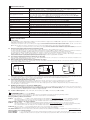
Power supply (see 4.1)
Max power consumption
Current supplied to solenoids
Reference input signal (see 4.2)
Standard
Nominal: +24 VDC
Rectified and filtered: VRMS = 20 ÷ 32 VMAX (ripple max 10 % VPP)
option /12 Nominal: +12 VDC
Rectified and filtered: VRMS = 10 ÷ 14 VMAX (ripple max 10 % VPP)
50 W for 01H version and for 05H version if drive double solenoid valve
100 W for 05H version if drive two single solenoid valves
IMAX = 2.7 A with +24 VDC power supply to drive standard proportional valves (3,2 W solenoid)
IMAX = 3.3 A with +12 VDC power supply to drive proportional valves with /6 option (2,1 W solenoid)
IMAX = 2.5 A with +24 VDC power supply to drive ex-proof proportional valves (3,2 W solenoid) for /A option
Voltage:
Current:
range ±10 VDC
range ±20 mA
Input impedance:
Input impedance:
Ri > 50 kW
Ri = 500 W
Enable and ON/OFF inputs (see 4.5, 4.7) Range : 0 ÷ 24 VDC ( OFF state: 0 ÷ 5 VDC ; ON state: 9 ÷ 24 VDC ) Input impedance:
±5 VDC @ max 10 mA : output supply for external potentiometers (only for /P option)
Output supply (see 4.4)
Ri > 10 kW ;
Status output (see 4.6)
Output range :
Alarms
Solenoid not connected, short circuit and cable break with current reference signal
Format
Plastic box ; IP20 protection degree ; L 35 - H 7,5 mm rail mounting as per EN60715
Operating temperature
-20 ÷ +60 °C (-20 ÷ +40 °C for 05H version if drive two single solenoid proportional valves; storage -25 ÷ +85 °C)
Mass
130 g
Additional characteristics
Short circuit protection of current output to solenoids; protection against reverse polarity of power supply
Electromagnetic compatibility (EMC)
According to Directive 2004/108/CE - Immunity: EN 61000-6-2 (2005); Emission: EN 61000-6-4 (2001)
Communication interface
RS232 serial connection (not insulated), Atos protocol with ASCII coding (see section 5)
Recommended wiring cable
LiYCY shielded cables:
4
4.1
4.2
4.3
4.4
0 ÷ 24 VDC ( ON state > [power supply - 2 V] ; OFF state < 1 V ) @ max 1,4 A
0,5 mm2 for length up to 40 m [1,5 mm2 for power supply and solenoids]
SIGNALS SPECIFICATIONS
Power supply
The power supply must be appropriately stabilized or rectified and filtered: apply at least a 10000 mF/40 V capacitance to single phase rectifiers or a
4700 mF/40 V capacitance to three phase rectifiers.
A safety fuse is required in series to each driver power supply: 2,5 A fuse for 01H version and for 05H version if drive double solenoid valve
5 A fuse for 05H version if drive two single solenoid valves
Option /12: This driver execution is designed to receive a 12 VDC power supply and it is commonly used in mobile application.
A safety fuse is required in series to each driver power supply: 4 A fuse for 01H version and 05H version if drive double solenoid valve
6,3 A fuse for 05H version if drive two single solenoid valves
Reference Input Signals (pin B1 and B3, both referred to pin B2)
The driver proportionally transforms the external reference input signal into the current supplied to the solenoid.
The driver is designed to receive one (01H) or two (05H) analog reference inputs (CMD1 on pin B1, CMD2 on pin B3); both signals are referred to a
common electric ground (CMD- on pin B2). CMD1 has to be used in case of 05H version that drives one double solenoid valve.
The input range is software selectable among voltage (0 ÷ ±10 VDC) or current (4 ÷ 20 mA with cable break detection or 0 ÷ ±20 mA).
Default settings: 0 ÷ 10 VDC for two position valves; 0 ÷ ±10 VDC for three position valves (see valve’s tech. table). Other ranges can be set by
software. Internal reference generation is software selectable (see 6.6).
Note: software selection of analog input range (voltage or current) is applied to both signals CMD1 and CMD2.
Pressure Input Signal (pin B3 referred to pin B2) only for, /W option)
When hydraulic power limitation is active (see 6.7), input signal CMD2 must be connected to an external pressure transducer installed on the
hydraulic system; maximum input range 0 ÷ 10 VDC.
Output supply Signal for external reference potentiometers (/P option)
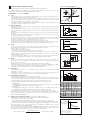
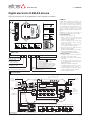
The reference analog signals can be generated by one (01H) or two (05H) external potentiometers directly connected to the driver, using the ±5 VDC
supply output available at pin C3 and C4.
1 single solenoid valve
2 single solenoid valves
C3 / +5 V
1 double solenoid valve
C3 / +5 V
C3 / +5 V
01H
10 KW
05H
10 KW
10 KW
05H
10 KW
B2 / CMDB2 / CMDB1 / CMD1
C4 / -5 V
B1 / CMD1
B3 / CMD2
B1 / CMD1
4.5
Enable Input Signal (pin D3 referred to pin D2)
Enable input signal allows to enable/disable the current supply to the solenoids, without removing the electrical power supply to the driver; it is used
to maintain active the serial connection and the other driver functions when the valve must be disabled for safety reasons.
To enable the driver, supply a 24VDC on pin D3 referred to pin D2.
4.6
Status Output Signal (pin D4 referred to pin D2)
Status output signal indicates fault conditions of the driver (short circuits, solenoids not connected, cable broken for 4 ÷ 20mA input)
and is not affected by Enable input signal status: fault presence corresponds to 0 VDC, normal working corresponds to 24 VDC.
When hydraulic power limitation function is active (see 6.7), status output signal can be software configured to indicate power limitation status:
not active (0 VDC) or active (24 VDC).
4.7
ON/OFF Input Signals (pin C1...C4 referred to DGND pin B4 )
When the driver is configured in internal reference generation mode (see 6.6), the 4 ON/OFF input signals (DI) are used to select the active reference signal, among the available stored values. If the 4 ON/OFF input signals (DI) are not active, the driver can be commanded by external analog
reference. The polarity of the digital inputs can be customized: active status = 24 VDC is the default setting.
Note: with /P option two ON/OFF signals are available as digital inputs (DI).
4.8
Possible combined options: /12W, /12PW, /AW, /PW and /APW (only for 05H); /12P and /AP (for 01H and 05H)
5 PROGRAMMING TOOLS - see tech table GS500
Valve's functional parameters and configurations, can be easily set and optimized using Atos E-SW-PS programming software.
A proper RS232 connection is required between the PC and the electronic driver communication port,
Basic programming software, free download :
E-SW-PS
web download
= software can be downloaded upon web registration at www.download.atos.com ; service and DVD not included
Upon web registration user receive via email the Activation Code (software free license) and login data to access Atos Download Area.
The software remains active for 10 days from the installation date and then it stops until the user inputs the Activation Code.
Full programming software, to be ordered separately :
E-SW-PS
DVD first supply
= software has to be activated via web registration at www.download.atos.com ; 1 year service included
Upon web registration user receive via email the Activation Code (software license) and login data to access personal Atos Download Area.
The software remains active for 10 days from the installation date and then it stops until the user inputs the Activation Code.
E-SW-PS-N DVD next supplies = only for supplies after the first; service not included, web registration not allowed
Software has to be activated with Activation Code received upon first supply web registration
Atos Download Area: direct access to latest releases of E-SW-PS software, manuals, USB drivers and fieldbus configuration files at www.download.atos.com
Cable and adapter, to be ordered separately :
E-C-PS-DB9/RJ45
= cross cable from DB9 connector (PC communication port) to RJ45 connector (driver communication port)
E-A-PS-USB/DB9
= adapter from DB9 to USB connector (PC communication port); required if the DB9 communication port is not available on the PC