1
4.1
Front panel
4 DEVICE OVERVIEW
4.1
Front panel
4
DEVICE OVERVIEW
Id
Description
Id Description
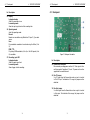
3, 4, 5
Modulation CV inputs
Modulate selected destination.
The modulated destination is chosen using the Destination
switches (11, 12, 13).
The amplitude of modulation is set using the Gain potentiometers (8, 9, 10).
6
Oscillator output
Audio output.
Signal can be up to 16V peak-to-peak.
19 Travel mode
Controls the wavetable scanning:
Gated:
Travel the wavetable from start position when gate is asserted,
stop at current position when gate is deasserted.
Step:
Advance the wavetable position on each gate pulse.
Free:
Cycle through the wavetable according to Travel.
7
USB interface
Load and save wavetable data with computer or update
firmware.
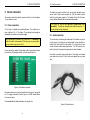
8, 9, 10
Modulation gains
Controls depth of each modulation.
11, 12, 13 Modulation destinations
Select the destination for each modulation input.
14
Pitch CV trimmer
Fine-tune the scaling for the pitch CV input.
15
Spectrum control
Transpose spectral envelope of the tone.
Transposition range is from -64 to +64 semitones.
16
Brilliance control
Sharpen or flatten the spectral envelope peaks of the tone.
17
Keytrack
Set wave playback pitch relative to pitch.
18
Noisiness ”Noisy” control
Adjust wavetable rendering from periodic to noisy.
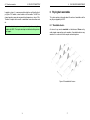
10
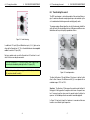
20 Travel speed
In playback mode:
Set the wavetable playback speed.
Speed ranges from -120 RPM to +120 RPM (rotation per minute).
In recording mode:
Set the recorded wavetable playback quality.
21 Wavetable position
In playback mode:
Set the wavetable playback start position.
Position ranges from 0◦ to 360◦ .
In recording mode:
Set the recording compression ratio.
22 Tune range
Select the octave.
Octave can be set from -4 (C-4, 16.35Hz) to -2 (C-2, 65.41Hz).
23 Tune pitch
Adjust pitch.
Adjustment range covers 12 semitones.
24 Wavetable dial
In playback mode:
Select wavetable.
In recording mode:
Set the recording threshold level or gate triggering.
11