1
8. Check status
lf the user wants lo know the present setting and work status of the device, just needs to send one of following SMS to camera and the camera will reply a MMS image
includjng all
settings (Not including the password.).
For master userand family user
Forguest
|
#07#
#07#oassword#
9. Audible Visual Alarms
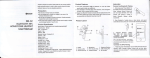
A indicator
B indicator
9.1 Bind wireless Audible Visual Alarms to host
) ON the Audlble Visual Alarms: Disconnect the power supply of wireless Audible Visual Alarms first,then push the switch to PANEL, 2 seconds later and then connect the power
1
supply
3) At the send time, sending an SMS or phone to switch host arm / disarm status (see 3, Quick
Sarl 2. deployed 3, disarm), afrer the success
of the hosl status switch, the Audibte
a successfully.
4) Press the REMOTE button to save the received code and exit the leamirg status.
9.2 Disbind wireless Audible VisualAlarms to host
To
disband the Audible Visual Alarms to host, MUST resel the lhe audible Msual ALarm to restore tile factory settings , the operation is as follows:
1) Otr the Audible Msual Alarmss;
2) Press SENSOR or REMOTE butlon, lhen lum the audlble visual alarm . Afier 3 seconds ,the audible visual atarm light RED light. it means the audible visuat atams has been
restored factory setlings, then release button,
3) At the same time, switch the host arm / disarm alarm status, there are no any ections of the audible visual alam,il means the disbinrting of audible visuat atam lo host is
succcss.-
10.
lntelligent switch
Channel 213 Working lndicator
Channel
I Working lndicator
/
Coding lndicator
Channel 1 Manual Switch
Channel 2 Manual Switch
Ghannel 3 Manual $witch
Channel 'l Socket
(2:00w)
Channel 2 $ocket
Channel 3 SOcket
This GSM remote camera supports control up to 3 general 315M Wireless lntelligent switch, sockets, etc. Now we have intelligent switch HLD-002 show above for instructions.
10.1 Learning of intelligent switch always ON
channel
1
switch button, and the intelligent switch is on the learning status.
2) Use master's mobile phone send SMS to the host, set ALWAYS ON control code on the intelligent switch.
# 190 # Switch Name # 'l #
"switch name" refers to the intelligent switch named by master, cab be letters (case sensitive) or numbers,
suchas#190#TV#1#
3) Afrer received control code, the coding indicalor of intelligent switch flash one time,it means, learning successfully.
4) The host can save 3 lntelligent switch name only
'10.2 Learning of intelligent switch always OFF