1
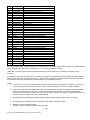
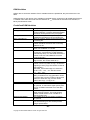
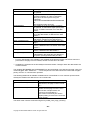
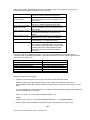
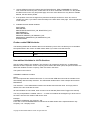
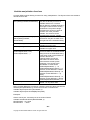
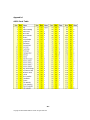
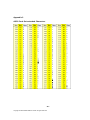
C-Command A#; Page size selection Larger than zero is valid. Here is a list of some paper sizes: 26 24 100 3 A4 A6 B5 envelope Letter 27 90 1 101 A3 DL envelope Executive Custom 25 A5 91 C5 envelope 2 Legal This command is used for the paper size selection, the PCL commands ←&l##A. Any entered value C-Command B#; Back page selection This command is used in conjunction with the Duplex command. The following values are supported: B0; Continue on next printing side B1; Continue on next front side B2; Continue on next back side Important notes: This command may perform a form feed, if it does, the page will not be counted, as DSM counts FormFeeds! In this case no next page definitions will be performed. This command should always be used in conjunction with the duplex command, which needs to be defined first in the DSM command. C-Command D#; Printing Direction The following variables are valid: D0; Portrait D1; Landscape D2; Reverse Portrait D3; Reverse Landscape C-Command F[-]#[x[,y[,d]]]; Call macro The definition F# calls a macro/form with the ID number # on the C command defined page. Any number between 1 and 32000 is valid. But especially for SAP users, it is strongly recommended not to use any macro number below 1000. The macros can be generated from any PCL5 .PRN file, or on the fly using the DSM Software. First DSM inserts the PCL 5 command for a macro select and call. If the download function is active, and the macro file (*.mac) is installed in the device, DSM will automatically download the macro to the printer. If the macro cannot be found in the device and the macro is not stored in the printer, the command has no effect. Sometimes you may wish to position the macros on the page, for example a signature. The position variable follows the macro number separated with commas F1000x,y. The first number is the x position and the second one the y position. This command remain active until changed by either using other offsets in the next F# command, or in the general PL and PS or PX commands, if valid on the next page. Finally you may add a print direction to the macro, 0 is the default, 90, 180 or 270 degrees. 0 (normal print direction) - 32 Copyright © 2005 William Matthew Limited. All rights reserved.