1
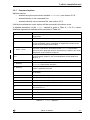
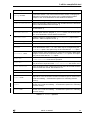
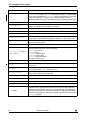
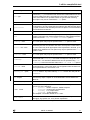
7 st20run
GUI session files
A session file may be submitted to the debugger using the -i option, in order to
initialize the state of the debugging GUI. This file can contain the saved state of a
previous debugging session. The session file contains window, program and break
commands and is saved via the Save session option on the File menu of the
debugging GUI, see Chapter 8.
If a saved session file is included on the command line via the -i option, then further
connect or load commands should not be submitted via the command line.
A session file may have the extension .ses and the be included as follows:
st20run -g -i filename.ses
7.2.2
The breakpoint trap handler
On target hardware a breakpoint trap handler has to be installed to enable the
debugger to interact with the target and to access the register state of the CPU when
a breakpoint occurs. When the trap handler is first required, the debugger searches
for a memory segment that has been declared with the attribute DEBUG.The
debugger loads a breakpoint trap handler into this segment and installs the trap
handler, which is then used for breakpoints and target/host interaction. (If necessary a
trap handler other than the default can be used by specifying the traphandler
command after the chip command within the configuration file. See Chapter 23
“Alphabetical list of commands” in the "ST20 Embedded Toolset Reference Manual"
for details of the traphandler command.
Note: when the breakpoint trap handler is running all interrupts are disabled. Support
is included in the breakpoint trap handlers delivered with the toolset to keep an
enabled watchdog timer alive while the breakpoint trap handler is running.
7.2.3
The inform mechanism
Input/output functions such as debugmessage and printf operate via an ‘inform’
mechanism. The host installs a relocatable code unit (RCU) for this inform mechanism
in the DEBUG segment, following the breakpoint trap handler.
The debugger adds the debug information file ‘.dbg’ for this RCU to its program list.
If the inform information is corrupted the debugger reports the error message:
‘Can’t handle informs’
If a spurious inform signal is sent to the debugger it is also possible to get the error:
‘Unidentified target poke; address 0xn, data 0xn’
On an inform operation the target signals the host via the DCU and waits in a busy
loop until the communication is complete. Interrupts are still enabled whilst the inform
operation is running. If the debugger is not connected then the inform operation does
not occur. The informs command can be used to turn the inform mechanism on and
off.
See Chapter 23 “Alphabetical list of commands” in the "ST20 Embedded Toolset
Reference Manual" for details of the informs command.
ADCS 7143840G
93