1
OTHER RECORDING FUNCTIONS
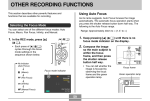
3. Use [왖] and [왔] to
• To cancel EV Shift, adjust the value until it becomes
0.0.
change the exposure
compensation value,
and then press [SET].
4. Record the image.
• Pressing [SET] registers
the displayed value.
IMPORTANT!
• When shooting under very dark or very bright
conditions, you may not be able to obtain satisfactory
results even after performing exposure
compensation.
EV value
Up : Increases the EV value. A higher EV value is best
used for light-colored subjects and backlight
subjects.
NOTES
• Performing an EV shift operation causes the
metering mode to switch automatically to center
weighted metering. Returning the EV shift value to
0.0 causes the metering mode to change back to
multi-pattern metering.
• You can use key customization (page 77) to
configure the camera to perform exposure
compensation whenever you press [왗] or [왘] while in
the REC mode.
Down : Decreases the EV value. A lower EV value is best
for dark-color subjects and for shooting outdoors
on a clear day.
62