1
OTHER RECORDING FUNCTIONS
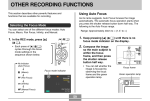
2. While watching the
Using Focus Lock
image on the monitor
screen, use [왗] and
[왘] to focus.
Focus lock is a technique you can use to focus on a subject
that is not located within the focus frame when you record
an image. You can use focus lock in the Auto Focus mode
and the Macro mode ( ).
1. Using the monitor
Manual focus position
To do this:
Do this:
Focus out on the subject
Press [왗].
Focus in on the subject
Press [왘].
screen, compose the
image so the main
subject is within the
focus frame, and then
press the shutter
release button half
way.
• Pressing [왗] or [왘] causes the area inside of the
boundary displayed in step 1 to fill the monitor
screen momentarily to aid in focus. The normal
image reappears a short while later.
99
1600 1200
NORMAL
IN
1 / 1000
F2.6
03/12
03
12/24
24
12:58
12
58
Focus frame
• You can tell whether the image is focused by
observing the focus frame and the green operation
lamp. The indications of the focus frame and green
operation lamp are the same as those in the Auto
Focus mode.
3. Press the shutter release button to record the
image.
IMPORTANT!
• In the Manual Focus mode, the [왗] and [왘] keys
adjust focus, even if you used key customization to
assign other functions to them (page 77).
60