1
OTHER RECORDING FUNCTIONS
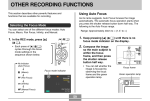
5. Align the focus frame
on the monitor screen
with the subject you
want on the left side
of the image, and
then press the shutter
release button to
record the image.
6. Next, align the focus
frame with the
subject you want in
the right side of the
image, taking care to
align the actual
background with the
semi-transparent
image of the
background of the
first image, which is
shown on the monitor
screen. When
everything is aligned
correctly, record the
image.
Focus frame
• The focus, exposure,
white balance, zoom,
and flash settings are
fixed for this type of
image.
Semi-transparent
image
• Pressing [MENU] any time after step 5 of the above
procedure cancels the first image and returns to step
5.
70