1
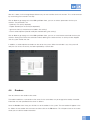
appear on the reader. Then, click on Save to save your information.
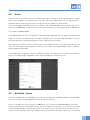
If you would like to edit an existing activity, select the desired activity with the mouse and then click on Edit.
The Edit activity box will open on the screen. Make the desired changes and then click on Save to save your
information.
If you would like to remove an activity, select the desired activity with the mouse and then click on the Remove
button. Click on Yes to confirm.
4.5
Article groups – Cycles
Creating a cycle always requires an article group. Therefore, an article group must always be created before
creating a cycle.
How to create an article group:
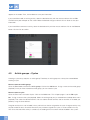
Go to the Extra menu and click on Article groups. Click on the Add button. Assign a name to the article group
(required). Once you have created the article group, you can create a cycle.
How to create a cycle:
Go to the Extra menu and select Cycles. Click on the Add button. This will open page 1/3 of the Edit cycle
box. Assign a name to the cycle (required). Select the article group you just created from the drop-down menu
(required). Then select the desired activities. You can add or remove activities and set activities in the order you
prefer by using the arrow buttons.
A register activity that is not included in the cycle itself can also be assigned to the cycle. A register activity may
only be carried out once. An end-of-life activity may also be assigned to a cycle. It can be carried out at any
time. Once the end-of-life activity is carried out, the reading of that instrument will be disabled in the system.
14