1
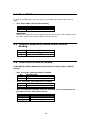
2.4 Clear CMOS
To clear the CMOS data, close the JP2 (2-3) for about 3 seconds, then open it
again.
•
JP2: Clear CMOS (Reserved Function)
JP2
1-2
2-3
DESCRIPTION
Normal Operation
Clear CMOS Setup
WARNING:
When you change the power supply between ATX and AT, clear CMOS (Power
On) first. Otherwise, the CPU Board may fail to boot.
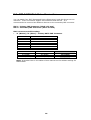
2.5 Onboard Keyboard/Mouse Power Source
Setting
JP11
1-2
2-3
DESCRIPTION
+5V
+5VSB
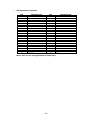
2.6 COM2 RS232/RS422/RS485
COM2 RS232/RS422/RS485 mode Selection & Voltage Output (PIN11)
Setting
•
JP9: To set the operating mode of COM2.
JP9
1-2
2-3
•
JP14: To set the operating mode of COM2.
JP14
1-2
2-3
•
DESCRIPTION
RS232
RS422/485
DESCRIPTION
RS422
RS485
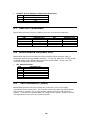
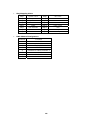
JP6: To select the function of pin 11 at COM2, you can set this pin to
provide RI, 5V or 12V power source.
JP6
(1-3) (2-4)
(3-5) (2-4)
(1-3) (4-6)
COM2 PIN8
+5V
+12V
RI
11