1
sensor, as well as store that
information to the sensor’s flash
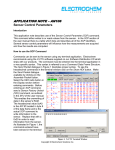
memory. The terminal window in
Figure 2 displays five different
packets of commands. The first is
the RAT command which changes
the communication channel.
Second is the Sensor Factory
Unlock (SFU) command which
enables the overwriting of data into
RAM. Third is the RAT command
which actually writes the
information to sensor’s RAM.
Fourth is the Sensor Save
Enable (SSE) command which
enables the saving of data from
RAM to flash memory. Last is
the Sensor Memory Save (SMS)
command which actually stores
the data to the sensor’s flash
memory. Displayed in the Send
Packet window in Figure 2 is the
code for reading the sensor’s
Channel parameter. This
command is simply a check which
ensures that the data has been
Figure 2: X-CTU Terminal Window
stored to the sensor’s flash
memory. For additional information on how to use the Radio AT command, consult the
Radio AT (RAT) application note.
Conclusion
After the communication channel has been changed for both the base station and the
sensor, the PAN ID parameter can be changed for an extra level of networking security.
However, be sure to change only one parameter at a time. An exact byte by byte
description of the Command Data Frame Structure can be found in the RAT section of
the user manual.
Copyright © Electrochem Solutions Inc.