1
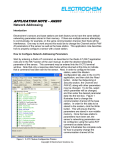
APPLICATION NOTE – AN106 Sensor Control Parameters Introduction This application note describes use of the Sensor Control Parameter (SCP) command. This command either writes to or reads values from the sensor. In the SCP section of the user manual there is a table which lists and describes all of the SCP identifiers. Several sensor control parameters will influence how the measurements are acquired and how the results are computed. How to use the SCP Command Commands can be sent to the sensor using any terminal application. Electrochem recommends using the X-CTU software supplied on our Software Distribution CD which ships with our products. The command must be entered into the terminal application in a very specific syntax. This syntax is referred to as a Command Data Frame Structure. The Send Packet dialogue in Figure 1 illustrates proper syntax. To see the hexadecimal commands in the terminal window click on the Show HEX button. Make the Send Packet dialogue available by clicking on the Assemble Packet button. Select the HEX radio button in the Display section before entering commands. Before entering an SCP command, send a Sensor Factory Unlock (SFU) command, as outlined in the SFU of the user manual. This enables the overwriting of data in the sensor’s RAM. The hexadecimal value 0xA0 is the API ID located in byte 9 of the data frame and is the actual SCP command to write information to the sensor. Replace that with a 0x20 in order to read information from the sensor. As illustrated in Figure 1, the commands entered have been echoed in the terminal Figure 1: X-CTU Terminal Window Copyright © Electrochem Solutions Inc. window, shown in blue. The information shown in red is the response data followed by the reply data. The two frames can be distinguished by looking for the Start Delimiter, indicated by 0x7E in byte 1 of each data frame. The response data frame indicates success or failure of the data transmission to the sensor. The reply data frame confirms transmission and execution of the command and displays any resulting data. The example shown in Figure 1 illustrates the procedure for changing a sensor’s units of measure for temperature from Fahrenheit, which is the default setting, to Celsius. Included in the terminal window are the following: The first data frame is the Sensor Factory Unlock command. Second, the SCP-Write data frame. Byte 10 of this data frame (0x09) is the SCP ID for TemperatureUOM. Byte 11 (0x01) is the data which determines how to alter the sensor’s parameter. Third is the Sensor Save Enable (SSE) command which allows for the saving of data from RAM into flash memory. This data frame is outlined in the SSE section of the user manual. Fourth is the Sensor Memory Save (SMS) command which actually saves the data from RAM into flash memory. This data frame is outlined in the SMS section of the user manual. The last data frame is the SCP-Read command. This command assures that the information has been properly saved to the flash memory. Conclusion An exact byte by byte description of the Command Data Frame Structure can be found in the SCP section of the user manual. Entering different command data frames into the X-CTU program is not the only way to alter the sensor’s control parameters. The Factory Setup Application, also included on our Software Distribution CD will allow users to configure the control parameters. Note that changes made to the parameters via X-CTU will be reflected when using the Factory Setup Application. Copyright © Electrochem Solutions Inc.