1
1.Display Panel and Keyboard
1). Display Panel
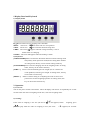
Kg g lb oz t: There are five weighing units selectable.
ZERO : The arrow “ ”appears when scale is in zero position.
TARE: The arrow “ ”appears when this function being used.
CHRG: The arrow“ ”appears when the voltage of battery is low or
flashes when it is charging.
STABLE: The arrow“▼”appears when the reading is stable.
2). Keyboard
[CHECK/MODE]KEY is used for the alternation between normal counting mode
and quantity check operation mode,and for setting alarm number.
At setting status, this key can be used for setting mode key.
[UNITS/SHIFT]KEY is used for changing units in the weighing mode. At setting
status, this key can be used as shift key.
[TARE/ <] KEY is used for deducting the tare weight (box or container etc.
on the platform) from the gross weight. At setting status, this key
can be used as increase key.
[ZERO/ >] KEY is used for setting or re-adjusting the scale in correct zero
position for accurate weighing operation. At setting status, this
key can be used as decrease key.
2. Operation
1). Power on :
Turn on the power switch at the bottom. The LCD display will show 0~F sequentially for several
seconds. Then the value of weighing will be zero, and enter weighing status.
1
2). Zeroing:
If the value of weighing is not zero (the arrow“
0
”is not appears) before
[ZERO/>] key back the value of weighing to zero (the arrow
“
0
weighing, press
”appears) for accurate