1
5 Operation explanation
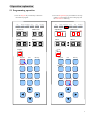
5.1 Programming operation
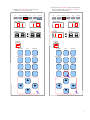
1). Press the Program key continuously to determine
the number of program.
Manual
Run
Programming
Check
Pause
Amendment
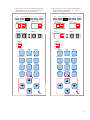
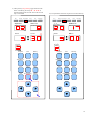
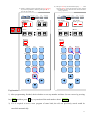
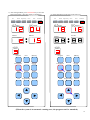
2). Press the Programming key, the LED shows the step
number 01 (which means the first working step) and
the tank number is flickering.
Run
Manual
Programming
Check
Pause
Amendment
Step
工步number
Tank
缸号number
Step
工步number
Tank
缸号number
分钟
Minute
秒
Second
分钟
Minute
秒
Second
Program
程序
Program
☼
Program
程序
End
Amendment
Memory
Program
Prompt
Amendment
Memory
End
Prompt
Exit
Chect
Pause
Exit
Chect
Pause
Run
Programming
Manual
Run
Programming
Manual
▲
▲
+
+
▲
▲
▲
▲
▲
▲
-
-
6