1
2. By using the control panel service function:
• Activate the panel service mode (from any supported keypad): [SERVICE
CODE][¾], ÆService mode.
• Select in turn the items from the menu of displayed functions:
ÆStructure; ÆEquipment; ÆIdentification; ÆKeypad addresses.
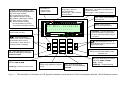
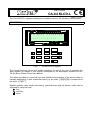
On the displays of manipulators (which have no physical jumpers), a message
will appear as shown in Figure 3 (corresponding to the language version of
control panel program).
• Enter the appropriate address from the 0-7 range; the keypad will confirm
performance of the function with four short and one long beeps; then, press the
[¾] key - the keypad will quit the address change function.
NOTES:
-
For the LCD keypads to be properly supported by the CA-64 control panel, the keypad
identification function must be performed after setting the keypad addresses.
-
Setting the same address in several keypads will trigger the anti-tampering alarm, and
also will display the „Keypad replaced” message and disable operation of such
keypads. To restore the operation of keypads, change their repeating addresses into
unique ones. The changes can be made as described herein.
TECHNICAL DATA
Supply voltage ..........................................................................................................11...14V
Minimum current consumption......................................................................................60mA
Maximum current consumption...................................................................................125mA
SATEL
-3-
CA-64 KLCD-L