1
16
User Manual
INTEGRA
• registering the guard round.
The keypad can respond to the card being briefly presented to the reader or to its being
presented and held for a few seconds (approx. 3 sec.). It is also possible to perform two
consecutive functions which are assigned to bringing the card closer and holding it at the
reader. This feature makes it possible, by a single use of the card, to perform rather
complicated functions which might be time-consuming when called from the keypad.
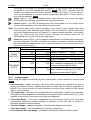
List of functions which can be called by using the proximity card:
1. no function – no response
2. as code * – enters the user functions menu
3. as code # – calls the function of selecting partitions to be armed or disarmed
(arming/disarming if the selection list for the particular code is limited to just one partition)
4. as code Ç – performs function assigned to the arrow key (p. 48)
5. as code Å – performs function assigned to the arrow key
6. as code Æ – performs function assigned to the arrow key
7. as code È – performs function assigned to the arrow key
8. open door (entry) – controls the electromagnetic door lock (generates a USER ACCESS
event)
9. open door (exit) – controls the electromagnetic door lock (generates a USER EXIT event)
10. 2 long sounds – signals reading of the card code
11. 1 short beep – signals that the card code has been read
Notes:
• Selecting the function 2 or 3 to be started by PRESENT CARD will block access to the HOLD
CARD.
• The 8 and 9 functions require that the installer select the door to be opened by the keypad.
It is possible to control any door handled by the system (i.e. opened by code locks,
partition keypads or expanders of proximity card readers).
• Two long beeps can also mean readout of a card with unknown code.
• Readout of an unknown (wrong) code, if repeated three times, may generate a panel
recorded event or an alarm PROG. It can also block the reader in the keypad for 90 sec.
6.3 PARTITION KEYPADS
SATEL offers the following partition keypads for INTEGRA control panels:
− INT-S-GR/INT-S-BL
− INT-SK-GR
These keypads differ by size and shape. The keypads are available with green or blue
backlighting of the keys. Designation of the models with green display ends with "GR" letters,
and that of the models with blue display – with "BL" letters. The backlighting may be
permanent or time-controlled (switched on automatically).
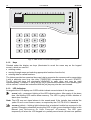
The partition keypads are provided with LED indicators:
-
(red) – permanent lighting of the LED means alarm. After the alarm time
expires, blinking of the LED indicates the alarm memory. The LED goes off after the
alarm is cleared (see: ALARMS).
ALARM
Note: The LED may not signal alarms in the armed mode if the installer has enabled the
option DO NOT SHOW ALARM IF ARMED, as required by the CLC/TS 50131-3 standard.
-
(green) – steady light indicates that the partition assigned to this keypad has
been armed. The LEDs are blinking during exit delay countdown. Blinking indicates
that exit delay countdown is underway.
ARMED