1
Installing Your HD 100 > Troubleshooting
Troubleshooting
This section covers basic troubleshooting scenarios. For the
most up-to-date troubleshooting information, refer to
randmcnally.com/HD100troubleshooting.
NOTE: To remain compliant, you must keep paper logs if your
HD 100 or IntelliRoute® TND™ 720 is not functioning properly.
Red light is off for more than 3 minutes after connecting
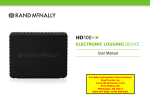
HD 100 to diagnostic port (No power on HD 100 device):
• Check power connection on HD 100 device.
-
Ensure the cable is secured to the truck’s diagnostic port
and to the HD 100 device. Disconnect, then reconnect both ends of the power cable, making sure the collar on the diagnostic port end of the cable is locked in place.
• Check that the red light turns on. The red light should illuminate within about 20 seconds, indicating that the device is receiving power from the vehicle.
Nothing appears on the IntelliRoute® TND™ 720 screen:
• Make sure your IntelliRoute® TND™ 720 is charged and
powered on.
14
HD 100 User Manual