1
AVSIM Online - Flight Simulation's Number 1 Site!
It offers many product features such as (short version):
- 553,000+ Real-Time Scheduled Flights
- 1,383,000+ General Aviation Flights
- 100's of Airlines Worldwide
- 6000+ Airports with Traffic
- Fully Featured Interface
- Add-On Schedules
- Airline / Airport Printable Timetables
- Flight Plan Assignments
- Flight View Map
- Status Board
- Aircraft Tail Numbers / Parking Codes
Flight1 offers a Power Pack for UT2. Flight1 says about the Power Pack: "The Ultimate Traffic 2 Power Pack is a FREE add-on to
Flight1's Ultimate Traffic 2 product for FSX. The Power Pack is an easy to use tool that allows the user to compile and import
add-on schedules, create new schedules from scratch, modify or create airport identifiers, plus much more."
Further Flight1 offers a dedicated Ultimate Traffic II website with all AI traffic data as well as a link to a protected forum.
Enough about this AI traffic introduction. It's time to move on.
What's in it for $44.95?
First a quick summary: you get a DVD box with the UT2 DVD and an Ultimate
Traffic 2 booklet. Because this is a Flight1 DVD, there's no need to use the Flight1
wrapper. Just insert the DVD and let the installer do her work.
Sorry, hold on, not too quick!!!!! Before using the Flight1 installer to verify that you
have installed the required FSX SP2, most likely the case, check that Microsoft .NET
3.5 Service Pack 1 is installed as well.
Time to start the installation process. In a short time Ultimate Traffic 2 is installed
and integrated into FSX including some shortcuts, accessible via the Start menu
button - All Program - Flight One Software - Ultimate Traffic 2 directory. The UT2
directory offers the Ultimate Traffic 2 control panel program and an uninstaller. By
the way, this UT2 control panel is also accessible via a shortcut on your desktop.
Let's first have a quick look at what the DVD box offers; the DVD and an Operations
Handbook. I haven't compared every page of this booklet with the software version
of the user manual, but most of the menus from the UT2 control panel are
discussed in this handy booklet. Referring back to the booklet, you've got two
possibilities. Either you go for the integrated software manual in the UT2 control
panel or you download the user manual.
Test System
Intel Core Extreme i7-965 3.2Ghz
6GB Tri-Channel DDR3 1600Mhz
EVGA GTX-285 For the Winner
Triple WD VelociRaptor 300GB HDD
Single WD 1TB HDD
Windows 7 Ultimate X64
Microsoft Flight Simulator FSX SP2
Microsoft Flight Simulator 9.1
Laminar Research X-Plane 9.50rc3
Saitek Pro Flight System
TrackerIR Pro 4
TrackerClip Pro
Flying Time:
59 hours
The Acrobat User Manual is 44 pages thick and tells you all about the program, how to change items, how to print out time
tables and why you should do this. You can of course read the manual on your screen via the integrated software manual in
the UT2 control panel. Either choice will give you all the information you need.
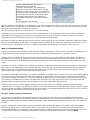
What you need to do first is check for UT2 program updates. You do this with the help of the UT2 control panel shortcut found
on your desktop. On the left hand side you'll find the option "Update". Clicking this will result in retrieving the necessary
information of available Service Packs and/or hot fixes. It turns out UT2 offers a Service Pack 1 (download file size 1.02GB)
and a hot fix (4,77MB) available for download.
Just download these two files and install SP1 first, followed by the hot fix. While writing this review - June 2010 - the current
UT2 product equals version 2.07. After you've installed the Service Pack and hot fix, the next time you start the UT2 control
panel, it should show you in the RH lower corner version 2.07.
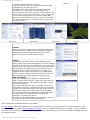
What else happened during the UT2 installation? During the installation, it adds under FSX menu Add-ons, sub-menu "Ultimate
Traffic 2". This sub-menu offers the following items:
http://www.avsim.com/pages/0710/Flight 1-2/UT2.htm (2 of 12)16/07/2010 7:35:57 PM