1
AVSIM Online - Flight Simulation's Number 1 Site!
Default KATL airport with GEX North America, UTX USA, REX 2.0 and DBS W&F
picture I
picture II
picture III
picture IV
picture V
picture VI
Picture I:
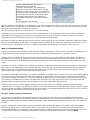
The Delta 757 is taking off however, another AI airplane (within the red square) appears out
of nothing. At least not out of the sky which you should expect. Still no airplane collision, but
odd the way it appears.
Picture II:
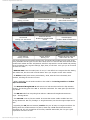
Zoomed in at the beginning of runway 9L, where our previous arriving AI aircraft has reached
the beginning of 9L.
Picture III:
Here our intruder has landed, which is visible by the smoke from the tires.
Picture IV:
Our landed AI model takes the first high-speed turnoff. That's quick however, but that
doesn't interest me for the moment. What's more important and keep your eyes on that one,
is the departing 737.
Picture V:
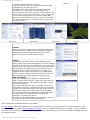
In the mean time another AI traffic has landed, while our previous 737 is making speed for
the takeoff run. Those two aircrafts become one (within the red square). It looks good, but
for sure, it's not the way it should be simulated.
Picture VI:
Finally our AI 737 continues with it's takeoff and leaves the smaller AI jet behind her. The
smaller AI models take the first available high-speed turnoff.
First of all; where are those AI approaching models coming from. It seems, after checking this behavior for hours that the
approaching AI models land far before the planned touchdown zone. That explains why they are already on the ground before
runway 9L and that these models take the first available high speed taxi turnoff. Knowing this, I needed to find out which
program causes this problem, assuming it's something odd. What do I mean with this statement?
On my PC I've got a 2nd clean FSX installation. Clean means there's no scenery or sky enhancement program installed except
DBS Studio Walk and Follow. Ultimate Traffic 2 behavior while in the same condition with DBS Studio Walk and Follow
disabled, seems normal and this means that arriving AI traffic lands on the parallel runway. The moment I enable DBS
Studio Walk and Follow, it seems that the above screenshot behavior appears. I checked it for several hours and every time
FSX was started with DBS Walk and Follow activated, the problem appears. When I started FSX without DBS, no problems.
Back to my main FSX "PC configuration". With the above, it seems by having all those additional environmental programs
installed, those are not causing this problem. As far as I've seen, the problem comes when during startup and when DBS Walk
and Follow is used. By the way, for making screenshots, I use Walk and Follow often and because of this, I ran into
problems. ..... and what else?
That’s a good question, but I don't know the answer. Don't know the answer means that it could be that UT2 has other hidden
problems I haven't seen. That fact that I found these items doesn't say anything about the overall quality. I waited and while
sitting on the grass alongside the runway, I monitoring the AI aircraft movements. Back to my statement "..... and what else",
I haven't seen any other anomalies than already mentioned and/or explained.
Highlights of the UT2 control panel
http://www.avsim.com/pages/0710/Flight 1-2/UT2.htm (7 of 12)16/07/2010 7:35:57 PM