1
AVSIM Online - Flight Simulation's Number 1 Site!
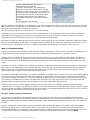
- Start or Stop AI Traffic (ctrl+shift+T)
- Reset Traffic (ctrl+shift+R)
- Increase Traffic Density (ctrl+shift+F12)
equals the control panel Traffic Option "Weekly-"
and "Daily" Traffic density. After you pressed the
ctrl+shift+F12 key combination a few times, you
need to reset the AI traffic as described before.
- Decrease Traffic Density (ctrl+shift+F11)
for detailed information see the increase traffic
density.
- Clear Approach (ctrl+shift+A)
With this keyboard combination you can temporarily clear all the AI approach traffic for your convenience during your landing.
After a minute or so, the AI traffic is injected back in FSX. Just a remark. In the Learning Center of the control panel, you will
find for this "Clear Approach" keyboard "ctrl+shift+S".
First, it's confusing and second, it doesn't work, so use "ctrl+shift+A".
Furthermore, you can tick DX10 Preview since UT2 is compatible with it, so no problems with white AI traffic or whatsoever.
That doesn't mean I suggest you should use it. Everybody has his or her own reasons to enable or disable it. For now it's
important to know that this Flight1 product can be used with DX10 Preview ticked.
Personally I'm faced with DX10 Preview active, flickering runway markings, and some airplane models are simply grey without
textures and disappearing aircraft parts or completely distorted models. On the other hand, with DX10 Preview active, you'll
see an increase in your FPS but is that al of a sudden so important? That question I can't answer. That's up to you!
Wow, UT2 implementation
The UT2 control panel gives full control of FSX Ultimate Traffic, but personally I would like to know what I need to do with the
control panel before I can use UT2 AI traffic? The answer is simple and straight forward .... you don't need it!
Does this mean you can throw away the UT2 control panel? Of course not! You can't forget the control panel, but after the
installation, UT2 is ready to go. Ready to go means; start FSX and it’s worth mentioning, during the startup a friendly voice
tells you that UT2 has been initialized and UT2 airplanes/airliners are, with a slight delay, shown at every airport in the FSX
world.
Important to mention; AI traffic is only injected if available at that airport for that day and time of the week, so "for pleasure"
flying traffic is not implemented and to complete the story; this means not only AI commercial traffic but also GA registered
traffic! Irrespective of the default FSX AI Airline traffic density and General aviation traffic density slider position, UT2 has
become active and no longer are the default FSX airplanes shown.
According to Thomas Main from Flight1 "the installer will disable the default traffic on install, but you can have default traffic at
any time you like by renaming the default traffic bgl back to its original name. UT2 is designed to replace the default traffic,
hence why we disable it at install time. UT2 is also designed to allow you to use as many other traffic bgl files as you like. We
do not step on or disable them in anyway. We have many customers who enjoy using UT2 for their commercial traffic and
MyTraffic traffic to handle all military. UT2 will happily run alongside other traffic bgls/programs."
In other words, there's no need to adjust anything. UT2 is from the moment it's installed, configured and automatically
injected in FSX. For example, the control panel allows you to make certain airline and aircraft traffic changes, monitoring static
as well as dynamic timetables, tweaking utilities like tail numbers, in-sim settings and parking codes. As you can see, with the
control panel you can change and/or monitor the outcome of UT2.
AI traffic (airline/airplane combination)
Lets' give you an example of airline/airplane injection at any airport. As said before, my FSX TRAFFIC sliders are at 0%
although their position doesn't influence UT2 traffic as explained in the previous section by Thomas Main. I first start FSX, then
change the default flight to an airport in Seattle, Washington, USA - KSEA. Depending on the time of the day, UT2 injects the
AI traffic.
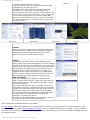
The UT2 control panel "Status Board" offers you information about arrivals and departures at KSEA. I hope this statement
makes sense, but in case you aren't familiar with it or not aware of it, UT2 does it's work without the need of having the
control panel available. The control panel, like the status board, can help you identify the activity at a specific time of any day
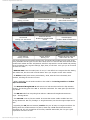
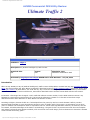
in and around the airport. The following screenshots are randomly taken at different times on a Sunday at KSEA.
http://www.avsim.com/pages/0710/Flight 1-2/UT2.htm (3 of 12)16/07/2010 7:35:57 PM