1
4.5 Data Transfer
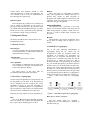
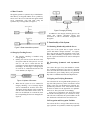
The applets generate a symmetric key at initialization.
Then this key is encrypted with the server’s public key
and is sent to the server. Thereafter the applet and the
server communicate with each other using the
symmetric key to encrypt data (see Figure 3).
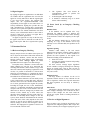
Figure 5: Integrity checking
In addition to the integrity checking process, the
system also supports document signing and
verification as well as documents encryption and
decryption.
5. Functionality of the System
Figure 3: Data transmission protocol
4.6 Integrity Checking Process
•
•
The integrity checking is handled using
message digests.
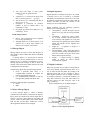
Initially, the user has to store the state of his
file-system when the file-system is at a safe
state (i.e. the user is certain that the file
system has not been changed without his/her
knowledge). At this stage, a message digest
for each file is calculated and stored at the
server database (see Figure 4).
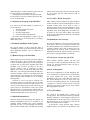
5.1 Obtaining Membership with the Server
Every user of the system has to register with the
system and obtain a unique username. To register,
users must provide personal information such as full
name, address, nationality, occupation etc. Users must
provide a password which will be used in subsequent
login sessions.
5.2 Generating Symmetric and Asymmetric
Keys
User selects the type of key that should be created.
E.g. Symmetric/asymmetric. Next, the key algorithm
to be used and the location where the key should be
stored has to be given. Finally, the keys are generated.
Key name is validated and checked for duplications.
5.3 Signing and Verifying Documents
Figure 4: Update of file status
•
When the file system is to be scanned for
integrity checking, a set of message digests
will be calculated for each file once more.
Then these message digests will be compared
with the ones stored at the remote server. If
these two are different for a certain file, then
the corresponding file has been changed (See
figure 5).
User selects the file to be signed and the private key to
sign with. This private key can be one which is stored
locally or the user can download one of his/her pregenerated keys from the server. After that the user has
to choose to either save the signed file or to upload it
to the server. The system will act accordingly.
In the case of verification, user selects the signed
file and the relevant public key or certificate to verify
with. After the verification, the system indicates to the
user whether the verification was successful or not.
5.4 Encryption and Decryption Facilities
User selects the file to encrypt. Then chooses the key
type (symmetric or asymmetric) and the key algorithm