1
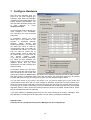
There are several sections in the Job Scheduler. Job No. section is for identification job, this number
is created automatically by Disc Manager. In Job Name section you can see name of the job. Copies
shows total quantity of discs for duplication, Complete shows quantity and percentage amount of
finished discs and Bad shows number of bad discs.
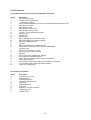
In Attributes section there you can see following parameters:
E
R
Rs
V
P
Ps
B
W
erase rewriteable media
recording
simulation recording
verification
printing
simulation printing
print before recording
wait for previous job
Tip:
If you move cursor over some job then tool tip with description of job will be shown.
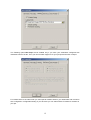
The following dialog window will be displayed if you click Add or Edit button. Here you can select one
of the predefined jobs and then set recording speed and number of copies you want to produce.
Tip:
During the duplication process the Disc Manager automatically saves state of Job Scheduler. So if
there is some problem with Disc Manager or with computer or hardware there is possibility to load
scheduled jobs after new start of Disc Manager from menu Job Scheduler/Load Scheduled Jobs.
9