1
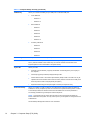
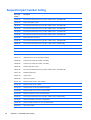
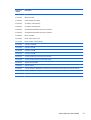
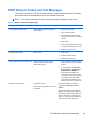
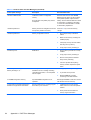
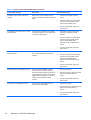
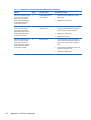
Table A-1 Numeric Codes and Text Messages (continued)
Control panel message
Description
Recommended action
2201-MEBx Module did not checksum
correctly
Memory error during POST execution of the
Management Engine (ME) BIOS Extensions
option ROM.
1.
Reboot the computer.
2.
Unplug the power cord, re-seat the
memory modules, and reboot the
computer.
3.
If the memory configuration was
recently changed, unplug the power
cord, restore the original memory
configuration, and reboot the
computer.
4.
If the error persists, replace the system
board.
1.
Reboot the computer.
2.
Unplug the power cord, re-seat the
memory modules, and reboot the
computer.
3.
If the memory configuration was
recently changed, unplug the power
cord, restore the original memory
configuration, and reboot the
computer.
4.
If the error persists, replace the system
board.
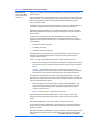
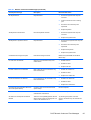
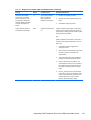
2202-PMM Deallocation Error during MEBx
cleanup
Memory error during POST execution of the
Management Engine (ME) BIOS Extensions
option ROM.
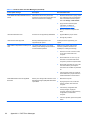
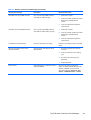
2211-Memory not configured correctly for
proper MEBx execution
SODIMM1 is not installed.
Make sure there is a memory module in the
SODIMM1 socket and that it is properly
seated.
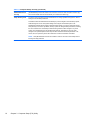
2212-USB Key Provisioning failure writing to
device
USB device used for USB key provisioning
will not allow BIOS to update provision file
properly.
1.
Try a different USB key device for
provisioning.
2.
If the error persists, update to the latest
BIOS version and ME firmware
version.
3.
If the error still persists, replace the
system board.
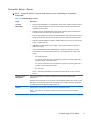
1.
Reboot the computer.
2.
If the error persists, update to the latest
BIOS version and ME firmware
version.
3.
If the error still persists, replace the
system board.
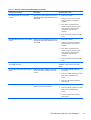
2217-ME Firmware Version request failure
ME firmware is not properly responding to
BIOS query for version information.
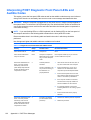
POST Numeric Codes and Text Messages
97