1
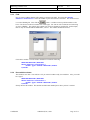
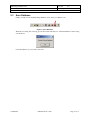
RFID Image Database Tool User's Guide Document ID: DTUG Version: 4.0 Date: April 25, 2002 3. RFID Image Database 3.1 Save the Database You can save the RFID Image Database one of two ways: • • Click “Save Data” under the File menu Click on the save data icon on the toolbar Figure 3-1 Save RFID Image Database 3.2 File Format 3.2.1 Types Items are stored in the RFID Image Database based on the standard types in the IA32. Specifically the following types are used. UINT32 DOUBLE STRING 3.2.2 – – – A little endian, 32-bit, unsigned integer A 64-bit double precision floating-point number (Little endian) A null terminated ASCII character string File Description The first four bytes in the file contain the number of records in the database stored as a UINT32. Next follows a record descriptor for each record in the database. <UINT32>Number of Records | RECORD | RECORD | … 3.2.3 Record Descriptor The first four bytes of the record descriptor contain the size of the record stored as a UINT32. The record size includes the four bytes that store the size. Next comes the barcode data associated with the record stored as a STRING. If no barcode is associated with the record, the string consists of a single null character. Next comes the number of buffers in the record stored as a UINT32. Next comes a buffer descriptor for each buffer in the record. <UINT32>record size | <STRING>barcodeData | <UINT32>numberOfBuffers | BUFFER | BUFFER | … 3.2.4 Buffer Descriptor The first four bytes of the buffer descriptor contain the start address for the buffer stored as a UINT32. Next comes the size of the buffer in bytes stored as a UINT32. Note this is the size of the buffer not the size of the buffer descriptor. Last comes the actual buffer data. <UINT32>start address | <UINT32>bufferSize | bufferdata Confidential Metalcraft, Inc., 2002 Page 9 of 13