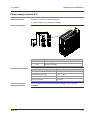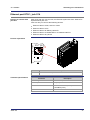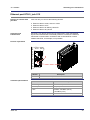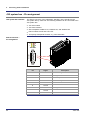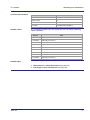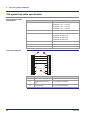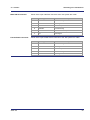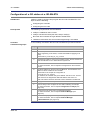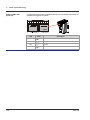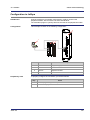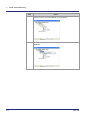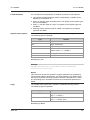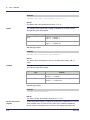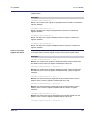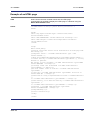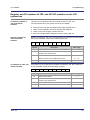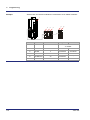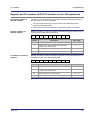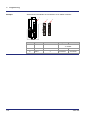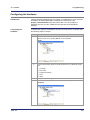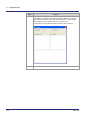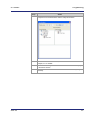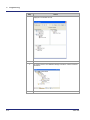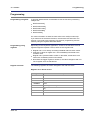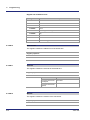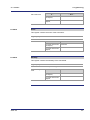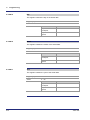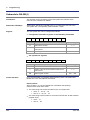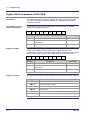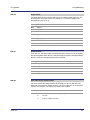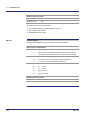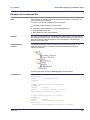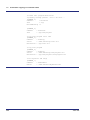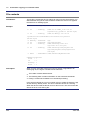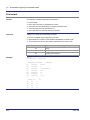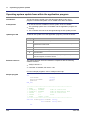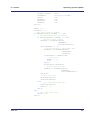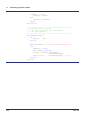
1
User Manual JC-940MC - Controller 60879946 We automate your success. Introduction Item # 60879946 Revision 1.05.3 November 2014 / Printed in Germany This document has been compiled by Jetter AG with due diligence, and based on the known state of the art. In the case of modifications, further developments or enhancements to products shipped in the past, a revised document will be supplied only if required by law, or deemed appropriate by Jetter AG. Jetter AG shall not be liable for errors in form or content, or for missing updates, as well as for damages or disadvantages resulting from such failure. The logos, brand names, and product names mentioned in this document are trademarks or registered trademarks of Jetter AG, of associated companies or other title owners and must not be used without consent of the respective title owner. 2 Jetter AG JC-940MC Address Introduction How to contact us: Jetter AG Graeterstrasse 2 71642 Ludwigsburg Germany Assignment to product Phone - Switchboard: +49 7141 2550-0 Phone - Sales: +49 7141 2550-433 Phone - Technical Hotline: +49 7141 2550-444 Fax - Sales: +49 7141 2550-484 E-mail - Sales: [email protected] E-mail - Technical Hotline: [email protected] This User Manual is an integral part of JC-940MC: Type: Serial #: Year of manufacture: Order #: To be entered by the customer: Inventory #: Place of operation: Jetter AG 3 Introduction Significance of this User Manual This document is an integral part of the JC-940MC: Keep this document in a way that it is always at hand until the JC-940MC will be disposed of. Pass this document on if the JC-940MC is sold or loaned/leased out. In any case you encounter difficulties to clearly understand the contents of this document, please contact Jetter AG. We would appreciate any suggestions and contributions on your part and would ask you to contact us at the following e-mail address: [email protected]. Your feedback will help us produce manuals that are more user-friendly, as well as address your wishes and requirements. This document contains important information on the following topics: Transport Mounting Installation Programming Operation Maintenance Repair Therefore, you must carefully read, understand and observe this document, and especially the safety instructions. In the case of missing or inadequate knowledge of this document Jetter AG shall be exempted from any liability. Therefore, the operating company is recommended to obtain the persons' confirmation that they have read and understood this manual in writing. 4 Jetter AG JC-940MC Contents Table of Contents 1 Safety instructions 11 Basic safety instructions .............................................................................................................. 12 Instructions on EMC ..................................................................................................................... 14 2 Product description and design 17 JC-940MC - Product description .................................................................................................. 18 Parts and interfaces ..................................................................................................................... 19 Order references/options ............................................................................................................. 21 List of documentation ................................................................................................................... 22 Physical dimensions .................................................................................................................... 24 3 Identifying the controller 3.1 3.2 3.3 4 Identification by means of the nameplate ............................................................................... 26 Nameplate .................................................................................................................................... 27 Electronic Data Sheet EDS ........................................................................................................ 28 EDS File "eds.ini" ......................................................................................................................... 29 EDS registers ............................................................................................................................... 32 Version registers ........................................................................................................................ 34 Hardware revisions ...................................................................................................................... 35 Software versions......................................................................................................................... 36 Mounting and installation 4.1 4.2 4.3 4.4 4.5 4.6 Jetter AG 25 37 Interfaces .................................................................................................................................... 38 Power supply terminal X10 .......................................................................................................... 39 Ethernet port ETH 1, jack X14 ..................................................................................................... 41 Ethernet port ETH 2, jack X15 ..................................................................................................... 43 Ethernet port ETH 3, jack X16 ..................................................................................................... 45 USB port - Jacks X61 to X64 ....................................................................................................... 47 JX2 system bus interface - communicating via PCI bus ....................................................... 48 Configuration of the controller JC-940MC-E01 ............................................................................ 49 JX2 system bus - Pin assignment ................................................................................................ 50 JX2 system bus cable specification ............................................................................................. 52 Line length and baud rate of the JX2 system bus........................................................................ 54 Local JX6-I/O submodules connected via PCI bus ................................................................ 55 Pinout of the JX6-SV1 .................................................................................................................. 56 Pinout of the JX6-IO16CB ............................................................................................................ 58 Indicators and LEDs .................................................................................................................. 60 LEDs of the controller .................................................................................................................. 61 LEDs of the controller during boot process .................................................................................. 63 Status LEDs - Ethernet interface.................................................................................................. 64 LEDs of the submodule JX6-SB(-I) .............................................................................................. 65 Control elements ........................................................................................................................ 67 Pushbutton S10............................................................................................................................ 68 Mode selector S11 ....................................................................................................................... 69 Installing and removing the controller JC-940MC .................................................................. 71 Installing the controller JC-940MC ............................................................................................... 72 Removing the controller JC-940MC ............................................................................................. 73 5 Contents 4.7 4.8 5 Battery replacement .................................................................................................................. 74 Removing the battery of the controller JC-940MC ...................................................................... 75 IP configuration ......................................................................................................................... 76 Factory settings ........................................................................................................................... 77 Determining the IP address of the controller JC-940MC ............................................................ 78 The configuration memory........................................................................................................... 80 Configuration file "config.ini"........................................................................................................ 82 Configuration registers ................................................................................................................ 86 Changing the IP address of the controller ................................................................................... 87 Changing the IP address of the controller JC-940MC via JetIPScan ......................................... 88 Setting the IP address via "config.ini" file .................................................................................... 90 Setting the IP address via registers to be remanent ................................................................... 91 Setting the IP address automatically via the USB flash drive ..................................................... 94 Setting the IP address during runtime ......................................................................................... 95 Using names for IP addresses .................................................................................................... 97 Setting a static route .................................................................................................................... 99 Initial commissioning 103 Preparations for initial commissioning of the controller ............................................................. 104 Initial commissioning of a JC-940MC ........................................................................................ 105 Configuration of a JX3 station at a JX3-BN-ETH ...................................................................... 107 Configuration in JetSym ............................................................................................................ 109 6 File system 6.1 6.2 6.3 6.4 6.5 7 117 Properties .................................................................................................................................. 118 Flash disk - Properties ................................................................................................................ 119 USB flash drive - Properties ...................................................................................................... 120 User administration................................................................................................................. 121 Administration of users .............................................................................................................. 123 As-delivered condition/Predefined users and keys ................................................................... 125 Assigning locks .......................................................................................................................... 126 Assigning names to keys/locks ................................................................................................. 128 Reviewing the flash disk capacity used ................................................................................ 130 Flash disk capacity used ........................................................................................................... 131 Operating system update and application program ............................................................ 135 Formatting and checking........................................................................................................ 136 Formatting the flash memory .................................................................................................... 137 FTP server 139 Logon......................................................................................................................................... 140 Supported commands ............................................................................................................... 141 Example: Windows FTP client................................................................................................... 142 8 HTTP server 8.1 6 143 Server Side Includes ............................................................................................................... 144 Namespace tag ......................................................................................................................... 145 Inserting real-time controller values .......................................................................................... 146 Example of an HTML page ........................................................................................................ 151 Jetter AG JC-940MC 9 Programming 9.1 9.2 9.3 9.3.1 9.3.2 9.3.3 9.3.4 9.3.5 Jetter AG Contents 153 Abbreviations, module register properties and formats ............................................................. 154 Memories - Overview ............................................................................................................... 155 Operating system memory ......................................................................................................... 156 File system memory ................................................................................................................... 157 Application program memory ..................................................................................................... 158 Memory for volatile application program variables .................................................................... 159 Memory for non-volatile application program registers .............................................................. 160 Memory for non-volatile application program variables ............................................................. 161 Registers on I/O modules .......................................................................................................... 163 Special registers ......................................................................................................................... 165 Inputs and outputs ...................................................................................................................... 166 Flags .......................................................................................................................................... 168 Numbering registers and I/Os for a JC-9xx ........................................................................... 169 Registers and module registers ................................................................................................. 170 Slot numbering ........................................................................................................................... 172 Register and I/O numbers of local JX6-I/O submodules ........................................................... 173 Register numbers of JX2 slave modules connected to the JX2 system bus ............................. 174 Register and I/O numbers of JX2- and JX3-I/O modules on the JX2 system bus ..................... 175 Register and I/O numbers of IP67-I/O modules on the JX2 system bus ................................... 177 Registers and I/O numbers of CANopen® modules on the JX2 system bus ............................ 179 Register and I/O numbers of JX3 modules connected to a JX3-BN-ETH ................................. 181 JX3 module register and I/O numbers from the JX3-BN-ETH view........................................... 183 Jetter Ethernet system bus ..................................................................................................... 184 Data exchange via Jetter Ethernet system bus .................................................................... 185 Data exchange ........................................................................................................................... 186 Register access.......................................................................................................................... 190 Publish/subscribe ....................................................................................................................... 192 NetCopy ..................................................................................................................................... 193 NetBitSetReg and NetBitClearReg ............................................................................................ 196 Indirect addressing of remote modules ...................................................................................... 198 Indirect addressing with variable destination window ................................................................ 203 Hardware Manager ................................................................................................................... 207 Hardware Manager .................................................................................................................... 208 Configuring the hardware ........................................................................................................... 209 Publish/subscribe - Functioning principle .................................................................................. 214 Publication parameter options ................................................................................................... 221 Subscription parameter options ................................................................................................. 224 Generated publish/subscribe variables ...................................................................................... 227 Publish/subscribe - Registers .................................................................................................... 229 Error handling at the Jetter Ethernet system bus ................................................................ 235 Error message during CRC computing ...................................................................................... 236 Error message on part of a subscription .................................................................................... 237 Controller evaluates errors reported by a remote network node ............................................... 238 NetConsistency function ......................................................................................................... 239 NetConsistency function ............................................................................................................ 241 Assigning the network parameters dependent on the GNN ...................................................... 243 Activating and deactivating JetIPScan in JetControl ................................................................. 247 Program run at system launch ................................................................................................... 248 Register description - NetConsistency basic driver ................................................................... 249 Register description of the NetConsistency instance ................................................................ 257 Error evaluation at NetConsistency ........................................................................................... 258 Administrating the connections of the JetIP/TCP and STX debug server ......................... 260 Automatic termination of connections ........................................................................................ 261 Register ...................................................................................................................................... 263 7 Contents 9.4 9.5 9.6 9.7 9.8 9.9 9.9.1 9.9.2 9.9.3 9.9.4 9.10 9.11 9.11.1 9.11.2 9.11.3 9.12 9.12.1 9.12.2 9.12.3 8 Startup delay register.............................................................................................................. 265 Setting the startup delay............................................................................................................ 266 Real-time clock (RTC) ............................................................................................................. 267 Technical specifications ............................................................................................................. 268 Programming ............................................................................................................................. 269 Sample program for real-time clock .......................................................................................... 276 Runtime registers .................................................................................................................... 278 Description of the runtime registers .......................................................................................... 279 Sample program - Runtime registers ........................................................................................ 281 Monitoring the interface activity ............................................................................................ 282 Operating principle .................................................................................................................... 283 Programming ............................................................................................................................. 285 Programming the local JX6-I/O submodules ....................................................................... 287 Submodule JX6-SB(-I) .............................................................................................................. 288 Digital JX6-I/O submodule JX6-IO16CB ................................................................................... 290 Combi module JX6-SV1 ............................................................................................................ 295 Sample program for local JX6-I/O submodules ........................................................................ 302 E-mail ........................................................................................................................................ 306 Configuring the E-mail feature ............................................................................................... 307 Configuration file "/EMAIL/email.ini" .......................................................................................... 308 Section [SMTP] ......................................................................................................................... 309 Section [POP3] ........................................................................................................................... 311 Section [DEFAULT] ................................................................................................................... 313 Configuration file - Examples .................................................................................................... 314 Creating e-mails ...................................................................................................................... 315 Name of the e-mail template file ............................................................................................... 316 Structure of the e-mail template file ........................................................................................... 317 Inserting real-time controller values .......................................................................................... 319 Sending an e-mail.................................................................................................................... 324 Registers .................................................................................................................................. 325 Overview of registers ................................................................................................................. 326 Register description................................................................................................................... 327 Sorting data.............................................................................................................................. 330 Modbus/TCP ............................................................................................................................ 331 Modbus/TCP server ................................................................................................................. 332 Addressing ................................................................................................................................ 333 Supported commands - Class 0 ................................................................................................ 335 Supported commands - Class 1 ................................................................................................ 336 Supported commands - Class 2 ................................................................................................ 337 Modbus/TCP client .................................................................................................................. 338 Modbus/TCP client with STX variables ................................................................................. 340 User-programmable IP interface ............................................................................................ 342 Programming ........................................................................................................................... 344 Initializing the user-programmable IP interface ......................................................................... 345 Establishing a connection.......................................................................................................... 346 Sending data ............................................................................................................................. 350 Receiving data ........................................................................................................................... 352 Terminating a connection .......................................................................................................... 355 Registers .................................................................................................................................. 356 Register numbers ...................................................................................................................... 357 Register description................................................................................................................... 358 Sample programs .................................................................................................................... 361 Server ........................................................................................................................................ 363 Client ......................................................................................................................................... 367 Jetter AG JC-940MC 10 Automatic copying of controller data 10.1 10.2 10.3 10.4 11 11.2 12 371 Operating principle .................................................................................................................. 373 Activating the AutoCopy feature................................................................................................. 374 Executing AutoCopy commands ................................................................................................ 375 Terminating AutoCopy mode ...................................................................................................... 377 The file "autocopy.ini" ............................................................................................................. 378 Section [OPTIONS] .................................................................................................................... 379 Command sections .................................................................................................................... 380 Example of a command file........................................................................................................ 387 Log file ...................................................................................................................................... 389 File contents ............................................................................................................................... 390 Data files ................................................................................................................................... 391 File format .................................................................................................................................. 392 Operating system update 11.1 Contents 393 Updating the operating system of the controller .................................................................. 394 OS update by means of JetSym ................................................................................................ 395 Operating system update via FTP ............................................................................................. 396 Automatic OS update from USB flash drive ............................................................................... 397 Operating system update from within the application program ................................................. 398 OS update of a module ............................................................................................................ 401 OS update by means of JetSym ................................................................................................ 402 Operating system update via FTP ............................................................................................. 403 Automatic OS update from USB flash drive ............................................................................... 404 Operating system update from within the application program ................................................. 405 Application program 409 Application program - Default path ............................................................................................ 410 The application program is stored to the USB flash drive.......................................................... 411 Loading an application program................................................................................................. 413 13 Motion Control 415 14 Quick reference JC-9xx 417 Appendix A: B: Jetter AG 427 Technical specifications .......................................................................................................... 428 Technical data ............................................................................................................................ 429 Physical dimensions .................................................................................................................. 430 Operating parameters - Environment and mechanics ............................................................... 431 Operating parameters: Enclosure .............................................................................................. 432 DC power supply inputs and outputs ......................................................................................... 433 Shielded data and I/O lines ........................................................................................................ 434 Index .......................................................................................................................................... 435 9 JC-940MC 1 Safety instructions Safety instructions Introduction This chapter informs the user of basic safety instructions. It also warns the user of residual dangers, if there are any. Furthermore, it contains information on EMC. Contents Topic Page Basic safety instructions ............................................................................... 12 Instructions on EMC ..................................................................................... 14 Jetter AG 11 1 Safety instructions Basic safety instructions Introduction This device complies with the valid safety regulations and standards. Jetter AG attaches great importance to the safety of the users. Of course, the user should adhere to the following regulations: Relevant accident prevention regulations Accepted safety rules EC guidelines and other country-specific regulations Intended conditions of use Usage according to the intended conditions of use implies operation in accordance with this User Manual. The controller JC-940MC is used to control machinery, such as conveyors, production machines, and handling machines. Operate the controller JC-940MC only within the limits and conditions set forth in the technical specifications. The operating voltage of the controller JC-940MC is classified as SELV (Safety Extra Low Voltage). Therefore, the JC-940MC controller is not subject to the EU Low Voltage Directive. Usage other than intended The device must not be used in technical systems which to a high degree have to be fail-safe, such as, for example, in ropeways and airplanes. The JC-940MC is no safety-related part as per Machinery Directive 2006/42/EC. This device is not qualified for safety-relevant applications and must, therefore, NOT be used to protect persons. If you intend to operate the device at ambient conditions not being in conformity with the permitted operating conditions, please contact Jetter AG beforehand. Personnel qualification Depending on the life cycle of the product, the persons involved must possess different qualifications. These qualifications are required to ensure proper handling of the device in the corresponding life cycle. 12 Product life cycle Minimum qualification Transport/storage: Trained and instructed personnel with knowledge in handling electrostatic sensitive components. Mounting/installation: Specialized personnel with training in electrical engineering, such as industrial electronics technician. Commissioning/ programming: Trained and instructed experts with profound knowledge of, and experience with, electrical/drive engineering, such as electronics engineer for automation technology. Operation: Trained, instructed and assigned personnel with knowledge in operating electronic devices. Decommissioning/ disposal: Specialized personnel with training in electrical engineering, such as industrial electronics technician. Jetter AG JC-940MC Safety instructions Modifications and alterations to the module For safety reasons, no modifications and changes to the device and its functions are permitted. Any modifications to the device not expressly authorized by Jetter AG will result in a loss of any liability claims to Jetter AG. The original parts are specifically designed for the device. Parts and equipment from other manufacturers have not been tested by Jetter AG and are, therefore, not released by Jetter AG. The installation of such parts may impair the safety and the proper functioning of the device. Any liability on the part of Jetter AG for any damages resulting from the use of non-original parts and equipment is excluded. Transport The JC-940MC contains electrostatically sensitive components which can be damaged if not handled properly. To exclude damages to the JC-940MC during transport it must be shipped in its original packaging or in packaging protecting against electrostatic discharge. Use an appropriate outer packaging to protect the JC-940MC against impact or shock. In case of damaged packaging inspect the device for any visible damage. Inform your freight forwarder and Jetter AG. Storing When storing the JC-940MC observe the environmental conditions given in the technical specification. Repair and maintenance The operator is not allowed to repair the device. The device does not contain any parts that could be repaired by the operator. If the device needs repairing, please send it to Jetter AG. Disposal When disposing of devices, the local environmental regulations must be complied with. Jetter AG 13 1 Safety instructions Instructions on EMC Noise immunity of a system The noise immunity of a system is determined by the weakest component of the system. For this reason, correct wiring and shielding of cables is of paramount importance. Measures Measures for increasing EMI in electric plants: Also refer to Application Note 016 EMC-compatible installation of electric cabinets by Jetter AG. The following instructions are excerpts from Application Note 016: Physically separate signal and power lines. Jetter AG recommend spacing greater than 20 cm. Cables and lines should cross each other at an angle of 90°. The following line cables must be shielded: Analog lines, data lines, motor cables coming from inverter drives (servo output stage, frequency converter), lines between components and interference suppressor filter, if the suppressor filter has not been placed at the component directly. Shield cables at both ends. Unshielded wire ends of shielded cables should be as short as possible. The entire shield, must, in its entire perimeter, be drawn behind the isolation, and then be clamped under the earthed strain relief with the greatest possible surface area. When male connectors are used: Draw the shield, in its entire perimeter, under the shielding clamp of the metallized connector housing (impedance shielding), respectively of the EMC gland bushing, its greatest possible surface area being clamped under a strain relief. Only use metallized connectors, e.g. Sub-D with metallized housing. Make sure that the strain relief is directly connected with the housing here as well. 14 Jetter AG JC-940MC Downloading Application Note 016 Jetter AG Safety instructions You can download Application Note 016 EMC-Compatible Installation of Electric Cabinets from the Jetter AG homepage http://www.jetter.de. In order to download Application Note 016, browse the following path: Industrial Automation - Support - Downloads - 07_application_notes. 15 JC-940MC 2 Product description and design Product description and design Introduction This chapter covers the design of the device, as well as how the order reference is made up including all options. Contents Topic Page JC-940MC - Product description .................................................................. 18 Parts and interfaces ...................................................................................... 19 Order references/options .............................................................................. 21 List of documentation.................................................................................... 22 Physical dimensions ..................................................................................... 24 Jetter AG 17 2 Product description and design JC-940MC - Product description The controller JC-940MC The JetControl 940MC is a high-end compact controller of excellent performance in combination with motion control. The JC-940MC offers a motion control feature which allows programming axis groups and complex path controls. Special attention was given to straightforward and efficient realization of complex path controls. The controller can be integrated into a network via its Ethernet ports. Product features The features of this product are listed below: Scope of delivery 18 Point-to-point axes without limitations 3 Ethernet ports Up to 64 servo axes with path control clock: 2 ms 4 USB ports Powerful programming language JetSym STX Non-volatile registers 120,000 Program/data memory: 8 MBytes Real-time clock Integrated Web server/e-mail feature Modbus/TCP The following items are included in the scope of delivery of the controller JC-940MC: Item no. Quantit y Description 10000742 1 The controller JC-940MC - 1 2-pin connector, spring-cage connection 60874441 1 Installation manual Jetter AG JC-940MC Product description and design Parts and interfaces Parts and interfaces The controller JC-940MC features the following parts and interfaces: Number Jetter AG Part Description 1 Fastening screw threads For fixing the controller in the electric cabinet 2 X10 Power supply 3 PCI slot for the module board and JX6 submodules You can connect two JX2 system busses 4 X14 Ethernet port ETH 1 5 X15 Ethernet port ETH 2 6 X16 Ethernet port ETH 3 7 X61 and X62 USB port 1 and 2 8 X63 and X64 USB port 3 and 4 9 LEDs Diagnostic and status LEDs 19 2 Product description and design Number 20 Part Description 10 S11 RUN - STOP - LOAD mode selector 11 S10 Reset button Jetter AG JC-940MC Product description and design Order references/options Order reference The order reference consists of the name of the controller JC-940MC and the desired options. Each of the options given below supplements the controller JC-940MC. The order reference reflects only existing options. JC-940MC - A - E Part JC-940MC A Description Controller Number of MC-axes (path control): 16, 24 or 64 There is no functional limitation to the number of PtP axes. This limitation is independent of the system bus. JX2 system bus: 16 PtP axes max. per JX6-SB-I Ethernet system bus: 250 PtP axes max. E01 One PCI slot with two submodules JX6-SB-I E03 One PCI slot, not assembled Item no. Order reference 10000742 JC-940MC 64 MC axes; no PCI-expansion 10000857 JC-940MC-16 16 MC axes; no PCI-expansion 10000859 JC-940MC-24 24 MC axes; no PCI-expansion Ordering additional options Specify your desired options in the order. The controller cannot be equipped with additional features afterwards. Integrated Web server and e-mail feature If the controller JC-940MC is equipped with integrated Web server and e-mail feature, it is able to perform the following functions: HTTP server: The user downloads the homepages into the controller via Modbus/TCP Jetter AG FTP. They can be accessed with any standard internet browser. SMTP client: The controller sends e-mails. The controller JC-940MC can be equipped with Modbus/TCP protocol. The controller can act as both server and client. 21 2 Product description and design List of documentation Introduction Various documents and software tools will support the user in engineering, installing and programming the JC-940MC controller. You can download these documents and software tools from the Jetter AG homepage http://www.jetter.de. Engineering The following documents and files support you at engineering the controller: Industrial automation catalog Product description Technical specifications Manual on the controller JC-3xx Engineering a JX2 station on the JX2 system bus The document at hand The following document and the following software tool support you when engineering a JX2 station at the JX2 system bus (JC-9xx): JX6-SB - User information System bus topology JX2 system bus specification System bus configurator Engineering a JX3 station on the JX3 system bus Excel file for designing the JX2 system bus SysBus_Configuration_xxx_e.xls (xxx: Version) The following document and the following software tool support you when engineering a JX3 station at the JX3 system bus (JX3-BN-ETH): User manual on the bus node JX3-BN-ETH Engineering a JX3 station Product descriptions of JX3 modules System bus configurator 22 Excel file for designing the JX3 system bus SysBus_Configuration_xxx_e.xls (xxx: Version) Jetter AG JC-940MC Installation Product description and design The following documents support you at installing the controller: Installation manual It is included in the boxed controller JC-940MC and contains information on: Installing the controller Terminal assignment Specification of terminals Diagnostics via LEDs Manual on the controller JC-3xx Programming The document at hand The following documents and files support you at programming the controller: Manual on the controller JC-3xx The document at hand JX6-SB - User information Configuring the JX2-system bus Module numbering system Diagnostics of modules on the JX2 system bus JetSym Jetter AG Programming tool 23 2 Product description and design Physical dimensions Physical dimensions 232 242.43 186 R5 46 A Detail A 15 62 30 10.43 6 310 257 R 2.5 7 288.8 42 225 Minimum clearances At mounting the controller JC-940MC, a minimum clearance above, below and on the right-hand side (side where the heat sink is positioned) must be maintained. Minimum clearance, above: 100 mm Minimum clearance, below: 100 mm Minimum clearance, right-hand side: 50 mm Module width The width of the controller JC-940MC is 77 mm. The corresponding module boards (PCI slots) have a width of 30 mm each. In case of option E, they widen the dimensions of the controller. The width of the controller JC-940MC-E01 is 107 mm, for example. Mounting orientation The orientation of the controller JC-940MC is vertical. 24 Jetter AG JC-940MC 3 Identifying the controller Identifying the controller Purpose of this chapter This chapter is for supporting you in identifying the following information with regard to JC-940MC: Determining the hardware revision Reading the electronic data sheet EDS. Numerous production-relevant data are stored in the EDS. Determining the OS version of the controller and its software components Prerequisites To be able to identify the JC-940MC controller, the following prerequisites must be fulfilled: The controller is connected to a PC. The programming tool JetSym 4.2 or higher is installed on the PC. Information for hotline requests If you wish to contact the hotline of Jetter AG in case of a problem, please have the following information on the JC-940MC controller ready: Serial number OS version number of the controller Hardware revision Contents Topic Page Identification by means of the nameplate ..................................................... 26 Electronic Data Sheet EDS .......................................................................... 28 Version registers ........................................................................................... 34 Jetter AG 25 3 Identifying the controller 3.1 Identification by means of the nameplate Introduction The nameplate is attached to the housing of the JC-940MC and contains details, such as hardware revision number and serial number. If you wish to contact the hotline of Jetter AG in case of a problem, please have this information ready. Contents Topic Page Nameplate ..................................................................................................... 27 26 Jetter AG JC-940MC Identifying the controller Nameplate Nameplate The nameplate of a JC-9xxMC controller contains the following information: Number Jetter AG Description 1 Hardware revision 2 Serial number 3 Controller name 4 Item number 27 3 Identifying the controller 3.2 Electronic Data Sheet EDS Introduction Each JC-940MC features an Electronic Data Sheet (EDS). Numerous production-relevant data are permanently stored in the EDS. The EDS data can be read out via files in the file system of the JC-940MC or via special registers. Contents Topic Page EDS File "eds.ini" .......................................................................................... 29 EDS registers ................................................................................................ 32 28 Jetter AG JC-940MC Identifying the controller EDS File "eds.ini" Introduction EDS data can be read via the file eds.ini. Properties You can access this file through the file system of the controller. For an FTP connection, the user needs administrator rights (e.g. user admin) or system rights (e.g. user system). The EDS file of the controller is located in the directory /System. This file allows only read access. Formatting the flash disk does not influence the file. Path to EDS files The illustration below shows an example of the directory /System containing the EDS files of the controller: File structure The EDS file is a text file the entries of which are grouped into several sections. Example - Controller This is an example of an EDS file belonging to a JetControl 940MC: ;Jetter AG Electronic Data Sheet [IDENTIFICATION] Version = 0 Code = 2304 Name = JC-940MC Jetter AG 29 3 Identifying the controller PcbRev = 02 PcbOpt = 00 [PRODUCTION] Version = 0 SerNum = 10080703010015 Day = 4 Month = 7 Year = 2010 TestNum = 1 TestRev = 01.10.03.50 [FEATURES] Version = 0 Axes = 16 NumberOfPCISlots = 00 STX = 1 NVRegs = 120000 Section [IDENTIFICATION] The general hardware configuration can be seen from section [IDENTIFICATION]. Name Section [PRODUCTION] Example 0 Version of this section Code 2304 Module code for JC-940MC Name JC-940MC Corresponds to the information on the nameplate PcbRev 02 Hardware revision PcbOpt 00 Hardware option The serial number and production date can be seen from section [PRODUCTION]. Name 30 Description Version Example Description Version 0 Version of this section SerNum 10080703010015 Corresponds to the information on the nameplate Day 04 Production date: Day Month 07 Production date: Month Year 2010 Production date: Year TestNum 1 Internal usage TestRev 01.10.03.50 Internal usage Jetter AG JC-940MC Section [FEATURES] Identifying the controller In the section [FEATURES] special properties of the controller are specified. The OS of the controller will ignore properties of missing entries in the file. Name Example Description Version 0 Version of this section Axes 16 Number of MC-axes NumberofPCI 00 slots STX 1 Number of PCI slots NVRegs Number of remanent registers 120000 Runtime environment for application program is available Related topics EDS registers (see page 32) Jetter AG 31 3 Identifying the controller EDS registers Introduction EDS registers let you retrieve entries in the Electronic Data Sheet (EDS). Register numbers The basic register number is dependent on the controller. The register number is calculated by adding the number of the module register (MR) to the number of the basic register. Controller JC-940MC EDS registers of a controller Basic register number 100000 100600 ... 100817 The following table lists the EDS registers of a controller, as well as their connection to the entries in the EDS file /System/eds.ini. Registers Section in eds.ini Name in eds.ini Description Version Version of this section MR 601 Code Module code MR 602 through 612 Name Module name or controller name MR 613 PcbRev Hardware revision MR 614 PcbOpt Hardware option MR 700 Version Version of this section MR 701 through 707 SerNum Serial number MR 708 Day Production date: Day MR 709 Month Production date: Month MR 710 Year Production date: Year MR 711 TestNum Internal usage MR 712 TestRev Internal usage MR 800 Version Version of this section MR 804 Switch RUN-STOP-LOAD switch MR 805 STX Runtime environment for the application program MR 806 NVRegs Number of remanent registers MR 810 MC software MR 811 MotionCon trol Axes MR 812 Web Web server and e-mail client MR 813 ModbusTCP Modbus/TCP client and server MR 817 RTC Real-time clock MR 600 32 Register numbers IDENTIFICATION PRODUCTION FEATURES Number of MC-axes Jetter AG JC-940MC Identifying the controller Related topics EDS File eds.ini (see page 29) Jetter AG 33 3 Identifying the controller 3.3 Version registers Introduction The operating system of the JC-940MC controller provides several registers which can be used to read out the revision numbers of the hardware or of the operating system and its components. If you wish to contact the hotline of Jetter AG in case of a problem, please have this revision ready. Contents Topic Page Hardware revisions ....................................................................................... 35 Software versions ......................................................................................... 36 34 Jetter AG JC-940MC Identifying the controller Hardware revisions Introduction The controller JC-940MC features special registers, the content of which lets you identify the hardware. Register overview The following registers let you read out the hardware revisions: Registers 200170 Version numbers in JetSym setup Description Controller type The following screenshot shows a JetSym setup window displaying the version registers: Related topics Software versions (see page 36) Jetter AG 35 3 Identifying the controller Software versions Introduction The controller JC-940MC features software with unique version numbers which can be read out via special registers. Format of software version numbers The software version numbers of the controller JC-940MC are four-figure values. 1 . 2 . 3 . 4 Element Description 1 Major or main version number 2 Minor or secondary version number 3 Branch or intermediate version number 4 Build version number Released version A released version can be recognized by both Branch and Build having got the value 0. Register overview The following registers let you read out the software versions: Registers Version numbers in JetSym setup Description 200169 Operating system version 210001 Version of the runtime unit for the STX application program The following screenshot shows a JetSym setup window displaying version registers. To have the version number displayed in the setup window of JetSym, select the format IP address. Number 1 Description V 1.05.0.00 Function OS version number of the controller JetSym displays this information in the title bar of each setup window. Related topics Hardware revisions (see page 35) 36 Jetter AG JC-940MC 4 Mounting and installation Mounting and installation Purpose of this chapter This chapter is for supporting you in mounting and installing the JC-940MC controller as regards the following points: Wiring the JC-940MC controller Description of the display items Description of control elements Installation Battery replacement Contents Topic Page Interfaces ...................................................................................................... 38 JX2 system bus interface - communicating via PCI bus .............................. 48 Local JX6-I/O submodules connected via PCI bus ...................................... 55 Indicators and LEDs ..................................................................................... 60 Control elements........................................................................................... 67 Installing and removing the controller JC-940MC ........................................ 71 Battery replacement ..................................................................................... 74 IP configuration ............................................................................................. 76 Jetter AG 37 4 Mounting and installation 4.1 Interfaces Terminal X10 The function of terminal X10 is as follows: Power supply for the controller JC-940MC Jack X14 Other than with jack X15 and X16, the Ethernet system bus from Jetter AG is implemented in jack X14. For this reason, jack X14 is the only port to connect a JX3-BN-ETH or a JetMove-200-ETH to. The function of jack X14 is as follows: Jacks X15 and X16 Ethernet port to a JX3-BN-ETH or a JetMove-200-ETH Ethernet port to any device The function of jacks X15 and X16 is as follows: Jack X61 Ethernet port to a hub, switch or router Ethernet port to a PC Ethernet port to an HMI by Jetter AG Ethernet port to a hub, switch or router Ethernet port to a PC Ethernet port to an HMI by Jetter AG Ethernet port to any device The function of jack X61 is as follows: USB interface to a USB flash drive Copying controller data automatically from or to a USB flash drive via sub-directory USB1 of the controller file system is possible. Jack X62, X63 and X64 The function of jacks X62, X63 and X64 is as follows: USB interface to a USB flash drive PCI module board (option) Up to two JX6 expansion modules can be connected to the PCI module board. Contents Topic Page Power supply terminal X10 ........................................................................... 39 Ethernet port ETH 1, jack X14 ...................................................................... 41 Ethernet port ETH 2, jack X15 ...................................................................... 43 Ethernet port ETH 3, jack X16 ...................................................................... 45 USB port - Jacks X61 to X64 ........................................................................ 47 38 Jetter AG JC-940MC Mounting and installation Power supply terminal X10 Terminal interface X10 lets you connect the following devices: Power supply for the controller JC-940MC Terminal assignment X10 POWER DC24V 0V 3,125A Terminal point DC24V 3.125A 0V Technical specifications Connector for power supply terminal X10 Jetter AG Description Power supply for controller JC-940MC Reference potential Parameter Description Rated voltage DC 24 V Permissible voltage range -15 % ... +20 % Input current 3.125 A max. Power consumption 75 W max. A 2-pin connector is included in the scope of delivery of the controller JC-940MC. 39 4 Mounting and installation Terminal 40 Parameter Description Technology Screw terminal Screwdriver SZS 0.6 x 3.5 AWG 12 ... 24 Single conductor 0.2 mm ... 2.5 mm Flexible conductor 0.2 mm ... 2.5 mm With wire end ferrule 0.25 mm ... 2.5 mm Wire end ferrule with sleeve 0.25 mm ... 2.5 mm 2 2 2 2 2 2 2 2 Jetter AG JC-940MC Mounting and installation Ethernet port ETH 1, jack X14 Devices to connect with jack X14 Other than with jack X15 and X16, the Ethernet system bus from Jetter AG is implemented in jack X14. Jack X14 lets you connect the following devices: Ethernet cable to a hub, switch or router Ethernet cable to a PC Ethernet cable to an HMI by Jetter AG Ethernet cable to a JX3-BN-ETH or a JetMove-200-ETH Ethernet cable to any device Position of jack X14 E T H 1 X14 X61 1 Number 1 Technical specifications Jetter AG Description Jack X14 - Ethernet port Parameter Description Connector type RJ45 Ethernet jack Number of ports One port per connector Bit rate 10 MBit/s, 100 MBit/s (Cat 5e) 1,000 MBit/s (Cat 6) Auto-crossover Yes 41 4 Mounting and installation Cables for jack X14 For connecting devices to jack X14 you can order the following cables: Item no. 42 Item 60537500 Patch cable 1:1, 1 m gray Hirose, Cat 5e, shielded 60854512 Patch cable 1:1, 2 m gray Hirose, Cat 5e, shielded 60854514 Patch cable 1:1, 5 m gray Hirose, Cat 5e, shielded 60854515 Patch cable 1:1, 10 m gray Hirose, Cat 5e, shielded Jetter AG JC-940MC Mounting and installation Ethernet port ETH 2, jack X15 Devices to connect with jack X15 Jack X15 lets you connect the following devices: Asynchronous transmission Ethernet cable to a hub, switch or router Ethernet cable to a PC Ethernet cable to an HMI by Jetter AG Ethernet cable to any device Port ETH 2 only allows asynchronous transmission of the data packets. Synchronous transmission of the data packets is not allowed. Therefore, reasonable communication via Ethernet with a JX3-BN-ETH or with a JetMove-200-ETH, for example, is not possible. Position of jack X15 E X14 X61 T H 1 X15 E T H 2 1 Number 1 Technical specifications Jetter AG Description Jack X15 - Ethernet port Parameter Description Connector type RJ45 Ethernet jack Number of ports One port per connector Bit rate 10 MBit/s, 100 MBit/s (Cat 5e) 1,000 MBit/s (Cat 6) Auto-crossover Yes 43 4 Mounting and installation Cables for jack X15 For connecting devices to jack X15 you can order the following cables individually: Item no. 44 Item 60537500 Patch cable 1:1, 1 m gray Hirose, Cat 5e, shielded 60854512 Patch cable 1:1, 2 m gray Hirose, Cat 5e, shielded 60854514 Patch cable 1:1, 5 m gray Hirose, Cat 5e, shielded 60854515 Patch cable 1:1, 10 m gray Hirose, Cat 5e, shielded Jetter AG JC-940MC Mounting and installation Ethernet port ETH 3, jack X16 Devices to connect with jack X16 Jack X16 lets you connect the following devices: Asynchronous transmission Ethernet cable to a hub, switch or router Ethernet cable to a PC Ethernet cable to an HMI by Jetter AG Ethernet cable to any device Port ETH 3 only allows asynchronous transmission of the data packets. Synchronous transmission of the data packets is not allowed. Therefore, reasonable communication via Ethernet with a JX3-BN-ETH or with a JetMove-200-ETH, for example, is not possible. Position of jack X16 E T H 2 X15 X63X64 E X16 T H 3 U S B 3 U S B 4 1 Number 1 Technical specifications Jetter AG Description Jack X16 - Ethernet port Parameter Description Connector type RJ45 Ethernet jack Number of ports One port per connector Bit rate 10 MBit/s, 100 MBit/s (Cat 5e) Auto-crossover Yes 45 4 Mounting and installation Cables for jack X16 For connecting devices to jack X16 you can order the following cables individually: Item no. 46 Item 60537500 Patch cable 1:1, 1 m gray Hirose, Cat 5e, shielded 60854512 Patch cable 1:1, 2 m gray Hirose, Cat 5e, shielded 60854514 Patch cable 1:1, 5 m gray Hirose, Cat 5e, shielded 60854515 Patch cable 1:1, 10 m gray Hirose, Cat 5e, shielded Jetter AG JC-940MC Mounting and installation USB port - Jacks X61 to X64 Device to connect with the respective jack To each of jacks X61 to X64, one USB flash drive can be connected. Only one USB flash drive at a time can be connected. By means of the AutoCopy function, copying of controller data automatically from or to a USB flash drive via sub-directory USB1 of the file system is possible. For this, the USB flash drive must be connected to jack X61. Position of jacks X61 and X62 1 2 X14 X61X62 U S B 1 X15 X63X64 U E S T B H 3 2 3 U S B 2 U S B 4 4 Number 1 Jack X61, USB1 port 2 Jack X62, USB2 port 3 Jack X63, USB3 port 4 Jack X64, USB4 port Technical specifications Jetter AG Description Parameter Description Maximum output current 0.5 A USB type Type A (host) Specification USB 2.0 Maximum permissible cable length 5m 47 4 Mounting and installation 4.2 JX2 system bus interface - communicating via PCI bus Introduction This chapter gives a description of the JX2 system bus interface of the controller JC-940MC - communicating via PCI bus. Possible number of JX2 system busses At the PCI bus, up to two JX2 system busses can be connected. The controller JC-940MC is available either without or with one module board. Into each module board, two JX6-SB(-I) cards can be plugged. Submodules JX6-SB and JX6-SB-I take on converting the PC-internal PCI bus to the JX2 system bus. Connectable modules The following modules can be connected to the JX2 system bus of the controller JC-940MC: Expandability JX2-I/O modules JX2 slave modules Servo amplifiers JetMove 1xx, JetMove 2xx, and JetMove 6xx IP67 modules LioN-S and LJX7-CSL Third-party CANopen® modules, e.g. valve terminals To each of the JX2 system busses, up to 31 JX2-I/O modules, 10 Smart-I/O modules, third-party CANopen® modules, as well as 16 JX2 slave modules or JetMoves can be connected. Contents Topic Page Configuration of the controller JC-940MC-E01 ............................................. 49 JX2 system bus - Pin assignment ................................................................. 50 JX2 system bus cable specification .............................................................. 52 Line length and baud rate of the JX2 system bus ........................................ 54 48 Jetter AG JC-940MC Mounting and installation Configuration of the controller JC-940MC-E01 Configuration U E R I JX6-SB-I BUS OUT 1 2 3 4 5 6 7 8 9 U E R I JX6-SB-I BUS OUT 1 2 3 4 5 6 7 8 9 Number Jetter AG Part Description 1 PCI bus Extended PCI bus 2 Module board Connection between PCI bus and JX2 system bus 3 BUS OUT JX2 system bus interface 4 PCI slot To each PCI slot, two JX2 system busses can be connected 49 4 Mounting and installation JX2 system bus - Pin assignment JX2 system bus interface The Sub-D connector of the submodule JX6-SB(-I) is the interface to the JX2 system bus by Jetter AG. The following modules can be connected to the JX2 system bus: JX2-I/O modules JX2 slave modules Servo amplifiers JetMove 1xx, JetMove 2xx, and JetMove 6xx IP67 modules LioN-S and LJX7-CSL Third-party CANopen® modules, e.g. valve terminals Sub-D connector Pin assignment U E I R JX6-SB-I BUS OUT 1 6 2 7 3 8 4 9 5 50 Pin Signal 1 CMODE0 2 CL 3 GND 4 CMODE1 5 Unused 6 Unused 7 CH 8 Unused 9 Unused Description Commissioning Data signal Reference potential Commissioning Data signal Jetter AG JC-940MC Mounting and installation Technical specifications Suitable cables Parameter Description Type of terminal Sub-D connector Number of pins 9 Electrical isolation None Baud rates 1,000/500/250/125 kBaud For connecting modules to the JX2 system bus you can order the following cables individually: Item no. Item 10309001 Cable assy # 530 0.2 m 10309002 Cable assy # 530 0.5 m 10309003 Cable assy # 530 1.0 m 10309004 Cable assy # 530 1.5 m 10309006 Cable assy # 530 2.0 m 10309016 Cable assy # 530 2.5 m 10309015 Cable assy # 530 3.0 m 10309007 Cable assy # 530 4.0 m 10309008 Cable assy # 530 5.0 m Related topics JX2 system bus - Cable specification (see page 52) Line length (in mm) and baud rate (see page 54) Jetter AG 51 4 Mounting and installation JX2 system bus cable specification JX2 system bus cable specification Parameter Description 2 Core cross-sectional area 1,000 kBaud: 0.25 … 0.34 mm 2 500 kBaud: 0.34 … 0.50 mm 2 250 kBaud: 0.34 … 0.60 mm 2 125 kBaud: 0.50 … 0.60 mm Cable capacitance 60 pF/m max. Resistivity 1,000 kBaud: 70 Ω/km max. 500 kBaud: 60 Ω/km max. 250 kBaud: 60 Ω/km max. 125 kBaud: 60 Ω/km max. Number of cores 5 Shielding Complete shielding, no paired shielding Twisting Core pairs CL and CH are twisted Connection diagram 1 1 2 2 3 3 4 4 5 5 6 6 7 7 8 8 9 9 Number 52 Part Description 1 Male Sub-D connector, 9-pin For connection to BUS-OUT 2 Female Sub-D connector, 9-pin For connection to BUS-IN 3 Not connected Do not connect these pins Jetter AG JC-940MC Male Sub-D connector Mounting and installation Pinout of the 9-pin male Sub connector at the JX2 system bus cable: Pin Female Sub-D connector Signal name 1 CMODE0 Commissioning 2 CL Data signal 3 GND Reference potential 4 CMODE1 Commissioning 5 TERM Short-circuited with pin 3 7 CH Data signal Pinout of the 9-pin female Sub-D connector to the JX2 system bus cable: Pin Jetter AG Description Signal name Description 1 CMODE0 Commissioning 2 CL Data signal 3 GND Reference potential 4 CMODE1 Commissioning 7 CH Data signal 53 4 Mounting and installation Line length and baud rate of the JX2 system bus Cable lengths Rules for calculating the stub length The maximum cable length depends on the baud rate used and the number of expansion modules connected to the bus. Baud rate Cable length Stub length Total stub length 1,000 kBaud 25 m max. 0.3 m max. 3m 500 kBaud 100 m max. 1.0 m max. 39 m 250 kBaud 200 m max. 3.0 m max. 78 m 125 kBaud 200 m max. - - When engineering the line length, follow the rules listed below: Each non-intelligent JX2-I/O module connected to the system bus reduces Baud rate the maximum line length by 1.0 m Each connected intelligent JX2-I/O slave module reduces the maximum line length by 1.0 m Each JetMove reduces the maximum line length by 1.0 m Each connected IP67-I/O module reduces the maximum line length by 1.0 m The baud rate setting depends on the number of modules connected to the JX2 system bus: JX2-I/O modules JX2 slave modules JetMove JX-SIO CANopen® modules 1,000 kBaud 500 kBaud 250 kBaud 125 kBaud x x x x x x x x x x x x x 54 x Jetter AG JC-940MC Mounting and installation 4.3 Local JX6-I/O submodules connected via PCI bus Introduction This chapter describes the local JX6-I/O submodules of the controller JC-940MC connected via PCI bus. Possible number of local JX6-I/O submodules At the PCI bus, up to two local JX6-I/O submodules can be connected. The controller JC-940MC is available either without or with one module board. Into each module board, two local JX6-I/O submodules can be plugged. The module board takes on converting the PC-internal PCI bus to the local JX6-I/O submodule. Pluggable modules The following JX6-I/O submodules can be plugged on the PCI module board of the controller JC-940MC: JX6-SV1: Combined module (counter, analog output, relay output) JX6-IO16CB: Digital inputs/outputs 24 V JX6-SB/JX6-SB-I (see chapter JX2 system bus interface - communicating via PCI bus) Expandability Onto the PCI module board, one or two JX6-I/O submodules can be plugged. The modules specified in the list can be combined at will. Contents Topic Page Pinout of the JX6-SV1 .................................................................................. 56 Pinout of the JX6-IO16CB ............................................................................ 58 Jetter AG 55 4 Mounting and installation Pinout of the JX6-SV1 Description of the JX6-SV1 The Sub-D connector of the I/O module JX6-SV1 is the interface to various I/O functions. The following interfaces are available on the Sub-D connector: 1 galvanically separated relay contact (NOC) 1 analog voltage output (-10 V ... +10 V) 1 incremental encoder input 5 V differential or 1 incremental encoder input 24 V or 1 absolute encoder input SSI Sub-D connector Pinout 1 9 8 15 Pin 56 Signal Signal Incremental encoder Incremental encoder 5 V differential 24 V incremental encoder Signal Absolute encoder SSI 1 GND GND GND 2 K0+ K0 Unassigned 3 K0- Unassigned Unassigned 4 K1+ K1 Data+ 5 K1- Unassigned Data- 6 K2+ K2 Unassigned 7 K2- Unassigned Unassigned 8 Unassigned Unassigned Clock- 9 Unassigned Unassigned Clock+ 10 DC 5 V (50 mA) Unassigned Unassigned 11 Interrupt input Interrupt input Interrupt input 12 Unassigned Unassigned Unassigned Jetter AG JC-940MC Mounting and installation Pin Technical specifications Jetter AG Signal Signal Incremental encoder Incremental encoder 5 V differential 24 V incremental encoder Signal Absolute encoder SSI 13 Analog output Analog output Analog output 14 Relay contact 1 Relay contact 1 Relay contact 1 15 Relay contact 2 Relay contact 2 Relay contact 2 Parameter Description Type of terminal Sub-D connector Number of pins 15 Electrical isolation Only at relay contact 57 4 Mounting and installation Pinout of the JX6-IO16CB Description of the JX6-IO16CB Sub-D connector Pinout The Sub-D connector of the I/O module JX6-IO16CB is the interface to digital inputs and outputs. 1 13 58 14 25 Pin Signal Description 1 Output 8 2 Output 7 3 DC 24 V 4 Output 6 5 Output 5 6 GND_A Reference potential of the outputs 7 DC 24 V Power supply for the outputs 8 Output 4 9 Output 3 10 GND_A Reference potential of the outputs 11 DC 24 V Power supply for the outputs 12 Output 2 13 Output 1 14 Input 8 15 GND_E 16 Input 7 17 Input 6 18 Input 5 19 DC 24 V Power supply for the outputs Reference potential of the inputs Power supply of the outputs Jetter AG JC-940MC Mounting and installation Pin Signal 20 Input 4 21 Input 3 22 Input 2 23 Input 1 24 GND_A 25 Not assigned Technical specifications Jetter AG Description Reference potential of the outputs Parameter Description Type of terminal Sub-D connector Number of pins 25 Electrical isolation Yes Rated voltage DC 24 V Number of inputs 8 Number of outputs 8 Peak current per output 0.5 A 59 4 Mounting and installation 4.4 Indicators and LEDs LEDs of the controller JC-940MC The controller JC-940MC features the following LEDs: Three LEDs for indicating conditions and errors of the controller Two LEDs for indicating the conditions of the Ethernet ports Contents Topic Page LEDs of the controller ................................................................................... 61 LEDs of the controller during boot process................................................... 63 Status LEDs - Ethernet interface .................................................................. 64 LEDs of the submodule JX6-SB(-I) ............................................................... 65 60 Jetter AG JC-940MC Mounting and installation LEDs of the controller LEDs of the controller The controller JC-940MC indicates conditions and errors via its LEDs. The LEDs are split into 2 groups: State messages of the operating system State of the Ethernet port State LEDs The state LEDs of the OS are located in the diagnostic and state area at the lower area of the front panel. ERR Normal operating condition RUN OS LED Color Description RUN green OS is running D1 amber Special conditions ERR red Error In normal operating condition, the OS LEDs of the controller JC-940MC indicate the following: ERR OFF Jetter AG D1 D1 OFF RUN ON State Normal operating condition Application program is running No error 61 4 Mounting and installation States of the OS LEDs The table below shows the possible states of the OS LEDs RUN, ERR, and D1: LED RUN State OFF 1Hz ON ERR OFF ON D1 OFF ON 62 Description No power supply or failure Application program is not being executed Application program is being executed No error Error; refer to error register Normal operating condition Special conditions Jetter AG JC-940MC Mounting and installation LEDs of the controller during boot process Normal boot process If the following requirements are met, the controller goes through its normal boot process: Mode selector S11 is in RUN position. There is a valid OS. There is a valid application program. During boot process of the controller, the OS status LEDs then indicate the following: Step 1 Description ERR ON 2 ERR OFF 3 ERR ON 4 ERR ON 5 ERR OFF Jetter AG D1 OFF D1 ON D1 ON D1 ON D1 OFF RUN OFF State Reset RUN OFF State Initializing the runtime environment of the application program and real-time communication RUN OFF RUN ON RUN ON State Motion control start State Initializing additional functions (Web, Modbus/TCP etc.) State Normal condition; the application program is being executed 63 4 Mounting and installation Status LEDs - Ethernet interface Status LEDs - Ethernet interface The state LEDs of the Ethernet interface are located in the immediate vicinity of the RJ45 jack. 2 E T H 3 X14 X61 1 1 Number LED color 2 green red 3 64 green Description LINK: Network connection of 100 MBit/s has been established LINK: Network connection of 1,000 MBit/s has been established ACT: Data transmission Jetter AG JC-940MC Mounting and installation LEDs of the submodule JX6-SB(-I) LEDs of the submodule JX6-SB(-I) The submodule JX6-SB(-I) indicates conditions and errors via its LEDs. The LEDs are at the front panel of the JX6-SB(-I). U E I R JX6-SB-I BUS OUT 1 2 3 4 5 States after power-up 8 9 I E R OFF OFF OFF 1Hz OFF OFF OFF 2x OFF 4Hz 4Hz 4Hz State LED R is flashing slowly. The JX6-SB submodule is ready for initialization commands. LED R flashes twice, followed by a long interval. The JX6-SB-I submodule is ready for initialization commands. No valid operating system on the JX6-SB(-I) submodule available. In the master-slave mode, the state-LEDs can enter the following states: LED R E I U Jetter AG 7 Immediately after switching on, the LEDs of the submodule JX6-SB(-I) have got the following states: U States in master-slave mode 6 State ON ON ON Description Successful initializing of the JX2 system bus by means of command 30. Error; see state registers of the JX6-SB(-I) submodule The JX2 system bus is initialized. The controller cyclically reads the input states of all modules connected to the JX2 system bus. After each reading the LED changes its state. 65 4 Mounting and installation Normal operating condition In normal operating condition, the LEDs of the submodule JX6-SB(-I) have got the following states: U I OFF 66 E OFF R ON State Normal operating condition The JX2 system bus has been initialized in the master-slave operating mode. There is no error. The controller cyclically reads the input states of all modules connected to the JX2 system bus. Jetter AG JC-940MC Mounting and installation 4.5 Control elements Control elements of JC-940MC The JC-940MC controller features the following control elements: Pushbutton S10 for triggering a reset Mode selector S11 with the following positions: RUN, STOP, and LOAD Contents Topic Page Pushbutton S10 ............................................................................................ 68 Mode selector S11 ........................................................................................ 69 Jetter AG 67 4 Mounting and installation Pushbutton S10 Pushbutton S10 STOP S11 S10 RUN LOAD RESET Function of the pushbutton By pressing this pushbutton a reset of the controller is triggered. Attention! Loss of data! By pressing this pushbutton, all changes made to non-volatile registers and flags get lost. All changes made after the latest turning on will be lost. 68 Jetter AG JC-940MC Mounting and installation Mode selector S11 Mode selector S11 STOP S11 RUN S10 RESET Position Jetter AG LOAD Description RUN Once the controller JC-940MC is turned on, it launches the application program. STOP Once the controller JC-940MC is turned on, the application program will not be launched. LOAD Once the controller JC-940MC is turned on, the application program will not be launched. 69 4 Mounting and installation Functions of the mode selector The controller JC-940MC checks the position of selector S11 in the following way: Step Description 1 Power supply of the controller is at connector X10. 2 The boot loader of the controller checks the position of selector S11. If ... 3 ... mode selector S11 = RUN or STOP, ... the OS is launched; --> proceed with step 3 ... mode selector S11 = LOAD, ... the controller starts the AutoCopy function. The controller checks the position of selector S11. If ... 4 ... then ... ... mode selector S11 = RUN, ... the application program is launched. ... mode selector S11 = STOP, ... the application program does not start. If ... ... the position of mode selector S11 is changed once the controller has been turned on, 70 ... then ... ... then ... ... this has no effect on the functioning of the controller. Jetter AG JC-940MC Mounting and installation 4.6 Installing and removing the controller JC-940MC Introduction This chapter describes how to install and remove the controller JC-940MC. Contents Topic Page Installing the controller JC-940MC ............................................................... 72 Removing the controller JC-940MC ............................................................. 73 Jetter AG 71 4 Mounting and installation Installing the controller JC-940MC Installing To install the controller JC-940MC, proceed as follows: Step Action 1 Mount the controller JC-940MC in vertical direction onto the panel of the control cabinet, as is shown in the illustration below. 2 Make sure that the clearance above and below the controller is 100 mm respectively. On the side of the heat sink, a clearance of at least 50 mm must be kept. 3 Mark on the panel two positions for the fastening screw threads of controller JC-940MC. The dimensions can be taken from the illustration below. 4 Drill the holes and cut the respective threads into the panel. 5 Screw the corresponding fitting bolts into the thread by half of their length. 6 By means of the oblong holes in the rear plate, hang up the controller JC-940MC by the fitting bolts. Then screw them down tightly. 310 257 R 2.5 288.8 42 A 6 R5 Detail A Related topics Removing the controller JC-940MC (see page 73) 72 Jetter AG JC-940MC Mounting and installation Removing the controller JC-940MC Removal To remove the controller JC-940MC, proceed as follows: Step Action 1 Remove power from the controller JC-940MC. 2 Unscrew the four fitting bolts by half of their length. 3 Remove the controller JC-940MC from the fitting bolts. Related topics Installing the controller JC-940MC (see page 72) Jetter AG 73 4 Mounting and installation 4.7 Battery replacement Introduction This chapter describes the technical key data to be considered when replacing batteries on a controller by Jetter AG. Liability Jetter AG recommend to return the controller always to Jetter AG to have the batteries replaced. The user is responsible for carrying out a complete data backup (application programs and user registers). Jetter AG assume no liability for any battery replacement which has not been carried out by Jetter AG. Notes Observe the rules for handling ESD-sensitive components while replacing the battery. Polarity reversal of the battery will damage the controller The rated voltage of the batteries is 3.0 V +/- 10 %. The batteries are integrated, residing in an intermediate socket. Contents Topic Page Removing the battery of the controller JC-940MC ....................................... 75 74 Jetter AG JC-940MC Mounting and installation Removing the battery of the controller JC-940MC Real-time clock registers The battery buffers the real-time clock. The lifetime is 10 years. For this reason, you have to remove the battery before this time has expired. Register areas to be backed up: None Real-time clock/BIOS: Real-time clock, battery-backed After battery removal: The real-time clock has to be reset Battery type The battery type is a B_CR2477N lithium button cell. You can order the battery from Jetter AG under the item number 60876304. The battery is placed in a socket. Battery position The illustration below shows the battery position in the JC-940MC controller. Battery state The battery state cannot be checked via software. Jetter AG 75 4 Mounting and installation 4.8 IP configuration Introduction This chapter describes the IP configuration for the controller JC-940MC. The following parameters can be set: Required skills of the network configurator IP address of the controller Subnet mask IP address of default gateway Static route of the IP address Static route of the subnet mask Static route of the gateway IP address of DNS server Controller name IP port number for the JetSym debugger Basic IP port number for communication via JetIP To carry out IP configuration of the controller JC-940MC knowledge of IP networks is required, such as IP addressing (IP address, port number, subnet masks etc.) FTP (connection setup, data transmission, etc.) Jetter Ethernet system bus The Jetter Ethernet system bus (JetIPScan, JetSync, Publish/Subscribe, etc.) and thus synchronous transfer of data packets will further be supported by port ETH 1 (X14) only. Contents Topic Page Factory settings ............................................................................................. 77 Determining the IP address of the controller JC-940MC .............................. 78 The configuration memory ............................................................................ 80 Configuration file "config.ini" ......................................................................... 82 Configuration registers .................................................................................. 86 Changing the IP address of the controller .................................................... 87 Changing the IP address of the controller JC-940MC via JetIPScan ........... 88 Setting the IP address via "config.ini" file ..................................................... 90 Setting the IP address via registers to be remanent ..................................... 91 Setting the IP address automatically via the USB flash drive ....................... 94 Setting the IP address during runtime .......................................................... 95 Using names for IP addresses ...................................................................... 97 Setting a static route ..................................................................................... 99 76 Jetter AG JC-940MC Mounting and installation Factory settings Introduction Factory settings Jetter AG Before the controller JC-940MC is shipped, various parameters are set to a certain value. The parameters can be changed by the user. Parameter Value ETH 1: IP address 192.168.1.1 ETH 1: Subnet mask 255.255.255.0 ETH 1: IP address of default gateway 0.0.0.0 IP address of DNS server 0.0.0.0 Controller name JetControl940MC IP port number for debugger 52000 IP port number for JetIP 50000 Password of the user admin admin Password of the user system system 77 4 Mounting and installation Determining the IP address of the controller JC-940MC Introduction The program JetIPScan determines the IP address, subnet mask and the IP address of the default gateway of the controller JC-940MC. Yet, this only applies to the Ethernet port ETH 1. Download of the program JetIPScan Jetter AG provide the program JetIPScan on their homepage http://www.jetter.de. You can find the file jetipscan_1-08-01.zip via Industrie Automation - Support - Downloads - 06_software - 30_sonstiges - jetipscan. Contents of the jetipscan_1-08-01.zip The zip file jetipscan_1-08-01.zip contains the following files: The program JetIPScanV1.08_01.exe The help jetipscan_01_help_en.png A batch file read_IP_via_JETIPSCAN.bat to determine the IP address A batch file write_IP_via_JETIPSCAN_10_150.bat to set IP address 192.168.10.150 for the controller The batch files start the program JetIPScan The files are unzipped to the folder jetipscan_1-08-01 Prerequisites 78 First, an Ethernet connection between the PC and the controller JC-940MC must be established. Then launch the JetIPScan program on your PC, for example via the batch file read_IP_via_JETIPSCAN.bat. Jetter AG JC-940MC Determining the IP address Mounting and installation To determine the IP address of the controller JC-940MC, proceed as follows: Step Jetter AG Action 1 Launch the JetIPScan program on your PC. Result: JetIPScan shows all IP addresses, which are presently active on your PC. 2 Select the interface (IP address) connected with the controller JC-940MC, of which you want to determine the IP address. Result: Among others, JetIPScan shows the IP address of the controller JC-940MC. 79 4 Mounting and installation The configuration memory Introduction The controller reads the parameters for initializing the IP interface out of the configuration memory during the boot process. The user can access the data stored in the configuration memory in the following ways: Registers let you read out and change the application data. Enabling conditions The controller reads out data located in the configuration memory only during the boot process. If you make changes to the configuration memory, reboot the controller for these changes to take effect. Only this way these changes take effect. Default values Before the controller further processes data from the configuration memory, it checks them for plausibility. If entries are invalid or absent, the controller uses the following default values: Parameter 80 Default value ETH 1: IP address 192.168.10.150 ETH 1: Subnet mask 255.255.255.0 ETH 1: IP address of default gateway 0.0.0.0 ETH 2: IP address 0.0.0.0 ETH 2: Subnet mask 0.0.0.0 ETH 2: IP address of default gateway 0.0.0.0 ETH 3: IP address 0.0.0.0 ETH 3: Subnet mask 0.0.0.0 ETH 3: IP address of default gateway 0.0.0.0 IP address of DNS server 0.0.0.0 ETH 1: Static route of the IP address 0.0.0.0 ETH 1: Static route of the subnet mask 0.0.0.0 ETH 1: Static route of the gateway 0.0.0.0 ETH 2: Static route of the IP address 0.0.0.0 ETH 2: Static route of the subnet mask 0.0.0.0 ETH 2: Static route of the gateway 0.0.0.0 ETH 3: Static route of the IP address 0.0.0.0 ETH 3: Static route of the subnet mask 0.0.0.0 ETH 3: Static route of the gateway 0.0.0.0 Controller name JetControl940MC Suffix type of the name 0 IP port number for debugger 52000 IP port number for JetIP 50000 Jetter AG JC-940MC Mounting and installation Related topics Configuration file config.ini (see page 82) Configuration registers (see page 86) Jetter AG 81 4 Mounting and installation Configuration file "config.ini" Introduction If, for initialization of the IP interface, the data in the configuration memory are not valid, the controller JC-940MC uses the settings in the configuration file config.ini. Yet, this only applies to the Ethernet port ETH 1. Properties You can access this file through the file system of the controller. For an FTP connection, the user must have administrator or system rights. This file is located in the folder System. You cannot delete the file, but only overwrite it. Formatting the Flash disk drive leaves the file unchanged. File structure The configuration file is a text file the entries of which are grouped into several sections. The controller replaces missing IP configuration parameters by their default values. Example: config.ini This is an example of a configuration file config.ini: ;<Productname> System Configuration ;Copyright (c) 2009 by Jetter AG, Ludwigsburg, Germany [IP] Address SubnetMask DefGateway DNSServer = = = = 192.168. 50. 1 255.255.255. 0 192.168. 50. 11 192.168. 1. 44 [HOSTNAME] SuffixType = 0 Name = JetControl940MC [PORTS] JetIPBase = 50000 JVMDebug = 52000 [FILES] AutoCopyIni = /USB1/autocopy.ini 82 Jetter AG JC-940MC Section [IP] Mounting and installation In section [IP] the required IP addresses and the subnet mask are specified. Address In the given example 192.168.50.1 Description IP address of the controller Allowed values Illegal values In the event of an illegal value > 1.0.0.0 < 223.255.255.255 Network address Broadcast address The controller resets all four values to their default values. SubnetMask In the given example 255.255.255.0 Description Sets the subnet mask Allowed values Illegal values In the event of an illegal value The controller resets all four values to their default values. >= 128.0.0.0 1 and 0 mixed DefGateWay In the given example 192.168.50.11 Description IP address of the gateway to other subnets; The controller must be able to reach the subnet (Address/SubnetMask), otherwise it will set this parameter to 0.0.0.0. Allowed values >= 0.0.0.0 and The Address value Illegal values In the event of an illegal value < 223.255.255.255 Network address Broadcast address A value (Address/SubnetMask) which cannot be reached by the controller. The controller sets the value to 0.0.0.0 DNSServer In the given example 192.168.1.44 Description IP address of the server for the Domain Name System Allowed values In the event of an illegal value Jetter AG >= 0.0.0.0 and < 223.255.255.255 The controller sets the value to 0.0.0.0 83 4 Mounting and installation Section [HOSTNAME] In section [HOSTNAME] the name of the controller is specified. If desired, the controller automatically generates an individual name. The controller JC-940MC presently does not use the host name. SuffixType In the given example 0 Description The type of the automatically generated suffix is attached to the controller name Allowed values 0: No attachment 2: Low-order byte of the IP address in hexadecimal notation In the event of an illegal value 1: Low-order byte of the IP address in decimal notation 0 Name Section [PORTS] In the given example JetControl940MC Description Specifies the controller name Allowed values In the event of an illegal value JetControl940MC First character: 'A' ... 'Z', 'a' ... 'z' Next characters: 'A' ... 'Z', 'a' ... 'z', '0' ... '9', '-' In section [PORTS] the IP port numbers of data and debug servers within the controller are specified. The IP port numbers must be consistent with, for example, the port numbers set in JetSym. JetIPBase In the given example 50000 Description IP port number for OS update and communication between controllers Allowed values In the event of an illegal value 50000 1024 ... 65535 JVMDebug 84 In the given example 52000 Description IP port number for debugger/setup in JetSym Allowed values In the event of an illegal value 52000 1024 ... 65535 Jetter AG JC-940MC Changing the IP configuration Mounting and installation Step Action 1 Create on your PC a configuration file named config.ini using a text editor and make the corresponding entries. 2 Open an FTP connection between the PC and the JC-940MC controller. 3 Log in as user with administrator or system rights. Default login information: User: admin, Password: admin 4 Browse to directory /System of the controller JC-940MC. 5 Copy the configuration file named config.ini, which has been created by you, to the controller. 6 Close the FTP connection 7 Reboot the controller. Result: If the data in the configuration memory are invalid, the new configuration is active. Related topics The configuration memory (see page 80) Configuration registers (see page 86) Jetter AG 85 4 Mounting and installation Configuration registers Introduction The parameters of the IP configuration can be read and modified via the configuration registers. An array of registers holds the data contained in the file \System\config.ini. Another array contains the parameters used for initializing the IP interface. Register numbers The basic register numbers of both arrays are dependent on the device. The register number is calculated by adding the number of the module register (MR) to the number of the basic register. Controller Data range JC-940MC Configuration registers Basic register number Register numbers config.ini 101100 101100 ... 101165 Parameters used 101200 101200 ... 101265 The following table lists the registers of both arrays, as well as their connection to the entries in the configuration file \System\config.ini: Registers Section in config.ini MR 0 IP Name in config.ini Description Address IP address of the controller MR 1 SubnetMask Sets the subnet mask MR 2 DefGateWay IP address of the gateway to other subnets MR 3 DNSServer IP address of the server for the Domain Name System SuffixType The type of the automatically generated suffix is attached to the controller name Name Specifies the controller name JetIPBase IP port number for OS update and communication between controllers JVMDebug IP port number for debugger/setup in JetSym MR 32 HOSTNAME MR 33 through 51 MR 64 MR 65 PORTS Related topics The configuration memory (see page 80) Configuration file config.ini (see page 82) 86 Jetter AG JC-940MC Mounting and installation Changing the IP address of the controller Introduction To be able to communicate with the controller JC-940MC via Ethernet, you must set an unambiguous IP address on the controller. Configuration options You can configure the IP address of the port ETH 1 in the following ways: Configuration via file config.ini Configuration during runtime via special registers (not remanent) Configuration via special registers (remanent) Configuration via the program JetipScan (remanent) You can configure the IP addresses ports ETH 2 and ETH 3 in the following ways: Configuration during runtime via special registers (not remanent) Configuration via special registers (remanent) Related topics Setting the IP address via config.ini file (see page 82) Setting the IP address during runtime (see page 95) Jetter AG 87 4 Mounting and installation Changing the IP address of the controller JC-940MC via JetIPScan Introduction The program JetIPScan changes the IP address, subnet mask and the IP address of the default gateway of the controller JC-940MC. Yet, this only applies to the Ethernet port ETH 1. Download of the program JetIPScan Jetter AG provide the program JetIPScan on their homepage http://www.jetter.de. You can find the file jetipscan_1-08-01.zip via Industrie Automation - Support - Downloads - 06_software - 30_sonstiges - jetipscan. Contents of the jetipscan_1-08-01.zip The zip file jetipscan_1-08-01.zip contains the following files: The program JetIPScanV1.08_01.exe The help jetipscan_01_help_en.png A batch file read_IP_via_JETIPSCAN.bat to determine the IP address A batch file write_IP_via_JETIPSCAN_10_150.bat to set IP address 192.168.10.150 for the controller The batch files start the program JetIPScan The files are unzipped to the folder jetipscan_1-08-01 Possible commands of the software JetIPScan Prerequisites 88 First, an Ethernet connection between the PC and the controller JC-940MC must be established. Jetter AG JC-940MC Changing the IP address Changing the subnet mask Mounting and installation To change the IP address of the controller JC-940MC, proceed as follows: Step Action 1 Write a batch file. The content of the batch file is JetIPScanV1.08_01.exe -W -I 192.168.10.150. 2 Execute the batch file. Result: JetIPScan is launched and shows all IP addresses, which are presently active on your PC. 3 Select the interface (IP address) connected with the controller JC-940MC, of which you want to determine the IP address. 4 JetIPScan shows all the devices found. To change the IP address of a device, select the respective device from the list. Result: JetIPScan changes the IP address of the controller JC-940MC to the value 192.168.10.150. To change the subnet mask of the controller JC-940MC, proceed as follows: Step Changing the default gateway Action 1 Write a batch file. The content of the batch file is, for example JetIPScanV1.08_01.exe -W -M 250.255.248.0. 2 Execute the batch file. Result: JetIPScan is launched and shows all interfaces, which are presently active on your PC. 3 For all further steps, please refer to the instruction Changing the IP address. To change the default gateway of the controller JC-940MC, proceed as follows: Step Jetter AG Action 1 Write a batch file. The content of the batch file is, for example, JetIPScanV1.08_01.exe -W -G 192.168.4.1. 2 Execute the batch file. Result: JetIPScan is launched and shows all interfaces, which are presently active on your PC. 3 For all further steps, please refer to the instruction Changing the IP address. 89 4 Mounting and installation Setting the IP address via "config.ini" file Configuration file config.ini You can set the IP address of the controller JC-940MC in the config.ini file. [IP] Address ... = aaa.bbb.ccc.ddd Element Note Transferring the config.ini file 90 Description Address Enter the IP address into this line aaa First byte of IP address bbb Second byte of IP address ccc Third byte of IP address ddd Fourth byte of IP address If the data in the configuration memory are not o.k., the controller uses the IP address settings in the configuration file config.ini. Yet, this only applies to the Ethernet port ETH 1. Step Action 1 Establish an FTP connection to the JC-940MC controller. 2 Log in as user with administrator or system rights. Default login information: User: admin; Password: admin User: system; Password: system 3 Open the folder System. 4 Copy the file config.ini into the folder System. 5 Clear the FTP connection. 6 Reboot the controller. Jetter AG JC-940MC Mounting and installation Setting the IP address via registers to be remanent Introduction The IP interfaces ETH 1 to ETH 3 are initialized during the boot process by the settings in the configuration memory. The following remanent settings can also be changed via registers: Register overview IP address of the controller Subnet mask IP address of default gateway Static route of the IP address Static route of the subnet mask Static route of the gateway IP address of DNS server Host name and suffix type Port numbers for JetIP and the JetSym debugger Register 101200 ETH 1: IP address 101201 ETH 1: Subnet mask 101202 ETH 1: IP address of default gateway 101203 IP address of DNS server 101210 ETH 2: IP address 101211 ETH 2: Subnet mask 101212 ETH 2: IP address of default gateway 101213 ETH 3: IP address 101214 ETH 3: Subnet mask 101215 ETH 3: IP address of default gateway 101216 ETH 1: Static route of the IP address 101217 ETH 1: Static route of the subnet mask 101218 ETH 1: Static route of the gateway 101219 ETH 2: Static route of the IP address 101220 ETH 2: Static route of the subnet mask 101221 ETH 2: Static route of the gateway 101222 ETH 3: Static route of the IP address 101223 ETH 3: Static route of the subnet mask 101224 ETH 3: Static route of the gateway 101232 Host name suffix type 101233 through 101251 Jetter AG Description Host name 91 4 Mounting and installation Registers Setting IP addresses and subnet mask Description 101264 Port number for JetIP 101265 Port number for STX debugger 101299 Saving the settings (0x77566152) For changing of the IP addresses, the subnet mask, and the default gateway of the Ethernet port ETH 1 to be remanent, proceed as follows: Step Action 1 Enter the desired IP address of port ETH 1 into register 101200. 2 Enter the desired subnet mask into register 101201. 3 Enter the desired IP address of the default gateway into register 101202. 4 To have the controller take over the values, you must enter a password. For this, write value 2002149714 (0x77566152) to register 101299. 5 Boot the controller JC-940MC. Result: The settings are completed. Communication is possible again. To set the IP address, the subnet mask, and the default gateway of the Ethernet ports ETH 2 and ETH 3, proceed accordingly. Setting the default gateway Only one default gateway can be set at a time. If in the configuration memory of the configuration several default gateways are set, the controller uses the first default gateway that having got a value unequal 0.0.0.0 which it finds. The controller proceeds in the sequence of the ports. To set the default gateway on the Ethernet port ETH 2, proceed as follows: Step 92 Action 1 Enter the value 0.0.0.0 into register 101202. 2 Enter the desired IP address of the default gateway into register 101212. 3 To have the controller take over the values, enter the password that is needed. For this, write value 2002149714 (0x77566152) to register 101299. 4 Boot the controller JC-940MC. Jetter AG JC-940MC Mounting and installation Result: The default gateway of port ETH 2 is set. The value set for the default gateway of port ETH 3 does not relate to the controller any more. Related topics The configuration memory (see page 80) Setting the IP address during runtime (see page 95) Setting a static route (see page 99) Jetter AG 93 4 Mounting and installation Setting the IP address automatically via the USB flash drive Introduction To have the IP configuration of the controller automatically set via a USB flash drive, you can apply the function Copying controller data automatically (AutoCopy). For this, use the registers described in the chapter Setting the remanent IP address via registers. Prerequisites You are familiar with the AutoCopy function AutoCopy command file The example below shows a command file of the AutoCopy function: [OPTIONS] CommandCount = 1 LogFile = /USB1/autocopy.log LogAppend = 0 # set registers for IP configuration [COMMAND_1] Command = DaFileRead DaFile = /USB1/ip-setup.da Data file ip-setup.da This example shows a data file, by which the IP address, the subnet mask and the port number for the JetIP protocol is set in the configuration memory: SD101 ; Data File - Jetter AG ; ; Register 101200: ip address RS 101200 -1062729066 ; Register 101201; subnet mask RS 101201 -512 ; Register 101264 JetIP port number RS 101264 51000 ; Register 101299: write to configuration memory RS 101299 2002149714 Related topics The configuration memory (see page 80) Copying controller data automatically (see page 371) 94 Jetter AG JC-940MC Mounting and installation Setting the IP address during runtime Introduction The IP interface is initialized by the settings in the configuration memory during the boot process. The following settings can also be changed via registers to be non-remanent: IP address of the controller Subnet mask IP address of default gateway Important note The settings made during runtime do not change the parameters in the configuration memory. At de-energizing the controller, your settings will be lost. Prerequisites While settings are being made, there is no communication via IP interface. Register overview Setting IP addresses and subnet mask Otherwise, this would lead to a loss of data. The values entered are valid, e.g. by including a validity check in the application program. If you set the parameters during runtime of the controller, they will not be checked. Register 104531 ETH 1: IP address 104532 ETH 1: Subnet mask 104533 ETH 1: IP address of default gateway 104540 ETH 2: IP address 104541 ETH 2: Subnet mask 104542 ETH 3: IP address 104543 ETH 3: Subnet mask 104544 ETH 2: IP address of default gateway 104545 ETH 3: IP address of default gateway For changing the IP addresses and the subnet mask of the Ethernet port ETH 1, proceed as follows: Step Jetter AG Description Action 1 Enter the value 0.0.0.0 into 104533. 2 Enter the value 0.0.0.0 into 104532. 3 Enter the desired IP address of Ethernet port ETH 1 into register 104531. 4 Enter the desired subnet mask into register 104532. 5 Enter the desired IP address of the default gateway into 104533. 95 4 Mounting and installation Result: The Ethernet port ETH 1 is set. Communication is possible again. The default gateways of ports ETH 2 und ETH 3 are reset. The reason is that only for one of the three ports an IP address other than 0.0.0.0 is permitted to be defined for a default gateway. To set the IP address, the subnet mask, and the default gateway of the Ethernet ports ETH 2 and ETH 3, proceed accordingly. Related topics The configuration memory (see page 80) Setting the IP address via registers to be remanent (see page 91) Setting a static route (see page 99) 96 Jetter AG JC-940MC Mounting and installation Using names for IP addresses Introduction Names can be specified as IP addresses for target systems, e.g. when configuring the e-mail client. The controller resolves the names into IP addresses. A configuration file or the Domain Name System is used to assign names to their corresponding IP address. Name resolution Names are resolved to IP addresses in the following way: Step Description 1 During the boot process the controller reads the IP address of the DNS server out of the configuration memory. 2 During the boot process the controller reads the file /etc/hosts. The controller creates a translation table with the names and IP addresses found in this file. 3 After the boot process the controller detects a name instead of an IP address. 4 Based on this translation table, the controller tries to resolve the name into a related IP address. If ... 5 ... the controller has resolved the name, ... ... proceed with step 6. ... the controller has not resolved the name, ... ... proceed with step 5. The controller tries to resolve the name into a related IP address by sending a request to the DNS server. If ... 6 Configuration file hosts Jetter AG ... then ... ... then ... ... the controller has resolved the name, ... ... it enters the name and IP address into the translation table; --> proceed with step 6. ... the controller has not resolved the name, ... ... the controller aborts the function, e.g. the system function for sending an e-mail, and issues an error message. The controller uses the IP address resolved for further communication. This file holds the static assignment between name and IP address. The controller reads this file once during boot-up. File format: Text Location: /etc File name: hosts 97 4 Mounting and installation Example # Example hosts file for JC-9xx 192.168.33.209 jetter_mail 192.168.33.208 jetter_demo 192.168.1.1 JC940MC 192.168.1.2 JC940MC Domain Name System (DNS) If a name cannot be found in the file /etc/hosts, the controller tries to obtain the corresponding IP address from a DNS server. During boot-up, the controller reads the IP address of the DNS server out of the configuration memory. Related topics The configuration memory (see page 80) 98 Jetter AG JC-940MC Mounting and installation Setting a static route Introduction The operating system of the JC-940MC offers the possibility to configure simple routing of IP-packets among the three supported Ethernet ports ETH 1 to ETH 3. If the addressed device can be reached this way, the controller then forwards IP packets received at one of the ports to one of the other ports. If networks have to be accessed which are not in the directly accessible range of the JC-940MC, the user must established static routes to these networks. Static routes especially have to be established, if the default gateway cannot reach the respective network. Saving a route to a configuration memory For each Ethernet port, entries can be made in the configuration memory. These entries can be changed via registers 101216 through 101224 to be remanent. All entries saved to the configuration memory are activated when the controller is rebooted. Saving a route at runtime Another register set (R 104550 through 104555) lets you - during runtime make further entries into the routing table or delete existing routes. Five entries per port can be made. R 104550 Status This register lets you read out the status when adding or deleting routes during runtime. Register properties Reading values R 104551 0 No error -1 Routing table is full -2 Entry not found -3 Port is not active -4 TCP/IP stack not initialized Command This command lets you define, whether you want to add or delete a route. Register properties Writing values R 104552 1 Add route 2 Delete route Port number Use this register to define the Ethernet port. Jetter AG 99 4 Mounting and installation Register properties Writing values R 104553 1 ETH 1 (X14) 2 ETH 2 (X15) 3 ETH 3 (X16) IP address of the static route Enter the IP address of the route into this register. Register properties Writing values R 104554 0.0.0.0 ... 255.255.255.255 Subnet mask of the static route Enter the number of the subnet mask of the route into this register. Register properties Writing values R 104555 0.0.0.0 ... 255.255.255.255 Gateway of the static route Enter the gateway IP address of the route into this register. Register properties Writing values Setting a static route 0.0.0.0 ... 255.255.255.255 To either add the route to the routing table or delete it from there during runtime, proceed as follows: Step Action 1 Enter the port number into register 104552. 2 Enter the desired IP address into register 104553. 3 Enter the desired subnet mask into register 104554. 4 Enter the desired IP address of the Gateway into register 104555. 5 Enter the command into register 104551. Result: If register 104550 has got value 0, the command has been executed successfully. The route settings are active. 100 Jetter AG JC-940MC Example Mounting and installation The JC-940MC is connected with your in-house network, for example, via its ETH 2 port and a router. JetControl 940MC ETH 1 ETH 2 ETH 3 IP: 192.168.6.10 Subnet mask: 255.255.255.0 Route IP: 192.168.20.0 Route mask: 255.255.254.0 Route gateway: 192.168.6.1 IP: 192.168.6.1 Subnet mask: 255.255.255.0 Router IP: 192.168.20.100 Subnet mask: 255.255.254.0 In-house network The JC-940MC transmits frames to addresses within the subnets 192.168.20.xxx and 192.168.21.xxx.The route set in the JC-940MC connects these with your in-house network via router. Related topics Setting the IP address via registers to be remanent (see page 91) Setting the IP address during runtime (see page 95) Jetter AG 101 JC-940MC 5 Initial commissioning Initial commissioning Purpose of this chapter The first part of this chapter gives a compact description of the initial commissioning of the controller JC-940MC and covers the following functions: Creation and execution of a program which increments a variable. This chapter covers the initial commissioning of the bus node JX3-BN-ETH with the aid of the following steps: Configuring the hardware and installing of a JX3 station Configuring the software in JetSym Creating and executing a program to read out a module register of a peripheral module connected to the JX3-BN-ETH. Addressing the bus node JX3-BN-ETH Describing the Jetter Ethernet system bus by the following means: • Hardware Manager • Publisher/Subscriber mechanisms Prerequisites For initial commissioning the JC-940MC controller, the following prerequisites must be fulfilled: The controller is connected to a PC directly via Ethernet or via switch or a hub. The programming tool JetSym 4.2 or higher is installed on the PC. Mode selector S11 is in STOP position. The controller is connected with the JX3-BN-ETH bus node. Contents Topic Page Preparations for initial commissioning of the controller .............................. 104 Initial commissioning of a JC-940MC ......................................................... 105 Configuration of a JX3 station at a JX3-BN-ETH ....................................... 107 Configuration in JetSym ............................................................................. 109 Jetter AG 103 5 Initial commissioning Preparations for initial commissioning of the controller Ethernet connection with the controller The controller JC-940MC in delivered condition has got IP address 192.168.1.1. Configure the Ethernet interface of your PC so that it is able to communicate with the controller via this IP address. Behavior after power-up If the mode selector is in position STOP when the controller is powered-up, the application program will not be launched. States of the LEDs Following a correct commissioning, the LEDs are lit as follows: ERR LED RUN ERR D1 104 D1 RUN State Description 1Hz Logic voltage supply is OK; application program has been stopped OFF OFF No error No error Jetter AG JC-940MC Initial commissioning Initial commissioning of a JC-940MC Configuration The initial commissioning is based on the following configuration: 2 1 Number Creating a program Part Description 1 PC Programming system 2 JC-940MC Controller If you wish to create and check the program, proceed as follows: Step Jetter AG Action 1 Start the programming tool JetSym 2 Create a new project 3 Set the controller model (JC-940MC) 4 Set the IP address of the controller 5 Open the program editor 6 Enter the program specifications 7 Upload the project to the controller 8 Open a setup window 9 Enter the variable name (Count) 10 Activate the setup 105 5 Initial commissioning Software versions The sample program has been tested for compliance with the following software versions: JetSym version 5.1 Controller JC-940MC, OS version 1.05 For other sample programs, refer to JetSym online help. JetSym STX program The following program increments the content of a variable by one every 2 seconds: Var Count: End_Var; Int; Task Increment Autorun Loop Inc(Count); Delay(T#2s); End_Loop; End_Task; Setup pane The JetSym setup window displays the content of the variable: Number 1 106 Description Present content of the variable Function The content of the variable is incremented by one every 2 seconds Jetter AG JC-940MC Initial commissioning Configuration of a JX3 station at a JX3-BN-ETH Introduction JetSym is used to configure and program the bus node JX3-BN-ETH. This topic covers the following: Configuring the controller Configuring the bus node Prerequisites The following requirements must be satisfied: Overview: Commissioning steps JetSym is installed on the PC used. JetSym has been licensed (see online help in JetSym). Bus node and controller have got different IP addresses. Limitations to be taken into account when engineering a JX3 station To successfully commission the bus node JX3-BN-ETH proceed as follows: Step Action 1 Make sure that the controller is disabled. 2 Add the required JX3 modules with a JX3-BN-ETH to form the JX3 station. When engineering a JX3 station, consider the limitations applying to its setup. Please refer to jx3-bn-eth_ba_xxxy_manual 3 Use Ethernet cables to connect the controller JX-9xx, the PC and the bus node JX3-BN-ETH to be a Jetter Ethernet system bus. 4 Set an IP address on the JC-9xx controller. For more information, refer to chapter IP Configuration in the manual on JC-9xx. 5 Set the IP address on the bus node JX3-BN-ETH. This IP address must differ from the IP address of the controller. Please refer to the chapter IP Configuration in jx3-bn-eth_ba_xxxy_manual For instance, the controller has got IP address 192.168.10.170. The bus node can then be assigned the default IP address 192.168.10.15. Take care that the first three elements of the IP addresses are identical. Jetter AG 6 Supply the JX3 station with power. 7 Launch JetSym Then configure the JX3 station following an example For more information, refer to chapter Configuration in JetSym (see page 109). 8 Configure the JX3 station using the Hardware Manager. For more information, refer to chapter Hardware Manager (see page 207). 9 Enter the sample program. Then, upload the program to the controller. For more information, refer to chapter Hardware Manager Publish/Subscribe (see page 214). 107 5 Initial commissioning If commissioning has been completed without error, the states of the LEDs on JX3-BN-ETH must be as follows: JX3-BN-ETH State of LEDs after power-up R E D1 D2 Jetter LED R E D1 D2 108 State ON OFF OFF OFF Description Logic voltage supply is OK No error No error No error Jetter AG JC-940MC Initial commissioning Configuration in JetSym Introduction A simple example is to illustrate configuration in JetSym: Connect the peripheral module JX3-AI4 with a bus node JX2-BN-ETH. The minimalist program cyclically retrieves the state of the peripheral module. Configuration This example is based on the following configuration: 4 Jetter JC-940MC 1 2 3 X14 POWER E T H 1 Err D1 RUN STOP S11 S10 Number Preparatory work Part LOAD RESET Description 1 PC Programming system 2 JX3-BN-ETH Bus nodes 3 JX3-AI4 Peripheral module 4 JC-940MC Controller To properly configure the JX3 station, proceed as follows: Step Jetter AG RUN Action 1 Start the programming tool JetSym. 2 Create a new project. 109 5 Initial commissioning Step 110 Action 3 In JetSym, start the Hardware Manager by clicking on the tab Hardware with the mouse or by pressing Alt + 5 on your keyboard. 4 In Hardware Manager, click on the folder Hardware Right-click Scan Hardware. Jetter AG JC-940MC Initial commissioning Step Jetter AG Action 5 Enter an IP address mask. A hardware scan applies to the whole IP subnet. Therefore, you have to enter at least the first three elements of the IP address. In this example, the IP address of the controller JC-9xx is 192.168.10.170. To detect the control systems and all bus nodes, enter 192.168.10. 6 Click the button Scan. 111 5 Initial commissioning Step 112 Action The Hardware Manager scans the Jetter Ethernet system bus and compares the scanned hardware with the really set hardware. 7 In the window Scanned Hardware, click the name of the controller In this example, it is JC-940MC. The Hardware Manager has the tree of the controller JC-940MC displayed in the bottom window. 8 Drag the entire tree of the JX3-BN-ETH into the lower window by Drag and Drop. Jetter AG JC-940MC Initial commissioning Step Jetter AG Action The Hardware Manager has the tree of the controller JX3-BN-ETH displayed in the bottom window. 9 Click the button Submit. The window closes. The Hardware Manager has taken over the hardware parameters. 113 5 Initial commissioning Software versions Step Action 10 Download the current configuration to the controller by clicking the file Network and right-click on the menu item Download All Configurations. 11 Activate the programming environment by entering Alt + 0 on your keyboard. As an alternative, you can click the tab File. 12 Enter the program shown below. 13 Compile the program. 14 Upload the program to the controller. The trace window shows the status of the peripheral module JX3-AI4. The status indication is updated every 2 seconds. The sample program has been tested for compliance with the following software versions: JetSym version 5.1 Controller JC-940MC, OS version 1.05 Bus node JX3-BN-ETH of OS version 1.18 Module JX3-AI4 of OS version 1.04 For more up-to-date sample programs, please refer to the JetSym online help. 114 Jetter AG JC-940MC JetSym STX program Initial commissioning The following program lets you retrieve the global status register on the peripheral module JX3-AI4. Var // Reading the status of JX3-AI4 via JX3-BN-ETH: JX3_AI4_Status: Int At %VL 1001020000; End_Var; Task ReadState Autorun Loop // By Trace, display the content of the JX3-AI4 status register // in hexadecimal notation: Trace ('State JX3-AI4: ' + StrFormat('Status = %x', JX3_AI4_Status) + '$n'); Delay(T#2s); End_Loop; End_Task; Related topics Hardware Manager (see page 207) Jetter AG 115 JC-940MC 6 File system File system Introduction This chapter describes the file system of the JC-940MC. The file system enables access to files located on the internal flash disk or an USB flash drive. Categories The files of the file system are categorized as follows: System directories or system files used by the operating system A range that is at the user's disposal System directories The system directories cannot be deleted. They even still exist after formatting. Directory /System /USB1 Description System configuration System information Root directory of the USB flash drive Contents Topic Page Properties .................................................................................................... 118 User administration ..................................................................................... 121 Reviewing the flash disk capacity used ...................................................... 130 Operating system update and application program.................................... 135 Formatting and checking ............................................................................ 136 Jetter AG 117 6 File system 6.1 Properties Introduction This chapter covers the properties of the file system. The description distinguishes between the internal flash disk and the USB flash drive. General properties The following properties apply to the internal flash disk and USB flash drive: 8 files max. to be opened simultaneously Separate directory names by a slash "/", not by a backslash "\". When the controller creates a file, the file contains date and time assigned by the controller. Date, time, and file size are not available for all system files. Contents Topic Page Flash disk - Properties ................................................................................ 119 USB flash drive - Properties ....................................................................... 120 118 Jetter AG JC-940MC File system Flash disk - Properties Size The following disk space is available to the user: Parameter Flash disk capacity Properties Value 8 MBytes The internal flash disk drive has got the following properties: Up to 7 directory levels and 1 file level are allowed. Upper- and lower-case are distinguished. Directory and file names are permitted to have a total length of 63 characters. All characters except "/" and ".." are permitted for directory and file names. User/access administration for a maximum number of 31 locks and 33 users Jetter AG 119 6 File system USB flash drive - Properties Size The available capacity depends on the USB flash drive used: Parameter Tested capacity Properties Value 256 MByte ... 16 GByte The USB flash drive has got the following properties: The USB flash drive must be compatible with FAT 16 or FAT 32. To store data to the USB flash drive, please mind: Directory and file names are permitted to have a total length of 260 characters. Upper- and lower-case are not distinguished. The following characters are not allowed in directory and file names: "/", "\", ":", "*", "?", "<", ">" and "|" There is no user/access administration. Jetter AG cannot guarantee the proper functioning of all USB flash drives available on the market. 120 Jetter AG JC-940MC File system 6.2 User administration Introduction The file system for the internal flash disk lets you define authorization for access (locks) to directories, and set up users. For each user, you can set individual access rights (keys). Users are not allowed to access directories and files for which they do not have the required key. In case of an FTP/IP connection, these directories and files are not displayed. Prerequisites Administrator rights are required for user administration. Properties The properties of user administration are as follows: Property Files Max. value Number of users 33 Number of predefined users 2 Length of a user name 31 alphanumeric characters Password length 31 alphanumeric characters Number of keys for read access 31 Number of keys for write access 31 Number of predefined keys 2 You can make settings for user administration in three files located in the folder System. File Description flashdisklock.ini Assignment of locks to directories keys.ini Assignment of names to locks/keys users.ini Administration of users These files are always existing. They cannot be deleted, but only modified or overwritten. Restrictions Please take the following restrictions into account: User administration can only be applied to the internal flash disk. It cannot be applied to the USB flash drive. If user administration has been assigned to a file, its contents are readable at once. The settings become active when the system is rebooted. Jetter AG 121 6 File system Contents Topic Page Administration of users ............................................................................... 123 As-delivered condition/Predefined users and keys ..................................... 125 Assigning locks ........................................................................................... 126 Assigning names to keys/locks ................................................................... 128 122 Jetter AG JC-940MC File system Administration of users Introduction The configuration file /System/users.ini lets you manage the user administration for the file system. Prerequisites If you want to use names for the keys, you must make them known to the device beforehand. Therefore, set up the names first as described in Setting up names for keys/locks (see page 128). Administration of users To manage user administration, proceed as follows: Step Action 1 Establish an FTP connection to the device. Log on as administrator. 2 Open the file /System/users.ini. 3 Enter the required information. 4 Save the changed file to the device. 5 Reboot the device. Result: The changed user administration settings are now enabled. Structure of the file /System/users.ini This configuration file is a text file the entries of which are grouped into several sections. Sections For each user a separate section is to be created. In these sections values can be set which are then used by the file system. You can insert blank lines as required. The following characters precede a comment line: "!", "#" or ";". The sections are named [USER1] through [USER33]. Here, the user name and the related password, as well as read and write permissions are specified. Example: [USER4] NAME=TestUser3 PW=testpass READKEYS=5,openLock2,10,11 WRITEKEYS=openLock2,10,11 SYSKEYS= Jetter AG 123 6 File system NAME In the given example TestUser3 Description User's login name Allowed values A maximum of 31 alphanumeric characters In case of illegal value or missing entry User administration settings are not made PW In the given example testpass Description User's login password Allowed values A maximum of 31 alphanumeric characters In case of missing entry The user is allowed to log in without password READKEYS In the given example 5,openLock2,10,11 Description Keys for read access (read keys) Allowed values 1 ... 31 (or corresponding names) In case of missing entry No read keys are assigned to the user WRITEKEYS In the given example openLock2,10,11 Description Keys for write access (write keys) Allowed values 1 ... 31 (or corresponding names) In case of missing entry No write keys are assigned to the user SYSKEYS Description 124 No function assigned; reserved for future extensions Jetter AG JC-940MC File system As-delivered condition/Predefined users and keys Introduction Two predefined users with set rights are included in the file system. It is not possible to delete these two users. The user administration lets you only change the password for these two users. Factory settings In delivered condition the content of the configuration file included in the controller is as follows. [USER1] NAME=admin PW=admin READKEYS=1,2,3,4,5,6,7,8,9,10,11,12,13,14,15,16,17,18,19,20,21,2 2,23,24,25,26,27,28,29,30,31 WRITEKEYS=1,2,3,4,5,6,7,8,9,10,11,12,13,14,15,16,17,18,19,20,21, 22,23,24,25,26,27,28,29,30,31 SYSKEYS= [USER33] NAME=system PW=system READKEYS=2,3,4,5,6,7,8,9,10,11,12,13,14,15,16,17,18,19,20,21,22, 23,24,25,26,27,28,29,30,31 WRITEKEYS=2,3,4,5,6,7,8,9,10,11,12,13,14,15,16,17,18,19,20,21,22 ,23,24,25,26,27,28,29,30,31 SYSKEYS= User admin All keys are available to this user admin, and he/she is, therefore, able to read all directories and files and to write to them. User system All keys except for key 1 are available to user system, too. Predefined keys Two out of the 31 keys have a predefined function. Lock/key 1 2 Jetter AG Function Ethernet configuration User administration Operating system update of the CPU Operating system update of JX2 and JX3 modules 125 6 File system Assigning locks Introduction In the configuration file /System/flashdisklock.ini you assign locks to directories located on the flash memory. Only users with the corresponding key are allowed to read or write (delete) files and subdirectories located in these directories. Prerequisites If you want to use names for the locks, you must make them known to the device beforehand. Therefore, set up the names first Setting up names for keys/locks (see page 128). Installing the lock To assign a lock to a directory, proceed as follows: Step Action 1 Establish an FTP connection to the device; when doing so, log in with administrator rights. 2 Open the file /System/flashdisklock.ini. 3 Adjust the file entries. 4 Save the changed file to the device. 5 Reboot the device. Result: A lock is assigned to this directory. Structure of the file /System/flashdisklock.ini Section This configuration file is a text file containing one section. In this section values can be set which are then used by the file system. Specify each directory with its lock number in an individual line. You can insert blank lines as required. The following characters precede a comment line: "!", "#" or ";". The section is named [LOCKS]. Here, locks are assigned to directories in accordance with the following rule: Directory=Lock Example: [LOCKS] test1=0 test1/sub1=2 test1/sub2=5 test2=userlock2 126 Jetter AG JC-940MC Lock numbers File system Use the following lock numbers: The valid lock numbers are 0 ... 31. Lock number 0: No lock is assigned to this directory. You can access this directory without any special permissions. You can use numbers or previously defined names. Jetter AG 127 6 File system Assigning names to keys/locks Introduction Keys/locks are consecutively numbered from 1 through 31. To provide ease of handling, a name can be assigned to each key/lock combination. These names are assigned in the configuration file /System/keys.ini. Configuring names To assign names to keys/locks, proceed as follows: Step Action 1 Establish an FTP connection to the device; when doing so, log in with administrator rights. 2 Open the file /System/keys.ini. 3 Adjust the file entries. 4 Save the changed file to the device. 5 Reboot the device. Result: The names are available now. The names are now available and can be used when assigning locks and managing user accounts. Structure of the file /System/keys.ini This configuration file is a text file containing one section. Section In this section values can be set which are then used by the file system. Each key is specified with its name in an individual line. You can insert blank lines as required. The following characters precede a comment line: "!", "#" or ";". The section is named [KEYS]. Here, names are assigned to keys/locks in accordance with the following rule: KEYxx=Name xx: Number of the key (01 ... 31) Example: [KEYS] KEY01=Admin KEY02=System KEY03= KEY04= KEY05=service ... KEY31= 128 Jetter AG JC-940MC Names for Locks/Keys File system For names the following definitions are true: A maximum of 15 alphanumeric characters Lock and key have the same name. Jetter AG 129 6 File system 6.3 Reviewing the flash disk capacity used Introduction You can view the application scope of the internal flash disk. Details on the allocation of the application scope are given in this chapter. Contents Topic Page Flash disk capacity used ............................................................................. 131 130 Jetter AG JC-940MC File system Flash disk capacity used README You can view the application scope of the internal flash disk. You can see the capacity used of the user area from the file /System/flashdiskinfo.txt. Example In this example, the fictive capacity used of a flash disk in a JetControl 940MC (8 MByte) is shown: Name : Date : Time : Tracks: Track Track Track Track Track Track Track Track Track Track Track Track Track Track Track Track Track Track Track Track Track Track Track Track Track Track Track Track Track Track Track Track Track Track Jetter AG flash disk 07.04.2011 08:58 126 0: 1: 2: 3: 4: 5: 6: 7: 8: 9: 10: 11: 12: 13: 14: 15: 16: 17: 18: 19: 20: 21: 22: 23: 24: 25: 26: 27: 28: 29: 30: 31: 32: 33: sectors: sectors: sectors: sectors: sectors: sectors: sectors: sectors: sectors: sectors: sectors: sectors: sectors: sectors: sectors: sectors: sectors: sectors: sectors: sectors: sectors: sectors: sectors: sectors: sectors: sectors: sectors: sectors: sectors: sectors: sectors: sectors: sectors: sectors: 128 128 128 128 128 128 128 128 128 128 128 128 128 128 128 128 128 128 128 128 128 128 128 128 128 128 128 128 128 128 128 128 128 128 (used: 97 / blocked: (used: 111 / blocked: (used: 5 / blocked: (used: 97 / blocked: (used: 0 / blocked: (used: 90 / blocked: (used: 5 / blocked: (used: 0 / blocked: (used: 0 / blocked: (used: 0 / blocked: (used: 0 / blocked: (used: 0 / blocked: (used: 0 / blocked: (used: 0 / blocked: (used: 66 / blocked: (used: 80 / blocked: (used: 0 / blocked: (used: 103 / blocked: (used: 83 / blocked: (used: 0 / blocked: (used: 0 / blocked: (used: 0 / blocked: (used: 0 / blocked: (used: 0 / blocked: (used: 0 / blocked: (used: 0 / blocked: (used: 0 / blocked: (used: 128 / blocked: (used: 79 / blocked: (used: 0 / blocked: (used: 0 / blocked: (used: 0 / blocked: (used: 0 / blocked: (used: 0 / blocked: 31 17 20 31 0 38 0 0 0 0 0 0 0 0 62 48 0 25 45 0 0 0 0 0 0 0 0 0 49 0 0 0 0 0 / / / / / / / / / / / / / / / / / / / / / / / / / / / / / / / / / / free: free: free: free: free: free: free: free: free: free: free: free: free: free: free: free: free: free: free: free: free: free: free: free: free: free: free: free: free: free: free: free: free: free: 0) 0) 103) 0) 128) 0) 123) 128) 128) 128) 128) 128) 128) 128) 0) 0) 128) 0) 0) 128) 128) 128) 128) 128) 128) 128) 128) 0) 0) 128) 128) 128) 128) 128) 131 6 File system Track Track Track Track Track Track Track Track Track Track Track Track Track Track Track Track Track Track Track Track Track Track Track Track Track Track Track Track Track Track Track Track Track Track Track Track Track Track Track Track Track Track Track Track Track Track Track Track Track 132 34: 35: 36: 37: 38: 39: 40: 41: 42: 43: 44: 45: 46: 47: 48: 49: 50: 51: 52: 53: 54: 55: 56: 57: 58: 59: 60: 61: 62: 63: 64: 65: 66: 67: 68: 69: 70: 71: 72: 73: 74: 75: 76: 77: 78: 79: 80: 81: 82: sectors: sectors: sectors: sectors: sectors: sectors: sectors: sectors: sectors: sectors: sectors: sectors: sectors: sectors: sectors: sectors: sectors: sectors: sectors: sectors: sectors: sectors: sectors: sectors: sectors: sectors: sectors: sectors: sectors: sectors: sectors: sectors: sectors: sectors: sectors: sectors: sectors: sectors: sectors: sectors: sectors: sectors: sectors: sectors: sectors: sectors: sectors: sectors: sectors: 128 128 128 128 128 128 128 128 128 128 128 128 128 128 128 128 128 128 128 128 128 128 128 128 128 128 128 128 128 128 128 128 128 128 128 128 128 128 128 128 128 128 128 128 128 128 128 128 128 (used: (used: (used: (used: (used: (used: (used: (used: (used: (used: (used: (used: (used: (used: (used: (used: (used: (used: (used: (used: (used: (used: (used: (used: (used: (used: (used: (used: (used: (used: (used: (used: (used: (used: (used: (used: (used: (used: (used: (used: (used: (used: (used: (used: (used: (used: (used: (used: (used: 0 0 0 0 0 0 0 0 0 0 0 0 0 0 0 0 0 0 0 0 106 128 128 128 128 128 128 128 128 128 128 128 128 128 128 128 128 128 128 128 128 128 128 128 128 128 36 0 0 / / / / / / / / / / / / / / / / / / / / / / / / / / / / / / / / / / / / / / / / / / / / / / / / / blocked: blocked: blocked: blocked: blocked: blocked: blocked: blocked: blocked: blocked: blocked: blocked: blocked: blocked: blocked: blocked: blocked: blocked: blocked: blocked: blocked: blocked: blocked: blocked: blocked: blocked: blocked: blocked: blocked: blocked: blocked: blocked: blocked: blocked: blocked: blocked: blocked: blocked: blocked: blocked: blocked: blocked: blocked: blocked: blocked: blocked: blocked: blocked: blocked: 0 0 0 0 0 0 0 0 0 0 0 0 0 0 0 0 0 0 0 0 22 0 0 0 0 0 0 0 0 0 0 0 0 0 0 0 0 0 0 0 0 0 0 0 0 0 33 0 0 / / / / / / / / / / / / / / / / / / / / / / / / / / / / / / / / / / / / / / / / / / / / / / / / / free: free: free: free: free: free: free: free: free: free: free: free: free: free: free: free: free: free: free: free: free: free: free: free: free: free: free: free: free: free: free: free: free: free: free: free: free: free: free: free: free: free: free: free: free: free: free: free: free: 128) 128) 128) 128) 128) 128) 128) 128) 128) 128) 128) 128) 128) 128) 128) 128) 128) 128) 128) 128) 0) 0) 0) 0) 0) 0) 0) 0) 0) 0) 0) 0) 0) 0) 0) 0) 0) 0) 0) 0) 0) 0) 0) 0) 0) 0) 59) 128) 128) Jetter AG JC-940MC File system Track Track Track Track Track Track Track Track Track Track Track Track Track Track Track Track Track Track Track Track Track Track Track Track Track Track Track Track Track Track Track Track Track Track Track Track Track Track Track Track Track Track Track 83: 84: 85: 86: 87: 88: 89: 90: 91: 92: 93: 94: 95: 96: 97: 98: 99: 100: 101: 102: 103: 104: 105: 106: 107: 108: 109: 110: 111: 112: 113: 114: 115: 116: 117: 118: 119: 120: 121: 122: 123: 124: 125: Total: 128 128 128 128 128 128 128 128 128 128 128 128 128 128 128 128 128 128 128 128 128 128 128 128 128 128 128 128 128 128 128 128 128 128 128 128 128 128 128 128 128 128 128 sectors: 16128 Used : Blocked: Free : Jetter AG sectors: sectors: sectors: sectors: sectors: sectors: sectors: sectors: sectors: sectors: sectors: sectors: sectors: sectors: sectors: sectors: sectors: sectors: sectors: sectors: sectors: sectors: sectors: sectors: sectors: sectors: sectors: sectors: sectors: sectors: sectors: sectors: sectors: sectors: sectors: sectors: sectors: sectors: sectors: sectors: sectors: sectors: sectors: (used: (used: (used: (used: (used: (used: (used: (used: (used: (used: (used: (used: (used: (used: (used: (used: (used: (used: (used: (used: (used: (used: (used: (used: (used: (used: (used: (used: (used: (used: (used: (used: (used: (used: (used: (used: (used: (used: (used: (used: (used: (used: (used: 0 0 0 0 0 0 0 0 0 0 0 0 0 0 0 0 0 0 0 0 0 0 0 0 0 0 0 0 0 0 0 0 0 0 0 0 0 0 0 0 0 0 0 / / / / / / / / / / / / / / / / / / / / / / / / / / / / / / / / / / / / / / / / / / / blocked: blocked: blocked: blocked: blocked: blocked: blocked: blocked: blocked: blocked: blocked: blocked: blocked: blocked: blocked: blocked: blocked: blocked: blocked: blocked: blocked: blocked: blocked: blocked: blocked: blocked: blocked: blocked: blocked: blocked: blocked: blocked: blocked: blocked: blocked: blocked: blocked: blocked: blocked: blocked: blocked: blocked: blocked: 0 0 0 0 0 0 0 0 0 0 0 0 0 0 0 0 0 0 0 0 0 0 0 0 0 0 0 0 0 0 0 0 0 0 0 0 0 0 0 0 0 0 0 / / / / / / / / / / / / / / / / / / / / / / / / / / / / / / / / / / / / / / / / / / / free: free: free: free: free: free: free: free: free: free: free: free: free: free: free: free: free: free: free: free: free: free: free: free: free: free: free: free: free: free: free: free: free: free: free: free: free: free: free: free: free: free: free: 128) 128) 128) 128) 128) 128) 128) 128) 128) 128) 128) 128) 128) 128) 128) 128) 128) 128) 128) 128) 128) 128) 128) 128) 128) 128) 128) 128) 128) 128) 128) 128) 128) 128) 128) 128) 128) 128) 128) 128) 128) 128) 128) (used: 4286 / blocked: 421 / free: 11421) 2177288 byte 213868 byte 5801868 byte 133 6 File system Total Elements of info file : 8193024 byte Tracks and sectors represent the administration units of the flash disk. The info file comprises the following elements: Element Description Name Dedicated name of the flash disk Date/Time Point in time when the flash disk was formatted last Tracks Total number of tracks Track xx: sectors: 128 Assignment of sectors of a track States of sectors Total: sectors: Overall statistical data of sectors Used Total number of used bytes Blocked Total number of blocked bytes Free Total number of available bytes Total Total size of the flash disk The smallest administrative unit of the flash disk, i.e. the sector, may enter the following states: State 134 Meaning used The sector is occupied by data. blocked The sector is no longer occupied, but cannot be used yet due to administrative reasons. free The sector is not occupied and can be used. Jetter AG JC-940MC File system 6.4 Operating system update and application program Introduction An OS update for a controller, an HMI or an I/O module, as well as access to the application program can be carried out via file system. For a detailed description on this topic refer to the following chapter: Operating system update (see page 393) Application program (see page 409) Jetter AG 135 6 File system 6.5 Formatting and checking Introduction This chapter describes formatting the internal flash disk. The internal flash disk needs not be checked using a separate function, since it provides maximum safety of its administrative structures by design. Operating principle When the device boots up, the OS system checks the content of the control register. The control register is part of the file system. Depending on the value contained in this register the following functions are carried out: Formatting the flash disk Register number The register number of the control register is dependent on the device: Device Register number JC-24x 2936 JM-D203-JC-24x 2936 JC-340, JC-350, JC-360, JC-360MC 202936 JC-940MC 202936 JVM-407 202936 JX3-BN-ETH 202936 JX3-COM-EIPA 202936 Contents Topic Page Formatting the flash memory ...................................................................... 137 136 Jetter AG JC-940MC File system Formatting the flash memory Introduction In the following cases, reformatting the flash disk is required: When you upload an OS version that has got another flash disk format When information for flash disk administration has been destroyed Consequences All files and directories located in the user area will be deleted! Formatting will not affect system files and directories. Formatting the flash disk To have the device format the internal flash disk, proceed as follows: Step Action 1 Switch the device ON. 2 Enter value -999720373 (0xc4697a4b) into the control register of the file system. 3 Switch the device OFF. 4 Switch the device ON. Result: During the boot process of the JC-940MC, the flash disk is formatted and the control register is set to 0. Jetter AG 137 JC-940MC 7 FTP server FTP server Introduction The FTP server allows access to directories and files using an FTP client. The files can be stored to the following storage media: Flash disk integrated into the controller USB flash drive This chapter covers the login process and describes the commands supported by the FTP server. FTP clients The user has the option of using a command line FTP client, which comes with many PC operating systems, or graphic FTP tools. Number of possible connections The FTP server on the JC-940MC is able to manage four FTP connections simultaneously. That is, up to 4 FTP client programs can be connected with the JC-940MC at the same time. Any additional client, which tries to connect with the FTP server, will get no response to its request for establishing a connection. Required programmer's skills To be able to use the functions described in this chapter, the following skills are required: The user must be familiar with the file system of the controller. The user must be familiar with IP networks. Contents Topic Page Logon .......................................................................................................... 140 Supported commands ................................................................................ 141 Example: Windows FTP client .................................................................... 142 Jetter AG 139 7 FTP server Logon Logon To be able to access the file system via FTP, the FTP client must log on when the connection is established. As Server Name enter the IP address of the device. As User Name enter your user name, e.g. admin. As Password enter your password, e.g. admin. Factory settings The factory settings include two user accounts: [USER1] NAME=admin PW=admin [USER33] NAME=system PW=system Administration of users The user administration of the file system lets you change the password and add new users. Related topics User administration (see page 121) 140 Jetter AG JC-940MC FTP server Supported commands Supported commands The following table lists the commands known to the FTP server, as well as their purpose. Command Description USER Sends the user name; is used at the beginning of the login process PASS Sends the password; is sent after USER to complete the login process QUIT Terminates the connection PORT Specifies the IP address and port number to which the FTP server is to connect for the next file transfer. TYPE Sets the transfer type; the following types are possible: Jetter AG Type A with interpretation N Type I Type L with 8 bits per character MODE Sets the transfer mode; here, only "S" (stream) is possible STRU Sets the file structure when transferring data; here, only "F" (file) is possible NLST Returns a list containing the file names of a directory LIST Returns a list containing the file names and file information of a directory PWD Returns the name of the current directory CWD Switches to another directory CDUP Moves up by one directory level MKD Creates a new directory RMD This instruction is for removing a directory STOR Stores a file RETR Reads a file DELE Deletes a file RNFR Indicates the file name to be changed; Command RNFR must be followed by RNTO RNTO Indicates the new name of the file which has been selected by the command RNFR before. PASV The FTP server enters into passive mode 141 7 FTP server Example: Windows FTP client Task Carry out the following tasks using an FTP client, for example, the one which comes with Windows XP: Launch the FTP client by opening a connection and entering the IP address. Log in as user admin with password admin Displaying the content of the current directory using dir Transferring the file jetter1.jpg to the JetControl using the command put Displaying the content of the current directory using dir Terminating the session and the FTP client using bye Action 142 Jetter AG JC-940MC 8 HTTP server HTTP server Introduction A standard browser is sufficient for accessing the HTTP server. The browser is for reading and displaying files which have been downloaded to the controller via FTP. Here, it may be necessary to enter the user name and password to have access to certain pages (depending on the file system configuration). This chapter covers the Server Side Includes (SSI) function included in the HTTP server. Default file names The default file names are index.htm and index.html. Supported file types The following file types are supported: Required programmer's skills *.htm, *.html, *.shtml *.txt, *.ini *.gif, *.tif, *.tiff, *.bmp, *.wbmp *.jpg, *.jpe, *.jpeg, *.png *.xml *.js, *.jar, *.java, *.class, *.cab *.ocx *.pdf, *.zip, *.doc, *.rtf *.css *.wml, *.wmlc, *.wmls, *.wmlsc *.ico, *.svg To be able to use the functions described in this chapter, the following skills are required: The user must be familiar with the file system of the controller. The user must be familiar with IP networks. Contents Topic Page Server Side Includes .................................................................................. 144 Jetter AG 143 8 HTTP server 8.1 Server Side Includes Introduction The HTTP server features Server Side Includes (SSI). This function is for showing present real-time controller values on an HTML page. Rules You must specify a namespace tag at the beginning of the HTML page that is to contain the real-time controller values. This namespace tag is for defining the namespace used in the HTML page. In the body section of the HTML page the data tags are specified. Updating real-time controller values When the HTML page is uploaded to the browser, the HTTP server once replaces the data tags by actual real-time controller values. To refresh the controller values, the HTML page must be reloaded over and over again. Contents Topic Page Namespace tag ........................................................................................... 145 Inserting real-time controller values ............................................................ 146 Example of an HTML page ......................................................................... 151 144 Jetter AG JC-940MC HTTP server Namespace tag Namespace tag Structure The name namespace tag must be the first entry in the HTML file. It has got the following structure: <NS:DTAG xmlns:NS=http://jetter.de/ssi/jetcontrol/ with NS representing the namespace. The namespace is a character string with a maximum length of 63 characters. The namespace introduced here will be re-used for the subsequent data tags. The remaining parts of the line are preassigned and have to be specified in exactly the same way. In the following examples, the namespace applied is JW. Jetter AG 145 8 HTTP server Inserting real-time controller values Introduction Actual real-time controller values are integrated into parameter entries within the sections via tag functions. This way, the contents respectively states of registers, text registers, inputs, outputs and flags can be displayed. Tag delimiters All tags start and end with defined strings. Between these tag delimiters, the variables are defined. Delimiter Variable definition String Tag start <JW:DTAG Tag end /> The variable definition in a tag contains attributes which are used to set, for example, how the value of a variable is to be displayed: name Description Variable name Comments Code letter followed by the variable number Example name="R1000023" type Description Variable type of notation Example type="REAL" format Description Representation format Comments Refer to format definition Example format="+0####.###" factor Description Factor by which the real-time controller value is multiplied Comments Multiplication is executed prior to adding the offset. Example factor="1.5" offset 146 Description Value which is added to the real-time controller value Comments Multiplication by the factor is executed prior to adding the value to the real-time controller value. Example offset="1000" Jetter AG JC-940MC Format definition HTTP server You can define the representation of variables by means of their attribute. The number of digits/characters used for representing a variable can be defined by the character "#". Prefix "0" sets the output of leading zeros. This applies to the register types INT, INTX and REAL. Prefix "+" sets the output of a sign. This applies to the register types INT and REAL. Prefixing a blank sets the output of a blank. This applies to the register types INT and REAL. Registers/text registers The variable name begins with a capital "R" followed by the register number. The following types are possible: Type Notation INT Integer, decimal INTX Integer, hexadecimal INTB Integer, binary BOOL Register content = 0 --> Display: 0 Register content != 0 --> Display: 1 REAL Floating point, decimal STRING Text register Standard type: INT Example: JW:DTAG name="R1000250" type="REAL" format="+0####.###" factor="3.25" offset="500" / Result: This instruction causes the contents of register 1000250 to be multiplied by 3.25 and then added to product 500. The result appears in the Web browser with sign and at least five integer positions before the decimal point. If need be, five leading zeros are added. Furthermore, three decimal positions are added. Flags The variable name begins with a capital "F" followed by the flag number. The following types are possible: Type Notation BOOL Flag = 0 --> Display: 0 Flag = 1 --> Display: 1 STRING Flag = 0 --> Display: FALSE Flag = 1 --> Display: TRUE Standard type: BOOL Jetter AG 147 8 HTTP server Example: <JW:DTAG name="F100" type="STRING" format="#" /> Result: The state of flag 100 is displayed as string "T" or "F". Inputs The variable name begins with a capital "I" followed by the input number. The following types are possible: Type Notation BOOL Input = 0 --> Display: 0 Input = 1 --> Display: 1 STRING Input = 0 --> Display: OFF Input = 1 --> Display: ON Standard type: BOOL Example: <JW:DTAG name="I201200308" type="STRING" /> Result: The state of input 201200308 on the CPU is displayed as string "ON" or "OFF". Outputs The variable name begins with a capital "O" followed by the output number. The following types are possible: Type Notation BOOL Output = 0 --> Display: 0 Output = 1 --> Display: 1 STRING Output = 0 --> Display: OFF Output = 1 --> Display: ON Standard type: BOOL Example: <JW:DTAG name="O201100308" /> Result: The state of output 201100308 is inserted as "1" or "0". Access via pointer register 148 Access via pointer register is realized by inserting the capital letter "P" in front of the variable name. In each case the value of the variable is displayed whose number corresponds to the content of the register specified in the Jetter AG JC-940MC HTTP server variable name. Examples: <JW:DTAG name="PR1000300" /> Result: The content of the register is displayed whose number is contained in register 1000300. <JW:DTAG name="PF1000300" /> Result: The state of the flag is displayed whose number is contained in register 1000300. <JW:DTAG name="PI1000300" /> Result: The state of the input is displayed whose number is contained in register 1000300. <JW:DTAG name="PO1000300" /> Result: The state of the output is displayed whose number is contained in register 1000300. Access via pointer register and offset To specify the number of the variable to be displayed, it is also possible to add a constant value or another register content to the pointer register value Examples: <JW:DTAG name="PR1000300 + 100" /> Result: The content of the register is displayed whose number results from the addition of the content of register 1000300 and value 100. <JW:DTAG name="PR1000300 + R1000100" /> Result: The content of the register is displayed whose number results from the addition of the content of register 1000300 and the content of register 1000100. <JW:DTAG name="PF1000300 + 100" /> Result: The state of the flag is displayed whose number results from the addition of the content of register 1000300 and value 100. <JW:DTAG name="PF1000300 + R1000100" /> Result: The state of the flag is displayed whose number results from the addition of the content of register 1000300 and the content of register 1000100. <JW:DTAG name="PI1000300 + 100" /> Result: The state of the input is displayed whose number results from the addition of the content of register 1000300 and the value 100. <JW:DTAG name="PI1000300 + R1000100" /> Jetter AG 149 8 HTTP server Result: The state of the input is displayed whose number results from the addition of the content of register 1000300 and the content of register 1000100. <JW:DTAG name="PO1000300 + 100" /> Result: The state of the output is displayed whose number results from the addition of the content of register 1000300 and the value 100. <JW:DTAG name="PO1000300 + R1000100" /> Result: The state of the output is displayed whose number results from the addition of the content of register 1000300 and the content of register 1000100. 150 Jetter AG JC-940MC HTTP server Example of an HTML page Task Insert current real time controller values into an HTML page. It should then be possible to display the HTML page in a browser using the Server Side Include feature. Action <JC:DTAG xmlns:JC="http://jetter.de/ssi/jetcontrol" /> <html> <head> <meta http-equiv="Content-Type" content="text/html; charset=windows-1252"> <meta name="GENERATOR" content="Microsoft FrontPage 4.0"> <meta name="ProgID" content="FrontPage.Editor.Document"> <title>Index</title> </head> <body> Hello World, <p>Actual controller values can be inserted into an html page like this: </p> <p>Register 201000 = <JC:DTAG name="R201000" type = INT format="+####" />, or Hex: 0x<JC:DTAG name="PR201000+10" type="INTX" format="0###" />, or rather this way: <JC:DTAG name="R201000" type="BOOL" />, if only Boolean is queried. But binary is also possible: <JC:DTAG name="R201000" type="INTB" format=######## />b. </p> <p>Strings could also be defined "<JC:DTAG name="R201000" type="STRING" />". </p> <p>A real number looks as follows: <JC:DTAG name="R1001500" type="REAL" /> or this way: <JC:DTAG name="R1001500" type="REAL" factor="1.3" format="###.##" />. </p> <p>The value of a flag is represented as follows: <JC:DTAG name="F10" /> or <JC:DTAG name="PF1000000" type="STRING" />. </p> <p>The same way, it is done the same way: <JC:DTAG name="PI1000130" type="BOOL" /> or <JC:DTAG name="201100205" type="STRING" />. </p> <p>R201000 = <JC:DTAG name="R201000" type="INT" format="+0##########" /> </p> <p>Regards </p> <p>Yours JetControl</p> </body> </html> Jetter AG 151 JC-940MC 9 Programming Programming Purpose of this chapter This chapter is for supporting you when programming a JC-940MC controller in the following fields of activity: Determining the register numbers of connected modules Determining the I/O numbers of connected modules Programming additional functions Prerequisites To be able to program the JC-940MC controller, the following prerequisites must be fulfilled: The controller is connected to a PC. On the PC, the JetSym programming software has been installed. Contents Topic Page Abbreviations, module register properties and formats .............................. 154 Memories - Overview .................................................................................. 155 Numbering registers and I/Os for a JC-9xx ................................................ 169 Jetter Ethernet system bus ......................................................................... 184 Startup delay register .................................................................................. 265 Real-time clock (RTC) ................................................................................ 267 Runtime registers........................................................................................ 278 Monitoring the interface activity .................................................................. 282 Programming the local JX6-I/O submodules .............................................. 287 E-mail .......................................................................................................... 306 Sorting data ................................................................................................ 330 Modbus/TCP ............................................................................................... 331 User-programmable IP interface ................................................................ 342 Jetter AG 153 9 Programming Abbreviations, module register properties and formats Abbreviations The abbreviations used in this document are listed in the table below: Abbreviation Module register properties R 100 Register 100 MR 150 Module register 150 Each module register is characterized by certain properties. Most properties are identical for many module registers - the value after reset is always zero, for example. In the following description, module register properties are mentioned only if a property deviates from the following default properties. Module register properties Numerical formats Description Default property for most module registers Access Read/write Value after reset 0 or undefined (e.g. release number) Takes effect Immediately Write access Always Data type Integer The numerical formats used in this document are listed in the table below: Notation JetSym sample programs Numerical format 100 Decimal 0x100 Hexadecimal 0b100 Binary The notation for sample programs used in this document is listed in the table below: Notation 154 Description Var, When, Task Keyword BitClear(); Commands 100 0x100 0b100 Constant numerical values // This is a comment Comment // ... Further program processing Jetter AG JC-940MC Programming 9.1 Memories - Overview Introduction The JC-940MC features several types of program and data memories. There is volatile memory. Volatile memory loses its content at switching off. Non-volatile memory keeps its content even when the power supply is off. The memory is located directly in the CPU or in separate memory or I/O modules. This chapter gives an overview of the available memory. Contents Topic Page Operating system memory ......................................................................... 156 File system memory ................................................................................... 157 Application program memory...................................................................... 158 Memory for volatile application program variables ..................................... 159 Memory for non-volatile application program registers .............................. 160 Memory for non-volatile application program variables .............................. 161 Registers on I/O modules ........................................................................... 163 Special registers ......................................................................................... 165 Inputs and outputs ...................................................................................... 166 Flags ........................................................................................................... 168 Jetter AG 155 9 Programming Operating system memory Introduction The OS is stored to a non-volatile flash memory in the CPU. Therefore, the OS can be executed immediately after the device is powered up. Characteristics Internal flash memory for storing OS data Internal volatile RAM for storing OS data Memory access The user is not allowed to directly access the OS memory. To modify the OS, it must be updated. Related topics OS update (see page 394) 156 Jetter AG JC-940MC Programming File system memory Introduction The file system memory is for storing data and program files. Properties Internal flash disk Non-volatile Slow access: Milliseconds up to seconds A limited number of write/delete cycles: approx. 1 million By operating system Memory access Jetter AG Internal flash disk size: 8 MBytes By JetSym Via FTP connection By the e-mail client By browser (via HTTP server) By means of file commands from within the application program 157 9 Programming Application program memory Introduction By default, the application program is uploaded from JetSym to the controller and is stored to it. Properties Stored as file within the file system Default directory /app By operating system By JetSym Via FTP connection Memory access Files may also be stored to other directories Size limited by flash memory By means of file commands from within the application program Related topics Application program (see page 409) 158 Jetter AG JC-940MC Programming Memory for volatile application program variables Introduction Volatile variables are used to store data which need not be maintained when the JC-940MC is de-energized. Properties Global variables which are not assigned to permanent addresses (not %VL or %RL) Local variables Variables are stored in a compact way. Variables are initialized with value 0 when they are created. Memory access By JetSym From the application program JetSym STX program The following program increments the content of a global variable by one every 2 s. Var Count: End_Var; Int; Task Inkrement Autorun Loop Inc(Count); Delay(T#2s); End_Loop; End_Task; Setup pane The JetSym setup pane displays the content of the variable. Number 1 Jetter AG Description Present content of the variable Function The content of the variable is incremented by one every two seconds. 159 9 Programming Memory for non-volatile application program registers Introduction Non-volatile registers are used to store data which must be maintained when the JC-940MC is de-energized. Properties Global variables which are assigned to permanent addresses (%VL) Register variables always occupy 4 bytes. Register variables are not initialized by the operating system. Number of register variables: 120,000 By JetSym By the e-mail client Memory access JetSym STX program Register numbers: 1000000 ... 1119999 By browser (via HTTP server) From HMIs From the application program From other controllers The following program increments the content of a register variable every time the application program is started. This way, the number of program starts is counted. Var ProgramStartCounter: End_Var; Int At %VL 1000000; Task Work Autorun ProgramStartCounter := ProgramStartCounter + 1; Loop // ... End_Loop; End_Task; Setup pane The JetSym setup pane displays the content of the register variable. Number 1 160 Description Present content of the register variable Function The content of the register variable is incremented by one every time the program is started. Jetter AG JC-940MC Programming Memory for non-volatile application program variables Introduction Non-volatile variables are used to store data which must be maintained when the JC-940MC is de-energized. Properties Memory access By JetSym From the application program JetSym STX program The following program increments the content of four non-volatile variables every second. The working range of the counters is between 0 and 255 (variable type: byte). For these four variables the four bytes of register 1000010 are used. Global variables which are assigned to permanent registers (%RL) Variables are stored in a compact way. Size: 480,000 bytes Register numbers: 1000000 ... 1119999 Var Cnt1, Cnt2, Cnt3, Cnt4: End_Var; Byte At %RL 1000010; Task Count4 Autorun Loop Inc(Cnt1); Inc(Cnt2, 2); Inc(Cnt3, 5); Inc(Cnt4, 10); Delay(T#1s); End_Loop; End_Task; Setup pane The JetSym setup pane displays the content of the variable. As the type of the four counters is byte, this will result in counter overflow after a relatively short time: Number Jetter AG Description Function 1 Present content of the variable Cnt1 The content of the variable is incremented by one every second. 2 Present content of the variable Cnt2 The content of the variable is incremented by two every second. 161 9 Programming Number 162 Description Function 3 Present content of the variable Cnt3 The content of the variable is incremented by five every second. 4 Present content of the variable Cnt4 The content of the variable is incremented by ten every second. Jetter AG JC-940MC Programming Registers on I/O modules Introduction These registers are located on modules connected to the JX2 system bus. Properties Global variables which are assigned to permanent addresses (%VL) Type depending on the module Register numbers on JX2 system bus: 201100000 ... 201227999 Memory access JetSym STX program By JetSym By the e-mail client By browser (via HTTP server) From HMIs From the application program From other controllers The following program calculates the set speed of a servo axis at the first JX2 system bus (AxSpeed) from an analog value. The analog value results from a measuring (SpeedIn) via a module at the second JX2 system bus. Var AxSpeed: SpeedIn: End_Var; Float At %VL 201112103; Int At %VL 201203002; Task SetSpeed Autorun Loop If SpeedIn > 100 Then AxSpeed := SpeedIn * 0.35; End_If; Delay(T#100ms); End_Loop; End_Task; Jetter AG 163 9 Programming Setup pane The JetSym setup window displays the content of the register variable: Number 164 Description Function 1 Present content of the register variable SpeedIn Analog value on channel 1 of the JX2-AI4 module on the JX2 system bus 2 Present content of the register variable AxSpeed Set speed of the servo amplifier JetMove on the first JX2 system bus Jetter AG JC-940MC Programming Special registers Introduction Special registers let you control OS functions and retrieve status information. Properties Global variables which are assigned to permanent addresses (%VL) When the operating system is launched, special registers are initialized Memory access using default values. Register numbers: 100000 ... 999999 Network registers: 1nnnxxxxxx (nnn = GNN) By JetSym By the e-mail client By browser (via HTTP server) From HMIs From the application program From other controllers Related topics Access by registers to remote participants (see page 190) Indirect addressing of remote modules (see page 198) Indirect addressing with variable destination window (see page 203) Jetter AG 165 9 Programming Inputs and outputs Introduction Inputs and outputs are 1-bit variables. This means they can either have the value TRUE or FALSE. Properties of virtual inputs/outputs Global variables assigned to permanent addresses (%IX, %QX) Used for RemoteScan via Modbus/TCP Quantity: 16,000 I/O numbers: 20001 ... 36000 Properties of digital inputs/outputs Global variables assigned to permanent addresses (%IX, %QX) Located on modules connected to the JX2 system bus I/O numbers on the JX2 system bus: 201100201 ... 201203216 By JetSym By the e-mail client Memory access JetSym STX program I/O numbers of remote participants connected to a JX3-BN-ETH: 1nnn010201 ... 1nnn011716 (nnn = GNN) By browser (via HTTP server) From HMIs From the application program In the following program, moving lights are triggered on a digital output module connected to the first JX2 system bus. If a digital input is set at the second JX2 system bus, the corresponding output is activated for 100 ms. Var Lights: Array[8] Of Bool At %QX 201100309; HighSpeed: Bool At %IX 201200601; End_Var; Task RunningLight Autorun Var Idx: Int; End_Var; Loop For Idx := 0 To 7 Do Lights[Idx] := True; If HighSpeed Then Delay(T#100ms); Else Delay(T#300ms); End_If; Lights[Idx] := False; End_For; End_Loop; End_Task; 166 Jetter AG JC-940MC Setup pane Programming The JetSym setup window displays the state of inputs and outputs: Number Jetter AG Description Function 1 Present state of outputs The outputs are set and reset one after another. 2 Present state of the output When the input is set, the corresponding output is activated for 100 ms. 167 9 Programming Flags Introduction Flags are one-bit operands. This means they can either have the value TRUE or FALSE. Properties of user flags Global variables which are assigned to permanent addresses (%MX) Non-volatile Quantity: 256 Flag numbers: 0 ... 255 Properties of overlaid user flags Global variables which are assigned to permanent addresses (%MX) Non-volatile Overlaid by registers 1000000 through 1000055 Properties of special flags Quantity: 1,792 Flag numbers: 256 ... 2047 Global variables which are assigned to permanent addresses (%MX) When the operating system is launched, special flags are initialized using their default values. Quantity: 256 Flag numbers: 2048 ... 2303 Memory access 168 By JetSym By the e-mail client By browser (via HTTP server) From HMIs From the application program Jetter AG JC-940MC Programming 9.2 Numbering registers and I/Os for a JC-9xx Introduction Controllers and modules produced by Jetter AG offer a host of functions which can be accessed by the user via registers. A unique number is assigned to each register and each digital input or output. Applying a register number Register numbers are applied in the following cases: You want to read or write to a module register in the JetSym setup. You want to declare a module register a variable in the JetSym application Applying an I/O number program. You want to declare a module register a tag in JetViewSoft I/O numbers are applied in the following cases: You want to read from a digital input in the JetSym setup. You want to read or write to a digital output in the JetSym setup. You want to declare a digital input or output a variable in the JetSym application program. You want to declare a digital input or output a tag in JetViewSoft. Contents Topic Page Registers and module registers .................................................................. 170 Slot numbering............................................................................................ 172 Register and I/O numbers of local JX6-I/O submodules ............................ 173 Register numbers of JX2 slave modules connected to the JX2 system bus .......................................................................................... 174 Register and I/O numbers of JX2- and JX3-I/O modules on the JX2 system bus .......................................................................................... 175 Register and I/O numbers of IP67-I/O modules on the JX2 system bus.... 177 Registers and I/O numbers of CANopen® modules on the JX2 system bus .......................................................................................... 179 Register and I/O numbers of JX3 modules connected to a JX3-BN-ETH .. 181 JX3 module register and I/O numbers from the JX3-BN-ETH view ........... 183 Jetter AG 169 9 Programming Registers and module registers Definition - Module register By means of module registers, process, configuration and diagnostic data can be read by the module, or written to the module. The module register number within the module is unique. Definition - Registers This way, you can access registers directly: In an application program In a JetSym setup pane In a visualization process The register number within the system is unique. Definition - Global Node Number The Global Node Number (GNN) is an ID number ranging from 000 ... 199 which lets you address controllers and bus nodes. The Hardware Manager configures the GNN and assigns a unique and specific ID to each controller and bus node: In each project, GNN 000 is assigned to the controller by default. In the same project, the GNN assigned to bus nodes ranges from 001 ... 199. Example - Module registers Via module register 9 the OS version of a JX2-IO16 module can be accessed. Example: Registers on the JX2 system bus A JX2-IO16 module is connected with the JX2 system bus at its first position placed in the PCI slot 1 (module board 1) at the upper part of the system bus. At the JX2 system bus, the module number of this module is 2. Number Element Description 1 Register number Can be used directly 2 Register prefix 20120300: For the first JX2-I/O module connected to a JC-940MC controller. 3 Module register number r = 9: OS version of the JX2-IO16 In the setup window of JetSym you can directly read out the operating system version 2.01 via register number 201203009. 170 Jetter AG JC-940MC Example: Registers on the Ethernet system bus Programming A JX3-AI4 module is connected to a bus node JX3-BN-ETH. The module number of the JX3 module is 2. The bus node has got the ID (GNN) 001. Number Element Description 1 Register number Can be used directly 2 Bus node ID, GNN 001: ID of the first JX3-BN-ETH 3 Module number 02: The first JX3-I/O module connected to the JX3-BN-ETH 4 Register prefix 100102 5 Module register number 0009: OS version of the JX3-AI4 In the setup window of JetSym you can directly read out the operating system version 1.4.0.0 via register number 1001020009. Jetter AG 171 9 Programming Slot numbering Configuration E U R I JX6-SB-I BUS OUT 1 2 3 4 5 6 7 8 9 E U R I JX6-SB-I BUS OUT 1 2 3 4 5 6 7 8 9 Code Numbering Description S Slot number of the module board on the PCI bus J Number of the JX6-I/O board located on the module board This way you can determine the numbers: The counting direction of the module board slots on the PCI bus is right-to-left. The module board slot on the PCI bus directly next to the CPU is assigned number 1. The lower JX6-I/O board is assigned number 1. The upper JX6-I/O board is assigned number 2. 172 Jetter AG JC-940MC Programming Register and I/O numbers of local JX6-I/O submodules Register numbers for local JX6-I/O submodules Register numbers for local JX6-I/O submodules connected to the JC-940MC consist of the following elements: 2 0 S J 0 Element z z Description Value range Module board number 1 ... 3 J Number of the JX6-I/O submodule located on the module board 1 ... 2 Module register number 100 ... 999 I/O numbers for local JX6-I/O submodules connected to the JC-940MC consist of the following elements: 2 0 Element Jetter AG z S zzz I/O numbers for local JX6-I/O submodules 0 S J 0 0 1 z z Description Value range S Module board number 1 ... 3 J Number of the JX6-I/O submodule located on the module board 1 ... 2 zz Module-specific I/O number 01 ... 08 173 9 Programming Register numbers of JX2 slave modules connected to the JX2 system bus Slave module numbers of JX2 slave modules This way you can determine the slave module numbers of intelligent JX2 slave modules and JetMoves at the JX2 system bus of the JC-940MC: Count the JX2 slave modules left-to-right, starting with 2. Leave out the power supply module JX2-PS1. Leave out non-intelligent JX2-I/O modules. Register numbers for JX2 slave modules Register numbers for JX2 slave modules connected to the JX2 system bus of the JC-940MC consist of the following elements: 2 0 S J Element Example x z z z Description Value range S Module board number 1 ... 3 J Number of the JX6-I/O board (JX2 system bus) located on the module board 1 ... 2 xx Slave module number + 10 zzz Module register number 12 ... 27 000 ... 999 Several JM-200 drives are connected to a JC-940MC controller. 1 Number 174 x Module 2 3 Slave module number Register 1 JC-940MC 1 Refer to documentation on JC-940MC 2 JM-206 2 201212zzz 3 JM-206 3 201213zzz Jetter AG JC-940MC Programming Register and I/O numbers of JX2- and JX3-I/O modules on the JX2 system bus I/O module numbers of JX2- and JX3-I/O modules This way you can determine the I/O module numbers of JX2- and JX3-I/O modules at the JX2 system bus of the JC-940MC: Count the JX2- and JX3-I/O modules left-to-right, starting with 2. Register numbers for JX2- and JX3-I/O modules Leave out the intelligent JX2 slave modules and JetMoves. Leave out the power supply module JX2-PS1. Count the JX3-BN-CAN modules left-to-right, starting with 33. Register numbers for JX2- and JX3-I/O modules connected to the JX2 system bus of the JC-940MC consist of the following elements: 2 0 S J 0 Element x z Description Value range Module board number 1 ... 3 J Number of the JX6-I/O board (JX2 system bus) located on the module board 1 ... 2 xx I/O module number minus 2 00 ... 30 Module number of the JX3-BN-CAN minus 2 31 ... 61 Module register number 0 ... 9 I/O numbers for JX2- and JX3-I/O modules connected to the JX2 system bus of the JC-940MC consist of the following elements: 2 0 Element Jetter AG x S z I/O numbers for JX2- and JX3-I/O modules 3 S J 0 x x z z Description Value range S Module board number 1 ... 3 J Number of the JX6-I/O board (JX2 system bus) located on the module board 1 ... 2 xx Module-specific I/O number 02 ... 32 zz Module-specific I/O number 1 ... 16 175 9 Programming Example Several JX2- and JX3-I/O modules are connected to a JC-940MC controller. 1 0V POWER 1 2 INPUT Jetter 3 E D2 Jetter R E 1 2 3 5 6 7 D2 4 8 9 10 11 12 13 14 15 16 X21 1 Jetter JX2-PS1 R X18 4 Jetter JX2-ID8 JX2-SER1 2 BUS IN 0V 24V 6 5 4 JX3-DIO16 3 JX3-BN-CAN 2 3 4 5 6 7 X19 Tx 5 2 6 24V 3 7 5V 4 8 Rx 8 0V X32 BUS OUT 1 9 10 11 6 INPUT 7 8 12 0V 13 POWER 5 Number 176 Module I/O module number 14 X10 15 DC24V 1,0A 0V 0V 16 Register I/O 1 JC-940MC 1 2 JX2-PS1 - - - 3 JX2-ID8 2 20120300z 2012002zz 4 JX2-SER1 3 20120301z 2012003zz 5 JX3-BN-CAN 33 20120331z - 6 JX3-DIO16 4 20120302z 2012004zz Refer to documentation on JC-940MC Jetter AG JC-940MC Programming Register and I/O numbers of IP67-I/O modules on the JX2 system bus I/O module numbers of IP67-I/O modules This way you can determine the I/O module numbers of IP67-I/O modules at the JX2 system bus of the JC-940MC: The I/O module numbers you set by means of the addressing switch located on the module itself. LioN-S and LJX7-CSL modules are counted among IP67-I/O modules. Register numbers for IP67-I/O modules Register numbers for IP67-I/O modules connected to the JX2 system bus of a JC-3xx consist of the following elements: 2 0 S J 0 Element I/O numbers for IP67-I/O modules x x z Description Value range S Module board number 1 ... 3 J Number of the JX6-I/O board (JX2 system bus) located on the module board 1 ... 2 xx I/O module number minus 2 z Module register number 00 ... 30 0 ... 9 Register numbers for IP67-I/O modules connected to the JX2 system bus of a JC-940MC consist of the following elements: 2 0 Element Jetter AG 3 S J 0 x x z z Description Value range S Module board number 1 ... 3 J Number of the JX6-I/O board (JX2 system bus) located on the module board 1 ... 2 xx Module-specific I/O module number 02 ... 32 zz Module-specific I/O number 1 ... 16 177 9 Programming Example Several IP67-I/O modules are connected to a JC-940MC controller. 1 2 Number 178 Module 3 I/O module number Register I/O 1 JC-940MC 1 3 LioN-S 2 20120300z 2012002zz 4 LioN-S 3 20120301z 2012003zz Refer to documentation on JC-940MC Jetter AG JC-940MC Programming Registers and I/O numbers of CANopen® modules on the JX2 system bus I/O module numbers of CANopen® modules This way you can determine the I/O module numbers of CANopen® modules at the JX2 system bus of the JC-940MC: In most cases, the I/O module numbers correspond to the node ID of the CANopen® module. Exceptions: SMC EX120 and Lenze frequency inverter Register numbers for CANopen® modules Register numbers for CANopen® modules connected to the JX2 system bus of the JC-940MC consist of the following elements: 2 0 S J 0 Element I/O numbers for CANopen® modules x z z Description Value range S Module board number 1 ... 3 J Number of the JX6-I/O board (JX2 system bus) located on the module board 1 ... 2 xx I/O module number 70 ... 79 z Module register number 00 ... 99 I/O numbers for CANopen® modules connected to the JX2 system bus of a JC-940MC consist of the following elements: 2 0 Element Jetter AG x S J 0 x x z z Description Value range S Module board number 1 ... 3 J Number of the JX6-I/O board (JX2 system bus) located on the module board 1 ... 2 xx Module-specific I/O module number 70 ... 79 zz Module-specific I/O number 1 ... 64 179 9 Programming Example A CANopen® module is connected to a JC-940MC controller. 1 2 8 DI Number 180 Module 8 DO 12 12 12 12 12 12 12 12 14 14 14 14 14 14 14 14 I/O module number 1 JC-940MC 1 2 Festo CPX 2 Register I/O Refer to documentation on JC-940MC 2012070zz 2012070zz Jetter AG JC-940MC Programming Register and I/O numbers of JX3 modules connected to a JX3-BN-ETH Global Node Numbers on the Jetter Ethernet system bus of a JX3-BN-ETH The JetSym Hardware Manager assigns Global Node Numbers to the bus node JX3-BN-ETH on the Jetter Ethernet system bus. Register numbers for JX3 modules The register number for JX3 modules at the Ethernet bus node consists of the following elements: 1 n n n Element nnn z z z z Description Value range 001 ... 199 Module number of the module within the JX3 station zzzz 02 ... 17 Module register number 0000 ... 9999 The I/O number for JX3 modules connected to an Ethernet bus node consists of the following elements: 1 n Element nnn Jetter AG x Global Node Number of a JX3-BN-ETH on the Ethernet system bus xx I/O numbers for JX3 modules x n n 0 1 x x Description Global Node Number of a JX3-BN-ETH on the Ethernet system bus z z Value range 001 ... 199 xx Module number of the module within the JX3 station 02 ... 17 zz Module-specific I/O number 1 ... 16 181 9 Programming Example Two bus nodes JX3-BN-ETH are connected to a JC-940MC controller. 1 Jetter D2 2 3 4 6 7 8 9 10 11 12 X21 E T H 1 ETHERNET X14 X14 POWER X10 DC24V 1,2A 0V E D2 1 2 3 4 5 6 7 8 R E D2 9 10 11 12 Jetter 13 14 15 16 R 1 2 3 3 E D2 1 2 3 4 5 6 7 8 9 10 11 12 13 14 15 16 X21 1 2 X21 1 X14 2 3 4 4 4 5 5 5 6 6 7 7 8 8 0V 0V X32 X15 R JX3-DIO16 E 1 5 JC-360 R 13 14 15 16 ETHERNET Jetter 6 7 8 0V X32 X15 X32 9 9 9 10 10 10 11 11 12 12 13 13 14 14 15 15 16 16 0V 0V 11 12 13 14 POWER D2 JX3-DIO16 R E JX3-DIO16 JC-360 JC-940MC X10 DC24V 1,2A 0V 15 16 0V Err D1 RUN STOP S11 RUN S10 LOAD RESET Number 182 Module Module number GNN Register I/O 1 JC-940MC 1 0 Refer to documentation on JC-940MC 2 JX3-BN-ETH - 1 Refer to documentation on JX3-BN-ETH 3 JX3-DIO16 2 4 JX3-DIO16 3 - 5 JX3-BN-ETH - 2 6 JX3-DIO16 2 - 100102zzzz 10010102zz 100103zzzz 10010103zz Refer to documentation on JX3-BN-ETH 100202zzzz 10020102zz Jetter AG JC-940MC Programming JX3 module register and I/O numbers from the JX3-BN-ETH view Module number of a JX3 station This way, you determine module numbers in a JX3 station: Count the JX3-I/O modules left-to-right, starting with 1. Leave out the power supply module JX3-PS1. From the perspective of the Ethernet bus node, the register numbers consist of the following elements: 1 0 0 x x Element xx z z Description Value range 02 ... 17 Module register number 0000 ... 9999 From the perspective of the Ethernet bus node, the I/O numbers consist of the following elements: 1 0 0 0 0 Element x x z z Description Value range xx Module number of the module within the JX3 station 02 ... 17 zz Module-specific I/O number 1 ... 16 8 X10 DC24V 1,0A 0V Number X21 R E D2 1 2 3 4 5 6 7 8 9 10 11 12 13 14 15 16 X21 R E D2 1 2 3 4 5 6 7 8 9 10 11 12 13 14 15 16 X21 R E D2 1 2 3 4 5 6 7 8 9 10 11 12 13 14 15 16 R E D2 1 2 3 4 5 6 7 8 9 10 11 12 13 14 15 16 X21 X21 R E D2 1 2 3 4 5 6 7 8 9 10 11 12 13 14 15 16 X21 R E D2 1 2 3 4 5 6 7 8 9 10 11 12 4 R JX3-DIO16 4 JX3-PS1 3 7 Jetter 13 14 15 16 X21 R E 5 D2 1 2 3 4 5 6 7 8 9 10 11 12 13 14 15 16 X21 I1+ 1 1 1 1 1 1 1 1 0V 2 2 2 2 2 2 2 2 0V 3 3 3 3 3 3 3 3 SHLD 4 4 4 4 4 4 4 4 U2+ 5 5 5 5 5 5 5 5 I2+ 6 6 6 6 6 6 6 0V 7 7 7 7 7 7 7 0V 8 8 8 8 8 8 8 SHLD 0V 0V 0V 0V 0V 0V 0V X52 X32 X32 X32 X32 X32 X32 6 7 8 0V X32 X32 I3+ 9 9 9 9 9 9 9 9 0V 10 10 10 10 10 10 10 10 0V 11 11 11 11 11 11 11 SHLD 12 12 12 12 12 12 12 U4+ 13 13 13 13 13 13 13 I4+ 14 14 14 14 14 14 14 0V 15 15 15 15 15 15 15 0V 16 16 16 16 16 16 16 SHLD 0V 0V 0V 0V 0V 0V 0V Module Module number 11 12 13 X10 POWER ETHERNET POWER X15 D2 2 6 9 10 11 12 X51 X14 E 1 5 JX3-DIO16 R 13 14 15 16 JX3-DIO16 E D1 D2 JX3-DIO16 R Jetter JX3-DIO16 D2 JX3-DIO16 E JX3-AO4 JX3-BN-ETH R 3 3 2 JX3-DIO16 1 Example of a JX3 station at a JX3-BN-ETH Jetter AG z Module number of the module within the JX3 station zzzz I/O numbers for JX3 modules z JX3-DIO16 Register numbers for JX3 modules DC24V 0,5A 0V 14 15 16 0V Register I/O 1 JX3-BN-ETH 1 2 JX3-AO4 2 10002zzzz 1000002zz 3 JX3-DIO16 3 ff. 10003zzzz 1000003zz 4 JX3-PS1 - - - 5 JX3-DIO16 10 10010zzzz 1000010zz Refer to documentation on JX3-BN-ETH 183 9 Programming 9.3 Jetter Ethernet system bus Introduction Controllers and modules produced by Jetter AG offer a host of functions which can be accessed by the user via registers. The Jetter Ethernet system bus has been designed for data exchange between controllers, bus nodes and communication modules via standard Ethernet. Minimum requirements The device is operated in a system consisting of various components by Jetter AG. In order to ensure proper interaction of these components, the operating system used and the programming tool JetSym must have the release numbers listed below. Component Configuring the Jetter Ethernet system bus As of version JC-340 V 1.09.0.00 JC-350 V 1.09.0.00 JC-360 V 1.09.0.00 JC-360MC V 1.09.0.00 JC-940MC V 1.00.0.50 JX3-BN-ETH V 1.09.0.00 JX3-COM-EIPA V 1.01.0.00 JetSym V 4.3.0 Jetter AG advises the use of the JetSym Hardware Manager for configuring the Jetter Ethernet system bus. Contents Topic Page Data exchange via Jetter Ethernet system bus .......................................... 185 Hardware Manager ..................................................................................... 207 Error handling at the Jetter Ethernet system bus ....................................... 235 NetConsistency function ............................................................................. 239 Administrating the connections of the JetIP/TCP and STX debug server .. 260 184 Jetter AG JC-940MC 9.3.1 Programming Data exchange via Jetter Ethernet system bus Introduction This chapter covers data exchange via Jetter Ethernet system bus. Contents Topic Page Data exchange ............................................................................................ 186 Register access .......................................................................................... 190 Publish/subscribe........................................................................................ 192 NetCopy ...................................................................................................... 193 NetBitSetReg and NetBitClearReg ............................................................. 196 Indirect addressing of remote modules ...................................................... 198 Indirect addressing with variable destination window................................. 203 Jetter AG 185 9 Programming Data exchange Introduction This chapter describes the varieties and features of data exchange when applying the Jetter Ethernet system bus. Various kinds of data exchange If you want to access data of two remote peripheral modules, you can transmit the data to the controller in two ways: Publish/subscribe NetCopy Publish/subscribe integrates process data registers into the controller's address space. This lets you address input and output data like local peripheral modules via address offset. When programming, you have to decide whether to transmit data by publish/subscribe or by NetCopy. Publish/subscribe is helpful in those cases: Variables that have to be transmitted quickly Small amounts of data Short response times for the remote system NetCopy is helpful in those cases: Any other types of data transmission Items that are not transmitted by publish/subscribe are internally resolved as NetCopy by JetSym. 186 Jetter AG JC-940MC Comparison Programming The Jetter Ethernet system bus lets you exchange data in the following way: Data exchange by the following means: Publish/subscribe Description Type of data: Process data Publish/subscribe NetCopy () Cyclic data exchange Automatic data exchange Very fast Limited number of data Type of data: Variables Features of NetCopy (): NetBitSetReg () NetBitClearReg () Explicit data exchange Data exchange by JetSym program Not as fast as the process data Type of data: Properties: Indirect addressing Explicit data exchange Data exchange by JetSym program Not as fast as the process data Type of data: Variables Features of indirect addressing: Jetter AG Register numbers starting from 1 billion Internet resolution of the addresses by means of NetCopy A range of 200 registers is visible in the controller. Access is also possible via variable destination window. 187 9 Programming Features of publish/subscribe The publish/subscribe mechanism functions in the following way: The remote modules are integrated into the controller's address space as process data registers. Publish/subscribe by default transmits important data, such as the analog value of a peripheral module, cyclically, . This means you need not make inquiries on any values. JC-9xx JC-9xx JX3-DIO16 JX3-AO4 E D2 JX3-AO4 R R E D1 D2 Jetter I1+ ETHERNET X14 X15 POWER 188 DC24V 1,0A 0V E D2 1 2 3 5 6 7 4 8 9 10 11 12 X21 1 0V 2 0V 3 SHLD 4 U2+ 5 I2+ 6 0V 7 0V 8 SHLD 0V X52 I3+ X10 R 13 14 15 16 X51 JX3-BN-ETH JX3-DIO16 JX3-BN-ETH Pub/Sub X32 9 0V 10 0V 11 SHLD 12 U4+ 13 I4+ 14 0V 15 0V 16 SHLD 0V t Jetter AG JC-940MC Features of NetCopy () Programming All data, except process data, are exchanged via NetCopy. JetSym internally resolves inquiries or variable and register assignments via NetCopy. This operation takes more time than exchange by means of process data. JC-9xx Task ... 1.nnn.980.zzz := 1234 ; E D2 JX3-AO4 R R E D1 D2 Jetter ETHERNET X14 POWER Multicast in other networks X10 DC24V 1,0A 0V E D2 1 2 3 5 6 7 4 8 9 10 11 12 X21 I1+ 1 0V 2 0V 3 SHLD 4 U2+ 5 I2+ 6 0V 7 0V 8 SHLD X15 R 13 14 15 16 X51 JX3-BN-ETH JX3-DIO16 JX3-BN-ETH NetCopy () X52 0V X32 I3+ 9 0V 10 0V 11 SHLD 12 U4+ 13 I4+ 14 0V 15 0V 16 SHLD 0V 1x t Please note that the Jetter Ethernet system bus operates with multicasts (multipoint connections). If you couple the Jetter Ethernet system bus with your local network, you have to filter out unwanted multicasts by a router. Publish/subscribe operates with multicasts. You can sort multicasts of publish/subscribe in groups of 0 ... 254. Related topics RFC5771 http://www.rfc-archive.org/getrfc.php?rfc=5771 Jetter AG 189 9 Programming Register access Introduction This chapter describes register access via GNNs (Global Node Numbers) when applying the Jetter Ethernet system bus. Addressing via GNNs To reach remote peripherals, addressing via GNNs is needed. 200 network nodes can be addressed in the Jetter Ethernet system bus. The Hardware Manager of JetSym assigns an unambiguous GNN to each controller and each remote network node in the Jetter Ethernet system bus. By default, the controller has got the GNN 000. This corresponds to nnn = 000. The register array as of 1 billion is structured in the following way: 190 Register array Description 1nnn020000 ... 1nnn179999 JX3 peripheral modules at the JX3-BN-ETH Register addressing 1nnn980000 ... 1nnn980199 Indirect addressing of remote modules via register arrays, resolved by NetCopy 1nnn990000 ... 1nnn999999 Indirect addressing with variable destination window; resolved by NetCopy Jetter AG JC-940MC Networking example Programming The following illustration shows networking of a possible JX3 system. Each network node is assigned a GNN. ETHERNET 4 8 R E D1 D2 1 2 3 5 6 7 4 8 R E D1 D2 1 2 3 5 6 7 4 8 R E D1 D2 1 2 3 5 6 7 4 8 R E D1 D2 1 2 3 5 6 7 4 8 R E D1 D2 1 2 3 5 6 7 4 8 9 10 11 12 9 10 11 12 9 10 11 12 9 10 11 12 13 14 15 16 13 14 15 16 13 14 15 16 X21 1 X21 1 X21 1 X21 1 X21 1 R Jetter R E D1 D2 1 2 3 5 6 7 4 8 E D1 D2 1 2 3 5 6 7 4 8 R E D1 D2 1 2 3 5 6 7 4 8 R E D1 D2 1 2 3 5 6 7 4 8 R E D1 D2 1 2 3 5 6 7 4 8 R E D1 D2 1 2 3 5 6 7 4 8 R E D1 D2 1 2 3 5 6 7 4 8 R E D1 D2 1 2 3 5 6 7 4 8 9 10 11 12 9 10 11 12 9 10 11 12 9 10 11 12 9 10 11 12 9 10 11 12 9 10 11 12 13 14 15 16 13 14 15 16 13 14 15 16 13 14 15 16 13 14 15 16 13 14 15 16 13 14 15 16 1 1 R 9 10 11 12 13 14 15 16 X21 X21 JX3-DI16 7 JX3-DI16 3 6 JX3-DI16 2 5 JX3-DI16 E D1 D2 1 JX3-DI16 R 13 14 15 16 1 JX3-DI16 8 X21 JX3-DI16 4 9 10 11 12 X21 1 X21 1 X21 1 X21 1 X21 1 X21 1 X21 1 2 2 2 2 2 2 2 2 2 3 3 3 3 3 3 3 3 3 3 3 3 3 3 3 3 4 4 4 4 4 4 4 4 7 8 0V X22 4 5 6 7 8 0V X22 4 5 6 7 8 0V X22 4 5 6 7 8 0V X22 4 5 6 7 8 0V X22 4 5 6 7 8 0V X22 4 5 6 7 8 0V X22 4 5 5 6 6 7 7 8 8 0V 0V X22 X22 2 5 6 7 8 0V X22 2 5 6 7 8 0V X22 2 5 6 7 8 0V X22 2 5 6 7 8 0V X22 2 5 6 7 8 0V X22 2 5 6 7 8 0V X22 2 5 6 7 8 0V X22 9 9 9 9 9 9 9 9 9 9 9 9 9 9 9 9 10 10 10 10 10 10 10 10 10 10 10 10 10 10 10 10 11 POWER 7 13 14 15 16 5 X10 3 6 9 10 11 12 6 DC24V 0,5A 0V 2 5 13 14 15 16 4 X15 E D1 D2 1 9 10 11 12 1 X14 R 13 14 15 16 X21 JX3-PS1 8 9 10 11 12 JX3-DI16 4 JX3-DI16 7 JX3-DI16 3 6 JX3-DI16 2 5 JX3-DI16 E D1 D2 1 JX3-DI16 R 13 14 15 16 11 11 11 11 11 11 11 11 11 11 11 11 11 11 11 12 12 12 12 12 12 12 12 12 12 12 12 12 12 12 12 13 13 13 13 13 13 13 13 13 13 13 13 13 13 13 13 14 14 14 14 14 14 14 14 15 15 15 15 15 15 15 15 16 16 16 16 16 16 16 16 0V 0V 0V 0V 0V 0V 0V 0V X10 POWER Jetter JX3-DI16 E D1 D2 JX3-DI16 R JX3-DI16 JX3-BN-ETH GNN = 000 DC24V 0,5A 0V 14 14 15 14 14 14 14 14 14 15 15 15 15 15 15 15 16 16 16 16 16 16 16 16 0V 0V 0V 0V 0V 0V 0V 0V GNN = 001 PC GNN = 002 Jetter AG 191 9 Programming Publish/subscribe Introduction Publish/subscribe has been developed for automatic data exchange in the JX3 system. Enter the process data which the local controller is to exchange automatically with remote network nodes in the Hardware Manager. Features of publish/subscribe If you add modules and make them known to the Hardware Manager, it will automatically generate the process data belonging to these modules as publish/subscribe variables. Features of publish/subscribe Parameter Number of network nodes Number of process variables per network node Cycle time Value 01 ... 199 64 1 ... 6 ms Description 200 network nodes max.: They are entered into the Hardware Manager by their name and as GNN 64 process variables max: This corresponds to an 256 byte of process data Default: 2 ms Network nodes are the controller, the communication modules and the bus nodes. For details on characteristic features of publish/subscribe, please turn to chapter Hardware Manager. Related topics Hardware Manager (see page 207) 192 Jetter AG JC-940MC Programming NetCopy Introduction The NetCopy command is a versatile tool for data exchange between Jetter products via Ethernet. The NetCopy command lets you copy the following data: Access via NetCopy Register values Values of register blocks Variable values Values of variable blocks NetCopy functions with the following nodes: Controllers Bus nodes Communication modules To access other nodes, use the command NetCopy as follows: If ... you wish to copy data from the controller to another node, ... then ... use the command NetCopyRegToReg NetCopyVarToReg you wish to copy data from another node use the command to the controller, NetCopyRegFromReg NetCopyVarFromReg Parameters of the NetCopy functions For detailed information on the parameters, refer to the JetSym help. NetCopy: Example: NetCopy and the bus node As you can see in the following illustration, a controller JC-9xx is connected to a PC. The bus node JX3-BN-ETH is connected to a peripheral module JX3-AI4. When the Hardware Manager detects the peripheral module JX3-AI4, it creates publish/subscribe variables. You may use these variables. The Hardware Manager sets the status register and the measured values as process data. This example describes how to access a module register of the peripheral module. Jetter AG 193 9 Programming 4 1 3 POWER 2 Number Part Description 1 PC PC with JetSym 2 JX3-BN-ETH Bus nodes 3 JX3-AI4 Peripheral module with analog inputs 4 JC-9xx Controller Task Status register of input 1 is to be retrieved using NetCopy. Solution The command NetCopy copies the content of MR 1100 on the JX3-AI4 module into a variable. The register number of the peripheral module is seen from the perspective of the JX3-BN-ETH: 1 0 0 x x z z z z with First module at the JX3-BN-ETH zzzz = 1100: Status registers of the JX3-AI4 Software versions The sample program has been tested for compliance with the following software versions: JetSym version 5.1 Controller JC-940MC, OS version 1.05 Bus node JX3-BN-ETH of OS version 1.18 For more up-to-date sample programs, please refer to the JetSym online help. 194 Jetter AG JC-940MC JetSym STX program Programming Var n_Get : Int; End_Var; Task t_FromReg Autorun // Content of MR 1100 is now in variable n_Get Loop // Required for pub/sub End_Loop; End_Task; Jetter AG 195 9 Programming NetBitSetReg and NetBitClearReg Introduction The NetBit command is an all-purpose tool to set or clear register bits of Jetter products The Jetter products are interconnected via an Ethernet network. Access via NetBit NetBit functions with the following nodes: Controllers Bus node Communication modules To access other nodes, use the command NetBit as follows: If ... you wish to set register bits for another node, you wish to clear register bits of another node, ... then ... use the command NetBitSetReg use the command NetBitClearReg Parameters of the NetBit functions For detailed information on the parameters, refer to the JetSym help. Benefit of applying NetBit functions NetBit functions let you both set and clear bits in one go. Without the NetBit functions, only the folllowing actions can be taken: A NetCopy command lets you copy the register value from the remote node to the local controller. Changing the state of the bits on the local controller as desired Another NetCopy command lets you copy the register value to the remote node again. For this, several commands are required. Thus, a register value may be changed during this action by an application program running on the remote controller. The second NetCopy command will then overwrite this value again. There is an undefined data condition, which is prevented by the NetBit functions. Software versions The sample program has been tested for compliance with the following software versions: JetSym version 5.1 Controller JC-940MC, OS version 1.05 Bus node JX3-BN-ETH of OS version 1.18 For more up-to-date sample programs, please refer to the JetSym online help. 196 Jetter AG JC-940MC JetSym STX program Programming Var bi_BitSet, bi_BitClear n_IPaddr n_PortNr n_BitMask n_RegNum n_RegValue n_Result End_Var; : : : : : : : Bool; Int; Int; Int; Int; Int; Int; Task t_BitSetClear Autorun n_IPaddr n_PortNr := IP#192.168.10.209; := 50000; // Bit mask The register The register The register n_BitMask bit remains as it was bit is set at NetBitSetReg bit is cleared at NetBitClearReg := 0x00000040; // Application registers // Range: R 1000000 ... 1119999 n_RegNum := 1000100; // JetSym setup lets you change the bit mask and the // register number Loop bi_BitSet := FALSE; bi_BitClear := FALSE; // JetSym setup lets you set the state of the flags bi_BitSet // or bi_BitClear to TRUE // n_RegValue contains the value of register nRegNum When bi_BitSet Then n_Result := NetBitSetReg(n_IPaddr,n_RegNum,n_BitMask, n_RegValue,3,n_PortNr,0); Else_When bi_BitClear Then n_Result := NetBitClearReg(n_IPaddr,n_RegNum,n_BitMask, n_RegValue,3,n_PortNr,0); End_When; End_Loop; End_Task; Jetter AG 197 9 Programming Indirect addressing of remote modules Introduction Indirect addressing lets you access module registers of the controller and enter addresses of remote devices into a register array of the controller. The controller internally resolves indirect addressing via JetSym. This way, it permits read and write access to register contents of the remote network nodes. Register overview Overview of the registers allowing indirect addressing of remote nodes: Registers Value range Characteristics 235 000 + GNN 235000 ... 235199 Register array for IP addresses 235400 + GNN 235400 ... 235599 Register array of port number registers 236000 + ppp 236000 ... 236199 Register array for the Index 1nnn980ppp 1nnn980000 ... 1nnn980199 Register array for the Content with nnn = GNN in the array 000 ... 199 ppp in the array 000 ... 199 Addressing scheme In order to access network nodes via register number, there are three register arrays of 200 registers each available in the JC-9xx controller series. The three register arrays have got room for variables, by which you have at the moment got read and write access to 200 contents of remote network nodes. The addressing scheme for contents of indirect addressing is as follows: 1 1 n n n 0 3 2 Number 198 8 9 Element p p p 4 Description 1 Register number Can be used directly 2 GNN nnn = 001 ... 199: Global Node Number (GNN) of the remote network node 3 Designation: 980 indicates indirect addressing of the register number 4 Index for contents Array: ppp = 0 ... 199 Jetter AG JC-940MC Internal resolution of indirect addressing Programming JetSym resolves inquiries or assignments at a register address of numbers greater than 1 billion via NetCopy. Before assigning, you must enter the IP address, port number and the index into the respective register arrays to enable JetSym to correctly resolve the command. When the register arrays of remote network nodes have been defined, resolution via Hardware Manager is carried out. 1 1nnn980ppp := 2 1234; NetCopyRegToReg(IP,Src,Dest,1,3,1,Port); 236000 236001 236002 101100 102911 1234 192.168.10.208 192.168.10.209 235.002 235400 192.168.8.105 50000 235.003 235401 192.168.8.106 50000 235.004 192.168.12.200 235402 51000 235000 235001 ...235403 235404 ... ... 52000 52000 ... 3 Number Element Description 1 Indirect address in a JetSym program or a JetSym setup pane The address contains the GNN of the remote network node (nnn = 000 ... 199) and the index (ppp = 000 ... 199, here 002). 2 NetCopy command Here: NetCopyRegToReg 3 Variable register tables Variable register array for the following items: of 200 entries max. IP address Jetter AG Port number Index to contents 199 9 Programming Action If you want to enter a value into the register of a remote network node using register addresses as of 1 billion, proceed as follows: Step 1 Action Enter the IP address of the remote network node into register 235000 + GNN. Value range of GNN: 0 ... 199 2 Enter the port number into register 235400 + GNN. Value range of GNN: 0 ... 199 3 Enter the required register number of the remote network node into register 236000 + ppp. Result: Now you can access the value via register 1nnn980ppp. Value range of GNN = nnn: 000 ... 199 Value range of ppp: 000 ... 199 This configuration lets you indirectly access via 200 controller registers all module registers of the remote network node. Example A controller of the JC-9xx series is connected with a JX3-BN-ETH bus node. Task: You want to take the following action: Read the IP address from the local module register of the JX3-BN-ETH bus node Read the seconds of the real-time clock from the local module register of the JX3-BN-ETH bus node Solution: The IP address of the JX3-BN-ETH is contained in MR 101200. The seconds of the real-time clock of the JX3-BN-ETH are contained in MR 102911. Using the Hardware Manager, you have configured the controller and the bus node. The controller has got GNN = 000. The bus node JX3-BN-ETH has got GNN = 001. In the controller, addressing looks as follows: Enter the number of the local module register IP address from the JX3-BN-ETH to R 236000. From the quick reference, you know that the IP address of the JX3-BN-ETH can be read from MR 101200. In case of read access to R 1001980000, read now the IP address of the JX3-BN-ETH. Enter the number of the local module register seconds of the real-time clock from the JX3-BN-ETH to R 236001. In case of read access to R 1001980001, read now the IP seconds of the real-time clock on the JX3-BN-ETH. Write access to R 1001980ppp is also possible. 200 Jetter AG JC-940MC Programming Index Reg. Value Content Reg. 236 101200 1 980 236 102911 1 980 1 980 236 ... ... ... ... 236 1 980 = 000 ... 199 Software versions = 000 ... 199 = 000 ... 199 The sample program has been tested for compliance with the following software versions: JetSym version 5.1 Controller JC-940MC, OS version 1.05 Bus node JX3-BN-ETH of OS version 1.18 For more up-to-date sample programs, please refer to the JetSym online help. JetSym STX program Var // Controller with GNN = 000 // Bus node with GNN = 001 - see Hardware Manager IP_AdrContr: Int At %VL 235000; IP_BusNode: Int At %VL 235001; PortNr_Contr: Int At %VL 235400; PortNr_BusNode: Int At %VL 235401; IndexReg1: Int At %VL 236000; IndexReg2: Int At %VL 236001; ContentReg1: Int At %VL 1001980000; ContentReg2: Int At %VL 1001980001; End_Var; Task JX3_BN_ETH_Access Autorun // Initialization IP_AdrContr := IP#192.168.10.10; IP_BusNode := IP#192.168.10.15; PortNr_Contr := 50000; PortNr_BusNode := 50000; // Access to IP addresses of the JX3-BN-ETH (R101200): IndexReg1 := 101200; // Now, index register 1 points to the register "IP address" // of the JX3-BN-ETH Jetter AG 201 9 Programming Trace('IP von JX3-BN-ETH: ' + InttoStr(Contentreg1)); // Access to the seconds of the clock of the JX3-BN-ETH (R102911): IndexReg2 := 102911; // Now, index register 2 points to the register // "Seconds of the real-time clock" Trace('Seconds: + InttoStr(Contentreg2)); Loop // Show the values by the Trace function Trace(' IP vom JX3-BN-ETH: ' + InttoStr(Contentreg1)); Trace(' Seconds of the JX3-BN-ETH: InttoStr(Contentreg2) + '$N'); Delay(T#900ms); End_Loop; End_Task; File ModConfig.da When you download the configuration files, the Hardware Manager transfers the file ModConfig.da to the controller. The OS of the controller loads this file when the controller is energized or when the corresponding command is automatically issued by the Hardware Manager after download. The file ModConfig.da lists registers with their corresponding values. The OS enters the corresponding values into these registers. This file also holds the IP addresses (register 235000 + GNN) and port numbers (register 235400 + GNN) of the nodes on the network. It is no longer required to enter values into registers via application program. Related topics NetCopy (see page 193) 202 Jetter AG JC-940MC Programming Indirect addressing with variable destination window Introduction Indirect addressing also allows for a variable destination window. You shift the register array of 10,000 registers of the remote network nodes by an offset by entering a value into R 272702 of the remote network nodes. Register overview Overview of the registers allowing indirect addressing with variable destination window: Register Value range Characteristics 235000 + GNN 235000 ... 235199 Register array for IP addresses 235400 + GNN 235400 ... 235599 Register array of port number registers 1nnn99oooo 1nnn990000 ... 1nnn999999 Register content of a remote network node; The register is in the variable destination window which consists of 10,000 registers. R 272702 0 ... 2,147,483,647 Variable destination window: The destination window is a register array of a remote network node. This destination window is shifted by this offset. with nnn = GNN in the array 000 ... 199 oooo in the array 0 ... 9,999 Addressing scheme The addressing scheme for contents of indirect addressing with variable destination window is as follows: 1 1 n n n o 3 2 Number Jetter AG 9 9 Element o o o 4 Description 1 Register number Can be used directly 2 GNN nnn = 001 ... 199: Global Node Number (GNN) of the remote network node 3 Designation: 99 99 indicates indirect addressing of the register number with offset. 4 Index to a register oooo: 0 ... 9,999: The register is in the variable destination window which consists of 10,000 registers. 203 9 Programming Steps to take for indirect addressing with destination window To use register addresses starting from 1 billion with variable destination window (offset), proceed as follows: Step 1 Action Enter the IP address of the remote network node into register 235000 + GNN. Value range of GNN: 0 ... 199 Example 2 Enter the port number into register 235400 + GNN. Value range of GNN: 0 ... 199 3 Set the base address of the destination window: Enter a value into R 272702 of the remote network node. Now, registers 1nnn990000 ... 1nnn999999 let you access the value. A JetControl is to read a register value from a JX3-BN-ETH. Control system and bus node are interconnected via the Jetter Ethernet system bus. There are JX3 modules connected to the JX3-BN-ETH, such as a JX3-AO4 of module number 03. By entering value 100000 into R 272702 of the JX3-BN-ETH, you get read access to the EDS of the connected JX3 modules. In this example, the module code of the JX3-AO4 is to be read. JC-xxx JX3-BN-ETH R 1001990601 R 1001990501 R 1001990500 R 272702 R 235401 R 100601 R 100501 R 235001 R 100500 R0 R0 GNN: 001 GNN: 000 Reading is carried out in three steps: Step 204 Action 1 Enter value 1 for a JX3 module into R 1001990500. 2 Enter module number 03 into R 1001990501. 3 Read module code 304 for JX3-AO4 from R 1001990601. Jetter AG JC-940MC Software versions Programming The sample program has been tested for compliance with the following software versions: JetSym version 5.1 Controller JC-940MC, OS version 1.05 Bus node JX3-BN-ETH of OS version 1.18 For more up-to-date sample programs, please refer to the JetSym online help. JetSym STX program Var // Controller with GNN = 000 // Bus node with GNN = 001 IP_AdrContr : Int At %VL IP_BusNode : Int At %VL PortNr_Contr : Int At %VL PortNr_BusNode : Int At %VL IndexReg : Int At %VL ContentReg : Int At %VL Target_Window_500 : Int At %VL Target_Window_501 : Int At %VL Target_Window_601 : Int At %VL Module_code : Int; End_Var; 235000; 235001; 235400; 235401; 236000; 1001980000; 1001990500; 1001990501; 1001990601; Task EDS_JX3_Modules Autorun // Initialization IP_AdrContr := IP#192.168.10.15; IP_BusNode := IP#192.168.10.16; PortNr_Contr := 50000; PortNr_BusNode := 50000; // Setting a basic address of the destination window on the JX3-BN-ETH // (R 272702): IndexReg := 272702; ContentReg := 100000; // Selecting an EDS of a JX3 module // connected to a JX3-BN-ETH Target_Window_500 := 1; Target_Window_501 := 3; // Reading the module code Module_code := Target_Window_601; Loop // ... End_Loop; End_Task; Jetter AG 205 9 Programming File ModConfig.da 206 When you download the configuration files, the Hardware Manager transfers the file ModConfig.da to the controller. The OS of the controller loads this file when the controller is energized or when the corresponding command is automatically issued by the Hardware Manager after download. The file ModConfig.da lists registers with their corresponding values. The OS enters the corresponding values into these registers. This file also holds the IP addresses (register 235000 + GNN) and port numbers (register 235400 + GNN) of the nodes on the network. It is no longer required to enter values into registers via application program. Jetter AG JC-940MC 9.3.2 Programming Hardware Manager Introduction The Hardware Manager lets you easily configure the peripheral devices. If possible, always use the Hardware Manager that is part of JetSym. Making configurations by hand is complicated and prone to errors. Contents Topic Page Hardware Manager ..................................................................................... 208 Configuring the hardware ........................................................................... 209 Publish/subscribe - Functioning principle ................................................... 214 Publication parameter options .................................................................... 221 Subscription parameter options .................................................................. 224 Generated publish/subscribe variables ...................................................... 227 Publish/subscribe - Registers ..................................................................... 229 Jetter AG 207 9 Programming Hardware Manager Hardware Manager The Hardware Manager manages all connected hardware components. The Hardware Manager assists you in the following aspects: Engineering and configuring control systems and bus nodes Engineering modules and axes at the JX2 system bus and configuring axes at the JX2 system bus Launching the Hardware Manager Engineering JX3 modules at a JX3-BN-ETH and a JC-3xx Engineering and configuring Ethernet axes Engineering an axis group (path group and technology group) Configuring a path group Configuring technology group For launching the Hardware Manager, klick, in JetSym, the tab Hardware. As an alternative, launch the Hardware Manager via keys Alt + 5. Related topics Ethernet system bus (see page 184) 208 Jetter AG JC-940MC Programming Configuring the hardware Introduction JetSym Hardware Manager lets you register your hardware in a tree structure. Information on detected hardware components is stored to the file project_name.hardware along with project data. You can change the hardware any time. For this, update the tree structure in the Hardware Manager. Configuring the hardware To detect and configure all hardware devices connected to the controller, take the following steps in JetSym: Step Action 1 In JetSym, start the Hardware Manager by clicking on the tab Hardware with the mouse or by pressing Alt + 5 on your keyboard. Result: 2 Connect the following Jetter AG products with the PC via Ethernet system bus: Jetter AG Controller Bus nodes Peripheral modules Axes HMIs 3 Energize the power supply. 4 In Hardware Manager, click on the folder Hardware, right-click Scan Hardware. 209 9 Programming Step 210 Action 5 Enter an IP address mask. A hardware scan applies to the whole IP subnet. Therefore, you have to enter at least the first three elements of the IP address. In this example, the IP address of the controller JC-9xx is 192.168.10.170. To detect the control systems and all bus nodes, enter 192.168.10. 6 Click the button Scan. Jetter AG JC-940MC Programming Step Jetter AG Action The Hardware Manager scans the Jetter Ethernet system bus and compares the scanned hardware with the really set hardware. 7 In the window Scanned Hardware, click the name of the controller. In this example, it is JC-940MC. The Hardware Manager has the tree of the controller JC-940MC displayed in the bottom window. 8 Drag the entire tree of the JX3-BN-ETH into the lower window by Drag and Drop. 211 9 Programming Step 212 Action The Hardware Manager has the tree of the controller JX3-BN-ETH displayed in the bottom window. 9 Click the button Submit. The window closes. The Hardware Manager has taken over the hardware parameters. 10 Check the result of the automatic hardware scan. Jetter AG JC-940MC Advice on publish/subscribe Programming When testing peripheral modules, observe the following rule: If you change the configuration, always write the changed configuration to the connected devices by clicking Download all Configurations. To maintain communication via the Ethernet system bus, there must be an Software versions active minimum program running in JetSym. The setup pane displays correct data, for example, if a minimum program is running in the controller. If you write a minimum program without endless loop, publish/subscribe access does not work properly. The task is run through once and then stopped by TaskBreak. The sample program has been tested for compliance with the following software versions: JetSym version 5.1 Controller JC-940MC, OS version 1.05 Bus node JX3-BN-ETH of OS version 1.18 For more up-to-date sample programs, please refer to the JetSym online help. JetSym STX program File ModConfig.da Jetter AG Task Main Autorun // Do not forget! Loop // Do not do anything // Only for testing purposes: Please refer to changes made in JetSym setup End_Loop; //... End_Task; When you download the configuration files, the Hardware Manager transfers the file ModConfig.da to the controller. The OS of the controller loads this file when the controller is energized or when the corresponding command is automatically issued by the Hardware Manager after download. The file ModConfig.da lists registers with their corresponding values. The OS enters the corresponding values into these registers. This file also holds the IP addresses (register 235000 + GNN) and port numbers (register 235400 + GNN) of the nodes on the network. It is no longer required to enter values into registers via application program. 213 9 Programming Publish/subscribe - Functioning principle Introduction This chapter covers the functioning principle of the publish/subscribe mechanisms. The publish/subscribe feature lets you exchange process data over Jetter's Ethernet system bus. Each JC-9xx controller, as well as each bus node JX3-BN-ETH is able to publish and subscribe data. Detected peripheral devices If you connect peripheral devices to a controller JC-9xx or to a bus node JX3-BN-ETH, the Hardware Manager detects the peripheral devices. The Hardware Manager sets features of peripheral Jetter modules as process data. Some of them are: Advanced settings Status registers of the peripheral module Command registers of the peripheral module Error registers of the peripheral module Input data for peripheral modules with analog or digital inputs Output data for peripheral modules with analog or digital outputs If you want to access the publish/subscribe settings of controller and bus node, take the following steps: Step 214 Action 1 In JetSym, start the Hardware Manager by clicking on the tab Hardware with the mouse or by pressing Alt + 5 on your keyboard. The Hardware Manager shows the hardware components in a tree structure. 2 To enable the publish/subscribe feature, right click the folder Network. Jetter AG JC-940MC Programming Step Action 3 Select Advanced configuration. In the hardware tree below controllers and bus nodes, JetSym automatically creates a folder, which, in this case, is named ETH-Systembus. This folder contains two subfolders named Publications and Subscriptions. For each controller and each device used, the Hardware Manager creates a Publication and a Subscription item by default. Publications and subscriptions communicate with each other. Sending changes to controller and bus node Once you have configured the hardware according to your requirements, you have to send the current configuration to the controller and the other connected devices. The Hardware Manager transmits the updated configuration to all bus nodes and controllers in the Jetter Ethernet system bus. Download the current configuration to the controller by clicking the file Network and right-click on the menu item Download All Configurations Jetter AG 215 9 Programming Result: The controller and all further bus nodes have received the configuration data. Internal administration of publish/subscribe If you make any changes to the hardware, you have to send these changes by Download All Configurations to the connected hardware via Hardware Manager. If you click in Hardware Manager Download All Configurations, the following happens: In the project, JetSym has created a directory, e.g. Release, below the active configuration. This directory contains the following files: ModConfig.da ModConfig_BN_001.da NetConsistency.xml Publisher.pub Publisher_BN_001.pub Subscriber.sub Subscriber_BN_001.sub The following files are copied to the local controller: Normally, the controller has got GNN 000. ModConfig.da NetConsistency.xml The following files are copied to the bus node: Publisher.pub Subscriber.sub ModConfig.da 216 Jetter AG JC-940MC Programming Recommendation: Jetter AG advises the use of JetSym Hardware Manager for this task. Experienced users may also transfer these files via FTP, e.g. when the bus node has been replaced. Important Note! Do not delete these files. They are required by JetSym, the controller, and the bus nodes. If you delete, for instance, the file ModConfig_BN_001.da, you are no longer able to access remote I/Os. Publish/subscribe Configuration Publish/subscribe identification (pub ID, sub ID): An ID is assigned to each publication and subscription. The range of 0 ... 9,999,999 is reserved for user-defined publication and subscription IDs. JetSym uses the range starting from 10,000,000. The structure of a publication ID is 10.nnn.bcc, where: nnn = number of the bus node nnn is the Global Node Number (GNN). Value range: 001 ... 199; normally, 000 is assigned to the local controller. b = Sender identification (0 = controller, 1 = bus node [also for controllers used as I/O expansion], etc.) cc = consecutive number of the publication Publication name: Besides the ID, a name is assigned to each publication. The default name of a publication consists of the following elements: Name: Pub<From|To><bus node name> "From" for publication of input data from the bus node "To" for publication of output data to the bus node Subscription name: Besides the ID, a name is assigned to each subscription. The default name of a subscription consists of the following elements: Name: Sub<From|To><bus node name> "From" for subscription to input data from the bus node by the controller "To" for subscription to output data by the bus node Jetter AG 217 9 Programming Controller Publish PubToBn_001 Subscribe SubFromBn_001 Configuring the controller Bus node Subscribe SubToBn_001 Publish PubFromBn_001 If you click in Hardware Manager/local controller on the publication PubToBN_001, the configuration for publishing opens. This dialog shows the configuration for the publication (PubToBN_001) of a controller. This configuration applies to output data (process data) to be sent to the bus node, such as the state of an output of a peripheral module that is connected to the bus node. 218 Jetter AG JC-940MC Programming If you click in Hardware Manager/local controller on the subscription SubFromBN_001, the configuration for subscribing opens. This dialog shows the configuration for the subscription (SubToBN_001) of a controller. The subscription is assigned to the publication (PubFromBN_001). JetSym creates the subscription automatically which lets the bus node publish input data and the controller subscribe to them. Jetter AG 219 9 Programming Configuring the bus node If you click in Hardware Manager/bus node on the publication PubFromBN_001, the configuration for publishing opens. This dialog shows the configuration for the publication (PubFromBN_001) of a bus node. This configuration applies to input data (process data) of the bus node, such as input data of a peripheral module which is connected to the bus node. If you click in Hardware Manager/bus node on the subscription SubToBN_001, the configuration for subscribing opens. This dialog shows the configuration for the subscription (SubToBN_001) of the bus node. The subscription is assigned to the publication (PubToBN_001), that is, to publishing. JetSym creates the subscription automatically which lets the controller publish output data and the bus node subscribe to them. 220 Jetter AG JC-940MC Programming Publication parameter options Introduction In the Hardware Manager, the following publication parameters can be set: Configuration parameter options GNN and name of publication Times Network properties Using and creating further variables The respective configuration menu lets you make the following settings: Part Name of the publication Description The name is generated automatically. It consists of the following components: Jetter AG Pub being the prefix in Publication To designating the direction Here: BN being the target ID of the publication project JetSym manages each publication and subscription using IDs Properties of the cycle time The publisher sends the message in the set time interval. The cycle time for publishing is typically 32 2 ms. Theoretically, a value up to 2 - 1 is possible. Autorun properties By clearing the check box, publication is disabled. 221 9 Programming Advanced configuration parameter options The respective advanced configuration menu lets you make the following settings: Part 222 Description Mode The mode can be set as follows (presently, there is no alternative): Cyclic transmission of publications Multicast group You can sort multicasts in groups of 0 ... 254. Offset Publication is offset, that is, it is delayed by a defined time interval. 32 Value range of the offset: 0 ... 2 - 1 µs Repetitions: You can set the repeat count of the publication. 32 Value range of the repetitions: 0 ... 2 - 1 This only makes sense, though, if you have set a longer cycle time. Jetter AG JC-940MC Variable parameter options Programming The Variables menu of the publication lets you make the following settings: Part Description 1/64 Hardware Manager lets you create a maximum of 64 process variables to be publish/subscribe variables. Hardware Manager automatically generates the variables of peripheral modules and the device-specific variables. Local name The local name of a variable consists of the following components: Prefix Pub BN for Bus Node GNN of the corresponding device JX3_DIO16: Name of the corresponding peripheral module Second peripheral module Outputs: What is being addressed? Jetter AG Input Output Status Channel x Type Presently supported: regInt and regFloat The published variable is 32 bits wide; the interpretation can be set. Register The automatically computed register Generate If the Generate check box has been marked, Hardware Manager creates a variable by the displayed name in the file PubSubVariables.stxp. 223 9 Programming Subscription parameter options Introduction In the Hardware Manager, the following subscription parameters can be set: Configuration parameter options GNN and name of subscription Times Network properties Using and creating further variables The respective configuration menu lets you make the following settings: Part Name of the subscription Description The name is generated automatically. It consists of the following components: 224 Sub being the prefix in Subscription From designating the direction Here: BN being the source ID of the subscription project JetSym manages each publication and subscription using IDs Properties of the cycle time The device expects the subscription in the set time interval. Properties of the maximum response time At the remote bus node as viewed from the local controller, you can define a maximum response time. If the response time of a subscription has elapsed, an error bit is set in register R 255000. Autorun properties By clearing the check box, subscription is disabled. Jetter AG JC-940MC Advanced configuration parameter options Programming The respective advanced configuration menu lets you make the following settings: Part Properties of the variables Jetter AG Description Mode The mode can be set as follows (presently, there is no alternative): Cyclic reception of subscriptions Multicast group You can sort multicasts in groups of 0 ... 254. Offset Subscription is offset, that is, it is delayed by a defined time interval. 32 Value range of the offset: 0 ... 2 - 1 µs Hardware Manager creates subscriptions depending on connected bus nodes and peripheral devices. The Variables menu of the subscription lets you make the following settings: 225 9 Programming Part Description Active In the check box Active you can add or remove individual subscriptions. Local Name Local Name of the subscription consists of the following components: Prefix Sub BN for Bus Node GNN of the corresponding device JX3_DIO16: Name of the corresponding peripheral module Second peripheral module Outputs: What is being addressed? 226 Input Output Status Channel x Remote Name Name of the local module register of the removed device Remote Type Presently supported: regInt and regFloat The variable subscribed to is 32 bits wide; the interpretation can be set. Remote Register Module register of the remote device Register The copy of the Remote Register subscribed to is stored to this register. Type Presently supported: regInt and regFloat The variable subscribed to is 32 bits wide; the interpretation can be set. Mask You can hide desired bits by a mask. Generate If the Generate check box has been marked, Hardware Manager creates a variable by the displayed name in the file PubSubVariables.stxp. Value On Error If you mark the check box, you can have the variable subscribed to set to a defined value under fault condition. Value On Error Mask Under fault condition, the mask hides the bits of the respective value. Set Value On Error If the Set Value On Error check box has been marked, the subscribed variable takes the preset Value On Error. Jetter AG JC-940MC Programming Generated publish/subscribe variables Introduction If you mark the Generate check box for the variables of publish/subscribe, they will be to your disposal in the JetSym program. Variable storage You can view the generated variables in the JetSym file PubSubVariables.stxp. The include file is automatically included in the code. To access the generated publish/subscribe variables, you do not need an #include-instruction. Important Note! Do not change the contents of the file PubSubVariables.stxp. By means of the Hardware Manager, JetSym manages the file PubSubVariables.stxp. Updating within JetSym If, in JetSym you execute a build (F7), JetSym checks your configurations by means of the Hardware Manager and then updates the file PubSubVariables.stxp. Then upload the new configuration to the controller by selecting Download All Configurations. Example of an include file In the following example, Hardware Manager has generated the include file PubSubVariables.stxp. Hardware Manager has detected the following hardware: JC-940MC of GNN = 000 JX3-BN-ETH of GNN = 001 JX3-DIO16 at the bus node JX3-BN-ETH // ------------------------------------------------------------------// *** DO NOT EDIT *** Automatically Generated Code *** DO NOT EDIT *** // ------------------------------------------------------------------// Jetter AG 227 9 Programming // Date of Generation: 04.04.2013 10:03:47 // JetSym Version: 5.0.2.2920 // // ------------------------------------------------------------------// Copyright (c) 2013, Jetter AG // ------------------------------------------------------------------#ifndef __AUTO_PUBSUBVARIABLES_STXP #define __AUTO_PUBSUBVARIABLES_STXP var BN_001_JX3_DIO16_02_Outputs : int at %vl 1001020003; end_var; #endif //__AUTO_PUBSUBVARIABLES_STXP Software versions The sample program has been tested for compliance with the following software versions: JetSym version 5.1 Controller JC-940MC, OS version 1.05 Bus node JX3-BN-ETH of OS version 1.18 Module JX3-AI4 of OS version 1.04 For more up-to-date sample programs, please refer to the JetSym online help. JetSym STX program 228 Task Use_PubSub Autorun // All digital outputs of the peripheral module JX3-DIO16 // are flashing Loop BN_001_JX3_DIO16_02_Outputs := 0xFF; Delay(T#100ms); BN_001_JX3_DIO16_02_Outputs := 0x00; Delay(T#500ms); End_Loop; End_Task; Jetter AG JC-940MC Programming Publish/subscribe - Registers Introduction Register overview If you transmit cyclic data by publish/subscribe, there are several module registers available for administration, configuration and error detection. You have got read and partial write access to these module registers. Module registers Description 210004, 200008, 200009 General error registers 250000 ... 250004 Registers for administration of all subscriptions 250x10 ... 250x11 Registers for administration of one subscription 250x20 ... 250x30 Registers for configuring one subscription 254001 ... 254003 Registers for error detection 255000 ... 255004 Registers for administration of all publications 255x10 ... 255x11 Registers for administration of one publication 255x20 ... 255x30 Registers for configuring one publication Flag 2080 Enable for publishing an error Flag 2081 Error collection of the subscriber x = 0 ... 9 Availability Administration and configuration registers are available as follows: For subscriptions and publications, 10 arrays for administration and configuration registers are available. The register arrays differ by the hundred's place of the respective register number. The placeholder x indicates the number of the register array. Value range of x: 0 ... 9 External clients use register array x = 1, such as JetSym with visualization and PCOMX protocol. STX functions use register array x = 0. In order to gain faster access to individual publish/subscribe administration registers, several register arrays are at your disposal: There are individual publish/subscribe IDs to be called in each register array. Jetter AG 229 9 Programming Registers for administration of all subscriptions There are several registers available which go with all subscriptions. Register Subscriber status Name Description 250000 Status Status register 250001 Command Command register 250002 ID in case of error Displays the ID of the subscription, in which an error has occurred. 250003 Amount Total amount of subscriptions 250004 CRC 16-bit CRC (Cyclic Redundancy Code) of the subscriber configuration file Status registers of all subscriptions From MR 250000, you can read the collective status of all subscriptions. In case of an error, you first read out the ID of the subscription, in which an error has occurred. Meaning of the individual bits Bit 0 Bit 1 Error in CRC computing of the configuration file 0= No error has occurred. 1= For CRC computing, the configuration file does not exist. For this reason, CRC computing has not taken place. Error in connection with a subscription 1= Bit 7 An error has occurred in a subscription. At the moment, this is only a timeout error. Subscription is functioning. 0= If a subscription fails, bit 7 is reset. 1= The subscriptions are functioning. Module register properties Type of access Subscriber command Read Command registers of all subscriptions Via MR 250001, you transmit commands to all subscriptions. Commands 230 102 Reboot all subscribers 105 Stop all subscribers 110 Acknowledge error Jetter AG JC-940MC Selecting a subscription Programming The following registers let you select a subscription as follows: The index is for selecting subscriptions. • If the subscription exists, R 250x11 shows its ID. • If the subscription does not exist, R 250x11 shows value -1. In this case, enter the ID of the subscription into R 250x11. • If the subscription exists, the content of R 250x11 is kept. • If the subscription does not exist, R 250x11 shows value -1. Register Configuring a subscription Name 250x10 Index Index of the subscriptions: 0: Selects the first subscription 1: Selects the next subscription 2: etc. 250x11 ID The ID of the subscription is entered The following registers show the configuration of a subscription, which you have selected via R 250x10 and R 250x11. Register Jetter AG Description Name Description 250x20 Status Bit 0: Publication received Bit 1: Timeout 250x21 Mode 0: Cyclic 1: Upon request 250x22 Number of variables As configured 250x23 Group address As configured 250x24 Hash Internal usage 250x25 Sequence number Internal usage 250x26 Data size Internal usage 250x27 Timeout in ms Bus cycle * 3 250x28 Number of received publications - 250x29 Amount of timeouts - 250x30 Amount of missing The subscriber of a publication computes the sequence difference between present and last received numbers sequence number. If the value of the difference is greater than one, certain publications have not been received. 231 9 Programming Registers for error detection If a subscription has not received any process data from the assigned publication before timeout, the subscription will generate an error. Further, the operating system writes the address of the bus node into registers 254001 to 254003, with which communication has been terminated. This helps you to search for the error exactly in this bus node using NetCopy commands. Register Registers for administration of all publications 254001 GNN 254002 IP address 254003 Port number Description Global Node Number There are several registers available which go with all publications. Register Publisher status Name Name Description 255000 Status Status register 255001 Command Command register 255002 ID in case of error Displays the ID of the publication, in which an error has occurred. 255003 Amount Amount of all publications 255004 CRC 16-bit CRC (Cyclic Redundancy Code) of the publication configuration file Status registers of all publications From MR 255000, you can read the collective status of all publications. In case of an error, you first read out the ID of the publication, in which an error has occurred. Meaning of the individual bits Bit 0 Bit 1 Error in CRC computing of the configuration file 0= No error has occurred. 1= For CRC computing, the configuration file does not exist. For this reason, CRC computing has not taken place. Error in connection with a publication 1= Bit 7 An error has occurred in a publication. Presently, no error messages have been sent yet. Publication is functioning 0= If a publication fails, bit 7 is reset. 1= The publications are functioning. Module register properties Type of access 232 Read Jetter AG JC-940MC Publisher command Programming Command registers of all publications Via MR 255001, you transmit commands to all publications. Commands Selecting a publication 102 Reboot all publishers 105 Stop all publishers 110 Acknowledge error The following registers let you select a publication: The index is for selecting publications. • If the publication exists, R 255x11 shows its ID. • If the publication does not exist, R 255x11 shows value -1. In this case, enter the ID of the publication into R 255x11. • If the publication exists, the content of R 255x11 is kept. • If the publication does not exist, R 255x11 shows value -1. Register Configuring a publication Name 255x10 Index Index of the publications: 0: Selects the first publication 1: Selects the next publication 2: etc. 255x11 ID The ID of the publication is entered The following registers show the configuration of a publication, which you have selected via R 255x10 and R 255x11. Register Jetter AG Description Name Description 255x20 Status Bit 0: Publication transmitted 255x21 Mode 0: Cyclic 1: Upon request 255x22 Number of variables As configured 255x23 Group address As configured 255x24 Hash Internal usage 255x25 Sequence number Internal usage 255x26 Data size Internal usage 255x27 Timeout in ms Bus cycle 255x28 Number of publications sent - 233 9 Programming 234 Register Name Description 255x29 Number of retries - 255x30 Number of transmit errors - Jetter AG JC-940MC 9.3.3 Programming Error handling at the Jetter Ethernet system bus Introduction This chapter covers error handling at the Jetter Ethernet system bus. Contents Topic Page Error message during CRC computing ...................................................... 236 Error message on part of a subscription..................................................... 237 Controller evaluates errors reported by a remote network node ................ 238 Jetter AG 235 9 Programming Error message during CRC computing Detecting the error Both publisher and subscriber carry out a CRC of their configuration files. The calculated value can be read from registers 255004 and 250004. If there is no configuration file, they report an error. Root cause of the error This error may be caused by the following root cause: CRC computing failed, because there is no configuration file. Response of the device to this error The operating system of the device responds to the error by taking the following steps: Step 1 Description The operating system sets bit 0 in the status register of the publisher (R 255000) or of the subscriber (R 250000). Fixing the root cause Deploying a configuration file Acknowledging the error After deploying a configuration file, restart both publisher and subscriber. 236 Jetter AG JC-940MC Programming Error message on part of a subscription Detecting the error If a subscriber has not received any process data from the assigned publisher before timeout, the subscriber will generate an error. The subscriber for the subscription of which the error has been generated, can run either on a controller or on a network node. The remote network node is a JX3-BN-ETH, for example. Root cause of the error The error may be caused as follows: Communication with the network client providing the process data is terminated. Response of the device to this error The operating system of the device responds to the error by taking the following steps: Step Description 1 Sets bit 1 in R 250000. 2 Writes the subscription ID to R 250002. 3 Sets flag 2081. 4 Writes value 11103 and the ID to the error buffers. The error buffer can be accessed via registers 380000 ff. (error history). 5 Writes the GNN of the network node communication with which has been terminated to R 254001. 6 Writes the IP address of the network node communication with which has been terminated to R 254002. 7 Writes the port number of the network node communication with which has been terminated to R 254003. 8 If ... ... flag 2080 is set, ... then ... ... bit 3 is set in R 210004 and R 200008. The red status LED of the controller is lit. Fixing the root cause By means of NetCopy commands, you can precisely locate the error and fix the root cause. This works, because GNN, IP address and port number of the other network node are known. Acknowledging the error To acknowledge the error, write command 110 to register 250001. Jetter AG 237 9 Programming Controller evaluates errors reported by a remote network node Access to the status registers The controller has got read access to the contents of the following status registers of all network nodes at the Jetter Ethernet system bus. The contents are accessed via registers 39nnn0 through 39nnn5. (GNN: nnn = 001 ... 199). Registers JX3-BN-ETH, JX3-COM-EIPA Controller Error register 200008 39nnn0 Enhanced error register 1 200009 39nnn1 Enhanced error register 2 200010 39nnn2 JetSync status 240010 39nnn3 Subscriber status 250000 39nnn4 Subscription ID 250002 39nnn5 The operating system writes the ID of the subscription for which last an error has been reported to register 250002. Locating faults If the value of register 39nnn0 is unequal zero, an error has occurred. A network node has reported this error to the controller via its status registers. In consequence, the operating system of the controller reacts by taking the following steps: Step 1 2 Description The operating system sets bit 10 in R 200009. If ... ... Bit x = 1 of R 200009, Fixing the root cause 238 ... or ... Bit x = 1 of R 200010, ... then ... ... the operating system sets bit 7 of R 200008. 3 The operating system enters the GNN of the network node having last reported an error to the controller into R 394001. 4 The operating system enters the IP address of the network node having last reported an error to the controller into R 394002. 5 The operating system enters the port number of the network node having last reported an error to the controller into R 394003. By means of NetCopy commands, you can precisely locate the error and fix the root cause. This works, because GNN, IP address and port number of the other network node are known. Make sure the contents of registers 39nnn0 through 39nnn5 are read by the application program. Further registers having got a value unequal zero indicate that further network nodes have reported an error. Make sure you also clear these errors. Jetter AG JC-940MC 9.3.4 Programming NetConsistency function Target The goal of NetConsistency is automated comparison of actual system properties with the set system properties. If the actual system properties are not in accordance with the set system properties, the respective issues are automatically replaced within the system by the set system properties. Application The user can take the following actions by applying NetConsistency: Exchanging a defective system component, a network node by simply System properties adjusting it to the new system component within an engineered plant. The JetControl, which is the NetConsistency master, automatically configures the new system component by all kinds of information given in the former system component. Easily updating an already existing plant: Download of the new system properties to the NetConsistency master JetControl, is required. JetControl automatically recognizes the difference between the former and the actual system configuration. It assigns the new system properties to the respective places. Possible system properties are: Network parameters (IP address, port number, subnet mask, default gateway) Parameter data Configuration data Configuration data The JetSym Hardware Manager generates the configuration and parameter data and transfers them to JetControl through the feature Compare program/Download. The NetConsistency master The NetConsistency feature supplies a NetConsistency master defined in the system. Only a JetControl can be a NetConsistency master. Jetter AG 239 9 Programming Availability NetConsistency is available for the following product versions: Product As of version JetSym V 5.1.0 JC-940MC V 1.05.0.08 Ethernet axis JM-xxx (JM-2xx-OEM) V 2.07.0.37 Ethernet axis MC-JM-xxx (JM-2xx-OEM) V 2.07.0.37 JX3-BN-ETH V 1.18.0.02 JX3-COM-EIPA V 1.01.0.00 Contents Topic Page NetConsistency function ............................................................................. 241 Assigning the network parameters dependent on the GNN ....................... 243 Activating and deactivating JetIPScan in JetControl .................................. 247 Program run at system launch .................................................................... 248 Register description - NetConsistency basic driver .................................... 249 Register description of the NetConsistency instance ................................. 257 Error evaluation at NetConsistency ............................................................ 258 240 Jetter AG JC-940MC Programming NetConsistency function Restrictions Function The NetConsistency feature in its actual version comprises the system property Network parameters: NetConsistency is only available for the Jetter Ethernet system bus. The network nodes have to be connected to the same subnet. Only if JetIPScan is active, NetConsistency will be executed. JetControl executes NetConsistency only once at booting the JetControl, which is the master of NetConsistency. IP address Subnet mask Default gateway For this, NetConsistency uses JetIPScan. One of the JetIPScan features is to assign network parameters to bus nodes via GNN. The JC-940MC assigns the network parameters to those bus nodes which you have configured in Hardware Manager. As subnet mask, the JC-940MC assigns its own subnet mask to the bus node. As default gateway, the JC-940MC assigns its own IP address to the bus node. System launch of the bus nodes At system launch, the bus nodes use the GNN set via their own DIP switch sliders 1 to 8. This applies, until the network parameters configured in the Hardware Manager via JetControl - which is the NetConsisteny master - are assigned to the bus node. Remanent storing via NetConsistency of the network parameters assigned last is not implemented. We recommend: When configuring the bus nodes in the Hardware Manager, use the GNN as least significant byte of the IP address. System launch of the JX3-BN-ETH The network parameters assigned by NetConsistency are saved to the remanent store in the config.ini file of the JX3-BN-ETH, when the DIP switch sliders 9 through 12 of the JX3-BN-ETH are in the position listed below. DIP switch sliders Position 9 ON 10 OFF 11 OFF 12 OFF The GNN of the JX3-BN-ETH is configured via DIP switch sliders 1 through 8. The coding is binary, which means that, for example, switch 3 in position ON means GNN = 4. Jetter AG 241 9 Programming At system launch, the JX3-BN-ETH uses the network parameters stored in config.ini, until the network parameters configured in the Hardware Manager via JetControl - which is the NetConsistency master - are assigned to the JX3-BN-ETH. If NetConsistency has already assigned the network parameters configured in Hardware Manager to the JX3-BN-ETH, the JX3-BN-ETH uses these for system launch. The JX3-BN-ETH stores the assigned network parameters in the file System\config.ini in the file system. In this case, the already existing file config.ini is overwritten. The GNN set by the DIP switch of the JX3-BN-ETH is for identifying the JX3-BN-ETH within the system in order to assign the network parameters configured in Hardware Manager. 242 Jetter AG JC-940MC Programming Assigning the network parameters dependent on the GNN Introduction Via JetIPScan, NetConsistency sets the network parameters automatically for the following devices: Ethernet axes JM-xxx (JM-2xx-OEM) Ethernet axes MC-JM-xxx (JM-2xx-OEM) JX3-BN-ETH JX3-COM-EIPA Automatically means that when exchanging a network node, you only have to take over the GNN (Global Node Number) which has got the same function as the settings of the DIP switch belonging to the former network node. Any further settings are transmitted to the network node by the JetControl. Via JetIPScan, NetConsistency assigns the network parameters as set in Hardware Manager for the respective network nodes. Network parameter assignment for MC-JM-xxx or JM-xxx Step Action 1 Set the GNN at the DIP switch (DIP switch sliders 1 through 8) of the MC-JM-xxx or JM-xxx. 2 Launch JetSym. 3 Select the device MC-JM-xxx or JM-xxx in Hardware Manager. 4 Select the tab Axis Parameters. 5 As an address for Ethernet Networks (1), enter the IP address. A special hint: Use the GNN as least significant byte of the IP address. 6 As GNN (2), enter the Global Node Number of the device. The number has to match the settings of the DIP switch at the device. Jetter AG 243 9 Programming Setting the DIP switch at the MC-JM-xxx or JM-xxx The MC-JM-xxx or JM-xxx uses the settings of the DIP switch sliders 1 through 8 as GNN. The coding is binary. Examples GNN = 4: Switch 3 is set to ON. All other DIP switch sliders are set to OFF. GNN = 5: DIP switch sliders 1 and 3 are set to ON. All other DIP switch sliders are set to OFF. GNN = 8: Switch 4 is set to ON. All other DIP switch sliders are set to OFF. If at the digital servo amplifier an Ethernet port is integrated, there is a 10-pin DIP switch available. The illustration below shows the position of the DIP switch sliders. ON 1 2 3 4 5 6 7 8 9 10 Position of the DIP switch sliders at the MC-JM-xxx or JM-xxx 244 Jetter AG JC-940MC Programming Assignment at the JX3-BN-ETH Step Action 1 Set the GNN at the DIP switch (DIP switch sliders 1 through 8) of the JX3-BN-ETH. 2 Set the operating mode GNN at the DIP switch (DIP switch sliders 9 through 12) of the JX3-BN-ETH. 3 Launch JetSym. 4 Select the device JX3-BN-ETH in Hardware Manager. 5 Select the tab Configuration. 6 As IP Address (1), enter the IP address. 7 Select the tab Bus Node. 8 As GNN (2), enter the Global Node Number of the device. The number has to match the settings of the DIP switch at the device. Jetter AG 245 9 Programming Setting the DIP switch sliders at the JX3-BN-ETH The settings of DIP switch sliders 9 through 12 activate remanent storage of the assigned network parameters in the config.ini file. Set DIP switch slider 9 to ON and DIP switch sliders 10 through 12 to OFF. The settings of DIP switch sliders 1 through 8 are for configuring the IP address. The coding is binary. Examples GNN = 4: Switch 3 is set to ON. All other DIP switch sliders are set to OFF. GNN = 5: DIP switch sliders 1 and 3 are set to ON. All other DIP switch sliders are set to OFF. GNN = 8: Switch 4 is set to ON. All other DIP switch sliders are set to OFF. Position of the DIP switch sliders at the JX3-BN-ETH The illustration below shows the position of the DIP switch sliders. ON 1 2 3 4 5 6 7 8 9 10 11 12 Compare program/Download When you have set all parameters in Hardware-Manager, transfer the settings to the system parameters via Compare program/Download. This is done by the following instruction in Hardware Manager: Compare program/Download (right mouse button on release) 246 Jetter AG JC-940MC Programming Activating and deactivating JetIPScan in JetControl Introduction You have to enable JetIPScan by making an entry into the system command register. The settings are remanent. Enable JetIPScan To enable JetIPScan, proceed as follows: Step Disable JetIPScan Action 1 Switch the device ON. 2 Write value 1112502132 (0x424f6f74) to password register 202960. 3 Enter value 331 into system command register 202961. Bit 2 of register 202962 is set and JetIPScan is enabled. To disable JetIPScan, proceed as follows: Step Jetter AG Action 1 Switch the device ON. 2 Write value 1112502132 (0x424f6f74) to password register 202960. 3 Enter value 330 into system command register 202961. Bit 2 of register 202962 is cleared and JetIPScan is disabled. 247 9 Programming Program run at system launch Program run at system launch The following table shows the program run at system launch: Step Program run at NetConsistency Description 1 During the boot process, each network node, except for JetControl and JX3-BN-ETH, uses the settings of the DIP switch as a fixed IP address. 2 During the boot process of the JetControl, each network node is assigned a network configuration (IP address, subnet mask, gateway address) via JetIPScan at executing the NetConsistency function. 3 After the boot process of the JetControl, and thus, after executing the NetConsistency function, the network nodes can be reached by the network configurations set in the Hardware Manager. NetConsistency passes the following states of the JetControl boot process. Step 248 Description 1 The basic driver is initialized. 2 An instance is initialized. 3 The functions of NetConsistency is executed. Jetter AG JC-940MC Programming Register description - NetConsistency basic driver Register overview Register Description 470000 ... 470008 R 470000 ... R 470008 Cookie 470009 Version number 470010 Status 470011 Command 470020 Maximum possible number of instances 470021 Number of instances ready for operation 470030 ... 470035 Restrictions 470040 ... 470157 Locating faults Cookie This register shows the beginning of the NetConsistency registers. This way, orientation is simplified. Module register properties R 470009 Type of access Read Value after reset NetConsistency Data type RegString Version of NetConsistency R 470009 shows the version of NetConsistency. Module register properties Values R 470010 Type of access Read Value after reset Version of NetConsistency Status register R 470010 shows the status of the NetConsistency basic driver. Meaning of the individual bits Bit 0 Jetter AG Error 0= No error 1= Error 249 9 Programming Bit 2 Status of initialization 0= Basic driver not initialized 1= Basic driver initialized Module register properties R 470011 Type of access Read Value after reset 0x00000004 Command register The value is 0, as there are no commands. R 470020 Maximum possible number of instances R 470020 shows the maximum possible number of NetConsistency instances. The actual value is always 1. Module register properties R 470021 Values 1 Type of access Read Value after reset 1 Number of instances ready for operation R 470021 shows the number of NetConsistency instances. Module register properties 250 Values 0 ... 1 Type of access Read Value after reset 1 Jetter AG JC-940MC R 470030 Programming Maximum number of error messages for the logger R 470030 sets the maximum number of error messages which are transferred to the logger by NetConsistency. Module register properties R 470031 Values 10 Type of access Read Value after reset 10 Number of error messages transmitted to the logger R 470031 displays the number of error messages transmitted to the logger by NetConsistency. Module register properties R 470032 Values 0 ... 10 Type of access Read Maximum number of warnings for the logger R 470032 sets the maximum number of warnings forwarded to the logger by NetConsistency. Module register properties R 470033 Values 10 Type of access Read Value after reset 10 Number of warnings forwarded to the logger R 470033 displays the number of warnings transmitted to the logger by NetConsistency. Module register properties Jetter AG Values 0 ... 10 Type of access Read 251 9 Programming R 470034 Maximum possible number of error history entries R 470034 defines the maximum possible number of error history entries. Module register properties R 470035 Values 10 Type of access Read Value after reset 10 Number of entries in the error history R 470035 displays the number of error messages entered into the error history by NetConsistency. Module register properties R 470040 Values 0 ... 30 Type of access Read Error numbers R 470040 shows the error numbers. Error name 252 Error number NoError 0 GroupFunction -1 GroupCStandard -2 GroupJetterFileSystem -3 GroupJetterLogger -4 GroupJetterOS -5 GroupJetterParserXml -6 GroupJetterPcom -7 GroupUtility -8 GroupJetIpScan -9 Api -100 Manager -110 ManagerInit -111 ManagerDeinit -112 ManagerMultipleInit -113 Instance -120 InstanceInit -121 Jetter AG JC-940MC Programming Error name Jetter AG Error number InstanceDeinit -122 StateMachine -140 StateMachineInit -141 StateMachineDeinit -142 Error -150 ErrorInit -151 ErrorDeinit -152 Warning -160 WarningInit -161 WarningDeinit -162 Register -170 RegisterInit -171 RegisterDeinit -172 Xml -180 XmlInit -181 XmlDeinit -182 XmlInvalidGnn -183 XmlInvalidIpAddress -184 XmlTagNetConsistencyAttrVersion -185 XmlTagNetNodesAttrCount -186 XmlTagNetNodeAttrName -187 XmlTagNetNodeAttrType -188 XmlTagNetNodeAttrGnn -189 XmlTagPcomAttrName -190 XmlTagPcomAttrCommand -191 XmlTagPcomAttrModuleId -192 XmlTagPcomAttrTypeId -193 XmlTagIpAddress -194 XmlTagJetIPAttrPort -195 XmlTagJx3SystembusAttrCrcEdsModuleCount -196 XmlTagFilesAttrCount -197 XmlTagFilesAttrCrc -198 XmlTagFileAttrCrc -199 XmlTagFileAttrPath -200 XmlTagFileAttrName -201 JetModuleReadReg -300 JetModuleWriteReg -301 253 9 Programming Error name Error number Utility -310 JetIPScan -320 JetIPScanInit -321 JetIPScanDeinit -322 Processing -330 ProcessingInit -331 ProcessingDeinit -332 Module register properties R 470041 16 Values -2 ... 0 Type of access Read Time of the error in milliseconds R 470041 displays the time of the error in milliseconds. When JetControl has been activated for 50 days, an overflow occurs. Module register properties R 470042 32 Values 0 ... 2 Type of access Read ms = 0 ... 50 days Instance, at which the error occurred R 470042 displays the instance, at which the error occurred. In fact, only one instance is possible. Module register properties R 470043 Values 0: First instance Type of access Read Number of error parameters R 470043 shows the number of error parameters. Module register properties 254 Values 0 ... 5 Type of access Read Jetter AG JC-940MC R 470044 Programming Error parameter 1 R 470044 shows error parameter 1. The value is only valid, if R 470043 ≥ 1. Module register properties R 470045 32 Values 0 ... 2 Type of access Read Error parameter 2 R 470045 shows error parameter 2. The value is only valid, if R 470043 ≥ 2. Module register properties R 470046 32 Values 0 ... 2 Type of access Read Error parameter 3 R 470046 shows error parameter 3. The value is only valid, if R 470043 ≥ 3. Module register properties R 470047 32 Values 0 ... 2 Type of access Read Error parameter 4 R 470047 shows error parameter 4. The value is only valid, if R 470043 ≥ 4. Module register properties R 470048 32 Values 0 ... 2 Type of access Read Error parameter 5 R 470048 shows error parameter 5. The value is only valid, if R 470043 = 5. Module register properties Jetter AG 32 Values 0 ... 2 Type of access Read 255 9 Programming R 470049 Number of characters of the error message R 470049 shows the number of characters of the error message. The error message has been stored to registers 470050 ... 470157. Module register properties R 470050 ... R 470157 Values 0 ... 300 Type of access Read Text of the error message These registers contain the text of the error message. Module register properties 256 Type of access Read Value after reset "" Data type RegString Jetter AG JC-940MC Programming Register description of the NetConsistency instance Register overview R 471010 Register Description 471010 Status 471011 Command Status register R 470010 shows the status of the first NetConsistency instance. Meaning of the individual bits Bit 0 Bit 2 Bit 3 Error 0= No error 1= Error Status of initialization 0= The first instance has not been initialized 1= The first instance has been initialized Status of execution 0= No execution 1= Execution in process Module register properties R 471011 Type of access Read Value after reset 0x00000004 Command register The value is 0, as there are no commands. Jetter AG 257 9 Programming Error evaluation at NetConsistency Possibilities of error output There are the following possibilities of error output: R 200009 Onto a screen via VGA interface of the JC-940MC Via the logger of NetConsistency Via the enhanced error register R 200009 Via error number register R 200051 of JetIPScan Via error number register R 200061 of NetConsistency Enhanced error register R 200009 is a bit-coded register. Meaning of the individual bits Bit 12 Bit 16 Error message by JetIPScan 0= No error 1= JetIPScan has reported an error. The error number is contained in R 200051. Error message by NetConsistency. 0= No error 1= NetConsistency has reported an error. The error number is contained in R 200061 and R 470040. Module register properties Type of access 258 Read Jetter AG JC-940MC R 200051 Programming Error numbers of JetIPScan R 200051 shows the error numbers of JetIPScan. Error name Error number NoError 0 AllDiff -1 CantSetIp -2 Already -3 CantSaveIp -4 InvalidList -10 InvalidId -11 Internal -12 NotRunning -20 WrongType -1000 NotFound -2000 MultiFound -3000 Module register properties R 200061 16 Values -2 ... 0 Type of access Read Error numbers of NetConsistency R 200061 shows the error numbers of NetConsistency, see R 470040. Related topics Register description - NetConsistency basic driver (see page 249) Jetter AG 259 9 Programming 9.3.5 Administrating the connections of the JetIP/TCP and STX debug server Introduction This document covers the connection management enhancements of the JetIP/TCP server and of the STX debug server in a JetControl PLC. Previous to this enhancement, nodes were only able to clear active connections with other nodes. If, for example, the Ethernet cable was unplugged or cut, the node was not able to clear the connection. The connection remained active. The enhanced connection management allows for the server to clear connections according to criteria that can be set by the user. Number of connections The number of simultaneously established connections for the TCP server in a JetControl is limited to the following value: Server Connections JetIP/TCP server 4 STX debug server 20 Contents Topic Page Automatic termination of connections ......................................................... 261 Register ....................................................................................................... 263 260 Jetter AG JC-940MC Programming Automatic termination of connections Introduction If the maximum number of simultaneously established connections has been reached, any further connections cannot be established. If further connect requests are made, the user can set the response by the JetIP/TCP server and of the STX Debug server. There are the following possibilities: Reject new connection. Terminate one existing connection and establish the new one. Terminate all existing connections and establish the new one. Default setting By default, the server terminates the connection with the longest time of inactivity. No automatic termination of connections If the server is not to terminate any of the existing connections, proceed as follows: Step 1 Terminating the connection with the longest time of inactivity Action Enter value 0 into MR 1. If the server is to terminate the connection that has been inactive the longest time, proceed as follows: Step Terminating the connection when the set minimum time has expired Action 1 Enter value -1 into MR 2. 2 Enter value 1 into MR 1. If the server is to terminate a connection after a set minimum time of inactivity, proceed as follows: Step Action 1 Enter the minimum time [ms] into MR 2. 2 Enter value 1 into MR 1. If the set minimum value has not been exceeded yet, the server rejects the new connection. Terminating any connection If the server is to terminate any of the existing connections, proceed as follows: Step Jetter AG Action 1 Enter value 2 into MR -1. 2 Enter value 1 into MR 2. 261 9 Programming Terminating all connections which exceed the minimum time of inactivity If the server is to terminate all existing connections which have exceeded the minimum time of inactivity proceed as follows: Step 262 Action 1 Enter the minimum time [ms] into MR 2. 2 Enter value 1 into MR 2. Jetter AG JC-940MC Programming Register Register numbers The register numbers to be used are calculated by adding and the controller-dependent basic register number and the module register number. Controller/server Basic register number Register numbers JC-24x: JetIP/TCP 2755 2755 ... 2757 JC-340, JC-350, JC-360(MC), JC-940MC: JetIP/TCP 230000 230000 ... 230002 JC-340, JC-350, JC-360(MC), JC-940MC: STX-Debug 212000 212000 ... 212002 Number of connections The number of currently established connections can be read from module register 0. Module register properties Values 0 ... 4 (JetIP/TCP server) 0 ... 20 (STX debug server) Mode If the maximum number of connections is active, and if the server is to establish a new connection, module registers 1 and 2 determine the behavior. Module register properties Jetter AG Values 0 ... 2 Value after reset 1 263 9 Programming Minimum inactivity time If the maximum number of connections is active, and if the server is to establish a new connection, module registers 1 and 2 determine the behavior. Module register properties 264 Values -1 ... 2,147,483,647 [ms] Value after reset -1 Jetter AG JC-940MC Programming 9.4 Startup delay register Introduction The device JC-940MC provides a register to which a delay time can be written. Application The boot process of the device is delayed by the entered delay time. Contents Topic Page Setting the startup delay ............................................................................. 266 Jetter AG 265 9 Programming Setting the startup delay Introduction If other devices connected to the bus have got a longer startup time, the boot process must be delayed. Set delay time To set the delay time, proceed as follows: Step Action 1 Switch on the device JC-940MC. For this, mode selector S11 must be in RUN position. 2 Enter the password. For this, write value 1112502132 (0x424f6f74) to R 202970. 3 Enter the desired delay time in steps of 100 ms into register 202971. Result: The next boot process will be delayed by the set startup delay time. Display The yellow LED will remain lit during the delay time. With advancing delay time, the flashing intervals of the green LED become shorter and shorter. 266 Jetter AG JC-940MC Programming 9.5 Real-time clock (RTC) Introduction The JC-940MC is equipped with a component which maintains time and date settings for a certain time even when it is not energized. Usage by OS The OS uses the real-time clock for the following functions: Storing file date and time to a file Restrictions When using the real-time clock, the following restrictions apply: When the device is de-energized the power reserve is limited. The real-time clock has no automatic daylight savings time function. Contents Topic Page Technical specifications .............................................................................. 268 Programming .............................................................................................. 269 Sample program for real-time clock............................................................ 276 Jetter AG 267 9 Programming Technical specifications Technical data Real-time clock Factory settings 268 Parameter Description Lifetime Minimum: 10 years Deviation 1 minute per month max. At the end of the controller manufacturing process, the manufacturers set the real-time clock to the actual date and time. Jetter AG JC-940MC Programming Programming Programming using STX To program date and time it is advisable to use the functions provided by JetSym STX: DateTimeActual() DateTimeDecode() DateTimeEncode() DateTimeIsValid() DateTimeSet() For more information on these functions refer to the JetSym online help. If you make use of the above functions, the minimum time interval is one second. If you need a time interval of one second, programming must be made by using the registers described below. Programming using registers Depending on the respective application, access to the real-time clock via registers might be required. For this, there are two register sets: Register set 1 is for directly accessing individual real-time clock values. Changes to values in register set 1 are immediately transferred to the Register overview real-time clock. Register set 2 operates within a buffer. In the buffer, all real-time clock values are consistently read out and written. Not before the trigger register is written to, the value changes made in or out of register set 2 are transferred. The following registers have been assigned to the real-time clock: Register set 1: Direct access Register Jetter AG Description R 102910 Milliseconds R 102911 Seconds R 102912 Minutes R 102913 Hours R 102914 Weekday (0 = Sunday) R 102915 Day R 102916 Month R 102917 Year 269 9 Programming Register set 2: Buffer access Register R 102910 Description R 102920 Milliseconds R 102921 Seconds R 102922 Minutes R 102923 Hours R 102924 Weekday (0 = Sunday) R 102925 Day R 102926 Month R 102927 Year R 102928 Read/write trigger Milliseconds This register contains the millisecond of the actual time. Register properties R 102911 Values 0 ... 999 Value after reset 0 Seconds This register contains the seconds of the actual time. Register properties Values 0 ... 59 If ... Value after reset R 102912 ... then ... the power reserve has not elapsed, actual time the power reserve has elapsed, 0 Minutes This register contains the minutes of the actual time. Register properties Values 270 0 ... 59 Jetter AG JC-940MC Programming If ... Value after reset R 102913 ... then ... the power reserve has not elapsed, actual time the power reserve has elapsed, 0 Hours This register contains the hours of the actual time. Register properties Values Value after reset R 102914 0 ... 23 If ... ... then ... the power reserve has not elapsed, actual time the power reserve has elapsed, 0 Weekday This register contains the weekday of the actual date. Register properties Values Value following a reset Jetter AG 0 ... 6 (0 = Sunday) If ... ... then ... the power reserve has not elapsed, actual time the power reserve has elapsed, 0 271 9 Programming R 102915 Day This register contains the day of the actual date. Register properties Values 1 ... 31 If ... Value after reset R 102916 ... then ... the power reserve has not elapsed, actual time the power reserve has elapsed, 1 Month This register contains the month of the actual date. Register properties Values 1 ... 12 If ... Value after reset R 102917 ... then ... the power reserve has not elapsed, actual time the power reserve has elapsed, 1 Year This register contains the year of the actual date. Register properties Values Value after reset 272 0 ... 99 If ... ... then ... the power reserve has not elapsed, actual time the power reserve has elapsed, 0 Jetter AG JC-940MC R 102920 Programming Milliseconds This register contains the milliseconds stored in the buffer. Register properties R 102921 Values 0 ... 999 Value after reset 0 Takes effect After read/write access to register 102928 Seconds This register contains the seconds stored in the buffer. Register properties R 102922 Values 0 ... 59 Value after reset 0 Takes effect After read/write access to register 102928 Minutes This register contains the minutes stored in the buffer. Register properties R 102923 Values 0 ... 59 Value after reset 0 Takes effect After read/write access to register 102928 Hours This register contains the hours stored in the buffer. Register properties Jetter AG Values 0 ... 23 Value after reset 0 Takes effect After read/write access to register 102928 273 9 Programming R 102924 Weekday This register contains the weekday stored in the buffer. Register properties R 102925 Values 0 ... 6 (0 = Sunday) Value following a reset 0 Takes effect After read/write access to register 102928 Day This register contains the day stored in the buffer. Register properties R 102926 Values 0 ... 31 Value after reset 0 Takes effect After read/write access to register 102928 Month This register contains the month stored in the buffer. Register properties R 102927 Values 0 ... 12 Value after reset 0 Takes effect After read/write access to register 102928 Year This register contains the year stored in the buffer. Register properties 274 Values 0 ... 99 Value after reset 0 Takes effect After read/write access to register 102928 Jetter AG JC-940MC R 102928 Programming Read/write trigger This register allows transferring values between buffer register and real-time clock. Register properties Jetter AG Read The actual date and time are transferred from real-time clock to buffer registers 102920 through 102927. The reading is undefined. Write The values contained in buffer registers 102920 ... 102927 are transferred to the real-time clock. The value written is ignored. 275 9 Programming Sample program for real-time clock Task Read the actual time and date of the JC-940MC and have the values displayed. Solution An application program task reads out the real-time clock at regular intervals. Then it outputs the readings properly formatted as trace message. When you activate the trace mode in JetSym, JetSym displays these readings. Software versions The sample program has been tested for compliance with the following software versions: JetSym version 5.1 Controller JC-940MC, OS version 1.05 For other sample programs, refer to JetSym online help. JetSym STX program Type // Structure of the RTC buffer TimeAndDate: Struct Second: Int; Minute: Int; Hour: Int; DayOfWeek: Int; Day: Int; Month: Int; Year: Int; Trigger: Int; End_Struct; End_Type; Var RTCregs: End_Var; TimeAndDate At %VL 102921; Task ShowTimeAndDate Autorun Var Dummy: Int; End_Var; Loop // Wait for one second Delay(T#1s); // Copy current time and current date // to RTC buffer Dummy := RTCregs.Trigger; 276 Jetter AG JC-940MC Programming // Displaying day of the week Case RTCregs.DayOfWeek Of 0: Trace('Sunday'); Break; 1: Trace('Monday'); Break; 2: Trace('Tuesday'); Break; 3: Trace('Wednesday'); Break; 4: Trace('Thursday'); Break; 5: Trace('Friday'); Break; 6: Trace('Saturday'); Break; End_Case; // Displaying date Trace(StrFormat(' , %2d.%02d.%4d , ', RTCregs.Day, RTCregs.Month, RTCregs.Year + 2000)); // Zeit anzeigen (plus cr/lf) Trace(StrFormat('%2d:%02d:%02d$n', RTCregs.Hour, RTCregs.Minute, RTCregs.Second)); End_Loop; End_Task; Jetter AG 277 9 Programming 9.6 Runtime registers Introduction The JC-940MC provides several registers which are incremented by the operating system at regular intervals. Application These registers can be used to easily carry out time measurements in the application program. Contents Topic Page Description of the runtime registers ............................................................ 279 Sample program - Runtime registers .......................................................... 281 278 Jetter AG JC-940MC Programming Description of the runtime registers Register overview The device is equipped with the following runtime registers: Register R 201000 Description R 201000 Application time base in milliseconds R 201001 Application time base in seconds R 201002 Application time base in R 201003 * 10 ms R 201003 Application time base units for R 201002 R 201004 System time base in milliseconds R 201005 System time base in microseconds Application time base in milliseconds Every millisecond this register is incremented by one. Register properties Values R 201001 -2,147,483,648 ... 2,147,483,647 (overflowing) Application time base in seconds Every second this register is incremented by one. Register properties Values R 201002 -2,147,483,648 ... 2,147,483,647 (overflowing) Application time base in application time base units Every [R 201003] * 10 ms this register value is incremented by one. Using the reset value 10 in register 201003, this register is incremented every 100 ms. Register properties Values Jetter AG -2,147,483,648 ... 2,147,483,647 (overflowing) 279 9 Programming R 201003 Application time base units for R 201002 This register contains the multiplier for runtime register R 201002. Register properties R 201004 Values 1 ... 2,147,483,647 (* 10 ms) Value after reset 10 (--> 100 ms) Enabling conditions After at least 10 ms System time base in milliseconds Every millisecond this register value is incremented by one. Register properties R 201005 Values -2,147,483,648 ... 2,147,483,647 (overflowing) Type of access Read System time base in microseconds Every microsecond this register value is incremented by one. Register properties 280 Values -2,147,483,648 ... 2,147,483,647 (overflowing) Type of access Read Jetter AG JC-940MC Programming Sample program - Runtime registers Task Measure how much time it takes to store variable values to a file. Solution Before storing the values, set register 201000 to 0. Once the values have been stored, you can see from this register how much time it took to store the values [in milliseconds]. Software versions The sample program has been tested for compliance with the following software versions: JetSym version 5.1 Controller JC-940MC, OS version 1.05 For other sample programs, refer to JetSym online help. JetSym STX program Var DataArray: File1: WriteTime: WriteIt: MilliSec: End_Var; Array[2000] Of Int; File; Int; Bool; Int At %VL 201000; Task WriteToFile Autorun Loop // Resetting the start flag WriteIt := False; // Wait for user to set start flag When WriteIt Continue; // Opening the file in write mode // If there is no file available, a new file // is created If FileOpen(File1, 'Test.dat', fWrite) Then // Set the application time base register to null MilliSec := 0; // Write the data range into the file FileWrite(File1, DataArray, SizeOf(DataArray)); // Register the run time WriteTime := MilliSec; FileClose(File1); // Display the run time Trace(StrFormat('Time : %d [ms]$n', WriteTime)); Else // Display the error message Trace('Unable to open file!$n'); End_If; End_Loop; End_Task; Jetter AG 281 9 Programming 9.7 Monitoring the interface activity Introduction Several servers for variables have been integrated into the controller to make variables used within the controller accessible from outside. These servers support several protocols on different interfaces. The servers do not require any programming in the application program, but process requests from external clients on their own. This chapter explains one possibility for detecting from within the application program whether communication with the servers takes place through these interfaces. Monitored interface activities The following interface activities can be monitored: Application JetIP server via Ethernet interface STX debug server via Ethernet interface The monitoring function for interface activities is used, amongst others, for the following scenarios: Plants requiring process visualization to ensure safe operation. They can be transferred into a save condition if communication fails. When the service technician connects an HMI, the application program automatically displays additional status information. Contents Topic Page Operating principle ...................................................................................... 283 Programming .............................................................................................. 285 282 Jetter AG JC-940MC Programming Operating principle Introduction The application program monitors the activity of a client communicating with a server of the device JC-940MC by means of two special flags and one special register per interface. Overview The illustration below shows the interdependence between interface activity and the two special flags, as well as the special register: 1 Telegrams Timeout 2 OS Flag 3 User Flag Application program: WHEN OS_FLAG Continue User_FLAG := TRUE; Number Description Description 1 Telegrams The client places requests to the server. 2 OS flag OS flag set by the device JC-940MC after receiving a request 3 User flag You must set the user flag in the application program once the device has set the OS flag.This indicates that the connection has temporarily been disrupted even if the device resets the OS flag very quickly. 4 Timeout Time of inactivity after which the OS resets both special flags. This time can be set in a special register. Interface activities are monitored as follows: Step Jetter AG Element 4 Description 1 Enter the desired value into the timeout register of the application program. This way, the monitoring mode is activated as well. 2 When the controller receives the next telegram, the device JC-940MC sets the corresponding OS flag. 3 If the OS flag has been set, the application program also sets the respective user flag. 4 Each new telegram causes the timeout to restart. 5 If telegrams cease to arrive, both special flags are reset by the controller upon expiry of the timeout interval. 283 9 Programming 284 Step Description 6 The application program detects that the device has reset the special flags and therefore takes appropriate action. 7 When further telegrams start arriving, the device sets the corresponding OS flag. The user flag, however, remains reset. Jetter AG JC-940MC Programming Programming Registers/flags Overview For interface monitoring, the device provides the following registers and flags: Timeout registers Register Interface R 203000 JetIP (Ethernet) R 203005 STX debugging (Ethernet) Application Visualization Controller networking JetSym via Ethernet Special flags Flags F 2088 Interface JetIP (Ethernet) F 2089 F 2098 OS flag User flag STX debugging (Ethernet) F 2099 R 203000 Application OS flag User flag Timeout in the case of JetIP (Ethernet) This register contains the timeout for the JetIP server (Ethernet) in milliseconds. Register properties R 203005 Values 0 ... 2,147,483,647 [ms] Value after reset 0 (monitoring disabled) Timeout in the case of STX debugging (Ethernet) This register contains the timeout for the STX debug server (Ethernet) in milliseconds. Register properties Jetter AG Values 0 ... 2,147,483,647 [ms] Value after reset 0 (monitoring disabled) 285 9 Programming Enabling the monitoring function To enable monitoring of interface activities, proceed as follows: Step Detecting a timeout Action 1 Enter the desired value into the timeout register of this interface. 2 Wait until the controller has set the OS flag of this interface. 3 Set the corresponding user flag. To detect a timeout, proceed as follows: Step Action 1 Enable monitoring of interface activities (see above). 2 Wait until the controller has reset the user flag of this interface. Result: A timeout has occurred. 3 Check the corresponding OS flag. If ... 286 ... then ... ... the OS flag is set, ... the connection was temporarily disrupted. ... the OS flag is reset, ... the connection is still disrupted. Jetter AG JC-940MC Programming 9.8 Programming the local JX6-I/O submodules Introduction This chapter covers programming of the local JX6-I/O submodules at the PCI bus of the controller JC-940MC. Contents Topic Page Submodule JX6-SB(-I) ................................................................................ 288 Digital JX6-I/O submodule JX6-IO16CB..................................................... 290 Combi module JX6-SV1 ............................................................................. 295 Sample program for local JX6-I/O submodules .......................................... 302 Jetter AG 287 9 Programming Submodule JX6-SB(-I) Introduction This chapter covers configuring of the JX2 system bus interface at the PCI bus of the controller JC-940MC. Submodule JX6-SB(-I) Submodules JX6-SB and JX6-SB-I take on converting the PCI bus to the JX2 system bus. The operating mode is Master - Slave. Register The JX2 system bus can be configured as follows: Configuration and status registers of the JX6-SB(-I) submodule 2 0 S J 0 Element 0 z z z Description Value range S Module board number 1 ... 3 J Number of the JX6-I/O submodule located on the module board 1 ... 2 zzz Module register number 100 .... 163 JX2 system bus registers 2 0 Element J 0 2 z z z Description Value range S Module board number 1 ... 3 J Number of the JX6-I/O submodule located on the module board 1 ... 2 zzz Further literature S Module register number 000 .... 999 For more information on registers and engineering of the JX2 system bus, please turn to the JX6-SB user information. Enhancements Since revision 2.11.2 of the JX6-SB user information the following enhancements have been made: The value range I/O module numbers on the JX2 system bus 288 • old: 0, 2 ... 32, 70 ... 79 • new: 0, 2 ... 64, 70 ... 79 The value range of the number of connected JX2-I/O and JX-SIO modules (register 2013) • old: 0 ... 41 • new: 0 ... 64 Jetter AG JC-940MC Programming The module code was supplemented by the following items: • • • • • • Jetter AG JX3 modules JX-TP20-R Festo CP-FB modules LioN-S modules Third-party I/O modules Third-party slave modules 289 9 Programming Digital JX6-I/O submodule JX6-IO16CB Introduction The digital input/output module is equipped with eight galvanically isolated 24 V inputs, and eight galvanically isolated 24 V outputs with a maximum current of 0.5 A each. I/O numbers for local JX6-I/O submodules I/O numbers for local JX6-I/O submodules connected to the JC-940MC consist of the following elements: 2 0 S J 0 Element Register numbers 1 z Description Value range Module board number 1 ... 3 J Number of the JX6-I/O submodule located on the module board 1 ... 2 zz Module-specific I/O number 01 ... 08 In this chapter only the module register number is specified. To calculate the actually used register number, add the basic register number of the corresponding controller. The basic register number is made up of the module board number and the number of the submodule on the module board. 0 S Element J 0 0 z z z Description Value range S Module board number 1 ... 3 J Number of the JX6-I/O submodule located on the module board 1 ... 2 zzz Module register number 100 ... 999 The local JX6-I/O module can be programmed using a set of module registers. Register 290 z S 2 Register overview 0 Description MR 100 State of the digital inputs MR 101 Access to the digital outputs MR 102 Error state of the digital outputs MR 103 Control register MR 104 Filter interval of inputs 1 to 4 MR 105 Filter interval of inputs 5 to 8 Jetter AG JC-940MC MR 100 Programming Digital inputs The input state can be read from MR 100. At a voltage greater than 12 V, the bit assigned to this input is set in this register (= 1). At lower voltages, the assigned bit is not set (= 0). Meaning of the individual bits Bit 0 Input 1 Bit 1 Input 2 ... Bit 7 Input 8 Module register properties MR 101 Type of access Read Value after reset State of the inputs Digital outputs From MR 101, the output state can be read and the outputs can be energized and de-energized. When the bit is set, the assigned output is energized When the bit is reset, the assigned output is de-energized. Meaning of the individual bits Bit 0 Output 1 Bit 1 Output 2 ... Bit 7 MR 102 Output 8 Error state of the digital outputs The error state of the digital outputs can be read from bit 7 of MR 102. The other bits of this register remain cleared (= 0). Even if the error is cleared, bit 7 remains set. Clear bit 7 by writing any value to this register. Meaning of the individual bits Bit 7 Jetter AG Collective error message of the digital outputs 0= No error 1= Error in at least one output 291 9 Programming Module register properties Values 0, 128 Value after reset 128 The following errors are recognized: The voltage of the 24 V output supply is too low. Short-circuit of the output Overloading of the output MR 103 Control register Via the control register, you can configure the JX6-I/O module. Meaning of the individual bits Bit 0 Bit 1 Bit 3, 2 Bit 7 in output register MR 101 0= The error state of the digital outputs is stored to bit 7 of MR 101. 1= The state of output 8 is stored to bit 7 of MR 101 when reading. Behavior at errors of digital outputs 0= In case of an error only the faulty output is switched off. 1= In case of an error all outputs are switched off Filter interval for the error signal of the outputs 00 = 1.5 ... 2.0 ms 01 = 0.4 ... 0.5 ms 10 = approx. 0.1 ms 11 = approx. 0.02 ms Module register properties Value after reset 292 1 Jetter AG JC-940MC MR 104 Programming Filter interval of inputs 1 to 4 Write the filter interval for inputs 1 to 4 to this register. Two bits of this register have been assigned to each input. Meaning of the individual bits Bit 1, 0 Bit 3, 2 Bit 5, 4 Bit 7, 6 Jetter AG Filter interval of input 1 00 = 1.5 ... 2.0 ms 01 = 0.4 ... 0.5 ms 10 = approx. 0.1 ms 11 = approx. 0.02 ms Filter interval of input 2 00 = 1.5 ... 2.0 ms 01 = 0.4 ... 0.5 ms 10 = approx. 0.1 ms 11 = approx. 0.02 ms Filter interval of input 3 00 = 1.5 ... 2.0 ms 01 = 0.4 ... 0.5 ms 10 = approx. 0.1 ms 11 = approx. 0.02 ms Filter interval of input 4 00 = 1.5 ... 2.0 ms 01 = 0.4 ... 0.5 ms 10 = approx. 0.1 ms 11 = approx. 0.02 ms 293 9 Programming MR 105 Filter interval of inputs 5 to 8 Write the filter interval for inputs 5 to 8 to this register. Two bits of this register have been assigned to each input. Meaning of the individual bits Bit 1, 0 Bit 3, 2 Bit 5, 4 Bit 7, 6 Filter interval of input 5 00 = 1.5 ... 2.0 ms 01 = 0.4 ... 0.5 ms 10 = approx. 0.1 ms 11 = approx. 0.02 ms Filter interval of input 6 00 = 1.5 ... 2.0 ms 01 = 0.4 ... 0.5 ms 10 = approx. 0.1 ms 11 = approx. 0.02 ms Filter interval of input 7 00 = 1.5 ... 2.0 ms 01 = 0.4 ... 0.5 ms 10 = approx. 0.1 ms 11 = approx. 0.02 ms Filter interval of input 8 00 = 1.5 ... 2.0 ms 01 = 0.4 ... 0.5 ms 10 = approx. 0.1 ms 11 = approx. 0.02 ms Related topics Slot numbering of the module board and of the JX6-I/O module (see page 172) 294 Jetter AG JC-940MC Programming Combi module JX6-SV1 Introduction The combi module is supplied by a potential-free relay contact, an analog voltage output and a counting input for incremental encoders or SSI absolute encoders. Register numbers In this chapter only the module register number is specified. To calculate the actually used register number, add the basic register number of the corresponding controller. The basic register number is made up of the module board number and the number of the submodule on the module board. 2 0 S J 0 Element z z Description Value range Module board number 1 ... 3 J Number of the JX6-I/O submodule located on the module board 1 ... 2 Module register number 100 ... 999 The local JX6-SV module can be programmed using a set of module registers. The functions of module registers 103 to 110 depends on whether an incremental encoder or an absolute encoder has been configured: Register Jetter AG z S zzz Register overview 0 Description MR 100 Module ID MR 101 Hardware configuration MR 102 Analog output MR 103 Strobe value/encoder value received MR 104 Preset/pulse generator MR 105 Count value MR 106 Reference/offset MR 107 Control register MR 108 Status register MR 110 Sampling timer 295 9 Programming MR 100 Module ID This register shows you, whether a JX6-SV1 has been connected. Module register properties MR 101 Type of access Read Value after reset 1 (with JX6-SV1) Hardware configuration This register is for setting the module hardware. Always write 0 to bits that have not been documented. Meaning of the individual bits Bit 0 Bit 2 Bit 5 MR 102 Relay 0= de-energized; pin 14 not connected with pin 15 1= energized; pin 14 is connected with pin 15 CHD signal on the counter chip 0= Counter zeroing/reference has been disabled 1= Counter zeroing/reference has been enabled Encoder type 0= Incremental encoder 1= SSI absolute encoder Analog output After writing a value to this register, module JX6-SV1 outputs a voltage proportional to the written value at its analog output. Module register properties Values 296 -32,767 ... 32,767 (-10 V ... +10 V) Jetter AG JC-940MC MR 103 Programming Incremental encoder: Strobe register Module register properties Values 24 bits Write Writing the actual count value to this register Read Reading the count value written to the register last Absolute encoder: Encoder value This register shows the position value output by the SSI encoder. Only if bit 0 is set in the status register (MR 108), there are valid values to be read. Module register properties MR 104 Type of access Read Values 32 bits Incremental encoder: Preset When writing a value into register MR 105, this value is taken over as new count value. Module register properties Values 24 bits Absolute encoder: Clock generator This register is for configuring the connected SSI encoder. Meaning of the individual bits Bit 9 ... 0 Frequency of the SSI pulse signal = Module clock/(SSI clock * 2) - 1 Example: Module clock = 8 MHz; SSI clock = 500 kHz = 8,000,000 / (500,000 * 2) - 1 = 7 Bit 15 ... 10 Data width of the SSI encoder in bits = Pulse number * 2 + 1 Jetter AG 297 9 Programming Example: Number of increments = 24 = 24 * 2 + 1 = 49 Module register properties MR 105 Values 0 ... 65,535 Example 49 * 1,024 + 7 = 50,183 Incremental encoder: Count value This register lets you access the present count value of the incremental encoder. Module register properties MR 106 Values 24 bits Read Present count value Write The value of MR 104 is taken over into this register. Reference/offset This register can be used both as reference or offset register, dependent on the settings in the control register. Module register properties Values 298 24 bits Jetter AG JC-940MC MR 107 Programming Control register This register lets you set the operating modes and input filters. Meaning of the individual bits Bit 0 Bit 1 Bit 2 Bit 3 Bit 4 Bit 5 Bit 6 Bit 9, 8 Bit 10 Bit 11 Bit 12 Strobe 0= Strobe not allowed 1= Strobe allowed Reference strobe 0= Reference strobe not allowed 1= Reference strobe allowed (with /CHA * CHB * CHD) Comparison with reference value 0= Comparison is not being executed 1= The count value is compared with the reference value In case of equal values, bit 2 is set in MR 008. Counter zeroing 0= No counter zeroing 1= Once-only counter zeroing using CHC * CHD Repeated counter zeroing 0= No counter zeroing 1= Counter zeroing at each CHC * CHD Counting inputs 0= Counter inputs are active 1= Deactivating the counting inputs Set by reference 0= Set-by reference deactivated 1= The counter is loaded with the reference value with CHC * CHD Pulse edge selection 00 = Pulse-direction mode 01 = Single evaluation 10 = Dual evaluation 11 = Four-fold evaluation Addition of offset 0= Addition disabled 1= Addition of an offset to a count and strobe value File format using an SSI encoder 0= Binary 1= Gray-format Parity using an SSI encoder 0= Jetter AG No parity bit 299 9 Programming 1= Bit 13 Bit 23 ... 14 Parity check Polarity of the parity bit 0= even parity 1= odd parity Input filters Minimum signal duration until a signal is detected: = (Tsig / Tsys) - 1 Tsig Minimum signal duration Tsys Period of a system cycle (125 ns at 8 MHz) Module register properties MR 108 Values 24 bits Value after reset 0x300 Status register After read access to this register, all bits, except for bit 3, are cleared. Meaning of the individual bits Bit 0 Strobe Incremental encoder: 0= Strobe value not yet detected 1= Strobing value detected Absolute encoder: Bit 1 0= Invalid positioning value 1= Valid positioning value Reference strobe 1= Bit 2 Comparison with reference value 1= Bit 3 Count value and reference value agree with each other Counter zeroing 1= Bit 4 Reference strobe detected Counter zeroing has been executed Strobing value has been overwritten Incremental encoder: 1= The value in the strobe register has been overwritten Absolute encoder: 1= 300 The position value has been overwritten Jetter AG JC-940MC Programming Bit 5 Lost reference value 1= Bit 6 Z track error 1= Bit 7 Z track errors or maximum travel speed exceeded or illegal Z track change Parity error 1= MR 110 A new reference value got lost, as the previous value has not been read out yet. A parity error has occurred Sampling timer This register value determines the intervals of reading the position value from the encoder. When the register content is "0", sampling will not be carried out. If you write a value other than "0" to the register, a sampling cycle is carried out when the set interval has elapsed. Module register properties Values 0 ... 65,535 Calculation = Module frequency/(sampling frequency * 2) - 1 Example Module frequency = 8 MHz Sampling frequency = 1 kHz = 8,000,000 / (1,000 * 2) - 1 = 3,999 Related topics Slot numbering of the module board and of the JX6-I/O module (see page 172) Jetter AG 301 9 Programming Sample program for local JX6-I/O submodules Task Cyclically read the position value of an absolute encoder with an SSI interface. Simultaneously physically establish moving lights. Solution For reading the position value, read module JX6-SV1. Physically establish the moving lights by using module JX6-IO16CB. Sample configuration This example is based on the following configuration: The module board is inserted in PCI slot 1 (S = 1). The JX6-IO16CB module is inserted in slot 1 of the module board (J = 1). The JX6-SV1 module is inserted in slot 2 of the module board (J = 2). Program function In the task Main, the modules JX6-SV1 and JX6-IO16CB are initialized, Software versions and the cyclic task is started. Depending on a digital input the interval is set, at which each output of the moving lights is active. During the While-loop, the eight outputs for the moving lights are activated and deactivated successively. The cyclic task Encode stops the sampling timer. In the end, it reads the position value output by the encoder last. Then, the timer is started with an interval of 0.8 ms. After this, the JX6-SV1 transmits another position value from the SSI encoder so that at the next startup of the cyclic task, the result is ready for being fetched. Finally, the position value referring to the set format is masked. The sample program has been tested for compliance with the following software versions: JetSym version 5.1 Controller JC-940MC, OS version 1.05 For other sample programs, refer to JetSym online help. JetSym STX program 302 Type DIG_I8O8: Struct Inputs Outputs OutStatus Control FilterI1to4 FilterI5to8 End_Struct; : : : : : : Int; Int; Int; Int; Int; Int; Jetter AG JC-940MC Programming JX6_SV1: Struct ModuleIdentification Config DAC CntValue CntBitClock CntDummy CntRef CntControl CntStatus IntMask Timer End_Struct; End_Type; : : : : : : : : : : : Int; Int; Int; Int; Int; Int; Int; Int; Int; Int; Int; Const // Gray-to-bin conversion; 2-MHz filter SSI_CONTROL = 0x4800; // Delay 800 µs SSI_TIMER_1MS = 3199; End_Const; Var DigitalIO Encoder : DIG_I8O8 : JX6_SV1 SSIdataMask SSIsignBit SSIsignExt : Int; : Int; : Int; SSItimerValue Position : Int; : Int; OutputTime End_Var; At %VL 201100100; At %VL 201200100; : Int; Function SetUpSSI(DataLen, Clock_kHz: Int): Int; Var i, j : Int; End_Var; // Configuration as an SSI encoder Encoder.Config := 32; i := 0xffffffff; j := 32 - DataLen; i >>= j; Jetter AG 303 9 Programming SSIdataMask := i; SSIsignExt := SSIdataMask Wxor 0xffffffff; SSIsignBit := DataLen - 1; // Data length of the SSI encoder in bits i := DataLen * 2 + 1; i <<= 10; // Frequency of the SSI pulse signal j := 4000 / Clock_kHz - 1; Encoder.CntBitClock := i Wor j; Encoder.CntControl := SSI_CONTROL; SSItimerValue := SSI_TIMER_1MS; // Start the timer Encoder.Timer := SSItimerValue; End_Function; Task Main Autorun Var OutMask: End_Var; Byte; // 24-bit data length, 500 kHz SetUpSSI(24, 500); // Acknowledge the error state of the digital outputs DigitalIO.OutStatus := 0; TaskAllEnableCycle(); Loop If BitSet(DigitalIO.Inputs, 7) Then OutputTime := T#200ms; Else OutputTime := T#100ms; End_If; OutMask := 1; While OutMask Do DigitalIO.Outputs := OutMask; Delay(OutputTime); OutMask <<= 1; End_While; End_Loop; End_Task; 304 Jetter AG JC-940MC Programming Task Encode Cycle T#1ms // Stop the sampling timer of the SSI encoder Encoder.Timer := 0; // Read the position value from the SSI encoder Position := Encoder.CntValue; // Restart timer Encoder.Timer := SSItimerValue; // Mask the data bits Position := Position Wand SSIdataMask; // Is a sign-extension required? If BitSet(Position, SSIsignBit) Then // Sign extension to 32 bits Position := Position Wor SSIsignExt; End_If; End_Task; Jetter AG 305 9 Programming 9.9 E-mail Introduction The user creates template files for e-mails. Into these, the controller JC-940MC can enter variables for sending, if required. The controller sends e-mails to an e-mail server which will then forward the message. This chapter gives a description on how to configure the e-mail feature in the JC-940MC controller, and on how the controller creates and sends e-mails. Required programmer's skills To be able to use the e-mail feature, the following skills are required: Since files are used to configure the e-mail feature, and e-mails as such are based on these files, the user must be familiar with the file system. The user must be familiar with IP networks. Contents Topic Page Configuring the E-mail feature .................................................................... 307 Creating e-mails .......................................................................................... 315 Sending an e-mail ....................................................................................... 324 Registers ..................................................................................................... 325 306 Jetter AG JC-940MC 9.9.1 Programming Configuring the E-mail feature Introduction This chapter gives a description on how to configure the e-mail feature so as to allow sending e-mails from within the application program. During the boot process, the JC-940MC reads out configuration data from the file /EMAIL/email.ini. Prerequisites For creating the configuration file, the following prerequisites must be fulfilled: The IP address of the e-mail server is known. If the IP address of the e-mail server is not known, name resolution through a DNS server must be possible - refer to Using names for IP addresses. The log-on and authentication parameters at the e-mail server are known. To obtain this information contact your network administrator. Contents Topic Page Configuration file "/EMAIL/email.ini" ........................................................... 308 Section [SMTP] ........................................................................................... 309 Section [POP3] ............................................................................................ 311 Section [DEFAULT] ..................................................................................... 313 Configuration file - Examples ...................................................................... 314 Jetter AG 307 9 Programming Configuration file "/EMAIL/email.ini" Introduction The configuration of the e-mail client in the controller is based on the contents of the file /EMAIL/email.ini. The JC-940MC reads the values during the boot process only. File structure This configuration file is a text file the entries of which are grouped into several sections. These sections are for entering values which are then used by the e-mail client. You can insert blank lines as required. The following characters precede a comment line: "!", "#" or ";". Sections The configuration file contains up to three sections. Section [SMTP] is mandatory. The user does not need to create the other sections unless they are actually required. Section [SMTP] [POP3] [DEFAULT] 308 Configuration values IP address and port number of the SMTP server Log-on parameters IP address and port number of the POP3 server Log-on parameters Name of an e-mail template file containing default values Jetter AG JC-940MC Programming Section [SMTP] Introduction In this section, specify the parameters for establishing a connection with the SMTP server. Example: [SMTP] IP PORT HELO USER PASSWORD Authentication This type of authentication requires the JC-940MC to log on at the SMTP server before sending an e-mail. During the logon process USER and PASSWORD have to be entered. The JC-940MC supports the following authentication methods: = = = = = 192.168.40.1 25000 JetControl_2 JetControl0815 MyPassWord LOG-ON PLAIN CRAM-MD5 Configuration values IP In the given example 192.168.40.1 Description IP address of the SMTP server; can also be specified as name. Allowed values Illegal values In case of illegal value or missing entry > 1.0.0.0 < 223.255.255.255 Network address Broadcast address The e-mail feature is not available PORT In the given example 25.000 Description Port number of the SMTP server Allowed values Illegal values In case of missing entry 25 >0 < 65.536 > 65.335 HELO Jetter AG In the given example JetControl_2 Description Name for logging on at the e-mail server Allowed values String of 63 characters max. 309 9 Programming In case of missing entry When sending the e-mail, the JC-940MC uses the entry contained in [FROM] USER In the given example JetControl0815 Description Log-on name for SMTP authentication. If this entry exists, the entry PASSWORD is required, too. Allowed values String of 63 characters max. In case of missing entry SMTP authentification will not be carried out PASSWORD 310 In the given example MyPassWord Description Log-on password for SMTP authentication. If this entry exists, the entry USER is required, too. Allowed values String of 63 characters max. In case of missing entry SMTP authentification will not be carried out Jetter AG JC-940MC Programming Section [POP3] Introduction In this section, specify the parameters for establishing a connection with the POP3 server. Only in case the e-mail server requires authentication via POP3-before-SMTP, this section is required. Example: [POP3] IP PORT USER PASSWORD Authentication This type of authentication requires the JC-940MC to log on at the POP3 server. During the logon process USER and PASSWORD have to be entered. After that, the SMTP server allows to send e-mails for a given period of time (10 to 30 minutes). Configuration values = = = = 192.168.40.1 25100 JetControl4711 Pop3PassWord IP In the given example 192.168.40.1 Description IP address of POP3 server; can also be specified as name. Allowed values Illegal values In case of illegal value or missing entry > 1.0.0.0 < 223.255.255.255 Network address Broadcast address POP3 log-in will not be carried out PORT In the given example 25.100 Description Port number of POP3 server Allowed values Illegal values In case of missing entry 110 >0 < 65.536 > 65.335 USER Jetter AG In the given example JetControl4711 Description Log-on name for POP3 authentication. If this entry exists, the entry PASSWORD is required, too. Allowed values String of 63 characters max. In case of missing entry POP3 log-in will not be carried out 311 9 Programming PASSWORD 312 In the given example Pop3PassWord Description Log-on password for POP3 authentication. If this entry exists, the entry USER is required, too. Allowed values String of 63 characters max. In case of missing entry POP3 log-in will not be carried out Jetter AG JC-940MC Programming Section [DEFAULT] Introduction In this section, specify the name of an e-mail template file which contains default settings for e-mails. If the respective section is not available in the respective e-mail template, the JC-940MC applies these default settings for sending an e-mail message. Example [DEFAULT] MAILCFG = EmailDefaults.cfg Related topics Structure of template file (see page 317) Jetter AG 313 9 Programming Configuration file - Examples Introduction This section contains several examples of the e-mail configuration file /EMAIL/email.ini. Minimum configuration If no authentication is required and the default value is assigned to the IP port of the SMTP server, the configuration file must contain only the IP address of the SMTP server. [SMTP] IP Authentication through POP3 Log-on = 192.168.40.1 In case the e-mail server requires previous log-on through POP3 and an e-mail template containing default setting has been defined: [SMTP] IP = 192.168.40.1 [POP3] IP = 192.168.40.1 USER = JetControl4711 PASSWORD = Pop3PassWord [DEFAULT] MAILCFG = EmailDefaults.cfg Authentification through SMTP 314 In case the e-mail server requires an encrypted authentication: [SMTP] IP = 192.168.40.1 USER = JetControl0815 PASSWORD = MyPassWord Jetter AG JC-940MC 9.9.2 Programming Creating e-mails Introduction This chapter describes how to create an e-mail. Then, the application program sends these e-mails. For each e-mail the user has to create an e-mail template file. Contents Topic Page Name of the e-mail template file ................................................................. 316 Structure of the e-mail template file ............................................................ 317 Inserting real-time controller values............................................................ 319 Jetter AG 315 9 Programming Name of the e-mail template file Introduction The name of an e-mail template file consists of a constant part of the name and a variable part. The variable part of the name allows the application program to choose various e-mails for sending. File name email_#.cfg Part of the name email_ # .cfg Storage location Description Name prefix which always remains constant Number of the e-mail; value between 0 and 255 Constant file extension E-mail template files have to be stored to the same directory on the internal flash disk as is the configuration file. /EMAIL Examples 316 email_0.cfg email_37.cfg email_255.cfg Jetter AG JC-940MC Programming Structure of the e-mail template file Introduction An e-mail template file is a text file which is divided into sections. When sending an e-mail, it is compiled based on the information contained in these sections. E-mail template file Sections [FROM] and [TO] are mandatory. This information may be specified either in the e-mail to be sent or in the e-mail template file containing the default settings. All parameters in these sections can be tagged with real-time controller values (refer to Inserting real-time controller values). [FROM] Sender [TO] Addressee [CC] Additional addressee(s) [SUBJECT] Subject [ATTACHMENT] Complete path and file name [MESSAGE] E-mail message text Sections [FROM] Description E-mail sender Comments Please check with your IT administrator which information has to be entered here. Length 63 characters Example [FROM] [email protected] [TO] Jetter AG Description E-mail addressee Comments Several addressees are separated by the semicolon “;”. Length 255 characters Example [TO] [email protected] 317 9 Programming [CC] Description Additional e-mail addressee(s) Comments Several addressees are separated by the semicolon “;”. Length 255 characters Example [CC] [email protected];[email protected] [SUBJECT] Description Subject Length 255 characters Example [SUBJECT] Fatal Error [ATTACHMENT] Description Complete name of the file to be attached Comments The attached file must be a text file. Length 511 characters Example [ATTACHMENT] /logfiles/error_report.log [MESSAGE] 318 Description E-mail message text Comments Text only message Length 65,535 characters Example [MESSAGE] Have a nice day ! JetControl. Jetter AG JC-940MC Programming Inserting real-time controller values Introduction Actual real-time controller values are integrated into parameter entries within the sections via tag functions. This way, the contents respectively states of registers, text registers, inputs, outputs and flags can be displayed. Tag delimiters All tags start and end with defined strings. Between these tag delimiters, the variables are defined. Delimiter Variable definition String Tag start <JW:DTAG Tag end /> The variable definition in a tag contains attributes which are used to set, for example, how the value of a variable is to be displayed: name Description Variable name Comments Code letter followed by the variable number Example name="R1000023" type Description Variable type of notation Example type="REAL" format Description Representation format Comments Refer to format definition Example format="+0####.###" factor Description Factor by which the real-time controller value is multiplied Comments Multiplication is executed prior to adding the offset. Example factor="1.5" offset Jetter AG Description Value which is added to the real-time controller value Comments Multiplication by the factor is executed prior to adding the value to the real-time controller value. Example offset="1000" 319 9 Programming Format definition You can define the representation of variables by means of their attribute. The number of digits/characters used for representing a variable can be defined by the character "#". Prefix "0" sets the output of leading zeros. This applies to the register types INT, INTX and REAL. Prefix "+" sets the output of a sign. This applies to the register types INT and REAL. Prefixing a blank sets the output of a blank. This applies to the register types INT and REAL. Registers/text registers The variable name begins with a capital "R" followed by the register number. The following types are possible: Type Notation INT Integer, decimal INTX Integer, hexadecimal INTB Integer, binary BOOL Register content = 0 --> Display: 0 Register content != 0 --> Display: 1 REAL Floating point, decimal STRING Text register Standard type: INT Example: JW:DTAG name="R1000250" type="REAL" format="+0####.###" factor="3.25" offset="500" / Result: This instruction causes the contents of register 1000250 to be multiplied by 3.25 and then added to product 500. The result appears in the Web browser with sign and at least five integer positions before the decimal point. If need be, five leading zeros are added. Furthermore, three decimal positions are added. Flags The variable name begins with a capital "F" followed by the flag number. The following types are possible: Type Notation BOOL Flag = 0 --> Display: 0 Flag = 1 --> Display: 1 STRING Flag = 0 --> Display: FALSE Flag = 1 --> Display: TRUE Standard type: BOOL 320 Jetter AG JC-940MC Programming Example: <JW:DTAG name="F100" type="STRING" format="#" /> Result: The state of flag 100 is displayed as string "T" or "F". Inputs The variable name begins with a capital "I" followed by the input number. The following types are possible: Type Notation BOOL Input = 0 --> Display: 0 Input = 1 --> Display: 1 STRING Input = 0 --> Display: OFF Input = 1 --> Display: ON Standard type: BOOL Example: <JW:DTAG name="I201200308" type="STRING" /> Result: The state of input 201200308 on the CPU is displayed as string "ON" or "OFF". Outputs The variable name begins with a capital "O" followed by the output number. The following types are possible: Type Notation BOOL Output = 0 --> Display: 0 Output = 1 --> Display: 1 STRING Output = 0 --> Display: OFF Output = 1 --> Display: ON Standard type: BOOL Example: <JW:DTAG name="O201100308" /> Result: The state of output 201100308 is inserted as "1" or "0". Access via pointer register Jetter AG Access via pointer register is realized by inserting the capital letter "P" in front of the variable name. In each case the value of the variable is displayed whose number corresponds to the content of the register specified in the 321 9 Programming variable name. Examples: <JW:DTAG name="PR1000300" /> Result: The content of the register is displayed whose number is contained in register 1000300. <JW:DTAG name="PF1000300" /> Result: The state of the flag is displayed whose number is contained in register 1000300. <JW:DTAG name="PI1000300" /> Result: The state of the input is displayed whose number is contained in register 1000300. <JW:DTAG name="PO1000300" /> Result: The state of the output is displayed whose number is contained in register 1000300. Access via pointer register and offset To specify the number of the variable to be displayed, it is also possible to add a constant value or another register content to the pointer register value Examples: <JW:DTAG name="PR1000300 + 100" /> Result: The content of the register is displayed whose number results from the addition of the content of register 1000300 and value 100. <JW:DTAG name="PR1000300 + R1000100" /> Result: The content of the register is displayed whose number results from the addition of the content of register 1000300 and the content of register 1000100. <JW:DTAG name="PF1000300 + 100" /> Result: The state of the flag is displayed whose number results from the addition of the content of register 1000300 and value 100. <JW:DTAG name="PF1000300 + R1000100" /> Result: The state of the flag is displayed whose number results from the addition of the content of register 1000300 and the content of register 1000100. <JW:DTAG name="PI1000300 + 100" /> Result: The state of the input is displayed whose number results from the addition of the content of register 1000300 and the value 100. <JW:DTAG name="PI1000300 + R1000100" /> 322 Jetter AG JC-940MC Programming Result: The state of the input is displayed whose number results from the addition of the content of register 1000300 and the content of register 1000100. <JW:DTAG name="PO1000300 + 100" /> Result: The state of the output is displayed whose number results from the addition of the content of register 1000300 and the value 100. <JW:DTAG name="PO1000300 + R1000100" /> Result: The state of the output is displayed whose number results from the addition of the content of register 1000300 and the content of register 1000100. Jetter AG 323 9 Programming 9.9.3 Sending an e-mail Introduction This chapter gives a description on how to send previously created e-mails from within the application program. When sending an e-mail from the application program, the device JC-940MC creates the e-mail based on the e-mail template file and inserts variable values if required. Processing within the application program Sending an e-mail may take considerable time. Therefore, other tasks of the application program are processed while an e-mail is being sent. Only a function call via e-mail is not possible. While an e-mail of a task is being sent, all other tasks which invoke the e-mail function are therefore blocked until this operation is completed. System function 110 As of JetSym 5.0, system function 110 is outdated. Instead, apply JetSym STX function EMailSend(). JetSym STX function EMailSend() The JetSym STX function EMailSend() has been described in detail in the online help of JetSym. Declaration of functions: Function EmailSend(Const Ref FileName: String): Int; 324 Jetter AG JC-940MC 9.9.4 Programming Registers Introduction This chapter gives a description of those registers from which you can query the status of e-mail processing. Contents Topic Page Overview of registers .................................................................................. 326 Register description .................................................................................... 327 Jetter AG 325 9 Programming Overview of registers Introduction Register overview 326 The device JC-940MC makes the registers available from which you can query the status of e-mail processing. Register Description 202930 Web status 292932 IP address of the SMTP server 292933 IP address of the POP3 server 292934 Port number of the SMTP server 292935 Port number of POP3 server 292937 Status of e-mail processing 292938 ID of the task that is just sending an e-mail Jetter AG JC-940MC Programming Register description R 202930 Web status The Web status register displays all available functions in bit-coded mode. Meaning of the individual bits Bit 0 FTP server 1= Bit 1 HTTP server 1= Bit 2 available Modbus/TCP 1= Bit 5 available Data file function 1= Bit 4 available E-mail 1= Bit 3 available existing Modbus/TCP 1= available Module register properties R 292932 Type of access Read Value after reset Depending on options purchased IP address of the SMTP server; From this register the IP address of the SMTP server can be seen as it has been specified in the file /EMAIL/email.ini. Module register properties R 292933 Type of access Read Value after reset Depending on configuration Takes effect Once R 202930.2 = 1 IP address of POP3 server From this register the IP address of the POP3 server can be seen as it has been specified in the file /EMAIL/email.ini. Jetter AG 327 9 Programming Module register properties R 292934 Type of access Read Value after reset Depending on configuration Takes effect Once R 202930.2 = 1 Port number of the SMTP server From this register the port number of the SMTP server can be seen as it has been specified in the file /EMAIL/email.ini. Module register properties R 292935 Type of access Read Value after reset Depending on configuration Takes effect Once R 202930.2 = 1 Port number of POP3 server From this register the port number of the POP3 server can be seen as it has been specified in the file /EMAIL/email.ini. Module register properties R 292937 Type of access Read Value after reset Depending on configuration Takes effect Once R 202930.2 = 1 Status of e-mail processing With the help of this register the user can track the e-mail status. Module register properties Values Type of access 328 0 No e-mail is being sent 1 Parameters are being handed over to the e-mail client of the JC-940MC 2 E-mail is being compiled and connection with the server is being established 3 E-mail has been sent to the server Read Jetter AG JC-940MC R 292938 Programming Task ID (e-mail) The ID of the task that is just sending an e-mail can be seen from this register Module register properties Values Jetter AG 0 ... 99 Task ID 255 No task is sending an e-mail Value after reset 255 Type of access Read 329 9 Programming 9.10 Sorting data Introduction This chapter describes system function 50. This system function is used to trigger the sorting algorithm provided by the operating system. Application For sorting data in controller registers by their value. The sort algorithm is provided by the operating system of the controller. The data to be sorted are indirectly addressed through a descriptor using parameter 1. System function 50 As of JetSym 5.0, system function 50 is outdated. Instead, apply JetSym STX function QSort(). JetSym STX function QSort() The JetSym STX function QSort() has been described in detail in the online help of JetSym. Declaration of functions: Function QSort(DataPtr: Int, ElementCnt: Int, ElementSize: Int, SortOffset: Int, SortType: STXBASETYPE, SortMode: QSORTMODE): Int; 330 Jetter AG JC-940MC Programming 9.11 Modbus/TCP Introduction This chapter describes the functions of the Modbus/TCP server and client integrated into JC-940MC. Required programmer's skills To be able to use the functions described in this chapter, the following skills are required: The user must be familiar with Modbus/TCP and the supported commands. The user must be familiar with IP networks. Contents Topic Page Modbus/TCP server .................................................................................... 332 Modbus/TCP client ..................................................................................... 338 Modbus/TCP client with STX variables ...................................................... 340 Jetter AG 331 9 Programming 9.11.1 Modbus/TCP server Introduction After successful start of the Modbus/TCP server, an external client can access registers, flags, inputs and outputs. This chapter covers the addressing process and describes the commands supported by the Modbus/TCP server. Number of possible connections Four connections may be opened at the same time. Restriction Modbus/TCP only supports transmission of registers with a width of 16 bits. From this follows, that only the 16 least significant bits are transmitted when 32-bit registers are sent. When assigning incoming register values to the internal 32-bit registers no sign extension will be carried out. Contents Topic Page Addressing .................................................................................................. 333 Supported commands - Class 0 ................................................................. 335 Supported commands - Class 1 ................................................................. 336 Supported commands - Class 2 ................................................................. 337 332 Jetter AG JC-940MC Programming Addressing Introduction The addresses which have been received via Modbus/TCP can be modified locally in the server. For this purpose, three registers have been provided. The basic addresses for accessing registers, inputs and outputs are entered into these registers. Then, the address contained in the Modbus/TCP frame specifies the address with reference to the basic address. R 272702 Register offset The basic address for accessing registers via Modbus/TCP is entered into R 272702. Module register properties Value after reset R 272704 1000000 Input offset The basic address for accessing inputs via Modbus/TCP is entered into R 272704. Module register properties Value after reset R 272705 100000000 Output offset The basic address for accessing outputs via Modbus/TCP is entered into R 272705. Module register properties Value after reset 100000000 Example 1 The Modbus/TCP server on the JetControl receives from a Modbus/TCP client the command read multiple registers starting from register number 100. The number of registers to be read is 5. Register 272702 Register Offset contains the value 1000000. Hence, registers 1000100 through 1000104 will be read. Example 2 The Modbus/TCP server on the JetControl receives from a Modbus/TCP client the command read input discretes specifying input number 205 and the instruction to read this input. Register 272704 Input Offset contains the value 201100000. Jetter AG 333 9 Programming Hence, input 201100205, for example of a peripheral module JX2-IO16, will be read. Example 3 334 The Modbus/TCP server on the JetControl receives from a Modbus/TCP client the command write coils specifying output number 205 and the instruction to set this output. Register 272705 Output Offset contains value 201200000. Hence, output 201100205, for example of a peripheral module JX2-IO16, will be activated. Jetter AG JC-940MC Programming Supported commands - Class 0 fc 3 read multiple registers Reading register sets The starting register number within JC-940MC is calculated as follows: Register number specified in the command plus the content of R 272702 Register Offset. fc 16 write multiple registers Writing register sets The starting register number within JC-940MC is calculated as follows: Register number specified in the command plus the content of R 272702 Register Offset. Jetter AG 335 9 Programming Supported commands - Class 1 fc 1 read coils Reading outputs The output number within the JC-940MC is calculated as follows: Output number specified in the command plus the content of register 272705 Output Offset. fc 2 read input discretes Reading inputs The input number within JC-940MC is calculated as follows: Input number specified in the command plus the content of register 272704 Input Offset. fc 4 read input registers Reading inputs blockwise in 16-bit words. The starting register number within JC-940MC is calculated as follows: Register number specified in the command plus the content of R 272702 Register Offset. fc 5 write coil Enabling/disabling an individual output The output number within the JC-940MC is calculated as follows: Output number specified in the command plus the content of register 272705 Output Offset. fc 6 write single register Entering values into the 16 least significant bits of a register The starting register number within JC-940MC is calculated as follows: Register number specified in the command plus the content of R 272702 Register Offset. 336 Jetter AG JC-940MC Programming Supported commands - Class 2 fc 15 force multiple coils Enabling/disabling several outputs The output number within the JC-940MC is calculated as follows: Output number specified in the command plus the content of register 272705 Output Offset. fc 23 read/write registers Reading/writing registers simultaneously The starting register number within the JC-940MC is calculated as follows: Register number specified in the command plus the content of R 272702 Register Offset. Jetter AG 337 9 Programming 9.11.2 Modbus/TCP client Introduction The Modbus/TCP client included in JC-940MC supports only Class 0 Conformance. In this class, commands for reading and writing multiple registers are used. Up to 125 registers with a width of 16 bits can be transmitted in one frame. As protocol ID "0" is used. Assignment of sent and received frames is carried out using the transaction ID. This chapter describes how to carry out noncyclical or cyclical transmission to a Modbus/TCP server using system functions. Number of possible connections Connections to eleven different Modbus/TCP servers may be opened at the same time. Noncyclical data transmission System functions 65 and 67 reading registers, as well as 66 and 68 writing registers are used to establish a noncyclical transmission channel to a Modbus/TCP server. These system functions establish a connection to the specified Modbus/TCP server, transmit the desired data and clear down the connection. If RemoteScan has already established a connection for cyclical data transmission, this connection will be used. Setting up and clearing down the connection is, therefore, not required. Cyclical data transmission Cyclical data transmission is made through the configurable function RemoteScan. The inputs and outputs 20001 through 36000 that are combined in the 16-bit registers 278000 through 278999 are cyclically transmitted from and to the Modbus/TCP servers. Only one connection is established to each Modbus/TCP server (IP address and port) irrespective of the number of communication units which have been configured on this server. If several communication units are configured on one Modbus/TCP server, accesses are serialized since servers often do not support command pipelining. If several servers have been configured, communication is carried out in parallel. Combined inputs and outputs Register Inputs and outputs 278000 20001 ... 20016 278001 20017 ... 20032 278002 20033 ... 20048 ... ... 278999 35985 ... 36000 These registers and the inputs and outputs mapped to them are merely storage cells within the RAM. There is no direct mapping to the hardware. Therefore, it is not defined whether inputs or outputs are mapped to a register. Assignment is made not until configuration in the communication units takes place. 338 Jetter AG JC-940MC Unit ID Programming The instruction header of a Modbus/TCP telegram contains a Unit ID. The Unit ID is not evaluated by Modbus/TCP devices, as they can be addressed without ambiguity by their IP address. Therefore, in the case of system functions 65, 66 and 80 always value "1" is sent. Converters from Modbus/TCP to Modbus RTU use the Unit ID for addressing the Modbus RTU servers. Therefore, the corresponding system functions for reading and writing registers (system functions 67 and 68), as well as for initializing RemoteScan (system function 85) have been provided. These system functions can be used to set the Unit ID. Restriction Modbus/TCP only supports transmission of registers with a width of 16 bits. From this follows, that only the 16 least significant bits are transmitted when 32-bit registers are sent. When assigning incoming register values to the internal 32-bit registers no sign extension will be carried out. Outdated system functions As of JetSym 5.0, the system functions are outdated. Instead, apply the corresponding JetSym STX functions. JetSym STX functions This is a comparison between the system functions and the corresponding JetSym STX functions. System function Jetter AG Corresponding JetSym STX function 60 Function ModbusCRCgen(FramePtr: Int, Length: Int): Int; 61 Function ModbusCRCcheck(FramePtr: Int, Length: Int): Int; 65/67 Function ModbusReadReg(Const Ref MbParam: MODBUS_PARAM): Int; 66/68 Function ModbusWriteReg(Const Ref MbParam: MODBUS_PARAM): Int; 80/85 Function RemoteScanConfig(Protocol: RSCAN_PROTOCOL, Elements: Int, Const Ref Configuration: RSCAN_DSCR): Int; 81 Function RemoteScanStart(Protocol: Int): Int; 82 Function RemoteScanStop(Protocol: Int): Int; 339 9 Programming 9.11.3 Modbus/TCP client with STX variables Introduction The Modbus/TCP client included in JC-940MC supports only Class 0 Conformance. In this class, commands for reading and writing multiple registers are used. One frame transmits up to 125 registers of 16 bits width. As protocol ID, "0" is used. Assignment of transmitted and received frames is carried out using the transaction ID. This chapter describes how to carry out noncyclical or cyclical transmission to a Modbus/TCP server using STX functions. Number of possible connections Connections to eleven different Modbus/TCP servers may be opened at the same time. Noncyclical data transmission Functions ModbusReadReg() and ModbusWriteReg() are used to establish a noncyclical transmission channel to a Modbus/TCP server. These functions copy data between registers of a Modbus/TCP server and STX variables. They establish a connection to the specified Modbus/TCP server, transmit the desired data and clear down the connection again. If RemoteScan has already established a connection for cyclical data transmission, this connection will be used. Setting up and clearing down the connection is, therefore, not required. Cyclical data transmission Cyclical data transmission is made through the configurable function RemoteScanConfig(). The data are cyclically transmitted from and to the Modbus/TCP servers by means of STX variables. Only one connection is established to each Modbus/TCP server (IP address and port) irrespective of the number of communication units which have been configured on this server. If several communication units are configured on one Modbus/TCP server, accesses are serialized since servers often do not support command pipelining. If several servers have been configured, communication is carried out in parallel. Unit ID Converters from Modbus/TCP to Modbus RTU use the Unit ID for addressing the Modbus RTU servers. For this reason, the Unit ID can be set. 340 Jetter AG JC-940MC JetSym STX functions Programming The JetSym STX functions have been described in detail in the online help of JetSym. System function Jetter AG Corresponding JetSym STX function 60 Function ModbusCRCgen(FramePtr: Int, Length: Int): Int; 61 Function ModbusCRCcheck(FramePtr: Int, Length: Int): Int; 65/67 Function ModbusReadReg(Const Ref MbParam: MODBUS_PARAM): Int; 66/68 Function ModbusWriteReg(Const Ref MbParam: MODBUS_PARAM): Int; 80/85 Function RemoteScanConfig(Protocol: RSCAN_PROTOCOL, Elements: Int, Const Ref Configuration: RSCAN_DSCR): Int; 81 Function RemoteScanStart(Protocol: Int): Int; 82 Function RemoteScanStop(Protocol: Int): Int; 341 9 Programming 9.12 User-programmable IP interface The user-programmable IP interface The user-programmable IP interface allows to send or receive any data via Ethernet interface on the JC-940MC using TCP/IP or UDP/IP. When using this feature, data processing is completely carried out by the application program. Applications The user-programmable IP interface allows the programmer to carry out data exchange via Ethernet connections which do not use standard protocols, such as FTP, HTTP, JetIP or Modbus/TCP. The following applications are possible: Required programmer's skills Server Client TCP/IP UDP/IP To be able to program user-programmable IP interfaces the following knowledge of data exchange via IP networks is required: IP addressing (e.g. IP address, port number, subnet mask) TCP (e.g. connection establishment/termination, data stream, data backup) UDP (e.g. datagram) Restrictions For communication via user-programmable IP interface, the programmer must not use any ports which are already used by the operating system of the controller. Therefore, do not use the following ports: Protocol 342 Port number Default value 20 User TCP Depending on the FTP client TCP 21 FTP server (controller) TCP 23 System logger TCP 80 HTTP server TCP From the file /EMAIL/email.ini TCP 502 Modbus/TCP server TCP, UDP 1024 - 2047 Various TCP, UDP IP configuration 50000, 50001 JetIP TCP IP configuration 52000 Debug server 25, 110 FTP server (data) E-mail client Jetter AG JC-940MC Programming Contents Topic Page Programming .............................................................................................. 344 Registers ..................................................................................................... 356 Sample programs ....................................................................................... 361 Jetter AG 343 9 Programming 9.12.1 Programming Introduction The user-programmable IP interface is used to carry out data exchange between application program and network client via TCP/IP or UDP/IP connections. For this purpose, function calls are used. These function calls are included in the programming language of the JC-940MC. To program this feature proceed as follows: Step Technical data Action 1 Initializing the user-programmable IP interface 2 Open connections 3 Transfer data 4 Terminate the connections Technical data of the user-programmable IP interface: Feature Restrictions Description Number of connections 20 Maximum data size 4,000 byte While the controller JC-940MC is processing one of the functions of the user-programmable IP interface, tasks having called the functions should not be stopped through TaskBreak or restarted through TaskRestart. Failure to do so could result in the following errors: Connections do not open Data loss during sending or receiving Connections remain open unintentionally Connections are closed unintentionally Contents Topic Page Initializing the user-programmable IP interface .......................................... 345 Establishing a connection ........................................................................... 346 Sending data ............................................................................................... 350 Receiving data ............................................................................................ 352 Terminating a connection ............................................................................ 355 344 Jetter AG JC-940MC Programming Initializing the user-programmable IP interface Introduction This function must be initialized each time the application program is launched. Function declaration Function ConnectionInitialize():Int; Return value The following return value is possible: Return value 0 How to use this function Always The function is used and its return value assigned to a variable for further utilization in the following way: Result := ConnectionInitialize(); Operating principle The device JC-940MC processes this function in the following steps: Step Description 1 The device JC-940MC closes all open connections of the user-programmable IP interface. 2 The device JC-940MC initializes all OS-internal data structures of the user-programmable IP interface. Related topics Jetter AG Establishing a connection (see page 346) Terminating a connection (see page 355) Sending data (see page 350) Receiving data (see page 352) 345 9 Programming Establishing a connection Introduction Before data can be sent or received, a connection has to be established. Here, the following criteria have to be discerned: Which transaction log (TCP or UDP) has to be used? Is it a client or a server that has to be installed? Function declaration Function ConnectionCreate(ClientServerType:Int, IPType:Int, IPAddr:Int, IPPort:Int, Timeout:Int):Int; Function parameters Description of the function parameters: Parameter Return value Value Comment ClientServerType Client = 1 = CONNTYPE_CLIENT Server = 2 = CONNTYPE_SERVER IPType UDP/IP = 1 = IPTYPE_UDP TCP/IP = 2 = IPTYPE_TCP IPAddr Valid IP address Required only for TCP/IP client IPPort Valid IP port Will be ignored for UDP/IP client Timeout 0 ... 1,073,741,824 [ms] 0 = infinitely If the return value was positive, the connection could be established. If the returned value was negative, an error occurred and the connection could not be established. Return value 346 >0 A positive return value must be stored in a variable. It must be made available as a handle at activating the functions Send data, Receive data, and Terminate connection. -1 Error during connection set-up -2 Internal error -3 Invalid parameter -8 Timeout Jetter AG JC-940MC Using this function with a TCP/IP client Programming If a client is to establish a TCP/IP connection to a server, you can invoke the function and assign the return value of a variable for further evaluation as follows: Result := ConnectionCreate(CONNTYPE_CLIENT, IPTYPE_TCP, IP#192.168.75.123, 46000, T#10s); Functioning principle with a TCP/IP client The task stops at the program line until the connection is established or the specified timeout has elapsed. This function is processed in the following steps: Step 1 2 Description The device JC-940MC tries to establish a TCP/IP connection via port 46000 to the network client with IP address 192.168.75.123. If ... ... then ... the network client has accepted the the function is terminated and a connection, positive value is returned as handle for further access to the connection. Using this function with a TCP/IP server the connection could not be established and the timeout of 10 seconds has not elapsed yet, step 1 is carried out. an error has occurred or the timeout has elapsed, the function is terminated and a negative value is returned. If a server is to establish a TCP/IP connection to a client, you can invoke the function and assign the return value of a variable for further evaluation as follows: Result := ConnectionCreate(CONNTYPE_SERVER, IPTYPE_TCP, 0, 46000, T#100s); Jetter AG 347 9 Programming Functioning principle with a TCP/IP server The task stops at the program line until the connection is established or the specified timeout has elapsed. This function is processed in the following steps: Step Description 1 The device JC-940MC sets up TCP/IP port 46000 for receiving connection requests. 2 Using this function with a UDP/IP client If ... ... then ... the network client has established a connection, no further connection requests to this port are accepted, the function is terminated and a positive value is returned as handle for further access to the connection. the connection could not be established and the timeout of 100 seconds has not elapsed yet, the system waits for a connection to be established. an error has occurred or the timeout has elapsed, the function is terminated and a negative value is returned. If a client is to establish a UDP/IP connection to a server, you can invoke the function and assign the return value of a variable for further evaluation as follows: Result := ConnectionCreate(CONNTYPE_CLIENT, IPTYPE_UDP, 0, 0, 0); Functioning principle with a UDP/IP client UDP is a connectionless communication mode. For this reason, the device JC-940MC opens only one communication channel for sending data to a network client. This function is processed in the following steps: Step 1 2 348 Description The device JC-940MC sets up a UDP/IP communication channel for sending data. If ... ... then ... no error has occurred, the function is terminated and a positive value is returned as handle for further access to the connection. an error has occurred, the function is terminated and a negative value is returned. Jetter AG JC-940MC Using this function with a UDP/IP server Programming If a server is to establish a UDP/IP connection to a server, you can invoke the function and assign the return value of a variable for further evaluation as follows: Result := ConnectionCreate(CONNTYPE_SERVER, IPTYPE_UDP, 0, 46000, 0); Functioning principle with a UDP/IP server UDP is a connectionless communication mode. For this reason, the device JC-940MC opens only one communication channel for receiving data from a network client. This function is processed in the following steps: Step 1 2 Description The device JC-940MC sets up a UDP/IP communication channel at port 46000 for receiving data. If ... ... then ... no error has occurred, the function is terminated and a positive value is returned as handle for further access to the connection. an error has occurred, the function is terminated and a negative value is returned. Related topics Jetter AG Terminating a connection (see page 355) Sending data (see page 350) Receiving data (see page 352) Initializing the user-programmable IP interface (see page 345) 349 9 Programming Sending data Introduction Data can be sent via a previously established TCP/IP connection or via a UDP/IP connection of a client. Via UDP/IP connection of a server data cannot be sent, but only received. Function declaration Function ConnectionSendData(IPConnection:Int, IPAddr:Int, IPPort:Int, Const Ref SendData, DataLen:Int):Int; Function parameters Description of the function parameters: Parameter Value IPConnection Handle IPAddr Outcome of the function ConnectionCreate() Valid IP address Required only for UDP/IP client IPPort Valid IP port Required only for UDP/IP client SendData Address of the data block to be sent 1 ... 4,000 Return value Comment Data block length in bytes The following return values are possible: Return value Using this function with a TCP/IP connection 0 Data have been sent successfully. -1 Error when sending, e.g. connection interrupted. -3 Invalid handle, e.g. sending via a UDP/IP server. If data are to be sent via a TCP/IP connection, you can invoke the function and assign the return value of a variable for further evaluation as follows: Result := ConnectionSendData(hConnection, 0, 0, SendBuffer, SendLen); 350 Jetter AG JC-940MC Functioning principle with a TCP/IP connection Programming When using TCP/IP, data are sent via a previously opened connection. Therefore, specification of the IP address and IP port is not required anymore and can be ignored in the function. In the following situations, the task is not processed further after issuing the command: Until the data are sent and receiving them has been confirmed. Until an error has occurred. Using this function with a UDP/IP client If, with a client, data are to be sent via a UDP/IP connection, you can invoke the function and assign the return value of a variable for further evaluation as follows: Result := ConnectionData(hConnection, IP#192.168.75.123, 46000, SendBuffer, SendLen); Functioning principle with a UDP/IP client With UDP/IP there is no connection between two given network clients. Therefore, with each function call data can be sent to another client or another port. The task will pause at the command until the data are sent. You will not get any acknowledgment of the remote network client having received the data. Related topics Jetter AG Initializing the user-programmable IP interface (see page 345) Establishing a connection (see page 346) Terminating a connection (see page 355) Receiving data (see page 352) 351 9 Programming Receiving data Introduction Data can be sent via a previously established TCP/IP connection or via a UDP/IP connection of a server. Via UDP/IP connection of a client data cannot be received, but only sent. Function declaration Function ConnectionReceiveData(IPConnection:Int, Ref IPAddr:Int, Ref IPPort:Int, Ref ReceiveData, DataLen:Int, Timeout:Int):Int; Function parameters Description of the function parameters: Parameter Return value Value Comment IPConnection Handle IPAddr Outcome of the function ConnectionCreate() Address of a variable for saving the IP address of the sender Required only for UDP/IP server IPPort Address of a variable for saving the IP port number of the sender Required only for UDP/IP server ReceiveData Address of the data block to be received DataLen 1 ... 4,000 Maximum data block length in bytes Timeout 0 ... 1,073,741,824 [ms] 0 = infinitely The following return values are possible: Return value 352 >0 Number of received data bytes -1 Error when receiving data, e.g. connection interrupted. -3 Invalid handle, e.g. receiving data via a UDP/IP client. -8 Timeout Jetter AG JC-940MC Using this function with a TCP/IP connection Programming If data are to be received via a TCP/IP connection, you can invoke the function and assign the return value of a variable for further evaluation as follows: Result := ConnectionReceiveData(hConnection, Dummy, Dummy, ReceiveBuffer, sizeof(ReceiveBuffer), T#10s); Functioning principle with a TCP/IP connection When using TCP/IP, data are sent via a previously opened connection. Therefore, specification of the IP address and IP port is not required any more and can be ignored in the function. In the following situations, the task is not processed further after issuing the command: Until the data have been received Until an error has occurred In case of a TCP/IP connection, data are transmitted as data stream. The device JC-940MC processes this function in the following steps: Step Description 1 The device JC-940MC waits until data have been received, but no longer than the specified timeout. 2 3 If ... ... then ... the timeout has elapsed or the connection has been terminated, the function is exited and an error message is issued. data have been received, they are copied to the receiving buffer given along with the data (but not exceeding the amount given along with the data). Then, the function continues with stage 3. If ... ... then ... more data have been received than these are buffered by the JC-940MC could have been copied into the to be fetched by further function receiving buffer, calls. 4 Using this function with a UDP/IP server The function is exited and the number of data, which have been copied into the receiving buffer, is returned. If, with a server, data are to be received via a UDP/IP connection, you can invoke the function and assign the return value of a variable for further evaluation as follows: Result := ConnectionReceiveData(hConnection, IPAddr, IPPort, ReceiveBuffer, sizeof(ReceiveBuffer), T#10s); Jetter AG 353 9 Programming Functioning principle with a UDP/IP server In the following situations, the task is not processed further after issuing the command: Until all data have been received. Until an error has occurred. In case of a UDP/IP connection, data are transmitted as datagram. The controller processes this function in the following steps: Step 1 2 3 Description The device JC-940MC waits until all data of a datagram have been received, but no longer than the specified timeout. If ... ... then ... the timeout has elapsed or the connection has been terminated, the function is exited and an error message is issued. data have been received, they are copied to the receiving buffer given along with the data (but not exceeding the amount given along with the data). Then, the function continues with stage 3. If ... ... more data have been received than could be copied into the receiving buffer - that is, if the sent datagram is too large, ... then ... ... these data are discarded. 4 The sender's IP address and IP port are transferred into the variables which are given along with the data. 5 The function is exited and the number of data, which have been copied into the receiving buffer, is returned. Related topics 354 Initializing the user-programmable IP interface (see page 345) Establishing a connection (see page 346) Terminating a connection (see page 355) Sending data (see page 350) Jetter AG JC-940MC Programming Terminating a connection Introduction Clear all connections which are no longer required as the number of concurrently opened connections is limited. Function declaration Function ConnectionDelete(IPConnection:Int):Int; Function parameters Description of the function parameters: Parameter IPConnection Return value Value Handle Comment Outcome of the function ConnectionCreate() The following return values are possible: Return value How to use this function 0 Connection terminated and deleted -1 Invalid handle This way, you can invoke the function and assign its return value to a variable for further utilization: Result := ConnectionDelete(hConnection); Related topics Jetter AG Establishing a connection (see page 346) Sending data (see page 350) Receiving data (see page 352) Initializing the user-programmable IP interface (see page 345) 355 9 Programming 9.12.2 Registers Introduction This chapter describes the registers of the JC-940MC from which the current connection list of the user-programmable IP interface can be read out. These registers can be used for debugging or diagnostic purposes. However, they can't be used for other functions such as establishing or terminating a connection. Contents Topic Page Register numbers ........................................................................................ 357 Register description .................................................................................... 358 356 Jetter AG JC-940MC Programming Register numbers Introduction Data of one connection each are displayed within the registers of a coherent register block. The basic register number of this block is dependent on the controller. Register numbers Determining the register number Register overview Jetter AG Controller Basic register number Register numbers JC-24x 10290 10290 ... 10297 JM-D203-JC24x 10290 10290 ... 10297 JC-340, JC-350, JC-360, JC-360MC 350000 350000 ... 350007 JC-940MC 350000 350000 ... 350007 JVM-407, JVM-407B 350000 350000 ... 350007 JVM-104 350000 350000 ... 350007 In this chapter only the last figure of a register number is specified. To calculate the actually used module register number, add the basic register number of the corresponding device. Register Description MR 0 Selecting a connection MR 1 Type of connection MR 2 Transport protocol MR 3 IP address MR 4 IP port MR 5 State MR 6 Number of sent bytes MR 7 Number of received bytes 357 9 Programming Register description Introduction The operating system manages the established connections in a list. Module register MR 0 Selection of a connection is used to copy connection details into other registers of a register block. MR 0 Selecting a connection Connections are selected by writing values to this register. Read access to this register is used to display whether the following registers contain connection details. Module register properties Reading values 0 Connection exists -1 Connection does not exist Module register properties Writing values MR 1 0 Address the first connection in the list >0 Address the next connection in the list <0 Address the previous connection in the list Type of connection The value in this register shows whether the connection is a client or a server connection. Module register properties Values MR 2 1 Client 2 Server Transport protocol The value in this register shows whether TCP or UDP is used as transport protocol. Module register properties Values 358 1 UDP 2 TCP Jetter AG JC-940MC MR 3 Programming IP address The value in this register shows the configured IP address. Module register properties Values MR 4 0,0,0,0 ... 255,255,255,255 IP port The value in this register shows the configured IP port number. Module register properties Values MR 5 0 ... 65,535 State The value in this register shows status the connection is currently in. Module register properties Values MR 6 0 Connection terminated 1 Connection is being established 2 Connection is established 3 TCP/IP server: Waiting for connection request from client 4 Internal usage Number of sent bytes The value in this register shows the number of data bytes sent via the given connection. Since this is a signed 32-bit register and the sent bytes are added each time, the number range may be exceeded from the positive maximum value to the negative maximum value. Module register properties Values Jetter AG -2,147,483,648 ... 2,147,483,647 359 9 Programming MR 7 Number of received bytes The value in this register shows the number of data bytes received via the given connection. Since this is a signed 32-bit register and the received bytes are added each time, the number range may be exceeded from the positive maximum value to the negative maximum value. Module register properties Values 360 -2,147,483,648 ... 2,147,483,647 Jetter AG JC-940MC Programming 9.12.3 Sample programs Introduction This chapter contains sample programs for implementing a server and a corresponding client which will use TCP/IP for communication. Sample configuration The examples in this chapter are based on the following configuration: 1 Jetter JC-940MC JC-350 2 E D1 D2 U1 U2 U3 U4 Jetter X19 S11 RUN LOAD X14 BUS OUT STOP ETHERNET E T H 1 X14 R SD X15 X11 X61 STOP RUN S10 LOAD POWER S11 RESET Number Part X10 SD-CARD SER Err D1 RUN DC24V 1,2A 0V Description 1 JC-940MC Controller 2 JC-350 Controller Due to the platform-independent implementation of the user-programmable IP interface these sample programs can be used for other configurations without modification. Use case Jetter AG The use case is a Jetter AG controller or HMI communicating with a device from a third-party manufacturer. The user-programmable IP interface lets you make protocol adjustments in the application program of the Jetter AG device. 361 9 Programming Contents Topic Page Server.......................................................................................................... 363 Client ........................................................................................................... 367 362 Jetter AG JC-940MC Programming Server Task A server is to receive a data block with a given number of characters and to return the received data to the client. Solution Programming a server for the user-programmable IP interface. The server communicates via TCP/IP. Sample configuration This example is based on the configuration described under Sample configuration (see page 361). Software versions The sample program has been tested for compliance with the following software versions: JetSym version 5.1 Controller JC-940MC, OS version 1.05 For other sample programs, refer to JetSym online help. JetSym STX program Const TCP_PORT = 52100; MSG_LEN = 4000; End_Const; Var // Handle as a return value of the function "Establishing // a connection" ConnHandle : Int; // Transmit buffer SendBuf : Array[MSG_LEN] Of Char; // Receive buffer RecvBuf : Array[MSG_LEN] Of Char; ResConnInit ResConnCreate ResConnReceive ResConnSend ConnTimeOut RecvTimeOut : : : : : : Int; Int; Int; Int; Int; Int; // Amount of receive errors RecvErrors : Int; // Amount of transmit errors SendErrors : Int; // Counter of correct communication transmissions CommCnt : Int; AmountToReceive : Int; Jetter AG 363 9 Programming // Dummy NotUsed End_Var; : Int; Task TCPserver Autorun Var RecvTimer ReceiveCnt End_Var; : Timer; : Int; // Timeout for connection ConnTimeOut := T#5s; // Timeout when receiving a data packet RecvTimeOut := T#5s; // Amount of data to be received AmountToReceive := MSG_LEN; // Terminate all connections, initialize the data structures ResConnInit := ConnectionInitialize(); If ResConnInit >= 0 Then Trace('Server running.$n'); While (True) Do // Connection attempt ResConnCreate := ConnectionCreate ( CONNTYPE_SERVER, IPTYPE_TCP, 0, TCP_PORT, ConnTimeOut ); If ResConnCreate > 0 Then Trace('Connection established.'); // Save the return value (handle) ConnHandle := ResConnCreate; // Repeat, while the connection exists Loop // Set up a timeout for completely transmitting the data packet TimerStart(RecvTimer, RecvTimeOut * 5); // Initialize the counter for the received data ReceiveCnt := 0; 364 Jetter AG JC-940MC Programming // Repeat, until all expected data have been received // Otherwise, retry until timeout While ReceiveCnt < AmountToReceive And Not TimerEnd(RecvTimer) Do ResConnReceive := ConnectionReceiveData ( ConnHandle, NotUsed, NotUsed, RecvBuf[ReceiveCnt], SizeOf(RecvBuf), RecvTimeOut ); If ResConnReceive > 0 Then // A value has been received, increment the counter ReceiveCnt := ReceiveCnt + ResConnReceive; Else // Error during reception ResConnReceive := -1; // Increment the error counter value Inc(RecvErrors); // Exit the loop Exit; End_If; End_While; // At this point, implement the server function // In this example, the received data // are returned If ReceiveCnt Then // Copy the data from the receiving buffer to the transmit buffer MemCopy(SendBuf,RecvBuf,SizeOf(SendBuf)); ResConnSend := ConnectionSendData ( ConnHandle, 0, 0, SendBuf, ReceiveCnt ); If ResConnSend < 0 Then // Increment the error counter value Inc(SendErrors); End_If; End_If; If ResConnSend >= 0 And ResConnReceive >= 0 Then // No error --> Counter OK to increment Inc(CommCnt); Else // Exit the loop Exit; End_If; Jetter AG 365 9 Programming End_Loop; If ConnHandle > 0 Then // Terminate the connection ConnectionDelete(ConnHandle); // Handle is no longer valid ConnHandle := 0; Trace('Connection closed.$n'); End_If; End_If; // Wait shortly for another connection to be tried Delay(T#3s); End_While; Else Trace('ConnectionInitialize() failed, server stopped !$n'); End_If; End_Task; Related topics Client (see page 367) 366 Jetter AG JC-940MC Programming Client Task A client is to send a data block with a given number of characters and to return the data received from the server. Solution Programming a client for the user-programmable IP interface. The client communicates via TCP/IP. Sample configuration This example is based on the configuration described under Sample configuration (see page 361). Software versions The sample program has been tested for compliance with the following software versions: JetSym version 5.1 Controller JC-350, OS version 1.18 For other sample programs, refer to JetSym online help. JetSym STX program Const TCP_ADDR = IP#192.168.10.210; TCP_PORT = 52100; MSG_LEN = 4000; End_Const; Var // Handle as a return value of the function "Establishing // a connection" ConnHandle : Int; // Transmit buffer SendBuf : Array[MSG_LEN] Of Char; // Receive buffer RecvBuf : Array[MSG_LEN] Of Char; ResConnInit : Int; ResConnCreate : Int; ResConnReceive : Int; ResConnSend : Int; ConnTimeOut : Int; RecvTimeOut : Int; // Amount of receive errors RecvErrors : Int; // Amount of transmit errors SendErrors : Int; // Counter of correct communication transmissions CommCnt : Int; AmountToReceive : Int; SendDelay : Int; // Dummy Jetter AG 367 9 Programming NotUsed End_Var; : Int; Task TCPclient Autorun Var RecvTimer ReceiveCnt End_Var; : Timer; : Int; // Timeout for connection ConnTimeOut := T#5s; // Timeout when receiving a data packet RecvTimeOut := T#5s; // Amount of data to be received AmountToReceive := MSG_LEN; SendDelay := T#500ms; // Terminate all connections, initialize the data structures ResConnInit := ConnectionInitialize(); If ResConnInit >= 0 Then Trace('Client running.$n'); While (True) Do // Connection attempt ResConnCreate := ConnectionCreate ( CONNTYPE_CLIENT, IPTYPE_TCP, TCP_ADDR, TCP_PORT, ConnTimeOut ); If ResConnCreate > 0 Then Trace('Connection established.'); // Save the return value (handle) ConnHandle := ResConnCreate; // Repeat, while the connection exists Loop ResConnSend := ConnectionSendData ( ConnHandle, 0, 0, 368 Jetter AG JC-940MC Programming SendBuf, AmountToReceive ); If ResConnSend < 0 Then // Increment the error counter value Inc(SendErrors); End_If; // Timeout for completely transmitting the data packet // to be set up TimerStart(RecvTimer, RecvTimeOut * 5); // Initialize the counter for the received data ReceiveCnt := 0; // Repeat, until all expected data have been received // Otherwise, retry until timeout While ReceiveCnt < AmountToReceive And Not TimerEnd(RecvTimer) Do ResConnReceive := ConnectionReceiveData ( ConnHandle, NotUsed, NotUsed, RecvBuf[ReceiveCnt], SizeOf(RecvBuf), RecvTimeOut ); If ResConnReceive > 0 Then // A value has been received, increment the counter ReceiveCnt := ReceiveCnt + ResConnReceive; Else // Error during reception ResConnReceive := -1; // Increment the error counter value Inc(RecvErrors); // Exit the loop Exit; End_If; End_While; If ResConnSend >= 0 And ResConnReceive >= 0 Then // No error --> Counter OK to increment Inc(CommCnt); Delay(SendDelay); Else // Exit the loop Exit; End_If; End_Loop; Jetter AG 369 9 Programming If ConnHandle > 0 Then // Terminate the connection ConnectionDelete(ConnHandle); // Handle is no longer valid ConnHandle := 0; Trace('Connection closed.$n'); End_If; End_If; // Wait shortly for another connection to be tried Delay(T#3s); End_While; Else Trace('ConnectionInitialize() failed, client stopped !$n'); End_If; End_Task; Related topics Server (see page 363) 370 Jetter AG JC-940MC Automatic copying of controller data 10 Automatic copying of controller data Introduction This chapter describes the AutoCopy function which allows to copy data within the controller and/or between controller, the connected expansion modules and a controller within the network. To this end, you can create a command file which is then stored along with the data to a USB flash drive, for example. This command file is automatically processed by the controller during the boot process. Functions The AutoCopy function executes the following functions: Areas of application Storing registers and flags to a file Restoring registers and flags from a file Creating directories Deleting directories Copying files Deleting files There are the following application scopes for the AutoCopy function: Where remote control is not possible Where there is no PC on site If the operator is not able or should not be allowed to make modifications to the plant The following actions can be taken using the AutoCopy function: Prerequisites Modification to the application program Modification to the application data Modification to the controller configuration Operating system update (controller and modules on the system bus) Duplication of a control system For automatic copying of controller data, the following prerequisites must be fulfilled: The programmer is familiar with the file system. In the configuration file config.ini of the controller, the path and file name Jetter AG of the command file in the section [FILES] must be entered in AutoCopyIni. For access to the configuration file, at least system rights are required. The command file and other required files are available. 371 10 Automatic copying of controller data Example: config.ini This is an example of a configuration file config.ini with an entry AutoCopyIni. ;JC-940MC System Configuration ;Copyright (c) 2009 by Jetter AG, Ludwigsburg, Germany [IP] Address = 192.168. 10.209 SubnetMask = 255.255.255. 0 DefGateway = 0. 0. 0. 0 DNSServer = 192.168. 10.244 [HOSTNAME] SuffixType = 0 Name = JetControl940MC [PORTS] JetIPBase = 50000 JVMDebug = 52000 [FILES] AutoCopyIni = /USB1/autocopy.ini Designation In this description Complete Name means the name of the file or directory including the complete path. Contents Topic Page Operating principle ...................................................................................... 373 The file "autocopy.ini" .................................................................................. 378 Log file......................................................................................................... 389 Data files ..................................................................................................... 391 372 Jetter AG JC-940MC Automatic copying of controller data 10.1 Operating principle Introduction This chapter describes how to start and execute the AutoCopy function. Contents Topic Page Activating the AutoCopy feature ................................................................. 374 Executing AutoCopy commands................................................................. 375 Terminating AutoCopy mode ...................................................................... 377 Jetter AG 373 10 Automatic copying of controller data Activating the AutoCopy feature Introduction The AutoCopy function can only be executed when the controller is booting (i.e. after startup). Prerequisites You have created the command file and stored it to the respective directory. Value Activating the AutoCopy feature File name autocopy.ini All lower case letters Directory /USB1/ Root directory on the USB flash drive To start the AutoCopy function, proceed as follows: Step 374 Remarks Action 1 Switch the controller off. 2 Set the mode selector S11 to LOAD position. 3 Switch the controller on. 4 Wait for the yellow LED D1 to be lit and for the green LED RUN to flash slowly by approximately 1 Hz. Result: The controller executes the AutoCopy function. 5 Wait for the yellow LED D1 to be lit and for the green LED RUN to flash fast by approximately 4 Hz. Result: The AutoCopy function is set. Jetter AG JC-940MC Automatic copying of controller data Executing AutoCopy commands Introduction During the boot process in AutoCopy mode the controller executes the commands contained in the command file. Restrictions In AutoCopy mode the following restrictions of controller functions apply: The controller does not execute the application program. Communication with the controller is not possible. After terminating the AutoCopy function, restart of the controller is required. Executing AutoCopy commands LEDs of the JC-940MC in AutoCopy mode The OS of the controller processes the AutoCopy function in the following steps: Step Description 1 The controller opens, for example, the file /USB1/autocopy.ini, which is specified within the entry AutoCopyIni that belong to the configuration file /System/config.ini. 2 The controller reads the values from section [OPTIONS]. 3 The controller reads the command and its parameters from the section [COMMAND_1], processes it and writes the results, if any, into the log file. 4 ... n The controller processes the other commands in ascending order up to the number given in section [OPTIONS]. n+1 The controller calculates the statistic values for all command results and writes them into the log file. During the boot process of the controller, the OS status LEDs indicate the following: Step 1 Description ERR ON 2 3 4a Jetter AG D1 OFF RUN OFF ERR D1 RUN OFF ON OFF ERR D1 RUN OFF ON ERR D1 OFF ON 1Hz RUN 4Hz State Reset State Initialization State The AutoCopy function is executed. State AutoCopy function is completed; no errors occurred 375 10 Automatic copying of controller data Step 4b Description ERR ON 376 D1 ON RUN 4Hz State AutoCopy function is completed; errors occurred Jetter AG JC-940MC Automatic copying of controller data Terminating AutoCopy mode Introduction Only a restart of the controller terminates the AutoCopy mode. Prerequisites Processing the AutoCopy command is completed. Terminating AutoCopy mode To terminate the AutoCopy mode, proceed as follows: Step Action 1 Switch the controller off. 2 Set the mode selector to RUN or STOP position. 3 Switch the controller on. Result: The controller is rebooting. Jetter AG 377 10 Automatic copying of controller data 10.2 The file "autocopy.ini" Introduction This chapter covers the structure of the file autocopy.ini and the available commands. File structure This command file of the AutoCopy function is a text file the entries of which are grouped into several sections. In these sections you can set values then used by the AutoCopy function. You can insert blank lines as required. Introduce comment marks by "!", "#" oder ";". Sections The command file has two section types: In the [OPTIONS] section, you can make default settings. This file is unique. In the [COMMAND_#] section, you can specify the commands that are to be executed. The number of command section is limited to a value of 128. Contents Topic Page Section [OPTIONS] ..................................................................................... 379 Command sections ..................................................................................... 380 Example of a command file......................................................................... 387 378 Jetter AG JC-940MC Automatic copying of controller data Section [OPTIONS] Introduction In the [OPTIONS] section, you can make default settings. This section exists only once, preferably at the beginning of the file. Example [OPTIONS] CommandCount = 14 LogFile = /USB1/autocopy.log LogAppend = 1 Elements of this section The section consists of the following elements: CommandCount In the given example 14 Description Number of command sections that follow Allowed values >=0 Illegal values <0 In case of illegal value or missing entry 0 LogFile In the given example /USB1/autocopy.log Description Complete name of the log file Allowed values Illegal values In case of illegal value or missing entry All allowed file names Directory exists Incorrect filename Non-existent directory The device does not create a log file. LogAppend Jetter AG In the given example 1 Description Defines whether a new log file is to be created or it is to be appended to an existing one Allowed values 0 = Delete file which may exist and create a new one 1 = Append file to an existing one. If no file exists, the device creates a new log file Illegal values <0 In case of illegal value or missing entry The device re-creates a log file. >1 379 10 Automatic copying of controller data Command sections Introduction In these sections you can specify commands which are then executed by the AutoCopy function. Example [COMMAND_1] Command = DirCreate Path = /Homepage ErrorAsWarning = 1 [COMMAND_2] Command Source Destination = FileCopy = /USB1/Index.htm = /Homepage/index.htm [COMMAND_3] Command ServerAddr UserName Password = = = = FtpConnect 192.168.123.45 admin admin Section names The names of the sections consist of the COMMAND_ string followed by a value. The value is between one and the value of the CommandCount entry from section [OPTIONS]. Processing commands The AutoCopy function processes the commands in order of their section names: Starting with the command under section [COMMAND_1] Ending with the command under the section with the value of entry CommandCount from section [OPTIONS] Each command section may only contain one command. Thus, you have to create an individual section for each command. Troubleshooting When an error occurs while a command is being processed, the device makes a corresponding entry in the log file. For each command the user can set, whether the device is to enter the error into the log file as Error or as Warning. Make this setting by the optional parameter ErrorAsWarning. ErrorAsWarning 380 Entry into the log file Parameter does not exist Error ErrorAsWarning = 0 Error ErrorAsWarning = 1 Warning Jetter AG JC-940MC File names Automatic copying of controller data The function parameter for the local file may contain the path to this file, e.g. "/Data/TestFiles/LocalTestFile.txt". If the file system supports this, the function parameter for the file located on the FTP server can also contain the path to this file. If this feature is not supported, the corresponding directory must be set beforehand using the command FtpDirChange(...). The file system of a JC-940MC supports both options. Available commands in the local file system The following commands are available for access to the local file system: Command = DirCreate Description Creates a subdirectory Parameter name Path Parameter value Complete directory name Allowed values Illegal values All valid directory names Higher-level directories are available Invalid directory name Non-existent higher-level directory Name of an already existing directory In the event of an illegal value The device does not generate the directory. It enters the error into the log file. Example [COMMAND_1] Command = DirCreate Path = /sub1 [COMMAND_2] Command = DirCreate Path = /sub1/sub2 Command = DirRemove Description Removes a subdirectory Parameter name Path Parameter value Complete directory name Allowed values Illegal values All valid directory names The directory is empty Invalid directory name Directory is not empty In the event of an illegal value The device does not remove the directory. It enters the error into the log file. Example [COMMAND_8] Command = DirRemove Path = /sub1/sub2 Command = FileCopy Jetter AG Description This command is for copying a file Parameter name 1 Source Parameter value 1 Complete name of the source file 381 10 Automatic copying of controller data Parameter name 2 Destination Parameter value 2 Complete name of the destination file Allowed values Illegal values All allowed file names The destination directory does exist Incorrect filename Non-existent source file Non-existent destination directory In the event of an illegal value The device does not copy the file. It enters the error into the log file. Example [COMMAND_1] Command = FileCopy Source = /USB1/OS/JC-940MC_1.03.0.20.os Destination = /System/OS/op_system.os [COMMAND_2] Command = FileCopy Source = /USB1/Manual.pdf Destination = /sub1/Manual.pdf Command = FileRemove Description Delete file Parameter name Path Parameter value Complete name of the file Allowed values All allowed file names Illegal values Incorrect filename In the event of an illegal value The device does not delete the file. It enters the error into the log file. Example [COMMAND_5] Command = FileRemove Path = /sub1/Manual.pdf Command = DaFileRead Description Transferring register values and flag states from a data file to the JC-940MC Parameter name DaFile Parameter value Complete name of the data file Allowed values All allowed file names for data files Illegal values In the event of an illegal value The data are not transmitted to the device JC-940MC. The JC-940MC enters the error into the log file. Example [COMMAND_12] Command = DaFileRead DaFile = /USB1/Data/MyTestData.da Incorrect filename Nonexistent data file Command = DaFileWrite Description 382 This command is for storing register values and flag states to a data file Jetter AG JC-940MC Automatic copying of controller data Parameter name 1 DaFile Parameter value 1 Complete name of the data file Allowed values Illegal values The destination directory does exist Incorrect filename Non-existent destination directory In the event of an illegal value The device does not generate the data file. It enters the error into the log file. Parameter name 2 Append Parameter value 2 Defines whether a new data file is to be created or it is to be appended to an existing one. Allowed values 0 = Delete the data file which may exist and create a new data file 1 = Append the file to an existing one. If no file exists, the device creates a new data file <0 Illegal values >1 In the event of an illegal value A new data file will be created. Parameter name 3 Type Parameter value 3 Defines whether registers or flags are to be stored. Allowed values Register Flag Illegal values Values other than "Register" or "Flag" In the event of an illegal value The device does not generate the data file. It enters the error into the log file. Parameter name 4 First Parameter value 4 Number of the first register or flag Allowed values All valid numbers from the memory area of the corresponding JC-940MC Illegal values Invalid numbers In the event of an illegal value The device does not generate the data file. It enters the error into the log file. Parameter name 5 Last Parameter value 5 Number of the last register or flag Allowed values All valid numbers from the memory area of the corresponding JC-940MC which are equal to or greater than the value for "First". Illegal values In the event of an illegal value Jetter AG All allowed file names for data files Invalid numbers Numbers less than "First" The device stores only one value (First). 383 10 Automatic copying of controller data Example Available commands for access via FTP [COMMAND_11] Command = DaFile = Append = Type = First = Last = DaFileWrite /USB1/MyTestData2.da 0 Register 1000000 1000000 [COMMAND_12] Command = DaFile = Append = Type = First = Last = DaFileWrite /USB1/MyTestData2.da 1 Flag 10 20 [COMMAND_13] Command = DaFile = Append = Type = First = Last = DaFileWrite /USB1/MyTestData2.da 1 Register 1000001 1000999 The following commands are available for access via network using FTP: Command = FtpConnect Description Establishing a connection to an FTP server Parameter name 1 ServerAddr Parameter value 1 IP address or name of FTP server Allowed values Illegal values Name which can be resolved through DNS IP address other than that of the FTP server Name which cannot be resolved Parameter name 2 UserName Parameter value 2 User name for logging on at the FTP server Parameter name 3 Password Parameter value 3 Password for logging on at the FTP server In the case of a illegal values The device does not establish the connection. It enters the error into the log file. Example [COMMAND_1] Command = FtpConnect ServerAddr = 192.168.123.45 UserName = admin Password = admin Restriction 384 IP address of the FTP server Only one connection with an FTP server can be established at a time. The device terminates the existing connection, before a connection to another FTP server is established. Jetter AG JC-940MC Automatic copying of controller data Command = FtpFileRead Description Copying file from FTP server into the local file system Parameter name 1 ServerFile Parameter value 1 Complete name of the source file in the FTP server Parameter name 2 ClientFile Parameter value 2 Complete name of the destination file in the local file system Allowed values Illegal values All allowed file names The destination directory does exist Incorrect filename Non-existent source file Non-existent destination directory In the event of an illegal value The device does not copy the file. It enters the error into the log file. Example [COMMAND_8] Command ServerFile ClientFile = FtpFileRead = /app/cantest/cantest.es3 = /USB1/cantest3.es Command = FtpFileWrite Description Copying the file from the local file system into the file system of the FTP server Parameter name 1 ServerFile Parameter value 1 Complete name of the destination file in the FTP server Parameter name 2 ClientFile Parameter value 2 Complete name of the source file in the local file system Allowed values Illegal values All allowed file names The destination directory does exist Incorrect filename Non-existent source file Non-existent destination directory In the event of an illegal value The device does not copy the file. It enters the error into the log file. Example [COMMAND_5] Command = FtpFileWrite ServerFile = /System/OS/op_system.os ClientFile = /USB1/OS/JC-940_1.03.0.20.os Command = FtpFileRemove Jetter AG Description Deleting a file from the FTP server Parameter name ServerFile Parameter value Complete filename Allowed values All allowed file names Illegal values Incorrect filename In the event of an illegal value The device does not delete the file. It enters the error into the log file. 385 10 Automatic copying of controller data Example [COMMAND_9] Command = FtpFileRemove ServerFile = /sub1/Manual.pdf Command = FtpDirChange Description Changing the working directory in FTP server Parameter name ServerDir Parameter value Complete directory name Allowed values All valid directory names Illegal values Invalid directory name In the event of an illegal value The device does not switch the directory. It enters the error into the log file. Example [COMMAND_12] Command = FtpDirChange ServerDir = /Data/MyTestData Command = FtpDirCreate Description Create a subdirectory in the FTP server Parameter name ServerDir Parameter value Complete directory name Allowed values Illegal values All valid directory names Higher-level directories are available Invalid directory name Non-existent higher-level directory Name of an already existing directory In the event of an illegal value The device does not generate the directory. It enters the error into the log file. Example [COMMAND_6] Command = FtpDirCreate ServerDir = /Data/MyTestData Restriction If a directory with the corresponding path is specified as function parameter, all directories up to the directory to be created must exist. Recursive creation of several directories is not supported. Command = FtpDirRemove Description Clear the subdirectory in the FTP server Parameter name ServerDir Parameter value Complete directory name Allowed values Illegal values 386 All valid directory names The directory is empty Invalid directory name Directory is not empty In the event of an illegal value The device does not remove the directory. It enters the error into the log file. Example [COMMAND_8] Command = FtpDirRemove ServerDir = /Data/MyTestData Jetter AG JC-940MC Automatic copying of controller data Example of a command file Task The controller JC-940MC controls an already existing plant. In this plant, you want to enhance the functions. To this end, the following modifications are required: Operating system update for the controller Operating system update for a connected JetMove 2xx New application program New values for some of the registers Solution You copy the required files to a USB flash drive and create a command file for the AutoCopy function. Then you send this USB flash drive along with a short instruction sheet to the plant operator. Once the update is completed, the operator returns the card. USB flash drive Content The following illustration shows the directory structure and the files on the USB flash drive from the controller's point of view before the AutoCopy function is executed: Following execution the log file autocopy.log has been added. Command file [OPTIONS] CommandCount = 6 LogFile = /USB1/autocopy.log LogAppend = 0 # update operating system of controller [COMMAND_1] Command = FileCopy Source = /USB1/OS/JC-940MC_1.03.0.20.os Destination = /System/OS/op_system.os # update operating system of controller [COMMAND_2] Command = FileCopy Source = /USB1/OS/JM2xx_2.14.0.00.os Destination = /System/PCI-Slot1/SB-Module2/JX2-Slave02/OS/system.os Jetter AG 387 10 Automatic copying of controller data # create user program directories # probably already present - but to be sure ... [COMMAND_3] Command = DirCreate Path = /app ErrorAsWarning = 1 [COMMAND_4] Command = DirCreate Path = /app/userprogtest # copy user [COMMAND_5] Command Source Destination program start file # copy user [COMMAND_6] Command Source Destination program = FileCopy = /USB1/UserProgs/start.ini = /app/start.ini = FileCopy = /USB1/UserProgs/userprogtest.es3 = /app/userprogtest/userprogtest.es3 # set registers and flags [COMMAND_7] Command = DaFileRead DaFile = /USB1/UserData/MyTestData.da 388 Jetter AG JC-940MC Automatic copying of controller data 10.3 Log file Introduction This chapter covers the structure and contents of the log file into which the device enters the outcome of the respective commands. Contents Topic Page File contents ............................................................................................... 390 Jetter AG 389 10 Automatic copying of controller data File contents Introduction The log file is a plain text file. By making an entry into the command file, you define whether a log file is to be created or whether the device is to append the entries to an existing log file. Example JetControl AutoCopy log file 07.11.2012 09:14:09 1: Ok - FileCopy 2: Ok - FileCopy /USB1/OS/JC-940MC_1.03.0.20.os /System/OS/op_system.os (187400 byte) /USB1/OS/JM2xx_2.14.0.00.os /System/PCI-Slot1/SB-Module2/JX2-Slave02/OS/system.os (567000 byte) 3: Warning - DirCreate /app 4: Ok - DirCreate /app/userprogtest 5: Ok - FileCopy /USB1/UserProgs/start.ini /app/start.ini (63 byte) 6: Ok - FileCopy /USB1/UserProgs/userprogtest.es3 /app/userprogtest/userprogtest.es3 (169 byte) 7: Error - DaFileRead /USB1/UserData/MyTestData.da Command statistics: Total : 7 Ok : 5 Warning: 1 Error : 1 Description When for each executed AutoCopy function a section is appended to an existing log file, the log file consists of three elements: The header contains date and time. The following block contains information on the executed commands. Finally, it contains short statistics on command processing. In the above example an error occurs when trying to create the directory /app as this directory already exists. This error enters the device as a warning. When the device reads the DA file, an error also occurs. This error enters the device as an error into the log file. 390 Jetter AG JC-940MC Automatic copying of controller data 10.4 Data files Introduction This chapter covers data files where register and flag values are stored. Contents Topic Page File format ................................................................................................... 392 Jetter AG 391 10 Automatic copying of controller data File format Format The data file consists of the following elements: Data lines Pure text file Each entry must be in a separate line of text Each line must be terminated by carriage return/line feed Comment lines must be preceded by ";" Each data file is to start with the entry SD1001. A data line consists of the following elements: ID of the variable at the beginning of the line Now follows the number of the variable separated by a blank or tab Then follows the value of the variable separated by a blank or tab Variable ID Example 392 Variable type FS Flags RS Integer register QA Floating-point registers SD1001 ; Data File - Jetter AG ; ; Registers 1000000 ... 1000005 RS 1000000 12345 RS 1000001 2 RS 1000002 -1062729008 RS 1000003 502 RS 1000004 50 RS 1000005 3 QS 1009000 3.14 ; ; Flags 10 ... 13 FS 10 0 FS 11 1 FS 12 1 FS 13 0 Jetter AG JC-940MC Operating system update 11 Operating system update Introduction Jetter AG are continuously striving to enhance the operating systems for their controllers and peripheral modules. Enhancing means adding new features, upgrading existing functions and fixing bugs. This chapter describes how to perform an operating system update for a system equipped with a JC-940MC controller. Downloading an operating system You can download operating systems from the Jetter AG homepage http://www.jetter.de. You get to the OS files for download at Industrial Automation - Support - Downloads or by clicking on the quick link Operating System Download on the website of the corresponding controller or module. JC-9xx system - Devices The following devices within a system equipped with the controller JC-940MC allow an OS update: Controller JC-940MC JX2 slave modules on a JX2 system bus Bus nodes on a JX2 system bus Bus nodes on a JX3 system bus Analog modules on a JX3 system bus Digital inputs and outputs on a JX3 system bus Contents Topic Page Updating the operating system of the controller ......................................... 394 OS update of a module ............................................................................... 401 Jetter AG 393 11 Operating system update 11.1 Updating the operating system of the controller Introduction This chapter describes how to update the OS of the controller JC-940MC. There are several options to transfer the OS file to the controller: From within the programming tool JetSym Via FTP connection From the application program Contents Topic Page OS update by means of JetSym ................................................................. 395 Operating system update via FTP .............................................................. 396 Automatic OS update from USB flash drive................................................ 397 Operating system update from within the application program .................. 398 394 Jetter AG JC-940MC Operating system update OS update by means of JetSym Introduction The programming tool JetSym offers an easy way to transfer an OS file to the JC-940MC. Prerequisites An OS file for the JC-940MC is available. A UDP/IP and a TCP/IP connection between programming tool and IP port Updating the OS of the JC-940MC is possible. The number of the device in the configuration memory is set as IP basic port number for JetIP communication. The OS is running. The controller must not be de-energized during the OS update process. To update the OS, proceed as follows: Step Jetter AG Action 1 Select in the JetSym menu Build the menu item Update OS. In the Advanced Configuration dialog of the Hardware Manager, click on the button Update OS. Result: The file selection dialog opens. 2 Select the new OS file here. Result: In JetSym, a confirmation dialog opens. 3 Launch the OS upload by clicking the button Yes. 4 Wait until the update process is completed. 5 To activate the transferred OS, re-boot the device. 395 11 Operating system update Operating system update via FTP Introduction Using an FTP client an OS file can be transferred to the device JC-940MC. Prerequisites An OS file for the JC-940MC is available. An FTP connection to the device must be possible. The login parameters for a user with administrator or system rights are at hand. The operating system of the JC-940MC is running. The controller must not be de-energized during the OS update process. Updating the OS To update the OS, proceed as follows: Step 396 Action 1 Establish an FTP connection to the JC-940MC. 2 Log in with administrator or system rights. 3 Navigate to the directory /System/OS. 4 Transfer the OS file. 5 Wait until the update process is completed. 6 Close the FTP connection. 7 To activate the transferred OS, re-boot the device. Jetter AG JC-940MC Operating system update Automatic OS update from USB flash drive Reference: Jetter AG An automatic OS update of the controller from the USB flash drive can be carried out using the AutoCopy function. For a detailed description, turn to the chapter AutoCopy (see page 371). 397 11 Operating system update Operating system update from within the application program Introduction The file functions included in the STX language allow to carry out a program-controlled OS update of a JC-940MC from within an OS file. Prerequisites An OS file must be available in the file system of the JC-940MC. The operating system of the JC-940MC and the application program are running. The controller must not be de-energized during the OS update process. Updating the OS To start an OS update out of the application program, proceed as follows: Step Software versions Action 1 Open the OS file in read-only mode. 2 Open a file with any name and the extension *.os in the directory /System/OS in write mode. 3 Read the data out of the OS file. 4 Write these data to the target file. 5 Close both files. 6 To activate the transferred OS, for example by writing to the system command register, re-boot the device. The sample program has been tested for compliance with the following software versions: JetSym version 5.1 Controller JC-940MC, OS version 1.05 For other sample programs, refer to JetSym online help. Sample program Var SourceName: DestinationName: UpdateIt: End_Var; String; String; Bool; //***************************************************** // Name: FileCopy // param[in] SrcName name of source file // param[in] DstName name of destination file // return >= 0 size of source file // return < 0 error // brief copies a file //***************************************************** Function FileCopy(Ref SrcName: String, Ref DstName: String):Int; Var 398 Jetter AG JC-940MC Operating system update SrcFile, DstFile: FileBuffer: Result: ReadSize: WriteSize: FileSize: End_Var; File; Array[1000] Of Byte; Int; Int; Int; Int; Result := 0; FileSize := 0; // open source file for reading If FileOpen(SrcFile, SrcName, 'r') Then // open destination file for writing If FileOpen(DstFile, DstName, 'w') Then // read first block of data ReadSize := FileRead(SrcFile, FileBuffer, SizeOf(FileBuffer)); While ReadSize <> 0 Do // write read data to destination file WriteSize := FileWrite(DstFile, FileBuffer, ReadSize); If WriteSize <> ReadSize Then // write error Result := -3; Exit; End_If; Inc(FileSize, WriteSize); // read next block of data ReadSize := FileRead(SrcFile, FileBuffer, SizeOf(FileBuffer)); End_While; // close both files FileClose(SrcFile); FileClose(DstFile); Else // can't open destination file FileClose(SrcFile); Result := -2; End_If; Else // can't open source file Result := -1; End_If; Jetter AG 399 11 Operating system update If Result < 0 Then FileCopy := Result; Else FileCopy := FileSize; End_If; End_Function; //**************************************************** // 1. Enable Tracing in JetSym // 2. Put source file name into 'SourceName' // 3. Set flag 'UpdateIt' //**************************************************** Task OSupdate Autorun Var ResCopy: Int; End_Var; DestinationName := '/System/OS/OperatingSystem.os'; Loop UpdateIt := False; When UpdateIt Continue; ResCopy := FileCopy(SourceName, DestinationName); Trace('Result : ' + IntToStr(ResCopy) + '$n'); End_Loop; End_Task; 400 Jetter AG JC-940MC Operating system update 11.2 OS update of a module Introduction This chapter describes how an OS update of a module connected to the system bus of the controller JC-940MC is carried out. There are several options to transfer the OS file to the module: From within the programming tool JetSym Via FTP connection From a USB flash drive From the application program Contents Topic Page OS update by means of JetSym ................................................................. 402 Operating system update via FTP .............................................................. 403 Automatic OS update from USB flash drive ............................................... 404 Operating system update from within the application program .................. 405 Jetter AG 401 11 Operating system update OS update by means of JetSym Introduction The programming tool JetSym offers an easy way to transfer an OS file to a module connected to the system bus of the controller. Prerequisites An OS file for the module is available. A UDP/IP and a TCP/IP connection between programming tool and IP port of the controller is possible (timeout 4,000 ms min.). The number of the controller in the configuration memory is set as IP basic port number for JetIP communication. The operating system is running. The controller has put the system bus into operation without any errors. The boot loader or the operating system of the module is running. The controller must remain energized during the OS update process. Updating the OS To update the OS, proceed as follows: Step Action 1 In JetSym, click on the menu Build and select item Update OS..., or click in the Advanced Configuration window of the Hardware Manager on OS Update. Result: The file selection dialog opens. 2 Select the new OS file here. Result: In JetSym, a confirmation dialog opens. 3 Confirm by clicking Yes. Result: JetSym opens an input box for entering the interface type and module number. 4 Enter the number of the module board (1), the number of the submodule (1 or 2) and the module number (2 ... 63). Launch the OS upload by clicking the button Update. 5 Wait until the update process is completed. 6 402 If ... ... then ... you wish to update other modules, proceed with step 1. ... do not you wish to update other modules, reboot the controller to launch the new operating system. Jetter AG JC-940MC Operating system update Operating system update via FTP Introduction Using an FTP client an OS file can be transferred to a module connected to the system bus of the controller. Prerequisites An OS file for the module is available. An FTP connection to the controller must be possible. The login parameters for a user with administrator or system rights are at hand. The operating system is running. The controller has put the system bus into operation without any errors. The boot loader or the operating system of the module is running. The controller must remain energized during the OS update process. Updating the OS To update the OS, proceed as follows: Step 1 Establish an FTP connection to the controller. 2 Log in with administrator or system rights. 3 Navigate to the OS directory of the module. Example: /System/PCI-Slot1/SB-Module1/JX2-Slave02/OS oder /System/PCI-Slot1/SB-Module2/JX3-Module05/OS 4 Transfer the OS file into this directory. 5 Wait until the update process is completed. 6 Jetter AG Action If ... ... then ... you wish to update other modules, proceed with step 3. ... do not you wish to update other modules, close the FTP connection. Then reboot the controller to launch the new operating system. 403 11 Operating system update Automatic OS update from USB flash drive Reference: 404 An automatic OS update of the a JX2 or JX3 module from the USB flash drive can be carried out using the AutoCopy function. For a detailed description, turn to the chapter AutoCopy (see page 371). Jetter AG JC-940MC Operating system update Operating system update from within the application program Introduction The file functions included in the STX language allow to transfer an OS file to a module on the JX2 or JX3 system bus of the controller. Prerequisites An OS file for the module is available in the file system of the controller. The operating system of the controller and the application program are running. The controller has put the system bus into operation without any errors. The boot loader or the operating system of the module is running. The controller must remain energized during the OS update process. Updating the OS To update the OS of a module, proceed as follows: Step Action 1 Open the OS file in read-only mode. 2 Open a file with any name and the extension *.os in the OS directory of the module in write mode. Example: /System/PCI-Slot1/SB-Module1/JX2-Slave02/OS/system.os oder /System/PCI-Slot1/SB-Module2JX3-Module05/OS/Irgendwas.os 3 Read the data out of the OS file. 4 Write these data to the target file for the module. 5 Close both files. 6 Software versions If ... ... then ... you wish to update other modules, proceed with step 1. ... do not you wish to update other modules, reboot the controller to launch the new operating system. The sample program has been tested for compliance with the following software versions: JetSym version 5.1 Controller JC-940MC, OS version 1.05 For other sample programs, refer to JetSym online help. Sample program Var SourceName: DestinationName: UpdateIt: End_Var; Jetter AG String; String; Bool; 405 11 Operating system update //****************************************************** // Name: FileCopy //! \param[in] SrcName name of source file //! \param[in] DstName name of destination file //! \return >= 0 size of source file //! \return < 0 error //! \brief copies a file //****************************************************** Function FileCopy(Ref SrcName: String, Ref DstName: String):Int; Var SrcFile, DstFile: File; FileBuffer: Array[1000] Of Byte; Result: Int; ReadSize: Int; WriteSize: Int; FileSize: Int; End_Var; Result := 0; FileSize := 0; // open source file for reading If FileOpen(SrcFile, SrcName, 'r') Then // open destination file for writing If FileOpen(DstFile, DstName, 'w') Then // read first block of data ReadSize := FileRead(SrcFile, FileBuffer, SizeOf(FileBuffer)); While ReadSize <> 0 Do // write read data to destination file WriteSize := FileWrite(DstFile, FileBuffer, ReadSize); If WriteSize <> ReadSize Then // write error Result := -3; Exit; End_If; Inc(FileSize, WriteSize); // read next block of data ReadSize := FileRead(SrcFile, FileBuffer, SizeOf(FileBuffer)); End_While; // close both files FileClose(SrcFile); FileClose(DstFile); 406 Jetter AG JC-940MC Operating system update Else // can't open destination file FileClose(SrcFile); Result := -2; End_If; Else // can't open source file Result := -1; End_If; If Result < 0 Then FileCopy := Result; Else FileCopy := FileSize; End_If; End_Function; //**************************************************** // 1. Enable Tracing in JetSym // 2. Put source file name into 'SourceName' // 3. Put destination file name into 'DestinationName' // 4. Set flag 'UpdateIt' //**************************************************** Task OSupdate Autorun Var ResCopy: Int; End_Var; Loop UpdateIt := False; When UpdateIt Continue; ResCopy := FileCopy(SourceName, DestinationName); Trace('Result : ' + IntToStr(ResCopy) + '$n'); End_Loop; End_Task; Jetter AG 407 JC-940MC Application program 12 Application program Introduction This chapter describes how to store the application program in JC-940MC. The user determines the program that is to be executed. Required programmer's skills This chapter requires knowledge on how to create application programs in JetSym and how to transmit them via the file system of the JC-940MC. Contents Topic Page Application program - Default path ............................................................. 410 The application program is stored to the USB flash drive ...........................411 Loading an application program ................................................................. 413 Jetter AG 409 12 Application program Application program - Default path Introduction When uploading the application program from JetSym to the controller, this program is stored as a file to the internal flash disk. The device enters the path and file name into the file /app/start.ini. Path and file name In the directory /app, JetSym, by default, creates a subdirectory and assigns the project name to it. Then, JetSym stores the application program to this subdirectory assigning the extension *.es9 to it. Path and file names are always converted into lower case letters. The file /app/start.ini This file is a text file with one section holding two entries: Element Description [Startup] Section name Project Path to the application program file, relative to /app Program Name of the application program file Example: [Startup] Project = test_program Program = test_program.es9 Result: The application program is loaded from the file /app/test_program/test_program.es9. Related topics Storing the application program to the USB flash drive (see page 411) 410 Jetter AG JC-940MC Application program The application program is stored to the USB flash drive Introduction When uploading the application program from JetSym to the controller, the default storage for application programs is used. If you want the device to read the application program from the USB flash drive, you have to configure the file path. If you want to store the application program to another directory of the internal flash disk, proceed the same way. Prerequisites Since the controller's file system is case sensitive, make sure that path and file names, as well as file entries are spelled correctly. Storing the application program to the USB flash drive If you want to store the application program to the USB flash drive, configure the device as follows: Step Action 1 Create an application program file by JetSym. 2 Create the desired directory on the USB flash drive. 3 Store the application program file to the desired directory. 4 Enter the path to the application program file and the program name into the file /app/start.ini on the internal flash disk of the device. Result: On re-boot, the device uploads the application program from the USB flash drive. The file /app/start.ini This file is a text file with one section holding two entries: Element Description [Startup] Section name Project Path leading to the application program file Program Name of the application program file Example: [Startup] Project = /USB1/TestProgram Program = Test1.es9 Result: The application program is loaded from the file Test1.es9 located in the folder TestProgram on the USB flash drive (/USB1/TestProgram/Test1.esx9). Jetter AG 411 12 Application program Related topics Application program - default path (see page 410) 412 Jetter AG JC-940MC Application program Loading an application program Introduction At reboot of the application program via JetSym or booting the JC-940MC, the application program is loaded and executed via the file system. For this, mode selector S11 must be in RUN position. The loading process The application program is loaded by the controller's OS as follows: Step Jetter AG Description 1 The OS reads the file /app/start.ini from the internal flash disk. 2 The OS evaluates the Project entry. It contains the path leading to the application program file. 3 The OS evaluates the Program entry. It contains the program name. 4 The OS loads the application program from the file <Project>/<Program>. 413 JC-940MC Motion Control 13 Motion Control Programming Jetter AG Please refer to the JetSym help for a description on functions and programming of the Motion Control. The Motion Control is programmed in the Motion API interface in the programming language STX. 415 JC-940MC Quick reference JC-9xx 14 Quick reference JC-9xx Corresponding OS version This quick reference summarizes in brief the registers and flags of the controller JC-940MC with OS version 1.05.0.13 General overview - Registers 100000 ... 100999 101000 … 101999 102000 … 102999 Electronic Data Sheet (EDS) Configuration Real-time clock 104000 ... 104999 108000 ... 108999 Ethernet CPU 200000 ... 209999 210000 ... 219999 230000 ... 239999 General system registers Application program Networking via JetIP 240000 ... 249999 250000 ... 259999 260000 ... 269999 270000 ... 279999 290000 ... 299999 310000 ... 319999 JetSync Ethernet System Bus RemoteScan Modbus/TCP E-mail File system/data files 320000 ... 359999 FTP client 350000 ... 359999 User-programmable IP interface 380000 ... 389999 390000 ... 399999 Error history I/O networking 470000 ... 470999 471000 ... 471999 NetConsistency: Basic drivers NetConsistency: First instance 1000000 ... 1119999 Application registers (remanent; Int/Float) 20SJ00000 ... 20SJ19999 JX2 modules; JetMove 2xx JX6 submodules 50000000 ... 59999999 Motion Control 1nnn020000 ... 1nnn179999 1nnn202000 ... 1nnn227999 1nnn810000 ... 1nnn819999 1nnn980000 ... 1nnn980199 1nnn990000 ... 1nnn999999 1nnn01xx01 ... 1nnn01xx16 100709 100710 Month Year 100711 100712 [Features] 100800 100804 100805 TestNum TestRev JC-9xx Internal version number Switch STX 100806 100810 Remanent registers Motion control 100812 100813 100817 HTTP/e-mail Modbus/TCP RTC PCB revision PCB options Internal version number Serial number (register string) Day Configuration From file /system/config.ini IP address Subnet mask Default gateway DNS server HOSTNAME suffix type Host name (register string) 101165 Port number for STX debugger Used by the system 101200 101201 101202 101203 101210 ETH 1: IP address ETH 1: Subnet mask ETH 1: Default Gateway DNS server ETH 2: IP address Networking via Jetter Ethernet system bus GNN: nnn = 000 ... 199 JX3 module registers 101211 101212 101213 101214 101215 101216 101217 101218 101219 ETH 2: Subnet mask ETH 2: Default Gateway ETH 3: IP address ETH 3: Subnet mask ETH 3: Default Gateway ETH 1: Static route of the IP address ETH 1: Static route of the subnet mask ETH 1: Static route of the gateway ETH 2: Static route of the IP address JX2 module registers 101220 101221 ETH 2: Static route of the subnet mask ETH 2: Static route of the gateway 101222 101223 101224 101232 101233 … 101251 101264 ETH 3: Static route of the IP address ETH 3: Static route of the subnet mask ETH 3: Static route of the gateway HOSTNAME suffix type Host name (register string) 101265 101299 Port number for STX debugger Write trigger (0x77566152) JetMove registers Indirect access via local R 236xxx Indirect access with variable target window Virtual I/Os for RemoteScan JX2 modules (xx: 02 ... 32); JX3 modules via JX3-BN-CAN (xx: 02 ... 17) JX3 modules via JX3-BN-ETH GNN: nnn = 000 ... 199 xx: 02 ... 17 Electronic Data Sheet (EDS) [Identification] 100600 Internal version number 100601 Module ID Jetter AG Module name (register string) 101100 101101 101102 101103 101132 101133 ... 101151 101164 I/Os - General overview 20001 ... 36000 20SJ0xx01 ... 20SJ0xx16 100602 ... 100612 100613 100614 [Production] 100700 100701 ... 100707 100708 JetIP port number JetIP port number Real-time clock Direct access 102910 102911 102912 102913 102914 102915 102916 102917 Milliseconds Seconds Minutes Hours Weekday (0 = Sunday) Day Month Year 417 14 Quick reference JC-9xx Buffer access 1 ETH 1 (X14) 102920 102921 102922 102923 102924 102925 102926 102927 Milliseconds Seconds Minutes Hours Day of the week (0 = Sunday) Day Month Year 2 ETH 2 (X15) 3 ETH 3 (X16) 102928 Read/write trigger 104553 104554 104555 CPU 108002 Ethernet 104004 104006 Link status ETH1 0 No link Bit 2: LED D1 108003 104550 104551 10 MBit/s half-duplex 1 = Flashing slowly 20 10 MBit/s full duplex 2 = Flashing fast 100 100 MBit/s half-duplex 200 100 MBit/s full duplex 1000 1000 MBit/s half-duplex 2000 1000 MBit/s full duplex Link status ETH2 0 No link 3 = ON 108004 418 LED ERR 0 = OFF 3 = ON 108005 LED D1 0 = OFF 3 = ON 10 10 MBit/s half-duplex 20 10 MBit/s full duplex 100 100 MBit/s half-duplex 200 100 MBit/s full duplex 2 = RUN 1000 1000 MBit/s half-duplex 3 = STOP 2000 1000 MBit/s full duplex Link status ETH3 0 No link 10 10 MBit/s half-duplex 20 10 MBit/s full duplex 100 100 MBit/s half-duplex 200 100 MBit/s full duplex 108015 Mode selector 1 = LOAD General system registers 200000 200001 200008 OS version (major * 100 + minor) Application program is running (bit 0 = 1) Error register (identical with 210004) Bit 0: Error on flash disk Bit 2: Error on JX2 system bus Bit 3: Error on Ethernet system bus Bit 4: Error on application register Bit 7: Error in expanded error register Bit 8: Illegal jump Bit 9: Illegal call Bit 10: Illegal index Bit 11: Illegal opcode Bit 12: Division by 0 Bit 13: Stack overflow Routing table Bit 14: Stack underflow Status 0 No error Bit 15: Illegal stack -1 Routing table is full Bit 16: Error when loading the application program -2 Entry not found Bit 17: Memory protection violated -3 Port is not active Bit 24: Timeout - cycle time -4 TCP/IP stack not initialized Bit 25: Timeout - task lock Bit 31: Unknown error ETH 1: Current IP address (rw) ETH 1: Current subnet mask (rw) ETH 1: Current Default Gateway (rw) ETH 2: Current IP address (rw) ETH 2: Current subnet mask (rw) ETH 3: Current IP address (rw) ETH 3: Current subnet mask (rw) ETH 2: Current Default Gateway (rw) ETH 3: Current Default Gateway (rw) Command 1 Add route 0 104552 LED RUN 0 = OFF 10 IP 104531 104532 104533 104540 104541 104542 104543 104544 104545 All LEDs on/off (bit-coded) Bit 0: LED RUN Bit 1: LED ERR Link status 104002 IP address Subnet mask Gateway Delete route Port number 200009 Enhanced error register (bit-coded) Bit 3: Error ModConfig.de Bit 10: A bus node (publish/subscribe client) has reported an error to the controller Jetter AG JC-940MC Quick reference JC-9xx Bit 12: Error message by JetIPScan Bit 16: Error message by NetConsistency. 202987 202988 Error history: Stop error code Error history: Stop error code - Threshold 200010 Enhanced error register (bit-coded) Bit 1: Error in the MC object 203000 203005 Interface monitoring: JetIP Interface monitoring: Debug server 200051 200061 Error number register of JetIPScan Error number register of NetConsistency 32-bit overlaying - Flag 0 ... 255 200169 200170 OS version (IP format) Controller type (940/970) 203100 ... 203107 203108 ... 203123 203124 ... 203131 201000 201001 201002 Runtime register in milliseconds (rw) Runtime register in seconds (rw) Runtime register in R 201003 Units (rw) 203132 ... 203147 16-bit overlaying - Flag 2048 ... 2303 201003 10 ms units for R 201002 (rw) 209700 209701 ... 209739 System logger: Global enable Enabling system components 201004 201005 Runtime registers in milliseconds (ro) Runtime registers in microseconds (ro) Application program 202930 Web status (bit-coded) 202936 202960 202961 202962 202970 202971 202980 202981 202984 202985 202986 Jetter AG Bit 0 = 1: FTP server available Bit 1 = 1: HTTP-server available Bit 2 = 1: E-mail available Bit 3 = 1: Data file function available Bit 4 = 1: Modbus/TCP exists Bit 5 = 1: Modbus/TCP available 210000 210001 210004 Control register - File system 0xc4697a4b: Formatting the flash disk Password for system command register (0x424f6f74) System command register 102 Controller restart (reboot) 103 Application register test 104 Resetting the configuration register 122 Waiting for communication - OFF 123 Waiting for communication - ON 160 Task switch on I/O access - OFF 161 Task switch on I/O access - ON 301 Saving the flash disk drive 310 Loading the configuration data 311 Load ModConfig.de 312 313 Load configuration for Ethernet system bus Stop Ethernet system bus 330 JetIPScan client - OFF 331 JetIPScan client - ON System status register (bit-coded) Bit 0 = 1: Task switch on I/O access Bit 1 = 1: Without waiting for communication Bit 2 = 1: JetIPScan client is ON Password for start delay (0x424f6f74) Delay time in 100 ms Error history: Status Error history: Command Error history: Number of entries Error history: Index Error history: Entry 210006 210007 210008 210009 210011 210050 16-bit overlaying - Flag 0 ... 255 32-bit overlaying - Flag 2048 ... 2303 Application program is running (bit 0 = 1) JetVM version Error register (bit-coded) Bit 0: Error on flash disk Bit 2: Error on JX2 system bus Bit 3: Error on JetEthernetBus Bit 4: Error on application register Bit 7: Error in expanded error register Bit 8: Illegal jump Bit 9: Illegal call Bit 10: Illegal index Bit 11: Illegal opcode Bit 12: Division by 0 Bit 13: Stack overflow Bit 14: Stack underflow Bit 15: Illegal stack Bit 16: Error when loading the application program Bit 17: Memory protection violated Bit 24: Timeout - cycle time Bit 25: Timeout - task lock Bit 31: Unknown error 210051 210056 210057 210058 210060 210061 210063 210064 210065 210070 210071 210072 210073 210074 210075 Highest task number Minimum program cycle time Maximum program cycle time Current program cycle time Current task number Current program position within the presently ongoing runtime ID of the presently ongoing runtime Desired total cycle time in µs Calculated total cycle time in µs Maximum time slice per task in µs Task ID (for R210061) Priority for task [R210060] Length of scheduler table Index in scheduler table Task ID in scheduler table Task ID (for R210071) Timer number (0 ... 31) Manual triggering of a timer event (bit-coded) End of cyclic task (task ID) Command for cyclic tasks Number of timers 210076 210077 Timer number (for R210077) Timer value in milliseconds 419 14 Quick reference JC-9xx Bit 1 = 1: Error in connection with a subscription 210100 ... 210199 Task state Please use the STX function TaskGetInfo() as described in the JetSym online help. 210400 ... 210499 Task - Program address 105: STOPP 110: Acknowledge error Subscription ID of the last error Number of subscriptions CRC of configuration file 250010 250011 Selection via command Selection via ID Subscription TCP auto-close for the JetIP/TCP server 250020 250021 250022 250023 250024 250025 250026 250027 250028 250029 250030 Status Mode Number of elements Multicast group Hash Current sequence number Size (bytes) Timeout Number of received publications Number of timeout errors Amount of sequence number errors Number of open connections Mode Time 250100 ... 250999 9 more subscriber register blocks Task ID of a cyclical task (for R210601) Processing time of a cyclical task in per mil figure Task lock timeout in ms -1: Monitoring disabled 210610 Timeout (bit-coded) Bit 0 -> Timer 0, etc. TCP auto-close for the STX debug server Number of open connections Mode Time Networking via JetIP 230000 230001 230002 Other registers for networking via JetIP 232708 232709 232710 232711 Timeout in milliseconds Response time in milliseconds Amount of network errors Error code of last access 0 = No error 1 = Timeout 3 = Error message from the remote station Status (bit-coded) Bit 0 = 1: No CRC Bit 1 = 1: Error in connection with a publication Bit 7 = 1: Subscriber is running 255001 Max. number of retries Number of retries 235000 ... 235399 235400 ... 235799 236000 ... 236199 IP addresses 1nnn020000 ... 1nnn179999 1nnn202000 ... 1nnn227999 1nnn810000 ... 1nnn819999 1nnn980000 ... 1nnn980199 1nnn990000 ... 1nnn999999 JX3 module registers Port numbers Indirect register numbers GNN: nnn = 000 ... 199 JX2 module registers JetMove registers Indirect access via local register 236xxx Indirect access with variable target window Ethernet system bus Subscriber 420 Publisher 255000 6 = Invalid amount of registers Network registers 250000 254001 254002 254003 Address of the bus node (or controller) exceeding the timeout time GNN IP address Port number 5 = Invalid network address 7 = Invalid interface number 232717 232718 Command 102: Restart 250002 250003 250004 210600 210601 210609 212000 212001 212002 Bit 7 = 1: Subscriber is running 250001 Command 102: Restart 105: STOPP 110: Acknowledge error 255002 255003 255004 Publication ID of the last error Number of publications CRC of configuration file 255010 255011 Selection via command Selection via ID Publication 255020 255021 255022 255023 255024 255025 255026 255027 255028 255029 255030 Status Mode Number of elements Multicast group Hash Current sequence number Size (bytes) Cycle time Number of publications sent Number of retries Number of transmit errors 255100 ... 255999 9 more publisher register blocks Status (bit-coded) Bit 0 = 1: No CRC Jetter AG JC-940MC Quick reference JC-9xx RemoteScan 262965 262966 262967 Protocol type Amount of configuration blocks Status Modbus/TCP 272702 272704 272705 278000 ... 278999 Register offset Input offset Output offset 16-bit I/O registers overlaid by virtual I/Os 20001 ... 36000 E-mail 292932 292933 292934 292935 292937 292938 IP address of the SMTP server IP address of the POP3 server Port number of the SMTP server Port number of POP3 server Status of e-mail processing Task ID - E-mail File system/data file function 312977 312978 Status of file operation Task ID FTP client 320000 320001 320002 320003 320004 320005 320006 320007 320008 320009 Number of open connections Command Timeout Server port Selection via number Selection via handle Server socket: IP address Server socket: Port Client socket: IP address Client socket: Port 320100 320101 Access status Task ID 380002 380003 380004 380005 380006 380007 380008 5: Circular buffer 6: Stop on error code ON 7: Stop on error code OFF 10: Remanent memory 11: Dynamic memory Buffer length Maximum buffer length Number of error entries Index to error list Error entry Error stop code Number of codes until stop I/O networking Status registers 390000 + node * 10 390001 + node * 10 390002 + node * 10 390003 + node * 10 390004 + node * 10 390005 + node * 10 394001 394002 394003 Error register Enhanced error register 1 Enhanced error register 2 JetSync status Subscriber status Subscription ID of the last error Address of a bus node (not of a controller) having reported an error GNN IP address Port number Control register 395000 + node * 10 Command NetConsistency function Basic drivers User-programmable IP interface Reading out the connection list 350000 350001 350002 350003 350004 350005 350006 350007 Last result (-1 = no connection selected) 1 = Client; 2 = Server 1 = UDP; 2 = TCP IP address Port number Connection state Number of sent bytes Number of received bytes Error history 380000 380001 Jetter AG Status Bit 0 = 1: Recording Bit 1 = 1: Stop if buffer is full Bit 2 = 1: Stop on error code Bit 3 = 1: Remanent memory Command 1: Clear error log 2: Start error log 3: Stop error log 4: Stop if error buffer is full 470000 ... 470008 470009 470010 Cookie Version Status Bit 0 = 1: Error Bit 1 = 1: Alarms Bit 2 = 1: Basic driver initialized 470011 Command 0: There are no commands 470020 470021 Maximum possible number of instances Number of instances ready for operation 470030 470031 470032 470033 470034 470035 Max. number of error messages for the logger Number of error messages transmitted to the logger Max. number of warnings for the logger Number of warnings forwarded to the logger Max. possible number of error history entries Number of entries in the error history 470040 470041 470042 470043 470044 ... 470048 Error numbers Time of the error in ms Instance, at which the error occurred Number of error parameters Error parameters 1 through 5 421 14 Quick reference JC-9xx 470049 470050 ... 470157 Number of characters of the error message Text of the error message First instance 471010 471011 Status Bit 0 = 1: Error Bit 1 = 1: Alarms Bit 2 = 1: An instance has been initialized Bit 3 = 1: Execution in process Command 0: There are no commands Application registers 1000000 ... 1119999 20SJ00106 20SJ00107 20SJ00108 20SJ00110 Submodule JX6-SB(-I) Operating mode "Master-Slave" 20SJ00100 20SJ00101 Status register Command register 20SJ00109 20SJ00201 20SJ00202 Firmware version number Register index of the JX-SIO Register date of the JX-SIO JX2 system bus registers 20SJ02000 20SJ02008 32-bit integer or floating point number (remanent) Basic register for initializing the PCI bus 20SJ00000 Global control register Bit 30: Initialization completed Bit 31: 20SJ00001 1: 20SJ00002 20SJ00005 20SJ00006 20SJ00007 20SJ00010 20SJ00011 20SJ00012 Error when initializing Command register Initializing the bus Number of detected module boards Bus initialization status 0: Initialization is running 1: Initialization OK -1: Error when initializing Number of JX2 modules Types of the JX6-I/O submodules 73: JX6-SB and JX6-SB-I 5: JX6-SV1 16: JX6-IO16CB Timeout while waiting for resetting the command Timeout while waiting for semaphore Timeout in the interpreter for total access 20SJ00051 Access error controller module Axis number - 1 20SJ00052 Access error - controller module Register number State of the digital inputs State of digital outputs Error state of the digital outputs Control register Filter time of the inputs 1 through 4 Filter time of the inputs 5 through 8 422 Module ID Hardware configuration Analog output Strobe value/encoder value received Preset/pulse generator Count value JX2 slave module timeout Bit 9: Error of I/O module periphery Bit 13: Error during JX2 system bus initialization Bit 14: Timeout of system registers I/O module number at timeout JX2 slave module number at timeout Amount of connected I/O modules Amount of connected JX2 slave modules Index to module array Module array Dummy I/O module JX2 slave dummy modules Monitoring interval for I/O modules [10 ms] Baud rate of JX2 system bus ON delay I/O module where a peripheral fault has occurred (bit-coded) Number of CANopen® modules Actual I/O sum of modules on the JX2 system bus Version of JX2 system bus driver (IP) Timeout for register access to CANopen® modules CANopen® sync intervall [ms] Enabling JX2 system bus special functions Bit 2: CAN-PRIM 20SJ02070 20SJ02071 20SJ02072 20SJ02073 20SJ02074 20SJ02077 Bit 3: 20SJ02080 CAN-PRIM only 20SJ02085 20SJ02086 20SJ02087 20SJ02088 CANopen® module index for JX2 system bus application registers SysBus application regs: Register number (65-89) SysBus application reg: Object ID SysBus application reg: Subindex SysBus application reg: Length 20SJ02638 Special flag, overlaid Bit 0: 20SJ02639 Flag 2048 Timeout during an access to a JX2-I/O module Bit 1: Flag 2049 Timeout during an access to a JX2 slave module Bit 2: Flag 2050 Timeout during register access to a JX2-I/O module Special flag, overlaid Bit 1: Combi module JX6-SV1 20SJ00100 20SJ00101 20SJ00102 20SJ00103 20SJ00104 20SJ00105 Bit 4: 20SJ02012 20SJ02013 20SJ02014 20SJ02015 20SJ02016 20SJ02023 20SJ02024 20SJ02028 20SJ02029 20SJ02032 20SJ02039 Digital I/O module JX6-IO16CB 20SJ00100 20SJ00101 20SJ00102 20SJ00103 20SJ00104 20SJ00105 Version of JX2 system bus driver (IP) Error (bit-coded) Bit 3: I/O or CANopen® module timeout 20SJ02011 Access to controller modules (JX6-SB(I)) Flag 2105 = 1 reports an error 20SJ00050 Access error controller module Slot number - 1 Reference/offset Control register Status register Sampling timer Bit 3: 20SJ02651 Flag 2065 Activated error signalization for output driver errors Fatal system bus error Special flag, overlaid Jetter AG JC-940MC Quick reference JC-9xx Bit 14: 20SJ02652 Flag 2270 Timeout during an access to an inactive JX-SIO module Special flag, overlaid Bit 0: Bit 1: Bit 2: Bit 3: Bit 4: Bit 5: Flag 2272 Access to an unknown JX-SIO-register Flag 2273 Access to a JX-SIO-register that is not supported Flag 2274 Timeout when monitoring a JX-SIO module Flag 2275 JX-SIO module is not ready for operation Flag 2276 Overflow during a read access to a 32-bit register Flag 2277 Selecting the upper 8 bits for 32-bit write access to JX-SIO-registers 20SJ02760 20SJ02761 20SJ02762 Max. number of I/O update retries Index of array of I/O retry counters Array of I/O retry counters 20SJ02763 20SJ02764 20SJ02765 Timeout for I/O update of I/O modules [ms] Timeout for register access to I/O modules [ms] Timeout for register access to JX2 slave modules [ms] 20SJ02995 Bootloader version of JX2 system bus interface 20SJ03xx0 ... 20SJ03xx9 Registers on I/O modules xx: I/O module number - 2 (00...22) 20SJ04000 ... 20SJ04367 20SJ05x00 ... 20SJ06x99 20SJ07x00 ... 20SJ07x99 20SJxx100 ... 20SJxx999 Inputs/outputs mapped to registers (see below) 20SJ10542 + Box * 20 20SJ10543 + Box * 20 20SJ10544 + Box * 20 CAN ID mask Command register of the box Received CAN ID Inputs/outputs 20001 ... 36000 20SJ00101 ... 20SJ00108 20SJ0xx01 ... 20SJ0xx16 1nnn01xx01 ... 1nnn01xx16 Virtual I/Os for RemoteScan JX6-IO16CB JX2 modules (xx: 02 ... 32); JX3 modules via JX3-BN-CAN (xx: 02 ... 17) JX3 modules via JX3-BN-ETH GNN: nnn = 000 ... 199 xx: 02 ... 17 32 combined inputs JX2 system bus: + 20SJ00000 Network: + 1nnn910000 4000 101..108 109..116 4001 109..116 201..208 201..208 209..216 209..216 301..308 301..308 309..316 401..408 409..416 501..508 509..516 601..608 609..616 701..708 709..716 801..808 809..816 901..908 909..916 1001..1008 1009..1016 1101..1108 1109..1116 1201..1208 1209..1216 1301..1308 1309..1316 1401..1408 1409..1416 1501..1508 1509..1516 1601..1608 1609..1616 1701..1708 1709..1716 1801..1808 1809..1816 1901..1908 1909..1916 2001..2008 2009..2016 2101..2108 2109..2116 2201..2208 2209..2216 2301..2308 2309..2316 2401..2408 309..316 401..408 409..416 501..508 509..516 601..608 609..616 701..708 709..716 801..808 809..816 901..908 909..916 1001..1008 1009..1016 1101..1108 1109..1116 1201..1208 1209..1216 1301..1308 1309..1316 1401..1408 1409..1416 1501..1508 1509..1516 1601..1608 1609..1616 1701..1708 1709..1716 1801..1808 1809..1816 1901..1908 1909..1916 2001..2008 2009..2016 2101..2108 2109..2116 2201..2208 2209..2216 2301..2308 2309..2316 2401..2408 2409..2416 20SJ10503 20SJ10504 20SJ10506 FIFO buffer occupancy FIFO data Global receiving mask 20SJ10507 Global receive ID 20SJ10530 + Box * 20 20SJ10531 + Box * 20 20SJ10532 + Box * 20 20SJ10533 + Box * 20 20SJ10534 ... 20SJ10541 + Box * 20 Status register of the box 4002 4003 4004 4005 4006 4007 4008 4009 4010 4011 4012 4013 4014 4015 4016 4017 4018 4019 4020 4021 4022 4023 4024 4025 4026 4027 4028 4029 4030 4031 4032 4033 4034 4035 4036 4037 4038 4039 4040 4041 4042 4043 4044 Configuration register of the box 16 combined inputs CAN ID JX2 system bus: + 20SJ00000 Network: + 1nnn910000 4060 101..108 109..116 4061 109..116 201..208 I/O registers: CANopen®/JX-SIO x: I/O module number - 70 (0...9) Configuration registers: CANopen®/JX-SIO x: I/O module number - 70 (0...9) JX2 slave registers xx: JX2 slave number + 10 CAN-PRIM registers 20SJ10500 20SJ10501 Status register Bit 1 = 1: CAN message received Bit 2 = 0: 11-bit CAN ID Bit 2 = 1: 29-bit CAN ID Command register 7 = clear FIFO 8 = Set CAN ID to 11 bits 9 = Set CAN ID to 29 bits 10 = Check boxes for received messages Jetter AG Number of data bytes Data bytes 4062 4063 4064 4065 201..208 209..216 301..308 309..316 401..408 409..416 501..508 509..516 601..608 609..616 701..708 709..716 801..808 809..816 901..908 909..916 1001..1008 1009..1016 1101..1108 1109..1116 1201..1208 1209..1216 1301..1308 1309..1316 1401..1408 1409..1416 1501..1508 1509..1516 1601..1608 1609..1616 1701..1708 1709..1716 1801..1808 1809..1816 1901..1908 1909..1916 2001..2008 2009..2016 2101..2108 2109..2116 2201..2208 2209..2216 2301..2308 201..208 209..216 301..308 309..316 209..216 301..308 309..316 401..408 409..416 501..508 509..516 601..608 609..616 701..708 709..716 801..808 809..816 901..908 909..916 1001..1008 1009..1016 1101..1108 1109..1116 1201..1208 1209..1216 1301..1308 1309..1316 1401..1408 1409..1416 1501..1508 1509..1516 1601..1608 1609..1616 1701..1708 1709..1716 1801..1808 1809..1816 1901..1908 1909..1916 2001..2008 2009..2016 2101..2108 2109..2116 2201..2208 2209..2216 2301..2308 2309..2316 209..216 301..308 309..316 401..408 423 14 Quick reference JC-9xx 4066 4067 4068 4069 4070 4071 4072 4073 4074 4075 4076 4077 4078 4079 4080 4081 4082 4083 4084 4085 4086 4087 4088 4089 4090 4091 4092 4093 4094 4095 4096 4097 4098 4099 4100 4101 4102 4103 4104 4105 4106 401..408 409..416 501..508 509..516 601..608 609..616 701..708 709..716 801..808 809..816 901..908 909..916 1001..1008 1009..1016 1101..1108 1109..1116 1201..1208 1209..1216 1301..1308 1309..1316 1401..1408 1409..1416 1501..1508 1509..1516 1601..1608 1609..1616 1701..1708 1709..1716 1801..1808 1809..1816 1901..1908 1909..1916 2001..2008 2009..2016 2101..2108 2109..2116 2201..2208 2209..2216 2301..2308 2309..2316 2401..2408 409..416 501..508 509..516 601..608 609..616 701..708 709..716 801..808 809..816 901..908 909..916 1001..1008 1009..1016 1101..1108 1109..1116 1201..1208 1209..1216 1301..1308 1309..1316 1401..1408 1409..1416 1501..1508 1509..1516 1601..1608 1609..1616 1701..1708 1709..1716 1801..1808 1809..1816 1901..1908 1909..1916 2001..2008 2009..2016 2101..2108 2109..2116 2201..2208 2209..2216 2301..2308 2309..2316 2401..2408 2409..2416 8 combined inputs JX2 system bus: + 20SJ00000 Network: + 1nnn910000 4120 101..108 4121 109..116 4122 4123 4124 4125 4126 4127 4128 4129 4130 4131 4132 4133 4134 4135 4136 4137 4138 4139 4140 4141 4142 4143 4144 4145 4146 4147 4148 4149 4150 4151 4152 4153 424 201..208 209..216 301..308 309..316 401..408 409..416 501..508 509..516 601..608 609..616 701..708 709..716 801..808 809..816 901..908 909..916 1001..1008 1009..1016 1101..1108 1109..1116 1201..1208 1209..1216 1301..1308 1309..1316 1401..1408 1409..1416 1501..1508 1509..1516 1601..1608 1609..1616 1701..1708 1709..1716 4154 4155 4156 4157 4158 4159 4160 4161 4162 4163 4164 4165 4166 4167 1801..1808 1809..1816 1901..1908 1909..1916 2001..2008 2009..2016 2101..2108 2109..2116 2201..2208 2209..2216 2301..2308 2309..2316 2401..2408 2409..2416 32 combined outputs JX2 system bus + 20SJ00000 Network: + 1nnn910000 4200 101..108 109..116 4201 109..116 201..208 201..208 209..216 209..216 301..308 4202 4203 4204 4205 4206 4207 4208 4209 4210 4211 4212 4213 4214 4215 4216 4217 4218 4219 4220 4221 4222 4223 4224 4225 4226 4227 4228 4229 4230 4231 4232 4233 4234 4235 4236 4237 4238 4239 4240 4241 4242 4243 201..208 209..216 301..308 309..316 401..408 409..416 501..508 509..516 601..608 609..616 701..708 709..716 801..808 809..816 901..908 909..916 1001..1008 1009..1016 1101..1108 1109..1116 1201..1208 1209..1216 1301..1308 1309..1316 1401..1408 1409..1416 1501..1508 1509..1516 1601..1608 1609..1616 1701..1708 1709..1716 1801..1808 1809..1816 1901..1908 1909..1916 2001..2008 2009..2016 2101..2108 2109..2116 2201..2208 2209..2216 209..216 301..308 309..316 401..408 409..416 501..508 509..516 601..608 609..616 701..708 709..716 801..808 809..816 901..908 909..916 1001..1008 1009..1016 1101..1108 1109..1116 1201..1208 1209..1216 1301..1308 1309..1316 1401..1408 1409..1416 1501..1508 1509..1516 1601..1608 1609..1616 1701..1708 1709..1716 1801..1808 1809..1816 1901..1908 1909..1916 2001..2008 2009..2016 2101..2108 2109..2116 2201..2208 2209..2216 2301..2308 301..308 309..316 401..408 409..416 501..508 509..516 601..608 609..616 701..708 709..716 801..808 809..816 901..908 909..916 1001..1008 1009..1016 1101..1108 1109..1116 1201..1208 1209..1216 1301..1308 1309..1316 1401..1408 1409..1416 1501..1508 1509..1516 1601..1608 1609..1616 1701..1708 1709..1716 1801..1808 1809..1816 1901..1908 1909..1916 2001..2008 2009..2016 2101..2108 2109..2116 2201..2208 2209..2216 2301..2308 2309..2316 309..316 401..408 409..416 501..508 509..516 601..608 609..616 701..708 709..716 801..808 809..816 901..908 909..916 1001..1008 1009..1016 1101..1108 1109..1116 1201..1208 1209..1216 1301..1308 1309..1316 1401..1408 1409..1416 1501..1508 1509..1516 1601..1608 1609..1616 1701..1708 1709..1716 1801..1808 1809..1816 1901..1908 1909..1916 2001..2008 2009..2016 2101..2108 2109..2116 2201..2208 2209..2216 2301..2308 2309..2316 2401..2408 4244 2301..2308 2309..2316 2401..2408 2409..2416 16 combined outputs JX2 system bus + 20SJ00000 Network: + 1nnn910000 4260 101..108 109..116 4261 109..116 201..208 4262 4263 4264 4265 4266 4267 4268 4269 201..208 209..216 301..308 309..316 401..408 409..416 501..508 509..516 209..216 301..308 309..316 401..408 409..416 501..508 509..516 601..608 Jetter AG JC-940MC 4270 4271 4272 4273 4274 4275 4276 4277 4278 4279 4280 4281 4282 4283 4284 4285 4286 4287 4288 4289 4290 4291 4292 4293 4294 4295 4296 4297 4298 4299 4300 4301 4302 4303 4304 4305 4306 601..608 609..616 701..708 709..716 801..808 809..816 901..908 909..916 1001..1008 1009..1016 1101..1108 1109..1116 1201..1208 1209..1216 1301..1308 1309..1316 1401..1408 1409..1416 1501..1508 1509..1516 1601..1608 1609..1616 1701..1708 1709..1716 1801..1808 1809..1816 1901..1908 1909..1916 2001..2008 2009..2016 2101..2108 2109..2116 2201..2208 2209..2216 2301..2308 2309..2316 2401..2408 Quick reference JC-9xx 609..616 701..708 709..716 801..808 809..816 901..908 909..916 1001..1008 1009..1016 1101..1108 1109..1116 1201..1208 1209..1216 1301..1308 1309..1316 1401..1408 1409..1416 1501..1508 1509..1516 1601..1608 1609..1616 1701..1708 1709..1716 1801..1808 1809..1816 1901..1908 1909..1916 2001..2008 2009..2016 2101..2108 2109..2116 2201..2208 2209..2216 2301..2308 2309..2316 2401..2408 2409..2416 8 combined outputs JX2 system bus + 20SJ00000 Network: + 1nnn910000 4320 101..108 4321 109..116 4322 4323 4324 4325 4326 4327 4328 4329 4330 4331 4332 4333 4334 4335 4336 4337 4338 4339 4340 4341 4342 4343 4344 4345 4346 4347 4348 4349 4350 4351 4352 4353 4354 4355 4356 4357 201..208 209..216 301..308 309..316 401..408 409..416 501..508 509..516 601..608 609..616 701..708 709..716 801..808 809..816 901..908 909..916 1001..1008 1009..1016 1101..1108 1109..1116 1201..1208 1209..1216 1301..1308 1309..1316 1401..1408 1409..1416 1501..1508 1509..1516 1601..1608 1609..1616 1701..1708 1709..1716 1801..1808 1809..1816 1901..1908 1909..1916 Jetter AG 4358 4359 4360 4361 4362 4363 4364 4365 4366 4367 2001..2008 2009..2016 2101..2108 2109..2116 2201..2208 2209..2216 2301..2308 2309..2316 2401..2408 2409..2416 Special flags for networks 2075 Error in networking via JetIP Special flags - Publish/subscribe 2080 2081 Enable for publishing an error Error collection of the subscriber Special flags - Interface monitoring 2088 2089 2098 2099 OS flag - JetIP User flag - JetIP OS flag - Debug server User flag - Debug server 32 combined flags 203100 203101 203102 203103 203104 203105 203106 203107 0 ... 31 32 ... 63 64 ... 95 96 ... 127 128 ... 159 160 ... 191 192 ... 223 224 ... 255 16 combined flags 203108 203109 203110 203111 203112 203113 203114 203115 203116 203117 203118 203119 203120 203121 203122 203123 0 ... 15 16 ... 31 32 ... 47 48 ... 63 64 ... 79 80 ... 95 96 ... 111 112 ... 127 128 ... 143 144 ... 159 160 ... 175 176 ... 191 192 ... 207 208 ... 223 224 ... 239 240 ... 255 32 combined special flags 203124 203125 203126 203127 203128 203129 203130 203131 2048 ... 2079 2080 ... 2111 2112 ... 2143 2144 ... 2175 2176 ... 2207 2208 ... 2239 2240 ... 2271 2272 ... 2303 16 combined special flags 203132 203133 203134 203135 2048 ... 2063 2064 ... 2079 2080 ... 2095 2096 ... 2111 425 14 Quick reference JC-9xx 203136 203137 203138 203139 203140 203141 203142 203143 203144 203145 203146 203147 2112 ... 2127 2128 ... 2143 2144 ... 2159 2160 ... 2175 2176 ... 2191 2192 ... 2207 2208 ... 2223 2224 ... 2239 2240 ... 2255 2256 ... 2271 2272 ... 2287 2288 ... 2303 Overlaid application registers/flags 1000000 1000001 1000002 1000003 1000004 1000005 1000006 1000007 1000008 1000009 1000010 1000011 1000012 1000013 1000014 1000015 1000016 1000017 1000018 1000019 1000020 1000021 1000022 1000023 1000024 256 ... 287 288 ... 319 320 ... 351 352 ... 383 384 ... 415 416 ... 447 448 ... 479 480 ... 511 512 ... 543 544 ... 575 576 ... 607 608 ... 639 640 ... 671 672 ... 703 704 ... 735 736 ... 767 768 ... 799 800 ... 831 832 ... 863 864 ... 895 896 ... 927 928 ... 959 960 ... 991 992 ... 1023 1024 ... 1055 1000025 1000026 1000027 1000028 1000029 1000030 1000031 1000032 1000033 1000034 1000035 1000036 1000037 1000038 1000039 1000040 1000041 1000042 1000043 1000044 1000045 1000046 1000047 1000048 1000049 1000050 1000051 1000052 1000053 1000054 1000055 1056 ... 1087 1088 ... 1119 1120 ... 1151 1152 ... 1183 1184 ... 1215 1216 ... 1247 1248 ... 1279 1280 ... 1311 1312 ... 1343 1344 ... 1375 1376 ... 1407 1408 ... 1439 1440 ... 1471 1472 ... 1503 1504 ... 1535 1536 ... 1567 1568 ... 1599 1600 ... 1631 1632 ... 1663 1664 ... 1695 1696 ... 1727 1728 ... 1759 1760 ... 1791 1792 ... 1823 1824 ... 1855 1856 ... 1887 1888 ... 1919 1920 ... 1951 1952 ... 1983 1984 ... 2015 2016 ... 2047 4 5 20 21 22 23 24 25 26 27 28 29 30 Conversion from BCD to HEX Conversion from HEX to BCD Square root Sine Cosine Tangent Arc sine Arc cosine Arc tangent Exponential function Natural logarithm Absolute value Separation of digits before and after the decimal point 50 60 61 65/67 66/68 80/85 81 82 90 91 92 96 110 150 151 152 Sorting register values CRC generation for Modbus RTU CRC check for Modbus RTU Reading register block via Modbus/TCP Writing register block via Modbus/TCP Initializing RemoteScan Starting RemoteScan Stopping RemoteScan Writing a data file Appending a data file Reading a data file Deleting a data file Sending an e-mail Configuring NetCopyList Deleting NetCopyList Sending NetCopyList JetSym STX functions System function 4 5 50 60 61 65/67 66/68 80/85 81 82 90/91 92 110 150 151 152 Corresponding JetSym STX function Function Bcd2Hex(Bcd: Int): Int; Function Hex2Bcd(Hex: Int): Int; Function QSort(DataPtr: Int, ElementCnt: Int, ElementSize: Int, SortOffset: Int, SortType: STXBASETYPE, SortMode: QSORTMODE): Int; Function ModbusCRCgen(FramePtr: Int, Length: Int): Int; Function ModbusCRCcheck(FramePtr: Int, Length: Int): Int; Function ModbusReadReg(Const Ref MbParam: MODBUS_PARAM): Int; Function ModbusWriteReg(Const Ref MbParam: MODBUS_PARAM): Int; Function RemoteScanConfig(Protocol: RSCAN_PROTOCOL, Elements: Int, Const Ref Configuration: RSCAN_DSCR): Int; Function RemoteScanStart(Protocol: Int): Int; Function RemoteScanStop(Protocol: Int): Int; Function FileDAWrite(Const Ref FileName: String, Const Ref Mode: String, VarType: DAWRITE_TYPE, First: Int, Last: Int): Int; Function FileDARead(Const Ref FileName: String): Int; Function EmailSend(Const Ref FileName: String): Int; Function NetCopyListConfig(IPAddr: Int, IPPort: Int, Const Ref List: TNetCopyLinstL): Int; Function NetCopyListSend(Handle: Int): Int; Function NetCopyListDelete(Handle: Int): Int; System function For reasons of compatibility, the system functions are listed below. In JetSym STX, use the corresponding JetSym STX functions instead of system functions. 426 Jetter AG JC-940MC Appendix Appendix Introduction This appendix contains electrical and mechanical data, as well as operating data. Contents Topic Page Technical specifications .............................................................................. 428 Index ........................................................................................................... 435 Jetter AG 427 14 Appendix A: Technical specifications Introduction This chapter contains information on electrical and mechanical data, as well as on operating data of the JC-940MC. Contents Topic Page Technical data ............................................................................................. 429 Physical dimensions ................................................................................... 430 Operating parameters - Environment and mechanics ................................ 431 Operating parameters: Enclosure ............................................................... 432 DC power supply inputs and outputs .......................................................... 433 Shielded data and I/O lines ......................................................................... 434 428 Jetter AG JC-940MC Appendix Technical data Electrical data: Power supply Parameter Rated voltage DC 24 V Permissible voltage range -15 % ... +20 % Input current 3.125 A max. Power consumption 75 W max. Memory configurations Technical data Real-time clock Jetter AG Description Parameter Description Remanent memory for variables 120,000 registers Flash disk 8 MBytes Parameter Description Lifetime Minimum: 10 years Deviation 1 minute per month max. 429 14 Appendix Physical dimensions Physical dimensions 232 242.43 186 R5 46 A Detail A 15 62 30 10.43 6 310 257 R 2.5 7 288.8 42 225 Minimum clearances At mounting the controller JC-940MC, a minimum clearance above, below and on the right-hand side (side where the heat sink is positioned) must be maintained. Minimum clearance, above: 100 mm Minimum clearance, below: 100 mm Minimum clearance, right-hand side: 50 mm Module width The width of the controller JC-940MC is 77 mm. The corresponding module boards (PCI slots) have a width of 30 mm each. In case of option E, they widen the dimensions of the controller. The width of the controller JC-940MC-E01 is 107 mm, for example. Mounting orientation The orientation of the controller JC-940MC is vertical. 430 Jetter AG JC-940MC Appendix Operating parameters - Environment and mechanics Environment Parameter Jetter AG Standard Operating temperature range 5 ... +55 °C Storage temperature range -40 ... +70 °C DIN EN 61131-2 DIN EN 60068-2-1 DIN EN 60068-2-2 Air humidity 10 ... 95 %, Non-condensing DIN EN 61131-2 Pollution degree 2 DIN EN 61131-2 Corrosion/ chemical resistance No special protection against corrosion. Ambient air must be free from higher concentrations of acids, alkaline solutions, corrosive agents, salts, metal vapors, or other corrosive or electroconductive contaminants. Maximum operating altitude Mechanical parameters Value 3,000 m above sea level Parameter Value DIN EN 61131-2 Standard Free falls withstanding test For weight < 10 kg: Height of fall (units within packing): 1 m Product packaging: 0.3 m DIN EN 61131-2 DIN EN 60068-2-31 Vibration resistance 5 ... 9 Hz: Amplitude: 3.5 mm 9 ... 150 Hz: 1 g acceleration: 1 octave/minute, 10 frequency sweeps (sinusoidal), all three spatial axes DIN EN 61131-2 DIN EN 60068-2-6 Shock resistance 15 g occasionally, 11 ms, sinusoidal half-wave, 3 shocks in the directions of all three spatial axes DIN EN 61131-2 DIN EN 60068-2-27 Degree of protection IP20 DIN EN 60529 Mounting orientation Vertical 431 14 Appendix Operating parameters: Enclosure Electrical safety EMC - Emitted interference EMC - Interference immunity 432 Parameter Value Standard Protection class III Dielectric test voltage Functional ground is DIN EN 61131-2 connected to chassis ground internally. Protective connection 0 DIN EN 61131-2 Overvoltage category II DIN EN 61131-2 Parameter Enclosure DIN EN 61131-2 Value Standard Frequency band 30 ... DIN EN 61000-6-3 230 MHz, limit 30 dB (µV/m) DIN EN 61131-2 in 10 m DIN EN 55011 Frequency band 230 ... 1,000 MHz, limit 37 dB (µV/m) at 10 m distance (Class B) Parameter Value Standard Magnetic field with mains frequency 50 Hz 30 A/m DIN EN 61131-2 DIN EN 61000-6-2 DIN EN 61000-4-8 RF field, amplitude-modulated Frequency band 80 MHz ... 1 GHz Test field strength: 10 V/m AM 80 % mit 1 kHz Criterion A DIN EN 61131-2 DIN EN 61000-6-2 DIN EN 61000-4-3 ESD Discharge through air: Test peak voltage 8 kV Contact discharge: Test peak voltage 4 kV Criterion A DIN EN 61131-2 DIN EN 61000-6-2 DIN EN 61000-4-2 Jetter AG JC-940MC Appendix DC power supply inputs and outputs EMC - Immunity to interference Parameter RF, asymmetric Value Standard Frequency band 0.15 ... 80 MHz DIN EN 61131-2 Test voltage 10 V DIN EN 61000-6-2 AM 80 % with 1 kHz DIN EN 61000-4-6 Source impedance 150 Ω Criterion A Jetter AG Bursts Test voltage 2 kV tr/tn 5/50 ns Repetition rate 5 kHz Criterion A DIN EN 61131-2 DIN EN 61000-6-2 DIN EN 61000-4-4 Surge voltages asymmetric (line to earth), symmetrical (line to earth) tr/th 1.2/50 µs Common-mode interference voltage 1 kV Series-mode interference voltage 0.5 kV DIN EN 61131-2 DIN EN 61000-6-2 DIN EN 61000-4-5 433 14 Appendix Shielded data and I/O lines EMC - Immunity to interference Parameter Asymmetric RF, amplitude-modulated Value Standard Frequency band 0.15 ... 80 MHz DIN EN 61131-2 Test voltage 10 V DIN EN 61000-6-2 AM 80 % with 1 kHz DIN EN 61000-4-6 Source impedance 150 Ω Criterion A Bursts Test voltage 1 kV tr/tn 5/50 ns Repetition rate 5 kHz Criterion A Voltage surges, asymmetric tr/th 1.2/50 µs Common-mode interference (line to earth) voltage 1 kV 434 DIN EN 61131-2 DIN EN 61000-6-2 DIN EN 61000-4-4 DIN EN 61131-2 DIN EN 61000-6-2 DIN EN 61000-4-5 Jetter AG JC-940MC B: Index A Application program Loading an application program • 413 Default path • 410 Storing to an USB flash drive • 411 Automatic copying of controller data • 371 Example of a command file • 387 Index Ethernet system bus • 184 Configuring the hardware (Publish/Subscribe) • 207 Data exchange • 185 Locating faults • 235 F User-programmable IP interface • 342 IP-Prim - Sample programs • 361 Programming the IP interface • 344 Register overview • 357 FTP server • 139 B H Battery replacement • 74 Order reference JC-940MC • 21 Intended conditions of use • 12 Operating parameters Enclosure • 432 Shielded data and I/O lines • 434 DC power supply inputs and outputs • 433 Environment and mechanics • 431 Operating system update • 393 HTTP server • 143 C Changing the IP address • 87 Changing the IP address via JetIPScan • 88 Comparing actual system properties with nominal system properties • 239 Components of the JC-940MC • 19 D File system • 117 User administration • 121 Properties • 118 Formatting and checking • 136 Sorting data • 330 Determining the IP address via JetIPScan • 78 Diagnostics at the Jetter Ethernet system bus • 235 E Real-time clock • 267 EDS EDS file • 29 EDS registers • 32 Inserting real-time controller values • 146 E-mail feature • 306 Configuration • 307 Creating e-mails • 315 Register overview • 326 Sending e-mails • 324 EMC Instructions on EMI • 14 Disposal • 12 Initial commissioning • 103 Jetter AG I Setting the IP address during runtime • 95 J Jacks Jack - Ethernet port 1 • 41 Jack - Ethernet port 2 • 43 Jack - Ethernet port 3 • 45 Jack - USB 1 to USB 4 • 47 Jack JX6-IO16CB • 58 Jack JX6-SV1 • 56 JX2 system bus JX2 system bus cable • 52 Line length (in mm) and baud rate • 54 Terminal assignment • 50 K Terminals Terminal - Power supply • 39 Quick reference • 417 L Runtime registers • 278 LEDs of the controller • 61 LEDs of the submodule JX6-SB(-I) • 65 M Physical dimensions • 24 Modbus/TCP • 331 Modbus/TCP client • 338, 340 Modbus/TCP server • 332 Installation Installing the controller JC-940MC • 72 N Usage other than intended • 12 435 Index P Personnel qualification • 12 Product descriptions JC-940MC • 18 Programming the local JX6-I/O submodules • 287 Digital JX6-I/O submodule JX6-IO16CB • 290 Combi module JX6-SV1 • 295 Sample program • 302 R Register number of CANopen® modules on the JX2 system bus • 179 of IP67-I/O modules on the JX2 system bus • 177 of JX2 slave modules on the JX2 system bus • 174 of JX2-I/O modules on the JX2 system bus • 175 of JX3-I/O modules on the JX2 system bus • 175 of local JX6-I/O modules • 175 Removing Removing a controller JC-940MC • 73 Repair • 12 S Mode selector S11 • 69 Monitoring interface activities • 282 Setting the IP address (remanent) • 91 Setting the IP address automatically via the USB flash drive • 94 Setting the IP address via • 90 Safety instructions • 11 Memory types • 155 Setting the startup delay • 266 Setting a static route • 99 T Pushbutton S10 • 68 Technical specifications • 429 Transport • 12 Nameplate • 27 U Modifications • 12 V Version registers • 34 436 Jetter AG Jetter AG Graeterstrasse 2 71642 Ludwigsburg | Germany Phone +49 7141 2550-0 Fax +49 7141 2550-425 [email protected] www.jetter.de We automate your success.