1
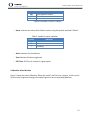
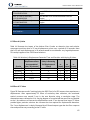
 mmVu® LabTime User’s Manual v3.0 G25 41.20 139.28 55.00 42.50 41.20 139.28 54.00 43.25 G27 7.08 54.61 40.00 26.00 7.08 54.61 38.75 21.50 G31 29.46 232.72 48.75 39.75 29.46 232.72 49.50 40.75 8.5 Event Log Files mmVu® LabTime reports software events to the Main Console. These events can be stored to a log file which can be useful for troubleshooting purposes. mmVu Event Log files are stored in the “System Log” folder and are named using the following naming convention: log + “_”+YY + MM + DD + HH + .txt 8.6 Project File Description The contents of mmVu® LabTime project files are described in Table 13 Table 13: mmVu Project File Description Project Entry [Version #] mmVu 3.0 [Last Saved] 2012,5,30,11,25,5 [DD Solutions] False [TDD Solutions] True [Store Residuals] True [Store Raw Obs] True [Store Outliers] True [Store Solutions] True [Archive Path] C:\Gemini Navsoft Technologies\mmVu Server\Projects\javad1\ [Processing Mode] 0 [Application Mode] 1 [Q1 Status] True Description mmVu Version Number UTC Year, Month, Day, Hour, Minute, Second of the last time the file was saved Indicates whether or not DD solutions should be computed Indicates whether or not TDD solutions should be computed Indicates if residuals will be archived to file Indicates if raw observation data will be archived to file Indicates if outliers will be archived to file Indicates if solutions will be archived to file Project folder to which data will be archived Indicates how data should be processed (0= real‐
time mode, 1 = post‐processing) Indicates application type (1= static, 2= kinematic, 3= dynamic) Indicates if Q1 value has been changed (True=no change, False=changed) 62