1
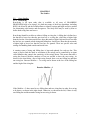
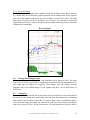
4.3.3 Reversal Signals
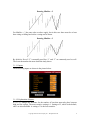
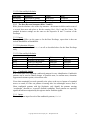
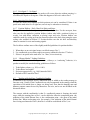
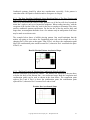
Similar to the re-entry signal after a partial exit has been taken as described in Section
4.6, should there be second entry signal generated on the timing chart in the opposite
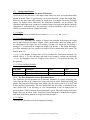
direction of the original trade before stops are hit then a reversal can be taken. The chart
below shows an 80% exit after a divergence (see Section 4.6.2), and then a second sell
signal forms before Dev1 is hit. At this point the remainder of the long trade is exited and
a short trade is established.
Reversal Signal
4.4
Placing and Managing Stops
After entering a trade, an “emergency” stop should always be placed at Dev3. The other
stop levels, as well as stops based on candlesticks may then be used to manage the risk if
exit setups and exit signals are triggered. These danger and exits signals, and the
suggested stop levels should danger or exit signals take place, are set forth below in
Section 4.6.
4.5
Scaling Up
Once a trade has been entered and at stop placed at Dev3 monitor for exits as described in
Section 4.6 on the timing chart. At the same time check the fast monitor for a confirming
entry signal in the direction of the trade (i.e. long or short). Once a confirming signal is
received on the longer bar length, the trade can be scaled up to that chart by moving the
stop to the respective Dev3 for the fast monitor. The fast monitor may then be used to
Copyright 2010 Kase and Company, Inc. All Rights Reserved.
20