1
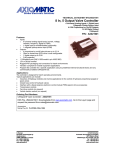
AL101A1A Joystick Controller for Operating a Snow Plow
page
•
Modes of operation, Deadman, Float
2
•
Program mode, unlock
3
•
Program address list, settings, ranges, presets
4
•
Wiring connections, joystick
5
•
Dimensional drawing
6
Page 1 of 6
AL101M1A
User manual
Effective date 1-9-09
ref. checksum A682
Operation
The AL101A1A is a 2-axis joystick controller for operating a standard snow plow application. The AL101A1A
receives two 0-5vdc signals from a two axis joystick. In response the AL101operates four PWM coil drivers.
Each coil driver is current controller. The output configuration uses two coils per axis, each coil has min and
max trim adjustment, range 5 to 3500 ma.
Deadman
The AL101 requires a trigger switch ( aka dead man switch ) input that must be activated to enable the AL101's
valve driver outputs. The state of the trigger switch is viewed by the yellow Led.
Float
The AL101 provides a Float PB (pushbutton) input to enable a plow down signal (Float). The Float function has
three modes of operation: Auto, Fixed, Off ( selected at address no. 10 ) factory pre-set is Fixed mode
Float (Off mode) The Float feature is disabled by selecting OFF at address no. 10
Float (fixed mode)
The installer can preset the desired plow down set-point (1-99%) at address no. 10. The user can
enable/disable the Float output by a press-n-release of the Float PB. This does not require using the
trigger switch and the joystick can be in any position.
The user can pull the joystick back (less than 50%) to allow the plow to move up and temporarily
suspending the Float mode. Once the stick is centered or the trigger is released the Float output reactivates.
To exit the Float mode; pull the joystick back to greater than 50% or simply press the Float PB.
Neither float exit methods requires using the trigger switch.
Float (auto mode)
The operator establishes the plow down set-point. The user must pull the trigger switch and push the
joystick forward to a desired plow down speed and then with a push-n-release of the Float PB the
current plow down drive is stored into memory.
The user can pull the joystick back (less than 50%) to allow the plow to move up and temporarily
suspending the Float mode. Once the stick is re-centered or the trigger is released the Float output reactivates.
To exit the Float mode pull the joystick back to greater than 50% or simply press the Float PB. Neither
of these float exit methods requires using the trigger switch.
Page 2 of 6
Program Mode:
The AL101 employs (3) magnetic switches; marked FCN, INC and DEC. The magnetic switches are labeled
on the front but they're actually located down lower on the side of the enclosure. To trip these switches requires
using a magnet. The small magnet on the end of a pocket screwdriver works well. If a screwdriver magnet
doesn't trip the switches, try a stronger one. When any of the three switches is pressed (tripped) the Green Led
will indicate a magnetic switch is active.
Unlock Sequence
To enter the program mode a special sequence of key strokes is required to unlock the AL101. Once unlocked
you can view and/or edit the internal settings. Note; The unlock sequence must be done as described below, if
the wrong key or sequence is used the process will reset and you must start over.
Step
1
First, use a magnet to press and hold the FCN key (Green Led goes active)
a.
hold FCN and observe the display count down from 9 to 0
b.
Release FCN key
c.
Display shows INC
2
Next, use magnet to press and hold INC key (Green Led goes active)
a.
hold INC and observe the display count down from 9 to 0
b.
Release INC key
c.
Display shows DEC
3
Lastly, use magnet to press and hold DEC key (Green Led goes active)
a.
hold DEC and observe the display count down from 9 to 0
b.
Release DEC key
c.
Display = A 1 (indicates you're at address # 1)
Navigating the various menus
Once in the program mode the display will either show the address (always preceded by A )or the data value
that is stored at that address. Since you can only press one magnetic switch at a time, you must press and
release the FCN Key to toggle between viewing address and viewing data.
To move thru the address list, press-n-release FCN key to view an A (left digit) then use the INC or DEC keys
to move to the desired address location (A 1 thru A 12)
At your desired address number, press-n-release the FCN key to toggle the display to show the corresponding
data value. While viewing the data value, use the INC and DEC keys to change the data value. After changing
a data value for it to be saved you MUST press and release the FCN key.
Warning There is a 2 minute time out if no key is pressed. The time out will close your secession (bumping
you out of program mode). If after the last value is changed you were to simply walk away the change will NOT
be saved. To prevent this it's always recommended that you follow your last change with a FCN key.
To get back into Run mode you can either, 1) scroll back to address no 1 or cycle the power.
Page 3 of 6
Program address list, settings, ranges, presets
The factory pre-sets are to be used as a starting point. Each vehicle may require further adjustments. When
adjusting the min/max trims you're blocked from making a min trim greater than its max trim or visa-versa.
Addr 1
Run mode
Left 2 digits
Right 2 digits
Addr 2
Addr 3
Addr 4
Addr 5
Addr 6
Display: xx yy shows the hydraulic valve drive (percentage)
xx = Plow Up / Dn
( Plow Up is indicated with decimal points x.x. )
yy = Plow Left / Right ( Plow Left is indicated with decimal points y.y. )
Plow Left min valve drive (amps)
Range: 0.005 - 3.500 amps
Factory pre-set = 0.500 amps
Plow Left max valve drive (amps)
Range: 0.005 - 3.500 amps
Factory pre-set = 0.700 amps
Plow Right min valve drive (amps)
Range: 0.005 - 3.500 amps
Factory pre-set = 0.500 amps
Plow Right max valve drive (amps)
Range: 0.005 - 3.500 amps
Factory pre-set = 0.700 amps
Plow Up min valve drive (amps)
Range: 0.005 - 3.500 amps
Factory pre-set = 0.500 amps
RUN Mode Display
Float
Trigger
PB
Left two digits
Plow Up and Down
DN 0 0 - 9 9
UP .0.0 -.9.9
note; the decimal points indicate the joystick
output is decreasing from 2.5v to 0v (n
LEDs:
- Float = Float PB is active
- Trigger = Trigger PB is active
- PB = 1 of 3 magnetic keys is active
Addr 7
Plow Up max valve drive (amps)
Range: 0.005 - 3.500 amps
Factory pre-set = 0.750 amps
Addr 8
Plow Down min valve drive (amps)
Range: 0.005 - 3.500 amps
Factory pre-set = 0.500 amps
Addr 9
Plow Down max valve drive (amps)
Range: 0.005 - 3.500 amps
Factory pre-set = 0.750 amps
Addr 10
Float setup
Range: OFF
(No float operation)
Range: 1-99
(Fixed Float set-point. 1-99% output)
Range: Auto
(Auto Float set-point)
Factory pre-set = Fixed set-point 80
Addr 11
Serial Number
View Only: 1 - 9999
Addr 12
serial number is set by the factory
Software Check-sum
View Only: four digit hexadecimal, indicates the software version
Page 4 of 6
Right two digits
Plow Left and Rig
RT 0 0 - 9 9
LT .0.0 -.9.9
AL101 connector pinout
Pin No.
Name
Description
1
Power
+10vdc to +32vdc
2
Input 1
Analog signal X axis
Plow left: joystick left,
Plow right: joystick right,
3
Input 2
Analog signal Y axis
Plow up: joystick pull backward,
Plow down: joystick push forward,
4
5
Input 3
Input 4
Float sw
Trigger sw
6
7
Output 4
Output 3
Y plow down ( push joystick forward )
Y plow up
( pull joystick backward )
8
9
Vref
Gref
joystick ref. supply ( 5.0vdc, 75ma max )
joystick ref. common
10
11
Output 2
Output 1
X plow right
X plow left
( move joystick right )
( move joystick left )
12
Ground
Ground
(negative)
vehicle power
use to move the plow left and right
(signal decreases from 2.5v - 0v )
(signal increases from 2.5v - 5.0v )
use to move the plow up and down
(signal decreases from 2.5v - 0v )
(signal increases from 2.5v - 5.0v )
( Float active when switch pulls the input to ground )
( Trigger active when switch pulls the input to ground )
AL101 Connector Type
Mating plug for the AL101, 12 pin Deutsch connector
Mini series mating plug
p/n: DTM06-12SA-E007 Key = A
Manuf; Ladd Industries 1-800-223-1236
The DTM06 mating plug requires; crimp sockets, wedge lock and a back-shell strain relief
Joystick
Penny + Giles JC6000
There are four connectors in the bottom of this joystick use the 16 & 12 pin connectors. This joystick offers
redundant output signals for each axis. The AL101 will only use one signal for each channel. There is a deadman trigger switch in the handle and one pushbutton on the handle for the Float function
16-way Amp connector
Pin 4 Float PB (connect to AL1 pin 4)
Pin 11 Float PB (connect to ground)
Pin 8 Person present sw (Trigger sw) (connect to AL1 pin 5)
Pin 12 Person present sw (Trigger sw) (connect to ground)
12-way Amp connector
Pin 1 5V supply (connect to AL1 pin 8, Vref)
Pin 2 0V supply (connect to AL1 pin 9, Gref)
Pin 5 Fwd/Back output (connect to AL1 pin 3, Y-axis)
Pin 7 Left/Right output (connect to AL1 pin 2, X-axis)
Page 5 of 6
Page 6 of 6