1
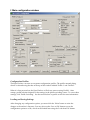
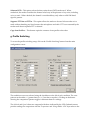
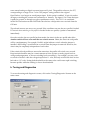
f. Main configuration window
Configuration Profiles The OpenTracker+ can store two separate configuration profiles. The profile currently being shown is selected using the tabs at the top of the window labeled ‘Profile 1’ and ‘Profile 2’. When it is first powered on, the OpenTracker+ will always start out using Profile 1. After startup, profile selection depends on the settings in the profile switching screen. To access these settings, click ‘Profile Switching’. See the section below on profile switch for more information. Loading and Saving Settings After changing any configuration options, you must click the ‘Write’ button to write the changes to the tracker’s firmware. You may also use the ‘Save to File’ button to save the configuration options to a file, which can be loaded later using the ‘Load from File’ button.