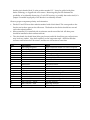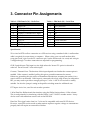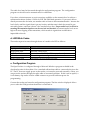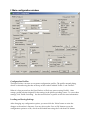
1
2. OpenTracker+ Kit Assembly Notes
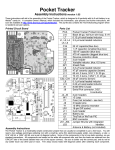
If you purchased an assembled unit, you may wish to skip ahead to the section on jumper settings and connections. The OpenTracker+ kit requires basic to intermediate level soldering skills. You will need a low‐
wattage soldering iron, wire cutters, and solder. Rosin core solder is recommended – never use acid core solder for electronics. Review the parts list and identify the components you received. If any are missing or damaged, contact [email protected] for replacements. Don’t worry if your kit includes extra resistors or other parts not listed above – these are provided for modifications and alternate versions of the kit. Assembly Notes
1. The order in which the components are installed is not critical. However, you may wish to install connectors X1 and X2 after nearby parts (D1, D2, and C1 in particular) have been installed. Don’t put your fingers directly under the connectors when pushing them on to the board; they can snap into place suddenly and poke you. 2. Solder the socket for U3 carefully. Avoid excess solder that may form bridges between the closely spaced pins. If you plan to solder the resistors from the top side of the board (this can save time, especially if you’re holding the board in a vice) install the socket after soldering the resistors to avoid damaging it. 3. Install the LED last. Insert it without soldering it, with its shortest lead toward the edge of the board and the D3 marking. Place the circuit board in the top half of the case, and push the LED into its mounting hole from the back. Solder it in place and trim the leads. 4. If the unit will not be powered through the serial connector, and will not be providing unregulated power to another device through the serial connector, consider removing the