1
I. Overview
Welcome to the user’s manual for your new PixiePro Modular Panel™! This manual documents all
of the steps necessary to get the PixiePro up and running, including:
-
Assembly of the PixiePro, including customization of the button modules
Mounting, including tabletop-mounting and wall-mounting (both flush- and surface-mounting)
Wiring the PixiePro to one infrared (IR) emitter, or to multiple IR emitters
Programming the codes from IR remote control devices into the PixiePro, including:
- Simple Programming: a single IR code learned by a single PixiePro button
- Complex Programming: a series of IR codes learned by a single PixiePro button
- Cloning or copying all of the settings and learned codes from one PixiePro to another
- Configuring settings on the PixiePro to optimize control
The PixiePro is a stand-alone IR-learning audiovisual control device. One PixiePro may learn codes
from the remote controls of many devices, or of just one. IR output may be wired to multiple devices
using additional IR emitters (ordered separately - SP Controls part no. PXE-EMIT). For instructions
about wiring the PixiePro, go to the Wiring section on page 7.
An example of an AV system that can be controlled by the PixiePro might consist of some or all of
the following elements (each with their own infrared remote control): projector, DVD player, laptop
computer, VCR, document camera, cable television receiver, electric screen, and other devices.
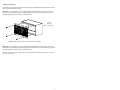
The PixiePro ships in a plastic surface mount box. It may be removed from the plastic box and
mounted into a standard four-gang metal switch or junction box, or four-gang mud ring for wall
installation. If used with a metal back box, be sure to use the included screws and plastic washers.
For instructions on mounting the PixiePro, including wall- and tabletop-mounting, see the Installation
section on page 5.
Each button may be programmed with up to 16 codes from any number of remote controls, up to a
maximum of 768 codes for the PixiePro. A single button on the PixiePro may be programmed with
just one code (see Simple Programming on page 10) or with multiple codes (see Complex
Programming on page 11). The codes programmed to a single button may be grouped in any combination of round robin or macro. Delay lengths between codes in a macro can be varied to optimize
performance. For instructions on learning codes, see the Programming section on page 9.
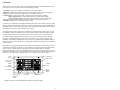
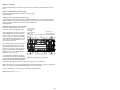
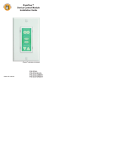
Power
Buttons
Menu/Security
Button Module
Security and
Timer Activity
Display
VCR/DVD
Control
Volume
Control/Display
Device
Up/Down
Buttons
Aux Up/Down
Ambient Light
Adjustment
Sensor
Aux Buttons
Source Buttons
Figure 1: PixiePro with all standard button modules inserted (as it ships)
1