1
Hang up
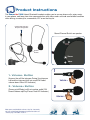
In call active state, press and hold VOL + ButtonGPSBCPVUTFDPOETUIFOSFMFBTFUP
hang up the call.
Last number redial
Double press the VOL + Button to redial the last called number when you are
connected with the mobile phone.
Note : the mobile phone has to support the Bluetooth Hands Free Protocol to use the
reject and redial fonction
Stereo Music Function Operation of Bluetooth
Helmet Headset
Pause/Play
Press and hold the VOL + ButtonGPSBCPVUTFDPOETUPQBVTFQMBZZPVSNVTJD
Note : above functions require the mobile phone to support the Bluetooth A2DP and AVRCP protocol.
FM Radio Operation
Enter FM Radio Operation
Bluetooth in standby state, long pressing the VOL - Button PSBCPVUTJYTFDPOETJU
can enter the radio function.
Channel Searching
%PVCMFDMJDLUIFVOL + ButtonUPFOUFSJOUPUIFOFYUDIBOOFM
AUX-in function
(Optional)
$POOFDUFEUP.11MBZFS*QPEFUDTPVSDFWJBUIFFYUFSOBMBVEJPDBCMFUIBUXFXJMM
provide, it can be used as a cable headphones.
Connecting with GPS Navigator
5IJTIFMNFU#MVFUPPUI)FBETFUGPODUJPODBOCFDPOOFDUFEXJUIB(14/BWJHBUPS
"TUPUIFQBJSJOHPQFSBUJPOQMFBTFSFGFSUPUIFNBOVBMPGZPVS(14/BWJHBUPS#FFO
paired, you can hear the navigate voice or music througn the Bluetooth Headset.
1IPOFDBMMTFOKPZIJHIFSQSJPSJUZUIBOUIF(14/BWJHBUPSUIFOBWJHBUPSWPJDFDBOCF
transmitted to the Bluetooth headset only when there is no incoming calls.
Note : Some GPS may occupy the HSP used by the mobile phone, in that case, only the GPS can be
connected.
Automatic shutdown function
When the Bluetooth Headset has no connection to any devices, the headset will
BVUPNBUJDBMMZUVSOFEPGGBGUFSNJOVUFT