1
Parameter Presets
Continued
U N D E R S TA N D I N G
“PRESET”
THE
P L AY I N G S T A T E
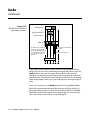
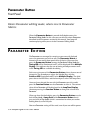
Preset 0 is the Preset used and edited while playing. These are the
Parameters active while you use the Echoplex.
When one of the fifteen presets is loaded for use, what really happens is
the values in that saved Preset are copied into Preset 0 to be used while
playing. When you save a Preset using the Preset Editor, what really
happens is the values in the Preset 0 playing state are copied into the
Preset location you are saving to.
If you make a change in a parameter value while you are playing, it is
only changed in Preset 0, and the Preset you loaded is not affected. This
is really helpful because it means you can freely reach over and change
something as you play, without affecting any Presets. When you decide
you like a setup, you can then go into the Preset Editor and save it. Or you
can load up another preset you have saved to get back to a known state.
Changes made in Preset 0 are preserved when the power is turned off.
When you turn the Echoplex back on again, it will be setup the way you
left it.
We call the playing state “Preset 0” because that is the actual location in
memory where it lives. This will matter to you if you use SysEx or a
preset librarian program to edit the parameter values saved in your
presets. If you want to edit the active playing state parameters with
SysEx, you simply edit the reset 0 location. See the SysEx chapter for
more information on SysEx control.
Reference - Parameter Presets 8-5