1
MTP41 User Manual
Rev.01
INTRODUCTION
“MTP41 is an extremely small and light pocket transmitter especially designed for
professional wireless microphone applications”
Very easy and quick to use thanks to OLED display, dedicated buttons and a joggle selector.
MTP41 benefits also of the latest Wisycom RF technology along with an enhanced
robustness against noise and inter-modulation.
Fig. 1
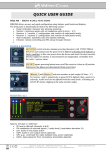
Turn on wireless:
Move the Wireless power switch in
“I” position:
A green blinking gives you
indications on battery status.
1
Turn on display:
Push <select switch> and hold it.
Open MIC Body:
Push the side buttons and flip down the cover, to access
internal setup controls and batteries.
2
3
❶ Switch to enable wireless transmission it
also indicates the battery status and
peak/mute operation (with PTT)
❷ LED to show information on RF
transmission/battery status/modulation
peek/PTT status
❸ Oled display for transmitter setup
❹ <ch>, <gain> and 3 positions <selector>
4
5
1.
6
❺ Battery holder
❻ Cover (to open push side buttons)
Fig. 2
2