1
Operating the VP-471 3G HD-SDI to DVI Scaler
2. Press the + or – button to highlight COLOR.
COLOR changes to green.
3. Press ENTER.
The Display submenu is displayed.
4. Press the + or – button to highlight G OFFSET.
G OFFSET changes to green.
5. Press ENTER.
The G OFFSET parameter changes to red.
6. Press the + button to increase the value to 42.
7. Press ENTER to set the value.
G OFFSET is highlighted in green.
8. To exit normal operation, press MENU.
6.2.1 The Main Menu
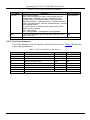
Table 3 defines the Main menu parameters and functions.
Table 3: The Main Menu Parameters and Functions
Parameter
Function
DISPLAY
Sets the output resolution, size and aspect ratio (see Table 4)
COLOR
Sets the output color parameters (see Table 5)
SDI AUDIO
Selects which embedded audio to output: Group 1, Group 2, Group 3, Group 4, Auto ,
Off 2
Default: Auto
1
FACTORY RESET
Resets all parameters to factory defaults
INFORMATION
Displays current input resolution, output resolution and firmware revision
AUTO SYNC OFF
When on, this de-activates the output after a few minutes if no input is present
EXIT
Exits the Main menu
3
6.2.2 The Display Submenu
The Display submenu sets the display output resolution, size and aspect ratio.
Table 4 defines the display output parameters.
1 When set to Auto, the unit searches for the lowest Group number which has audio and selects this audio Group
2 Audio is not outputted
3 Useful, for example, when the output is connected to a projector, and the projector will automatically shut down when it has no input
7