1
Operating the VP-471 3G HD-SDI to DVI Scaler
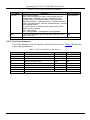
Table 4: The Display Submenu Parameters
Parameter
OUTPUT
Parameters
Factory Default
1024x768 @60
Sets the output resolution.
Native, 1920x1080p @50 (HD 1080), 1280x720p @50 (HD 720),
720x576p @50, 1920x1080p (HD 1080), 1280x720p (HD 720),
720x480p (NTSC), 1920x1200p (WUXGA), 1600x1200 (UXGA),
1680x1050 (WSXGA+), 1400x1050 (SXGA+), 1440x900, 1280x1024
(SXGA), 1280x800 (WXGA), 1360x768, 1280x768 (WXGA), 1024x768
(XGA), 800x600 (SVGA)
PC: VGA, SVGA, XGA, 1280x800, UXGA, SXGA, WXGA, SXGA+,
WXGA+, WSXGA, WUXGA
SDTV: 480p and 576p
HDTV: 720p @50/60Hz, 1080i @50/60Hz, 1080p @50/60Hz
SIZE
Sets the output size/aspect ratio: Full, Pan scan, Letter box, Under 2,
Under 1, Over scan
EXIT
Exits the Display menu
Full
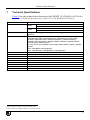
6.2.3 The Color Submenu
The Color submenu sets the display output color parameters. Table 5 defines the
color output parameters.
Table 5: The Color Submenu Parameters
Parameter
8
Function
Value Range
Factory Default
CONTRAST
Sets the output contrast
0-255
105
BRIGHTNESS
Sets the output brightness
0-192
96
R
Sets the output red value
0-255
128
G
Sets the output green value
0-255
128
B
Sets the output blue value
0-255
128
R OFFSET
Sets the output red signal level offset
0-63
32
G OFFSET
Sets the output green signal level offset
0-63
32
B OFFSET
Sets the output blue signal level offset
0-63
32
EXIT
Exits the Color submenu
KRAMER: SIMPLE CREATIVE TECHNOLOGY