1
Introduction
1.4
1-4
Typical operation
A typical application run of PLC-ANALYZER pro looks as follows:
•
•
•
•
•
•
•
•
Connect PC with the PLC programming unit interface
Select signals to record
Select signals to be displayed on the screen
Set trigger combinations to freeze the data being recorded
Start data recording
End data recording
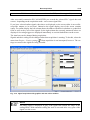
Evaluate and analyze recorded signals in graphical display
Use recorded signals to calculate time intervals
1.5
Help
You have access to a convenient online help for PLC-ANALYZER pro. To activate help just
select the menu item Help topics in the help menu. A help window appears with important information and comments on program operation.
If you need detailed help on a specific window, simply press the F1 key when the window is
active. Direct help on an individual dialog element can be obtained by positioning the mouse
over the element and clicking the right mouse key.
1.6
Technical Support
Check the online help and this manual if you run into difficulty when using PLC-ANALYZER.
There is a FAQ list at our Web site http://www.autem.de containing answers to frequently
asked questions.
Please contact our technical support if you cannot solve the problem.
Technical support AUTEM:
Tel. (+49) (0)4921-9610-0
Fax (+49) (0)4921-9610-96
eMail [email protected]