1
Calibrating the Printer
3
Controlling calibration files
Loading existing calibration settings
Note
The Load Calibration command is available only in the Expert
Calibration user mode. Refer to page 2-9 for instructions on
selecting this user mode.
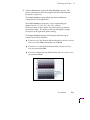
Use the Load Calibration dialog box to load an existing set of previously
saved calibration settings. This list will be empty if you haven’t saved or
imported any calibration settings.
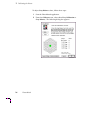
1.
Select Load Calibration from the File menu.
2.
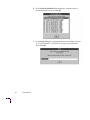
In the Load Calibration dialog box, select a name from the list to
load a set of saved calibration settings.
3.
Click OK when finished. The loaded settings are now available in
your computer’s memory for the following functions:
■
Sending to the printer (see page 3-23).
■
Editing the values (see pages 3-3, 3-10, and 3-15).
■
Exporting to a floppy diskette or other location (see page 3-25).
User Manual
3-21