1
5.7
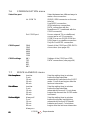
PROBLEMS AND THEIR LIKELY CAUSES
The green ‘PWR’ LED fails to light.
Probably the ON/OFF key was not
depressed long enough. Press the
ON/OFF key for a few seconds, until the
‘PWR’ LED is on. The start-up procedure
takes about 30 seconds to complete.
The red ‘BATT’ LED blinks.
The batteries are almost empty. Provide
external power supply or replace the
batteries.
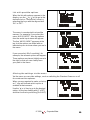
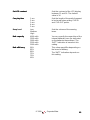
The ISDN connection fails to be
established; in the screen ‘CALL to retry’
appears.
Select CALL AUDIO to dial again.
The ISDN connection fails to be
Check both ends of the ISDN cable to
established, in the screen ‘unknown error’ ensure it is correctly connected.
appears.
Check the COMMUNICATION menu to
ensure the correct ISDN-TA has been
selected (See page 82).
The ISDN connection fails to be
established, in the screen ‘NO ANSWER’
or ‘USER BUSY’ appears.
Check with (via the telephone, for
example) the receiving party to ensure all
equipment is standing by properly.
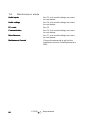
The ISDN connection appears to be
established, but the FRM indication fails
to light.
Check if the ReporterMate is
programmed with the same protocol as
the equipment of the receiving party.
See menu AUDIO SETTINGS – ‘mode’.
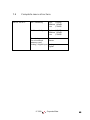
The PSTN connection fails to be
established.
© 1999
Check to ensure that the PSTN adapter
cable is inserted into the COMBI AUDIO
connector. Check if the special adapter
is connected to PSTN network.
- ReporterMate
65