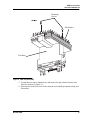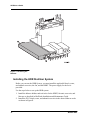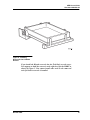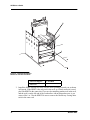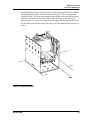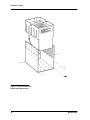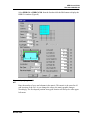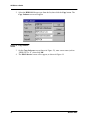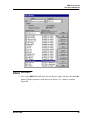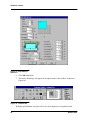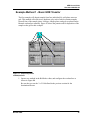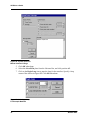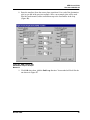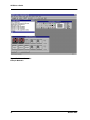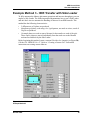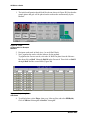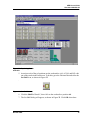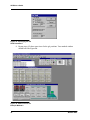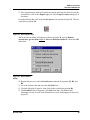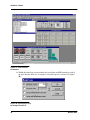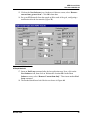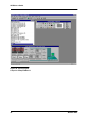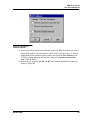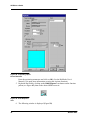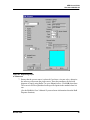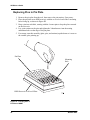
1
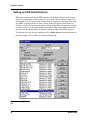
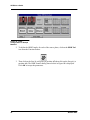
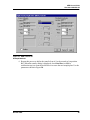
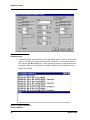
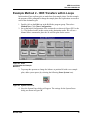
Beckman Part No. 609930-AA August 1998 Biomek 2000 ® High Density Replication System User’s Guide %'( Beckman Instruments, Inc. 4300 N. Harbor Blvd., Fullerton, CA 92835 Copyright© 1998 Beckman Instruments, Inc. Printed in U.S.A. Copyright, Licenses and Trademarks Copyright Beckman Instruments, Inc., 1998. All rights reserved. No part of this publication may be reproduced, transcribed, transmitted, or translated into any language in any form by any means without the written permission of Beckman Instruments, Inc. The product warranty does not apply to software which is warranted on an “as is” basis without fitness for any specific purpose with the exception of the media which is warranted against defects in materials and workmanship for a period of one year. The software is copyrighted and may not be altered or given to a third party without the written authorization from Beckman Instruments. High Density Replication System User’s Guide Document 609930-AA Table of Contents Notice ........................................................................................................... 1 Safety Notice ................................................................................................ 2 Introduction................................................................................................... 4 General Description................................................................................ 4 HDR System Components ........................................................................... 5 HDR Tool Body ...................................................................................... 5 HDR 384 Pin Plate Kit ............................................................................ 5 HDR 96 Pin Plate Kit .............................................................................. 5 HDR Fan Kits ......................................................................................... 5 HDR Pin Kits .......................................................................................... 5 Pre-Installation Requirements ...................................................................... 6 Pre-Installation Equipment ..................................................................... 6 Facility Requirements ............................................................................. 6 Electrical ........................................................................................... 6 Space ............................................................................................... 6 Additional Requirements .................................................................. 7 Setting up the HDR System ......................................................................... 8 Introduction............................................................................................. 8 HDR Sterilizer Components ................................................................... 9 Bleach Reservoir .............................................................................. 9 Water Reservoir................................................................................ 9 Ethanol Reservoir ............................................................................. 9 Fan Unit ............................................................................................ 9 High Density Replicating Tool (HDRT) ................................................. 10 Cable Clips ........................................................................................... 10 The Gels ............................................................................................... 10 Assembly of the HDR Tool Components.............................................. 10 Biomek 2000 i High Density Replication System User’s Guide Document 609930-AA Installing the HDR Sterilizer System ..................................................... 12 Activating the HDR System in BioWorks..................................................... 17 Using the BioWorks HDR Options .............................................................. 17 Introduction ........................................................................................... 17 Setting up HDR Gel Definitions............................................................. 18 Creating an HDR Method...................................................................... 20 Setting up the Configuration for an HDR Method............................ 21 Creating an HDR Method - Examples................................................... 23 Creating a Custom Gel....................................................................23 Example Method 1 - Basic HDR Transfer ............................................. 27 Example Method 2 - HDR Transfers within Loops ...................................... 31 Example Method 3 - HDR Transfer with Side Loader ................................. 35 Replenishing Liquid in Reservoirs.........................................................45 Preparing to Run a Replication ................................................................... 50 Running an HDR Method............................................................................ 50 Locating Specific Clones.............................................................................51 Troubleshooting & Maintenance..................................................................52 General Maintenance Procedures ........................................................ 53 Introduction ........................................................................................... 53 HDR System ......................................................................................... 53 Replacing the Pin Plate in the HDR Tool ..............................................54 Replacing Pins in Pin Plate ................................................................... 56 Sterilization ........................................................................................... 57 Supply List .................................................................................................. 58 Warranty...................................................................................................... 59 Items Not Covered by Warranty............................................................ 60 Glossary of Terms....................................................................................... 61 ii Biomek 2000 HDR User’s Guide Document 609930-AA Notice This equipment has been tested and found to comply with the limits for a Class A digital device, pursuant to part 15 of the FCC Rules. These limits are designed to provide reasonable protection against harmful interference when the equipment is operated in a commercial environment. This equipment generates, uses, and can radiate radio frequency energy and, if not installed and used in accordance with the instruction manual, may cause harmful interference to radio communications. Operation of this equipment in a residential area is likely to cause harmful interference in which case the user will be required to correct the interference at his own expense. The High-Density Replicating System using BioWorks software is copyrighted and all rights are reserved by Beckman Instruments, Inc. Duplicating (other than as specified herein), selling, or otherwise distributing this product is a violation of the law. This manual is copyrighted and all rights are reserved. This document may not, in whole or in part, be copied, photocopied, reproduced, translated or reduced to any electronic medium or machine-readable form without prior consent, in writing, from Beckman Instruments, Inc. The following trademarks are used in this manual: Biomek® and Beckman® are registered trademarks of Beckman Instruments, Inc. Microsoft® is a registered trademark of Microsoft Corporation Windows™ is a trademark of Microsoft Corporation Biomek 2000 1 HDR User’s Guide Safety Notice The international symbol displayed above and on the equipment is a reminder to the user that all safety instructions should be read and understood before installation, operation, maintenance or repairs to these instruments are attempted. When seeing the symbol on other pages of this manual, special attention must be given to the specific safety information which applies. If the product is used in a manner other than specified in the manual, the safety and performance of the equipment could be impaired. Summarized safety information basic to the safe operation of the High Density Replicating System (HDR) on the Biomek® 2000 Laboratory Automation Workstation is described below. More complete safety information appears in the manual where appropriate. • • • • • • 2 Perform only the maintenance described in the Biomek 2000 Installation and Maintenance Guide and in this manual (pertaining specifically to the HDR System). Maintenance or repair procedures not specifically described in the above mentioned manuals expose persons to risks of electric shock or injury. Refer such servicing to Beckman qualified service personnel. The HDR System is not autoclavable, nor should you use organic solvents to clean the system. However, you can autoclave the stainless steel pins and plate, and use organic solvents to clean them. Liquid transfers may generate aerosols. Therefore, operate the Biomek 2000 in an appropriate safety enclosure and take all necessary precautions when using pathologic, toxic, or radioactive materials. Objects dropped onto the labware or accidental tool release may result in splashing of liquids; therefore, take appropriate safety precautions, such as the use of safety glasses, when working with potentially hazardous liquids. Never attempt to exchange labware, reagents, or tools while the Biomek is operating, as indicated by the amber warning light on the front of the bridge. When the warning light is ON, it indicates that the workstation is in operation and may move suddenly and rapidly at any moment. Because the parts of the Biomek move automatically, keep clear of the head assembly during operation. Also, keep the area around the workstation clear (including the side module areas) to prevent obstructing the movement of the instrument. Biomek 2000 HDR User’s Guide Document 609930-AA • • • An emergency stop switch is located at the base of the workstation (front center) in case an emergency stop is required. Pressing this switch will freeze the workstation instantly, stopping the run in progress. When powering up system components NOT specifically described in this manual on the accessory power strip for the Biomek workstation, the total system leakage current must not exceed 5 milliamperes (values outside of North America may differ). Turn the POWER off and disconnect the workstation from the main power source before changing fuses or performing any maintenance. NOTICE It is your responsibility to decontaminate components of the Biomek system before requesting service by our Field Service Representative or returning parts to Beckman for repair. Beckman will NOT accept any items which have not been decontaminated where it is appropriate to do so. If parts are returned, they must be clearly labeled with a note stating that they are safe to handle and not contaminated. • • Do not replenish the bleach using the aspirate and bulk dispense transfers, as the bleach may damage the Wash tool. Do not attempt to use tools other than the HDR Tool (HDRT) when performing a High Density Replicating Transfer. Biomek 2000 3 HDR User’s Guide Introduction General Description The Biomek® 2000 High Density Replicating System (HDR System) used on the Biomek 2000 Laboratory Automation Workstation is designed for applications which require many small samples to be deposited on a suitable medium for the purposes of growth or analysis. The HDR system not only automates this time consuming and error-prone process, but also allows for the placement of 3,456 or more samples per 8 x 12 cm target area using the HDR Tool (HDRT). The patterns in which the samples are deposited correspond to 96-well or 384-well plates, such that the desired samples may be traced back to the sample of origin. The HDR system also offers a sterilization setup which allows the HDRT to be sterilized at any point in the assay. The target to which samples are transferred is called a Gel. (“Gel” is the Beckman term for any labware and/or medium used to receive the transfer). Each Gel is divided into 96 or 384 grid locations, depending on the Gel type. 96-position grids have locations measuring 9mm x 9mm. 384-position grids have locations measuring 4.5mm x 4.5mm. BioWorks is used to define a matrix for each grid location in the Gel. The matrix defined in BioWorks indicates the number and pattern of deposit positions, and the density of those positions. For instance, a 96-position Gel with a 4 x 4 matrix would define 16 deposit positions for each grid location, totalling 1,536 (16 x 96) deposits for the Gel. NOTE This manual should be used in conjunction with the BioWorks Operating System User’s Manual for general instructions on creating and running methods. 4 Biomek 2000 HDR User’s Guide Document 609930-AA HDR System Components The HDRT system is available in two configurations (i.e., 96 and 384 systems) to accomodate different needs and requirements. This allows you to individually select the components that you need. In most cases you will need one HDR Tool Body, one Plate Kit, and one Fan Kit. (Refer to the Supplies List, later in this manual). HDR Tool Body The HDR Tool Body provides a Biomek-compatible tool body which can accomodate either a 96-Pin or a 384-Pin Plate. This allows you to use the Plate Kit which best suits your needs, and to change from one configuration to the other with the same tool body. This kit includes the mounting screws required for attachment of a Plate Kit. HDR 384 Pin Plate Kit The HDR 384 Pin Plate Kit includes 2 plates, 400 0.015” diameter pins, and 400 0.045” diameter pins. HDR 96 Pin Plate Kit The HDR 96 Pin Plate Kit includes 2 plates, 100 0.015” diameter pins, and 100 0.045” diameter pins. HDR Fan Kits Each 96/384 Fan Kit includes a fan and power supply (120V or 240V), 3 reservoirs, 2 reservoir supports, a tool rack, and 5 cable clips. One Fan Kit is required for an HDR System. HDR Pin Kits Each Pin Kit provides 20 replacement pins. There are two pin kits available; one with 0.015” diameter pins and one with 0.045” diameter pins. Biomek 2000 5 HDR User’s Guide Pre-Installation Requirements Pre-Installation Equipment The HDR System is an accessory to the Biomek 2000 system. Before it can be installed, be sure that you have the following items in your laboratory. • • • Beckman Biomek 2000 Laboratory Automation Workstation (installed as directed in the Installation and Maintenance Guide) BioWorks software, version 3.0 or later Computer with at least the minimum requirements specified in the BioWorks Software Reference Manual, Migration Guide or Release Notes for the version of BioWorks in use. A printer is optional - however, if one is used it should be supported by Windows NT. Equipment not recommended by Beckman cannot be installed and/or maintained by our Field Service Engineers. Optional accessories to the computer, such as a printer, should be installed according to manufacturer’s instructions. Facility Requirements Following are the facility requirements for the HDR System accessory. Electrical A power supply (110/120V, 60 Hz or 220/240V, 50 Hz) is supplied in each Fan Kit for the operation of the fan used to dry the pins of the HDRT during the sterilization process. You must have a single outlet for the power supply in addition to the power supply used for the Biomek system. The appropriate outlet should be within 6 ft. (2 m) of the instrument. CAUTION DO NOT use any power supply other than the type supplied for the HDR System, as appropriate for the country where the Biomek is installed. Space The Biomek 2000 system with the HDR System must be installed in a clean, safe, and uncluttered environment, observing 2-in. (50-mm) clearances on all sides. If using hazardous materials, the workstation must be placed in a hood. 6 Biomek 2000 HDR User’s Guide Document 609930-AA Additional Requirements The necessary supplies for the sterilizer components are bleach, (3 to 10%), ethanol (95% ethanol), and sterile water. The recommended volume for liquids used in the HDR reservoirs is about 80 mL. Biomek 2000 7 HDR User’s Guide Setting up the HDR System Introduction A typical HDR System uses both a sterilization system and the High Density Replicating Tool (HDRT). The sterilization system consists of reservoirs for bleach, water and/or ethanol, and the fan. The HDRT (which consists of the Tool Body, a Pin Plate, and appropriate pins) resides in a tool rack. Additional labware is defined as “Gels” holds membranes, gels, or any other receiving medium. Figure 1 shows a typical HDR Setup. HDRT components are described in the following section. 8 2 1 8 3 4 5 7 6 5 900474.AI Figure 1: Typical HDR Setup 8 1 - HDRT 5 - Gels 2 - Fan 6 - Water Reservoir 3 - Ethanol Reservoir 7 - Bleach Reservoir 4 - Sample Plate 8 - Tool Rack Biomek 2000 HDR User’s Guide Document 609930-AA NOTE The configuration shown in Figure 1 is not compatible with use of a Tip Disposal. HDR Sterilizer Components Each HDR Fan Kit provides three reservoirs for water, bleach, or ethanol that may be used interchangeably and be placed at any available labware location on the work surface. Once sterilized with one or more of these solutions, the pins of the HDRT are dried using the fan. Typically, the sterilization process immerses the pins of the HDRT in bleach, then water, then ethanol, then finally places the tool onto the fan to dry the pins. You program the location of the sterilization liquids using the BioWorks software so that when a sterilization occurs in the method, the Biomek will perform the sterilization at the correct location and sequence. Each of the components for sterilization is described below. Bleach Reservoir Bleach is used to sterilize the HDRT pins. The bleach reservoir may rest in the same tool rack as the HDRT. You may also place the bleach reservoir at any location on the worksurface. Warning! Remove the Bleach immediately after the method is complete. Water Reservoir The water reservoir is used to remove the bleach residue from the pins of the tool. Ethanol Reservoir The ethanol reservoir is used to further sterilize and dry the pins of the tool. Fan Unit The fan is used to dry the pins of the HDRT after the tool has been immersed in one or more of the sterilization solutions. The fan is installed in a tool rack at any appropriate location on the work surface. The fan may occupy an entire tool rack, or may share the rack with one pipetting or wash tool. Biomek 2000 9 HDR User’s Guide High Density Replicating Tool (HDRT) The HDRT is the 96 or 384-pin tool that transfers the sample to the specified locations on the Gel. The HDRT may reside in any tool rack on the work surface. You may also place a bleach reservoir under the tool so that the pins are immersed in bleach when the tool is at rest. Refer to the “Bleach Reservoir” section for additional warning. WARNING If you use the tool rack to hold the bleach reservoir, remove the tool from the bleach and rinse thoroughly after each session. Do not store the HDRT with the pins immersed in bleach when not in use. Extended contact with bleach will result in corrosion of the metal pins. Cable Clips Beckman Instruments also provides adhesive clips to assist in routing the fan cable or the power supply cable. The Gels A Gel is the target to which you transfer your samples. (See “Setting Up HDR Gels.”) The Gel may be a gel, membrane or other surface to which submicroliter volumes of liquid are to be transferred. The Gel is divided into 96 locations for 96-well plates, or 384 locations for 384-well-plates. You specify the number of rows and columns in each location through the software. Assembly of the HDR Tool Components To assemble the pieces of the HDR Tool, use the following procedure: 1. If the pin plate is not attached to the tool body, make sure that the pin retainer is securely in place. 2. Turn the tool body upside-down and attach the pin plate to the bottom with the two screws provided (#4-40 x 1/2, flat head, stainless steel). See Figure 2. 10 Biomek 2000 HDR User’s Guide Document 609930-AA Mounting Screws Pin Retainer Tool Body Figure 2: HDR Tool Assembly 3. Loosen the two captive thumbscrews and remove the pin retainer from the tool. Store for future use (Figure 3). 4. Place the tool in the tool rack. Do not store the tool with the pin points resting on a flat surface. Biomek 2000 11 HDR User’s Guide Figure 3: Removing the Retainer Installing the HDR Sterilizer System Before you can use the HDR System, you must install the applicable bleach, water, and ethanol reservoirs, the fan, and the HDRT. The power supply for the fan is provided. Use the steps below to set up the HDR system. 1. Install the labware holders and tool racks for the HDRT, fan unit, reservoirs, and labware as described in BioWorks Installation and Maintenance Guide. 2. Install the PVC bleach, water, and ethanol reservoirs in the desired labware racks as shown in Figure 5. 12 Biomek 2000 HDR User’s Guide Document 609930-AA Figure 4: Installing Reservoirs into Labware Holders If you install the Bleach reservoir into the Tool Rack, use the reservoir supports to hold the reservoir at the right level for the HDRT as shown in Figure 5. You cannot install other tools in the same tool rack if a bleach reservoir is installed. Biomek 2000 13 HDR User’s Guide 3 2 1 Figure 5: Installing the Bleach Reservoir into the Tool Rack 1 - Reservoir Support 3 - Tool Rack 2 - Reservoir 3. Install the HDRT into the tool rack with the arrow pointing towards you as shown in Figure 6. If the HDRT is the only tool in the rack, or a bleach reservoir is used, place the HDRT in the center slot. If you are also installing another tool in the rack, and the rack is on the left end of the worksurface with no disposal next to it, you can use Slot 1 or 2 for the HDRT. Be sure to remove the bleach tray if using other tools in the same rack. 14 Biomek 2000 HDR User’s Guide Document 609930-AA 4. Install the fan unit in one of the tool racks, with the fan switch on the left, and the two fan tabs sitting in the rack slots as shown in Figure 7. The fan is generally installed in Slot 3. If you are also installing other tool(s) in the rack and the rack is on the left end of the work surface with no disposal next to it, the fan may be placed in Slot 1 or 2 of the rack. Plug the power supply into the fan unit, then route the fan cable using the cable clips if necessary. Plug the other end into your power source. Figure 6: Installing the HDRT Biomek 2000 15 HDR User’s Guide Figure 7: The Fan Unit on the Biomek 2000 Worksurface 16 Biomek 2000 HDR User’s Guide Document 609930-AA Activating the HDR System in BioWorks To activate the buttons and menu items for the HDR system, you must install BioWorks as described in the BioWorks Quick Start Guide, and enable the HDR System in the Biomek System Config dialog. If you are installing BioWorks for the first time (or installing a software upgrade) you will indicate that you have an HDR System when specifying the system components during the installation process. If you already have BioWorks installed, click on the System Config icon in the BioWorks Program Group, then enable the High-Density Replicating System in the Biomek Setup window. The HDR system items will be activated. Using the BioWorks HDR Options Introduction The HDR System in BioWorks allows you to create and run customized methods to transfer samples directly onto “Gels” using the HDRT. (Gel is the term for any labware and/or medium used to receive the transfer. The Gel may be a gel or a membrane.) Gels are divided into 96 or 384 grid locations. Each grid location contains an identical definable matrix of deposit positions where the HDRT transfers samples. An HDR Transfer Function, specified in a BioWorks method, involves one or more transfers by the HDRT from the source to the Gel. Each transfer makes one deposit at each of the grid locations (one pin per grid location per transfer). With each subsequent transfer the deposit positions are shifted until the matrix (2 x 2, 4 x 4, etc.) is fulfilled. For example, a 96-pin transfer for a Gel with a matrix of nine deposit positions at each grid location (3 x 3 matrix) requires nine transfers to fulfill the matrix. This will generate a Gel with 9 x 96 = 864 total deposits. The same transfer with a 384-Pin tool will make 3,456 deposits. To control the number of deposits within a grid location, and the spacing between deposit positions, edit the Gel labware type in the labware library. See “Setting Up HDR Gel Definitions,” as follows. When an HDR Transfer Function is specified, pause times are entered for the worksurface locations where the tool will pick up sample, deliver sample, and sterilize its pins. The rate at which the HDRT approaches the source and Gel is also specified in the Transfer Function. Biomek 2000 17 HDR User’s Guide Setting up HDR Gel Definitions HDR Gels are the targets for the HDR transfers. The default definition is for a Nunc Omni Tray, which may be filled with a Gel or covered with a membrane. Each Gel is divided into 96 or 384 grid locations which all receive transfers at the same time using the HDRT. 96-grid locations are 9mm x 9mm, while 384-format grid locations are 4.5mm x 4.5mm. The same matrix pattern, defined in BioWorks, is applied to all grid locations on the Gel. The matrix defines the number of deposit positions within each grid location, the spacing between positions, and the height of the HDRT deposits. To define the Gel type for your application, select Edit/Labware from the menu bar in the Edit module. A list of labware is displayed (Figure 8). Figure 8: Selecting the HDR Gel 18 Biomek 2000 HDR User’s Guide Document 609930-AA Select HDR Gel or HDR Gel 384 from the list then click the Edit button to display the HDR Gel window (Figure 9). Figure 9: Specifying the HDR Gel Enter the number of rows and columns in the matrix. This matrix is the same for all grid locations of the Gel. As you change the values, the matrix graphic changes accordingly. The first deposit position at any grid location will always be at the upper left corner. Biomek 2000 19 HDR User’s Guide Maximum matrix values depend on the sample and the gel media being used. However, the following maximum matrix sizes are recommended: 96-Pin Tool: 6x6 (0.015” pins) or 4x4 (0.045” pins) 384-Pin Tool: 3x3 (0.015” pins) or 2x2 (0.045” pins) To change the spacing between the deposit positions of the matrix, edit the Grid Spacing values. Note the following: • • When using a 96-pin tool, the default spacing must be reduced for matrices of 7 x 7 or greater. When using a 384-Pin Tool, make sure that the Matrix value times the Grid Spacing value does not exceed 4.5 mm x 4.5 mm maximum matrix size. Overlapping deposits may result. The HDR Gel dialog also includes height and depth parameters. For Top Height, enter the height of the labware, measured from the top of the well to the surface of the Biomek. For Well Depth, enter the distance from the top of the labware down to the top of the Gel where you wish the HDRT to transfer liquid. Click on OK to enter the parameters for the HDR Gel. If you wish to create several HDR Gels, click on the HDR Gel and then on Copy. The Gel will be copied. You may enter different parameters and name the copy as you wish it to be listed in the library. Creating an HDR Method Note that the following example is for a 96-pin transfer. For a 384-Pin tool transfer, use the same procedure substituting appropriate matrix dimensions and grid spacing values so that the defined matrix pattern does not occupy an area greater than 4.5 x 4.5 mm. BioWorks also supports 384-Well plates. HDR methods are created in essentially the same way as other methods: you set up the initial configuration, including sterilization components, then specify transfers. Loops are often useful for HDR methods because of the multiple transfers made to a single gel. For example, a 4 x 4 matrix requires 16 transfers from sample plates to the gel. By using loops to handle repetitive tasks, methods can be simplified and shortened. The Biomek automatically advances the deposit positions of the pins for subsequent HDR transfers to the same gel. 20 Biomek 2000 HDR User’s Guide Document 609930-AA CAUTION The method must specify the correct number of transfers necessary to complete the matrix. If the method specifies more transfers than the matrix specifies, deposits on the matrix may be contaminated by multiple transfers. NOTE If the bleach reservoir is in the tool rack, then the Biomek will perform a sterilize function automatically before performing the transfer. First double-click on the Edit icon in the BioWorks program group. Then select Method/New. Click on Clear Configuration. Setting up the Configuration for an HDR Method If you will be using sterilization, set up the sterilization components just as you would set up any other labware. The bleach, water, and ethanol reservoirs are under the Plates option on the Labware bar. To set up the fan, the HDRT, and the optional bleach tray in tool racks on the worksurface, click on Other on the labware bar and select a tool rack. Click on the location where you want to place the tool rack. A window similar to the one in Figure 10 appears. Figure 10: Specifying the Tool Rack Contents Biomek 2000 21 HDR User’s Guide NOTE Note that two tool racks are required for the fan and the HDRT. You should use two adjacent locations (such as A1 and A2, or A2 and A3) for the tool racks. If you have a Side Loader or Tip Disposal enabled, also be aware of any other restrictions which apply to labware placement. We recommend location A1 or A2 for the fan for ease of wiring. (See Figure 11, for example). Figure 11: Typical HDR Setup NOTE Do not place a tool rack of 5.4” (137 mm) length immedialety to the left of an automatic-latch tip rack holder. You will need to purchase a new tool holder for this purpose. You can also place a wash tool in a tool rack to replenish the water and ethanol. Click on the appropriate tool options then click on the desired location in the tool rack. If you are using a bleach reservoir under the HDRT, enable the Bleach Tray check box. NOTE When a bleach reservoir is used under the tool rack, the HDRT is automatically sterilized before the first transfer. The HDR Ethanol Tray, HDR Water Tray, and HDR Fan must be present in the method configuration. If a sterilization has been specified for the first transfer, the pause times for the sterilization will be taken from that sterilization. If not, the default pause times will be “0” for bleach, 10 for water and ethanol, and 20 for the fan. 22 Biomek 2000 HDR User’s Guide Document 609930-AA Use the Plates selection on the labware bar to select the HDR labware items for placement on the worksurface. A typical setup may look like the setup shown in Figure 11. (If you are using a 384-Pin tool, you can select a 384-well plate from BioWorks). The remainder of this section provides step-by-step instructions for customizing gel labware and creating some typical HDR methods. Creating an HDR Method - Examples The next two examples use gels with a 2 x 2 deposit matrix for the destination. To create this labware, copy the default Gel labware and modify it as follows: Creating a Custom Gel 1. From the BioWorks editor, select the Edit/Labware option from the menu bar. This displays the Edit Labware dialog, shown in Figure 12. Figure 12: The Edit Labware Window Biomek 2000 23 HDR User’s Guide 2. Select the HDR Gel labware type from the list, then click the Copy button. The Copy Labware screen will appear. Figure 13: Copy Labware screen 3. On the Copy Labware screen (shown in Figure 13), enter a new name (such as “HDR Gel (2 x 2)”), then click OK. 4. The Edit Labware screen will re-appear, as shown in Figure 14. 24 Biomek 2000 HDR User’s Guide Document 609930-AA Figure 14: New Labware Definition 5. Now, select HDR Gel (2 x 2) from the list shown in Figure 14, then click the Edit button. Edit the parameters of the labware to define a 2 x 2 matrix, as shown Figure 15. Biomek 2000 25 HDR User’s Guide Figure 15: New HDR Gel Definition 6. Click OK when done. 7. The newly defined gel will appear as an option in the Labware Bar, as shown in Figure 16. Figure 16: Labware Bar With this gel definition, each gel will receive four deposits at each grid location. 26 Biomek 2000 HDR User’s Guide Document 609930-AA Example Method 1 - Basic HDR Transfer The first example will deposit sample from four individual 96-well plates onto two gels. This method will result in two duplicate gels, each of which contains samples from all four of the sample plates. Labware, sample plates, and gels are placed on the Biomek worksurface manually. Figure 17 shows the pattern used for deposition of the sample on the gel for this example. Figure 17: Sample Deposition on Multiple Gels 1. Open a new method in the BioWorks editor, and configure the worksurface as shown in Figure 18. Be sure that you use the 2 x 2 Gel defined in the previous section for the destination labware. Biomek 2000 27 HDR User’s Guide Figure 18: Initial Configuration for Sample Method 1 2. To define the HDR Transfer for each of the source plates, click on the HDR Tool icon from the Function Palette. 3. Then click on the first 96-well plate (at position A5) then click on the first gel (at position A4). The HDR Transfer dialog shown below in Figure 19 is displayed. Click OK to accept the parameters. 28 Biomek 2000 HDR User’s Guide Document 609930-AA Figure 19: HDR Transfer for Example Method 1 4. Repeat this process to define the transfer from A5 to the second gel (at position B4). When the transfer dialog is displayed, check Sterilize (to enable a sterilization step) to clean the tool before it accesses the next sample plate. Use the parameters shown in Figure 20. Biomek 2000 29 HDR User’s Guide Figure 20: Transfer with Sterilization Step 5. Continue defining transfers from each of the sample plates to the gels in the same manner. To achieve the matrix pattern shown in Figure 17, select source plates in the order A5, A6, B5 and B6. Use a sterilization step after the second transfer from each plate. When you are finished, the method window should look like the one shown in Figure 21. Figure 21: Method Screen for Example Method 1 30 Biomek 2000 HDR User’s Guide Document 609930-AA Example Method 2 - HDR Transfers within Loops In this method, four replicate gels are made from four sample plates. For this example, the operator will be prompted to change the sample plate after replications are made to each of the destination gels. 1. Double-click on the Edit icon in the BioWorks program group. Then select Method/New. Click Clear Configuration. 2. Set up the Initial Configuration of the worksurface as shown in Figure 22. Use the 2 x 2 Gel defined earlier in this section as the destination media. We will use a Manual Move command to place the 96-well flat plate for the source. Figure 22: Initial Configuration for Example Method 2 3. To prompt the operator to change the labware at position B6 with a new sample plate, add a system pause (by selecting the following Pause System icon). Figure 23: System Pause icon 4. Next, the System Pause dialog will appear. The settings for the System Pause dialog are shown in Figure 24. Biomek 2000 31 HDR User’s Guide Figure 24: System pause for Manual Labware Change 5. Click OK when done. 6. Select the 96-well flat plate from the Labware Bar, and click position A3. 7. Click on the Begin Loop icon to start the loop for the transfers. Specify a loop count of 4 as shown in Figure 25. Click OK when done. Figure 25: Initiating a Loop For Example Method 2 32 Biomek 2000 HDR User’s Guide Document 609930-AA 8. Enter the transfers (from the source plate at position A3 to each of the destination gels) as you did in the previous example. Since a new sample plate will be used after the fourth transfer, add a sterilization step to the last transfer in the loop (Figure 26). Figure 26: HDR Transfer with Sterilization step for Example Method 2 9. Click OK when done. Add the End Loop function. Your method will look like the one shown in Figure 27. Biomek 2000 33 HDR User’s Guide Figure 27: Method Screen for Example Method 2 34 Biomek 2000 HDR User’s Guide Document 609930-AA Example Method 3 - HDR Transfer with Side Loader To fully automate the labware placement operations and increase throughput, you can employ a Side Loader. The following method demonstrates how to use a Side Loader and one Stack Area to automate the handling of labware for an HDR transfer. This method has the following characteristics: • • • 5 different sets of 4 plates are produced 4 duplicate gel plates, each using a 4 x 4 grid pattern, are made at a time; a total of 20 gels are produced 16 sample plates are used as source labware for the transfers to each of the gels. These source plates are moved individually from the stack area to the Biomek worksurface and back by the Side Loader. Before beginning this method, create a custom Gel with a 4 x 4 matrix (see Figure 28). Call the Gel “HDR GEL 4 x 4”. Refer to “Creating a Custom Gel” for detailed instructions on creating custom labware. Figure 28: 4 x 4 Gel for Example Method 3 Biomek 2000 35 HDR User’s Guide 1. The initial configuration should look like the one shown in Figure 29. Note that the sample plates and gels will be placed on the worksurface automatically by the Biomek. Figure 29: Initial Configuration for Example Method 3 2. Designate each stack in Stack Area 1 as an 8-Shelf Stack. 3. Now, populate the stacks with the labware for the method. To populate the first two stacks, select the 96-Well Flat plate from the Labware Bar, then click on Shelf 1 through Shelf 8 in the first stack. Then click on Shelf 1 through Shelf 8 of the second stack (Figure 30). Figure 30: Populating Stacks with Plates 4. To add gel plates, select Plates, then go to Labware Bar, and select HDR(4x4). Click on Shelves 1 through 5 in Stacks C through F. 36 Biomek 2000 HDR User’s Guide Document 609930-AA Figure 31: Populating Stacks with Gels 5. Associate each of the gel positions on the worksurface (A4, A5, B4, and B5) with one of the stacks in the stack areas. To do this, go to the Labware Bar and select the Set Shelf icon, as shown in Figure 32 . Figure 32: Set Shelf icon 6. Click the Shelf 1of Stack C, then click on the worksurface position A4. 7. The Set Shelf dialog will appear, as shown in Figure 33. Click OK when done. Biomek 2000 37 HDR User’s Guide Figure 33: Specifying the Set Shelf Parameters 8. Repeat steps 4-5 three more times for the gel positions. Your method window should look like Figure 34. Figure 34: Method screen for Example Method 3 38 Biomek 2000 HDR User’s Guide Document 609930-AA 9. Now, input the loop which will control moving the gels from the Stack Area to the worksurface. Click on the Begin Loop icon, select Loop for count, and specify 5 iterations. From the Labware Bar, click on the Next Labware icon, shown in Figure 35. Click on worksurface position A4. Figure 35: Next Labware icon The Next Labware dialog will appear, as shown in Figure 36. Specify Remove current item, get next item, uncheck “Recover lid before Removal”, then click OK when done. Figure 36: Next Labware dialog 10. Repeat this process to add a Next Labware command for positions A5, B4, and B5. 11. Go to the Labware Bar and select the Set Shelf icon. 12. Click the first shelf of stack A, then click on the worksurface position B6. 13. The Set Shelf dialog will appear. Click OK when done. The Method and Sideloader screens, as well as the Worksurface screen, should appear as shown in Figure 37. Biomek 2000 39 HDR User’s Guide Figure 37: Next Labware Commands. 14. Within the same loop, insert another loop to perform an HDR transfer to each of the gels. Because there are 16 samples, set up the loop for a count of 16 (Figure 38). Figure 38: Specifying a Loop for Sample Placement 40 Biomek 2000 HDR User’s Guide Document 609930-AA 15. Click on the Next Labware icon. On the next Labware screen, select “Remove current item, get next item”. Click OK when done. 16. Set up an HDR transfer from the sample at B6 to each of the gels, configuring a sterilization after the last transfer (Figure 39). Figure 39: HDR Transfer for Example Method 3 17. Insert an End Loop command after the last replication step. Next, click on the Next Labware icon, then click on Worksurface location B6. On the Next Labware screen, select “Remove Current item Only”. Then insert another End Loop command. 18. The method should now look like the one shown in Figure 40. Biomek 2000 41 HDR User’s Guide Figure 40: Specifying End Loops for Example Method 3 42 Biomek 2000 HDR User’s Guide Document 609930-AA Figure 41: Specifying Labware Removal 19. At the end of the method you should also remove the HDR Gels that were placed on the Worksurface, and put them back on the Side Loader stack area. To do this, highlight the END command in the method, then select the Next Labware icon. Click on position A4 on the Worksurface, then select “Remove current item only” from the dialog. 20. Repeat this for positions A5, B4, and B5. Your method should look like the one shown in Figure 42. Biomek 2000 43 HDR User’s Guide Figure 42: Method Screen For Example Method 3 44 Biomek 2000 HDR User’s Guide Document 609930-AA Replenishing Liquid in Reservoirs You may replenish the water or ethanol in the reservoirs by using the purge, aspirate, and bulk dispense functions. (Make sure a Wash Tool is installed in the tool rack, and the correct solution is in the bulk source container). CAUTION Do not use the Wash Tool to replenish the bleach solution as it may damage the tool. You can place a Wash Tool in the same tool rack as the HDR Fan with the following considerations: • • • The HDR Fan must be positioned in the tool rack so that it is located in the slot furthest to the left. The Wash Tool then goes into the right-most slot. The tool rack must be positioned at the far left-hand side of the Biomek Worksurface, as shown in Figure 43. No Disposal Accessory or Dual Disposal Unit to left of tool rack. Figure 43: Placing a Wash Tool on a Worksurface Because the fan extends over the edge of the worksurface, you may receive the warning message shown in Figure 44, when placing the labware. Biomek 2000 45 HDR User’s Guide Figure 44: Warning Dialog for HDR Fan extending beyond Tool Rack Likewise, when you place labware next to the HDRT tool rack (position A4 in the example shown) you may also receive warnings about pipetting to that position. To replenish liquid in a reservoir, do the following: 1. Purge the line of the Wash tool by clicking on the Purge icon (on the Labware Bar), then on the wash tool. Figure 45: Purge icon 2. A window similar to the one in Figure 46 is displayed. 46 Biomek 2000 HDR User’s Guide Document 609930-AA Figure 46: Purging the Wash Tool Select the source from which you wish to purge the tool (Buffer 1), the volume you wish to purge, and the rate the liquid is forced through the lines (1 is the slowest). 3. Specify an aspirate function by clicking on the Aspirate icon button on the function palette (see Figure 47), then click on the reservoir to replenish. Figure 47: Aspirate icon 4. The following window (Figure 48) is displayed. Biomek 2000 47 HDR User’s Guide Figure 48: Aspirating Liquid from a Reservoir Enter the aspiration parameters and click on OK. (See the BioWorks User’s Manual if you need more information on using the Aspirate function). 5. Replenish the fluid by clicking on the Bulk Dispense icon button on the function palette (see Figure 49), then on the desired HDR reservoir. Figure 49: Bulk Dispense icon 6. The following window is displayed (Figure 50). 48 Biomek 2000 HDR User’s Guide Document 609930-AA Figure 50: Dispensing Liquid to a Reservoir 7. Ensure that the correct source is selected if you have a six-port valve, otherwise the software will assume the single source. Enter the parameters for the bulk dispense of liquid, using Buffer 2 as your Ethanol source. Click OK when done. The reservoir will be replenished at the specified point in the method when it is run. (See the BioWorks User’s Manual if you need more information about the Bulk Dispense function). Biomek 2000 49 HDR User’s Guide Preparing to Run a Replication To prepare to run a replication, set up the Biomek Worksurface, sterilizer system, plates, and gels as follows: 1. Fill the bleach reservoir with 80 mL of 3 to 12% bleach. NOTE The bleach should be drained and properly discarded at the end of each day. The tool should be washed with bleach, then deionized water after each session. 2. 3. 4. 5. Fill the water reservoir with 80 mL of sterile water. Fill the ethanol reservoir with 80 mL of 95% ethanol. Make sure the drying fan’s power supply is connected. Place the 96- or 384-well plate(s) containing the samples on the Biomek. Remove the lid(s), if any. 6. Place the Gel(s) on the Biomek. Each gel can be either a gel or a gel with membrane. Remove the lids, if any, from the gel labware. If using membrane on the target gels the following steps are suggested. a. Prewet the membrane(s) in double distilled sterile water. b. Soak the membrane(s) 5 to 10 minutes in the same liquid media (minus agar). c. Once the membrane(s) have been placed on the gel(s), allow to desiccate for about 5 minutes. WARNING If using a Wash tool to replenish the water and/or ethanol, place the Wash tool reservoir snugly onto the support block. If it is not placed properly onto the block, the Wash tool may be damaged when the Biomek uses the tool. (See the Biomek 2000 Installation and Operations Guide for more information). Running an HDR Method To run an HDR method double-click on the Run icon in the BioWorks Program Group. Click on Method - Open. A list of methods is displayed. Double-click on the desired method. You must verify the physical locations of the HDR setup, then the method will run. 50 Biomek 2000 HDR User’s Guide Document 609930-AA Locating Specific Clones In order to locate positives on the autoradiogram following hybridization, we recommend the following methods. 1. Cut the membrane to fit the Gel exactly. We suggest you cut the bottom right-hand corner of the membrane. 2. Use a positive control 96- or 384-well plate as the first sample transfer onto the membrane. Mix a known amount of control probe (e.g., 1:10) with the specified probe for the hybridization reaction. The resulting autoradiogram will have a positive spot in the upper left-hand corner of each array. Each matrix represents the result of the transfers which are specified in number of rows and columns for each matrix in the software. Using this method you can see clearly each matrix so you can locate additional positives. Biomek 2000 51 HDR User’s Guide Troubleshooting & Maintenance This section provides a list of possible problems and suggested remedies. NOTE General Troubleshooting and Maintenance procedures are described in the BioWorks Installation and Operations Guide. Missed transfers on agar or membrane. May be caused by liquid, dirt or grease residue on pins causing them to stick. Clean the pins or pin plate with ethanol and dry thoroughly. Check for bent pins. Spot size varies; larger than normal overnight growth. May be caused by grease, dirt, or other residue on pins or pits on the surface due to corrosion. Clean pins with ethanol or replace pins. No growth of colonies, or inconsistent growth of colonies. May be caused by agar which is too dry, too low, not level or contains air bubbles; not enough sample in source plate, or ethanol contamination of sample. Pour agar so that it is level, add more sample to wells, increase fan pause times. Antibiotic-resistant bacterial colonies growing at random spots. May be caused by wet membranes or agar. Allow membranes to desiccate on agar for a few minutes before spotting. Stainless steel parts show signs of corrosion. May be caused by incomplete rinsing by water after bleach treatment or pins left in bleach. Extend the water rinse time and replace worn pins, as needed. If using the bleach reservoir in the tool rack, remove the tool from the bleach and rinse thoroughly after each session. Skips step in sterilization. Pause may be set to “0” for that sterilization step. Change the Pause time in the HDR Transfer to a non-zero value. Colonies too close together. The transfer area is too small. Increase grid spacing and/or decrease the number of rows and columns in matrix. Switch to 0.015-inch pins if not already in use. 52 Biomek 2000 HDR User’s Guide Document 609930-AA Overlapping matrices. The transfer area is too large. Decrease grid spacing and/or decrease the number of rows and columns in matrix. Biomek stalls when picking up the HDR tool. Pin retainer plate not removed. Stop the method and remove retainer plate. General Maintenance Procedures WARNING TURN THE POWER SWITCH OFF AND DISCONNECT THE BIOMEK 2000 FROM THE MAIN POWER SOURCE before attempting any cleaning or maintenance of any component of the Biomek 2000. Introduction The HDR System has been designed to keep customer maintenance simple. The following procedures should be performed routinely. Maintenance not covered in this manual should be handled by your Beckman Field Service Representative or other Beckman-trained personnel. Maintenance contrary to that permitted in this manual or under terms of the warranty may result in damage to the system and invalidation of the warranty agreement (see the Warranty). HDR System For proper maintenance of the HDR System perform the following on a daily basis: • • Be sure that you clean the pins and the pin plate section of the tool at the end of each day. Use bleach, then deionized water to clean these parts. This will sterilize the tool. The deionized water cleaning is necessary to neutralize the bleach, which will cause the stainless steel to corrode if left in contact with bleach during storage. Be sure to empty the bleach and ethanol reservoirs at the end of each day and rinse them out thoroughly with water. Biomek 2000 53 HDR User’s Guide Replacing the Pin Plate in the HDR Tool Before replacing the pin plate, be sure that you have a No.1 small head Phillips screwdriver. To remove or replace the pin plate follow the steps below: 1. To remove the pin plate, hold the tool in its normal operating position and slide the pin retainer into the space just above the tops of the pins. Tighten the two captive thumbscrews into the mating holes on the edge of the pin plate (see Figure 51). This retainer keeps the pins from falling out when the tool is tipped over during plate replacement. Retainer Figure 51: Inserting the Retainer 2. Lay the tool on its side on a flat surface and grasp the pin plate and retainer. 3. Remove the 2 Phillips mounting screws (turn counter-clockwise) to release the plate and retainer (see Figure 52). To change pins in the plate, see the next section. 54 Biomek 2000 HDR User’s Guide Document 609930-AA Tool Body Pin Retainer Mounting Screws Figure 52: Installing the Pin Plate 4. To attach a plate with pins captured by a retainer, reverse the steps above. Firmly tighten the 2 Phillips screws. 5. Remove the retainer before placing the tool in the Biomek tool rack. WARNING Damage to the pins may occur if the tool is used with the retainer in place. 6. Store the removed pin plate retainer assembly upside down so it rests on the retainer, pins pointing up. Biomek 2000 55 HDR User’s Guide Replacing Pins in Pin Plate 1. Remove the pin plate from the tool, then remove the pin retainer, if necessary. 2. Place the pin plate on an HDR reservoir with the un-beveled end of the 2 mounting holes facing up, as shown in Figure 53. 3. Drop a pin into each hole, starting with the 4 corner pins to keep the plate centered on the reservoir. 4. Lay a pin retainer on the pins and tighten the 2 thumbscrews into the mating attachment holes on the edge of the pin plate. 5. For storage, turn this assembly (plate, pins, and retainer) upside down so it rests on the retainer, pins pointing up. Pin Plate Mounting Hole HDR Reservoir or 96-well Plate Figure 53: Inserting Pins in Pin Plate of HDRT 56 Biomek 2000 HDR User’s Guide Document 609930-AA Sterilization WARNING Beckman does not endorse or certify any specific method of decontamination and/or sterilization of biologically active agents. Follow the procedures as specified by your Laboratory Safety Officer. The following information is given to ensure that the Biomek is not damaged by such decontamination and/or sterilization procedures. The pins and the retainer plate of the HDRT can be autoclaved at 121°C for one hour. After autoclaving, allow the pins to cool to room temperature before handling them. All other components should be disinfected with 75% ethanol and/or exposure to ultraviolet light. In the event of biological contamination, follow the appropriate decontamination procedures for your facility. Biomek 2000 57 HDR User’s Guide Supply List 96 HDR System, 120V, 50/60Hz . . . . . . . . . . . . . . . . . . . . . . . . . . . . . . . . . . . . . . . . . . 267616 Includes a Tool Body, 96-Pin Plate Kit, and Fan Kit for 120V, 50/60Hz operation 96 HDR System, 240V, 50/60Hz . . . . . . . . . . . . . . . . . . . . . . . . . . . . . . . . . . . . . . . . . . 267617 Includes a Tool Body, 96-Pin Plate Kit, and Fan Kit for 240V, 50/60Hz operation 384 HDR System, 120V, 50/60Hz . . . . . . . . . . . . . . . . . . . . . . . . . . . . . . . . . . . . . . . . . 267618 Includes a Tool Body, 384-Pin Plate Kit, and Fan Kit for 120V, 50/60Hz operation 384HDR System, 240V, 50/60Hz. . . . . . . . . . . . . . . . . . . . . . . . . . . . . . . . . . . . . . . . . . 267619 Includes a Tool Body, 384-Pin Plate Kit, and Fan Kit for 240V, 50/60Hz operation HDR Tool Body . . . . . . . . . . . . . . . . . . . . . . . . . . . . . . . . . . . . . . . . . . . . . . . . . . . . . . . 609668 HDR 384-Pin Plates . . . . . . . . . . . . . . . . . . . . . . . . . . . . . . . . . . . . . . . . . . . . . . . . . . . . 609079 Includes 2 plates, one with 0.015 pins, one with 0.045 pins HDR 96-Pin Plates. . . . . . . . . . . . . . . . . . . . . . . . . . . . . . . . . . . . . . . . . . . . . . . . . . . . . 609004 Includes 2 plates, one with 0.015 pins, one with 0.045 pins 120V Fan Kit . . . . . . . . . . . . . . . . . . . . . . . . . . . . . . . . . . . . . . . . . . . . . . . . . . . . . . . . . 609002 Includes 3 HDR reservoirs, fan, tool rack, and power supply 240V Fan Kit . . . . . . . . . . . . . . . . . . . . . . . . . . . . . . . . . . . . . . . . . . . . . . . . . . . . . . . . . 609003 Includes 3 HDR reservoirs, fan, tool rack, and power supply Pin Kit (0.015” Pins) . . . . . . . . . . . . . . . . . . . . . . . . . . . . . . . . . . . . . . . . . . . . . . . . . . . 609889 Includes 20 pins Pin Kit (0.045” Pins) . . . . . . . . . . . . . . . . . . . . . . . . . . . . . . . . . . . . . . . . . . . . . . . . . . . 609855 Includes 20 pins 58 Biomek 2000 HDR User’s Guide Document 609930-AA Warranty Subject to the exceptions and upon the conditions stated below, Beckman warrants that the Biomek 2000 with the High Density Replicating System shall be free from defects in workmanship and materials for one year after delivery of the product to the original Buyer by Beckman, and if the product should prove defective within such one year period, Beckman agrees, at its option, either (i) to correct by repair or, at Beckman’s election, by replacement with equivalent product any such defective product, provided that investigation and factory inspection discloses that such defect developed under normal and proper use, or (ii) to refund the purchase price. The exceptions and conditions mentioned above are as follows: (a) Components or accessories manufactured by Beckman which by their nature are not intended to and will not function for one year are warranted only to give reasonable service for a reasonable time; what constitutes reasonable time and reasonable service shall be determined solely by Beckman. A complete list of such components and accessories is maintained at the factory. (b) Beckman makes no warranty with respect to components or accessories not manufactured by it; in the event of defect in any such component or accessory Beckman will give reasonable assistance to Buyer in obtaining from the respective manufacturer whatever adjustment is authorized by the manufacturer’s own warranty. (c) Any product claimed to be defective must, if required by Beckman, be returned to the factory, transportation charges prepaid, and will be returned to Buyer with transportation charges collect unless the product is found to be defective, in which case Beckman will pay all transportation charges. (d) Beckman shall be released from all obligations under all warranties, either expressed or implied, if any product covered hereby is repaired or modified by persons other than its own authorized service personnel unless such repair by others is made with the written consent of Beckman. IT IS EXPRESSLY AGREED THAT THE ABOVE WARRANTY SHALL BE IN LIEU OF ALL WARRANTIES OF FITNESS AND OF THE WARRANTY OF MERCHANT ABILITY AND THAT BECKMAN SHALL HAVE NO LIABILITY FOR SPECIAL OR CONSEQUENTIAL DAMAGES OF ANY KIND FROM ANY CAUSE WHATSOEVER ARISING OUT OF THE MANUFACTURE, USE, SALE, HANDLING, REPAIR, MAINTENANCE OR REPLACEMENT OF ANY OF THE PRODUCTS SOLD UNDER THIS SALES ORDER. Representations and warranties made by any person, including dealers and representatives of Beckman, which are inconsistent or in conflict with the terms of this warranty shall not be binding upon Beckman unless reduced to writing and approved by an expressly authorized officer of Beckman. Biomek 2000 59 HDR User’s Guide Document 609930-AA The Biomek 2000 software is warranted on an “as is” basis without fitness for any specific purpose with the exception of the media that is warranted against defects in materials or workmanship for a period of one year. Parts replaced during the warranty period are warranted to the end of the instrument warranty. The software is copyrighted and may not be altered or given to a third party without written Beckman authorization. Items Not Covered by Warranty The customer will be charged at standard hourly rates if at any time Beckman service is called to: • • • • • • • perform routine tasks covered in the operators manual such as programming, move or reinstall the instrument, perform procedures which are covered in the “Maintenance” section of this manual, work on or diagnose a system problem where the problem is shown to be in a portion of the system not purchased from Beckman, repair instrument damage resulting from operator abuse of the instrument, work on the instrument but is unable to do so because it requires decontamination which is the operator’s/safety officer’s responsibility, train an operator subsequent to initial training during installation. Biomek 2000 60 HDR User’s Guide Document 609930-AA Glossary of Terms Bleach Reservoir: The HDR reservoir identified in the software as the reservoir containing bleach used in the sterilization process. The Bleach reservoir may reside in a tool rack or in one of the worksurface locations. Fan: The fan dries the pins of the HDRT at the end of the sterilization process. It must be placed in a tool rack and identified in the BioWorks software. Ethanol Reservoir: The HDRT reservoir identified in the software as the reservoir containing ethanol used in the sterilization process. The Ethanol reservoir may reside in one of the worksurface locations. HDR Gel: The gel or membrane that receive the sample. The structure of the Gel determines how the transfers can be arranged. The Gel is divided into 96 matrices. Each matrix receives the same row and column array specified in the BioWorks software. HDRT: High Density Replicating Tool. The tool which transfers 96 or 384 samples at a time from a source plate to a Gel. Matrix: One of the 96, 9 x 9 mm areas in the colony grid which receives the row and column array defined in the BioWorks software. Pin Plate: The plate that holds the 96 or 384 pins of the HDRT. Pins: The 96 or 384 transfer pins residing in the pin plate of the HDRT. Sterilizer System: The Bleach, Water, Ethanol reservoirs, and the fan unit used to sterilize the HDRT. Tool Holder: This term is also used to refer to the Tool Rack, which is a Biomek labware piece used to hold tools on the Biomek worksurface. Top Plate: The component in the HDRT which pushes the pins down to their original positions before and after each transfer. Water Reservoir: The HDRT reservoir identified in the software as the reservoir containing water used in the sterilization process. The Water reservoir may reside in one of the worksurface locations. Biomek 2000 61