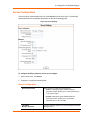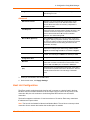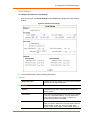
1
XPort Device Server User Guide Part Number 900-270 Revision P November 2014 Intellectual Property © 2014 Lantronix. All rights reserved. No part of the contents of this book may be transmitted or reproduced in any form or by any means without the written permission of Lantronix. Lantronix, DeviceLinx and XPort are registered trademarks of Lantronix. U.S. Patents 6,881,096; 7,018,242; 7,698,405; 8,010,789; 8,024,446; 8,219,661; 8,504,740; 8,788,814. Additional patents pending. Ethernet is a trademark of XEROX Corporation. UNIX is a registered trademark of The Open Group. Windows is a trademark of Microsoft Corp. Warranty For details on the Lantronix warranty policy, please go to our Web site at www.lantronix.com/support/warranty. Contacts Lantronix Corporate Headquarters 167 Technology Drive Irvine, CA 92618, USA Toll Free: 800-526-8766 Phone: 949-453-3990 Fax: 949-453-3995 Technical Support Online: www.lantronix.com/support Sales Offices For a current list of our domestic and international sales offices, go to the Lantronix web site at www.lantronix.com/about/contact Disclaimer All information contained herein is provided “AS IS.” Lantronix undertakes no obligation to update the information in this publication. Lantronix does not make, and specifically disclaims, all warranties of any kind (express, implied or otherwise) regarding title, noninfringement, fitness, quality, accuracy, completeness, usefulness, suitability or performance of the information provided herein. Lantronix shall have no liability whatsoever to any user for any damages, losses and causes of action (whether in contract or in tort or otherwise) in connection with the user’s access or usage of any of the information or content contained herein. The information and specifications contained in this document are subject to change without notice. Operation of this equipment in a residential area is likely to cause interference, in which case the user, at his or her own expense, will be required to take whatever measures may be required to correct the interference. Note: Changes or modifications to this device not explicitly approved by Lantronix will void the user's authority to operate this device. XPort® Device Server User Guide 2 Revision History Date Rev. Firmware Comments January 2007 A Initial release May 2007 B Added information about product support for RS485. August 2007 C Added XChip Direct information. November 2003 C Revised for version 1.6 of the firmware. April 2004 D Information to support XPort-03. August 2004 E Added XPort-485 functionality. Updated common settings for all models. October 2004 F Updates. March 2005 G Added reference documentation. January 2006 H 6.3 Revised for version 6.1 of the firmware. August 2007 I 6.5 Added XChip information. August 2008 J 6.6 Revised for version 6.6 of the firmware. September 2009 K June 2010 L 6.7 Minor technical corrections, Lantronix address updated; DeviceLinx and XPort trademark information updated. May 2012 M 6.8 Updated for 6.8 release. Added information for advanced password support and removed XChip information. February 2013 N 6.9.0.2 Updated part number and MAC address information. Updated Web Manager and DeviceInstaller content. August 2014 O 6.10.0.0 Updated for version 6.10 of the firmware. New monitor mode command to show full firmware release version. November 2014 P 6.10.0.1 New security settings command for 77FEh Access Mode. New monitor mode command to show flash write counts. Updated for XPort-04; removed XPort-01 references. For the latest revision of this product document, please check our online documentation at www.lantronix.com/support/documentation. If you use a previous version of the firmware, go to the Lantronix FTP site at ftp://ftp.lantronix.com/pub to find the earlier documentation. XPort® Device Server User Guide 3 Table of Contents Intellectual Property __________________________________________________ 2 Warranty ___________________________________________________________ 2 Contacts ___________________________________________________________ 2 Disclaimer __________________________________________________________ 2 Revision History _____________________________________________________ 3 List of Figures _______________________________________________________ 9 List of Tables _______________________________________________________ 9 1. Using This Guide 10 Purpose and Audience _______________________________________________ 10 Chapter Summary __________________________________________________ 10 Additional Documentation_____________________________________________ 11 2. Introduction 12 Capabilities ________________________________________________________ 12 Applications _______________________________________________________ 12 Protocol Support ____________________________________________________ 13 Configuration Methods _______________________________________________ 13 Addresses and Port Numbers _________________________________________ 13 Hardware Address _______________________________________________ 13 IP Address _____________________________________________________ 14 Port Numbers ___________________________________________________ 14 Product Information Label ____________________________________________ 14 3. Using DeviceInstaller 16 Installing DeviceInstaller ______________________________________________ 16 Assigning an IP Address _____________________________________________ 16 Accessing the XPort Module Using DeviceInstaller _________________________ 17 Viewing the Current Configuration ______________________________________ 17 4. Configuration Using Web Manager 20 Accessing Web Manager Using DeviceInstaller ___________________________ 20 Network Configuration _______________________________________________ 22 XPort® Device Server User Guide 4 Table of Contents Network Mode __________________________________________________ 22 Automatic IP Address Configuration _________________________________ 22 Static IP Address Configuration _____________________________________ 23 Ethernet Configuration ____________________________________________ 24 Server Configuration _________________________________________________ 25 Server Configuration _____________________________________________ 25 Advanced ______________________________________________________ 26 Host List Configuration _______________________________________________ 26 Retry Settings___________________________________________________ 27 Host Information _________________________________________________ 27 Channel 1 Configuration ______________________________________________ 27 Serial Settings __________________________________________________ 28 Connection Settings - UDP ________________________________________ 34 Email Configuration _________________________________________________ 35 Recipients _____________________________________________________ 36 Trigger Configuration _____________________________________________ 36 Conditions _____________________________________________________ 36 Message Properties ______________________________________________ 37 Configurable Pin Settings _____________________________________________ 37 Configurable Pin Functions ________________________________________ 38 Apply Settings ______________________________________________________ 38 Apply Defaults _____________________________________________________ 38 5. Configuration via Telnet or Serial Port (Setup Mode) 40 Accessing Setup Mode _______________________________________________ 40 Telnet Connection _______________________________________________ 40 Serial Port Connection ____________________________________________ 42 Exiting Setup Mode _________________________________________________ 42 6. Setup Mode: Server Configuration 43 Server Configuration (Option 0) ________________________________________ 43 IP Address ________________________________________________________ 43 Set Gateway IP Address _____________________________________________ 45 Netmask: Number of Bits for Host Part __________________________________ 45 Set DNS Server IP Address ___________________________________________ 45 Change Telnet/Web Manager Password _________________________________ 46 DHCP Name _______________________________________________________ 46 XPort® Device Server User Guide 5 Table of Contents Enable DHCP FQDN Option __________________________________________ 47 7. Setup Mode: Channel Configuration 48 Channel 1 (Option 1) ________________________________________________ 48 Baudrate __________________________________________________________ 48 I/F (Interface) Mode _________________________________________________ 50 RS-232 ________________________________________________________ 50 RS-485 2-Wire and RS-422 4-Wire __________________________________ 50 Flow _____________________________________________________________ 51 Port Number _______________________________________________________ 51 Connect Mode _____________________________________________________ 52 a) Incoming Connection ___________________________________________ 53 b) Response ____________________________________________________ 53 c) Active Startup _________________________________________________ 53 d) Datagram Type _______________________________________________ 56 e) Modem Mode _________________________________________________ 56 Send the Escape Sequence (+++) in Modem Mode ________________________ 58 Show IP addr after 'RING' ____________________________________________ 59 Auto Increment Source Port ___________________________________________ 59 Remote IP Address _________________________________________________ 59 Remote Port _______________________________________________________ 59 DisConnMode ______________________________________________________ 60 Flush Mode (Buffer Flushing) __________________________________________ 61 Pack Control _______________________________________________________ 61 Packing Interval _________________________________________________ 62 Trailing Characters _______________________________________________ 62 Send Characters ________________________________________________ 62 DisConnTime (Inactivity Timeout) ______________________________________ 63 Send Characters ____________________________________________________ 63 Telnet Terminal Type ________________________________________________ 63 Channel (Port) Password _____________________________________________ 63 8. Setup Mode: Advanced Settings 64 Email Settings (Option 3) _____________________________________________ 64 Mail Server _____________________________________________________ 65 Unit Name _____________________________________________________ 65 Domain Name __________________________________________________ 65 XPort® Device Server User Guide 6 Table of Contents Recipient 1 _____________________________________________________ 66 Recipient 2 _____________________________________________________ 66 Trigger 1 _______________________________________________________ 66 Trigger 2 _______________________________________________________ 67 Trigger 3 _______________________________________________________ 67 Expert Settings (Option 5) ____________________________________________ 67 TCP Keepalive time in seconds _____________________________________ 68 ARP Cache Timeout in Seconds ____________________________________ 68 CPU Performance _______________________________________________ 68 Disable Monitor Mode at bootup ____________________________________ 69 HTTP Port Number ______________________________________________ 69 SMTP Port Number ______________________________________________ 69 RS-485 TX Enable Active Level_____________________________________ 69 MTU Size ______________________________________________________ 69 TCP Re-transmission Timeout ______________________________________ 70 Enable alternate MAC ____________________________________________ 70 Ethernet Connection Type _________________________________________ 70 Security Settings (Option 6) ___________________________________________ 70 Disable SNMP __________________________________________________ 71 SNMP Community Name __________________________________________ 71 Disable Telnet Setup _____________________________________________ 71 Disable TFTP Firmware Upgrade ___________________________________ 71 Disable Port 77FE (Hex) __________________________________________ 71 77FEh Access Mode _____________________________________________ 72 Disable Web Server ______________________________________________ 72 Disable Web Setup ______________________________________________ 72 Disable ECHO Ports _____________________________________________ 72 Enable Encryption _______________________________________________ 72 Enable Enhanced Password _______________________________________ 74 Disable Port 77F0 (Hex) __________________________________________ 74 Default Settings (Option 7) ____________________________________________ 74 Channel 1 Configuration Defaults ___________________________________ 74 Expert Settings Defaults __________________________________________ 75 Security Settings Defaults _________________________________________ 75 Email Settings __________________________________________________ 76 XPort® Device Server User Guide 7 Table of Contents 9. GPIO Interface 77 Configurable Pins ___________________________________________________ 77 Features _______________________________________________________ 77 Control Protocol ____________________________________________________ 77 Guidelines _____________________________________________________ 78 Commands _____________________________________________________ 78 Examples _________________________________________________________ 81 10. Firmware Upgrades 82 Obtaining Firmware _________________________________________________ 82 Reloading Firmware _________________________________________________ 82 Using TFTP: Graphical User Interface ________________________________ 82 Using TFTP: Command Line Interface _______________________________ 83 Recovering the Firmware Using the Serial Port and DeviceInstaller _________ 84 11. Monitor Mode 85 Entering Monitor Mode Using the Serial Port ______________________________ 85 Entering Monitor Mode Using the Network Port ____________________________ 85 Monitor Mode Commands _________________________________________ 85 12. Troubleshooting 88 Problems and Error Messages _________________________________________ 88 A: Lantronix Technical Support 91 B: Binary to Hexadecimal Conversions 92 Converting Binary to Hexadecimal ______________________________________ 92 Conversion Table ________________________________________________ 92 Scientific Calculator ______________________________________________ 92 C: Compliance 94 RoHS Notice _______________________________________________________ 94 XPort® Device Server User Guide 8 List of Figures Figure 2-1. Product Label ________________________________________________ 15 Figure 4-1. Web Manager Login Window ____________________________________ 21 Figure 4-2. Lantronix Web Manager ________________________________________ 21 Figure 4-3. Network Settings _____________________________________________ 22 Figure 4-4. Server Settings _______________________________________________ 25 Figure 4-5. Hostlist Settings ______________________________________________ 27 Figure 4-6. Channel Serial Settings ________________________________________ 28 Figure 4-7. TCP Connection Settings _______________________________________ 31 Figure 4-8. UDP Connection Settings _______________________________________ 34 Figure 4-9. Email Settings ________________________________________________ 35 Figure 4-10. Email Trigger Settings ________________________________________ 36 Figure 4-11. Configurable Pins Settings _____________________________________ 37 Figure 4-12. Apply Settings and Apply Defaults _______________________________ 39 Figure 5-1. MAC Address ________________________________________________ 41 Figure 5-2. Setup Menu Options ___________________________________________ 41 Figure 7-1. Serial Port Parameters _________________________________________ 48 Figure 7-2. Apply Settings and Apply Defaults ________________________________ 55 Figure 8-1. Email Settings ________________________________________________ 64 Figure 8-2. Expert Settings _______________________________________________ 67 Figure 8-3. Security Settings ______________________________________________ 70 List of Tables Table 6-1. BootP/DHCP/AutoIP options _____________________________________ 43 Table 6-2. Standard IP Network Netmasks __________________________________ 45 Table 7-3. Interface Mode Options _________________________________________ 51 Table 7-4. Flow Control Options ___________________________________________ 51 Table 7-5. Reserved Port Numbers ________________________________________ 51 Table 7-6. Connect Mode Options _________________________________________ 52 Table 7-7. Manual Connection Address Example _____________________________ 54 Table 7-8. Modem Mode Messages ________________________________________ 56 Table 7-9. Modem Mode Commands _______________________________________ 58 Table 7-10. Disconnect Mode Options ______________________________________ 60 Table 7-11. Flush Mode Options ___________________________________________ 61 Table 7-12. Pack Control Options __________________________________________ 62 XPort® Device Server User Guide 9 1. Using This Guide Purpose and Audience This user guide covers these Lantronix® DeviceLinx® XPort® device server modules: Model XPort-03 Part Numbers XP1001000-03R XP1002000-03R XP100200S-03R XPort-04 XP1001000-04R XP1002000-04R XP100200S-04R XPort-05 XP1001000-05R XP1002000-05R XP100200S-05R It provides the information needed to configure, use, and update the XPort firmware and is intended for OEMs and system integrators who are embedding the XPort module in their end product designs. Chapter Summary The remaining chapters in this guide include: Chapter Description 2: Introduction Describes the main features of the XPort module and the protocols it supports. 3: Using DeviceInstaller Provides information for getting your unit up and running, using DeviceInstaller to assign an IP address. 4: Configuration Using Web Manager Details using the Web Manager to set parameters such as port and server properties. 5: Configuration via Telnet or Serial Port (Setup Mode) Provides instructions for accessing Setup Mode (command line interface) using a Telnet connection through the network or a terminal or terminal emulation program through the serial port. 6: Setup Mode: Server Configuration Details the network (server) settings 7: Setup Mode: Channel Configuration Details the serial port settings. 8: Setup Mode: Advanced Settings Details email, expert, and security settings and explains how to reset the unit to factory default values. XPort® Device Server User Guide 10 1: Using This Guide Chapter Description 9: GPIO Interface Provides instructions for configuring the three General Purpose I/O pins (CP1-3). 10: Firmware Upgrades Provides instructions for obtaining the latest firmware and updating the XPort module. 11: Monitor Mode Provides instructions for accessing and using the command line interface for monitoring the network and diagnosing problems. 12: Troubleshooting Describes common problems and error messages and how to contact Lantronix Technical Support. A: Lantronix Technical Support Provides contact information for Lantronix and other technical support options. B: Binary to Hexadecimal Conversions Provides instructions for converting binary numbers to hexadecimals. C: Compliance Provides RoHS compliance information. Additional Documentation Visit the Lantronix Web site at www.lantronix.com/support/documentation for the latest documentation and the following additional documentation. Document Description XPort Device Server Integration Guide Provides information about the XPort module hardware, testing the XPort device server using the demonstration board, and integrating the XPort device into your product. XPort Universal Demo Board Quick Start Provides the steps for getting the XPort module demonstration board up and running. XPort Universal Demo Board User Guide Provides information for using XPort module on the demo board. DeviceInstaller Online Help Provides information on using DeviceInstaller to configure IP addresses and locate Lantronix devices on the network. Com Port Redirector User Guide Provides information on using the Lantronix Windows-based utility to create secure virtual com port. XPort® Device Server User Guide 11 2. Introduction This chapter summarizes the XPort device server’s features and the basic information needed to get started. Capabilities The XPort device server has the following capabilities: Connects devices through a TCP data channel or through a Telnet connection to computers or to another device server. The XPort module also supports UDP datagrams. Contains a web [HTTP] server allowing presentation of custom content and easy configuration through a browser. Has three programmable I/O pins used to monitor or control attached devices. Applications The XPort device server connects serial devices such as those listed below to Ethernet networks using the IP protocol family. ATM machines CNC controllers Data collection devices Environmental sensors Universal Power Supply (UPS) management units Telecommunications equipment Data display devices Security alarms and access control devices Handheld instruments Modems Time/attendance clocks and terminals XPort® Device Server User Guide 12 2: Introduction Protocol Support The XPort device server uses the Internet Protocol (IP) for network communications. It uses the Transmission Control Protocol (TCP) to assure that no data is lost or duplicated, and that everything sent to the connection arrives correctly at the target. Supported protocols include: ARP, UDP, TCP, ICMP, Telnet, TFTP, AutoIP, DHCP, HTTP, and SNMP for network communications and management. TCP, UDP, and Telnet for connections to the serial port. TFTP for firmware and web page updates. IP for addressing, routing, and data block handling over the network. User Datagram Protocol (UDP) for typical datagram applications in which devices interact with other devices without maintaining a point-to-point connection. SMTP for email transmission. Configuration Methods For the unit to operate correctly on a network, it must have a unique IP address on the network. There are three basic methods for logging into the device server to assign an IP address and configure the unit: DeviceInstaller: Assign an IP address and view the current XPort module configuration using a Graphical User Interface (GUI) on a PC attached to a network. See 3 Using DeviceInstaller. Web Manager: Through a web interface, configure the XPort and its settings using the XPort module’s Web Manager. See 4 Configuration Using Web Manager Serial & Telnet Ports: There are two approaches to accessing Serial Mode. Make a Telnet connection to the network port (9999) or connect a terminal (or a PC running a terminal emulation program) to the unit’s serial port. See 5 Configuration via Telnet or Serial Port (Setup Mode). Addresses and Port Numbers Hardware Address You need to know the unit’s hardware address (also known as a MAC address). It is on the product label, in one of the following formats depending on the model of your XPort unit: Hardware Address for XPort-05: 00-80-A3-____-____-____ Hardware Address for XPort-03 and XPort-04: 00-20-4A-____-____-____ Note: Make note of the MAC address. It is needed to locate the XPort module using DeviceInstaller. XPort® Device Server User Guide 13 2: Introduction IP Address Every device connected to an IP network must have a unique IP address. This address is used to reference the specific unit. The XPort is automatically assigned an IP address on DHCP-enabled networks, as it is DHCP-enabled by default. Port Numbers Every TCP connection and every UDP datagram is defined by a destination IP address and a port number. For example, a Telnet application commonly uses port number 23. A port number is similar to an extension on a phone system. The unit's serial channel (port) can be associated with a specific TCP/UDP port number. Port number 9999 is reserved for access to the unit's Setup (configuration) Mode window. Ports 01024 are reserved as well. For more information on reserved port numbers, see to Table 7-5. Reserved Port Numbers on page 51. Product Information Label The product information label on the unit contains the following information about the specific unit: Part Number Revision Manufacturing Date Code Country of Origin Manufacturing Location ID MAC Address/Serial Number Barcode MAC Address/Serial Number* XPort® Device Server User Guide 14 2: Introduction Figure 2-1. Product Label MAC Address / Serial Number Barcode Part Number* Patent Country of Origin MAC Address/ Serial Number* Revision Date Code of Manufacturing Note: The Part Number* and MAC Address/Serial Number* on the product label will vary according the unit model (XPort-03, XPort-04 or XPort-05). XPort® Device Server User Guide 15 3. Using DeviceInstaller This chapter covers the steps for getting the XPort device server online and viewing its current configuration. Note: DeviceInstaller is a free utility program provided by Lantronix that discovers, configures, upgrades, and manages Lantronix Device Servers. It can be downloaded from the Lantronix website at www.lantronix.com/support/downloads. For instructions on using DeviceInstaller to configure the IP address and related settings or for more advanced features, see the DeviceInstaller Online Help. Installing DeviceInstaller To install DeviceInstaller: 1. Download the latest version of DeviceInstaller from http://www.lantronix.com/downloads. 2. Run the executable to start the installation process. 3. Respond to the installation wizard prompts. (If prompted to select an installation type, select Typical). Assigning an IP Address The unit’s IP address must be configured before it can work correctly on a network. You have several options for assigning an IP to your unit. We recommend that you manually assign the IP address over the network using DeviceInstaller. Note: To use a serial connection instead of an Ethernet connection to configure the device, see 5 Configuration via Telnet or Serial Port (Setup Mode) on page 42. The unit’s IP address is normally set to 0.0.0.0 at the factory. The hardware address is on the product label. The unit is DHCP enabled as the default. To assign an IP address manually: 1. Click StartAll ProgramsLantronixDeviceInstaller 4.3DeviceInstaller. If your PC has more than one network adapter, a message displays. Select an adapter and click OK. Note: If the unit already has an IP address (e.g., DHCP has assigned an IP address), click the Search icon and select the unit from the list of Lantronix device servers on the local network. 2. Click the Assign IP XPort® Device Server User Guide icon. 16 3: Using DeviceInstaller 3. If prompted, enter the hardware address (on the product label) and click Next. 4. Select Assign a specific IP address and click Next. 5. Enter the IP address. The Subnet mask displays automatically based on the IP address; if desired, you may change it. On a local network, you can leave the Default gateway blank (all zeros). Click Next. 6. Click the Assign button and wait several seconds until a confirmation message displays. Click Finish. 7. Select the device from the main window list and select Ping from the Tools menu. The Ping Device dialog box shows the IP address of the selected unit. 8. From the Tools menu, click the Ping button. The results display in the Status window. Click the Clear Status button to clear the window so you can ping the device again. Note: If you do not receive “Reply” messages, make sure the unit is properly attached to the network and that the IP address assigned is valid for the particular network segment you are working with. If you are not sure, check with your systems administrator. 9. Click the Close button to close the dialog box and return to the main window. Accessing the XPort Module Using DeviceInstaller 1. Click StartAll ProgramsLantronixDeviceInstaller 4.3DeviceInstaller. 2. Click the XPort folder. The list of available Lantronix XPort devices displays. 3. Expand the list of XPort modules by clicking the + symbol next to the XPort icon. Select the XPort unit by clicking on its IP address to view its configuration. Viewing the Current Configuration DeviceInstaller provides a view of the unit's configuration. To view the unit's current settings: 1. Follow the instructions above to locate the XPort module. 2. In the right pane, click the Device Details tab. The current XPort device configuration displays: Name Configurable field. A name that identifies the XPort module. Double-click the field, type in the value, and press Enter to complete. This name is not visible on other PCs or laptops using DeviceInstaller. XPort® Device Server User Guide 17 3: Using DeviceInstaller DHCP Device Name Non-configurable field. Displays the name associated with XPort module’s current IP address, if the IP address was obtained dynamically. To change the DHCP device name, see Configuration Using Web Manager or Configuration via Telnet or Serial Port (Setup Mode). Group Configurable field. A group name to categorize the XPort device server. Double-click the field, type in the value, and press Enter to complete. This group name is not visible on other PCs or laptops using DeviceInstaller. Comments Configurable field. Information about the XPort module. Double-click the field, type in the value, and press Enter to complete. This description or comment is not visible on other PCs or laptops using DeviceInstaller. Device Family Non-configurable field. Displays the XPort module’s device family as XPort device server. Type Non-configurable field. Displays the device type as XPort-03/04 or XPort-05 device servers. ID Non-configurable field. Displays the XPort module’s ID embedded within the box. Hardware Address Non-configurable field. Displays the XPort unit’s hardware (or MAC) address. Firmware Version Non-configurable field. Displays the firmware currently installed on the XPort module. Extended Firmware Version Non-configurable field. Displays the full version nomenclature of the firmware. Online Status Non-configurable field. Displays the XPort device’s status as online, offline, unreachable (the XPort module is on a different subnet), or busy (the XPort device server is currently performing a task). IP Address Non-configurable field. Displays the XPort module’s current IP address. To change the IP address, see Assigning an IP Address on page 16. IP Address was Obtained Displays “Dynamically” if the XPort module automatically received an IP address (e.g., from DHCP). Displays “Statically” if the IP address was configured manually. If the IP address was assigned dynamically, the following fields appear: Obtain via DHCP with value of True or False. Obtain via BOOTP with value of True or False. Obtain via RARP with value of True or False Obtain via Auto IP with value of True or False XPort® Device Server User Guide 18 3: Using DeviceInstaller Subnet Mask Non-configurable field. Displays the XPort module’s current subnet mask. To change the subnet mask, see Assigning an IP Address on page 16. Gateway Non-configurable field. Displays the XPort device’s current gateway. To change the gateway, see Assigning an IP Address on page 16. Number of COB partitions supported Non-configurable field. Displays the number of COB partitions supported. Number of Ports Non-configurable field. Displays the number of ports on the XPort module. TCP Keepalive Non-configurable field. Displays 1-65s, the XPort device server’s TCP keepalive value. The default setting is 45. Telnet Supported Non-configurable field. Indicates if Telnet sessions. Telnet Port Non-configurable field. Displays the XPort module’s port for Telnet sessions. Web Port Non-configurable field. Displays the XPort device server’s port for Web Manager configuration. Maximum Baud Rate Supported Non-configurable field. Displays the XPort module’s maximum baud rate. Note: the XPort unit may not currently be running at this rate. Firmware Upgradeable Non-configurable field. Displays True, indicating the XPort module’s firmware is upgradeable as newer version become available. Supports Configurable Pins Non-configurable field. Displays True, indicating configurable pins are available on the XPort device server. Supports Email Triggers Non-configurable field. Displays True, indicating email triggers are available on the XPort module. Supports AES Data Stream Non-configurable field. Displays True, if the XPort unit (certain part numbers) supports AES encryption. Supports 485 Non-configurable field. Displays True. XPort module supports the RS-485 protocol. Supports 921K Baud Rate Non-configurable field. Displays True. XPort device server supports baud rates up to 921600 bits per second (bps). Supports HTTP Server Non-configurable field. Displays True. Supports HTTP Setup Non-configurable field. Displays True. Supports 230K Baud Rate Non-configurable field. Displays True. Supports GPIO Non-configurable field. Displays True, indicating the XPort module supports General Purpose Input Output (GPIO). XPort® Device Server User Guide 19 4. Configuration Using Web Manager You must configure the unit so that it can communicate on a network with your serial device. For example, you must set the way the unit will respond to serial and network traffic, how it will handle serial packets, and when to start or close a connection. The unit’s configuration is stored in nonvolatile memory and is retained without power. You can change the configuration at any time. The unit performs a reset after you change and store the configuration. In this chapter, we describe how to configure the XPort device server using Web Manager, Lantronix’s browser-based configuration tool. (For information on using Setup Mode, our command line configuration interface, see 5 Configuration via Telnet or Serial Port (Setup Mode). Note: The examples in this section show a typical device. Your device may have different configuration options. Accessing Web Manager Using DeviceInstaller Note: For more information on DeviceInstaller, see 3 Using DeviceInstaller. 1. Run DeviceInstaller and search for the list of available Lantronix device servers. 2. Click on the XPort folder. The list of available XPort modules displays. 3. Expand the list of XPort device servers by clicking the + symbol next to the XPort icon. 4. Select the XPort unit by clicking its hardware address. 5. In the right pane, click the Web Configuration tab. 6. To view the XPort module’s Web Manager in the current DeviceInstaller window, click the Go button. To open the Web Manager in a web browser, click the External Browser button. Note: Alternatively, to open Web Manager, open your web browser and enter the IP address of the XPort device server. (With firmware 1.8 or earlier, your browser must be JAVA-enabled to use Web Manager. (With firmware 6.1.0.0 and later, your web browser does not need to be JAVA-enabled.) A dialog box appears to prompt for a User name and Password. XPort® Device Server User Guide 20 4: Configuration Using Web Manager Figure 4-1. Web Manager Login Window 7. Perform one of the following: If no Telnet password has been defined (default), leave both fields blank and click OK. If a Telnet password has been defined, leave the username blank, type in the password, and then click OK. The Web Manager displays. Figure 4-2. Lantronix Web Manager The main menu is in the left pane of the Web Manager window. XPort® Device Server User Guide 21 4: Configuration Using Web Manager Network Configuration The unit’s network values display when you select Network from the main menu. The following sections describe the configurable parameters on the Network Settings page. Figure 4-3. Network Settings Network Mode 1. Click Network from the main menu. 2. Note the following: Network Mode Wired Only is the only choice. It enables the Ethernet network connectivity. Automatic IP Address Configuration An IP address can be assigned automatically. You then enter related network settings. To assign an IP address automatically: 1. On the main menu, click Network. 2. Select Obtain IP address automatically. XPort® Device Server User Guide 22 4: Configuration Using Web Manager 3. Enter the following (as necessary): BOOTP Select Enable to permit the Bootstrap Protocol (BOOTP). server to assign the IP address from a pool of addresses automatically. Enable is the default. DHCP Select Enable to permit the Dynamic Host Configuration Protocol (DHCP) to assign a leased IP address to the XPort unit automatically. Enable is the default. AutoIP Select Enable to permit the XPort module to generate an IP in the 169.254.x.x address range with a Class B subnet. Enable is the default. DHCP Host Name Enter the desired host name for the XPort unit. Note: Disabling BOOTP, DHCP, and AutoIP (all three checkboxes) is not advised as the only available IP assignment method will then be ARP or serial port. 4. When you are finished, click the OK button. 5. On the main menu, click Apply Settings. Static IP Address Configuration You manually assign an IP address to the unit and enter related network settings. To assign an IP address manually: 1. On the main menu, click Network. 2. Select Use the following IP configuration. 3. Enter the following (as necessary): IP Address If DHCP is not used to assign IP addresses, enter it manually in decimal-dot notation. The IP address must be set to a unique value in the network. Subnet Mask A subnet mask defines the number of bits taken from the IP address that are assigned for the host part. Default Gateway The gateway address, or router, allows communication to other LAN segments. The gateway address should be the IP address of the router connected to the same LAN segment as the unit. The gateway address must be within the local network. DNS Server The DNS server allows the name of a remote machine to be resolved automatically. Enter the IP address of the DNS server. If the device is DHCP enabled, the DHCP server provides the DNS server IP address, which will override this configured value. Note: This setting is applicable only in Manual Connection mode. 4. When you are finished, click the OK button. 5. On the main menu, click Apply Settings. XPort® Device Server User Guide 23 4: Configuration Using Web Manager Ethernet Configuration You must specify the speed and direction of data transmission. To specify how data will be transmitted: 1. On the main menu, click Network. 2. Enter the following (as necessary): Auto Negotiate With this option, the Ethernet port auto-negotiates the speed and duplex with the hardware endpoint to which it is connected. This is the default. If this option is not selected, the complete the fields that become available: Speed: The speed of data transmission. The default is 100 Mbps. Duplex: The direction of data transmission. The default is Full. 3. When you are finished, click the OK button. 4. On the main menu, click Apply Settings. XPort® Device Server User Guide 24 4: Configuration Using Web Manager Server Configuration The unit’s server values display when you select Server from the main menu. The following sections describe the configurable parameters on the Server Settings page. Figure 4-4. Server Settings To configure the XPort module’s device server settings: 1. On the main menu, click Server. 2. Configure or modify the following fields: Server Configuration Enhanced Password Select whether to enable enhanced password: Enable: selecting this option enables advanced password creation, allowing you to create passwords up to 16 bytes in length. Disable: selecting this option disables advanced password creation, allowing you to create basic passwords up to 4 bytes in length. Telnet/Web Manager Password XPort® Device Server User Guide Enter the password required for Telnet configuration and Web Manager access. 25 4: Configuration Using Web Manager Retype Password Re-enter the password required for Telnet configuration and Web Manager access. Advanced ARP Cache Timeout When the unit communicates with another device on the network, it adds an entry into its ARP table. ARP Cache timeout defines the number of seconds (1-600) before it refreshes this table. TCP Keepalive TCP Keepalive time defines how many seconds the unit waits during an inactive connection before checking its status. If the unit does not receive a response, it drops that connection. Enter a value between 0 and 60 seconds. 0 disables keepalive. The default setting is 45. Monitor Mode @ Bootup Select Disable to disable entry into the monitor mode using the 'yyy' or 'xx1' key sequence at startup. This field prevents the unit from entering monitor mode by interpreting the stream of characters that are received during the device server's initialization at startup. CPU Performance Mode Select the XPort device server’s performance mode. Higher performance settings require more energy. Low is 26 MHz; Regular is 48 MHz; High is 88 MHz. The default is Regular. HTTP Server Port This option allows the configuration of the web server port number. The valid range is 1-65535. The default port is 80. Config Server Port Not applicable for this product. MTU Size The Maximum Transmission Unit (MTU) is the largest physical packet size a network can transmit for TCP and UDP. Enter between 512 and 1400 bytes. The default is 1400 bytes. TCP Re-transmission timeout (ms) The desired TCP re-transmission timeout value. If the ACK is not received for a packet sent from the XPort device, then the unit will retransmit the data. The valid range is 500-4000 msec. 3. When you are finished, click the OK button. 4. On the main menu, click Apply Settings. Host List Configuration The XPort module scrolls through the host list until it connects to a device listed in the host list table. After a successful connection, the unit stops trying to connect to any others. If this connection fails, the unit continues to scroll through the table until the next successful connection. The host list supports a minimum of 1 and a maximum of 12 entries. Each entry contains an IP address and a port number. Note: The host list is disabled for Manual and Modem Mode. The unit does not accept a data connection from a remote device when the hostlist option is enabled. XPort® Device Server User Guide 26 4: Configuration Using Web Manager To configure the XPort module’s host list: 1. On the main menu, click Hostlist. Figure 4-5. Hostlist Settings 2. Enter or modify the following fields: Retry Settings Retry Counter Enter the value for the number of times the XPort device server should attempt to retry connecting to the host list. Retry Timeout Enter the duration (in milliseconds) the XPort unit should abandon attempting a connection to the host list. Host Information Host Address Enter or modify the host’s IP address. Port Enter the target port number. 3. When you are finished, click the OK button. 4. On the main menu, click Apply Settings. Channel 1 Configuration The Channel 1 configuration defines how the serial port responds to network and serial communication. XPort® Device Server User Guide 27 4: Configuration Using Web Manager Serial Settings To configure the channel’s serial settings: 1. On the main menu, click Serial Settings (under Channel 1) to display the Serial Settings window. Figure 4-6. Channel Serial Settings 2. In the available fields, enter the following information: Channel 1 Disable Serial Port Available on Channel 2 settings only. When selected, disables communication through the serial port. Port Settings Protocol From the drop-down menu, select the protocol type for the selected channel. Flow Control Flow control manages data flow between devices in a network to ensure it is processed efficiently. Too much data arriving before a device is prepared to manage it causes lost or retransmitted data. None is the default. Baud Rate The unit and attached serial device, such as a modem, must agree on a speed or baud rate to use for the serial connection. Valid baud rates are 300, 600, 1200, 2400, 4800, 9600 (default), 19200, 38400, 57600, 115200, 230400, 460800, or XPort® Device Server User Guide 28 4: Configuration Using Web Manager 921600. Note: Baud rates 460800 and 921600 are available for selection only when CPU performance mode is set to High." Data Bits Indicates the number of bits in a transmitted data package. The default is 8. Parity Checks for the parity bit. The default is None. Stop Bits The stop bit follows the data and parity bits in serial communication. It indicates the end of transmission. The default is 1. Pack Control Enable Packing Select to enable packing on the XPort module. Two firmware-selectable packing algorithms define how and when packets are sent to the network. The standard algorithm is optimized for applications in which the unit is used in a local environment, allowing for very small delays for single characters, while keeping the packet count low. The alternate packing algorithm minimizes the packet count on the network and is especially useful in applications in a routed Wide Area Network (WAN). Adjusting parameters in this mode can economize the network data stream. Disabled by default. Idle Gap Time Select the maximum time for inactivity. The default time is 12 milliseconds. Match 2 Byte Sequence Use to indicate the end of a series of data to be sent as one group. The sequence must occur sequentially to indicate end of the data collection to the XPort device services. The default is No. Match Bytes Use to indicate the end of a series of data to be sent as one group. Set this value to 00 if specific functions are not needed. Send Frame Immediate After the detection of the byte sequence, indicates whether to send the data frame or the entire buffer. Select Yes to send only the data frame. The default setting is No. Send Trailing Bytes Select the number of bytes to send after the end-of-sequence characters. The default is None. Flush Input Buffer (Serial to Network) With Active Connect Select Yes to clear the input buffer with a connection that is initiated from the device to the network. The default is No. With Passive Connect Select Yes to clear the input buffer with a connection initiated from the network to the device. The default is No. At Time of Disconnect Select Yes to clear the input buffer when the network connection to or from the device is disconnected. The default is No. XPort® Device Server User Guide 29 4: Configuration Using Web Manager Flush Output Buffer (Network to Serial) With Active Connect Select Yes to clear the output buffer with a connection that is initiated from the device to the network. The default is No. With Passive Connect Select Yes to clear the output buffer with a connection initiated from the network to the device. The default is No. At Time of Disconnect Select Yes to clear the output buffer when the network connection to or from the device is disconnected. The default is No. 3. When you are finished, click the OK button. 4. On the main menu, click Apply Settings. Connection Settings - TCP To configure a channel’s TCP settings: 1. On the main menu, click Connection. The Connection Settings window for the channel displays. XPort® Device Server User Guide 30 4: Configuration Using Web Manager Figure 4-7. TCP Connection Settings XPort® Device Server User Guide 31 4: Configuration Using Web Manager 2. In the available fields, enter or modify the following information: Connect Protocol Protocol From the drop-down menu, select TCP. Connect Mode: Passive Connection Accept Incoming Select Yes to accept incoming connections. The default is Yes. Required Determines whether a password is required for an incoming passive connection. This field is not available when a password is set for Telnet mode. Password If Password Required was set to Yes, enter the password for passive connections. Connect Mode: Active Connection Active Connect Select None to disable Active Connect. Otherwise, indicate the connection type from the drop-down list: With Any Character: Attempts to connect when any character is received from the serial port. With Active Mdm Ctrl In: Accepts external connection requests only when the Modem Control In input is asserted. With Start Character: Attempts to connect when it receives a specific start character from the serial port. The default start character is carriage return. Manual Connection: Attempts to connect when directed by a command string received from the serial port. Auto Start: Automatically connects to the remote IP address and port after booting up. Start Character If Active Connect is set to With Start Character, enter the start character in this field. Modem Mode Indicates the on-screen response type when in Modem Mode (if Modem Mode is enabled). Show IP Address After Ring Indicates whether to display the remote IP address upon connection. The default setting is Yes. Endpoint Configuration Local Port Enter the local port number. Auto increment for active connect Select to auto-increment the local port number for new outgoing connections. The range of auto-incremented port numbers is 50,000 to 59,999 and loops back to the beginning when the maximum range is reached. Remote Port Enter the remote port number. Remote Host Enter the IP address of the remote device. XPort® Device Server User Guide 32 4: Configuration Using Web Manager Common Options Telnet Com Port Cntrl This field is available for configuration only when Active Connect is set to None. Select Enable to permit Telnet communication to the unit. The Telnet Com Port Cntrl feature is used in conjunction with the Com Port Redirector (CPR) utility. (See the CPR online Help for details.) Terminal Name This field is available for configuration only when Telnet Mode is set to Enable. Use the terminal name for the Telnet terminal type. Enter only one name. When this option is enabled, the unit also reacts to the end of record (EOR) and binary options, which can be used for applications such as terminal emulation to IBM hosts. Connect Response A single character is transmitted to the serial port when there is a change in connection state. Default setting is None. Use Hostlist If this option is set to True, the device server scrolls through the host list until it connects to a device listed in the host list table. Once it connects, the unit stops trying to connect to any others. If this connection fails, the unit continues to scroll through the table until it connects to another IP in the host list. The host list is disabled for Manual Mode and for Modem Mode. The unit will not accept a data connection from a remote device when the host list option is enabled. LED Select Blink for the status LEDs to blink upon connection or None for no LED output. Disconnect Mode On Mdm_Ctrl_In Drop Set to Yes for the network connection to or from the serial port to disconnect (drop) when Modem Control In transitions from an asserted state to not asserted state. The default setting is No. Hard Disconnect When set to Yes, the TCP connection closes even if the remote site does not acknowledge the disconnect request. Check EOT (Ctrl-D) Select Yes to drop the connection when Ctrl-D or Hex 04 is detected. Both Telnet Com Port Cntrl and Check EOT (Ctrl+ D) must be enabled for Disconnect with EOT to function properly. Ctrl+D is only detected going from the serial port to the network. The default setting is No. Inactivity Timeout Use this parameter to set an inactivity timeout. The unit drops the TCP connection to port 10001 if there is no activity on the serial line before the set time expires. Enter time in the format mm:ss, where m is the number of minutes and s is the number of seconds. To disable the inactivity timeout, enter 00:00. Note: The default port number for Port 1 is 10001 and 10002 for Port 2. However, port numbers may be set to a different value 3. When you are finished, click the OK button. 4. On the main menu, click Apply Settings. XPort® Device Server User Guide 33 4: Configuration Using Web Manager Connection Settings - UDP To configure a channel’s UDP settings: 1. On the main menu, click Connection. The Connection Settings window for the selected channel displays. 2. In the available fields, enter or modify the following information: Figure 4-8. UDP Connection Settings Connect Protocol Protocol Select UDP from the drop-down menu. Datagram Mode Datagram Type Configures the remote IP or network broadcast address and the remote port. Enter 01 for directed or broadcast UDP. The default setting is 00. Accept Incoming Select Yes to accept incoming UDP datagrams. Endpoint Configuration Local Port Enter the local port number. Remote Port Enter the port number of the remote device. Remote Host Enter the IP address of the remote device. Use Broadcast Select to broadcast the UDP datagram. The default is not to XPort® Device Server User Guide 34 4: Configuration Using Web Manager broadcast. Note: Datagrams are sent as subnet-directed broadcasts. Device Address Table The table is enabled when Datagram Type is set to FD. Enter values between 1 and 255 to identify units on the local network of device servers. Note: Lantronix Tech Support supports Datagram type 01. Datagram Type FD is for OEM use. 3. When you are finished, click the OK button. 4. On the main menu, click Apply Settings. Email Configuration The unit sends an email to multiple recipients when a specific trigger event occurs. There are three separate triggers, based on any combination of the configurable pins selected as user I/O functions. Optionally, use a two-byte serial string to initiate a trigger. Each trigger is independent of the others. Each condition within an individual trigger must be met before the unit will send the email. To configure the XPort module’s email settings: 1. On the main menu, select Email. The Email Settings window opens. Figure 4-9. Email Settings 2. Configure the following fields: Server IP Address Enter the IP address of the mail server. Server Port Enter the port number on the email server. Domain Name Enter the email server’s domain name. Unit Name Enter the user name used by the XPort unit to send email XPort® Device Server User Guide 35 4: Configuration Using Web Manager messages. Spaces are not permitted. Recipients Recipient 1: Email Address Enter the email address designated to receive email notifications. Recipient 2: Email Address Enter an additional email address designated to receive email notifications. 3. When you are finished, click the OK button. 4. On the main menu, click Apply Settings. Trigger Configuration A trigger event occurs when the unit receives the specified trigger input resulting from a specified combination of conditions on the configurable pins. Set the configurable pins to Active, Inactive, or None. The configurable pins are disabled if they are all set to None. If both the serial sequence and the configurable pins are disabled, the trigger is disabled. To configure the XPort module’s email trigger settings: 1. On the main menu, click Trigger 1, Trigger 2, or Trigger 3 to configure the desired trigger settings. The Email Trigger Settings page opens. Figure 4-10. Email Trigger Settings 2. Configure or modify the following fields: Conditions Configurable Pins XPort® Device Server User Guide Select the condition from the drop-down menu for the 36 4: Configuration Using Web Manager configurable pins. Repeat for each Trigger Input field. Enable Serial Trigger Input Enabling this option causes specified serial communications to count as a trigger input. Channel Select the channel prompting the trigger. For the XPort device server, there is only one channel. Data Size Select the data size prompting the trigger. Match Data Enter the data, which, when it appears in the communication stream, prompts a trigger. Note: All of the conditions must match for the XPort module to send an email notification. Message Properties Message The subject line of the trigger event email to the specified recipient(s). Priority The priority level for the email. Min. Notification Interval The minimum time allowed between individual triggers. If a trigger event occurs within the minimum interval since the last trigger, it is ignored. Re-notification Interval The time interval in which a new email message is sent to the recipient(s) when a single trigger event remains active. 3. When you are finished, click the OK button. 4. On the main menu, click Apply Settings. Configurable Pin Settings There are three configurable hardware pins on the XPort unit. For each pin, configure the pin function, communication direction, and activity level. For more information, see 9 GPIO Interface. To configure the XPort module’s Configurable Pins: 1. On the main menu, click Configurable Pins. The Configurable Pins page opens. Figure 4-11. Configurable Pins Settings XPort® Device Server User Guide 37 4: Configuration Using Web Manager 2. Configure or modify the following fields for each pin: Function From the drop-down menu, select the purpose of the specified pin. See Configurable Pin Functions (below) for a description of each available function. Direction Select whether the pin functions as an input or output. Active Level Select the signal active level (Low or High). Configurable Pin Functions General Purpose I/O Monitors input using the 77F0 port or controls output by the 77F0 port. HW Flow Control Out Allows for flow control on the connection with hardware handshaking. HW Flow Control In Allows for flow control on the connection with hardware handshaking. Status LED 1 Indicates channel 1 status and extended diagnostics when status LED 3 is lit. Status LED 3 Indicates errors and configurations. Modem Control In Allows for control of the connection (and disconnection) of channel 1. Modem Control Out (DCD) Indicates a connection is established on channel 1. Link Status Indicates the Ethernet link state. RS485 Tx Enable Allows for control of the RS485 Tx Output Enable signal. This function must be mapped to one of the CPs for the RS485 interface mode to operate correctly. 3. When you are finished, click the OK button. 4. On the main menu, click Apply Settings. Apply Settings 1. To save and apply the configuration changes to the device server, click the Apply Settings button. Note: Clicking OK on each page does not change the configuration on the device. Clicking the OK button tells the XPort module what changes to use; the Apply Settings button makes the changes permanent and reboots the XPort device server. Apply Defaults 1. Click the Apply Defaults button to set the device server back to the default settings. For details see Default Settings on page 74. XPort® Device Server User Guide 38 4: Configuration Using Web Manager 2. Click Yes to set factory settings or click No to cancel. Figure 4-12. Apply Settings and Apply Defaults XPort® Device Server User Guide 39 5. Configuration via Telnet or Serial Port (Setup Mode) You must configure the unit so that it can communicate on a network with your serial device. As an alternative to using a web browser, as described in the previous chapter, you can use the following procedures remotely or locally: Use a Telnet connection to configure the unit over the network. Use a terminal or terminal emulation program to access the serial port locally. The series of prompts at which you enter configuration settings is called Setup Mode. Note: Detailed information about other setup methods is available from your Lantronix Sales Associate. The unit’s configuration is stored in nonvolatile memory and is retained without power. You can change the configuration at any time. The unit performs a reset after the configuration has been changed and stored. This chapter tells you how to access Setup Mode and the general procedure for using it. To complete the configuration, continue with 6 Setup Mode: Server Configuration, 7 Setup Mode: Channel Configuration, and 8 Setup Mode: Advanced Settings. Note: The menus in the configuration chapters show a typical device. Your device may have different configuration options. Accessing Setup Mode Telnet Connection To configure the unit over the network, establish a Telnet connection to port 9999. Note: You can also use DeviceInstaller to access Telnet. Select the device from the main window list, and click the Telnet Configuration tab. Skip steps 1 and 2. XPort® Device Server User Guide 40 5: Configuration via Telnet or Serial Port (Setup Mode) To establish a Telnet connection: 1. From the Windows Start menu, click Run and type the following command, where x.x.x.x is the IP address, and 9999 is the unit’s fixed network configuration port number: Windows: telnet x.x.x.x 9999 UNIX: telnet x.x.x.x:9999 2. Click OK. The following information displays. Figure 5-1. MAC Address MAC address 0080A394616D Software version V6.10.0.0RC3 (140317) XPTEXE AES library version 1.8.2.1 Press Enter for Setup Mode 3. To enter Setup Mode, press Enter within 5 seconds. The configuration settings display, followed by the Change Setup menu. Figure 5-2. Setup Menu Options Change Setup: 0 Server 1 Channel 1 3 E-mail 5 Expert 6 Security 7 Defaults 8 Exit without save 9 Save and exit Your choice? _ 4. Select an option on the menu by entering the number of the option in the Your choice ? field and pressing Enter. 5. To enter a value for a parameter, type the value and press Enter, or to confirm a current value, just press Enter. 6. When you are finished, save the new configuration (option 9). The unit reboots. XPort® Device Server User Guide 41 5: Configuration via Telnet or Serial Port (Setup Mode) Serial Port Connection To configure the unit through a serial connection: 1. Connect a console terminal or PC running a terminal emulation program to your unit's serial port. 2. Set the terminal emulator serial port settings to 9600 baud, 8 bits, no parity, 1 stop bit, no flow control. Note: The XPort module always uses these serial port settings on boot-up. 3. Reset the XPort unit by cycling the unit's power (turning the power off and back on). Immediately upon resetting the device, enter three lowercase x characters (xxx). Note: The easiest way to enter Setup Mode is to hold down the x key at the terminal (or emulation) while resetting the unit. You must do this within three seconds of resetting the XPort module. At this point, the screen display is the same as when you use a Telnet connection. To continue, go to step 4, above, in the section Telnet Connection Exiting Setup Mode To exit setup mode: You have two options: To save all changes and reboot the device, select option 9 Save and exit from the Change Setup menu. All values are stored in nonvolatile memory. To exit the configuration mode without saving any changes or rebooting, select option 8 Exit without save from the Change Setup menu. XPort® Device Server User Guide 42 6. Setup Mode: Server Configuration This chapter explains how to configure the network settings. Note: Current values appear in parentheses. Server Configuration (Option 0) The unit’s basic network parameters display when you select Server configuration (option 0). The IP Address, Set Gateway IP Address, and Netmask fields display the current values. IP Address : (000) .(000) .(000) .(000) Set Gateway IP Address (N) ? Netmask: Number of Bits for Host Part (0=default) (0) Set DNS Server IP addr (N) ? Change Telnet/Web Manager password (N) ? Change DHCP device name (not set) ? (N) ? Enable DHCP FQDN option : (N) ? IP Address If DHCP is not used to assign IP addresses, enter the IP address manually. The IP address must be set to a unique value in the network. Enter each octet and press Enter between each section. The current value displays in parentheses. IP Address : ( 0) ( 0) ( 0) ( 0) _ If DHCP is used, the third octet of the IP address sets the BootP/DHCP/AutoIP options. The following table shows the bits you can manually configure to force the XPort module to disable AutoIP, DHCP, or BootP. To disable an option, set the appropriate bit. Table 6-1. BootP/DHCP/AutoIP options Options XPort® Device Server User Guide Bit AutoIP 0 DHCP 1 BootP 2 43 6: Setup Mode: Server Configuration For example, if the third octet is 0.0.5.0, the AutoIP and BootP options are disabled; only DHCP is enabled. (The value 5 results from adding the binary equivalents of 0 and 2.) This is the most common setting when using DHCP. XPort® Device Server User Guide 44 6: Setup Mode: Server Configuration Set Gateway IP Address The gateway address, or router, allows communication to other LAN segments. The gateway address should be the IP address of the router connected to the same LAN segment as the unit. The gateway address must be within the local network. The default is N (No), meaning the gateway address has not been set. To set the gateway address, type Y and enter the address. Set Gateway IP Address (N) ? Y Gateway IP addr ( 0) ( 0) ( 0) ( 0)_ Netmask: Number of Bits for Host Part A netmask defines the number of bits taken from the IP address that are assigned for the host part. Netmask: Number of Bits for Host Part (0=default) (0) _ Note: Class A: 24 bits; Class B: 16 bits; Class C: 8 bits The unit prompts for the number of host bits to be entered, then calculates the netmask, which appears in standard decimal-dot notation (for example, 255.255.255.0) when the saved parameters display. Table 6-2. Standard IP Network Netmasks Network Class Host Bits Netmask A 24 255.0.0.0 B 16 255.255.0.0 C 8 255.255.255.0 Set DNS Server IP Address The DNS server allows the name of a remote machine to be resolved automatically. The default is N (No), indicating the DNS server address has not been set. To set the DNS server address, type Y. At the prompt, enter the DNS server address. If the device is DHCP enabled, the DHCP server provides the DNS server IP address, which will override this configured value. Note: This setting is applicable only in Manual Connection mode. Set DNS Server IP addr (N) ? _ XPort® Device Server User Guide 45 6: Setup Mode: Server Configuration Change Telnet/Web Manager Password Setting the Telnet/Web Manager password prevents unauthorized access to the setup menu through a Telnet connection to port 9999 or through web pages. The password must have 4 characters. Change Telnet/Web Manager password (N) ? _ An enhanced password setting (for Telnet access only) of 16 characters is available under Security Settings (Option 6) on page 70. Note: You do not need a password to access the Setup Mode window by a serial connection. DHCP Name If a DHCP server has automatically assigned the IP address and network settings, you can discover the unit by using the DeviceInstaller network search feature. There are three methods for assigning DHCP names to the unit. Default DHCP Name: If you do not change the DHCP name, and you are using an IP of 0.0.0.0, then the DHCP name defaults to CXXXXXX (XXXXXX is the last 6 digits of the MAC address shown on the label on the bottom/side of the unit). For example, if the MAC address is 00-20-4A-12-34-56, then the default DHCP name is C123456. In other words, if you do nothing and leave the IP address set to 0.0.0.0, the UDS1100 will supply the DHCP name Cxxxxxx to the DHCP server, where xxxxxx is the last 6 digits of the MAC address. Custom DHCP Name: You can create your own DHCP name. If you are using an IP address of 0.0.0.0, then the last option in Server configuration is Change DHCP device name. This option allows you to change the DHCP name to an alphanumeric name (LTX in our example). For instance, if you type a 'Y' when asked if you want to change the DHCP name, you will be prompted for a new DHCP name. The example uses "LTX" as the DHCP name sent to the DHCP server, but you can type in anything you want, e.g. "Test_Lab", "Accounting", "Radiology" or any other string you want to use. Change DHCP device name (not set) ? (N) Y Enter new DHCP device name : LTX Numeric DHCP Name: You can change the DHCP name by specifying the last octet of the IP address. When you use this method, the DHCP name is LTXYY where YY is what you chose for the last octet of the IP address. If the IP address you specify is 0.0.0.12, then the DHCP name is LTX12. This method only works with 2 digit numbers (01-99). For instance, if you specify a two digit number for the last octet of the IP address, leaving the first three octets set to 0, then the DHCP name will be the name you provided with that number appended. I.e. if you specify IP address 0.0.0.43 and change the DHCP name to "Test_Lab" the name the UDS1100 sends to the DHCP server will be "Test_Lab43". Note that this has no effect on the IP address assigned to the UDS1100 by the DHCP server, it is only a method to add a two-digit number to the DHCP name specified. XPort® Device Server User Guide 46 6: Setup Mode: Server Configuration If the DHCP server is configured to work with a DDNS (Dynamic Domain Name Server) then the DHCP name supplied by the UDS1100 can also be used as a DNS host name on your network. Enable DHCP FQDN Option A fully qualified domain name (FQDN) is the complete domain name for your device in network. The FQDN consists of two parts, the hostname and the domain name. For example, an FQDN for your device might be myxport.lantronix.com. The hostname is myxport, and the host is located within the domain lantronix.com. The option to enable DHCP FQDN becomes available if DHCP is enabled. Enable DHCP FQDN option : XPort® Device Server User Guide (N) ? 47 7. Setup Mode: Channel Configuration This chapter explains how to configure the serial port. Channel 1 (Option 1) Select Channel 1 (option 1) from the Change Setup menu to define how the serial port responds to network and serial communications. The following sections describe the configurable parameters within the Channel configuration menu. Figure 7-1. Serial Port Parameters Baudrate (9600) ? I/F Mode (4C) ? Flow (00) ? Port No (10001) ? ConnectMode (C0) ? Send '+++' in Modem Mode Show IP addr after 'RING' (Y) ? Auto increment source port (Y) ? (N) ? Remote IP Address : (000) .(000) .(000) .(000) Remote Port (0) ? DisConnMode (00) ? FlushMode (00) ? DisConnTime (00:00) ?: SendChar 1 (00) ? SendChar 2 (00) ? Baudrate The unit and attached serial device, such as a modem, must agree on a speed or baud rate to use for the serial connection. Valid baud rates are 300, 600, 1200, 2400, 4800, 9600 (default), 19200, 38400, 57600, 115200, and 230400 bits per second. XPort module also supports high-performance baud rates of 460800 and 921600 bits per second. (See CPU Performance on page 68). XPort® Device Server User Guide 48 Baudrate (9600) ? _ XPort® Device Server User Guide 49 7: 133BSetup Mode: Channel Configuration I/F (Interface) Mode The Interface (I/F) Mode is a bit-coded byte entered in hexadecimal notation. I/F Mode (4C) ? _ RS-232 The following table displays available I/F Mode options: Note: All bit positions in the table that are blank represent “don’t care” bits for that particular option, which can be set to either a 0 or 1 value. Table 7-1. Interface Mode Options I/F Mode Option RS-232C 7 6 5 4 3 2 (1) 7 Bit 1 0 8 Bit 1 1 No Parity 0 0 Even Parity 1 1 Odd Parity 0 1 1 stop bit 2 stop bits (1) 0 1 1 1 1 0 0 0 (1) 2 stop bits are implemented by the software. This might influence performance. The following table demonstrates how to build some common Interface Mode settings: Table 7-2. Common Interface Mode Settings Common I/F Mode Setting Binary Hex RS-232C, 8-bit, No Parity, 1 stop bit 0100 1100 4C RS-232C, 7-bit, Even Parity, 1 stop bit 0111 1000 78 RS-485 2-Wire and RS-422 4-Wire Additional settings for RS-422 4-wire and RS-485 2-wire are available on the XPort models. Note: All bit positions in the table that are blank represent “don’t care” bits, for that particular option, which can be set to either a 0 or 1 value. XPort® Device Server User Guide 50 7: 133BSetup Mode: Channel Configuration Table 7-3. Interface Mode Options I/F Mode Option 7 6 5 4 3 2 1 0 RS-422 4-wire 0 1 RS-485 2-wire 1 1 Flow Flow control sets the local handshaking method for stopping serial input/output. Flow (0) ? _ Use the following table to select flow control options: Table 7-4. Flow Control Options Flow Control Option Hex No flow control 00 XON/XOFF flow control 01 Hardware handshake with RTS/CTS lines 02 XON/XOFF pass characters to host 05 Port Number The setting represents the source port number in TCP connections. It is the number that identifies the channel for remote initiating connections. Port No (10001) ? _ The default setting for Port 1 is 10001. The range is 1-65535, except for the following reserved port numbers: Table 7-5. Reserved Port Numbers Port Numbers Reserved for 1 – 1024 Reserved (well known ports) 9999 Telnet setup 14000-14009 Reserved for Redirector 30704 Reserved (77F0h) 30718 Reserved (77FEh) WARNING: We recommend that you not use the reserved port numbers for this setting as incorrect operation may result. Use Port 0 for the outgoing local port to change with each connection. The port range is 50,000 to 59,999. Each subsequent connection increments the number by 1 (it wraps back around to 50,000). XPort® Device Server User Guide 51 7: 133BSetup Mode: Channel Configuration Only use this automatic port increment feature to initiate a connection using TCP. Set the port to a non-zero value when the unit is in a passive mode or when using UDP instead of TCP. Connect Mode Connect Mode defines how the unit makes a connection, and how it reacts to incoming connections over the network. ConnectMode (C0) ? _ Enter Connect Mode options in hexadecimal notation. Note: All bit positions in the table that are blank represent “don’t care” bits, for that particular option, which can be set to either a 0 or 1 value. Table 7-6. Connect Mode Options Connect Mode Option 7 6 5 4 3 2 1 0 a) Incoming Connection Never accept incoming 0 0 0 Accept with active Modem Control In 0 1 0 Always Accept 1 1 0 b) Response Nothing (quiet) 0 Character response (C=connect, D=disconnect, N=unreachable) 1 c) Active Startup No active startup 0 0 0 0 With any character 0 0 0 1 With active Modem Control In 0 0 1 0 With a specific start character 0 0 1 1 Manual connection 0 1 0 0 Autostart 0 1 0 1 1 1 0 0 1 1 Hostlist 0 0 1 0 d) Datagram Type Directed UDP e) Modem Mode No Echo XPort® Device Server User Guide 0 0 52 7: 133BSetup Mode: Channel Configuration Connect Mode Option 7 6 5 4 3 2 1 0 Data Echo & Modem Response (Numeric) 0 1 1 1 1 Data Echo & Modem Response (Verbose) 0 1 1 1 0 Modem Response Only (Numeric) 0 0 1 1 1 Modem Response Only (Verbose) 0 0 1 1 1 1 0 a) Incoming Connection Never Accept Incoming Rejects all external connection attempts. Accept with active Modem Control In Accepts external connection requests only when the Modem Control In input is asserted. Cannot be used with Modem Mode. Always Accept Accepts any incoming connection when a connection is not already established. Default setting. b) Response Character Response A single character is transmitted to the serial port when there is a change in connection state: C = connected, D = disconnected, N = host unreachable. The IP address of the host connecting to the CoBos device will be provided when you use verbose mode. This option is overridden when the Active Start Modem Mode or Active Start Host List is in effect. Default setting is Nothing (quiet). c) Active Startup No Active Startup Does not attempt to initiate a connection under any circumstance. Default setting. With Any Character Attempts to connect when any character is received from the serial port. With active Modem Control In Attempts to connect when the Modem Control In input changes from not asserted to asserted. With a Specific Start Character Attempts to connect when it receives a specific start character from the serial port. The default start character is carriage return. XPort® Device Server User Guide 53 7: 133BSetup Mode: Channel Configuration Manual Connection Attempts to connect when directed by a command string received from the serial port. The first character of the command string must be a C (ASCII 0x43), and the last character must be either a carriage return (ASCII 0x0D) or a line feed (0x0A). No blanks or space characters may be in the command string. Between the first and last command string characters must be a full or partial destination IP address and may be a destination port number. The IP address must be in standard decimal-dot notation and may be a partial address, representing the least significant 1, 2, or 3 bytes of the remote IP address. The period is required between each pair of IP address numbers. If present, the port number must follow the IP address, must be presented as a decimal number in the range 1-65535, and must be preceded by a forward slash (ASCII 0x2F). The slash separates the IP address and the port number. If you omit the port number from a command string, the internally stored remote port number starts a connection. If a partial IP address is presented in a command string, it is interpreted to be the least significant bytes of the IP address and uses the internally stored remote IP address to provide the most significant bytes of the IP address. If the IP address entered is 0.0.0.0/0, the device server enters Monitor Mode. For example, if the remote IP address already configured in the unit is 129.1.2.3, then an example command string would be C3/7. (This would connect to 129.1.2.3 and port 7.) You may also use a different ending for the connection string. For example, C50.1/23 would connect you to 129.1.50.1 and port 23. If an IP address does not follow the first command string character (which is "C"), the subsequent character string is interpreted as the host name and domain to be used in DNS lookup. This character string can include a destination port number as well. The port number can be preceded by either a forward slash (/) or a colon ( : ). Table 7-7. Manual Connection Address Example Command String Result if remote IP is 129.1.2.3 and remote port is 1234 C121.2.4.5/1 Complete override; connection is started with host 121.2.4.5, port 1 C5 Connects to 129.1.2.5, port 1234 C28.10/12 Connects to 129.1.28.10, port 12 C0.0.0.0/0 Enters Monitor Mode Cwww.lantronix.com/80 Tries to connect to the Lantronix web server if the <hostname:domain> (www.lantronix.com) is configured in the DNS server database. Autostart (Automatic Connection) If you enable Autostart, the unit automatically connects to the remote IP address and remote port specified when the firmware starts. Hostlist If you enable this option, the device server scrolls through the hostlist until it connects to a device listed in the hostlist table. XPort® Device Server User Guide 54 7: 133BSetup Mode: Channel Configuration Command String Result if remote IP is 129.1.2.3 and remote port is 1234 Once it connects, the unit stops trying to connect to any others. If this connection fails, the unit continues to scroll through the table until it is able to connect to another IP in the hostlist. Hostlist supports a minimum of 1 and a maximum of 12 entries. Each entry contains the IP address and the port number. The hostlist is disabled for Manual and Modem Modes. The unit does not accept a data connection from a remote device when the hostlist option is enabled. Figure 7-2. Apply Settings and Apply Defaults To enable the hostlist: 1. Enter a Connect Mode of 0x20 (2X), where X is any digit. The menu shows you a list of current entries already defined in the product. 2. To delete, modify, or add an entry, select Yes. If you enter an IP address of 0.0.0.0, that entry and all others after it are deleted. 3. After completing the hostlist, repeat the previous step if necessary to edit the hostlist again. 4. For Retrycounter, enter the number of times the Lantronix unit should try to make a good network connection to a hostlist entry that it has successfully ARPed. The range is 1-15, with the default set to 3. XPort® Device Server User Guide 55 7: 133BSetup Mode: Channel Configuration 5. For Retrytimeout, enter the number of milliseconds the unit should wait before failing an attempted connection. The time is stored as units of milliseconds in the range of 1065535. The default is 250. d) Datagram Type Directed UDP When selecting this option, you are prompted for the Datagram type. Enter 01 for directed or broadcast UDP. Datagrams of type 01 can be sent as a broadcast by enabling the Send as Broadcast option. The default is not to broadcast. When the UDP option is in effect, the unit never attempts to initiate a TCP connection because it uses UDP datagrams to send and receive data. e) Modem Mode In Modem (Emulation) Mode, the unit presents a modem interface to the attached serial device. It accepts AT-style modem commands and handles the modem signals correctly. Normally, there is a modem connected to a local PC and a modem connected to a remote machine. A user must dial from the local PC to the remote machine, accumulating phone charges for each connection. Modem Mode allows you to replace modems with XPort modules, and to use an Ethernet connection instead of a phone call. By not having to change communications applications, you avoid potentially expensive phone calls. To select Modem Mode, set the Connect Mode to C6 (no echo), D6 (echo with full verbose), D7 (echo with numeric response), CF (modem responses only, numeric response), or CE (modem responses only, full verbose). Note: If the unit is in Modem Mode, and the serial port is idle, the unit can still accept network TCP connections to the serial port if Connect Mode is set to C6 (no echo), D6 (echo with full verbose), D7 (echo with numeric response, CF (modem responses only, numeric response), or CE (modem responses only, full verbose). Without Echo In Modem Mode, echo refers to the echo of all of the characters entered in command mode; it does not mean to echo data that is transferred. Quiet Mode (without echo) refers to the modem not sending an answer to the commands received (or displaying what was typed). Data Echo & Modem Response Full Verbose: The unit echoes modem commands and responds to a command with a message string shown in the table below. Numeric Response: The unit echoes modem commands and responds to a command with a numeric response. Modem Responses Only Full Verbose: The unit does not echo modem commands and responds to a command with a message string shown in the table below. Numeric Response: The unit does not echo modem commands and responds to a command with a numeric response. Table 7-8. Modem Mode Messages Message Meaning Full Verbose XPort® Device Server User Guide 56 7: 133BSetup Mode: Channel Configuration Message Meaning OK Command was executed without error. CONNECT A network connection has been established. NO CARRIER A network connection has been closed. RING n.n.n.n. A remote device, having IP address n.n.n.n, is connecting to this device. Numeric Response 0 OK 1 Connected 2 Ring 3 No Carrier 4 Error Received commands must begin with the two-character sequence AT and be terminated with a carriage return character. The unit ignores any character sequence received not starting with AT, and only recognizes and processes single AT-style commands. The unit treats compound AT commands as unrecognized commands. If the Full Verbose option is in effect, the unit responds to an unrecognized command string that is otherwise formatted correctly (begins with AT and ends with carriage return) with the "OK" message and takes no further action. If the Numeric Response option is in effect, the unit responds to an unrecognized command string that is otherwise formatted correctly with the "OK" message and takes no further action. When an active connection is in effect, the unit transfers data and does not process commands received from the serial interface. When a connection is terminated or lost, the unit reverts to command mode. When an active connection is in effect, the unit terminates the connection if it receives the following sequence from the attached serial device: No serial data is received for one second. The character sequence +++ is received, with no more than one second between each two characters. No serial data is received for one second after the last + character. At this time, the unit responds affirmatively per the selected echo/response mode. The character string ATH is received, terminated with a carriage return. The unit responds affirmatively according to the selected echo/response mode and drops the network connection. The serial interface reverts to accepting command strings. If this sequence is not followed, the unit remains in data transfer mode. XPort® Device Server User Guide 57 7: 133BSetup Mode: Channel Configuration Table 7-9. Modem Mode Commands Modem Mode Command ATDTx.x.x.x,pppp, ATDTx.x.x.x/pppp, or ATDTx.x.x.x:pppp Function Makes a connection to an IP address (x.x.x.x) and a remote port number (pppp). ATDTx.x.x.x Makes a connection to an IP address (x.x.x.x) and the remote port number defined within the unit. ATD0.0.0.0 Forces the unit into Monitor Mode if a remote IP address and port number are defined within the unit. ATD or ATDT Forces the unit into Monitor Mode if a remote IP address and port number are not defined within the unit. ATDx.x.x.x Makes a connection to an IP address (x.x.x.x) and the remote port number defined within the unit. ATH Hangs up the connection (Entered as +++ATH ). Enables or disables connections from the network going to the serial port. n=0 disables the ability to make a connection from the network to the serial port. ATS0=n n=1-9 enables the ability to make a connection from the network to the serial port. n>1-9 is invalid. Enables or disables character echo and responses. ATEn n=0 disables character echo and responses. n=1 enables character echo and responses. Enables numeric response or full verbose. ATVn n=0 enables numeric response. n=1 enables full verbose. Note: The unit recognizes these AT commands as single commands such as ATE0 or ATV1; it does not recognize compound commands such as ATE0V. Send the Escape Sequence (+++) in Modem Mode Send ‘+++’ in Modem Mode (Y) ? _ XPort® Device Server User Guide 58 7: 133BSetup Mode: Channel Configuration Disable or enable the XPort device’s ability to send the escape sequence. The default is Y (Yes) (send the escape sequence). Show IP addr after 'RING' Show IP addr after ‘RING’ <Y> ? Disable or enable the XPort module's ability to show the IP address after RING in Modem Mode. The default is Y (Yes), to show the IP address. Auto Increment Source Port Auto increment source port (N) ? _ Y (Yes) auto increment the source port. The XPort unit increments the port number used with each new connection. Remote IP Address This is the destination IP address used with an outgoing connection. Remote IP Address : (000) .(000) .(000) .(000)_ Note: This option does not display when Hostlist is enabled from the ConnectMode prompt (see Connect Mode on page 52 for more information). Remote Port You must set the remote TCP port number for the unit to make outgoing connections. This parameter defines the port number on the target host to which a connection is attempted. Remote Port (000) ? _ To connect an ASCII terminal to a host using the unit for login purposes, use the remote port number 23 (Internet standard port number for Telnet services). Note: This option does not display when Hostlist is enabled from the ConnectMode prompt (see Connect Mode on page 52 for more information). XPort® Device Server User Guide 59 7: 133BSetup Mode: Channel Configuration DisConnMode This setting determines the conditions under which the unit will cause a network connection to terminate. DisConnMode (000) ? _ Notes: In DisConnMode (Disconnect Mode), Modem Control In drop either drops the connection or is ignored. All bit positions in the table that are blank represent “don’t care” bits, for that particular option, which can be set to either a 0 or 1 value. Table 7-10. Disconnect Mode Options Disconnect Mode Option 7 Disconnect when Modem Control In is not asserted Telnet Com Port Cntrl and terminal type setup Hard disconnect 6 5 4 3 2 1 0 1 0 Ignore Modem Control In Channel (port) password (6) (1) 1 (2) 1 (3) 0 1 Disable hard disconnect State LED off with connection Disconnect with EOT (^D) (5) (4) 1 1 (1) The Telnet Com Port Control feature is used in conjunction with Com Port Redirector. The unit sends the Terminal Type upon an outgoing connection. (2) A password is required for a connection to the serial port from the network. (3) The TCP connection closes even if the remote site does not acknowledge the disconnection. (4) When there is a network connection to or from the serial port, the state LED turns off instead of blinking. (5) When Ctrl+D or Hex 04 is detected, the connection is dropped. Both Telnet Com Port Cntrl and Disconnect with EOT must be enabled for Disconnect with EOT to function properly. Ctrl+D is only detected going from the serial port to the network. (6) When Modem Control In transitions from a high state to a low state, the network connection to or from the serial port drops. XPort® Device Server User Guide 60 7: 133BSetup Mode: Channel Configuration Flush Mode (Buffer Flushing) Using this parameter, you can control line handling and network buffers with connection startup and disconnect. FlushMode ( 0) ? _ You can also select between two different packing algorithms. Note: All bit positions in the table that are blank represent “don’t care” bits, for that particular option, which can be set to either a 0 or 1 value. Table 7-11. Flush Mode Options Function 7 6 5 4 3 2 1 0 Input Buffer (Serial to Network) 1 Clear with a connection initiated from the device to the network 1 Clear with a connection initiated from the network to the device 1 Clear when the network connection to or from the device is disconnected Output Buffer (Network to Serial) 1 Clear with a connection initiated from the device to the network 1 Clear with a connection initiated from the network to the device 1 Clear when the network connection to or from the device is disconnected Alternate Packing Algorithm (Pack Control) Enable 1 Pack Control The packing algorithms define how and when packets are sent to the network. The standard algorithm is optimized for applications in which the unit is used in a local environment, allowing for very small delays for single characters, while keeping the packet count low. The alternate packing algorithm minimizes the packet count on the network and is especially useful in applications in a routed Wide Area Network (WAN). Adjusting parameters in this mode can economize the network data stream. Pack control settings are enabled in Flush Mode. Set this value to 00 if you do not need specific functions. Note: All bit positions in the table that are blank represent “don’t care” bits, for that particular option, which can be set to either a 0 or 1 value. XPort® Device Server User Guide 61 7: 133BSetup Mode: Channel Configuration Table 7-12. Pack Control Options Option 7 6 5 4 3 2 1 0 Interval: 12ms 0 0 Interval: 52ms 0 1 Interval: 250ms 1 0 Interval: 5sec 1 1 Packing Interval Trailing Characters None 0 0 One 0 1 Two 1 0 Send Characters 1 2-Byte Send Character Sequence Send Immediately After Send chars 1 Packing Interval Packing Interval defines how long the unit should wait before sending accumulated characters. This wait period is between successive network segments containing data. For alternate packing, the default interval is 12 ms. Trailing Characters In some applications, CRC, Checksum, or other trailing characters follow the end-ofsequence character; this option helps to adapt frame transmission to the frame boundary. Send Characters If 2-Byte Send Character Sequence is enabled, the unit interprets the sendchars as a 2byte sequence; if this option is not enabled, the unit interprets them independently. If Send Immediately After Characters is not set, any characters already in the serial buffer are included in the transmission after a "transmit" condition is found. If this option is set, the unit sends immediately after recognizing the transmit condition (sendchar or timeout). Note: A transmission might occur if status information needs to be exchanged or an acknowledgment needs to be sent. XPort® Device Server User Guide 62 7: 133BSetup Mode: Channel Configuration DisConnTime (Inactivity Timeout) Use this parameter to set an inactivity timeout. The unit drops the TCP connection to the local port if there is no activity on the serial line before the set time expires. Enter time in the format mm:ss, where m is the number of minutes and s is the number of seconds. DisConnTime (0: 0) ?: To disable the inactivity timeout, enter 00:00. Range is 0 (disabled) to 5999 seconds (99 minutes, 59 seconds). Default is 0. Send Characters Enter up to two characters in hexadecimal representation in sendchar. SendChar 1 ( 0) ? _ SendChar 2 ( 0) ? _ If the unit receives a character on the serial line that matches one of these characters, it sends the character immediately, along with any awaiting characters, to the TCP connection. This action minimizes the response time for specific protocol characters on the serial line (for example, ETX, EOT). Setting the first sendchar to 00 disables the recognition of the characters. Alternatively, the unit can interpret two characters as a sequence (see Pack Control on page 61). Telnet Terminal Type This parameter displays only if you enabled the terminal type option in Disconnect Mode. With this option enabled, you can use the terminal name for the Telnet terminal type. Enter only one name. With terminal type option enabled, the unit also reacts to the EOR (end of record) and binary options, useful for applications like terminal emulation to IBM hosts. Channel (Port) Password This parameter appears only if the channel (port) password option is enabled in Disconnect Mode. With this option enabled, you can set a password on the serial port. XPort® Device Server User Guide 63 8. Setup Mode: Advanced Settings Email Settings (Option 3) Note: You can change these settings using Telnet, a serial connection, or Web Manager with firmware versions 6.1.0.0 or later. Earlier versions do not allow you to configure email triggers using Web Manager. To configure email settings using DeviceInstaller, see Email Notification in the DeviceInstaller Online Help. The unit sends an email to multiple recipients when a specific trigger event occurs. There are three separate triggers, based on any combination of the configurable pins (PIO) when selected as user I/O functions. Optionally, use a two-byte serial string to initiate a trigger. To configure email configuration settings, select Email (option 3) from the Change Setup menu. Figure 8-1. Email Settings Mail server (0.0.0.0) ? (000) .(000) .(000) .(000) Unit name () ? Domain name () ? Recipient 1 () ? Recipient 2 () ? - Trigger 1 Enable serial trigger input (N) ? Trigger input1 [A/I/X] (X) ? Trigger input2 [A/I/X] (X) ? Trigger input3 [A/I/X] (X) ? Message () ? Priority (L) ? Min. notification interval (1 s) ? Re-notification interval (0 s) ? - Trigger 2 XPort® Device Server User Guide 64 8: Setup Mode: Advanced Settings Enable serial trigger input (N) ? Trigger input1 [A/I/X] (X) ? Trigger input2 [A/I/X] (X) ? Trigger input3 [A/I/X] (X) ? Message () ? Priority (L) ? Min. notification interval (1 s) ? Re-notification interval (0 s) ? - Trigger 3 Enable serial trigger input (N) ? Trigger input1 [A/I/X] (X) ? Trigger input2 [A/I/X] (X) ? Trigger input3 [A/I/X] (X) ? Message () ? Priority (L) ? Min. notification interval (1 s) ? Re-notification interval (0 s) ? Mail Server Enter the IP address of the mail server. Enter each 3-digit section and press Enter between each section inputted. The current value is displayed in parentheses. Mail server (0.0.0.0) ? (000) .(000) .(000) .(000)_ Unit Name Enter the username used by the XPort module to send email messages. The current value is displayed in parentheses. Unit name () ? _ Domain Name Enter the email server’s domain name. The current value is displayed in parentheses. XPort® Device Server User Guide 65 8: Setup Mode: Advanced Settings Domain name () ? _ Recipient 1 Enter the full email address of the trigger email recipient. The current value is displayed in parentheses. Recipient 1 () ? _ Recipient 2 Enter the full email address of the trigger email recipient. The current value is displayed in parentheses. Recipient 2 () ? _ Trigger 1 A trigger event occurs when the unit receives the specified trigger input because of a specified combination of conditions on the configurable pins. Enable serial trigger input (N) ? Trigger input1 [A/I/X] (X) ? Trigger input1 [A/I/X] (X) ? Trigger input1 [A/I/X] (X) ? Message () ? Priority (L) ? Minimum notification interval (1 s) ? Re-notification interval (0 s) ? Set the configurable pins to A = Active, I = Inactive, or X = Don’t Care. Active can mean active low or active high. If the configurable pins are all set to b (Don’t Care), then they are disabled. If both the serial sequence and the configurable pins are disabled, the trigger is disabled. To change the configurable pins’ settings, send setup records to Port 77FE. Message The subject line of the trigger event email to the specified recipient(s). Priority The priority level for the trigger even email. Enter L for normal priority or H for high priority. Minimum notification interval The minimum time allowed between individual triggers. If a trigger event occurs within the minimum interval since the last trigger, it is ignored. XPort® Device Server User Guide 66 8: Setup Mode: Advanced Settings Re-notification interval Indicates the time interval at which a new email message is sent to the recipient(s) when a single trigger event remains active. Trigger 2 Refer to Trigger 1 for details on completing these fields. Note: Each trigger is independent of the others. Each condition within an individual trigger must be met before the unit sends the email. Trigger 3 Refer to Trigger 1 for details on completing these fields. Note: Each trigger is independent of the others. Each condition within an individual trigger must be met before the unit sends the email. Expert Settings (Option 5) Note: You can change the Enable alternate MAC setting using telnet or serial connections only. It is not available through the Web Manager. CAUTION: Only an expert should change these parameters. You must definitely know the consequences the changes might have. Figure 8-2. Expert Settings TCP Keepalive time in s (1s - 65s; 0s=disable): ARP Cache timeout in s (1s - 600s) : (45) ? (600) ? CPU performance (0=Regular, 1=Low, 2=High): (0) ? Disable Monitor Mode @ bootup (N) ? RS485 tx enable active level (0=low; 1=high): HTTP Port Number : (80) ? SMTP Port Number : (25) ? MTU Size (512 - 1400): (0) ? (1400) ? TCP Re-transmission Timeout (500 - 4000) (ms): (500) ? Enable alternate MAC (N) ? Ethernet connection type: XPort® Device Server User Guide (0) ? 67 8: Setup Mode: Advanced Settings The default settings are listed below: TCP Keepalive time in s (1s – 65s; 0s=disable) 45 ARP Cache timeout in s (1s – 600s) 600 CPU Performance Regular Disable Monitor Mode @ bootup No RS485 tx enable Active low HTTP Port Number 80 (1-65535) SMTP Port Number 25 (1-65535) MTU Size (512 – 1400) 0 (resulting in an operational value of 1400) TCP Re-transmission Timeout (500-4000) (ms) 500 Enable alternate MAC No (OEM use only) Ethernet connection type 0 (resulting in auto-negotiation) TCP Keepalive time in seconds This option allows you to change how many seconds the unit waits during a silent connection before attempting to see if the currently connected network device is still on the network. If the unit gets no response, it drops that connection. TCP Keepalive time in s (1s – 65s; 0s=disable): (45)? _ ARP Cache Timeout in Seconds Whenever the unit communicates with another device on the network, it adds an entry into its ARP table. The ARP Cache timeout option allows you to define how many seconds (1-600) the unit will wait before timing out this table. ARP Cache timeout in s (1s - 600s) : (600) ? CPU Performance This option allows you to increase the CPU performance required to use the higher baud rates on the serial interface (460800 bps and 921600 bps). The standard CPU performance mode supports up to 230400 bps. CPU performance (0=Regular, 1=Low, 2=High): (0) ? Notes: If a baud rate of 460 Kbps or 920 Kbps is set and the high performance mode is disabled, the operation of the serial channel would be out of the specified error tolerance, thereby leading to inconsistent speed settings on the two ends of the serial channel. XPort® Device Server User Guide 68 8: Setup Mode: Advanced Settings Increasing CPU clock speed consumes more power and generates more heat. This reduces the maximum operating temperature specification. See the appropriate product brief for details. Disable Monitor Mode at bootup This option allows you to disable all entries into Monitor Mode during startup, except for the ‘xxx’ sequence. This prevents entry using yyy, zzz, xx1, and yy1 key sequences (only during the bootup sequence). The default for Monitor Mode at bootup is N (No). (See 11 Monitor Mode.) Disable Monitor Mode @ bootup (N) ? _ HTTP Port Number This option allows the configuration of the web server port number. The valid range is 1-65535. The default HTTP port number is 80. HTTP Port Number : (80) ? _ SMTP Port Number This option allows the configuration of the email port number. The valid range is 1-65535. The default SMTP port number is 25. SMTP Port Number : (25) ? _ Note: When configuring the HTTP or SMTP port number, take note of the ‘reserved’ port numbers on page 51. RS-485 TX Enable Active Level Note: The following applies to XPort model XP1004000-03 (XPort-485). This option allows the selection of the active level (either active high or active low) for the RS485_TXEN signal. The default is active low. This setting only applies if one of the configurable pins for the RS485_TXEN functionality is selected. For the RS-485 interface mode to operate correctly, configure one of the configurable pins to RS485_TXEN. To change the configurable pins’ settings, use DeviceInstaller or send setup records to port 77FE. MTU Size The Maximum Transmission Unit (MTU) is the largest physical packet size a network can transmit for TCP and UDP. Enter between 512 and 1400 bytes. The default is 1400 bytes. MTU Size (512 - 1400): XPort® Device Server User Guide (1400) ? 69 8: Setup Mode: Advanced Settings TCP Re-transmission Timeout This feature allows the configuration of the desired TCP re-transmission timeout value. If the ACK is not received for a packet sent from the XPort device, then the unit will retransmit the data. The valid range is 500-4000 msec. TCP Re-transmission Timeout (500 - 4000) (ms): (500) ? Enable alternate MAC If necessary, enable the alternate MAC address (if specified in the OEM setup record). Enable alternate MAC (N) ? _ Ethernet Connection Type The XPort module allows for the Ethernet speed and duplex to be manually configured. Enter 0 for auto-negotiation (default). To select the speed and duplex, enter one of the following: 2 (10 megabit/half duplex), 3 (10 megabit/full duplex), 4 (100 megabit/half duplex), or 5 (100 megabit/full duplex). Ethernet connection type: (0) ? _ Security Settings (Option 6) Note: You can change security settings by means of Telnet or serial connections only, not on the Web Manager. We recommend that you set security over the dedicated network or over the serial setup to prevent eavesdropping. CAUTION: Disabling both Telnet Setup and Port 77FE will prevent users from accessing the setup menu from the network. Disabling Port 77FE also disables the Web from configuring the device. Select 6 to configure security settings. Figure 8-3. Security Settings Disable SNMP (N) ? _ SNMP Community Name (): _ Disable Telnet Setup (N) ? _ Disable TFTP Firmware Update (N) ? _ Disable Port 77FEh (N) ? _ 77FEh Access Mode (0=Read & Write, 1=Read Only): (0) ? _ Disable Web Server (N) ? _ Disable Web Setup (N) ? _ XPort® Device Server User Guide 70 8: Setup Mode: Advanced Settings Disable ECHO ports (Y) ? _ Enable Encryption (N) ? _ Enable Enhanced Password (N) ? _ Disable Port 77F0h (N) ? _ Disable SNMP This setting allows you to disable the SNMP protocol on the unit for security reasons. Disable SNMP (N) ? _ SNMP Community Name The SNMP Community Name is a required field for NMS to read or write to a device. Enter a string of 1 to 13 characters. SNMP Community Name (public): _ The default entry is public. The current value is displayed in parentheses. Disable Telnet Setup Note: If you choose to disable this option, keep in mind that disabling both Telnet Setup and Port 77FE will prevent users from accessing the setup menu from the network. This setting defaults to the N (No) option. The Y (Yes) option disables access to Setup Mode by Telnet (port 9999). It only allows access locally using the web pages and the serial port of the unit. Disable Telnet Setup (N) ? _ Disable TFTP Firmware Upgrade This setting defaults to the N (No) option. The Y (Yes) option disables the use of TFTP to perform network firmware upgrades. With this option, you can download firmware upgrades over the serial port using DeviceInstaller’s Recover Firmware procedure. (See 10 Firmware Upgrades.) Disable TFTP Firmware Update (N) : _ Disable Port 77FE (Hex) Note: If you choose to disable this option, keep in mind that disabling both Telnet Setup and Port 77FE will prevent users from accessing the setup menu from the network. Port 77FE is a setting that allows DeviceInstaller, Web Manager, and custom programs to configure the unit remotely. You may wish to disable this capability for security purposes. XPort® Device Server User Guide 71 8: Setup Mode: Advanced Settings Disable Port 77FEh (N) ? _ The default setting is the N (No) option, which enables remote configuration. You can configure the unit by using DeviceInstaller, web pages, Telnet, or serial configuration. The Y (Yes) option disables remote configuration and web sites. Note: The Y (Yes) option disables many of the GUI tools for configuring the unit, including the embedded Web Manager tool. 77FEh Access Mode Configuring this setting is available if port 77FE is enabled. This option will not be listed if port 77FE is disabled. Set 0 for Read & Write mode, and 1 for Read Only mode. Default value of this setting is Read-Write(0). If access mode is Read-only, then read operation can be done through port 77FE, if ReadWrite access is selected, then both read and write of data can be done through port 77FE. 77FEh Access Mode (0=Read & Write, 1=Read Only): (0) ? _ Disable Web Server This setting defaults to the N (option). The Y (Yes) option disables the web server. Disable Web Server (N) ? _ Disable Web Setup The Y (Yes) option disables configuration using the Web Manager. This setting defaults to the N (option). Disable Web Setup (N) ? _ Disable ECHO Ports This setting controls whether port 7 echoes characters it receives. Disable ECHO ports (Y) ? _ Enable Encryption Rijndael is the block cipher algorithm chosen by the National Institute of Science and Technology (NIST) as the Advanced Encryption Standard (AES) to be used by the US government. The XPort module supports 128-, 192-, and 256-bit encryption key lengths. XPort® Device Server User Guide 72 8: Setup Mode: Advanced Settings Note: Configuring encryption should be done through a local connection to the serial port of the XPort device server, or via a secured network connection. Initial configuration information, including the encryption key, is sent in clear text over the network. To configure AES encryption on the XPort module: 1. When prompted to enable encryption, select Y. 2. When prompted, enter the encryption key length. The XPort device server supports 128-, 192-, and 256-bit encryption key lengths. 3. When prompted to change keys, select Y. 4. At the Enter Keys prompt, enter your encryption key. The encryption keys are entered in hexadecimal. The hexadecimal values are echoed as asterisks to prevent onlookers from seeing the key. Hexadecimal values are 0-9 and A-F. For a 128-bit key length, enter 32 hexadecimal characters. For a 192-bit key length, enter 48 hexadecimal characters. For a 256-bit key length, enter 64 hexadecimal characters 5. Continue pressing Enter until you return to the Change Setup menu. 6. From the Change Setup menu, select option 9 to save and exit. Encryption only applies to the port selected for data tunneling (default 10001), regardless of whether you are using TCP or UDP. Generally, one of these situations applies: Encrypted XPort unit-to-XPort unit communication. Be sure to configure both XPort devices with the same encryption key. Third-party application to XPort unit-encrypted communication: XPort module uses standard AES encryption protocols. To communicate successfully, products and applications on the peer side must use the same protocols and the same encryption key as the XPort device server. Lantronix Secure Com Port Redirector provides an encrypted connection from Windowsbased applications to the XPort module. Information about SCPR is at XPort® Device Server User Guide 73 8: Setup Mode: Advanced Settings www.lantronix.com/device-networking/utilities-tools/scpr. A 30-day trial version of SCPR is available. Note: Developers can license the Lantronix Encryption Library Suite. See www.lantronix.com/device-networking/utilities-tools. Enable Enhanced Password This setting defaults to the N (No) option, which allows you to set a 4-character password that protects Setup Mode by means of Telnet and web pages. The Y (Yes) option allows you to set an extended security password of 16-characters for protecting Telnet and Web Page access. Enable Enhanced Password (Y) ? _ Disable Port 77F0 (Hex) Port 77F0 is a setting that allows a custom application to query or set the three XPort module configurable pins when they are functioning as general purpose I/O (GPIO). You may want to disable this capability for security purposes. The default setting is the N (No) option, which enables GPIO control. The Y (Yes) option disables the GPIO control interface. Disable Port 77F0h ? _ Default Settings (Option 7) Select 7 to reset the unit’s Channel 1 configuration, email settings, and expert settings to the default settings. The server configuration settings for IP address, gateway IP address, and netmask remain unchanged. The configurable pins’ settings also remain unchanged. The specific settings that this option changes are listed below: Channel 1 Configuration Defaults Baudrate 9600 I/F Mode 4C (1 stop bit, no parity, 8 bit, RS-232C) Flow 00 Port number 10001 Connect Mode C0 (always accept incoming connection; no active connection startup) Send '+++' in Modem Mode Enabled Show IP addr after 'RING' Enabled Auto increment source port Disable Hostlist retry counter 3 XPort® Device Server User Guide 74 8: Setup Mode: Advanced Settings Hostlist retry timeout 250 (msec) Start character for serial channel 1 0x0D (CR) All other parameters 0 Expert Settings Defaults TCP Keepalive time in s 45 ARP Cache timeout in s 600 CPU Performance 0 (Regular) Disable Monitor Mode @ bootup No RS485 tx enable active low HTTP Port Number 80 (1-65535) SMTP Port Number 25 (1-65535) MTU Size (512 – 1400) 0 (resulting in an operational value of 1400) TCP Re-transmission Timeout (5004000) 500 (ms) Alternate MAC Disabled ( for OEM use only) Ethernet Connection Type 0 (auto-negotiate) Security Settings Defaults Disable SNMP No SNMP community name public Disable Telnet setup No Disable TFTP Firmware Update No Disable Port 77FEh No 77FEh Access Mode 0 (Read & Write) Disable Web Server No Disable Web Setup No Disable ECHO ports Yes Enable Encryption No Enable Enhanced Password No Disable Port 77F0h No XPort® Device Server User Guide 75 8: Setup Mode: Advanced Settings Email Settings Priority L Min. notification interval 1 (second) All other parameters 0 (e.g., email notification and triggers are disabled) XPort® Device Server User Guide 76 9. GPIO Interface Configurable Pins The XPort module has three pins (CP1-3) that you can configure for General Purpose I/O (GPIO). Note: You can also configure the pins for serial port control lines, such as hardware control, modem control (CTS, RTS, DTR, and DCD), and diagnostic outputs to LED, using DeviceInstaller. You can use these GPIO pins to control devices such as relays, servers, lights, monitor switches, sensors, and even processes such as data transfer. You can set the functions for the three pins independently and in any combination. The initial directions (input/output) and active levels (active low or high) at boot up can also be configured through 77FE, for example, by using DeviceInstaller. This chapter describes how the directions, active levels, and states can be dynamically controlled and probed through special port 77F0. The configurable pins default configuration is: Function: General Purpose Input Active Level: Active Low Features TCP and UDP can be used. The protocol supports up to 32 GPIO for future products. Function configuration can be retrieved. Input or output selection can be retrieved and controlled. Active low or high selection can be retrieved and controlled. Active or inactive selection can be retrieved and controlled. 77F0 can be disabled. Every change of state (active/inactive) requires a command over TCP or UDP, and thus is not very fast. If you use this port for data transfer, the throughput is low, usually up to 1 Kbps. Control Protocol The GPIO control protocol is a simple, proprietary protocol. XPort® Device Server User Guide 77 Guidelines The GPIO control protocol is described from the PC side. Send means from PC to XPort module. Response comes from XPort device server to PC. The protocol allows for control of up to 32 GPIOs. How many are actually available depends on the product. XPort module has only three. The parameters are four bytes long and represent GPIOs 0-31, with GPIO0 in bit 0 of the first byte (Little Endian). Parameter bits for configurable pins not configured as GPIOs are undefined for Get commands and ignored on Set commands. Every command consists of nine bytes: one command type of one byte and two parameters of four bytes each. Command Parameter 1 0 1 2 3 Parameter 2 4 5 6 7 8 On some commands, one or all parameters are ignored. For UDP, command type and parameters need to be in the same datagram. Responses to valid commands are always five bytes long, consisting of the returned command byte and as parameters in the current or updated values. In case of an invalid command, only one byte with value 0FFh is returned. Command 0 Parameter 1 1 2 3 4 When sending a command (TCP and UDP), wait for the response before sending the next command. Commands Byte 0 Command Types 10h Get functions 11h Get directions (input or output) 12h Get active levels (high active or low active) 13h Get current states (active or not active) 19h Set directions 1Ah Set active levels 1Bh Set current states There is no Set functions command. Since the pin’s function depends on the hardware in which the XPort unit is embedded, that configuration is only allowed using 77FE. Settings changed by any of the Set commands are not stored and are lost when the unit is powered down or rebooted. XPort® Device Server User Guide 78 Command 10h, Get Functions Send: No parameters Response: 1 parameter Bytes 1-4: Functions Bit X 1 means general purpose I/O available to the user. 0 means dedicated function (e.g., serial flow control, diagnostics) for configurable pin X. Command 11h, Get Directions Send: No parameters Response: 1 parameter Bytes 1-4: Directions Bit X 1 means GPIO X is an output. 0 means it is an input. Command 12h, Get Active Levels Send: No parameters Response: 1 parameter Bytes 1-4: Active levels Bit X 1 means GPIO X is active low (0V when active, 3.3V when inactive). 0 means it is active high (3.3V when active, 0V when inactive). Command 13h, Get Current States Send: No parameters Response: 1 parameter Bytes 1-4: States Bit X 1 means GPIO X is active 0 means it is inactive. XPort® Device Server User Guide 79 Command 19h, Set Directions Send: 2 parameters Bytes 1-4: Mask Bit X 1 means the direction for GPIO X will be updated with the value in the second parameter. 0 means the direction for that GPIO will not change. Bytes 5-8: New Directions Bit X 1 means GPIO X will become an output. 0 means it will become an input. Response: 1 parameter Bytes 1-4: The updated directions Command 1Ah, Set Active Levels Send: 2 parameters Bytes 1-4: Mask Bit X 1 means the direction for GPIO X will be updated with the value in the second parameter. 0 means the active type for that GPIO will not change. Bytes 5-8: New Active Levels Bit X 1 means GPIO X will become active low. 0 means it will become active high. Response: 1 parameter Bytes 1-4: Updated active levels Command 1Bh, Set States Send: 2 parameters Bytes 1-4: Mask Bit X 1 means the state for GPIO X will be updated with the value in the second parameter. 0 means the state for that GPIO will not change. Bytes 5-8: New States Bit X 1 means GPIO X will become active. 0 means it will become inactive. Response: 1 parameter Bytes 1-4: Updated states XPort® Device Server User Guide 80 Examples Example 1: PC sends command 10h to find out which configurable pins are available as GPIO. PC -> XPort: 10h, 00h, 00h, 00h, 00h, 00h, 00h, 00h, 00h XPort -> PC: 10h, 03h, 00h, 00h, 00h Command details: 10h = command 10h 00h, 00h, 00h, 00h = ignored 00h, 00h, 00h, 00h = ignored Response details: 10h = response to command 10h 03h, 00h, 00h, 00h = bits 0 and 1 are 1 →CP1 and CP2 are configured as GPIOs. bit 2 is 0 → CP3 is configured as either serial control or diagnostics. The other bits are ignored because there are only three configurable pins on the XPort module. Example 2: PC sends command 1Bh to change the current states of GPIO 0 and 1. PC -> XPort: 1Bh, 01h, 00h, 00h, 00h, 00h, 00h, 00h, 00h XPort -> PC: 1Bh, 05h, 00h, 00h, 00h Command details: 1Bh = command 1Bh 01h, 00h, 00h, 00h = the mask that determines which GPIOs will be changed. bit 0 is 1 → GPIO0 will be changed. bit 1 is 0 → GPIO1 will remain the same. 00h, 00h, 00h, 00h = the new states bit 0 is 0 → GPIO0 will become 0. bit 1 is ignored since it is masked out. Response details: 1Bh = response to command 1Bh 05h, 00h, 00h, 00h = bit 0 is 1 → GPIO0 = 1 bit 1 is 0 → GPIO1 = 0 bit 2 is 1 → GPIO2 = 1 The other bits are ignored because there are only three configurable pins on the XPort module. XPort® Device Server User Guide 81 10. Firmware Upgrades Obtaining Firmware You can obtain the most up-to-date firmware and release notes for the unit from the Lantronix web site (www.lantronix.com/support/downloads) or by using anonymous FTP (ftp.lantronix.com/pub). Reloading Firmware Note: For details on upgrading to version 6.1.0.0 (or higher) from pre-6.1.0.0, see the XPort module Upgrade Notice on the Lantronix ftp site (ftp.lantronix.com). There are several ways to update the unit's internal operational code (*.ROM): using DeviceInstaller (the preferred way), using TFTP, or using the serial port. You can also update the unit's internal Web interface (*.COB) using TFTP or DeviceInstaller. Here are typical names for those files. Check the Lantronix web site for the latest versions and release notes. Table 10-1. Firmware Files ROM File COB xpt05_61000.rom xpt_webm_2005.cob Please refer to the DeviceInstaller online Help for information about reloading firmware using DeviceInstaller. The other methods are discussed below. Using TFTP: Graphical User Interface To download new firmware from a computer: 1. Use a TFTP client to put a binary file to the unit (*.ROM to upgrade the unit's internal operational code and *.COB to upgrade its internal web interface). Note: TFTP requires the .rom (binary) version of the unit's internal operational code. 2. In the TFTP server field, enter the IP address of the unit being upgraded. 3. Select Upload operation and Binary format. 4. Enter the full path of the firmware file in the Local file name field. 5. In the Remote file name field, enter the current internal operational code or WEB1 to WEB6 for the internal web interface. XPort® Device Server User Guide 82 Figure 10-2. TFTP Window 6. Click the Upload Now button to transfer the file to the unit. The unit performs a power reset after the firmware has been loaded and stored. After the firmware has been loaded and stored, which takes approximately 8 seconds to complete, the unit performs a power reset. Using TFTP: Command Line Interface To download new firmware from a computer: 1. Enter the following from a TFTP command line interface: tftp –i <ip address> put <local filename> <destination file name> The following examples below demonstrate the TFTP command sequence to download the .rom file and the .cob file for each XPort model. For XPort-05 modules: tftp –i 192.168.1.111 put xpt05_61000.rom X9 tftp –i 192.168.1.111 put xpt_webm_2005.cob WEB1 For XPort-03 and XPort-04 modules: tftp –i 192.168.1.111 put xpt05_61000.rom X9 tftp –i 192.168.1.111 put xpt_webm_2005.cob WEB1 XPort® Device Server User Guide 83 Recovering the Firmware Using the Serial Port and DeviceInstaller If for some reason the firmware is damaged, you can recover the firmware file by using DeviceInstaller to download the *.ROM file over the serial port. To recover firmware: 1. Start DeviceInstaller. If your PC has more than one network adapter, a message displays. Select an adapter and click OK. 2. From the Tools menu, select Recover Firmware. The Serial Port Firmware Recovery window displays. 3. For Port on PC, enter the COM port on the PC that is connected to the serial port of the Lantronix unit. 4. For Device Model, be sure the appropriate XPort device is shown (XPort-03/-04 or XPort-05 modules). 5. For Firmware File, click the Browse button and go to the location where the firmware file resides. Note: Make sure the XPort module on which you are recovering firmware is connected to this selected port on your PC. 6. Click OK to download the file. 7. When prompted, reset the device. Status messages and a progress bar at the bottom of the screen show the progress of the file transfer. When the file transfer completes, the message “Successful, Click OK to Close” appears. 8. Click the OK button to complete this procedure. Note For more information, see Recovering Firmware in the DeviceInstaller online Help. XPort® Device Server User Guide 84 11. Monitor Mode Monitor Mode is a command-line interface used for diagnostic purposes. There are two ways to enter Monitor Mode: locally using the serial port or remotely using the network. Entering Monitor Mode Using the Serial Port To enter Monitor Mode locally: 1. Follow the same steps used for setting the serial configuration parameters (see Serial Port on page 42). 2. Instead of typing three x keys, however: 3. Type zzz (or xx1) to enter Monitor Mode with network connections. 4. Type yyy (or yy1) to enter Monitor Mode without network connections. A 0> prompt indicates that you have successfully entered Monitor Mode. Entering Monitor Mode Using the Network Port To enter Monitor Mode using a Telnet connection: 1. Establish a Telnet session to the configuration port (9999). The following message appears: MAC address 0080A394616E Software version V6.10.0.0 (130207) XPTEXE AES library version 1.8.2.1 2. Type M (upper case). A 0> prompt indicates that you have successfully entered Monitor Mode. Monitor Mode Commands The following commands are available in Monitor Mode. Many commands have an IP address as an optional parameter (xxx.xxx.xxx.xxx). If you enter the IP address, the command is applied to another unit with that IP address. If you do not enter the IP address, the command is executed locally. Note: All commands must be in capital letters. Responses to some of the commands are in Intel Hex format. XPort® Device Server User Guide 85 Table 11-1. Monitor Mode Commands Command Command Name Function AT ARP Table Shows the unit’s ARP table entries. co Set IP address, hostbits, gateway , and DNS server IP Example: co 192.168.0.10 8 192.168.0.1 10001 192.168.1.10 with 192.168.0.10 = IP address of the XPort module 8 = number of hostbits 192.168.0.1 = gateway IP address 10001 = port number of the XPort module 192.168.1.10 = IP address of the DNS Server The XPort device server stores the setup and performs a reset. It sends an X before the reset if the command was OK. G0, G1, ....,Ge, Gf Get configuration from memory page Gets a memory page of configuration information from the device. GC x.x.x.x Get Configuration Gets configuration of unit with IP address x.x.x.x as hex records (120 bytes). GM Get MAC address Shows the unit's 6-byte MAC address. NC Network Connection Shows the unit’s IP address, gateway, subnet mask, and DNS server. NS Network Status Reports the network interfaces’ statuses. Includes potentially negotiated parameters like speed/duplex for Ethernet or BSSID, encryption, authentication for wireless interfaces. PI x.x.x.x Ping Pings unit with IP address x.x.x.x to check device status. QU Quit Exits diagnostics mode. RS Reset Resets the unit’s power. S0, S1,...,Se, Sf Set configuration to memory page Sets a memory page of configuration information on the device. SA Scan Initiates a wireless scan if the wireless interface is enabled. Reports any stations found, including BSSID, SSID, and RSSI. If SA is followed by a string, the string is used to filter SSIDs before reporting. If the BSS does not broadcast its SSID, only the BSSID and RSSI are returned. SC x.x.x.x Send Configuration Sets configuration of unit with IP address x.x.x.x from hex records. SS Set Security record Sets the Security record without the encryption key and length parameters. The entire record must still be written, but the encryption-specific bytes do not XPort® Device Server User Guide 86 Command Command Name Function need to be provided (they can be null since they are not overwritten). TT TCP Connection Table Shows all incoming and outgoing TCP connections. VN Query full firmware version This command queries and displays full firmware version in readable string format. VS x.x.x.x Version Queries software header record (16 bytes) of unit with IP address x.x.x.x. WC Flash write count This command shows serial flash write counts, valid only on serial flash products. Note: Entering any of the commands listed above generates one of the following command response codes: Table 11-2. Command Response Codes Response Meaning 0> OK; no error 1> No answer from remote device 2> Cannot reach remote device or no answer 8> Wrong parameter(s) 9> Invalid command XPort® Device Server User Guide 87 12. Troubleshooting This chapter discusses how you can diagnose and fix errors quickly without having to contact a dealer or Lantronix. It helps to connect a terminal to the serial port while diagnosing an error to view summary messages that may display. When troubleshooting, always ensure that the physical connections (power cable, network cable, and serial cable) are secure. Note: Some unexplained errors might be caused by duplicate IP addresses on the network. Make sure that your unit's IP address is unique. When troubleshooting the following problems, make sure that the XPort module is powered up. Confirm that you are using a good network connection. Problems and Error Messages Problem/Message Reason Solution When you issue the ARP –S command in Windows, the "ARP entry addition failed: 5" message displays. Your currently logged-in user does not have the correct rights to use this command on this PC. Have someone from your IT department log you in with sufficient rights. When you attempt to assign an IP address to the unit by the ARP method, the "Press Enter to go into Setup Mode" error "(described below) message displays. Now when you Telnet to the device server, the connection fails. When you Telnet to port 1 on the device server, you are only assigning a temporary IP address. When you Telnet into port 9999 and do not press Enter quickly, the device server reboots, causing it to lose the IP address. Telnet back to Port 1. Wait for it to fail, then Telnet to port 9999 again. Make sure you press Enter quickly. When you Telnet to port 9999, the "Press Enter to go into Setup Mode" message displays. However, nothing happens when you press Enter, or your connection is closed. You did not press Enter quickly enough. You only have 5 seconds to press Enter before the connection is closed. Telnet to port 9999 again, but press Enter as soon as you see the "Press Enter to go into Setup Mode" message. When you Telnet to port 1 to assign an IP address to the device server, the Telnet window does not respond for a long time. You may have entered the Ethernet address incorrectly with the ARP command. Confirm that the Ethernet address that you entered with the ARP command is correct. The Ethernet address may only include numbers 0-9 and letters A-F. In Windows and usually in Unix, the segments of the Ethernet address are separated by dashes. In some forms of Unix, the Ethernet address is segmented with colons. XPort® Device Server User Guide 88 Problem/Message When you try to assign an IP with DeviceInstaller, you get the following : "No response from device! Reason Solution The IP address you are trying to assign is not on your logical subnet. Confirm that your PC has an IP address and that it is in the same logical subnet that you are trying to assign to the device server. The device server may not be plugged into the network properly. Make sure that the Link LED is lit. If the Link LED is not lit, then the device server is not properly plugged into the network. The cause is most likely one of the following: Double-check the parameters that you specified. The hardware address you specified is incorrect. Note: You cannot assign an IP address to a device server through a router. Verify the IP, Hardware Address and Network Class. Please try again." The IP address you are trying to assign is not a valid IP for your logical subnet. You did not choose the correct subnet mask. The device server is not communicating with the serial device to which it is attached. The most likely reason is the wrong serial settings were chosen. The serial settings for the serial device and the device server must match. The default serial settings for the device server are RS-232, 9600 baud, 8 character bits, no parity, 1 stop bit, no flow control. When you try to enter the setup mode on the device server using the serial port, you get no response. The issue is most likely something covered in the previous problem, or possibly, you have Caps Lock on. Double-check everything in the problem above. Confirm that Caps Lock is not on. You can ping the device server, but not Telnet to the device server on port 9999. There may be an IP address conflict on your network Turn the device server off and then issue the following commands at the DOS prompt of your computer: You are not Telneting to port 9999. The Telnet configuration port (9999) is disabled within the device server security settings. ARP -D X.X.X.X (X.X.X.X is the IP of the device server). PING X.X.X.X (X.X.X.X is the IP of the device server). If you get a response, then there is a duplicate IP address on the network. If you do not get a response, use the serial port to verify that Telnet is not disabled. XPort® Device Server User Guide 89 Problem/Message Reason Solution The device server appears to be set up correctly, but you are not communicating with your device attached to the device server across the network. If you are sure that the serial port setting is correct, then you may not be connecting to the correct socket of the device server. You can check to see whether there is a socket connection to or from the device server by checking the state of CP1, if it has been configured for LED1 functionality. Another possibility is that the device server is not set up correctly to make a good socket connection to the network. If the state of CP1 is blinking consistently, or is completely off, then there is a good socket connection. If the state of CP1 is low, use the Connect Mode option C0 for making a connection to the device server from the network. Use Connect Mode option C1 or C5 for a connection to the network from the device server. See the full list of Connect Mode options in Connect Mode When connecting to the Web Manager within the device server, the "No Connection With The Device Server" message displays. XPort® Device Server User Guide Your computer is not able to connect to port 30718 (77FEh) on the device server. Make sure that port 30718 (77FEh) is not blocked with any router that you are using on the network. Also, make sure that port 77FEh is not disabled within the Security settings of the device server. 90 A: Lantronix Technical Support Lantronix offers many resources to support our customers and products at http://www.lantronix.com/support. For instance, ask a question, find firmware downloads, access the FTP site and search through tutorials, FAQs, bulletins, warranty information, extended support services, and product documentation. To contact technical support or sales, look up your local office at http://www.lantronix.com/about/contact.html. When you report a problem, please provide the following information: Your name, company name, address, and phone number Lantronix product and model number Lantronix MAC number or serial number Firmware version and current configuration Description of the problem Status of the unit when the problem occurred (please try to include information on user and network activity at the time of the problem). XPort® Device Server User Guide 91 B: Binary to Hexadecimal Conversions Many of the unit’s configuration procedures require assembling a series of options (represented as bits) into a complete command (represented as a byte). Convert the resulting binary value to a hexadecimal representation. Converting Binary to Hexadecimal Following are two simple ways to convert binary numbers to hexadecimals. Conversion Table Hexadecimal digits have values ranging from 0 to F, which are represented as 0-9, A (for 10), B (for 11), etc. To convert a binary value (for example, 0100 1100) to a hexadecimal representation, the upper and lower four bits are treated separately, resulting in a two-digit hexadecimal number (in this case, 4C). Use the following table to convert values from binary to hexadecimal. Decimal Binary Hex 0 0000 0 1 0001 1 2 0010 2 3 0011 3 4 0100 4 5 0101 5 6 0110 6 7 0111 7 8 1000 8 9 1001 9 10 1010 A 11 1011 B 12 1100 C 13 1101 D 14 1110 E 15 1111 F Scientific Calculator Another simple way to convert binary to hexadecimals is to use a scientific calculator, such as the one available on Windows’ operating systems. For example: 1. On the Windows’ Start menu, click ProgramsAccessoriesCalculator. 2. On the View menu, select Scientific. The scientific calculator displays. 3. Select Bin (Binary), and type the number to convert. XPort® Device Server User Guide 92 B: Binary to Hexadecimal Conversions 4. Click Hex. The hexadecimal value displays. XPort® Device Server User Guide 93 C: Compliance RoHS Notice All Lantronix products in the following families are China RoHS-compliant and free of the following hazardous substances and elements: • • Lead (Pb) Cadmium (Cd) Product Family Name DSC EDS IntelliBox MatchPort Micro MSS100 PremierWave SCS SecureBox SLB SLC SLP Spider and Spider Duo UBox UDS1100 and 2100 WiBox WiPort xDirect xPico XPort XPress DR & XPress-DR+ xPrintServer xSenso • • Mercury (Hg) Hexavalent Chromium (Cr (VI)) • • Toxic or hazardous Substances and Elements Lead Mercury Cadmium Hexavalent (Pb) (Hg) (Cd) Chromium (Cr (VI)) 0 0 0 0 0 0 0 0 0 0 0 0 0 0 0 0 0 0 0 0 0 0 0 0 0 0 0 0 0 0 0 0 0 0 0 0 0 0 0 0 0 0 0 0 0 0 0 0 0 0 0 0 0 0 0 0 0 0 0 0 0 0 0 0 0 0 0 0 0 0 0 0 0 0 0 0 0 0 0 0 0 0 0 0 0 0 0 0 0 0 0 0 Polybrominated biphenyls (PBB) Polybrominated diphenyl ethers (PBDE) Polybrominated biphenyls (PBB) 0 0 0 0 0 0 0 0 0 0 0 0 0 0 0 0 0 0 0 0 0 0 0 O: toxic or hazardous substance contained in all of the homogeneous materials for this part is below the limit requirement in SJ/T11363-2006. Polybrominated diphenyl ethers (PBDE) 0 0 0 0 0 0 0 0 0 0 0 0 0 0 0 0 0 0 0 0 0 0 0 X: toxic or hazardous substance contained in at least one of the homogeneous materials used for this part is above the limit requirement in SJ/T11363-2006. XPort® Device Server User Guide 94