1
Chapter 3 - Specifications, EZSeries Text Panel Features, PLC Modes and
Operation and PLC Memory
3-7
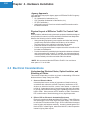
Using the Panel Set & PLC Release Option for a Function
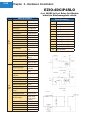
Pushbutton:
EXAMPLES:
Operator Presses Button:
F1 is set by the Panel (Bit 0 in Button Word).
This is a maintained pushbutton to the PLC.
PLC Releases Button:
REL F1 is set by the PLC (Bit 10 in LED Word).
The PLC resets the panel button by setting this
bit in the ladder program.
Panel Acknowledge Button Release:
ACK F1 is set by the Panel (Bit 10 in Button Word).
This is the panel acknowledging to the PLC that
it has reset the button.
Annunciator Lamps
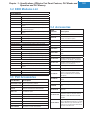
Annunciator Lamps use one 16-bit register. Use bits 0 through 15 for the PLC.
ANNUNCIATOR (BIT READ) PLC WORD — (TO PANEL)
(BITS)
LAMP 1 = Left Lamp, Bits 0 and 1
LAMP 2 = Center Lamp, Bits 2 and 3
LAMP 3 = Right Lamp, Bits 4 and 5
NA = not used (DO NOT use for other PLC program addresses)
To have the lamps illuminate in a particular color, or not to illuminate at all, set
the bits in your PLC Ladder Logic as follows: