1
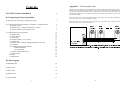
Appendix C : The Daisychain Cable
Contents
I) EL-WIN Software Installation
6
II) Configuring the EasyLog Module
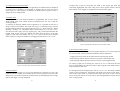
Multiple EasyLog modules may be connected together to operate as a multi-channel data logging network. It is
possible to mix single and dual channel modules on a network. All modules must be set up with identical Baud
rates (typically 9600) and each module must be configured with its own unique address, set between 0 and 7
(factory default address is 0). No two modules must share the same address. Jumper link Lk1 must be removed
from all but one module.
Switch Smartsearch on to increase the likelihood that all data loggers are detected by EL-WIN during a
Search, especially when one or more modules are logging.
1) Choosing and connecting an appropriate sensor
7
2) Connecting the EasyLog module to a computer : Communications
a) Hardware Link
b) Software Link : COM port, Baud rate, Address
c) Options: Smart search, Address Limit
7
7
7
9
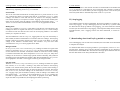
Ready-made cables are available from Lascar Electronics and its appointed agents, quoting part number
EasyLink. To make your own, proceed as follows.
(DV\ /RJ
(DV\ /RJ
0RGXOH 0RGXOH 3) Configuring the EasyLog module
a) Module name
b) Select channel
c) Sensor type
d) Display symbols : Units, Scaler
e) Sample rate
f) Storage modes : Normal, Rolling, Histogram, One-shot
g) Set alarms
h) Calibrating the EasyLog module
Default calibration
User calibration
i) Comms: Address, Baud rate
j) Clear/stop log
k) Reset
l) Multi-mimic
10
10
10
11
11
11
12
13
13
14
14
14
15
15
15
16
2) Push to start
16
3) Show active
16
4) Delayed start
16
5) Time and date
17
2
(DV\ /RJ
0RGXOH 56
,%0 &203$7,%/(
&20387(5
(DV\ /RJV DUH VXSSOLHG ZLWK WKH LU DGGUHVV VHW WR 'DLV\FKDLQ FDEOH OLQN LQ J X S WR (D V\/RJ PRGXOHV
:KHQ DGGLQJ ORJJHUV W R D V\VWHP JLYH HDFK RQH D GLII HUH QW DGGUH VV LQ
WKH VRI WZD UH D QG ZUL WH WKL V LQ WKH VSDFH SURYL GHG RQ W KH PRGXOH V 3&%
III) Start logging
1) Immediate start
27
/N VKRXOG WKH Q EH UHPRYHG I URP DOO EX W OR JJHU