1
Appendix B : File Header Description (Dual Channel Modules only)
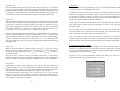
Documented below is a typical File Header (plus brief explanatory comments) for a Normal EL-WIN datalogger file. For compressed data files, the file header is similar, but the data format is different. Lascar recommends that compressed files are expanded within EL-WIN and re-saved in uncompressed (Tab, Space or
Comma Delimited) format, before attempting to manipulate them.
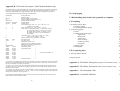
EASYDATA
6
EasyLog
10
0076832041
Channel A Channel B
Name A
Name B
1
1
2
0
2
0
0
0
20.00
30.00
-10.00
-15
0
0
0
145042030896
20.000
24.000
20.000
20.000
24.000
20.000
23.000
19.000
24.000
18.000
23.000
20.000
24.000
21.000
23.000
25.000
24.000
21.000
23.000
19.000
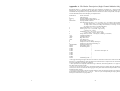
Generic File Name
(Data) File Type
EasyLog Module’s Logger Name *
Number of Samples in this Data File : $$
EasyLog Module’s Serial No
Channel Headers
Channel Names
Units Annunciator (0=none, 1=°C, 2=V, 3=Hz, 4=°F, 5=A,
6=%RH, 7=pH, 8=Ohm)
Scaler Annunciator (0=µ, 1=m, 2=none, 3=k, 4=M)
Sensor Type (16=Temp -200 to 200°C, 17=Temp -200 to 800°C,
18=Temp -200 to 200°F, 19=Temp -328 to 1562°F,
20=Voltage -200 to 200mV, 21=Voltage -2 to 2V,
22=Voltage -20 to 20V, 23=4-20mA Indication,
24=Disabled)
Sample Rate (0=5s, 1=10s, 2=20s, 3=1m, 4=5m, 5=10m,
6=20m, 7=1Hr, 8=4Hr, 9= 12Hr)
Storage mode (0=Normal, 2=Rolling, 3=One-Shot)
High Alarm Level
Low Alarm Level
Alarm Mode (0=Off, 1=On)
Sample No of 1st Low Battery Warning ***
Sample No of 1st Power Fail Warning ***
Start Time and Date ****
First Reading Value
-- |
Next Reading Value
|
.
|
.
|
.
|
$$ Total No of samples =10
.
|
.
|
.
|
.
|
Last Reading Value
-- |
* The Logger Name supports upper and lower case characters. As the first 8 characters are later used as a DOS
file name, it is recommended that, where possible, these 8 characters form a unique name. This will minimise
the risk of accidentally overwriting an existing file.
*** If not zero (0=No Error), then this is the Sample Number of the first sample where the specified error occurred, if no roll-over has occurred when logging in rolling mode. Data from this Sample Number onwards
should be treated as suspect.
**** EasyLog stores the date in the UK convention (ddmmyy) with one important exception. The value shown
for the month is referenced from zero, i.e.: Jan=00 . . . Dec=11. If you are manipulating an EasyLog Data File
directly, then True Month = EasyLog Month +1.
If one channel was disabled during a logging exercise, then the file will contain only one column of data, together with that channel’s header and name.
26
IV) Stop logging
17
V) Downloading data from EasyLog module to computer
17
VI) Graphing
18
1) Graphing with EL-WIN
a) Viewing graphs
b) Overlaying multiple graphs
2) Customising graphs
a) Fonts
b) Adding detail to the graph
Append info
Mark points
Alarm levels
Show warnings
Zooming in & out
Graph axes
c) Filtering data
d) Histograms
18
18
19
20
20
20
20
20
20
21
21
21
22
22
VII) Exporting data
23
1) EasyLog datafile formats
23
2) Exporting data
23
Appendix A : File Header Description (Single Channel Modules Only) 25
Appendix B : File Header Description (Dual Channel Modules Only)
26
Appendix C : The Daisychain Cable
27
Appendix D : Compatible Hardware
28
3