1
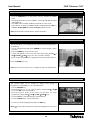
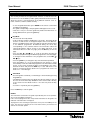
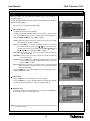
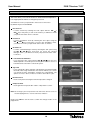
DVB-T Receiver
(HD+MPEG4)
Ref. 7143
User Manual
© Copyright, Televés, S.A.
User Manual
“DVB-T Receiver 7143”
Page
1.- Safety measures . . . . . . . . . . . . . . . . . . . . . . . . . . . . . . . . . . . . . . . . . . . . . . . . . . . . . . . . . . . . . . . . . . .
2.- General Information . . . . . . . . . . . . . . . . . . . . . . . . . . . . . . . . . . . . . . . . . . . . . . . . . . . . . . . . . . . . . . . . .
2.1.- Main features . . . . . . . . . . . . . . . . . . . . . . . . . . . . . . . . . . . . . . . . . . . . . . . . . . . . . . . . . . . . . . .
2.2.- Contents . . . . . . . . . . . . . . . . . . . . . . . . . . . . . . . . . . . . . . . . . . . . . . . . . . . . . . . . . . . . . . . . . .
3.- Panel and Control Description . . . . . . . . . . . . . . . . . . . . . . . . . . . . . . . . . . . . . . . . . . . . . . . . . . . . . . . .
3.1.- Remote Control . . . . . . . . . . . . . . . . . . . . . . . . . . . . . . . . . . . . . . . . . . . . . . . . . . . . . . . . . . . .
4.- Equipment Installation . . . . . . . . . . . . . . . . . . . . . . . . . . . . . . . . . . . . . . . . . . . . . . . . . . . . . . . . . . . . . . .
4.1.- Connection to a TV . . . . . . . . . . . . . . . . . . . . . . . . . . . . . . . . . . . . . . . . . . . . . . . . . . . . . . . . . . .
5.- First Installation . . . . . . . . . . . . . . . . . . . . . . . . . . . . . . . . . . . . . . . . . . . . . . . . . . . . . . . . . . . . . . . . . . . . .
6.- Basic Functions . . . . . . . . . . . . . . . . . . . . . . . . . . . . . . . . . . . . . . . . . . . . . . . . . . . . . . . . . . . . . . . . . . . . .
6.1.- Change between TV and Radio channels . . . . . . . . . . . . . . . . . . . . . . . . . . . . . . . . . . . . . . . . . .
6.2.- Programme selection . . . . . . . . . . . . . . . . . . . . . . . . . . . . . . . . . . . . . . . . . . . . . . . . . . . . . . . .
6.3.- Programme information . . . . . . . . . . . . . . . . . . . . . . . . . . . . . . . . . . . . . . . . . . . . . . . . . . . . . .
6.4.- Audio and volume control . . . . . . . . . . . . . . . . . . . . . . . . . . . . . . . . . . . . . . . . . . . . . . . . . . . . .
6.5.- Favourites List . . . . . . . . . . . . . . . . . . . . . . . . . . . . . . . . . . . . . . . . . . . . . . . . . . . . . . . . . . . . .
6.6.- Teletext . . . . . . . . . . . . . . . . . . . . . . . . . . . . . . . . . . . . . . . . . . . . . . . . . . . . . . . . . . . . . . . . . . .
6.7.- Subtitles . . . . . . . . . . . . . . . . . . . . . . . . . . . . . . . . . . . . . . . . . . . . . . . . . . . . . . . . . . . . . . . . . .
6.8.- Zoom . . . . . . . . . . . . . . . . . . . . . . . . . . . . . . . . . . . . . . . . . . . . . . . . . . . . . . . . . . . . . . . . . . . .
6.9.- Mosaic . . . . . . . . . . . . . . . . . . . . . . . . . . . . . . . . . . . . . . . . . . . . . . . . . . . . . . . . . . . . . . . . . . .
6.10.- Programme Guide . . . . . . . . . . . . . . . . . . . . . . . . . . . . . . . . . . . . . . . . . . . . . . . . . . . . . . . . .
7.- System settings . . . . . . . . . . . . . . . . . . . . . . . . . . . . . . . . . . . . . . . . . . . . . . . . . . . . . . . . . . . . . . . . . . .
7.1.- Time settings . . . . . . . . . . . . . . . . . . . . . . . . . . . . . . . . . . . . . . . . . . . . . . . . . . . . . . . . . . . . . . . .
7.2.- Timer Manager . . . . . . . . . . . . . . . . . . . . . . . . . . . . . . . . . . . . . . . . . . . . . . . . . . . . . . . . . . . . .
7.3.- Parental Control . . . . . . . . . . . . . . . . . . . . . . . . . . . . . . . . . . . . . . . . . . . . . . . . . . . . . . . . . . . .
7.4.- OSD Settings . . . . . . . . . . . . . . . . . . . . . . . . . . . . . . . . . . . . . . . . . . . . . . . . . . . . . . . . . . . . . .
7.5.- Language Settings . . . . . . . . . . . . . . . . . . . . . . . . . . . . . . . . . . . . . . . . . . . . . . . . . . . . . . . . . .
7.6.- A/V output Settings . . . . . . . . . . . . . . . . . . . . . . . . . . . . . . . . . . . . . . . . . . . . . . . . . . . . . . . . .
7.7.- Front Display Configuration . . . . . . . . . . . . . . . . . . . . . . . . . . . . . . . . . . . . . . . . . . . . . . . . . . .
7.8.- IP Settings . . . . . . . . . . . . . . . . . . . . . . . . . . . . . . . . . . . . . . . . . . . . . . . . . . . . . . . . . . . . . . . .
8.- Channel Manager . . . . . . . . . . . . . . . . . . . . . . . . . . . . . . . . . . . . . . . . . . . . . . . . . . . . . . . . . . . . . . . . . .
8.1.- Favourites . . . . . . . . . . . . . . . . . . . . . . . . . . . . . . . . . . . . . . . . . . . . . . . . . . . . . . . . . . . . . . . . . .
8.2.- Lock Channels . . . . . . . . . . . . . . . . . . . . . . . . . . . . . . . . . . . . . . . . . . . . . . . . . . . . . . . . . . . . .
8.3.- Move channels . . . . . . . . . . . . . . . . . . . . . . . . . . . . . . . . . . . . . . . . . . . . . . . . . . . . . . . . . . . . .
8.4.- Delete Channels . . . . . . . . . . . . . . . . . . . . . . . . . . . . . . . . . . . . . . . . . . . . . . . . . . . . . . . . . . . .
8.5.- Skip channels . . . . . . . . . . . . . . . . . . . . . . . . . . . . . . . . . . . . . . . . . . . . . . . . . . . . . . . . . . . . . .
9.- Installation . . . . . . . . . . . . . . . . . . . . . . . . . . . . . . . . . . . . . . . . . . . . . . . . . . . . . . . . . . . . . . . . . . . . . . . .
9.1.- Channel Search . . . . . . . . . . . . . . . . . . . . . . . . . . . . . . . . . . . . . . . . . . . . . . . . . . . . . . . . . . . .
9.2.- Data Transparency . . . . . . . . . . . . . . . . . . . . . . . . . . . . . . . . . . . . . . . . . . . . . . . . . . . . . . . . . .
9.3.- Data reset . . . . . . . . . . . . . . . . . . . . . . . . . . . . . . . . . . . . . . . . . . . . . . . . . . . . . . . . . . . . . . . . .
9.4.- System information . . . . . . . . . . . . . . . . . . . . . . . . . . . . . . . . . . . . . . . . . . . . . . . . . . . . . . . . . .
10.- Utils . . . . . . . . . . . . . . . . . . . . . . . . . . . . . . . . . . . . . . . . . . . . . . . . . . . . . . . . . . . . . . . . . . . . . . . . . . . .
10.1.- Calendar . . . . . . . . . . . . . . . . . . . . . . . . . . . . . . . . . . . . . . . . . . . . . . . . . . . . . . . . . . . . . . . . .
10.2.- Calculator . . . . . . . . . . . . . . . . . . . . . . . . . . . . . . . . . . . . . . . . . . . . . . . . . . . . . . . . . . . . . . . .
10.3.- MP3 . . . . . . . . . . . . . . . . . . . . . . . . . . . . . . . . . . . . . . . . . . . . . . . . . . . . . . . . . . . . . . . . . . . .
10.4.- JPG . . . . . . . . . . . . . . . . . . . . . . . . . . . . . . . . . . . . . . . . . . . . . . . . . . . . . . . . . . . . . . . . . . . . .
10.5.- Download . . . . . . . . . . . . . . . . . . . . . . . . . . . . . . . . . . . . . . . . . . . . . . . . . . . . . . . . . . . . . . . .
10.6.- Disk manager . . . . . . . . . . . . . . . . . . . . . . . . . . . . . . . . . . . . . . . . . . . . . . . . . . . . . . . . . . . . .
10.7.- File Manager . . . . . . . . . . . . . . . . . . . . . . . . . . . . . . . . . . . . . . . . . . . . . . . . . . . . . . . . . . . . . .
11.- Games . . . . . . . . . . . . . . . . . . . . . . . . . . . . . . . . . . . . . . . . . . . . . . . . . . . . . . . . . . . . . . . . . . . . . . . . . .
12.- Record/Play . . . . . . . . . . . . . . . . . . . . . . . . . . . . . . . . . . . . . . . . . . . . . . . . . . . . . . . . . . . . . . . . . . . . . .
12.1.- Time Shift Function . . . . . . . . . . . . . . . . . . . . . . . . . . . . . . . . . . . . . . . . . . . . . . . . . . . . . . . . .
4
6
6
6
7
8
10
10
11
12
12
12
12
13
13
13
14
14
14
15
16
16
17
18
19
19
20
20
21
22
22
23
23
24
24
25
25
26
27
27
28
28
28
28
29
29
30
31
31
32
33
Terminological Glossary . . . . . . . . . . . . . . . . . . . . . . . . . . . . . . . . . . . . . . . . . . . . . . . . . . . . . . . . . . . . . . . .
Menu structure . . . . . . . . . . . . . . . . . . . . . . . . . . . . . . . . . . . . . . . . . . . . . . . . . . . . . . . . . . . . . . . . . . . . . . .
Technical Specifications . . . . . . . . . . . . . . . . . . . . . . . . . . . . . . . . . . . . . . . . . . . . . . . . . . . . . . . . . . . . . . . .
Guarantee . . . . . . . . . . . . . . . . . . . . . . . . . . . . . . . . . . . . . . . . . . . . . . . . . . . . . . . . . . . . . . . . . . . . . . . . . . .
34
35
36
37
3
ENGLISH
INDEX
User Manual
“DVB-T Receiver 7143”
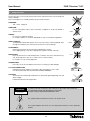
1.- Safety measures
The Receiver that you have just purchased has been manufactured to meet international
safety standards.
We recommend that you carefully read the safety instructions below.
POWERING:
100 - 250 V~ 50/60 Hz.
OVERLOAD:
Do not overload the mains sockets, extenders or adapters to avoid a fire hazard or
electric shock.
> 50°C
LIQUIDS:
Do not wet or splash the receiver.
Do not place objects or containers with liquids on top of or beside the equipment.
SMALL OBJECTS:
Avoid placing small metalic objects close to the unit. These could accidentally enter
through the ventilation slots of the Receiver and cause serious damage.
> 80 %
CLEANLINESS:
Unplug the Receiver from the mains before beginning to clean it.
Use a slightly damp, soft cloth (no detergent) to clean the outside of the unit
VENTILATION:
Place the Receiver in a well-ventilated area so that the slots are not blocked in any
way. Avoid exposure to the sun, to other sources of heat or flames.
Do not place on top of other equipment.
< 5°C
CONNECTIONS:
Only carry out the recommended connections to avoid any possible damage.
TV or VCR CONNECTION:
Switch the Receiver off before connecting or disconnecting it to a TV or VCR.
IF THIS IS NOT DONE, THE TV OR VCR COULD BE DAMAGED.
LOCATION:
The Receiver should be kept inside where it is protected against lightening, rain and
direct sunlight.
Install the Receiver in horizontal position.
WARNING
RISK ELECTRICAL SHOCK
DO NOT OPEN
TO AVOID THE RISK OF AN ELECTRIC SHOCK, DO NOT TAKE THE COVER OFF.
THE RECEIVER CANNOT BE REPAIRED BY THE USER.
PLEASE CONSULT QUALIFIED PERSONNEL ONLY
This symbol indicates that there is the risk of an electric shock.
This symbol indicates that there are some important instructions for this particular
product.
4
User Manual
“DVB-T Receiver 7143”
2.- General Information
Thank you for buying this hard-wearing DVB-T receiver.
This receiver has been created under strict quality control processes and is totally compatible with the
current specifications.
Your new receiver will offer you a higher image and sound quality, panoramic images and a series of new
features.
Compatible with MPEG2 and MPEG4/H.264
Access Control
Prepared for USB PVR
Automemorizes the last visualized channel.
Makes possible to play MP3 and JPG files
Return Function
Time Shift Function
Timer Function
Video Output – RGB; CVBS
Sleep Function
HDMI Output (576i, 576p, 720p and 1080i)
Two USB ports
Configurable VFD Display (name, number and “Stop and
go”)
IP Connection (software update and file distribution)
Clock (time presentation in “standby”)
Allows Channel Edition (Delete, Move, Lock, Skip and
Favourites.
Software update via USB or RS-232C
Favourite Channel List
3 Games
Supports OSD Teletex
Editable Mosaic Function (2, 4, 6 or 9 programmes)
Standard Subtitles and Teletex
Pause and Zoom Function
SPDIF-Digital audio output
Programme Guide
2.2.- Contents
Check that the following components are included in the package:
- 1 x DVB-T Receiver ref. 7143
- Intructions Manuals
- 1 x Remote Control
- 2 x “AAA” batteries
- 1 x A/V cable (3x RCA)
- 1 x component video cable (Y, Pb, Pr)
Manufactured according to Dolby Laboratories´ License. “Dolby” and the double-D logotype are registered trademarks of
Dolby Laboratories.
5
ENGLISH
2.1.- Main features
User Manual
“DVB-T Receiver 7143”
3.- Panel and Control Description
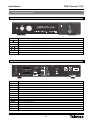
Front Panel
Key
Function
Switch between normal and standby operating mode.
MENU
SELECT
To activate and deactivate the main menu.
Shows the channel list. Selects one element or confirms a selection on the menú.
/
Selects the previous or next programme. Changes the cursor position on the menus.
/
Turns the volume down/up. Modifies a value on the menus.
DISPLAY
USB
Shows information about the selected programme. It also shows the time in standby mode.
Connector for USB.
ANT IN
VIDEO
(5V 100mA)
RS-232
Y
AUDIO
VCR/AUX
L
Pb
R
Pr
COMPONENT OUT
Rear Panel
MODEL No: DVB-T 7143
100 - 250 V~
50/60 Hz
Max. 40W
Manufactured under license from Dolby Laboratories.
"Dolby" and the double-D symbol are trademarks
of Dolby Laboratories.
HDMI
TV OUT
USB 2.0
TV
eSATA
LAN
S/PDIF
Name
ANT IN
Made for Televes
Function
Signal input of terrestrial antenna (power supply +5V/100 mA selectable by menu)
TV OUT
RF Signal Output to connect it to a TV or VCR.
USB 2.0
Connection to an external memory (Pen drive) or an external USB hard disk.
VCR/AUX
TV
SERIAL
Audio/video input/output to connect other equipment through SCART.
Video/Audio output to connect it to a TV via SCART.
Connection to low speed serial port.
HDMI
Interface for signal connection in high definition.
eSATA
Interface to connect an eSATA external disk.
LAN
VIDEO
AUDIO L/R
Y, Pb, Pr
S/PDIF
I/O
Connector for connection to a local net.
Composite video output.
Stereo and analog audio output.
Component video output.
Optical output of digital video.
General ON/OFF switch.
6
User Manual
“DVB-T Receiver 7143”
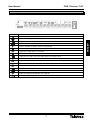
Front Display
Display
Function
Shows the receiver status (ON/OFF)
Lights when a programme is being recorded.
Lights when the Time Shift Function is activated.
Lights in Standby mode when a Timer is programmed.
Lights when the signal is HD.
Lights when a USB device is connected.
Indicates that the currect selected channel is locked.
Lights when the audio of the selected programme is in Dolby format.
Lights when the MUTE function is activated.
Lights when a MP3 player is connected.
Lights when selecting the “Loop” option in the MP3 player.
Lights when a radio programme is selected.
Lights when a TV programme is selected.
Indicates when the receiver is in mode “play a file from the list”.
Lights when playing a multimedia or recorded file.
Indicates the video output resolution.
7
ENGLISH
Lights when the Time Shift Function is activated.
User Manual
“DVB-T Receiver 7143”
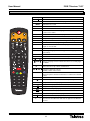
3.1.- Remote Control
Key
Function
Switches the receiver on and off.
TV/RAD
MUTE
TEXT
SUBTITLE
AUDIO
MOSAIC
SLEEP
Switches between TV and Radio programmes.
Eliminates the sound
Shows the teletext contents (if they are transmitted).
Activates or deactivates the Subtitle Menu.
Shows the different audio languages that are available and the
stereo-mono modes
Shows a mosaic of 2, 4, 6 or 9 programmes.
Disconnects the receiver once the selected time has expired.
FREEZE
Stops the image on the screen. Press the key again to continue.
ZOOM
Enlarges a selected area from the image that is being visualized.
GUIDE
INFO
Shows the TV/Radio programme guide.
Shows information about the current programme. Press this key
again for more details.
RECALL
Return to the Previous Channel
GROUP
To change the group of channels (general List or groups of
Favourites).
MENU
Activates/Deactivates the main Menu.
EXIT
To exit the current menu and return to the previous one.
VOL
Turns the volume up/down.
PAGE
Moves one page forward or back when there are several pages
available.
CH
/ CH
Select the previous or the next programme.
Move the cursor up or down on the menus.
VOL
/ VOL
Turn the volume up or down.
Modify a value on the menus.
OK
FILE LIST
Shows the channel list.
Runs the option selected on the menu or confirms the selected
value.
Shows the list of files that are available in external disks.
Shows the play list (in the disk selected by default).
Stops what is currently playing.
Quick return in play mode (x2, x4, x8, x32).
Stops the image in play mode.
Moves forward quickly in play mode (x2, x4, x8, x32).
Return to in real time play mode.
Starts recording the selected programme.
Moves forward slowly in play mode (1/2, 1/4).
The red, green, yellow and blue keys have secondary functions
that are not described here and that can appear in the different
menus.
8
User Manual
“DVB-T Receiver 7143”
Key
V. FORMAT
WIDE
Function
Direct Input for numerical data (as the number of a programme
to be watched).
Seletcs the video output resolution.
Selects the TV format type between Pan Scan or Letter Box (4:3)
and Full Screen or Pillar Box (16:9).
Notes:
- Point with the remote control directly at the receiver´s sensor.
- Do not expose the remote control or the receiver to an intense source of light, such as, direct sunlight.
- Do not leave the control remote in an extremely wet or warm place.
- Do not spill water or place any wet element on the remote control. Normally batteries last approximately one year under
normal USE conditions.
Notes:
The wrong use of batteries can cause corrosion and spillage of the internal liquid. Follow these instructions to use the
remote control in a secure way:
- Do not place the batteries in the wrong way. Make sure that the + and – poles of the batteries match up with the internal
marks of the battery unit.
- Do not recharge, warm, open or short-circuit the batteries.
- Do not throw the batteries to fire.
- Do not leave discharged batteries inside the remote control.
- Do not use different types of batteries at the same time. Do not mix old batteries with new batteries.
- If the remote control is not going to be used during a long period of time, remove the batteries to avoid posible damages
caused by corrosion.
- If the remote control does not work properly or the operating distance is very short, change the batteries for new ones.
- If an spillage of the batteries´ liquid takes place, clean up carefully the battery unit and then insert new batteries.
9
ENGLISH
0 ... 9
User Manual
“DVB-T Receiver 7143”
4.- Equipment Installation
This section explains how to install the receiver to a TV or to other A/V equipments.
Read the manuals provided with the equipment to install external equipment, such as, the antenna.
To add any new equipment, read the corresponding part of the manual for its installation.
4.1.- Connection to a TV
- Connect the antenna signal to the ANT IN connector of the receiver.
- Connect the audio and the video between the receiver and the TV using an SCART cable, RCA cables or a HDMI
connection.
7143
TV
Note: The component video output (YPbPr) is not available by default. It is necessary to activate on the “AV
Configuration” Menu (See Section 7.6).
All cables used to connect the receiver will be shielded cables.
DO NOT PLUG IN the receiver to the electrical network untill all the connections of the unit are finished.
10
User Manual
“DVB-T Receiver 7143”
5.- First Installation
Once you turn your receiver on, start with its configuration as indicated below:
First of all a menu showing all the languages available for the OSD will
appear.
- Select the language you wish using the CH
OK to confirm the selection.
/ CH
keys and press
Then the menu “A/V output settings” will be shown. Configure your
receiver according to the equipment or TV to which it is connected in
order to obtain the best performance of the equipment.
- SCART: Select one of the options CVBS (YPbPr ON) or RGB (YPbPr
OFF)*.
- Screen format: Select the screen format between 4:3 (Letter Box or
Pan Scan) and 16:9 (Full Screen or Pillar-Box).
- Video format: Select the video output resolution between 1080i, 720p,
576p or 576i.
- SPDIF: Select the type of audio output between Dolby Digital or
PCM.
* Whenever the RGB option is activated, the component video output (Y,
Pb, Pr) will not be available.
- Press the
key to continue.
“Time settings” Menu will come up. This menu deals with the way in
which the time will be shown on the receiver.
- GMT Usage: Active (ON) or deactive (OFF) the use of the time system
via GMT (Greenwich Meridian Time).
- Local Offset: Select the time zone in which you are located. Indicate
whether you want to add (+) or reduce (-) to the GMT
time the complementation time in fractions of one hour
time.
- Summer time: When you activate this option (ON), one hour will be
added up to the time shown by the receiver in order to
adapt it to the local time.
Press the
key to continue.
The menu “Channel search” will be shown
- To start searching automatically, press the
four colour group.
key or the red key on the
- This process can take some time. Please, wait.
- If you want to delete any of the channels searched, mark it by pressing
the red key on them and delete them pressing the green key.
- Once the search is finished, press the EXIT key to start watching your
programmes.
11
ENGLISH
To do so scroll the cursor through the options using the CH
/ CH
keys and select the value with the VOL
/ VOL
keys. You can also
press OK on the option and select the element you wish in the popup
menu using the CH / CH keys and press OK to confirm.
User Manual
“DVB-T Receiver 7143”
6.- Basic Functions
Now the basic operating functions of your receiver will be described.
6.1.- Change between TV and Radio channels
- While you are visualizing a TV channel, press TV/RAD on the remote
control to switch between TV channels and Radio channels.
- Press again this key to return to the previous mode.
6.2.- Programme selection
- To select a programme, use the
/
keys on the front panel, the CH
/ CH keys on the remote control or the numeric keyboard (0…9)..
- There is also another easy and visual way to change programmes. While
you are watching a TV or Radio programme, press the OK key on the
remote control. A window with the programme list will appear. Select the
new programme from the list with the CH / CH keys and press OK.
- You can move forward page by page on the programme list with the
PAGE
keys.
- Press the red key to alternate between the different ordering types: All, in
alphabetical order, by Transponder, by codification type.
- You can search a channel by its name or by part of it. Press the “i” key for
that. Press the OK key with the cursor situated on the “Sample” option,
write the name of the programme on the popup keyboard and press EXIT.
Move the cursor to the “Find next” option and press OK.
6.3.- Programme information
- Every time you change programmes, you will receive information about it
during some seconds.
- You can see information about the programme at any time while you are
visualizing it by pressing the “i” key on the remote control.
- If you press again this key while the information about the program is on
the screen, further information about it will be provided and a brief
summary of its contents will be shown.
Note: The EPG information is only available when it is provided by the
programme.
- Press EXIT to close this window.
12
User Manual
“DVB-T Receiver 7143”
6.4.- Audio and volume control
Volume Control
- To turn the volume up or down, use the VOL
/ VOL
keys on the
remote control or
/
on the front panel.
Note: The volume can also be controlled through the volume of your
TV.
Mute
- To eliminate the sound, press the MUTE key on the remote control. To
regain the sound, press this key again.
- You can select the audio Mode (Stereo, Left or Right), the audio track
(it depends on the audios included in the transmission) or the audio
level (loud, middle or low).
- Select one of the options using the CH
/ CH
keys. To modify a
value, press the VOL key and select it using the CH
/ CH
keys.
Press OK to confirm.
- The current audio configuration will be shown on the channel
information window.
6.5.- Favourites List
- To access the lists of favourite programmes, press the GROUP key on the
remote control.
- Select one of the lists with the CH
/ CH
keys and press OK.
- The Favourites lists will only show the channels that are included in each
list. You can select the channels following the same steps than in the
general list.
- To exit the Favourites list and access the general list, you must press
GROUP and select “All Channels”.
The method used to create the lists of favourite programmes is explained
in section 8.1.- Favourites.
6.6.- Teletext
- Press the TEXT key on the remote control to activate the Teletext.
- The teletext services will be visualized as usually.
- Even if your TV does not have Teletex Decoder, you will be able to
visualize it on the screen, since the receiver generates it automatically.
- The receiver´s remote control has colour keys which make the access to
teletext pages easier and faster.
- If you are using the TimeShift function or playing a programme previously
recorded onto the hard disk, the Teletext will not be available.
- To exit Teletext, press TEXT or EXIT key.
13
ENGLISH
Audio control
- Press the AUDIO key to activate the audio menu.
User Manual
“DVB-T Receiver 7143”
6.7.- Subtitles
- Press the SUBTITLE key on the remote control to activate the subtitle
menu.
- If the programme does not have subtitles, a message will appear stating
“NO SUBTITLE”.
- The subtitle services will be visualized on the bottom of the screen.
- Select the way in which the subtitles will be visualized between OFF (no
subtitles), English (DVB) (standard) and English (teletext format).
Note: Not all providers provide with this type of information.
6.8.- Zoom
This function allows you to enlarge an area selected from the image that you
are watching.
- You can enlarge fixed images (press FREEZE to stop the image) or video
in motion.
- Press the ZOOM key on the remote control.
- A frame will appear on the screen. Move this frame using the CH
CH and VOL / VOL keys to the area you want to enlarge.
/
- Press continously the OK key to enlarge the selected area more and more.
Press the ZOOM key to exit.
Note: Notice that the more the area is enlarged, the worst the quality will be.
6.9.- Mosaic
This function allows you to visualize an image mosaic (group of
programmes) constituted by 2, 4, 6 or 9 small screens.
- Press the MOSAIC key.
- Scroll through the “2”, “4”, “6”, and “9” options using the CH
keys. Press OK on the selected option.
/ CH
- Once the mosaic is shown on the screen, you can chose one of the
programmes using the CH / CH and VOL / VOL keys.
- Press the OK key to start watching the selected channel.
- Press the GROUP key to see the channel list.
- To return to normal visualizing mode, press the EXIT key.
Note: This function does not allow to visualize two programmes at the same
time.
14
User Manual
“DVB-T Receiver 7143”
6.10.- Programme Guide
The receiver provides the “Program Guide” function, so that the user can
have access to the TV Guide (or radio guide), which will show information
about the current or next programme in the different channels, such as,
name, start time, end time, a brief summary, …
- To see the guide information, press GUIDE on the remote control while
visualizing a programme.
- The guide corresponding to that programme will appear on the screen.
- There are to ways to show this guide: Day Mode and Time Mode. To
change between them, press the green key.
- In this mode the window is divided into four groups. The image will be
shown in a small screen on the upper left part of the screen. Below it,
the list of available memes and on the right the start time and the name
of the different programmes broadcasted during the whole day
corresponding to the selected channel. The information about the
selected programme will be shown in the upper right part. If the
information takes more than one page, press the blue key to turn the
page.
- Press the CH
/ CH
keys to scroll up and down through the
channel list (left) and through the different programmes of the day (right).
To change from the channel list to the programme list, use the VOL /
VOL keys.
- Press the yellow key to change the day of the information provided.
- Press the red key on one of the programmes from the list to create
automatically a new timer with that programme. The Timer Menu will be
shown on the screen showing the data corrensponding to the event.
Activate the timer and press the EXIT key to save and return to the
guide. For further information about how to programme an event, see
Section 7.2.- Timer Manager.
Time Mode
- Once the guide is activated, you will change to Time Mode by pressing
the green key.
- The difference between the Time Mode and the Day Mode is that the
first one shows the whole day divided into time slots instead of the day
of the week. The Time Mode works in the same way than the Day
mode.
- To return to Day Mode, press the green key.
Press the EXIT key to exit the guide.
NOTES:
The information contained in the guide is provided by the service provider,
so it can be unavailable sometimes.
If the selected programme does not provide information for the guide, the
indication “No Information” will appear.
To programme the recording of a particular event, press the red key on the
event. You will access directly to the Timer Menu where you will have to
activate the “Record” option.
15
ENGLISH
Day Mode
- It is the mode shown by default.
User Manual
“DVB-T Receiver 7143”
7.- System settings
7.1.- Time settings
GMT Usage (Greenwich Meridian Time)
The receiver has a clock that works automatically with the signal
received by the antenna, where the provider sends the GMT time.
This time varies according to the country selected in the “Offset local” section.
- Activate (ON) or deactivate (OFF) the use of the time system via GMT
using the VOL / VOL keys.
Local Offset
- Select the time zone where you are located. Indicate whether you
would like to add (+) or reduce (-) to the GMT time the
complementation time by fractions of one hour.
Current Date
If the option “GMT Use” is not activated (OFF), you can modify the
current date manually.
- Press the OK key to activate a calendar where you can select the
/
current month/year using the
keys and move from one day of
the month to the others with the VOL
/ VOL
and CH
/ CH
keys. Finally, press OK to confirm.
Current Time
- Insert the current time using the numeric keyboard.
Summer Time
When you activate this option (ON), one hour will be added to the time
shown by the receiver in order to adapt it to the local time.
Wake Up Mode
This function allows to turn the receiver on at a particular time.
- Indicate how often you are going to use this option: Off, Once, Daily or
from Monday to Friday.
Wake Up Time
- Insert the time at which the receiver must be turned on using the
numeric keyboard.
Wake Up Channel
- Press the OK key to activate the programme list. Select the one that will
automatically appear when turning on the unit on and press OK to confirm.
Sleep Mode
This function allows to turn the receiver off at a particular time.
- Indicate how often you are going to use this option: Off, Only once,
Daily or from Monday to Friday.
Sleep Time
- Insert the time at which the receiver must be turned off using the
numeric keyboard.
16
User Manual
“DVB-T Receiver 7143”
7.2.- Timer Manager
With this menu you can make the receiver turn on or record at a
programmed time.
You can programme different events, which can have different running times
(Off, Once, Daily, Weekly…).
- If no events are created, the list will be empty.
Create/add an event
- To add a new event, press the red key.
State: Indicate how often an event is going to be run: Off, Once, Daily,
from Monday to Frinday or Weekly.
Date: Press the OK key to activate a calendar where you can select
/
the current month/year using the
keys and move from
one day of the month to the others with the VOL / VOL and
CH / CH keys. Finally, press OK to confirm.
Start Time: Insert the time at which it must be turned on with the
numeric keyboard.
End Time: Insert the time at which it must be turned off with the
numeric keyboard.
Channel: Press the OK key to activate the programme list, select the
one that will automatically appear when turning on the unit
and press OK to confirm.
Record: Indicate if you want to record the event on an external hard
disk or pen drive as well (if a disk is not connected, the option
will not be activated).
- Press the EXIT key to save the modifications and confirm them. Press
again the EXIT key to exit.
Edit an event
- Press the OK key on an existing event in order to edit it.
- Press the EXIT key once the desired parameters have been modified.
Confirm the value modifications on the in the popup window.
Delete an event
- To delete an existing event, place the cursor on it, press the yellow key
and confirm the choice on the popup menu.
Note: You cannot create events if their start time or date is previous to the
current date or time.
17
ENGLISH
- It will be activated by default in Timer nº1. If you want to select another
one, press EXIT (the cursor turns orange) and scroll through the list
with the CH / CH keys. Press OK to confirm.
User Manual
“DVB-T Receiver 7143”
7.3.- Parental Control
This menu allows you to lock the receiver to avoid unwanted manipulations,
lock unappropriated channels or change the password.
You will have to insert your password to have access to this menu.
By default, the password is 0 0 0 0.
Receiver lock
/
- Lock the receiver by selecting the “ON” option with the VOL
VOL keys. Every time you turn on the receiver, you will have to insert
your password. Select “OFF” to unlock it.
Install lock
- Lock the “Installation” menu by selecting the “ON” option using the
VOL
/ VOL
keys. Every time you access the “Installation” menu,
you will have to insert your password. Select “OFF” to unlock it.
Channel lock
- Lock the “Channel Manager” menu by selecting the “ON” option using
/ VOL
the VOL
keys. Every time you access the “Channel
Manager” menu , you will have to insert your password. Select “OFF”
to unlock it.
Lock Channel Confirmation
/ VOL
- If you select the “ON” option with the VOL
keys, the user
will be required to insert the password every time he tries to access a
locked channel. Select OFF to unlock this option.
Age Limit
- If you activate this option and when a programme is broadcasted with
information about age classification, the receiver will ask you to insert
your password if the programme excedes the selected limit. The
options are: Free, 8 above, 12 above, 15 above and 18 above years.
New Password
- Insert a new password using the numeric keyboard to change it.
Verify Password
- Insert again the new password in order to verify that it is correct.
Note: Do not forget your new password. You will not be able to access to
the locked programmes, receiver and menus without it.
Finally, press EXIT to exit the menu. Confirm the changes made on the
popup menu.
18
User Manual
“DVB-T Receiver 7143”
7.4.- OSD Settings
This Menu allows you to modify the transparency parameters of the
channels on screen and how long the banner of the programme information
or of the volume level will remain visible.
Transparency
- Select a transparency level for the menus between 0 and 95% using
the VOL / VOL keys.
Information Timeout
/ VOL
- Use the VOL
keys to select how long the information
“banner” about the programme that it is being visualized will remain
visible.
/ VOL
- Use the VOL
keys to select how long the information
“banner” about the selected volume level will remain visible.
7.5.- Language Settings
This menu allows you to select the language in which the menus will be
shown on the screen, the audio language by default and the language of the
subtitles.
Menu Language
- Select the language in which the menus will be shown on the screen
/ VOL
keys for that or
by pressing the MENU key. Use the VOL
press OK to activate a popup list, select the language using the CH
/ CH keys and press OK to confirm.
Audio Language
- Select the language in which the programmes will be listened to. Use
the VOL / VOL keys for that or press OK to activate a popup list,
select the language using the CH
/ CH
keys and press OK to
confirm.
Note: If the programme does not have the selected audio, the first audio
transfered by default will be activated.
Subtitle language
- Select the language in which the subtitles will be shown. Use the
VOL
/ VOL
keys for that or press OK to activate a popup list,
select the language using the CH
/ CH
keys and press OK to
confirm.
Note: If the programme does not have the selected language for the
subtitles, the first language transfered by default will be activated.
19
ENGLISH
Volume Timeout
User Manual
“DVB-T Receiver 7143”
7.6.- A/V output Settings
This menu allows you to adjust the A/V signal outputs to the peripheral
equipment connected to the receiver.
SCART
- Select the video output mode between CVBS and RGB using the
VOL
/ VOL
keys or press OK to activate a popup list, select the
mode with the CH
/ CH
keys and press OK to confirm. If you
select the CVBS mode, the format YPbPr will be also activated.
Screen Format
- Select the screen format between 4:3 or 16:9 using the VOL
/
VOL keys or press OK to activate a popup list, select the format with
the CH / CH keys and press OK to confirm.
- You can select the following modes within each format Full Screen or
Pillar-Box (16:9) and Pan Scan or Letter Box (4:3).
Display Format
- You can select the following modes within each format Full Screen or
Pillar-Box (in 16:9) and Pan Scan or Letter Box (in 4:3).
Video Format
/ VOL
keys or
- Select the video output resolution using the VOL
press OK to activate a popup list, select the format with the CH
/
CH
keys and press OK to confirm. The values available are 576i,
576p, 720p and 1080i.
SPDIF
- Select the type of audio output between Dolby Digital and PCM using
keys or press OK to activate a popup list, select
the VOL
/ VOL
the type with the CH / CH keys and press OK to confirm.
7.7.- Front Display Settings
This menu allows you to indicate how information must be shown on the
front display of the receiver.
Text Moving
- Select “ON” if you want the text on the front display to have a
/
movement effect or “OFF” to keep the text fixed. Use the VOL
VOL keys for that.
Channel Number
- Select “ON” if you want the channel number of the front display to
remain visible or “OFF” if you want only the channel number to be
shown. Use the VOL / VOL keys for that.
20
User Manual
“DVB-T Receiver 7143”
7.8.- IP Settings
This menu allows you to connect the receiver to a remote PC via Internet in
order to update the software.
Your PC must have an application for the connection.
DHCP Use
- Select “ON” using the VOL / VOL keys if you want the receiver to
self assign automatically an IP address.
- Press the red key to start with the net scanning (this process can take
some time).
- Press the blue key.
- Insert the IP address of the PC to which it is going to be connected on
the popup menu and using the numeric keyboard. Pres OK to confirm.
- In case you prefer to assign an IP address manually, select “OFF” in
this option.
IP Address
- Place the cursor on this option and insert the IP Address assigned to
the receiver using the numeric keyboard.
Subnet Mask
- Place the cursor on this option and insert the value of the subnet
mask assigned to the receiver using the numeric keyboard.
Gateway
- Place the cursor on this option and insert the value of the gateway
assigned to the receiver using the numeric keyboard.
DNS
- Place the cursor on this option and insert the value for the DNS
assigned to the receiver using the numeric keyboard.
21
ENGLISH
- Select the file with the software (.stb), press OK. Wait until the file has
been completely downloaded.
User Manual
“DVB-T Receiver 7143”
8.- Channel Manager
8.1.- Set Favorites
Create Favourites List
When you enter the “Favourites” menu, a group of 16 lists of favourite
channels (Fav 0, …, Fav 15) will be shown.
- Select one of the lists using the CH
accept.
/ CH
keys and press OK to
- You can personalize the name of each list (cinema, news, etc.) pressing
the red key on the name. Insert the new name using on pop-up
keyboard and using the CH
/ CH
and VOL / VOL keys. Once
you have finished, press EXIT to save the new name and return to the
previous menu.
- The selected list or group will be indicated on the left side of the general
list.
- Place the cursor on the channel you want to mark as favourite and
press the OK key. The channel will be marked with the “ ” symbol to
indicate that it is a favourite channel. You can mark as many channels
as you want.
- To delete the favourite mark, place again the cursor on the channel and
press OK. To delete the mark of all the channels at the same time press
the yellow key.
- To select another group or favourites list, press the blue key.
- The channels marked as favourites in this menu will be the channels
that appear when you press the GROUP key in normal operating mode
(watching a TV programme).
Sorting
- Press the red key to put the channel list in order. You can use different
ordering types: All, in alphabetical order, by Transponder, by codification
type.
- Each time you press the red key the list will be shown in one of these
types.
Edit
- Press the green key on the name of a channel from the list to edit and
modify it.
- Press OK on the channel´s name. Insert the new name on the pop-up
keyboard and using the CH
/ CH
and VOL / VOL keys. Once
you have finished, press EXIT to save the new name and return to the
previous menu.
- The VPID, APID and PPID values are important to get an optimum
reception. Do not modify them if you are not qualified for that.
You can search a channel by its name or by part of it. Press the “i”. key to
do so. Press the OK key with the cursor situated on the “Token” option and
insert the name in the pop-up keyboard. Move the cursor to the “Find next”
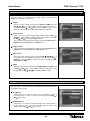
option and press OK.
Note: If the “channel lock” option is activated in the Parental Control, you
must insert your password to have access to this menu.
22
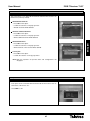
User Manual
“DVB-T Receiver 7143”
8.2.- Lock Channels
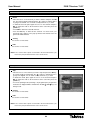
Lock
- Place the cursor on the channel you want to lock and press the OK key.
The channel will be marked with the “ ” symbol to indicate that it is
locked. You can mark as many channels as you want.
- To delete the locked mark, place again the cursor on the channel and
press OK. To delete the mark of all the channels at the same time press
the yellow key.
- The option “channel lock confirmation” from the Parental Lock menu
must be activated (ON) if you want the channel lock to work.
Sorting
See section 8.1-Favourites.
Note: If the “channel lock” option is activated in the Parental Control, you
must insert your password to have access to this menu.
8.3.- Move channels
Move
- Place the cursor on the channel you want to move and press the OK
key. The channel will be marked with the “ ” symbol to indicate that it
is going to be moved. You can mark as many channels as you want.
- To eliminate this mark, place again the cursor on the channel and press
OK. To eliminate the mark of all the channels at the same time press the
yellow key.
- Press the blue key, then place the cursor on the new location and press
the OK key. The selected channels will be moved to the new location.
Sorting
See section 8.1-Favourites.
Edit
See section 8.1-Favourites.
Note: If the “channel lock” option is activated in the Parental Control, you
must insert your password to have access to this menu.
23
ENGLISH
Edit
See section 8.1-Favourites.
User Manual
“DVB-T Receiver 7143”
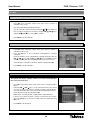
8.4.- Delete Channels
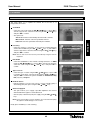
Delete
- Place the cursor on the channel you want to delete and press the OK
key. The channel will be marked with the “ ” symbol to indicate that it
is going to be deleted. You can mark as many channels as you want.
- To eliminate this mark, place again the cursor on the channel and press
OK. To delete the mark of all the channels at the same time press the
yellow key.
- Press EXIT to delete the selected channels.
- Press the blue key to delete all the channels. You must insert your
password and confirm it in the pop-up window. All channels from the
general list will be deleted.
Sorting
See section 8.1-Favourites.
Edit
See section 8.1-Favourites.
Note: If the “channel lock” option is activated in the Parental Control, you
must insert your password to have access to this menu.
8.5.- Skip channels
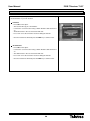
Skip
- Place the cursor on the channel you want to skip and press the OK key.
The channel will be marked with the “ ” symbol to indicate that it is
going to be skipped. You can mark as many channels as you want.
- To delete this mark, place again the cursor on the channel and press
OK. To delete the mark of all the channels at the same time press the
yellow key.
- In normal operating mode (watching a TV programme) the programmes
marked to be skipped will be omitted when the CH
/ CH
keys are
being moved.
Sorting
See section 8.1-Favourites.
Edit
See section 8.1-Favourites.
Note: If the “channel lock” option is activated in the Parental Control, you
must insert your password to have access to this menu.
24
User Manual
“DVB-T Receiver 7143”
9.- Installation
9.1.- Channel Search
This menu allows you to update the channel list in case the nº of
transponders inscreases.
Scan Mode
/ VOL
keys or press OK to
- Select the scan mode using the VOL
activate a pop-art list, select the mode using the CH
/ CH
keys
and press OK to confirm.
- The options are:
Auto Scan: Searches automatically all TV and radio channels.
Manual Scan: Selective search in a particular channel.
Frecuency
- Select the channel or frecuency for the manual scanning between
/ VOL
keys or press OK to
channel 21 and 69 using the VOL
activate a pop-art list, select the channel using the CH
/ CH
keys
and press OK to confirm.
Note: You can also insert the frecuency value directly using the numeric
keyboard.
Bandwidth
- Select the bandwidth for the manual scanning between 7 or 8MHz
using the VOL / VOL keys or press OK to activate a pop-art list,
select the value using the CH
/ CH
keys and press OK to
confirm.
Type of search
- Select the type of search using the VOL / VOL keys or press OK
to activate a pop-art list, select the mode using the CH / CH keys
and press OK to confirm. The options available are: All channels, Only
FTA (only free) or Only TV.
Network Search
- Indicate whether you want a net search or not by activating (ON) or
deactivating (OFF) this option using the VOL / VOL
keys.
Antenna Supply 5V
- This option allows you to supply a possible amplifier in the antenna
with 5V/100mA through the coaxial cable itself.
- Activate (ON) or deactivate (OFF) this supply using the VOL
keys.
/ VOL
Note: If your antenna does not have amplifier, you must deactivate (OFF)
this option to avoid damages in the receiver.
Finally press the red key to start searching.
25
ENGLISH
PID Scan: Searches a particular channel by the PID data.
User Manual
“DVB-T Receiver 7143”
9.2.- Data Transfer
This menu allows you to update the firmware of a second receiver or copy
the channel list on your own receiver.
Firmware
- Press OK on this option.
- The receiver will copy its own firmware.
- Connect the second receiver using a NULL-Modem cable and turn it
on.
- The data transfer to the second receiver will start.
- Do not turn off or disconnect the receivers during the transfer.
- Once the transfer has finished, press the EXIT key to exit the menu.
Channel Data
- Press OK on this option.
- Connect the second receiver using a NULL-Modem cable and turn it
on.
- The data transfer to the second receiver will start.
- Do not turn off or disconnect the receivers during the transfer.
- Once the transfer has finished, press the EXIT key to exit the menu.
26
User Manual
“DVB-T Receiver 7143”
9.3.- Data reset
This menu allows you to delete all the channels and return the receiver to its
initial status (values by default).
Delete Radio Channels
- Press OK on this option.
- Corfirm the selection on the pop-up menu.
- All radio channels will be deleted .
Delete Scrambled Channels
- Press OK on this option.
- Corfirm the selection on the pop-up menu.
- All the codified channels will be deleted.
ENGLISH
Delete All Channels
- Press OK on this option.
- Corfirm the selection on the pop-up menu.
- All the channels of the receiver will be deleted.
Factory Set
- Press OK on this option.
- Confirm the selection on the pop-up menu.
Note: With this operation all previous data and configurations will
disappear.
9.4.- System information
- This option shows a window with information about the receiver, such as,
SW version, HW version, etc.
- Press EXIT to exit.
27
User Manual
“DVB-T Receiver 7143”
10.- Utils
10.1.- Calendar
- Press OK on the “Calendar” option of the “Utils” menu to activate a
calendar on the screen.
- The current day will be particularly marked.
/
keys and move
- You can select the current month/year using the
from one day of the month to the others using the VOL / VOL keys
and the CH / CH keys. Press OK to confirm.
- Press EXIT to exit the calendar.
10.2.- Calculator
- Press OK on the “Calculator” option of the “Utils” menu to activate a
calculator on the screen.
- Press the red key to choose between Hexadecimal or Decimal
calculation.
- Insert the numbers to be calculated by selecting the figures with the
/ CH
keys. Press OK to fix the
VOL / VOL keys and the CH
number or directly with the numeric keyboard on the remote control.
- Select the type of operation to be done and the result pressing OK.
- Press EXIT to exit the calculator.
10.3.- MP3
This option will only be available if there is an external disk with MP3
files connected to the unit.
- Press OK on the “MP3” option of the “Utils” menu to activate the MP3
player.
- Using the VOL / VOL keys you can select the actions to be carried
out, such as, Play, Stop, Pause, Forward, Fast Back, Activate file list,
Show file information, the way in wich the file must be played or Mute.
- Select the action to be done and press OK.
- LIST, shows a list with the files contained in the selected volume.
- If there is more than one disk or volume connected to the receiver,
press the yellow key to show the list and select any of them pressing
OK on it.
- Press EXIT to exit the player.
28
User Manual
“DVB-T Receiver 7143”
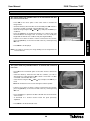
10.4.- JPG
This option will be only available if there is an external disk with JPG
files connected to the unit.
- Press OK on the “JPG” option of the “Utils” menu to activate the
image viewer.
- Select the directory where the files are located and press OK. If there is
more than one disk connected, select the disk first of all.
- Select an image using the CH
visualize it.
/ CH
keys and press the OK key to
- Press the green key to visualize the images in a continous way. The
interval between the images lasts 3 seconds. You can modify this
lenght and set intervals of 5 or 10 seconds pressing the red key.
- Press EXIT to exit the player.
Note: if the image is too heavy, the image loading can last longer than the
interval selected.
10.5.- Download
This option will be only available if there is an external disk connected
to the unit.
- Press OK on the “Download” option of the “Utils” menu to activate the
file list.
- Select the directory where the files with the software you want to
download are located and press OK. If there is more than one disk
connected, select the disk first of all.
- Select the file using the CH
run it.
/ CH
keys and press the OK key to
Note: Do not disconnect the receiver during the software update.
- If there is more than one disk or volume connected to the receiver,
press the yellow key to show the list and select any of them pressing
OK on it.
- Press the red key to upload to the disk a file with the current channels
of the receiver.
- To donwload it to another receiver follow the spets previously
explained.
- Press EXIT to exit the download menu.
29
ENGLISH
- If there is more than one disk or volume connected to the receiver,
press the yellow key to show the list and select any of them pressing
OK on it.
User Manual
“DVB-T Receiver 7143”
10.6.- Disk manager
This option will be only available if there is an external disk connected
to the unit.
This menu allows you to manage and check that the disks connected to the
reciever work properly.
Default Disk
- Indicate which one will be the disk by default, that is, the disk you will
always access in the first instance. The receiver always identifies the
first disk detected as volume0 and the second disk detected as
volume1, regardless of the USB port.
- If there is more than one disk connected, select one using the VOL
VOL keys.
/
Disk information
- If there is more than one disk connected, select one using the VOL /
VOL keys.
- Press the red key to see the data information, such as: Total Size,
Used Size and Free Size.
Check Disk
- If there is more than one disk connected, select one using the VOL
VOL keys.
- Press the red key to check the disk.
/
Format Disk
- If there is more than one disk connected, select one using the VOL
VOL keys.
- Press the red key to format the disk.
/
Note: Do not disconnect the disk during this process.
Note: If you format the disk, you will lose all the information contained
on it.
30
User Manual
“DVB-T Receiver 7143”
10.7.- File Manager
This option will be only available if there is an external disk connected
to the unit.
This menu allows you to manage the files contained in the disks as if the
unit were a PC.
- This menu allows you to configurate or edit an IP address (using the
yellow key) on which you can distribute the files (your PC must have
an application that allows communication). In case you have
configurated the IP address in section 7.8, you can only edit it now.
Press the blue key to delete this address.
- First of all select the disk or volume where the files are located.
- Press the MENU key to copy (onto a new folder), move (onto a new
folder) or delete the selected files and folders. To run the “new folder
and rename” functions you only have to place the cursor on the
selected file or folder.
- Press EXIT to exit the manager.
31
ENGLISH
- Then select a folder or file pressing the red key on it. You can select
everything pressing the green key.
User Manual
“DVB-T Receiver 7143”
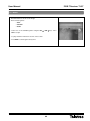
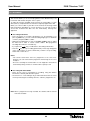
11.- Games
The Game Menu is shown on the image.
There are three games:
- Tetris
- Sokoban
- Snake
- Select one of the available games using the CH
OK to accept.
/ CH
- To play, follow the instructions shown on the screen.
- Press EXIT to exit the game at any time.
32
keys. Press
User Manual
“DVB-T Receiver 7143”
12.- Record/Play
This receiver allows you to record a programme in two different ways: one
in real time and another using the “Timer” option.
To make this function available, there must be an external disk or a pen
drive (memory stick) with FAT 32 format and a capacity higher than 2 GB.
When you connect a disk or pen drive to the receiver, the message “USB
Unit inserted (0)” will appear on screen. However, you can only record or
access files located in the disk once the “PVR Ready” message has
appeared.
Recording in Real Time
- During the recording time you can use the VOL / VOL keys to adjust
the time bar in order to search certain scenes. The programme
recording will continue in a normal way.
- If you press the
key you will return to Recording In Real Time.
- Press the
key to stop recording permanently. A message will appear
on the screen where you must confirm that you want to stop recording.
Select YES or NO to do so.
Notes:
- You cannot record more than one programme at the same time.
However, you can vatch another programme that belongs to the same
multiplex.
- Once the recording has started and if it is not stopped, it will continue
automatically during 24 hours or untill the disk´s capacity is full.
Recording with Timer/Guide
- There are two ways to programme a recording: using the Guide´s
information or directly with the Timer option.
- See Section 7.2.- Timer Manager to get information about how to create
events by indicating the recording start time, end time, programme, etc.
Note: When a programme is being recorded, the subtitles and the teletext
will not be available.
33
ENGLISH
- Press the
key to record the programme you are watching. If you
press again this key, you can set the recording lenght (up to a maximum
of 24 Hrs.) and press OK to confirm.
User Manual
“DVB-T Receiver 7143”
Play
Press the FILE LIST key to show the list of recorded programmes.
The list can be shown as a list or as a directory. Select one of these two
modes by pressing the green key.
- Press the yellow key to put the recorded programmes in order by
lenght or name.
- Select one of the recorded programmes from the list using the CH
CH keys and press OK to play it.
/
- When a programme is being played, the
,
,
,
keys can be
used to move forward or back in the time bar, move forward slowly,
make a pause, etc.
- Press the “i” key to activate the play function information window.
Press again the “i” key while this window remains visible. Now it will
appear an option that allows you to mark the important scenes in the
time bar.
Marker (Favourites)
- Press the red key to add a mark to the scene you want to watch later.
You can add more than one marker in the same way..
- Press the green key to watch the marked scene while the information
window is visible. The cursor will place itself in the previous position
and the scene will start to be played. If you press again the green key,
it will move immediately to the previous mark. If you press the yellow
key, it will move to the next marks.
- You can move forward or back manually using the VOL
keys.
- Press the
/ VOL
key to stop playing at any time.
12.1.- Time Shift Function
Option available if there is an external disk connected to the unit.
Timeshift is the time that passes between the video in real time and the
video recorded in the hard disk.
- Press the
key while you are watching a TV programme. The image will
be frozen on the screen.
- Press the
key to continue watching the programme starting at same
point where you had stopped. Use the VOL / VOL keys if you want to
adjust the time bar to search certain scenes.
- If you press the
- Press the
Broadcast.
key you will return to In Real Time Play Function.
key to exit the Timeshift function and return to In Real Time
Note: You can change programmes (within the same multiplex) while the
TimeShift function is being run, but you must return to the inicial
programme to have access to the recording.
The maximum time assigned to this function is 30 minutes.
34
User Manual
“DVB-T Receiver 7143”
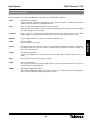
Terminological Glossary
• DVB:
Digital Video Broadcasting.
Group of different International Organizations and Companies aimed at establishing international
standards for the development of the Digital Television.
• EPG:
Electronic Programme Guide (Guía Electrónica de Programas ).
Guide that offers a list with the events that will be broadcasted by each programme, their broadcasting
time and a description of their contents.
• Letterbox:
A way to show on 4:3 televisions programmes broadcasted with 16:9 format. In this case two black
bands will appear on the upper and lower part of the screen to create a window with this format.
• MPEG4:
Group of digital audio/video compression standards used by the DVB.
• OSD:
On Screen Display.
System of Menus on the screen.
• Digital:
Sound converted into numeric values. You must use the DIGITAL AUDIO OUT COAXIAL or OPTICAL to
have digital sound. This connectors send the sound through several channels, instead of through only
two as in the analog system.
• JPEG:
Joint Picture Expert Group
System of photographic data compression that makes possible a high compression with scarce loss of
quality.
• MP3:
File format with an audio data compression system.
• PCM:
Pulse Code Modulation
This system turns the analog signal into digital signal so that it can be treated later. This conversion is
carried out without compressing data.
• HDMI:
High Definition Multimedia Interface.
High definition Multimedia Interface that makes possible to use standard, improved or high definition
video, as well as multichannel digital audio just in one cable.
35
ENGLISH
Now the meaning of some terms and abbreviations used in this User´s Guide will be explained.
User Manual
“DVB-T Receiver 7143”
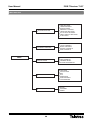
Menu Structure
SYSTEM SETTINGS
TIME SETTINGS
TIMER MANAGER
OSD SETTINGS
PARENTAL CONTROL
LANGUAGE SETTINGS
A/V OUTPUT SETTINGS
FRONT DISPLAY SETTINGS
IP SETTINGS
CHANNEL MANAGER
SET FAVORITES
LOCK CHANNELS
MOVE CHANNELS
DELETE CHANNELS
SKIP CHANNELS
INSTALLATION
CHANNEL SEARCH
DATA TRANSFER
DATABASE RESET
SYSTEM INFORMATION
UTILS
CALENDAR
CALCULATOR
MP3
JPG
DOWNLOAD
DISK MANAGER
FILE MANAGER
GAMES
TETRIS
SOKOBAN
SNAKE
MENU
36
User Manual
“DVB-T Receiver 7143”
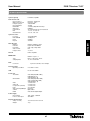
Technical Specifications
Full DVB compatible
Tuner and decoder
Input connector
Output loop-through
Frequency range
Input impedance
Bandwidth
Wave form
Carrier Mode
FEC
Guard Interval
IEC 169-2, female part
IEC 169-2, male
470-862 MHz
75 Ohm
7,8 MHz (-3dB) SW interchang.
COFDM
2K & 8K hierarchical/ non hierarchical
1/2, 2/3, 3/4, 5/6, 7/8
1/4, 1/8, 1/16, 1/32
System resource
Processor
DDR SDRAM
Flash
Eeprom
32 bit (266 MHz)
32 MByte x 4
8 MByte
256 Kbit
Video Decoder
MPEG 2
Data rate
Resolution
Video Format
Image Format
MPEG-2, MPEG-4, H.264
higher than 15M Mbits/s
576i, 576p, 720p, 1080i
PAL
4:3, 16:9
Teletext
DVB compatible
ENGLISH
System capacity
MPEG Audio
Type
Sampling Rate
MPEG-1 Layer 1, 2
Mono, Joint Stereo, Stereo
32, 44.1 and 48 KHz
Data
Connector
9 pines D-sub male, max 115 Kbps
Remote Control
Operating conditions
more than 7 meters
USB
DC 5V max. 500mA
Connectors
TV SCART
VCR SCART
Video
Audio L/R
Components (Y/Pb/Pr)
Data
ANT signal Input/Output
S/PDIF
HDMI
Video Output (RGB, CVBS)
RGB Output Loop
Audio Output (L, R)
Video Output (CVBS, RGB)
Video Input (CVBS, RGB)
Audio Output (L, R)
1 x RCA cinch
2 x RCA cinch
3 x RCA cinch
9 Pin D-SUB
CEI 169-2
Optical fiber
Video/Audio Digital Output
Power Supply
Input voltage
Power consumption
100 – 250V~, 50/60 Hz
40 W Max.
Physical Specifications
Size (L x H x W)
Weight
335 mm x 69 mm x 252 mm
3 kg
37
User Manual
“DVB-T Receiver 7143”
Guarantee
Televés S.A. offers a two year guarantee, beginning from the date of purchase for countries in the EU. For countries that are not part of the
EU, the legal guarantee that is in force at the time of purchase is applied. Keep the purchase invoice to determine this date.
During the guarantee period, Televés S.A. complies with the guarantee by repairing or substituting the faulty equipment.
The harm produced by improper usage, wear and tear, manipulation by a third party, catastrophes or any other cause beyond the control of
Televés S.A. is not included in the guarantee.
Disposal of Old Electrical & Electronic Equipment
(Applicable in the European Union and other European countries with separate collection systems).
This symbol on the product or on its packaging indicates that this product shall not be treated as household
waste. Instead it shall be handed over to the applicable collection point for the recycling of electrical and electronic
equipment. By ensuring this product is disposed of correctly, you will help prevent potential negative
consequences for the environment and human health, which could otherwise be caused by inappropriate waste
handling of this product. The recycling of materials will help to conserve natural resources. For more detailed
information about recycling of this product, please contact your local city office, your household waste disposal
service or the shop where you purchased the product.
38
RED COMERCIAL - COMMERCIAL NETWORK
UNITED KINGDOM
FRANCE
GERMANY
TELEVES (UK) Ltd.
11 Hill Street Industrial Estate
Cwmbran, Gwent NP44 7PG
UNITED KINGDOM
Telephone: +44 1633 875821
Fax: +44 1633 866311
EMail: [email protected]
TELEVES FRANCE Sarl
1 Rue Louis de Broglie
Parc d'Activités de l'Esplanade
77400 St. Thibault des Vignes
FRANCE
Telephone: +33 1 6035 9210
Fax: +33 1 6035 9040
EMail: [email protected]
PREISNER KOMMUNIKATIONSTECHNIK GmbH
An den Kiesgruben 6, 73240 Wendlingen
DEUTSCHLAND
Telephone: +49 7024 55358
Fax: +49 7024 6295
EMail: [email protected]
CHINA
TELEVES CHINA
Unit 207-208, Building A, No 374
Wukang Rd, Xuhui District
200031 Shanghai
CHINA (P.R.C.)
Telephone: +86 21 6126 7620
Fax: +86 21 6466 6431
EMail: [email protected]
USA
TELEVES USA LLC.
9800 Mount Pyramid Court, Suite 400
80112 Englewood, CO
USA
Telephone : +1 303 256 6767
Fax : +1 303 256 6769
EMail: [email protected]
PORTUGAL
ITALY
MIDDLE EAST
TELEVES ELECTRONICA PORTUGUESA
Via Dr. Francisco Sa Carneiro, Lote 17
Zona Ind. Maia 1 Sector X
4470 Barca-Maia-Porto
PORTUGAL
Telephone: +351 22 94 78900
Fax: +351 22 94 78900
EMail: [email protected]
TELEVES ITALIA Srl.
Via Liguria 24
2068 Peschiera Borromeo (MI)
ITALIA
Telephone: +39 02 5165 0604
Fax: +39 02 5530 7363
EMail: [email protected]
TELEVES MIDDLE EAST FZE
P.O. Box 17199 Jebel Ali Free Zone
Dubai
UNITED ARAB EMIRATES
Telephone: +971 48 834 344
Fax: +971 48 834 644
EMail: [email protected]
Oficinas Centrales / Head Office
Delegaciones / Subsidiaries
Sucursales / Distributors
Para conocer nuestra red de sucursales en el mundo, le rogamos consulte en nuestra pagina web
Please visit Televés web site to find your nearest Official Distributor
Rúa Benéfica de Conxo, 17
15706 - Santiago de Compostela
ESPAÑA (SPAIN)
Tel: +34 981 52 22 00 - Fax: +34 981 52 22 62
[email protected] - www.televes.com
Miembro de número del
7143_000_UK
Empresa
Registrada
ER 224/1/94