1
5.4
The Effects View
61
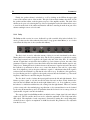
using the the Rate knob. The feedback knob is used to fix the amount of wet signal re-injected into
the delay. Finally, the Mix knob determines the amount of dry and wet signal sent to the output.
When this knob is adjusted in the left position, only dry signal is sent to the output, in its center
position, there is an equal amount of dry and wet signal in the output and in the right position, only
wet signal is sent to the output.
5.4.9
Wah
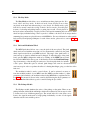
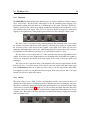
The Multi-Effect module includes 2 different types of Wah effects: wah wah, and auto wah. These
effects are used to enhance a frequency band around a varying center frequency using a bandpass
filter. In the wah wah effect, the center frequency of the bandpass filter varies at a rate fixed by
the user. In the case of the auto-wah, the variations of the center frequency is controlled by the
amplitude envelope of the incoming signal.
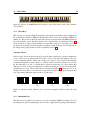
The Freq knob is used to control the central frequency of the filter. Turning this knob clockwise
increases the center frequency. In the case of the Wah Wah effect, the center frequency oscillates
around the value fixed by the Freq knob while with the Auto Wah effect, the setting of the Freq
parameter fixes the starting point value of the varying center frequency.
The Depth knob controls the excursion of the center frequency of the filter. In the case of
the Wah Wah effect, this excursion is applied around the value fixed by the Freq knob while in
Auto Wah effect the value of the center frequency increases from the value fixed by the Freq knob.
Turning this knob clockwise increases the excursion of the center frequency. Note that the Depth
parameter is also adjustable from the Play view.
Finally, the Rate knob controls the frequency or rate of the modulation of the center frequency
of the filter. In the case of the Wah Wah effect, turning this knob clockwise increases the rate of
the modulation. In the case of the Auto Wah filter, this knob is labeled Speed and controls the time
constant of the envelope follower. Turning this knob clockwise decreases the time constant, or in
other words the reaction time, of the envelope follower.
5.4.10
Notch Filter
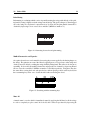
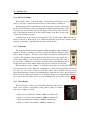
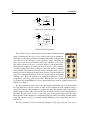
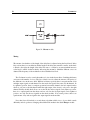
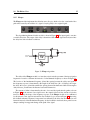
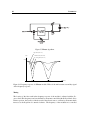
The Notch Filter does essentially the opposite of
a band-pass filter. It attenuates the frequencies in a
band located around the center frequency and leaves
those outside of this band unchanged as shown in Figure 39. As was the case for the Wah Wah
effect, the filter can be modulated.